Issues about changing the operating system
Can I use a custom image from Account A to change the operating system of an instance in Account B?
Can I use an image that contains data disks to change the operating system?
What is the difference between changing the operating system and re-initializing the system disk?
What should I do if scaling out the system disk by changing the operating system fails?
Issues about using Linux systems
How to disable or enable kernel upgrades using the package manager in a Linux instance
Common kernel network parameters and troubleshooting for Linux systems
What should I do if an error is reported when I run the systemctl command in a Linux instance?
Why do many "TCP: time wait bucket table overflow" errors occur in a Linux ECS instance?
How do I fix the "Read-only file system" error that occurs when I modify a file in a Linux instance?
Why does a Linux instance restart unexpectedly after the kernel.unknown_nmi_panic parameter is set?
How to configure an operation audit using the Audit tool in a Linux system
Issues about using Windows systems
How to change the remote desktop connection port of a Windows instance
What should I do if a Windows Update patch fails to install?
What should I do if error 812 occurs when Windows Server 2008 connects to a VPN?
What should I do if the IP address of a Windows system is modified unexpectedly?
What should I do if environment variables configured in Windows Server do not take effect?
What should I do if an error is reported when I update a Windows system?
What should I do if a service cannot be manually started in the service list of a Windows instance?
What should I do if a Windows system fails to be activated due to a corrupted system component?
What should I do if a Windows ECS instance gets stuck at 0% when the system is being updated?
How do I fix the issue where the Windows system used by an ECS instance fails to be activated?
What should I do if a Windows instance stutters because too much memory is reserved for hardware?
How do I check for residual disk driver entries in the registry of a Windows instance?
What type of container runtime is included in the Windows Server with Container image?
Why does a Windows system fail to write data when executing user data?
Offline installation of virtio drivers for Windows instances
How do I manually update the virtio driver of a Windows instance?
Windows Server Semi-Annual Channel image and instance management
How to activate a Windows Server system in a VPC network using a specific KMS domain name
Does Windows thread scheduling consider CPU cache hit ratio?
Issues about using Red Hat images
SUSE image issues
Issues about CentOS images
Issues about Ubuntu images
Issues about FreeBSD images
Issues about Fedora images
Issues about Alibaba Cloud Linux systems
General issues for Alibaba Cloud Linux
Enabling the CONFIG_PARAVIRT_SPINLOCK kernel option may cause performance issues
A printk deadlock in an Alibaba Cloud Linux system causes the system to go down
How to disable CPU vulnerability fixes in an Alibaba Cloud Linux system
What should I do if SysAK 2.2.0 causes a segmentation fault when I run the DNF command?
How do I avoid application performance fluctuations caused by cgroups?
How do I troubleshoot the cause of high slab_unreclaimable memory usage?
Is there a fee for running Alibaba Cloud Linux in Alibaba Cloud ECS?
Which Alibaba Cloud ECS instance types does Alibaba Cloud Linux support?
Does Alibaba Cloud Linux support 32-bit applications and libraries?
Does Alibaba Cloud Linux support a graphical user interface (GUI)?
Alibaba Cloud Linux 3
Alibaba Cloud Linux 2
How do I fix the polkit memory leak issue in Alibaba Cloud Linux 2?
Description of abnormal systemd service issues in an Alibaba Cloud Linux 2 system
How do I install and enable a later version of curl in Alibaba Cloud Linux 2?
What should I do if an ECS instance that runs Alibaba Cloud Linux 2 fails to create many processes?
Can I view the source code of Alibaba Cloud Linux 2 components?
Is Alibaba Cloud Linux 2 backward compatible with previous versions of Aliyun Linux?
Which third-party applications can run on Alibaba Cloud Linux 2?
GuestOS FAQ
FAQ and solutions for Linux operating systems (GuestOS)
Startup failures
Check whether block device information exists in the fstab file
Check whether block devices are correctly attached in the fstab file
Check whether the content format of the fstab file is correct
Logon failures
Check whether a password exists for the critical system user (the root account)
Check whether the SSH access permission configuration is correct
Check whether critical files or directories required for SSH access exist
Cannot access an instance
Check whether the kernel parameters for the NAT environment are correct
Check whether processes are started and whether common service ports are in the listening state
Network connection failures
Performance issues
FAQ and solutions for Windows operating systems (GuestOS)
Logon failures
Check whether port 3389 of the Windows system is open
You can use the Remote Desktop Protocol (RDP) service to easily manage and operate Windows instances. If you do not enable the RDP service, you cannot establish a remote desktop connection. For more information, see How to start the RDP service for a Windows instance.
Check whether the virtio driver version is too old
If the virtio driver version is too old, you may not be able to log on to the instance. For more information, see Update the virtio driver of a Windows instance.
Check whether the firewall is set correctly
Improper firewall settings may prevent you from logging on to the instance. For more information, see Windows system firewall policy configuration guide.
Performance issues
Is the CPU usage too high?
If the CPU usage remains high, the system stability and business operations are affected. For more information, see Troubleshoot and resolve high CPU usage on a Windows instance.
Check the version of the Windows operating system
Microsoft stopped providing support for Windows Server 2008 and Windows Server 2008 R2 on January 14, 2020. Therefore, Alibaba Cloud no longer provides technical support for ECS instances that run these operating systems. If you have ECS instances that run these operating systems, update them to Windows Server 2012 or later as soon as possible. For information about currently supported images, see Public images. You can also view them on the purchase page.
Check the disk capacity
Sometimes, the disk space of the C drive in a Windows system continuously decreases, which prevents the system from operating normally. For more information, see Troubleshooting ideas for reduced free space on the C drive of a Windows instance.
AD domain controller installation failure issues
Other issues
How do I install an NVMe driver for an existing custom image?
How do I install GRand Unified Bootloader (GRUB) for a Linux server?
How do I collect kernel dump information after an operating system goes down?
How do I fix the softlockup exception that occurs when deleting a cgroup in an ECS instance?
Why is virtual memory or Swap not enabled by default in ECS?
What should I do if an instance shuts down due to an operating system kernel error?
Appendix
How do I change the operating system (system disk)?
You can change the operating system of a system disk by changing the image of an ECS instance.
After you change the operating system, the original system disk is released and all data on it is cleared. We recommend that you create a snapshot of the system disk to back up data before you perform this operation.
Can I use a custom image created from a server under Account A to change the operating system for a server under Account B?
Yes. First, Account A must share a custom image with Account B. Then, Account B can use the shared image to replace the operating system of the system disk.
If an image contains data disks, can I use it to change the operating system?
You can use an image that contains data disks to change the operating system. Only the system disk of the original instance is replaced. The data disks of the original instance are not affected.
If you use a custom image that contains data disks to change the operating system, make sure that there are no dependencies between the system disk and the data disks in your services. Alternatively, make sure that operations on the data disks from the new system disk do not affect your business processes. For example, if your services involve reading data from or writing data to the data disks from the system disk, changing the operating system may cause exceptions when your services read data from or write data to the data disks.
What is the difference between changing the operating system and re-initializing the system disk?
The main differences are shown in the following table:
Difference | Re-initializing a system disk | Changing a system disk (operating system) |
Differences in features | Re-initialization restores the ECS instance to its initial state. The operating system remains the same. | This operation switches the current operating system to a different one. |
Impact on the system disk |
|
|
Impact on data disks | Data disks are not affected. | Data disks are not affected. |
Impact on snapshots |
|
|
Billing | Re-initializing a system disk is free of charge. Because the operating system remains the same, the billing items do not change. | Changing the operating system is free of charge. However, fees are charged in the following cases:
|
What do I do if scaling out the system disk by changing the operating system fails?
When you scale out a system disk by changing the operating system, the partition may fail to be scaled out due to a timeout. For systems that failed to scale out, you must manually extend the partition. For more information, see Extend partitions and file systems (Linux). This method only extends the system disk partition and does not affect the system version.
What do I do if I cannot select the destination image and a message indicates that the instance is not I/O optimized when I change the operating system?
Cause
The I/O optimization properties of the instance and the image must match. I/O optimized instances can use only I/O optimized images, and non-I/O optimized instances can use only non-I/O optimized images. Therefore, if the I/O optimization properties of the instance and the image do not match, you cannot select the destination image when you change the operating system. The following message is displayed: "This instance is a non-I/O optimized instance. You can only select an image that supports non-I/O optimization when changing the operating system."
Solution
All instance types that are currently for sale are I/O optimized. We recommend that you change to a new instance type.
To change the operating system (replace the system disk), select an image that supports I/O optimized instances.
You can query the I/O properties of an instance using the IoOptimized parameter of the DescribeInstances operation.
You can query the I/O properties of an image using the IsSupportIoOptimized parameter of the DescribeImages operation.
How do I reset the system time zone to the local time zone
For a single instance, you can run the timedatectl set-timezone local_timezone_xxx/xxx command in the system to directly change the time zone to your local time zone.
For multiple instances, use the batch modification feature of Cloud Assistant.
What type of container runtime is included in the Windows Server with Container image?
Due to changes in Microsoft's support policy for container runtimes (for more information, see Supported Container Runtime on Windows Server), the Windows Server with Container images updated by Alibaba Cloud ECS since 2024 no longer have the Mirantis Container Runtime (MCR) pre-installed. It is replaced with the open source containerd container runtime library. If you require MCR, you must purchase and install Mirantis Container Runtime from Mirantis.
Starting from March 1, 2024, the Windows Server with Container images provided by Alibaba Cloud ECS include the following container-related components:
Windows Server container feature component, which does not support Hyper-V isolation. For more information, see Windows and containers.
Containerd runtime library, version 1.7.13. For more information, see containerd.
nerdctl.exe, a command-line interface for managing containers, version 1.7.13. For more information, see nerdctl.
nat.exe, a Container Network Interface (CNI) plugin for Windows container networking, version 1.0.0. For more information, see windows-container-networking.
Why does a Windows system fail to write data when executing user data?
Description
Executing user data to write data to the C:\Users\Administrator\Desktop\userData_test.txt path fails, and a message indicates that the path could not be found.
Cause
In a Windows system, C:\Users and its subdirectories are the default storage locations for user profiles and data. They can be accessed only after you log on to the system. During the system initialization phase when user data is executed, you have not yet logged on to the system. Therefore, writing data to the C:\Users directory fails.
Solution
Change the path for writing data in the user data to another path, for example:
[bat]
echo "userData" > C:\userData_test.txt
For more information, see Customize instance initialization configurations.
What are the limits of the Windows Server 2025 image?
vCPU: 1 to 640
Memory: 2 GiB to 48 TiB
ECS instance types
Due to compatibility issues, the following ECS instance types do not currently support this image:
6th generation AMD instance types (general-purpose instance family g6a, compute-optimized instance family c6a, and memory-optimized instance family r6a)
Activate a Windows Server system in a VPC network using a specific KMS domain name?
In a VPC network, you need to use a specific KMS domain name to activate a Windows system instance. For more information, see How to use a KMS domain name to activate a Windows instance in a VPC network.
In a VPC network, you need to use a specific KMS domain name to activate a Windows system instance. For more information, see Activation methods for Windows instances in a VPC network.
In a VPC network, you need to use a specific KMS domain name to activate a Windows system instance. For more information, see Activation methods for Windows instances in a VPC network.
What do I do if my instance is running Windows Server and a message indicates that the copy of Windows is not genuine?
You need to activate Windows. For more information, see Use a KMS domain name to activate a genuine Windows Server system on an ECS instance.
How do I fix the abnormal system time caused by frequent calls to the Windows system API: timeBeginPeriod?
On Windows Server 2008, frequent calls to the system API `timeBeginPeriod` cause the Windows system time to slow down or speed up. You can perform the following operations to resolve this issue:
For information about system functions that may cause changes in system time precision, see the official Microsoft documentation.
Remotely log on to the ECS instance.
For more information, see Connect to a Windows instance using Workbench.
Download the tool.
Decompress CheckTimeBeginPeriod.zip.
Decompress bin.zip, go to the bin directory, and then double-click the .exe file.
For a 64-bit operating system, double-click InjectDllx64.exe.
For a 32-bit operating system, double-click InjectDllx86.exe.
The printed process is the one that calls `timeBeginPeriod`.
Stop or update the program that calls `timeBeginPeriod`, as needed.
If the issue persists, you can submit a ticket for technical support.
What should I do if a "Content from the website listed below is being blocked by the Internet Explorer Enhanced Security Configuration" message is displayed when I use IE on a Windows cloud server to open a website?
When you use IE on an ECS or Simple Application Server instance that runs a Windows operating system to open a website, an error message "Content from the website listed below is being blocked by the Internet Explorer Enhanced Security Configuration" is displayed. For the solution, see What should I do if a "Content from the website listed below is being blocked by the Internet Explorer Enhanced Security Configuration" message is displayed when I use IE on a Windows cloud server to open a website?.
Why is user data not automatically executed when I replace or re-initialize the system disk of a Windows instance?
Cause
After a Windows ECS instance starts normally, a cache file is created in the C:\ProgramData\aliyun\vminit\INSTANCE_{InstanceID}\METASERVER path. This file is used to mark whether the instance has been initialized. If you create a custom image from this ECS instance and use this custom image to re-initialize or replace the system disk, a cache file with the same ID as the current reset instance is found in the C:\ProgramData\aliyun\vminit\INSTANCE_ID\METASERVER path. The Vminit component determines whether the ECS instance is starting for the first time based on the existence of the cache file. If a cache file with the same ID as the current reset instance is found, the Vminit component determines that the ECS instance is not starting for the first time and does not automatically execute the user data script.
Vminit is automatically installed when a Windows instance is created. It provides initialization configuration capabilities for Windows instances during the startup phase, similar to cloud-init for Linux systems. For more information about the Vminit component, see Initialization tools.
Solution
Before you create a custom image from the ECS instance, check for and delete the cache file in the C:\ProgramData\aliyun\vminit\INSTANCE_{InstanceID}\METASERVER path.
Does Windows have a setting that allows threads of a process to be evenly distributed across all CPUs?
No.
Windows does not provide a direct setting to force threads of a specific process to be evenly distributed across all CPUs. The scheduler works based on the overall behavior of all threads in the system. To control thread distribution for a specific process, you typically need to use third-party tools or manually set thread affinity in your application code.
Does Windows thread scheduling consider CPU cache hit ratio?
During scheduling, Windows considers two primary factors to maximize the CPU cache hit ratio:
Ideal processor: The processor assigned to a thread when it is created, usually distributed across different CPUs using a round-robin approach.
Last processor: The processor on which the thread last ran.
In what scheduling scenarios will a Windows thread recalculate and migrate to another CPU for execution?
During thread execution, three main scheduling scenarios occur:
Time slice rotation: When the allocated time slice expires, the thread is placed back in the ready queue of the same CPU and typically continues running on the original CPU. The system does not recalculate the next CPU.
Preemptive scheduling: When a higher-priority thread preempts execution, the lower-priority thread is forced back into the queue of the original CPU and usually continues running on the same CPU without recalculation.
Voluntary wait: When a thread voluntarily suspends itself (e.g., waiting for I/O or a lock), upon resumption the system recalculates CPU assignment, preferring the ideal processor or the last processor the thread ran on.
How do I get technical support if I encounter problems when using Red Hat Enterprise Linux?
Unlike the traditional method of logging in to the Red Hat system to submit a support request, you can directly submit a ticket for technical support. Alibaba Cloud after-sales engineers will help you resolve the problems you encounter. If the problem involves a Red Hat Enterprise Linux issue that Alibaba Cloud cannot resolve, Alibaba Cloud submits the issue to Red Hat, which is responsible for providing the final technical support.
Which official Red Hat subscriptions are included in the Red Hat Enterprise Linux images provided by Alibaba Cloud?
The Red Hat images provided by Alibaba Cloud include Red Hat Enterprise Linux (RHEL) product subscriptions. The related software repository sources are as follows:
RHEL 7
Red Hat Enterprise Linux 7 Server - Extras from RHUI (RPMs)
Red Hat Enterprise Linux 7 Server - Optional from RHUI (RPMs)
Red Hat Enterprise Linux 7 Server from RHUI (RPMs)
RHEL 8 & RHEL 9
BaseOS
AppStream
The latest RHEL 8 & RHEL 9 images also have the CodeReady Linux Builder and Supplementary repositories pre-configured by default. To use these two software repositories in your purchased RHEL 8 & 9 instances, contact Alibaba Cloud after-sales support to obtain them.
For more information about the software repository sources and package lists for RHEL 8 & RHEL 9, see the RHEL 8 Package Manifest and the RHEL 9 Package Manifest.
Alibaba Cloud Red Hat images provide only RHEL product packages. To install packages for products other than RHEL, such as Red Hat Satellite or Red Hat Ceph Storage, you need to purchase a Red Hat subscription yourself, register the host, and subscribe to the relevant products.
Why is a Red Hat operating system purchased on Alibaba Cloud displayed as unsubscribed (Unknown)?
This is normal. When you purchase a Red Hat Enterprise Linux image, you can obtain updates from Red Hat from the update sources provided by Alibaba Cloud. The difference from the traditional model is that you do not receive a separate Red Hat account to obtain updates from the update sources provided by Red Hat. Therefore, when you run the subscription-manager command inside the instance to view the subscription status, the system is in an unsubscribed state, as shown in the following output.
+-------------------------------------------+
 System Status Details
+-------------------------------------------+
Overall Status: Unknown

System Purpose Status: Unknown
What service support is provided for SUSE operating systems?
The SUSE Linux Enterprise Server (SLES) operating systems sold online by Alibaba Cloud are regularly synchronized with SUSE update sources. For instances created from SLES public images, the operating system support service is included in Alibaba Cloud's enterprise-level support services. If you have purchased an enterprise-level support service, you can submit a ticket to obtain technical support. The Alibaba Cloud engineer team will assist you in resolving issues that occur on the SLES operating system.
Can I view the source code of Alibaba Cloud Linux 2 components?
Alibaba Cloud Linux 2 complies with open source protocols. You can download the source code package using the yumdownloader tool or from the Alibaba Cloud open source site. You can also download the Alibaba Cloud Linux 2 kernel source code tree from the GitHub site. For more information, see GitHub.
Is Alibaba Cloud Linux 2 backward compatible with previous versions of Aliyun Linux?
Alibaba Cloud Linux 2 is fully compatible with Aliyun Linux 17.01.
If you use self-compiled kernel modules, you may need to recompile them on Alibaba Cloud Linux 2 to use them normally.
Which third-party applications can run on Alibaba Cloud Linux 2?
Alibaba Cloud Linux 2 is binary compatible with the CentOS 7.6.1810 distribution and provides differentiated operating system features on this basis.
Compared with CentOS and RHEL, the advantages of Alibaba Cloud Linux 2 are reflected in:
Meeting your needs for new operating system features, with a faster release cycle and newer Linux kernel, user-mode software, and toolkits.
Out-of-the-box, with minimal user configuration, for the shortest time to service readiness.
Maximizing user performance benefits through coordinated optimization with the cloud infrastructure.
No runtime billing compared to RHEL, and commercial support compared to CentOS.
How does Alibaba Cloud Linux 2 ensure data security?
Alibaba Cloud Linux 2 is binary compatible with CentOS 7.6.1810/RHEL 7.6 and complies with RHEL security specifications. This is reflected in the following aspects:
Regular security scans are performed using industry-standard vulnerability scanning and security testing tools.
CVE patches for CentOS 7 are regularly evaluated to fix operating system security vulnerabilities.
Collaboration with the security team to support existing Alibaba Cloud OS security hardening solutions.
User security warnings and patch updates are released using the same mechanism as CentOS 7.
Does Alibaba Cloud Linux 2 support data encryption?
Alibaba Cloud Linux 2 retains the data encryption toolkit of CentOS 7 and ensures that the encryption solution where CentOS 7 works with KMS is supported on Alibaba Cloud Linux 2.
How do I set permissions for Alibaba Cloud Linux 2?
Alibaba Cloud Linux 2 is an operating system with the same source as CentOS 7. Administrators of CentOS 7 can seamlessly use the exact same management commands to set relevant permissions. The default permission settings of Alibaba Cloud Linux 2 are identical to those of the Alibaba Cloud CentOS 7 image.
Is there a fee for running Alibaba Cloud Linux in Alibaba Cloud ECS?
The Alibaba Cloud Linux image itself is free, but you need to pay for other resources such as ECS instances.
Which Alibaba Cloud ECS instance types does Alibaba Cloud Linux support?
Alibaba Cloud Linux supports most Alibaba Cloud ECS instance types, including ECS Bare Metal Instances.
Alibaba Cloud Linux does not support instances that use the Xen virtualization platform.
Does Alibaba Cloud Linux support 32-bit applications and libraries?
Not supported.
Does Alibaba Cloud Linux support a graphical user interface (GUI)?
Support is not guaranteed. You can install a GUI yourself by referring to the official CentOS documentation. For more information, see Install a graphical user interface for a Linux instance.
What should I do if a "command not found" error is reported when I run the wget command in a Linux ECS instance?
Symptoms
When you run the wget command in a Linux instance, a "command not found" error is reported. When you run the yum install wget command, a message "already installed and latest version" is reported.
Cause
An inspection of the /usr/bin directory shows that there is no wget command file, but there is a wge command file. The error may be caused by the command file being renamed.
Solution
Follow these steps:
Remotely connect to the Linux instance.
For more information, see Log on to a Linux instance using a password or key.
Run the following command to query the path of the
wgecommand.whereis wgeThe command returns the following result, which indicates that the path of the
wgecommand is/usr/bin/wge.wge: /usr/bin/wgeExecute the following command in the path above to rename it.
cp /usr/bin/wge /usr/bin/wgetRun the
wgetcommand again. If the error message is no longer reported, the issue is fixed.
What should I do if a "Permission denied" error is reported when I use the wget command to download files in a Linux ECS instance?
Symptoms
When you use the wget command to download files in a Linux ECS instance, the following message is reported.
wget bash: /usr/bin/wget: Permission deniedCause
In a Linux ECS instance, the permission for the wget command is 000, which means there are no read, write, or execute permissions.
Solution
Follow these steps:
Remotely connect to the Linux instance.
For more information, see Log on to a Linux instance using a password or key.
Run the following command to view the permissions of the
wgetcommand.ls -l /usr/bin/wgetThe command returns the following result, which indicates that the permission for the
wgetcommand is 000, with no read, write, or execute permissions.-------- 1 root root 366800 Oct 31 2014 /usr/bin/wgetRun the following command to view the attributes of the
/usr/bin/wgetdirectory.lsattr /usr/bin/wgetThe command returns the following result, which indicates that the attribute of the
/usr/bin/wgetdirectory isi(files cannot be created or deleted in this directory).----i--------e- /usr/bin/wgetRun the following command to remove the
iattribute from the/usr/bin/wgetdirectory.chattr -i /usr/bin/wgetRun the following command to grant permissions to the
/usr/bin/wgetdirectory.chmod 755 /usr/bin/wgetRun the
wgetcommand again. If the error message is no longer reported, the issue is fixed.
What should I do if the installation of the AD domain controller fails with an "Installation of Active Directory Domain Services binaries failed" error?
Symptoms
In a Windows ECS instance, the installation of the AD domain controller fails with an "Installation of Active Directory Domain Services binaries failed" error.
Cause
Opening the Event Viewer reveals an error. The Remote Registry service is disabled and cannot be started.
Solution
Follow these steps to start the Remote Registry service.
Remotely connect to the Windows instance.
For more information, see Log on to a Windows instance using a password or key.
Choose Start > Run, enter
services.msc, and then click OK.In the Services window, double-click the
Remote Registryservice to open the Remote Registry Properties window, and set the following options.In the Startup type section, select Automatic.
In the Service status section, click Start to make sure that the
Remote Registryservice is running normally.
Click OK to save the settings.
What should I do if a "This computer has dynamically assigned IP addresses" message is displayed when I install an AD domain controller?
Symptoms
When installing an AD domain controller on a Windows ECS instance, a message "This computer has dynamically assigned IP addresses" is displayed.
Cause
At least one physical network adapter on the Windows ECS instance does not have a static IP address assigned to its IP properties.
Solution
Remotely connect to the Windows instance.
For more information, see Log on to a Windows instance using a password or key.
Install the AD domain controller.
In the Static IP Assignment dialog box that appears during the AD domain installation, click Yes.
LoopBack uses DHCP, so you can continue the operation without assigning a static IP address.
What should I do if an "0x0000232B RC0DE_NAME_ERROR" error code is displayed when I install an AD domain controller?
Symptoms
When installing an AD domain controller on a Windows ECS instance, an "0x0000232B RCODE_NAME_ERROR" error code is displayed.
Cause
This may be due to an incorrect IP address configuration in the DNS server.
Solution
Follow these steps to change the DNS server for both the internal and external network adapters of the Slave to the private endpoint of the Master.
Remotely connect to the Windows instance.
For more information, see Log on to a Windows instance using a password or key.
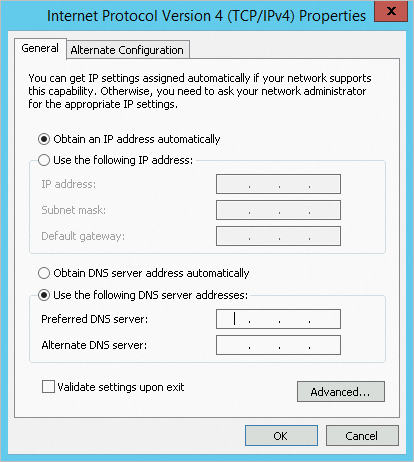
Go to the Internet Protocol Version 4 (TCP/IPv4) Properties window, change the DNS server address, and then click OK.
NoteChange the DNS server address to the actual private endpoint of the Master.
Check if you can ping the DNS server IP address.
How do I check for and fix missing IP addresses in CentOS 7 and Windows instances?
What should I do if a CentOS 7.9 ARM system fails to generate a dump file?
How do I handle CentOS DNS resolution timeouts?
Cause
Due to changes in the DNS resolution mechanism of CentOS 6 and CentOS 7, ECS instances created before February 22, 2017, or CentOS 6 and CentOS 7 instances created from custom images from before February 22, 2017, may experience DNS resolution timeouts.
Solution
Follow these steps to fix this issue:
Download the script fix_dns.sh.
Place the downloaded script in the /tmp directory of the CentOS system.
Run the bash /tmp/fix_dns.sh command to execute the script.
The function and logic of the script are described as follows:
Determines whether the instance system is CentOS.
If the instance is not a CentOS system, such as Ubuntu or Debian, the script stops working.
If the instance is a CentOS system, the script continues to work.
Queries the configuration of
optionsin the resolution file /etc/resolv.conf.If the
optionsconfiguration does not exist:The Alibaba Cloud
optionsconfigurationoptions timeout:2 attempts:3 rotate single-request-reopenis used by default.
If an
optionsconfiguration exists:If the
single-request-reopenconfiguration does not exist, this item is appended to theoptionsconfiguration.If the
single-request-reopenconfiguration exists, the script stops working and does not change the DNS nameserver configuration.
How do I check for and fix missing IP addresses in CentOS 7 and Windows instances?
For the cause and solution, see Check for and fix missing IP addresses in CentOS 7 and Windows instances.
What should I do if a CentOS 7.9 ARM system fails to generate a dump file?
Symptoms
After a CentOS 7.9 ARM system goes down, when you query the dump file using ls /var/crash, no vmcore file is generated.

Cause
The CentOS 7.9 ARM system has a kernel with the CONFIG_ARM64_USER_VA_BITS_52=y feature. The version of the makedumpfile software that comes with the system does not match the kernel version, so a dump file cannot be generated.
Solution
This solution applies only to systems where the kdump service has been correctly enabled. If you have not enabled the kdump service and follow the operations in this topic to fix the problem, you must manually configure the crashkernel parameter in the proc/cmdline file.
Run the following command to download the corresponding kexec-tools package.
wget http://mirrors.aliyun.com/centos-vault/7.9.2009/os/Source/SPackages/kexec-tools-2.0.15-51.el7.src.rpmRun the following command to install the RPM package.
rpm -ivh kexec-tools-2.0.15-51.el7.src.rpmRun the following command to download the patch file.
cd /root/rpmbuild/SOURCES
wget https://ecs-image-tools.oss-cn-hangzhou.aliyuncs.com/patch/rhelonly-kexec-tools-2.0.20-makedumpfile-arm64-Add-support-for-ARMv8.2-LVA-52-bi.patch
Run the following command to modify the kexec-tools.spec file.
Open the kexec-tools.spec file.
cd /root/rpmbuild/SPECS/
vi kexec-tools.spec
Press the
ikey to enter edit mode, and add the following two lines to the appropriate location in the file.Patch999: rhelonly-kexec-tools-2.0.20-makedumpfile-arm64-Add-support-for-ARMv8.2-LVA-52-bi.patch %patch999 -p1Add them in the following locations:
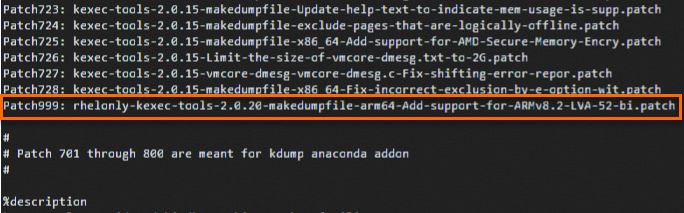
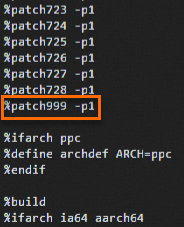
Press the
Esckey to exit edit mode, and enter:wqto save and exit.
Run the following command to check for installation dependencies.
yum-builddep kexec-tools.specRun the following command to build the RPM package.
yum -y install rpm-build
rpmbuild -ba kexec-tools.spec
Run the following command to install the modified RPM package.
cd /root/rpmbuild/RPMS/aarch64
rpm -ivh kexec-tools-2.0.15-51.el7.aarch64.rpm
If the system goes down again, you can query the dump file using ls -lh /var/crash. If a vmcore file is generated normally, the problem is resolved.

How do I fix the slow startup of Red Hat 8.1/8.2 images on ECS instances of the ECS Bare Metal Instance family?
In ECS instances of the ECS Bare Metal Instance family, Red Hat 8.1/8.2 images take 1 to 2 minutes longer to start up than Red Hat 7 images. To resolve this issue, in the /boot/grub2/grubenv file of the Red Hat 8.1/8.2 system, change the kernel boot parameter
console=ttyS0 console=ttyS0,115200n8toconsole=tty0 console=ttyS0,115200n8, and then restart the server for the configuration to take effect.
Why is the system load high after the Server Guard process is started in ECS instances of certain Ubuntu versions?
In ECS instances of certain Ubuntu versions, such as Ubuntu 18.04, the average system load is high after the Server Guard process (AliYunDun) is started.
For the specific cause and solution, see High system load after starting the Server Guard process in an Ubuntu 18.04 ECS instance.
Why are Ubuntu system services automatically restarted?
By default, Ubuntu automatically updates software packages. The unattended-upgrade service is responsible for these updates. This service runs automatically and periodically checks apt sources for new packages or drivers. If updates are found, it installs them, which can cause related services to restart. If you do not want automatic updates, disable this service.
systemctl stop unattended-upgrade
systemctl disable unattended-upgrade
How do I apply patches and compile the kernel in a FreeBSD system?
Alibaba Cloud FreeBSD public images already have their kernels patched to meet the startup requirements for instance families in Generation V or later. The specific instance families can be queried using the Generation parameter of the DescribeInstanceTypeFamilies operation.
The following situations may cause the system to fail to start normally. You can avoid or resolve the system startup failure by applying patches to the FreeBSD kernel source code and compiling the kernel.
When creating an ECS instance using a FreeBSD image and related custom images not provided by Alibaba Cloud, ECS instances of series V and above instance families may fail to start normally.
When creating an ECS instance using a FreeBSD public image and using freebsd-update or other methods to update kernel patches, ECS instances of series V and above instance families may fail to start normally.
FreeBSD 13 and later do not require patches. This example uses FreeBSD 12.3 to show how to apply patches to the FreeBSD kernel source code and compile the kernel.
Download and decompress the FreeBSD kernel source code.
wget http://ftp-archive.freebsd.org/pub/FreeBSD-Archive/old-releases/amd64/12.3-RELEASE/src.txz -O /src.txz
cd /
tar -zxvf /src.txz
Download the patch package.
In this example, the patch package
0001-virtio.patchis applied to the virtio driver.cd /usr/src/sys/dev/virtio/ wget https://ecs-image-tools.oss-cn-hangzhou.aliyuncs.com/0001-virtio.patch patch -p4 < 0001-virtio.patchCopy the kernel file, and compile and install the kernel.
make -j<N>specifies the number of parallel compilations, which needs to be determined based on the configuration of the environment where you are performing the compilation. For example, for a 1 vCPU environment, it is recommended to set-j2, meaning the ratio of vCPU cores to the variable N is1:2.cd /usr/src/ cp ./sys/amd64/conf/GENERIC . make -j2 buildworld KERNCONF=GENERIC make -j2 buildkernel KERNCONF=GENERIC make -j2 installkernel KERNCONF=GENERICAfter the compilation is complete, delete the source code.
rm -rf /usr/src/*
rm -rf /usr/src/.*
What should I do if a FreeBSD system cannot find the system disk in a KVM environment?
Symptoms
When you log on to a FreeBSD system in a KVM virtualized environment using VNC, the system disk cannot be found, and you cannot enter the system, as shown in the following figure.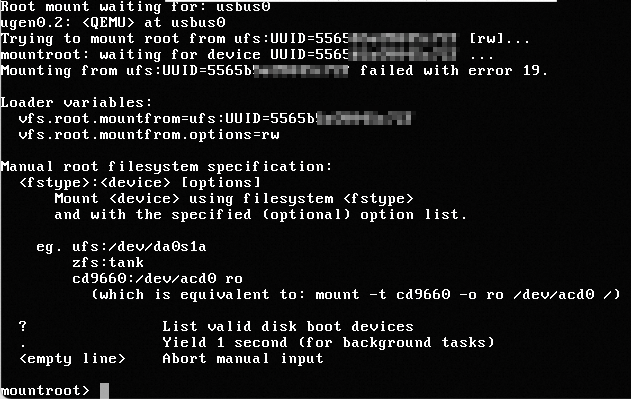
Solution
In VNC, enter ? to view the ufsid of the relevant rootfs.
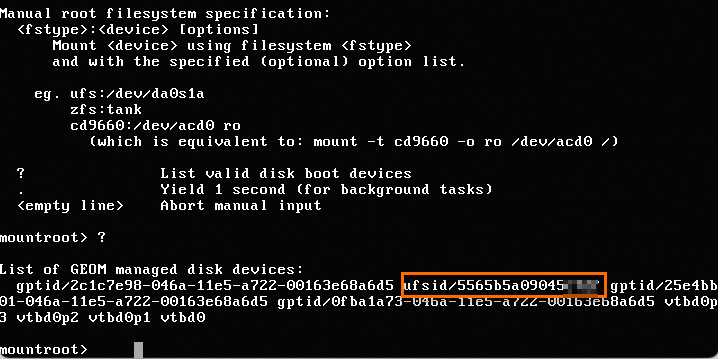
Continue by entering
ufs:/dev/ufsid/5565b5a09045****, and press Enter to enter the operating system normally.Enter the username and password to log on to the system.
Run the following command to view the
/etc/fstabconfiguration.cat /etc/fstabAs shown in the following figure, the
/etc/fstabconfiguration uses the UUID attach method. However, the FreeBSD system does not support the UUID attach method and needs to be changed to the ufsid method.
Change the attach method of the FreeBSD system to ufsid.
Run the following command to open
/etc/fstab.vi /etc/fstabPress the i key to enter edit mode.
Change
UUID=5565b5a09045****to/dev/ufsid/5565b5a09045****.After you make the changes, press the Esc key, enter
:wq, and press the Enter key to save and exit.
Run the following command to restart the system for the configuration to take effect.
reboot
Why can't I use an SSH key pair with the ssh-rsa signature algorithm to remotely connect to an instance that runs a 64-bit Fedora 33 system?
When you use an ECS instance with a 64-bit Fedora 33 operating system, if the logon credential is set to an SSH key pair with the ssh-rsa signature algorithm, you may not be able to successfully use SSH to remotely connect to the instance. You can resolve this issue in either of the following ways:
Replace the SSH key pair with the ssh-rsa signature algorithm with an SSH key pair with another signature algorithm, such as ECDSA.
Run the update-crypto-policies --set LEGACY command in the system to switch the encryption policy
POLICYtoLEGACY. You can then continue to use the SSH key pair with the ssh-rsa signature algorithm.
Why is the CPU information only half of the instance type specification after some instances are created using a Fedora CoreOS image?
After you create some instances, such as general-purpose instance family g5, using a Fedora CoreOS image, when you run the lscpu command to view CPU information, the total number of CPUs in the
On-line CPU(s) listis only half of the actual specification of the instance. For example, if you selected 2 CPU cores when you created the instance, the number of CPUs in theOn-line CPU(s) listis only 1. The following figure shows an example.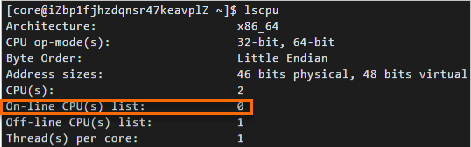 Note
NoteThe value of the
On-line CPU(s) listparameter represents the CPU number. The example in the figure indicates that only CPU 0 is available.This is because the kernel of the Fedora CoreOS image is configured with the
mitigations=auto,nosmtboot parameter by default, which automatically disables Simultaneous Multi-Threading (SMT) for systems with vulnerabilities. This results in a halving of available CPUs. Themitigations=auto,nosmtparameter can be viewed by running the cat /proc/cmdline command.For more information about SMT, see Automatically disable SMT when needed to address vulnerabilities and Policy for disabling SMT.
Appendix: FAQ and solutions for Linux operating systems (GuestOS)
Check whether block device information exists in the fstab file
If a block device exists in the instance but its information is not in the fstab file, the system may fail to start normally upon restart. You must remove the information of the non-existent block device from the
/etc/fstabfile. For more information, see How to remove a non-existent block device from the "/etc/fstab" file of a Linux instance.Is the block device correctly mounted in the fstab file?
If a block device is not correctly attached, the system may fail to start normally upon restart. For more information, see A disk is not correctly attached in a Linux instance.
Check whether the content format of the fstab file is correct
If the
/etc/fstabconfiguration file has a format error, the system may fail to start normally upon restart. For more information, see The "/etc/fstab" configuration file of a Linux instance has a format error.Use the fsck command to check system files
If the file system is corrupted, the instance may fail to start normally. For more information, see File system check and repair for a Linux instance.
Check whether the limits settings are correct
The
/etc/security/limits.confconfiguration file in a Linux system can limit system resources. If the value of thenofileparameter in the system exceeds the value of thenr_openparameter, you may not be able to remotely connect to the instance. For more information, see Adjust the value of the nofile parameter in the limits file of a Linux instance.Check whether a password exists for the critical system user (the root account)
If the information of a critical system user in the instance is lost, you cannot log on to the Linux instance. For more information, see A critical system user does not exist in a Linux instance.
Check the format of critical system files
If the format of some critical files is not Unix format, you may not be able to log on to the Linux instance. For more information, see How to change a file to Unix format in a Linux instance.
Check whether the SSH access permission configuration is correct
Abnormal SSH access permission configuration in a Linux instance prevents you from logging on to the Linux instance. For more information, see Abnormal SSH access permissions prevent remote connection to a Linux instance.
Check whether critical files or directories required for SSH access exist
If critical files or directories required for SSH access are missing in a Linux instance, for example, the instance is missing the
sshd_configconfiguration file, you may not be able to log on to the Linux instance. For more information, see Check whether a Linux instance has the necessary files or directories for the SSH service.Check whether the enormous page memory setting is too large
If the enormous page memory setting of an instance is too large, you may not be able to log on to the Linux instance. You need to adjust the value of the enormous page memory in the
/etc/sysctl.conffile. For more information, see Adjust the enormous page memory of a Linux instance.Check whether the operating system is out of memory (OOM)
If there is an OOM issue, you may not be able to log on to the Linux instance. For more information, see How do I handle OOM issues in a Linux instance?.
Check whether the system firewall is enabled
If the server's firewall is enabled and has rules that block external access, you may fail to connect to the server remotely. For more information, see Manage the system firewall of a Linux instance.
Check whether TCP SACK is enabled
If TCP SACK is not enabled in a Linux instance, the network performance of the Linux instance may be affected. For more information, see Enable TCP SACK in a Linux instance.
Check whether the UDP cache has overflowed
If the UDP cache overflows in a Linux instance, the network performance of the Linux instance may be affected, preventing you from logging on to the Linux instance. For more information, see Remote connection failure due to UDP cache overflow in a Linux instance.
Check whether SELinux is enabled
If the SELinux service is enabled in the system, an error may be reported when you remotely connect to the instance. For more information, see Abnormal SSH remote connection to a Linux instance due to the SELinux service being enabled.
Unable to log on to an instance using SSH or VNC
You can uninstall the system disk of the abnormal instance and then attach it to another instance as a data disk to perform the corresponding operations on the other instance. For more information, see How to uninstall the system disk of a Linux instance and attach it to another ECS instance as a data disk.
An error is reported when connecting to an instance
When you use the root user to log on to a Linux instance using SSH, a
Permission denied, please try againerror is reported. For more information, see How do I fix the "Permission denied, please try again" error when logging on to a Linux instance via SSH?.Check whether the kernel parameters for the NAT environment are correct
The on-premises network accesses the internet through NAT sharing, and abnormal configuration of Linux system kernel parameters causes the SSH connection to the Linux instance to fail, and access to the HTTP service on the instance is also abnormal. For more information, see Abnormal access to an instance in a NAT environment due to a Linux system kernel configuration problem.
Check whether processes are started and whether common service ports are in the listening state
If you cannot access a service in a Linux instance, one of the possible reasons is that the process corresponding to the service is not running. For more information, see How to start common services and query port listening status in a Linux instance.
Check whether the DHCP configuration is correct
An ECS instance uses DHCP to automatically assign an IP address to an Elastic Network Interface (ENI) and obtain the IP address lease expiration time by default. If the network adapter configuration file is incorrect, or the dhclient process corresponding to the network adapter is not running, the DHCP service of the Linux instance may be abnormal, causing the instance network to be disconnected. For more information, see Check and fix the DHCP configuration of the local network adapter in a Linux instance.
Check whether network-related processes exist
If the corresponding network process does not exist in the Linux system and the network is configured with DHCP, a network interruption occurs after the IP address lease expires because the lease cannot be renewed. For more information, see A network process does not exist in a Linux system.
Check whether multi-queue for network interface controllers is enabled
Multi-queue for network interface controllers refers to the maximum number of network adapter queues supported by an instance type. When a single ECS instance's CPU has a performance bottleneck in handling network interrupts, you can distribute the network interrupts in the instance to different CPUs to improve performance. For more information, see Multi-queue for network interface controllers.
Check whether the TCP backlog has overflowed
If the TCP backlog cache overflows in a Linux instance, the network performance of the Linux instance may be affected, preventing you from logging on to the Linux instance. For more information, see Remote connection failure to a Linux instance due to TCP backlog cache overflow.
Is the CPU usage too high?
If the CPU usage remains high, the system stability and business operations are affected. For more information, see Troubleshoot and resolve high CPU usage or load on a Linux instance.
Files cannot be written to the disk
As your business grows and application data increases, you can scale out the capacity of a specified disk online, including system disks and data disks. For more information, see Step 1: Resize a disk or Offline resize a disk.
How do I fix the issue where an ECS instance of an ECS Bare Metal Instance type fails to generate a crash dump file?
For the cause and solution, see How do I fix the issue where some ECS instances fail to generate a crash dump file?.
How do I fix the softlockup exception that occurs during kernel writeback in a Linux operating system?
Some older versions of the Linux operating system kernel experience a softlockup exception during the writeback of file caches. For the specific solution, see Solution to the softlockup exception that occurs during kernel writeback in a Linux operating system.
How do I fix the softlockup exception that occurs when deleting a cgroup in an ECS instance?
For the specific solution, see Solution to the softlockup exception that occurs when deleting a cgroup in an ECS instance.
Solutions for ECS instance downtime
Do public images come with FTP upload capabilities?
No, you need to install and configure it yourself. For more information, see Build an FTP site (Windows) and Build an FTP site (Linux).
Why is virtual memory or Swap not enabled by default in ECS?
A Swap partition or virtual memory file is a mechanism where the system memory management program temporarily saves memory data that has not been operated on for a long time to the Swap partition or virtual memory file when the system's physical memory is insufficient. This increases the amount of available memory.
However, if the memory usage is already very high and the I/O performance is not good, this mechanism has the opposite effect. Alibaba Cloud ECS disks use a distributed file system as the storage for cloud servers and make multiple strongly consistent copies of each piece of data. While this mechanism ensures the security of user data, the 3x increase in I/O operations reduces the storage performance and I/O performance of local disks.
In summary, to avoid further reducing the I/O performance of ECS cloud disks when system resources are insufficient, virtual memory is not enabled by default in Windows system instances, and Swap partitions are not configured by default in Linux system instances.
How do I enable kdump in a public image?
The kdump service is not enabled by default in public images. If you need an instance to generate a core file when it goes down so that you can analyze the cause of the downtime, follow these steps to enable the kdump service. This example uses the public image CentOS 7.2. When you perform the actual operation, please refer to your operating system.
Set the directory for generating the core file.
Run vim /etc/kdump.conf to open the kdump configuration file.
Set path to the directory where the core file is generated. In this example, the core file is generated in the /var/crash directory, so the path is set as follows.
path /var/crashSave and close the /etc/kdump.conf file.
Enable the kdump service.
Choose the method based on your operating system's command support.
Method 1: Run the following commands to enable the kdump service.
systemctl enable kdump.servicesystemctl start kdump.serviceMethod 2: Run the following commands to enable the kdump service.
chkconfig kdump onservice kdump startMethod 3: If your server has Cloud Assistant installed, you can enable the kdump service. For more information, see How do I resolve instance downtime after migration?.
What should I do if the server time cannot be synchronized after an IPv6 address is configured for a Linux operating system with an NTP service installed?
Symptoms
When you run
ntpq -pon the server to synchronize the time, a timeout is returned, as shown in the following figure.
Solution
NoteThis method applies to CentOS 7 and earlier, Ubuntu 20.04 and earlier, Anolis OS (ANCK\RHCK), Alibaba Cloud Linux, Debian, and other series of operating systems.
Remotely connect to the Linux instance.
For more information, see Connect to a Linux instance using Workbench.
Run the following command to modify the /etc/ntp.conf configuration file.
vi /etc/ntp.confPress the i key to enter edit mode.
Add
restrict -6 ::1to the file, as shown in the following figure.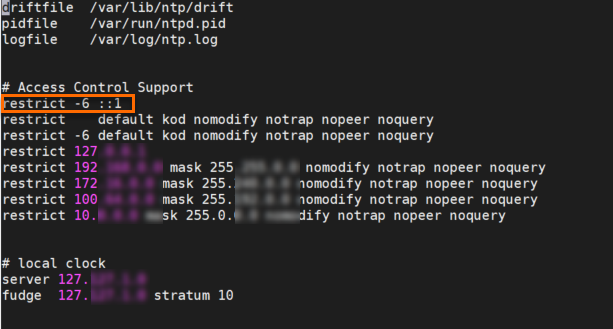
After you make the changes, press the Esc key, enter
:wq, and press the Enter key to save and exit.Run the following command to restart the NTP service.
systemctl restart ntp
Why does hot-plugging a disk or network interface controller fail for an instance created from a custom image?
Symptoms
Hot-plugging a disk refers to attaching or detaching a disk while the instance is in the Running state. Hot-plugging a network card refers to associating or disassociating an Elastic Network Interface (ENI) while the instance is in the Running state.
Alibaba Cloud supports hot-plugging of disks and network cards, but whether the hot-plugging is successful depends on the support of the operating system kernel. If the operating system kernel does not support it, the following problems occur:
After you attach a disk or associate an ENI, the corresponding device cannot be seen inside the operating system.
Detaching a disk or disassociating an ENI fails.
Solution
Hot-plugging for regular cloud servers and bare metal servers requires different kernel-supported features. We recommend that the kernel supports both Peripheral Component Interconnect (PCI) and Advanced Configuration and Power Management Interface (ACPI) hot-plugging features. These features are generally enabled by default, except for older systems such as CentOS 5. You can follow these steps to check whether the kernel has PCI/ACPI hot-plugging enabled.
Remotely connect to the Linux instance.
For more information, see Log on to a Linux instance using Workbench.
Run the following command to view the current instance's kernel version.
uname -rThe following information is returned, which indicates that the current system kernel version is
3.10.0-1127.19.1.el7.x86_64.
Run the following command to view the files in the
/bootdirectory.ll /bootThe following information is returned.
config-3.10.0-1127.19.1.el7.x86_64is the system kernel's configuration file.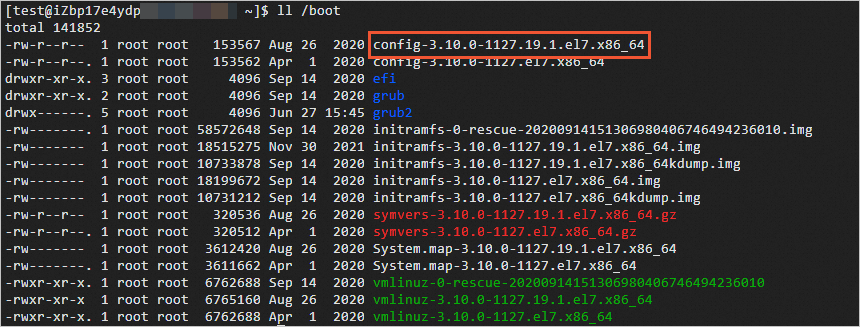
Run the following command to view the system kernel's configuration file.
cat /boot/config-3.10.0-1127.19.1.el7.x86_64If the following configuration items are all
y, it means the feature has been compiled into the kernel, and the operating system supports the corresponding hot-plugging.CONFIG_HOTPLUG_PCI_PCIE=y CONFIG_HOTPLUG_PCI=y CONFIG_HOTPLUG_PCI_ACPI=yIf a configuration item is
is not set, it means the kernel has not compiled this feature, and you need to recompile the kernel to support it.If a configuration item is
m, it means it is compiled as a module. For example, the followingCONFIG_HOTPLUG_PCI_ACPIis compiled as a module, and you need to load the corresponding module.CONFIG_HOTPLUG_PCI_PCIE=y CONFIG_HOTPLUG_PCI=y CONFIG_HOTPLUG_PCI_ACPI=mTaking the 2.6 kernel of a CentOS 5.x operating system as an example, the module corresponding to
CONFIG_HOTPLUG_PCI_ACPIis acpiphp.ko. To load it, you need to run themodprobe acpiphpcommand. If the loading fails, you can upgrade to a higher version of the kernel or stop the instance and perform a cold-plug.ImportantWe do not recommend that you upgrade the kernel and operating system version of your cloud server yourself. To upgrade the kernel, see How to prevent a Linux instance from failing to start after a kernel upgrade.
What should I do if an instance shuts down due to an operating system kernel error?
Symptoms
When an unexpected kernel panic occurs in the operating system, the second kernel (capture kernel) is loaded to perform a memory dump and generate a Kdump log. Due to compatibility issues with bare metal instance types, disk recognition fails during the startup of the second kernel. This causes the Kdump log collection to fail and the second kernel to fail to start. The instance is then in a shutdown state and needs to be restarted from the console.
For more information about bare metal instance types, see Instance families.
Cause
A bare metal instance may fail to generate a dump file using the operating system's built-in Kdump service.
This issue occurs on ebm*6 series bare metal instances when the following images are selected.
CentOS 8.3 and earlier CentOS versions
Ubuntu 16/18
Debian 10
Alibaba Cloud Linux 2 kernel versions earlier than
4.19.91-24.al7(4.19.91-24.al7has been fixed)
This issue occurs on ebm*7 series bare metal instances when the Debian 10 image is selected.
Solution
CentOS and other images
We recommend that you change to a higher version of the operating system. For more information, see Change the operating system (replace the system disk).
Alibaba Cloud Linux 2 image
We recommend that you follow these steps to upgrade the kernel version to
4.19.91-24.al7or later.Remotely log on to the ECS instance.
For more information, see Connect to a Linux instance using Workbench.
Run the following command to query the kernel version.
uname -rRun the following command to upgrade the kernel version.
sudo yum update kernelRun the following command to restart the ECS instance for the new kernel version to take effect.
sudo reboot