A known vulnerability in the open source systemd causes heap memory corruption on Alibaba Cloud Linux 2.1903 LTS 64-bit instances running systemd version systemd-219-78.4.al7 or earlier. When this happens, the systemd process freezes and cannot recover on its own.
Symptoms
On an Elastic Compute Service (ECS) instance running the Alibaba Cloud Linux 2.1903 LTS 64-bit public image, services may fail to start. The system journal may log the following error:
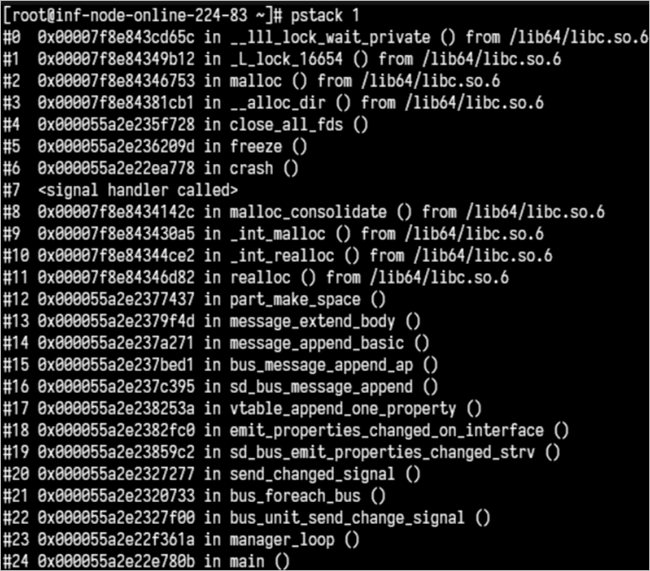
Failed to activate service 'org.freedesktop.systemd1': timed outRunning systemctl daemon-reexec does not fix the problem. Run pstack 1 to inspect the systemd process. The output will show that systemd is stuck, as illustrated below.
Cause
The open source systemd has a vulnerability that can corrupt heap memory, causing the systemd process to exit unexpectedly and then freeze. The process cannot recover without intervention.
kill -15 1 to recover the systemd service.Fix the systemd freeze
Prerequisites
Before you begin, create a snapshot of your ECS instance to back up your data. If data is lost during troubleshooting, use the snapshot to restore your disk. For more information, see Snapshot overview.
Diagnose and fix
Connect to the ECS instance. For more information, see Connection methods.
Check your systemd version:
rpm -q systemdThe output is similar to:
systemd-219-78.4.al7.3.x86_64Fix the problem based on your version:
Version is systemd-219-78.4.al7.3.x86_64 or earlier: upgrade systemd, then reboot.
Upgrade systemd:
yum update systemdReboot the instance:
reboot
Version is later than systemd-219-78.4.al7.3.x86_64 and still affected: send SIGTERM to recover the frozen systemd process:
kill -15 1