Problem description
After you restart a Linux ECS instance, the operating system runs normally, but Read-only file system *** errors appear when you run commands such as charrt, mkdir, and cat.
-
Running
chattronsshd_configreturns the Read-only file system *** error.
-
Running
mkidrto create a directory returns the cannot create directory 'test': Read-only file system *** error.
-
Running
catreturns the cannot create temp file for here-document: Read-only file system *** error.
Causes
Possible causes:
-
The
/etc/fstabfile specifies therooption for the root file system (/), preventing write operations. -
No mount option is specified for
/in/etc/fstab. After a restart, the system defaults toro, preventing write operations.
Solution
Change the mount option for the root file system in /etc/fstab
-
Connect to the Linux ECS instance with VNC. See Choose a connection method.
-
Check the mount option for the root file system.
cat /etc/fstab-
If the output shows the
rooption for the root file system (/), change it torw.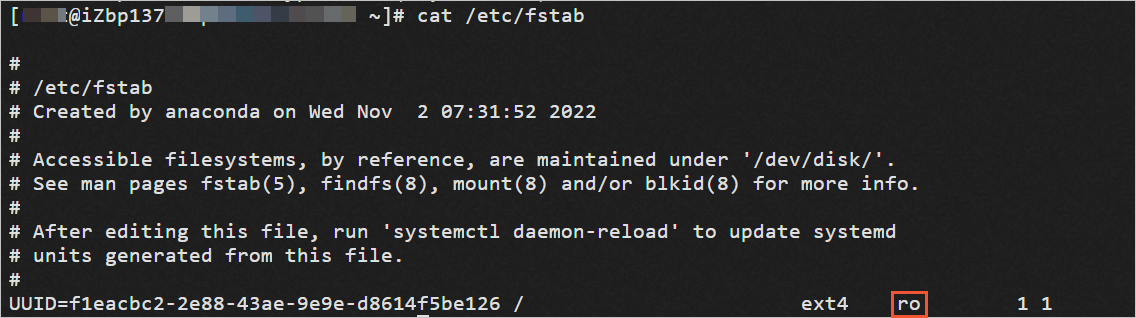
-
If no mount option is specified for
/, the system defaults toro. Set the option torw.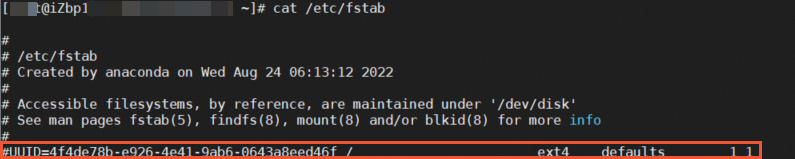
-
-
Remount the root file system read-write (
rw).mount -o remount rw / -
Set the mount option for
/torwin/etc/fstab.-
Open
/etc/fstab.vim /etc/fstab -
Set the mount option for
/torw.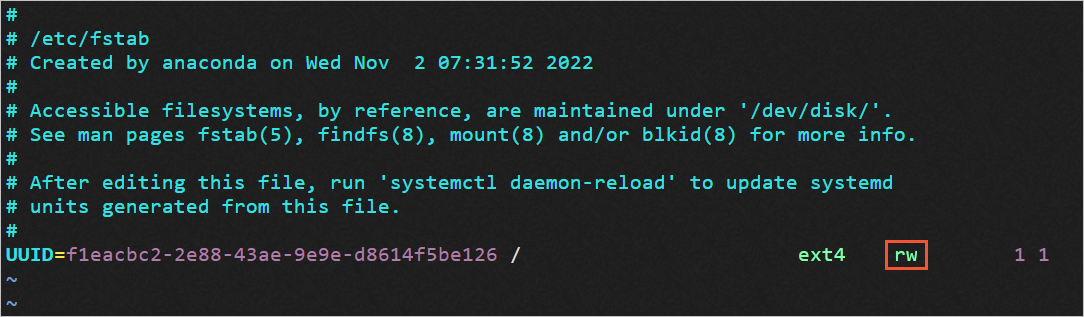
-
Press Esc, enter
:wq, and press Enter to save. -
Restart the instance for the change to take effect.
reboot
-