This topic explains how to resolve the "error: unpacking of archive failed on file /usr/bin/xxxx: cpio: open Failed" error, which occurs when yum commands like yum -y install XXX, yum list, or yum search XXX fail on a Linux ECS instance.
Problem description
On a Linux ECS instance, yum commands such as yum -y install XXX, yum list, and yum search XXX fail with the following error: error: unpacking of archive failed on file /usr/bin/xxxx: cpio: open Failed.
Cause
This issue occurs when the /usr/bin directory has incorrect file attributes. For example, setting the i or a attribute prevents data from being modified or deleted, which in turn causes yum installation commands to fail.
The following table describes common file attributes.
Attribute | Description |
i |
|
a |
|
u | When a file or directory with the |
s | When a file or directory with the |
e | Most files in Linux have the |
Solution
Follow these steps to modify the file attributes of the /usr/bin directory and resolve the yum command failure.
Run the following command to check the attributes of the
/usrdirectory.lsattr /usrIf the output matches the following, it indicates that the
/usr/bindirectory has theiattribute, which prevents file creation or deletion within it. Proceed to step 3 to remove this attribute.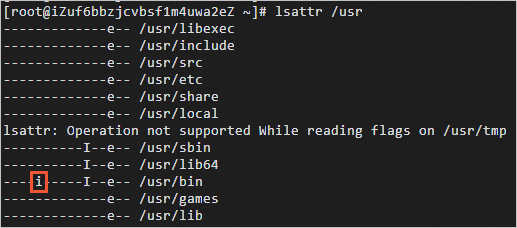
Run the
yumcommand again to confirm that it works as expected.