Overview
When using the email client, you can view the help document in the email client or view the tips on the error page if you encounter problems. You can also refer to this topic to find the corresponding solution to the problem.
The third-party client is disabled by default for newly purchased users.
If you need to use a third-party client, we also provide mailbox administrators with the ability to enable or disable the use of third-party clients.
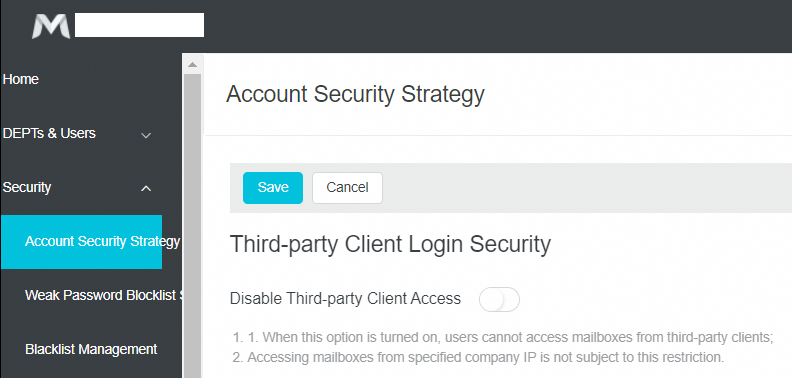
At the same time, in order to better protect your account security, we recommend opening the security password function of the third-party client:
Enabled by admin: How to Enable The Third-party Client Security Password by Email Admin?
Enabled by employee: How to Open and Use The Third-party Client Security Password?
How to Use / Set up
How to Configure Alibaba Mail Accounts on the Third-party Email Client
How to Set Up Alibaba Mail Account in the Email Client on Mobile Phone
Common Errors / Problems
Unable to Verify The Security Certificate While Using SSL Encrypted Connection in Outlook Client
The Error: 553 authentication is required Appeared When Setting up The Email Client
Unable to Receive All The Emails from Webmail by Using A Third-party Client
The Error Code 0X80042108 Prompted When Sending Emails in Outlook
The Error Code 0X800C0133 Prompted When Using Alibaba Mail in Outlook Express
Normal Email Found to Be Spam When Receiving Emails Through The Email Client
A Delay in Receiving Emails While Using The Third-party Client
The Solution for Wrong Password Error When Configuring Alibaba Mail in Outlook and Foxmail
The Error Code 0x800CCC78 Prompted When Sending Emails in Outlook
The Error: No such host is known Appeared When Sending and Receiving Emails in the Third-part Client
References
Applicable Scope
Alibaba Mail