Derived from the Best Practices of Alipay Mobile Apps
mPaaS helps enterprises quickly build stable and high-quality mobile apps with lowered technical barriers to entry, reduced R&D costs, and improved development efficiency.
The mPaaS development framework can automatically generate initialization code and provide the modular development mode for collaborative development.
High Stability
Each business module is containerized to minimize performance problems, such as white screen errors and loading failures.
Optimized Performance
All mPaaS components apply to scenarios that require high concurrency and traffic. mPaaS is an optimal solution that is compatible with complex clients. It helps apps run in weak network conditions and keeps processes alive.
Futuristic Technologies
Futuristic technologies based on Alipay are developed on mPaaS. For example, hotfixes help you fix errors in native code without releasing new versions of apps.
Message Push
Integrated with multiple cell phones, mPaaS allows you to customize message delivery settings, interact with app users, and obtain higher retention rates.
Security Armor
mPaaS provides stable, convenient, and effective security solutions for mobile applications to prevent reverse engineering.
Mobile Analysis Service
MAS enables monitoring of core product metrics through multiple terminals event tracking data collection and analysis.
Product Option
Mobile Gateway Service
A bridge between mobile client and server: mobile accesses backend via gateway
 Resource Package Type: Number of Mobile Gateway Calls
Number of Mobile Gateway Calls: 1 million
Validity Period: 1 year
Message Push Service
It supports message push of multiple types. The push methods include console page push and API push.
Resource Package Type: Number of Message Push Devices
Number of Message Push Devices: 10,000 units
Validity Period: 1 year
Performance Monitoring
By collecting and analyzing data from multiple terminals event tracking , it enables comprehensive monitoring and management of application performance.
Resource Package Type: Number of Performance Monitoring Devices
Number of Performance Monitoring Devices: 10,000 units
Validity Period: 1 year
Custom Analysis
Real-time analysis based on a client-side custom event tracking model.
Resource Package Type: Number of Custom Analysis Devices
Number of Custom Analysis Devices: 10,000 units
Validity Period: 1 year
Remote Training Service Package
This service aims to help customers build basic cognitive capabilities of mPaaS.
Service Package Type: mPaaS Remote Training
Purchase Quantity: 1
Validity Period: 1 year
Exclusive DingTalk Group Service Package - Basic Edition
This service helps clients integrate smoothly with mPaaS via training and dedicated DingTalk support.
Service Package Type: mPaaS Exclusive DingTalk Group Service
Purchase Quantity: 1
Validity Period: 1 year
Exclusive DingTalk Group Service Package – Premium Edition
This service provides enterprise-grade support for stable mPaaS integration and seamless operation with client systems.
Service Package Type: mPaaS Exclusive DingTalk Group Service
Purchase Quantity: 1
Validity Period: 1 year
Mobile Security Armor
Secure mobile apps against reverse engineering, boosting their security.
Application Hardening Service
Hardening Attempts: Unlimited
Purchase Quantity: 1
Architecture
Dynamic Mobile App Updates and Releases
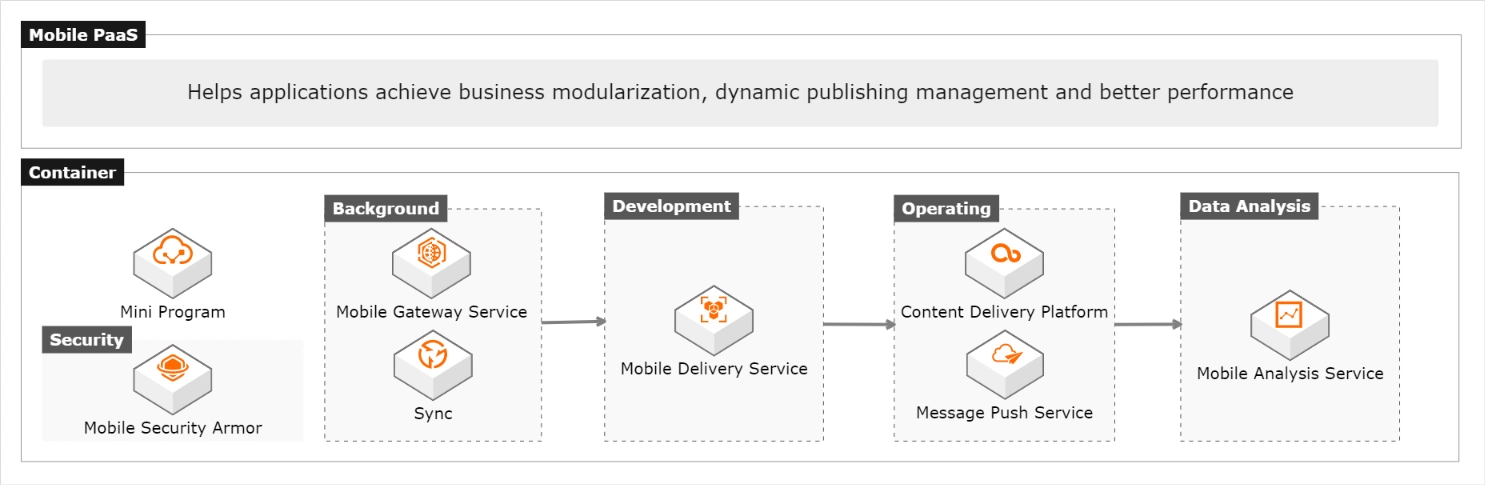
Scenarios




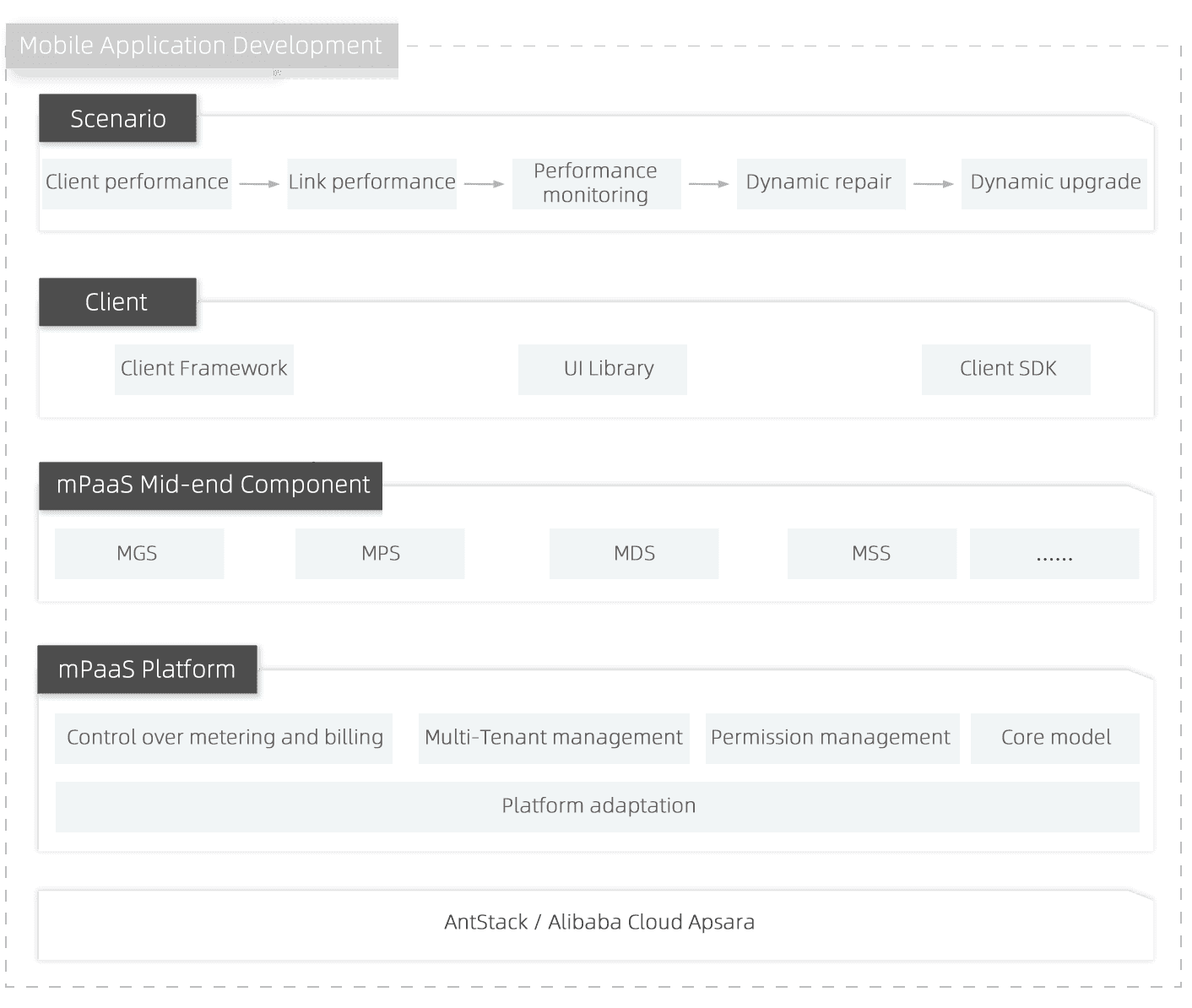
Dynamic Super Apps With Advanced Performance
Changes the mobile app development mode, helps enterprises with digital transformation, and creates dynamic super apps with a unified development framework, H5-offline packages, gateways, and custom analysis
Dynamic Super Apps
Integrates with highly available Alipay client framework to optimize client performance
Unified Architecture and Optimized Startup Performance
Provides H5-offline packages and hotfixes to optimize user experience with improved startup performance, accelerated network transmission, and adaptation across mobile models
Agile Development Process and High Release Efficiency
Provides the mPaaS modular development mode to accelerate the business iteration and expansion and shorten release periods





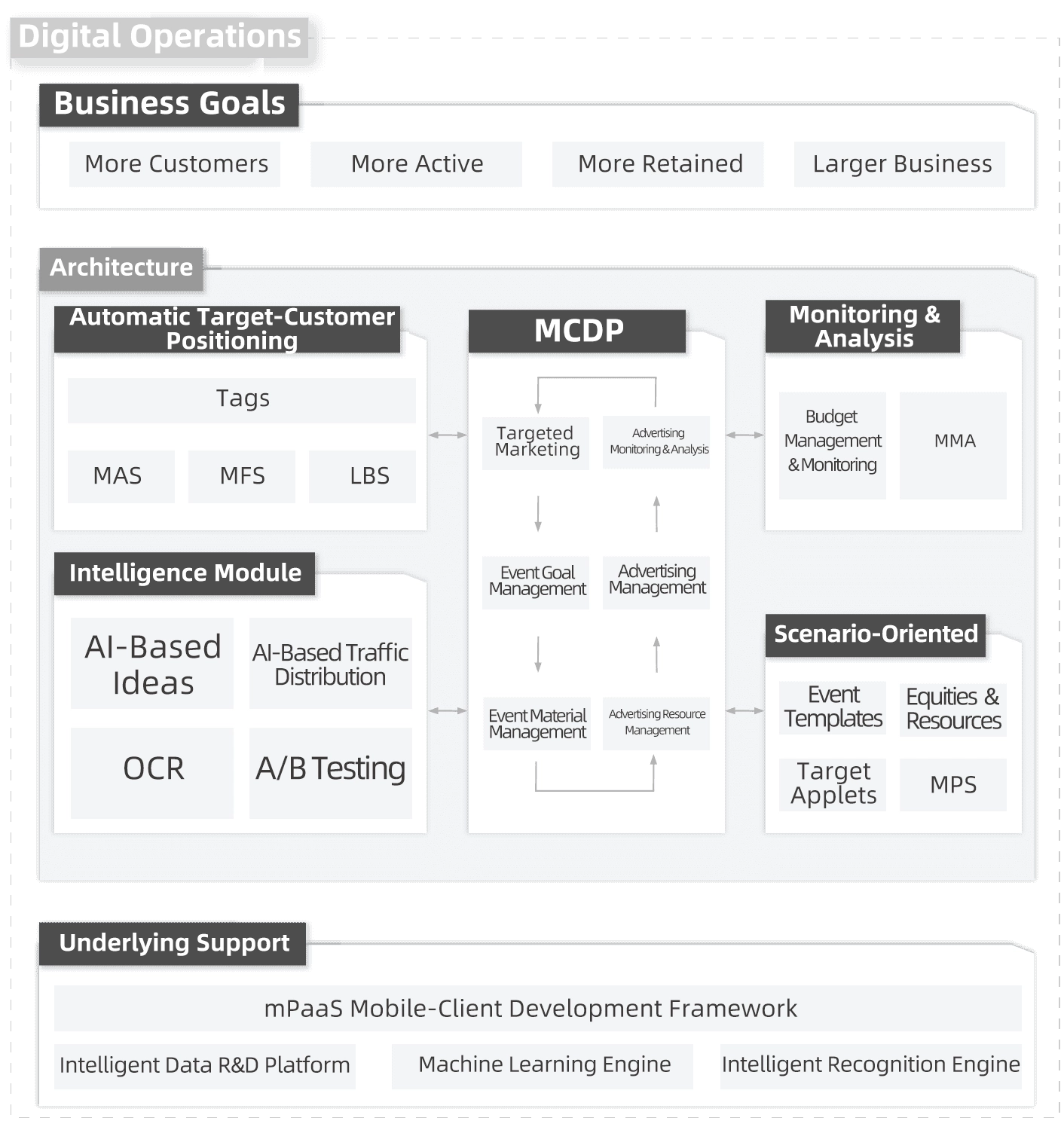
Digital Operation Capabilities
Provides one-stop operation management and intelligent advertising capabilities for businesses to maximize operation efficiency as well as advertising conversions
Target Customer Positioning
Provides multi-dimensional funnel analyses to customize target mobile-client customers and achieve operation success
Operation Preparations
Provides various online materials for operation events
Operation Lifecycle Management
Supports operation event management throughout an entire lifecycle and intelligent event scheduling to balance advertising conversions and user experience
Operation Analysis
Provides end-to-end advertising conversion dashboards to monitor operations in real time
Multiple Promotional Channels
Supports multiple mobile promotional methods such as notices, advertisements, and push notifications, and booths for notices as well as advertisements with immediate effect

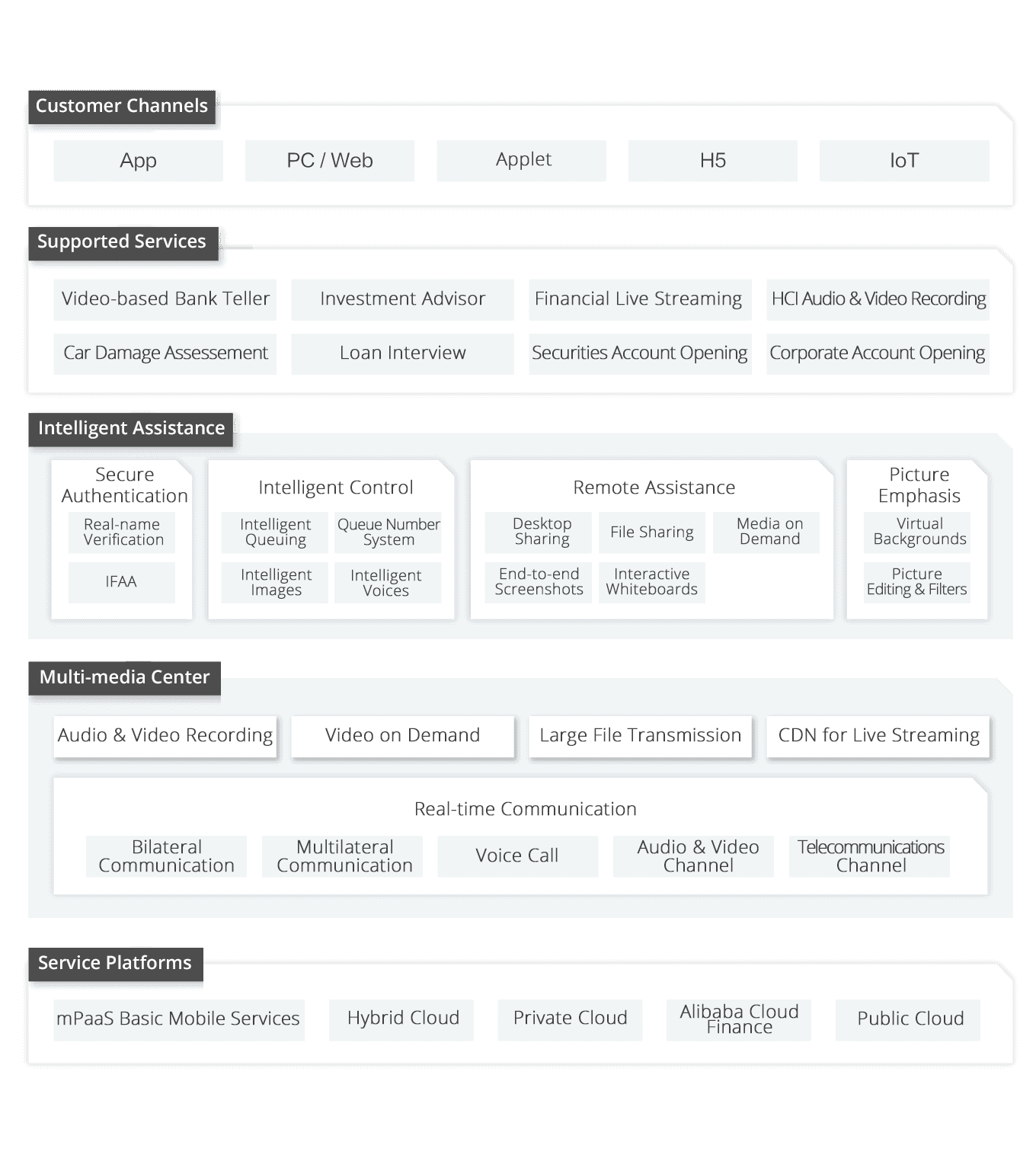
Business on Cell Phones
Digital's new generation of customers pursues rich, convenient and high-quality mobile services, and enterprise operations based on data and digital services have become an inevitable choice to maintain customers.
Multi-terminal Communication
Builds a channel between customer services as well as business managers and business as well as customers, and supports audio and video integration of various mobile clients, such as apps, PCs, and applets
Business Intelligence
Realizes intelligent guidance, authentication, and compliance detections of time-consuming business, such as video and audio recording by combining multimedia and intelligent technologies
End-to-end Encryption
Provides end-to-end communication encryption and dynamic API authentication
Stable Output
Supports deployment on the private cloud, hybrid cloud, and public cloud, and integration of video transmission with stability and efficiency
Solution Support


Contact Us
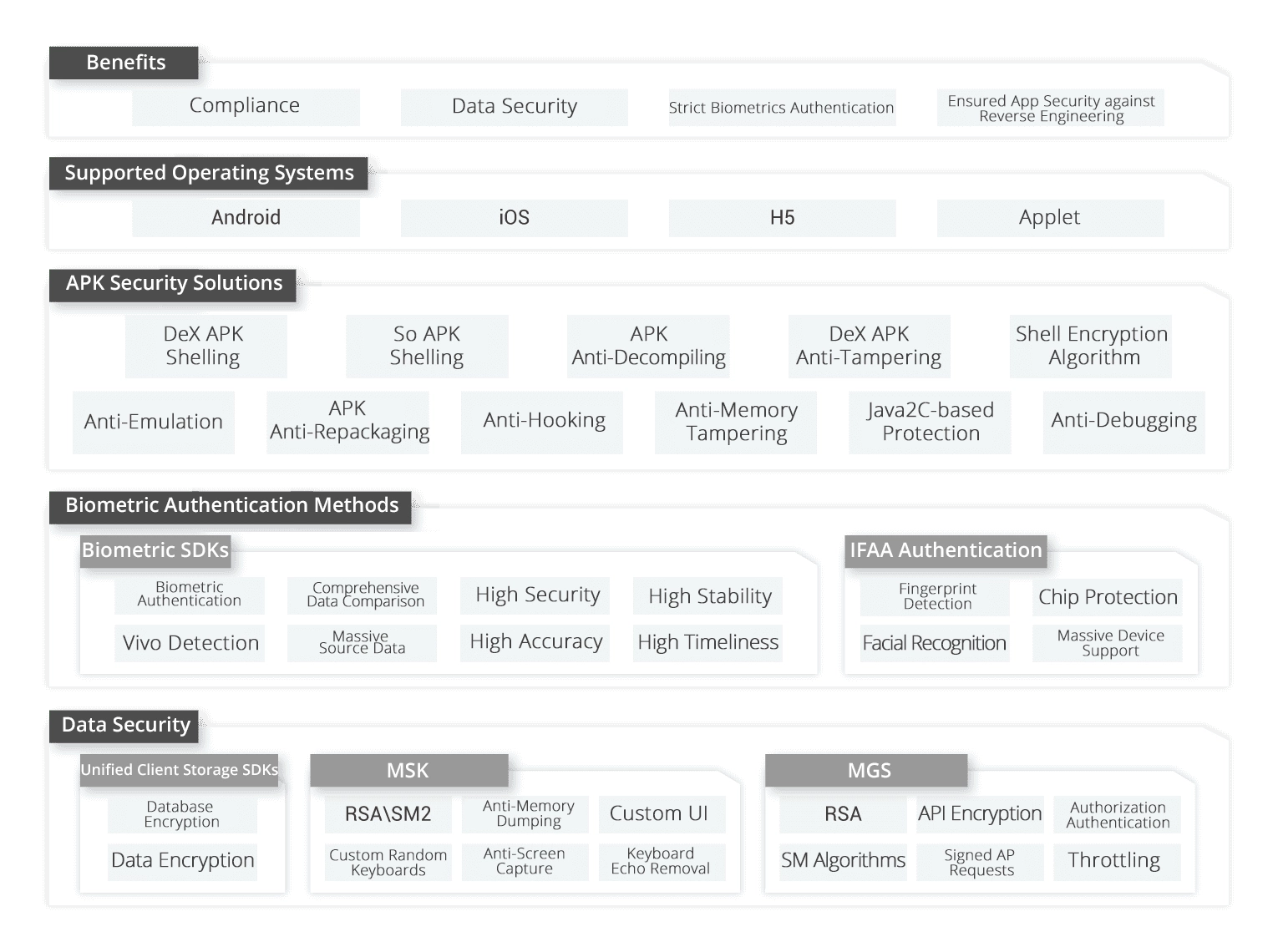
App Information and Lifecycle Safeguarding
Provides Alipay-based app security and compliance solutions, which are proven applicable to more than 2,000 industries, such as banking, securities, insurance, governments, transportation, education, and the Internet
Comprehensiveness
Applies to scenarios such as development, input, storage, transmission, certification, application reinforcement, and disaster recovery
Lightweighting
Provides lightweight security solutions that balance app security and performance
Universalness
Serves hundreds of millions of cell phone users worldwide
Solution Support
Contact Us
Procedure
1
Activate mPaaS
Use an Alibaba Cloud account to activate mPaaS.
2
Create Apps
Log on to the mPaaS console to create an app.
3
Configure Files
Specify the required parameters, upload the signed APK, download the code, and add the configuration file to the project.
4
Select Baseline
We recommend starting with mPaaS V10.2.3 to ensure more features and lower migration costs.
5
Add Components
Add the required components to the project.