Series Review: In the previous article In-depth Analysis of the Principles of Android Crash Capture and a Closed-loop Framework from Crash to Root Cause Identification, we deeply analyzed the technical insider details of crash collection—from the
UncaughtExceptionHandlermechanism in the Java layer to signal processing and Minidump technology in the Native layer, and then to the symbolization principle of the obfuscation stack. We believe that everyone has obtained a clear understanding of "how crashes are caught."
However, theory alone is not enough. This article will reproduce a production environment case to show how an Android developer, when encountering an online crash problem, can perform crash analysis and positioning through exception data and context collected by Real User Monitoring (RUM). It will take you through the complete flow of crash troubleshooting: from receiving alerts, viewing the console, analyzing the stack, and tracking user behavior, to locating the root cause.
An app V3.5.0 was published, which mainly optimized the loading performance of the product list. However, on the third day after the version was published, the team started to receive a large number of user complaints about unexpected app exits and crashes.
Severity:
● 10 + fold increase in crash rate
● App store ratings drop
● User uninstallation rate increased
Final solution: Alibaba Cloud RUM SDK was integrated to collect crash data and locate the problem within two hours.
After data integration, because alerting is configured, when the online crash rate rises significantly, the team developers will receive alerting notifications and follow the online problem immediately.
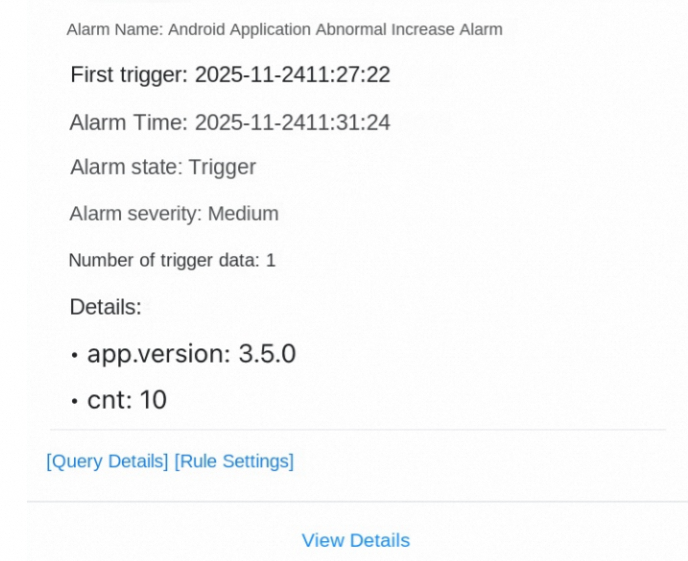
app.name: xxx and crash | SELECT diff[1] AS "current value", diff[2] AS "yesterday's value", round(diff[3], 4) AS "ratio" FROM ( SELECT compare(cnt, 86400) AS diff FROM ( SELECT COUNT(*) AS cnt FROM log)) ORDER BY "current value" DESCOperation path: Console homepage → RUM → Find the corresponding app → Exception statistics
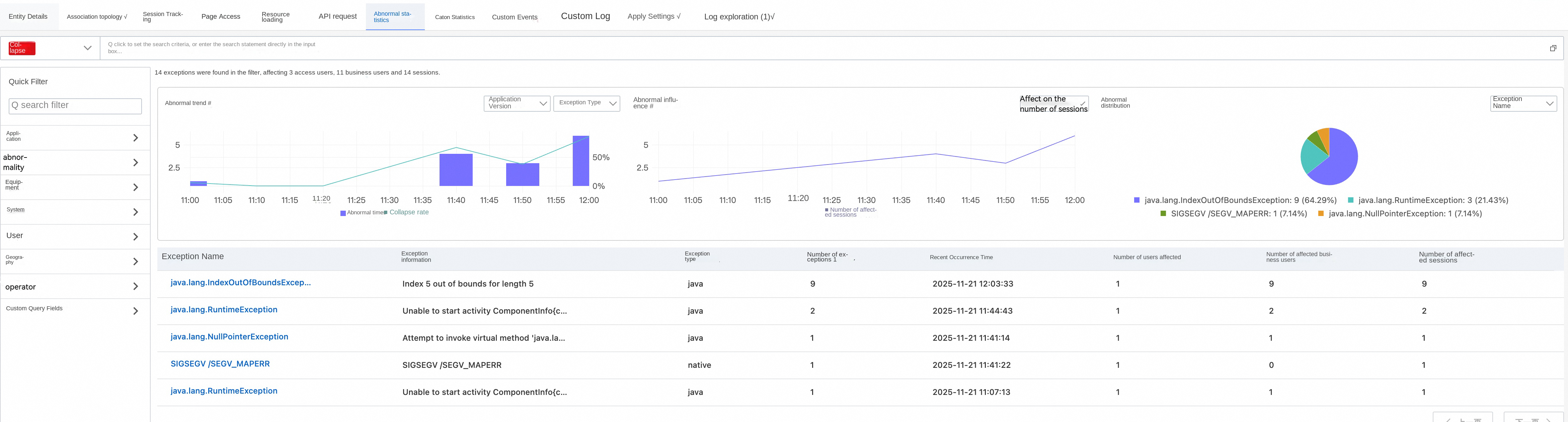
By analyzing the exception list displayed in the console, we found that IndexOutOfBoundsException accounted for the vast majority of crashes and was definitely the main problem, and began to appear in large quantities after V3.5.0 was published.
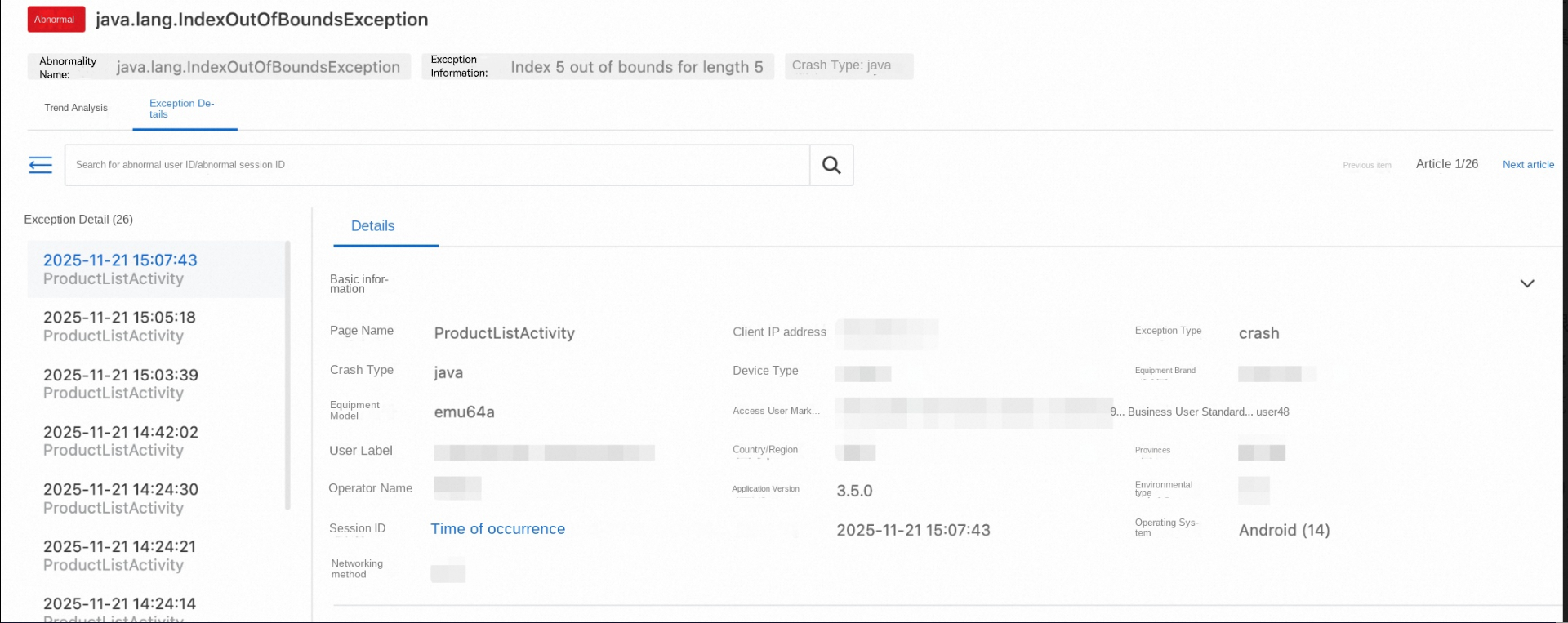
Click to enter the IndexOutOfBoundsException details page for in-depth analysis. This verified our idea. Here, you can locate that the crash occurred to the newly published V3.5.0, and the page where it occurred is: ProductListActivity. The corresponding session ID is: 98e9ce65-c51a-40c4-9232-4b69849e5985-01. This information is used for our subsequent analysis of user behavior.
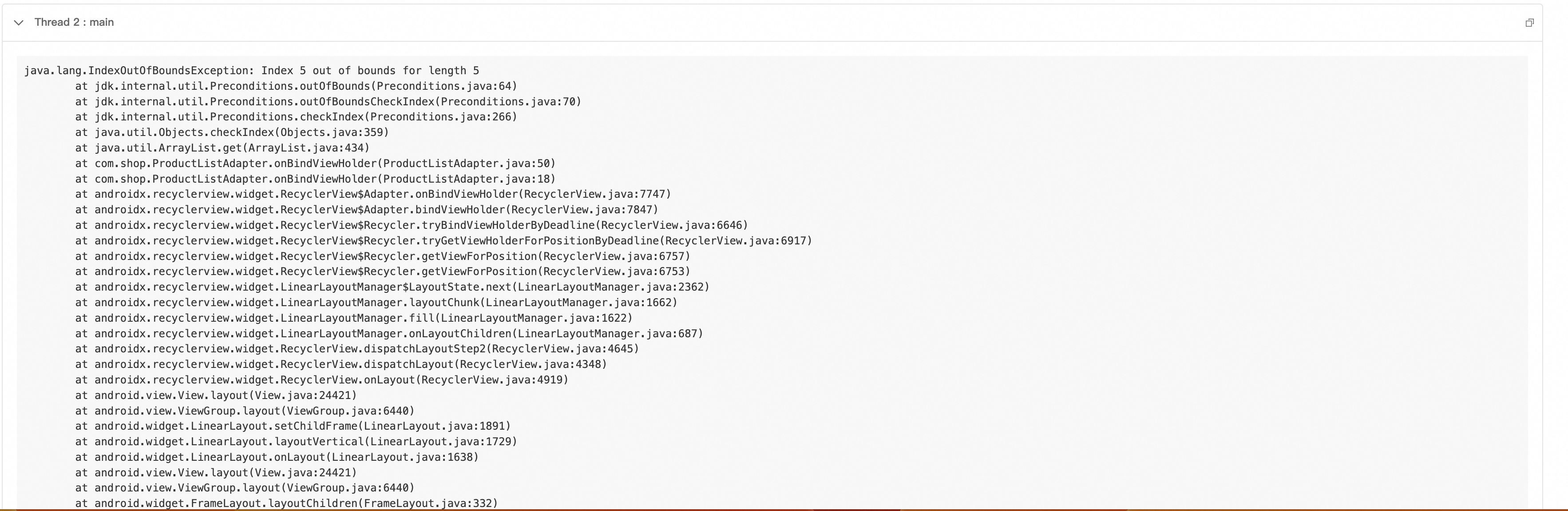
View the crash stack and analyze key information:
● The crash occurred on line 50 of the ProductListAdapter.onBindViewHolder() method.
● Fault reason: Attempted to access the 6th element (index 5) of the List, but the list has only 5 elements.
● This is a typical RecyclerView data inconsistency problem.
Preliminary assumptions:
● It may be that the data update timing is incorrect.
● It may be multi-threaded concurrent modification of data.
● It may be caused by rapid user operations.
However, the root cause cannot be determined solely by the stack. You need to view the specific operation path of the user.
Operation path: Crash details page → Select the session ID corresponding to the crash → View the session trace of the session ID
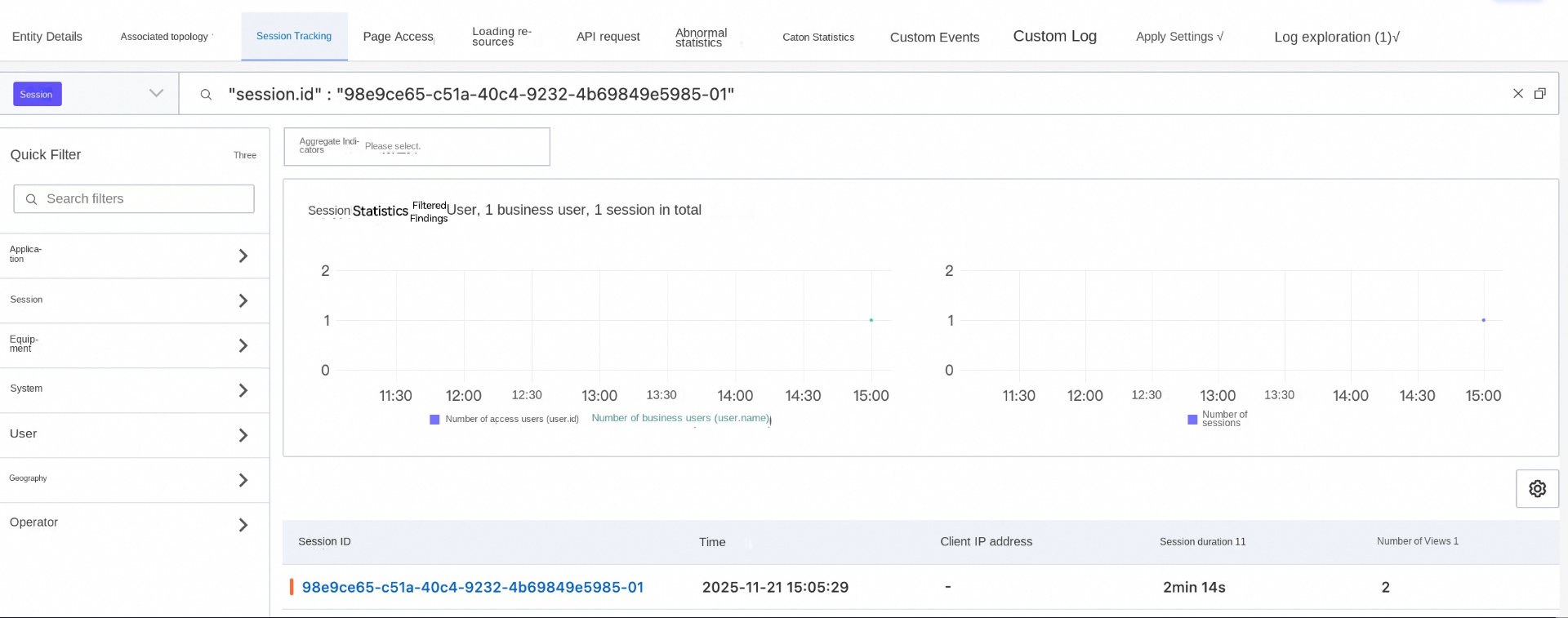
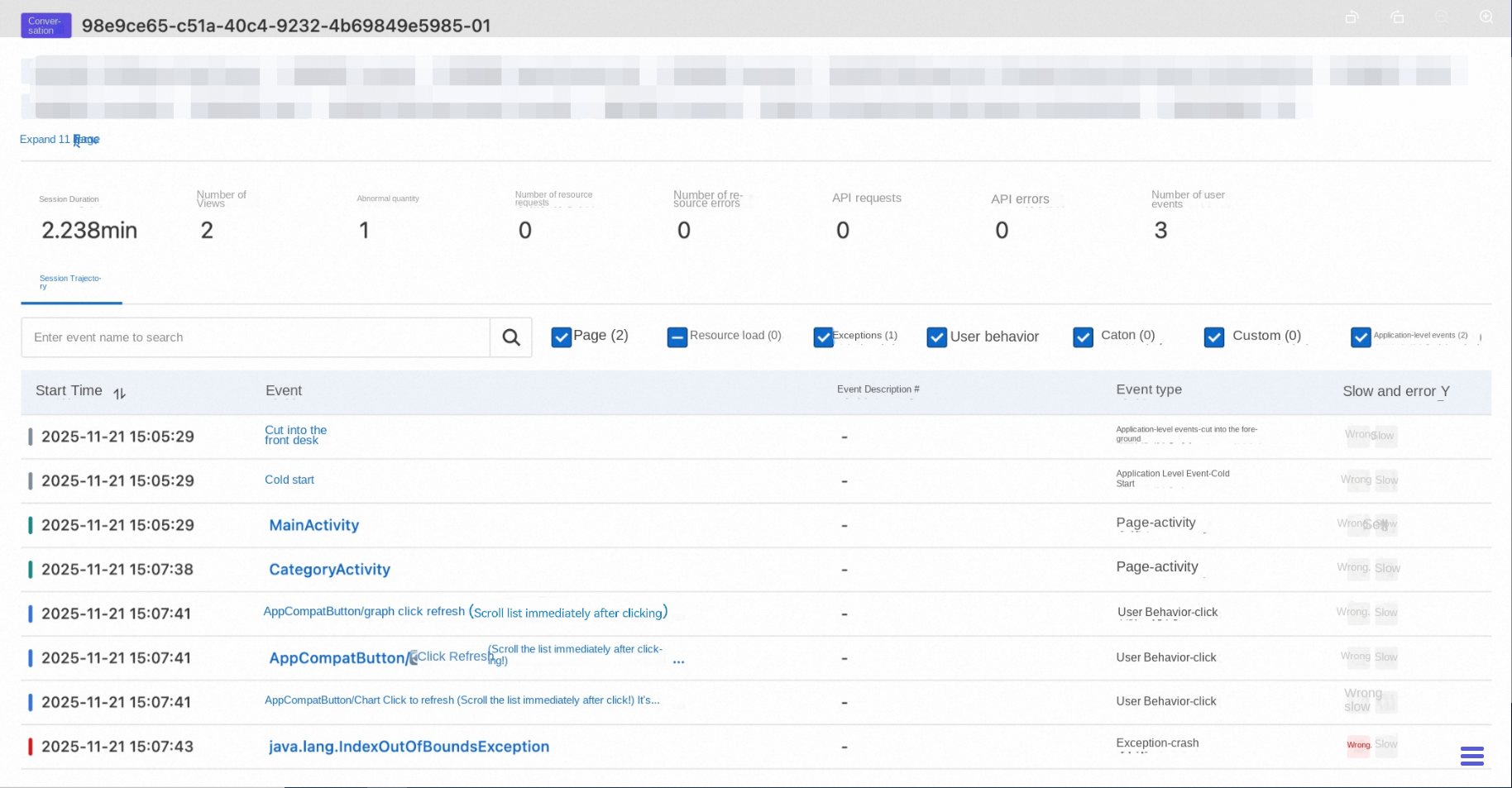
Click the session details to view the user behavior path, combined with the page where the crash occurred. We identified the following operation path.
Operation path:
● Go to the ProductListActivity page.
● Quickly click the refresh button three times consecutively, triggering an asynchronous update of the list (Note: A network request actually occurs here. Because we are reproducing it locally, an asynchronous update is used.)
● Online request timing issues:
● RecyclerView is still rendering the 6th position, but the data no longer exists.
● Root cause: Data race caused by multiple asynchronous requests.
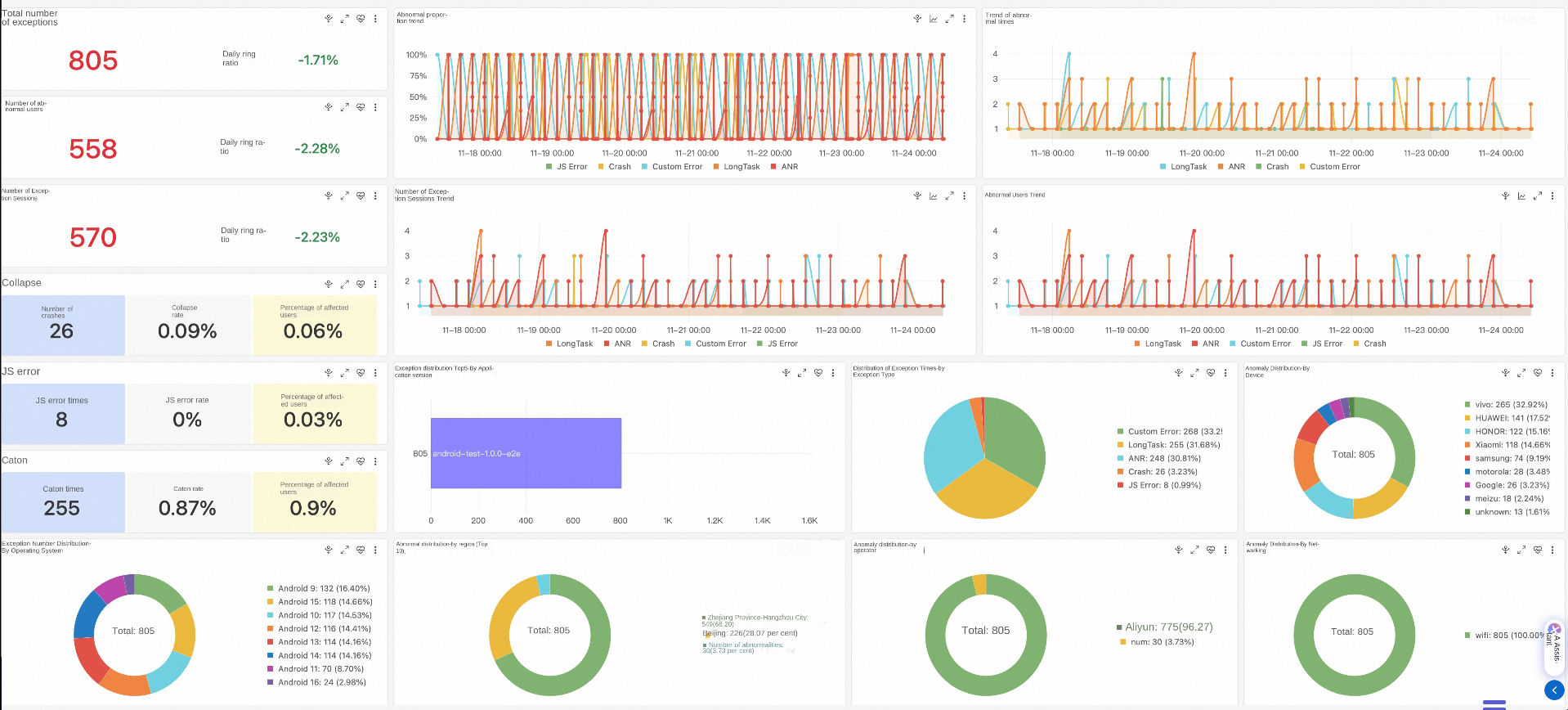
To further confirm the issue, you can perform multi-dimensional filtering and analysis on the crash data to analyze failure features and confirm the impact scope.
The crash data collected by the SDK contains the following core fields:
{
  "session.id": "session_abc123", // The session ID, which is used to associate the user behavior path.
  "timestamp": 169988400000, // The time when the crash occurred, in milliseconds.
  "exception.type": "crash", // The type of the exception.
  "exception.subtype": "java", // The subtype of the exception.
  "exception.name": "java.lang.NullPointerException", // The type of the exception.
  "exception.message": "Attempt to invoke virtual method on a null object", // The error message.
  "exception.stack": "[{...}]", // The full stack (JSON array).
  "exception.thread_id": 1, // The ID of the crash thread.
  "view.id": "123-abc", // The ID of the page on which the crash occurred.
  "view.name": "NativeCrashActivity", // The name of the page on which the crash occurred.
  "user.tags:": "{\"vip\":\"true\"}", // User tags (custom).
  "properties": "{\"version\":\"2.1.0\"}", // Custom properties.
  "net.type": "WIFI", // The network type of the user.
  "net.ip": "192.168.1.100", // The IP address of the client.
  "device.id": "123-1234", // The ID of the user device.
  "os.version": 14, // The version number of the user's system.
  "os.type": "Android" // The system type of the user.
}Location: RUM > Experience dashboard > Exception analysis
On the exception analysis dashboard, you can view the overall breakdown results of the application, including the total number of exceptions, exception trend, device distribution, exception type, and network distribution.
Because the actual list update operation is returned by a network request, we need to pay attention to the user's network type when a crash occurs in the online data. You can view the crash network distribution of V3.5.0 in the crash dashboard.
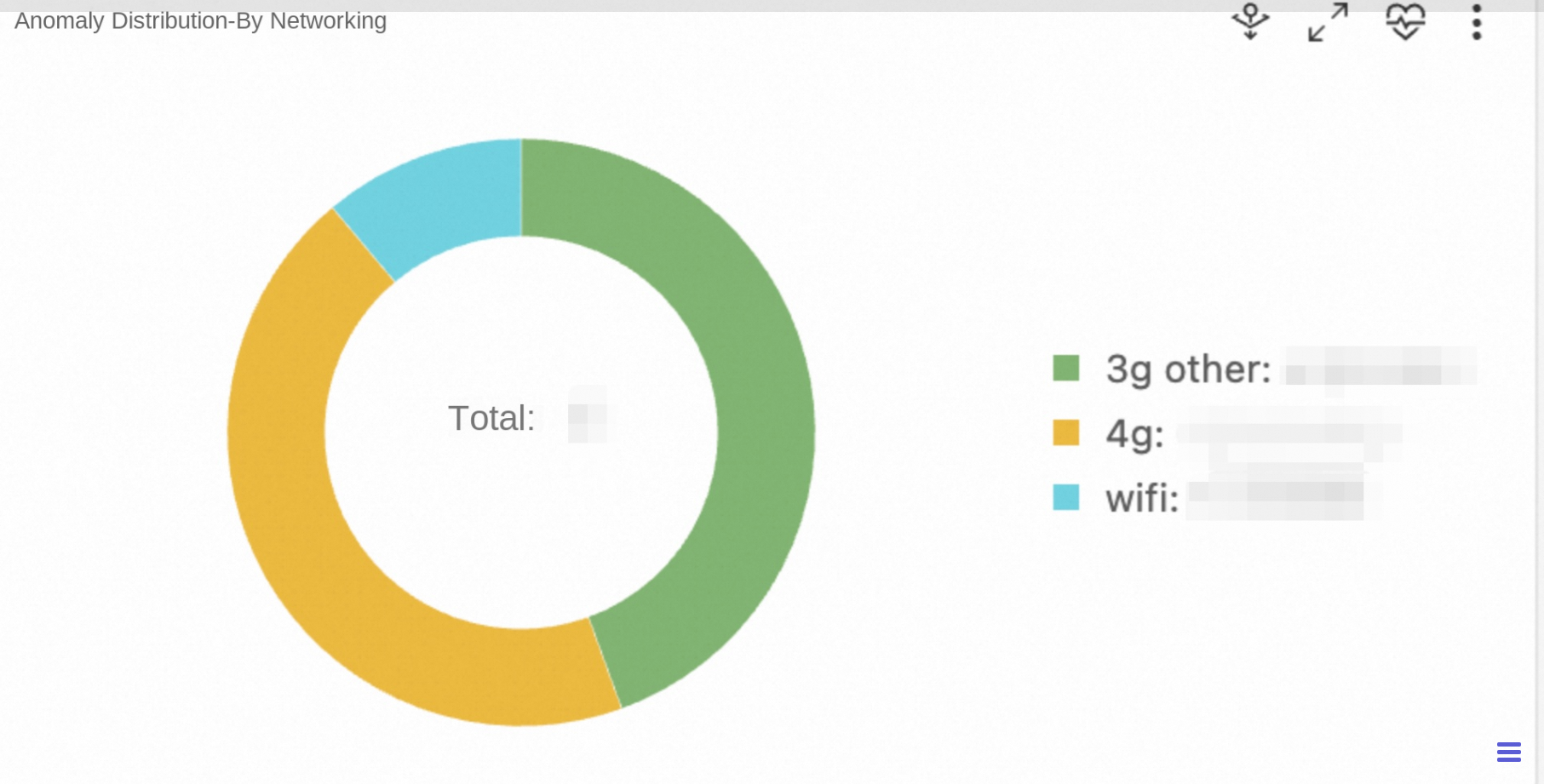
💡Conclusion: 90% crashes occur in 3G/4G networks and the rate of crashes in WiFi networks is very low. This confirms that the network (asynchronous request) is the key factor.
View the distribution of device brands that crashed in V3.5.0 on the crash dashboard.
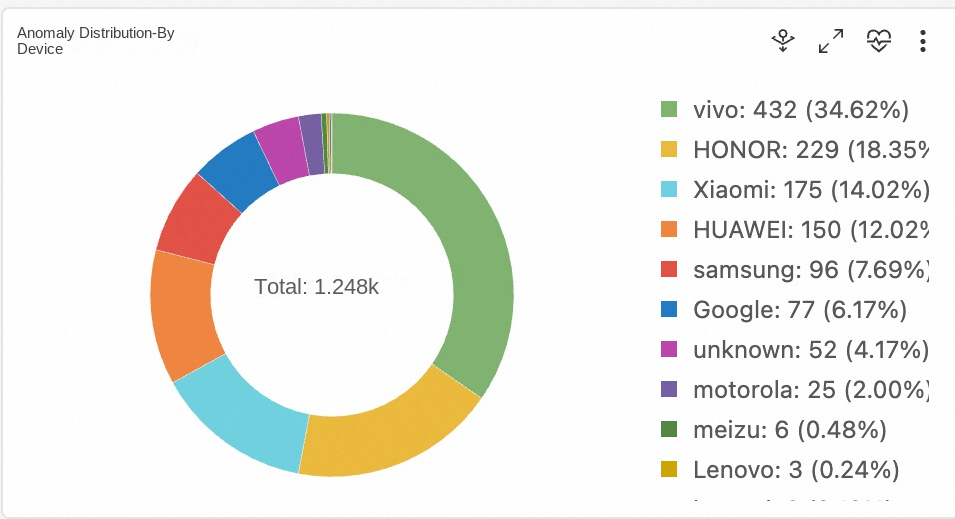
💡Conclusion: All brands are affected. It is not a model-specific issue, but a code logic issue.
In addition to the crash dashboard, we can still use SQL custom analysis on the Log Explorer tab page.
app.name: xxx and crash | select "app.version", count(*) from log group by "app.version"Operation: Compare the crash rates of V3.4.0 and V3.5.0.
| Version | Crash rate | Proportion of IndexOutOfBoundsException |
|---|---|---|
| v3.4.0 | 0.08% | 5% |
| v3.5.0 | 1.25% | 82.5% |
💡Conclusion: The problem is introduced in V3.5.0. You need to check the changes in this version.
Open ProductListActivity.java and find the refresh logic:
private void loadProducts() {
    // ❌ Changes in v3.5.0: Optimize performance with asynchronous loading.
    new Thread(() -> {
        try {
            // Simulate a network request.
            List<Product> newProducts = ApiClient.getProducts(currentCategory);
            // ❌ Problem 1: The previous request was not canceled.
            // ❌ Question 2: Directly clear and update data without considering that RecyclerView is rendering.
            runOnUiThread(() -> {
                productList.clear(); //💥Dangerous operation!
                productList.addAll(newProducts); //💥Data update.
                adapter.notifyDataSetChanged(); //💥Notification refresh.
            });
        } catch (Exception e) {
            e.printStackTrace();
        }
    }).start();
}
@Override
public void onBindViewHolder(@NonNull ProductViewHolder holder, int position) {
//💥Crash point: The position may exceed the range of products.
Product product = products.get(position); //IndexOutOfBoundsException!
holder.bind(product);
}Purpose of V3.5.0 changes: Optimize performance and move network requests to subthreads.
Introduced issues:
Through the previous troubleshooting process, we successfully located the root cause of the crash: The ProductListAdapter.onBindViewHolder() method has an index out-of-bounds problem when dealing with data updates. But you may have a question: How do we get from the obfuscated stack, exactly to ProductListAdapter.java:50 this line of code?
In a real production environment, to protect code and optimize package size, release versions published to the app store are obfuscated by ProGuard or R8. This means the crash stack initially seen on the console is as follows:
java.lang.IndexOutOfBoundsException: Index: 5, Size: 5
    at java.util.ArrayList.get(ArrayList.java:437)
    at com.shop.a.b.c.d.a(Proguard:58)
This is the reason why we need symbolication. Next, let's see how to configure symbolication in the RUM console.
After the release version is built, the mapping.txt file is located at:
app/build/outputs/mapping/release/mapping.txtSample file content:
com.example.ui.MainActivity -> a.b.c.MainActivity:
    void updateUserProfile(com.example.model.User) -> a
    void onClick(android.view.View) -> b

com.example.model.User -> a.b.d.User:
    java.lang.String userName -> a
void setUserName(java.lang.String) -> amapping.txt file
After the build is complete, the .so file in the folder is located at:
app/build/intermediates/cxx/release/xxx/obj/
├── arm64-v8a/
│ └ ── xxx-native.so ← contains debug symbols
├── armeabi-v7a/
│ └ ── xxx-native.so
└ ── x86_64/
└ ── xxx-native.soSimilar to the Java mapping file, upload the .so file of the corresponding architecture in the console.
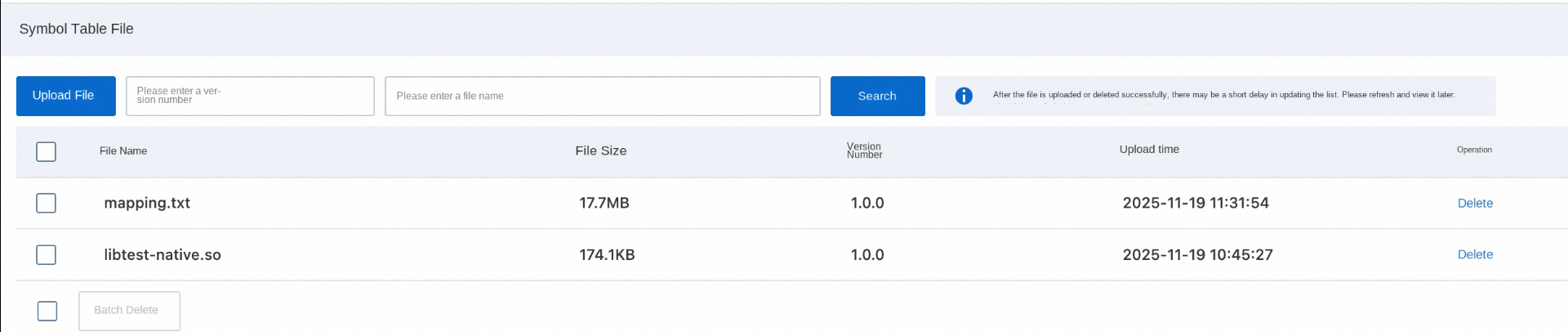
Use the symbol table file for parsing: Open crash details > Exception details > Parse the stack > Select the corresponding symbol table file (Use the .so file for the native stack, and .txt file for the java stack)
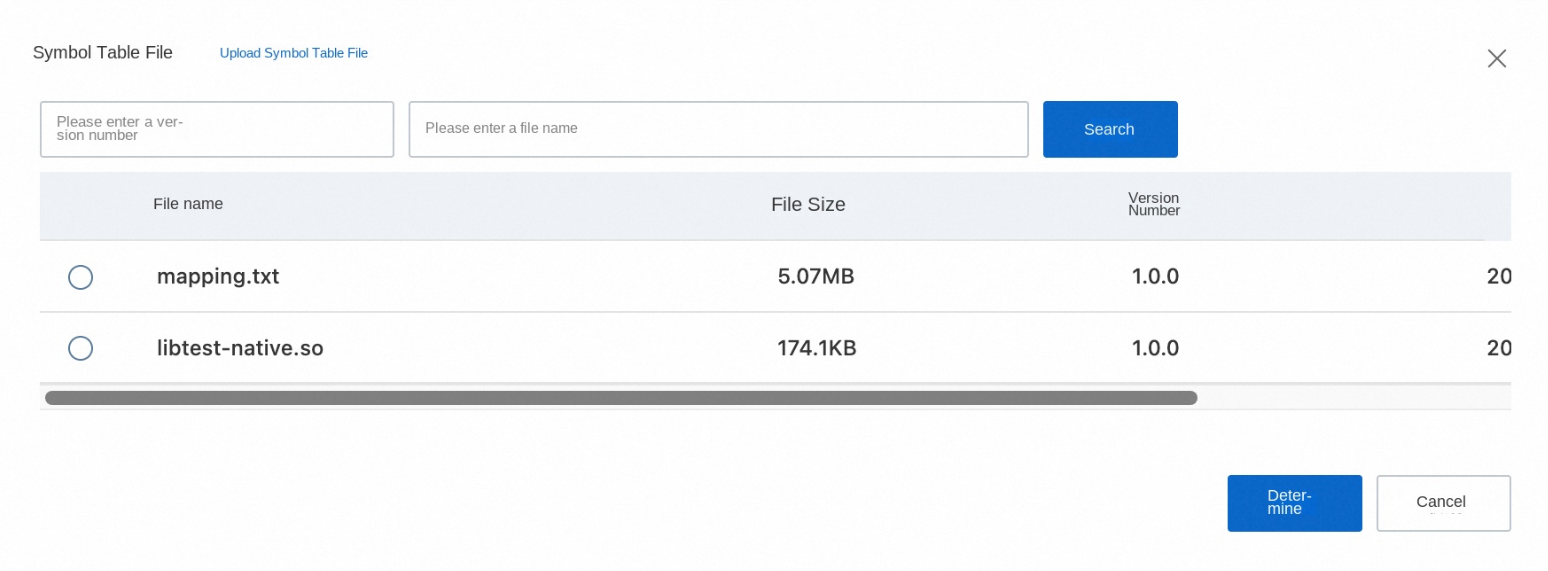
Click OK to display the parsed stack.
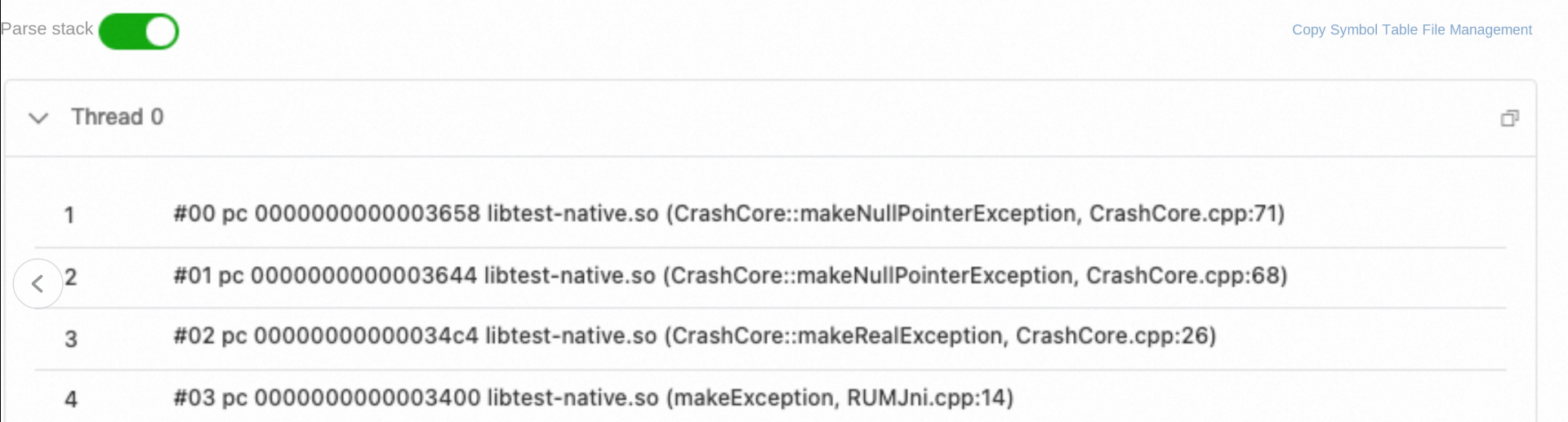
Symbolization success:
● Display full class name and method name.
● Show source file path and line number.
● C++ function name restored (non-mangled state).
What key help does RUM provide in troubleshooting this crash?
● Without RUM: Online applications can only see the obfuscated stack, and do not know where the crash occurred.
● With RUM: After uploading the mapping file, you can accurately pinpoint ProductListAdapter.java:50.
● Without RUM: We only know that "the user opens the list and it crashes", but cannot reproduce the crash.
● With RUM: You can view the complete operation timeline and discover that the issue is triggered by "rapidly clicking refresh multiple times."
● Without RUM: You do not know which users are affected or in what environment the crash occurred.
● With RUM:
● Without RUM: You rely on user complaints, and discovery is lagged.
● With RUM: You receive alerts immediately and start troubleshooting immediately.
Application stability is the cornerstone of user experience. Through systematic crash collection and analysis, developer teams can transform from "passive response" to "proactive prevention," continuously improving application quality and winning user trust. Alibaba Cloud RUM implements a non-intrusive collection SDK for application performance, stability, and user behavior for Android. You can refer to the integration document to experience it. In addition to Android, RUM also supports monitoring analysis for various platforms such as Web, miniapp, iOS, and HarmonyOS. For related questions, you can join the RUM support group (DingTalk group ID: 67370002064) for consultation.
Unified Cross-cloud Logging: Intelligently Importing S3 Data into SLS
Alibaba Cloud Observability and Datadog Release OpenTelemetry Go Automatic Instrumentation Tool

774 posts | 60 followers
FollowAlibaba Cloud Native Community - August 14, 2026
Alibaba Cloud Native Community - November 11, 2025
Alibaba Cloud Native Community - March 4, 2026
Alibaba Cloud Native Community - December 10, 2025
Alibaba Cloud Native Community - January 22, 2026
Alibaba Clouder - March 5, 2021
774 posts | 60 followers
Follow Application Real-Time Monitoring Service
Build business monitoring capabilities with real time response based on frontend monitoring, application monitoring, and custom business monitoring capabilities
Learn MoreMore Posts by Alibaba Cloud Native Community

