By Pan Weilong (Alibaba Cloud Observability), Ruan Xiaozhen (Alibaba Cloud Open Platform)
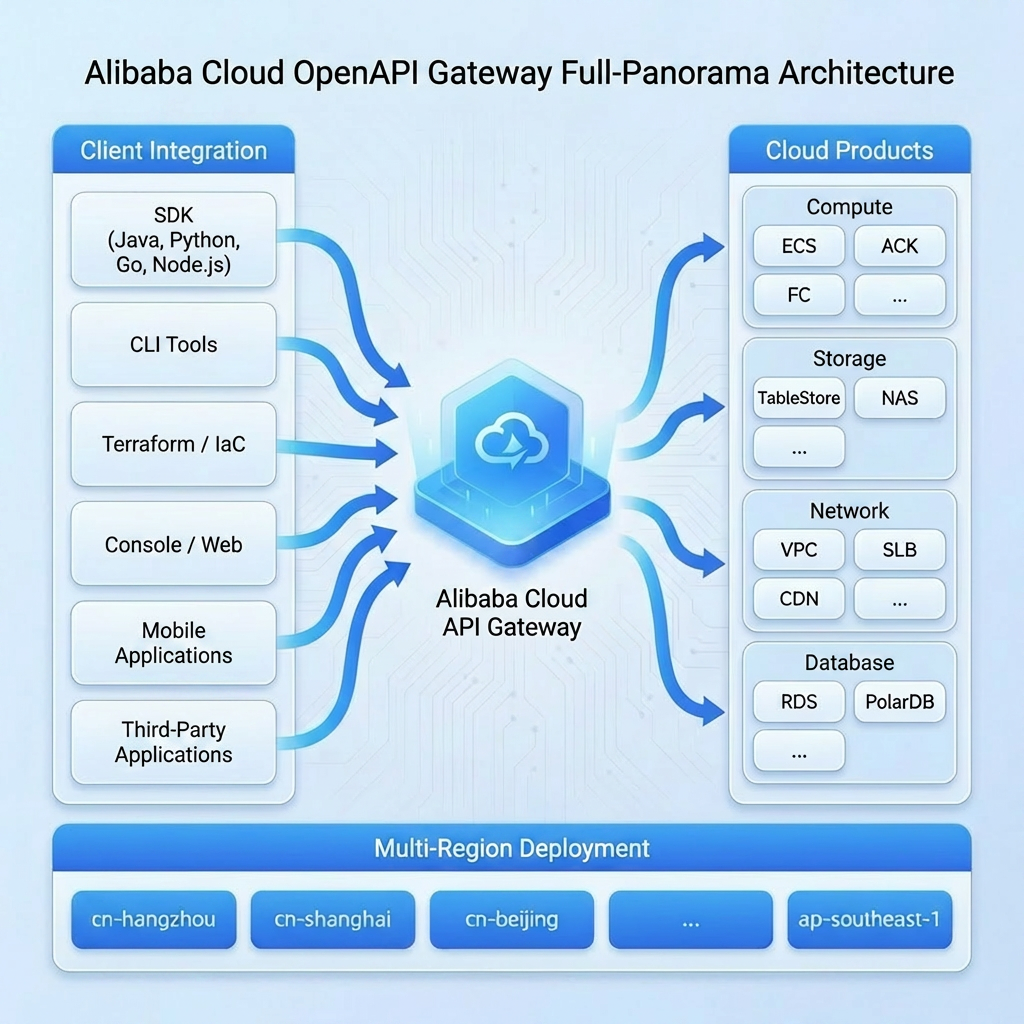
Alibaba Cloud Open Platform is the standard entry point for developers to manage cloud resources. The Open Platform hosts the external APIs of almost all cloud products, and allows for automated O&M and cloud resource management. As enterprise dependency on automation deepens, the stability of the Open Platform becomes crucial.
The stakeholders of the monitoring system include:
● Open Platform's O&M team: Responsible for the overall availability of the API gateway, requiring centralized monitoring and alerting capabilities.
● Cloud product teams (such as ECS, RDS, and SLB): Need to view the API call metrics and dashboards of their own products, and configure fine-grained alerting.
● SRE teams: Need to quickly locate faults and perform root cause analysis.
Fluctuations in any API may impact the production business of customers. Therefore, a comprehensive metric monitoring system must be established, accompanied by timely alerting capabilities to ensure high availability.
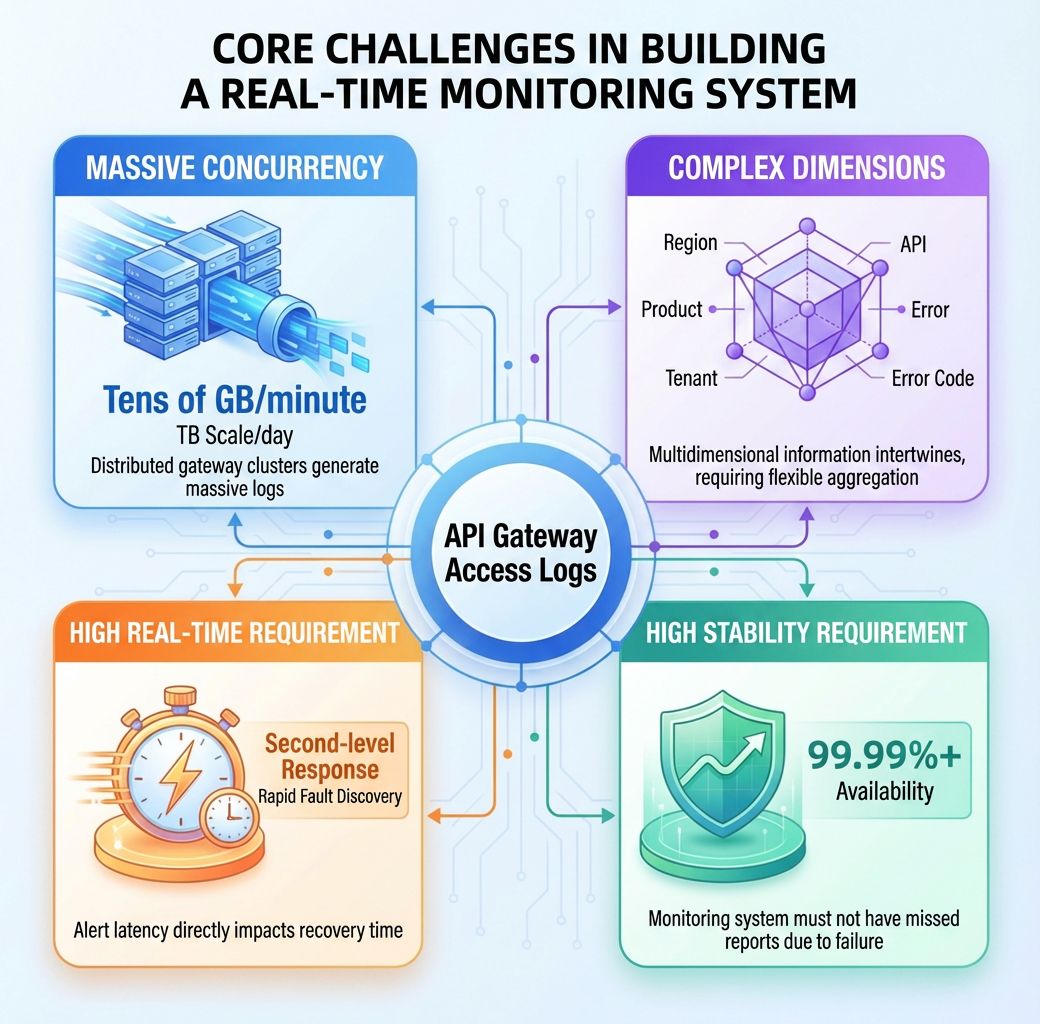
The primary data source for the monitoring system is the access logs of the API gateway. These logs are generated by gateway nodes distributed across various regions. The system faces the following challenges:
| Challenge | Description | Requirement |
|---|---|---|
| Massive concurrency | The gateway cluster is deployed in a distributed manner, generating tens of GB of logs per minute, and the average daily data volume reaches the TB level. | A real-time processing system |
| Multiple dimensions | It contains multi-dimensional information, such as regions, products, business domains, tenants, APIs, and error codes. | Flexible multi-dimensional aggregation capabilities |
| High data freshness | Fault detection requires second-level responses, and alerting delays directly affect the Mean Time To Repair (MTTR). | A stream processing architecture |
| High stability | The monitoring system must be 99.99%+ available, and false negatives cannot be caused by its own faults. | Highly reliable data pipelines and fault tolerance mechanisms |
To address those challenges, we adopt the cloud-native combination of Realtime Compute for ApacheFlink and SLS to build a real-time monitoring system.
The core components of this solution and the adoption rationale are as follows:
| Component | Adoption rationale |
|---|---|
| Realtime Compute for Apache Flink | An industry-leading stream processing engine that supports exactly-once semantics, window aggregation, and rich state management. |
| SLS | A cloud-native log platform from Alibaba Cloud. It natively supports massive log collection, storage, and consumption, and provides easy access to Logtail. |
| Realtime Compute for Apache Flink connector for SLS | Jointly built by the product teams of SLS and Realtime Compute for Apache Flink, the connector supports consumer groups, and natively implements checkpoint alignment. |
| MetricStore | SLS-native time series storage. Perfectly compatible with the Prometheus protocol and can directly connect to Grafana. |
The advantages of this solution are:
● Fully managed: SLS and Realtime Compute for Apache Flink are both fully managed services, eliminating the need to manage infrastructure.
● Scalability: Consumption throughput and compute resources can be scaled on demand.
● End-to-end guarantee: End-to-end observability, from collection to alerting.
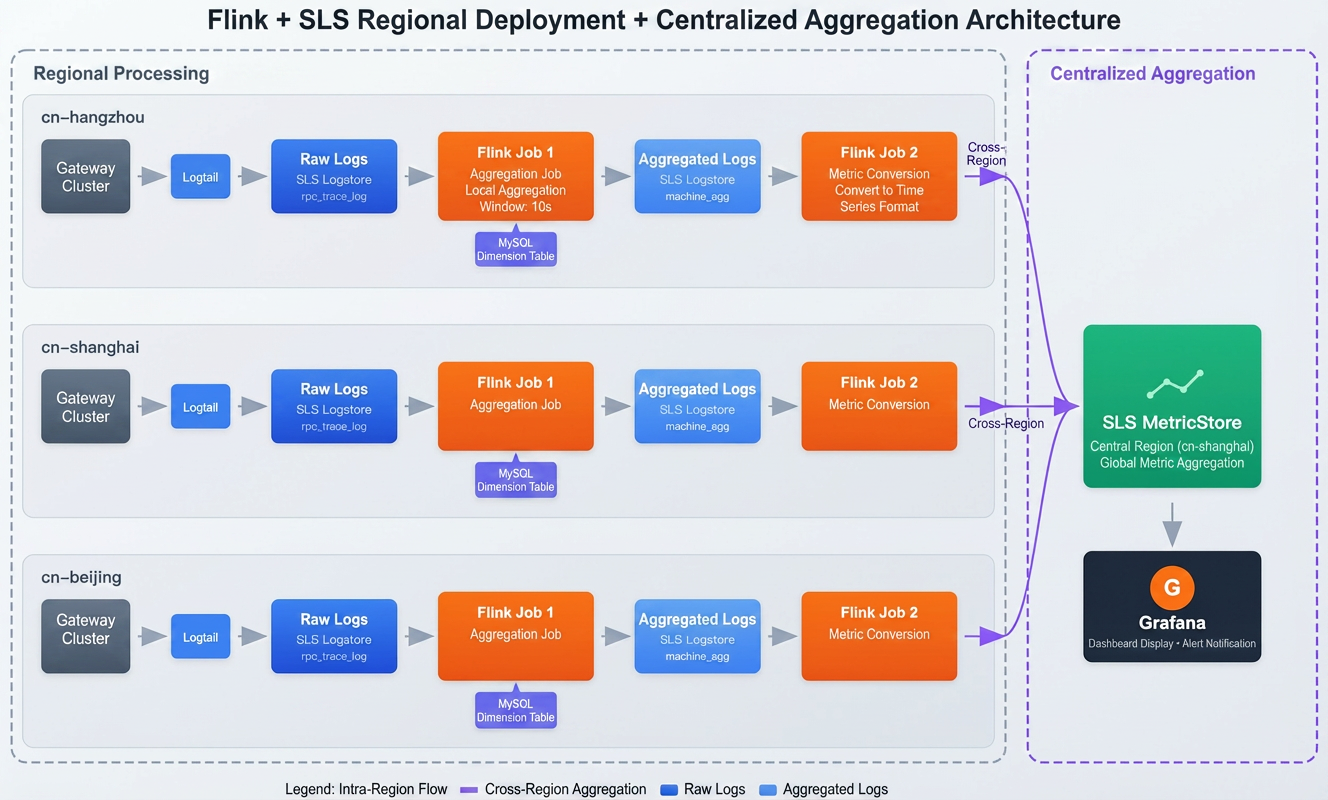
The entire data processing pipeline adopts a regional deployment and centralized aggregation design. Log collection and aggregation are completed within each region to reduce latency. Processed metric data is aggregated cross-region to a single MetricStore for centralized monitoring.
An independent data processing pipeline is deployed in each region to reduce latency:
1. Data collection: Logtail collects the gateway node logs in real time. Logtail is a high-performance, proprietary log collector from Alibaba Cloud. It has the capabilities of millisecond-level latency and a throughput of millions of EPS, ensuring the reliable transmission of massive logs.
2. Log storage: The SLS Logstore stores the raw API access logs in the region. It supports real-time query and analysis of request details, and serves as the data source for Flink stream processing.
3. Regional aggregation: Flink Job 1 is independently deployed in each region. It's joined with MySQL dimension tables (storing metadata, such as the cluster information of gateway nodes and API business domains like ECS) to aggregate business metrics. This can significantly reduce the size of data for cross-region transmission.
Local aggregation results are sent to a single MetricStore:
4. Cross-region aggregation: Flink Job 2 (metric transform) is independently deployed in each region, adding timestamp info to the aggregation results, and aggregating the results to the centralizedSLS MetricStore. This allows the O&M team to view the metrics of all regions centrally.
5. Visualization and alerting: Connect Grafana to the centralized SLS MetricStore, and query multi-dimensional metrics using standard Prometheus Query Language (PromQL), and alert on abnormal metrics.
The layered design effectively balances data freshness and resource efficiency:
| Layer | Service deployment | Tasks | Design rationale |
|---|---|---|---|
| Layer 1: Intra-region processing | Deploy Logstore and Flink in each region. | Live log collection, raw log storage, lookup joins, regional metrics aggregation | Data size reduction: Compressing TBs of raw logs to GBs at the source (each region) through high-dimension aggregation, significantly cutting cross-region transmission costs. |
| Layer 2: Centralized aggregation | Deploy Flink in each region, with a centralized MetricStore. | Metrics transformation, cross-region aggregation to the MetricStore sink. | Centralized management: Centralized monitoring and alert management for all regions. |
Why not one-layer aggregation?
- Avoid data skew: The API traffic distribution is extremely uneven, and the QPS of certain products (such as ECS) is thousands of times that of other products. Grouping data by product will cause data skew and state bloat in specific Flink tasks.
- Improve resource efficiency: Regional aggregation reduces data sent downstream by more than 90%, which significantly lowers compute and storage overhead.
The target metric system is composed of metrics and labels, covering the following four dimensions:
| Dimension | Prefix | Metric name | Label | When to use |
|---|---|---|---|---|
| Product | namespace_product_gw |
http_req (QPS), rt_mean, success_rate
|
product, region_id, biz_region_id
|
Each cloud service team monitors the overall health of its own product. |
| API | namespace_api_gw |
http_req, http_5xx, slow_http_req, http503_rate
|
product, api, version, priority
|
Locate specific API issues and perform analysis on slow invocations. |
| Error code | namespace_error_code_gw |
http_code, error_code
|
product, api, error_code
|
Error distribution analysis, and quickly locate the cause of the fault. |
| Tenant | namespace_tenant_gw |
api_req_limiting_rate (rate limiting ratio) |
uid, gc_level (GC5/6/7) |
Rate throttling monitoring for key customers and capacity planning. |
Metric naming pattern:
Prefix_MetricName. For example, the QPS metric of ECS isnamespace_product_gw_http_req.
Consumes raw logs, joins with MySQL sources, and performs two-stage aggregation: fine-grained multi-dimensional aggregation (by product, API, tenant, etc), followed by global metric aggregation.
Logtail collects raw logs from gateway nodes. Sample log:
{
  "AK": "STS.NZD***Lgwc",
  "Api": "DescribeCustomResourceDetail",
  "CallerUid": "109837***3503",
  "ClientIp": "192.168.xx.xx",
  "Domain": "acc-vpc.cn-huhehaote.aliyuncs.com",
  "ErrorCode": "ResourceNotFound",
  "Ext5": "{\"logRegionId\":\"cn-huhehaote\",\"appGroup\":\"pop-region-cn-huhehaote\",\"callerInfo\":{...},\"headers\":{...}}",
  "HttpCode": "404",
  "LocalIp": "11.197.xxx.xxx",
  "Product": "acc",
  "RegionId": "cn-huhehaote",
  "RequestContent": "RegionId=cn-huhehaote;Action=DescribeCustomResourceDetail;Version=2024-04-02;...",
  "TotalUsedTime": "14",
  "Version": "2024-04-02",
  "__time__": "1768484243"
} Note:
Ext5contains a nested JSON structure (such as caller information and request headers), andRequestContentis request parameters in key-value format. These complex structures need to be parsed.
Based on the log structure, define a Flink source table:
CREATE TABLE openapi_log_source (
  `__time__` BIGINT,
  LocalIp STRING,           -- Gateway node IP
  Product STRING,           -- Product code
  Api STRING,               -- API
  Version STRING,           -- API version
  Domain STRING,            -- Access domain
  AK STRING,                -- Access Key
  CallerUid STRING,         -- Caller UID
  HttpCode STRING,          -- HTTP code
  ErrorCode STRING,         -- Error code
  TotalUsedTime BIGINT,     -- Request time in ms
  ClientIp STRING,          -- Client IP
  RegionId STRING,          -- Region ID
  Ext5 STRING,              -- Extended field (nested JSON)
  RequestContent STRING,    -- Request parameters (k/v format)
  ts AS TO_TIMESTAMP_LTZ(`__time__` * 1000, 3),
  WATERMARK FOR ts AS ts - INTERVAL '5' SECOND
) WITH (
  'connector' = 'sls',
  'project' = '*****',
  'logstore' = 'pop_rpc_trace_log',
  'endpoint' = 'cn-shanghai-intranet.log.aliyuncs.com'
);
Watermark strategy: A
ts - INTERVAL '5' SECONDwatermark allows for up to 5 seconds of out-of-order data. Adjust this value based on your business needs. In production, with Logtail collecting gateway logs, the end-to-end latency is typically 2 to 3 seconds, making a 5-second delay sufficient for most cases. For cross-region scenarios, consider relaxing this to 10 to 15 seconds.
To add labels (such as app_group and gc_level) to metrics, associate a MySQL lookup source:
-- Gateway cluster info (join on LocalIp)
CREATE TABLE gateway_cluster_dim (
  local_ip STRING,
  app_group STRING,          -- Cluster name
  region_id STRING,          -- Region ID
  PRIMARY KEY (local_ip) NOT ENFORCED
) WITH ('connector' = 'jdbc', ...);

-- Tenant info (join on Uid)
CREATE TABLE user_level_dim (
  uid STRING,
  gc_level STRING,           -- Customer level (GC5/GC6/GC7)
  PRIMARY KEY (uid) NOT ENFORCED
) WITH (
  'connector' = 'jdbc',
  'url' = 'jdbc:mysql://xxx:3306/dim_db',
  'table-name' = 'user_level',
  'lookup.cache.max-rows' = '50000',       -- Max num of rows to cache
  'lookup.cache.ttl' = '10min',            -- Cache TTL
  'lookup.max-retries' = '3'               -- Max retries
);
Cache policy: In production,
gateway_cluster_dimadopts the ALL policy: loads data upon startup and refreshes regularly.user_level_dimuses the LRU policy: caches 50,000 hot spot tenant data records and sets the TTL to 10 minutes to balance the hit rate and data freshness.
The processing results are written to the SLS Logstore machine_agg_log as intermediate storage.
-- Define a regional log aggregation sink
CREATE TABLE machine_agg_log_sink (
  window_start TIMESTAMP(3),
  product STRING,
  api STRING,
  version STRING,
  caller_uid STRING,
  region_id STRING,
  app_group STRING,
  gc_level STRING,
  http_code STRING,
  error_code STRING,
  qps BIGINT,
  rt_mean DOUBLE,
  slow1s_count BIGINT,
  http_2xx BIGINT,
  http_5xx BIGINT,
  http_503 BIGINT
) WITH (
  'connector' = 'sls',
  'project' = '****',
  'logstore' = 'machine_agg_log',  -- Logstore name
  'endpoint' = 'cn-shanghai-intranet.log.aliyuncs.com' -- Replace it with actual endpoint
);

-- Insert data
INSERT INTO machine_agg_log_sink
SELECT
  TUMBLE_START(l.ts, INTERVAL '10' SECOND),
  l.Product, l.Api, l.Version, l.CallerUid, g.region_id, g.app_group, u.gc_level, l.HttpCode, l.ErrorCode,
  COUNT(*) as qps,
  AVG(CAST(l.TotalUsedTime AS DOUBLE)),
  SUM(CASE WHEN l.TotalUsedTime > 1000 THEN 1 ELSE 0 END),
  SUM(CASE WHEN l.HttpCode >= '200' AND l.HttpCode < '300' THEN 1 ELSE 0 END),
  SUM(CASE WHEN l.HttpCode >= '500' THEN 1 ELSE 0 END),
  SUM(CASE WHEN l.HttpCode = '503' THEN 1 ELSE 0 END)
FROM openapi_log_source l
LEFT JOIN gateway_cluster_dim FOR SYSTEM_TIME AS OF l.ts AS g ON l.LocalIp = g.local_ip
LEFT JOIN user_level_dim FOR SYSTEM_TIME AS OF l.ts AS u ON l.CallerUid = u.uid
GROUP BY
  TUMBLE(l.ts, INTERVAL '10' SECOND),
  l.Product, l.Api, l.Version, l.CallerUid, g.region_id, g.app_group, u.gc_level, l.HttpCode, l.ErrorCode;
Job 2 is deployed in each region to consume the log machine_agg_log, transform data into a time series format, and write the data to a centralized MetricStore in China (Shanghai).
CREATE TABLE machine_agg_log_source (
  window_start TIMESTAMP(3),
  product STRING,
  region_id STRING,
  -- ... Other field definitions are identical to machine_agg_log_sink
  WATERMARK FOR window_start AS window_start - INTERVAL '5' SECOND
) WITH (
  'connector' = 'sls',
  'project' = '****',
  'logstore' = 'machine_agg_log',  -- Consume the logstore in the region
  'endpoint' = 'cn-shanghai-intranet.log.aliyuncs.com'
); CREATE TABLE metricstore_sink (
`__time_nano__` BIGINT,
`__name__` STRING,
`__labels__` STRING,
`__value__` DOUBLE
) WITH (
'connector' = 'sls',
'project' = '****', -- The centralized SLS project
'logstore' = 'openapi_metrics', -- The centralized logstore
'endpoint' = 'cn-shanghai-intranet.log.aliyuncs.com' -- The region endpoint
); Job 2 performs further aggregation (such as by product), adds the timestamp info, and writes to the centralized project.
Example: Calculate QPS by product and aggregate it
INSERT INTO metricstore_sink
SELECT
  UNIX_TIMESTAMP(CAST(TUMBLE_START(window_start, INTERVAL '1' MINUTE) AS STRING)) * 1000000000,
  'namespace_product_gw_http_req',
  CONCAT('product=', product, '|region_id=', region_id), -- Retain region info
  CAST(SUM(qps) AS DOUBLE)
FROM machine_agg_log_source
GROUP BY TUMBLE(window_start, INTERVAL '1' MINUTE), product, region_id;
Solution benefits:
Bandwidth savings: Job 1 aggregates massive logs into smaller data (reduced by 99%). Job 2 only transmits these lightweight metrics across regions, which greatly reduces transfer costs.
Isolation: Data processing in each region is independent. A failure in a single region does not affect other regions.
To ensure job stability and data accuracy, we performed special optimization on the checkpoint and state backend in the production environment.
Two checkpointing strategies are provided: one for data consistency, the other for service availability:
Strategy A: Prioritizing data consistency (recommended for general scenarios)
This strategy is applicable to most monitoring scenarios that prioritize data accuracy.
SET 'execution.checkpointing.interval' = '60s';           -- Checkpoint every one minute
SET 'execution.checkpointing.mode' = 'EXACTLY_ONCE';      -- Exactly-once semantics
SET 'execution.checkpointing.timeout' = '10min';
Strategy B: Prioritizing high availability (this example)
Because this example involves highly concurrent data processing and is sensitive to availability, we adopt strategy B to reduce performance jitter from frequent checkpointing, without sacrificing consistency:
SET 'execution.checkpointing.interval' = '180s';          -- Checkpoint at a three-minute interval
SET 'execution.checkpointing.mode' = 'AT_LEAST_ONCE';     -- Use at-least-once semantics
SET 'execution.checkpointing.timeout' = '15min';          -- Relax checkpointing timeout
SET 'execution.checkpointing.max-concurrent-checkpoints' = '1';
SET 'execution.checkpointing.tolerable-failed-checkpoints' = '10'; -- Tolerate consecutive checkpoint failures to avoid job restart
Strategy comparison:
| Strategy | Consistency | Stability/Overhead | When to use |
|---|---|---|---|
| Strategy A | Exactly-once | Medium | Require highly consistent data, such as billing and auditing. |
| Strategy B | At-least-once | High | Ultra-large-scale monitoring, real-time dashboards, and trend analysis. |
Realtime Compute for Apache Flink provides the enterprise-level GeminiStateBackend. Compared with RocksDB used in Apache Flink, GeminiStateBackend is optimized for large-state jobs under the storage-compute-separation architecture. This example enables GeminiStateBackend and key-value separation to deal with large state and multiple aggregation keys:
SET 'table.exec.state.backend' = 'gemini';                -- Enable GeminiStateBackend
SET 'state.backend.gemini.kv.separate.mode' = 'GLOBAL_ENABLE'; -- Enable k/v separation
GeminiStateBackend vs. RocksDB:
| Attribute | GeminiStateBackend | RocksDB | Benefits of GeminiStateBackend |
|---|---|---|---|
| Key-value separation | Supported (automatic and manual). | Not supported (Hybrid storage) | 50%+ higher throughput: Stores large values separately, significantly reducing write amplification caused by compaction, and improving the performance of complex aggregation and join. |
| Adaptive parameter tuning | Adaptive tuning | Manual tuning | Stability enhancement: Automatically adjusts memory and I/O parameters based on traffic and access mode to avoid OOM errors or performance fluctuation caused by improper configuration. |
| State migration | Lazy migration | Full migration | Start within seconds: When a failover or scaling occurs, processing can start without waiting for the full data download, significantly shortening business interruption time. |
Production recommendations: For scenarios such as log aggregation with a large state size and extremely high throughput requirements, use GeminiStateBackend and key-value separation. Actual tests show after key-value separation is enabled, the CPU utilization of the job during traffic peaks decreases by 20%, and the checkpoint duration is more stable.
A multi-dimensional API monitoring Grafana dashboard is built for deep drill-down analysis, by product or specific error code.
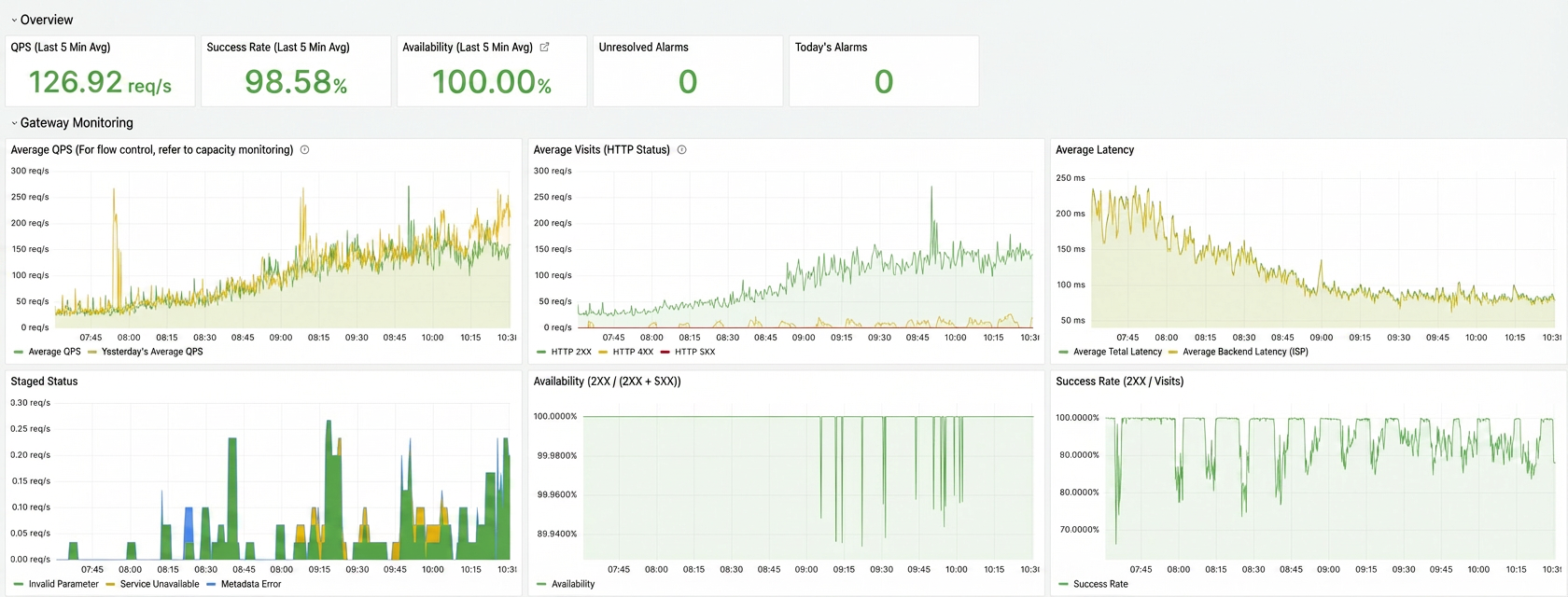
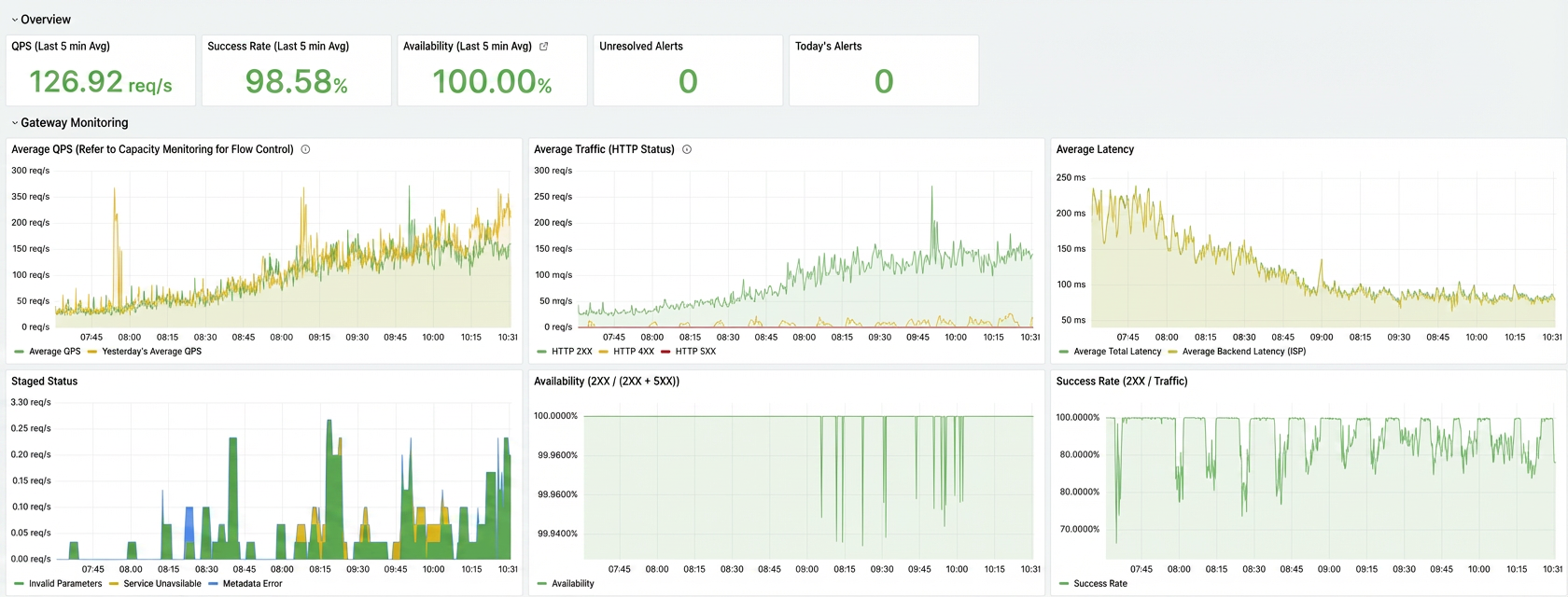
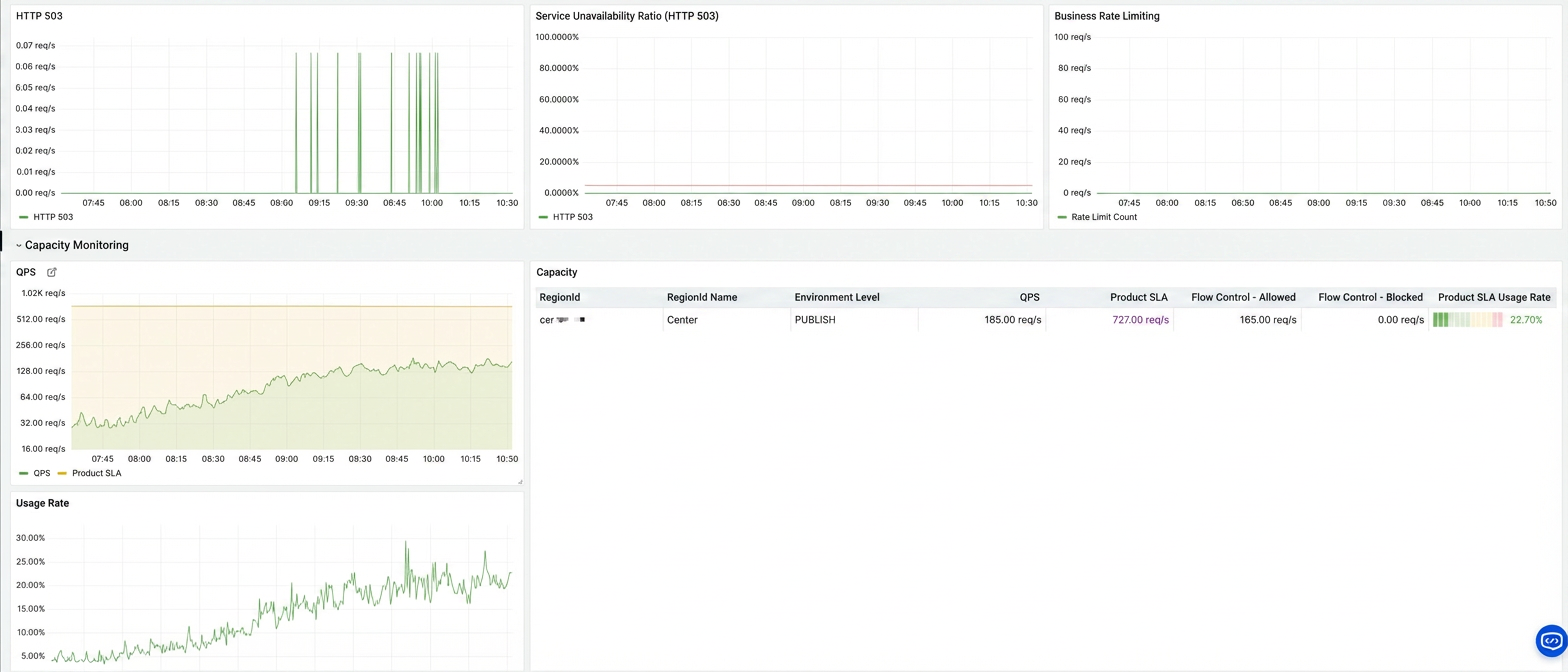
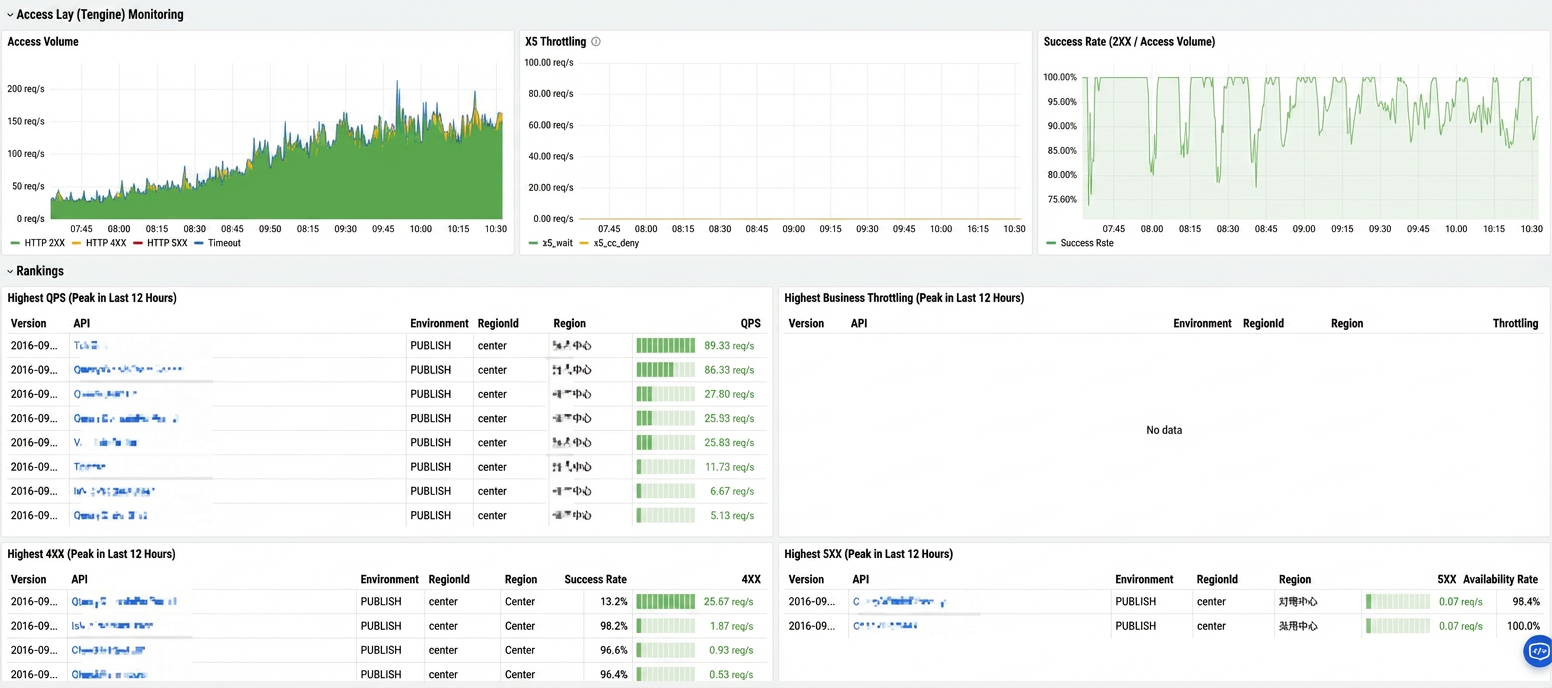
After SLS MetricStore is added as a data source in Grafana, each cloud product team can use Prometheus Query Language (PromQL) syntax to query metrics and configure their own alert rules:
Sample query:
# QPS trend
sum(namespace_product_gw_http_req) by (product)

# Error rate (current 1 min vs. 1hr ago)
(
  sum(rate(namespace_product_gw_http_5xx[1m])) / sum(rate(namespace_product_gw_http_req[1m]))
) / (
  sum(rate(namespace_product_gw_http_5xx[1m] offset 1h)) / sum(rate(namespace_product_gw_http_req[1m] offset 1h))
) > 2

# Avg latency
avg(namespace_product_gw_rt_mean) by (product)
Example alert rule:
- alert: HighErrorRate
  expr: sum(namespace_product_gw_http_5xx) by (product) / sum(namespace_product_gw_http_req) by (product) > 0.01
  for: 2m
  labels:
    severity: warning
  annotations:
    summary: "{
   { $labels.product }} error rate is too high"
    description: "Current error rate: {
   {
    $value | printf \"%.2f\" }}%"
Each cloud service team can configure their monitoring dashboard and alert rules in Grafana for autonomous O&M.
This solution has been stably running in production. Core metrics:
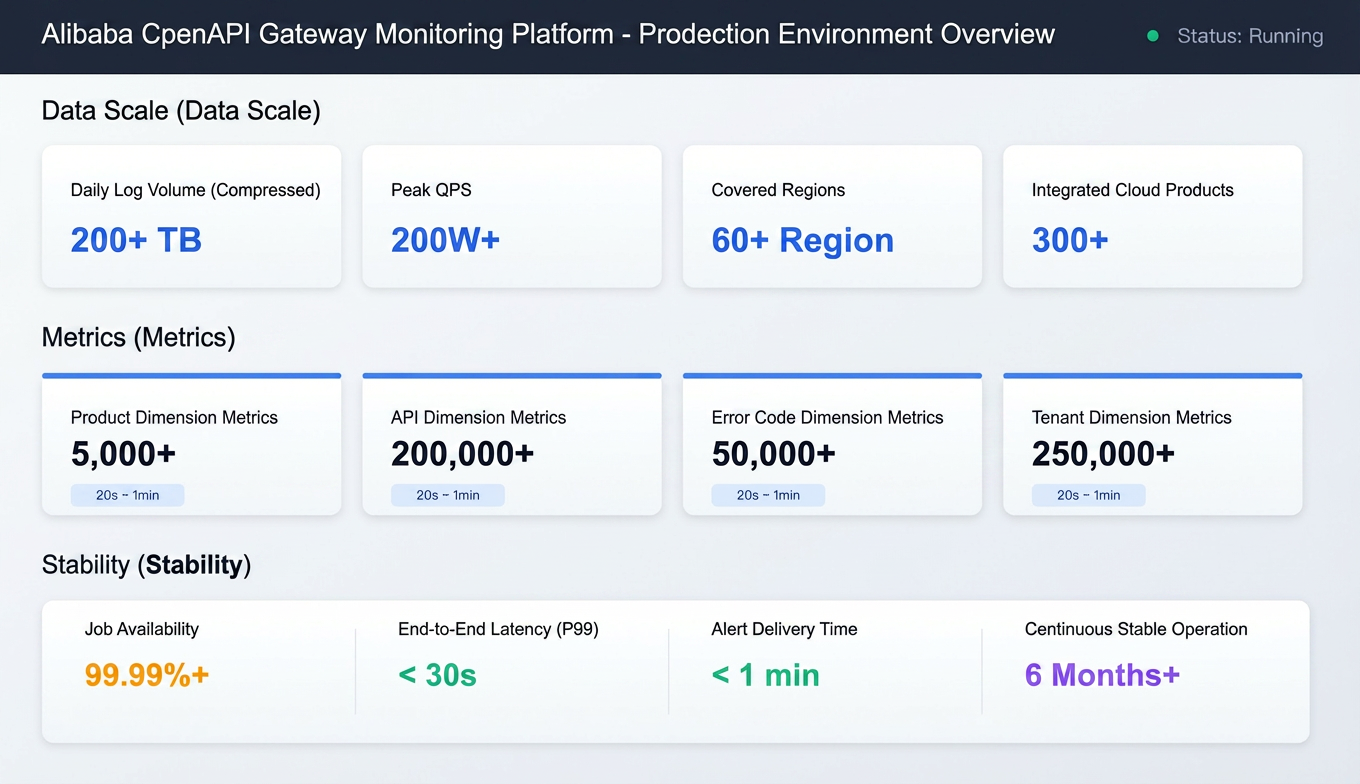
Thanks to the distributed computing capability of Flink and the high throughput storage of SLS, this solution has successfully supported the real-time monitoring of all API calls in Alibaba Cloud Open Platform. It covers more than 60 global regions and more than 300 cloud products, processes more than 200 TB of compressed logs (about 2 PB of raw logs, with a single log being about 4 to 5 KB) per day, and generates over 500,000 time series metrics.
| Item | Description |
|---|---|
| Average daily log size | 200+ TB (after compression) |
| Peak QPS | 2,000,000+/second |
| Regions | 60+ regions globally |
| Cloud products | 300+ |
| Metric category | Count | Update frequency |
|---|---|---|
| Product | 5,000+ | 20s to 1min |
| API | 200,000+ | 20s to 1min |
| Error code | 50,000+ | 20s to 1min |
| Tenant | 250,000+ | 20s to 1min |
| Metric | Performance |
|---|---|
| Flink job availability | 99.99%+ |
| End-to-end latency | P99 < 30s (from log generation to metric availability) |
| Alerting timeliness | < 1min |
| Continuous stable running | 6+ months without manual intervention for restart |
● Rapid fault discovery: The fault discovery time is shortened from minutes to seconds.
● Improved O&M efficiency: More than 300 cloud service teams have achieved self-service monitoring configuration.
During the implementation of the solution, we found the raw log contains a large number of redundant fields and nested structures, whereas metric calculation requires several core fields. To address this, we introduced predicate pushdown at the source for field pruning before data enters Flink, which effectively reduced network transmission and accelerated Flink processing.
Predicate pushdown, a classic database and big data optimization, executes filter conditions at the source. This reduces data volume and compute overhead. Flink's pushdown capability depends on its source connector implementation:
| Connector | Predicate pushdown | Implementation method |
|---|---|---|
| Kafka | ❌ Not supported | Kafka does not support server-side filtering |
| JDBC | ✅ Supported | Push down the WHERE clause to the database system |
| Hive | ✅ Supported | Partition pruning + column pruning |
| Iceberg/Hudi | ✅ Supported | Use Min/Max statistics to skip files |
| SLS | ✅ Supported | Execute SLS Processing Language (SPL) statements on the server-side |
In its early versions, the Realtime Compute for Apache Flink connector for SLS pulled all data from an SLS Logstore. But actually, many fields are not needed. SPL enables source-side predicate pushdown by doing filtering and conversion at SLS and sends processed results to Flink.
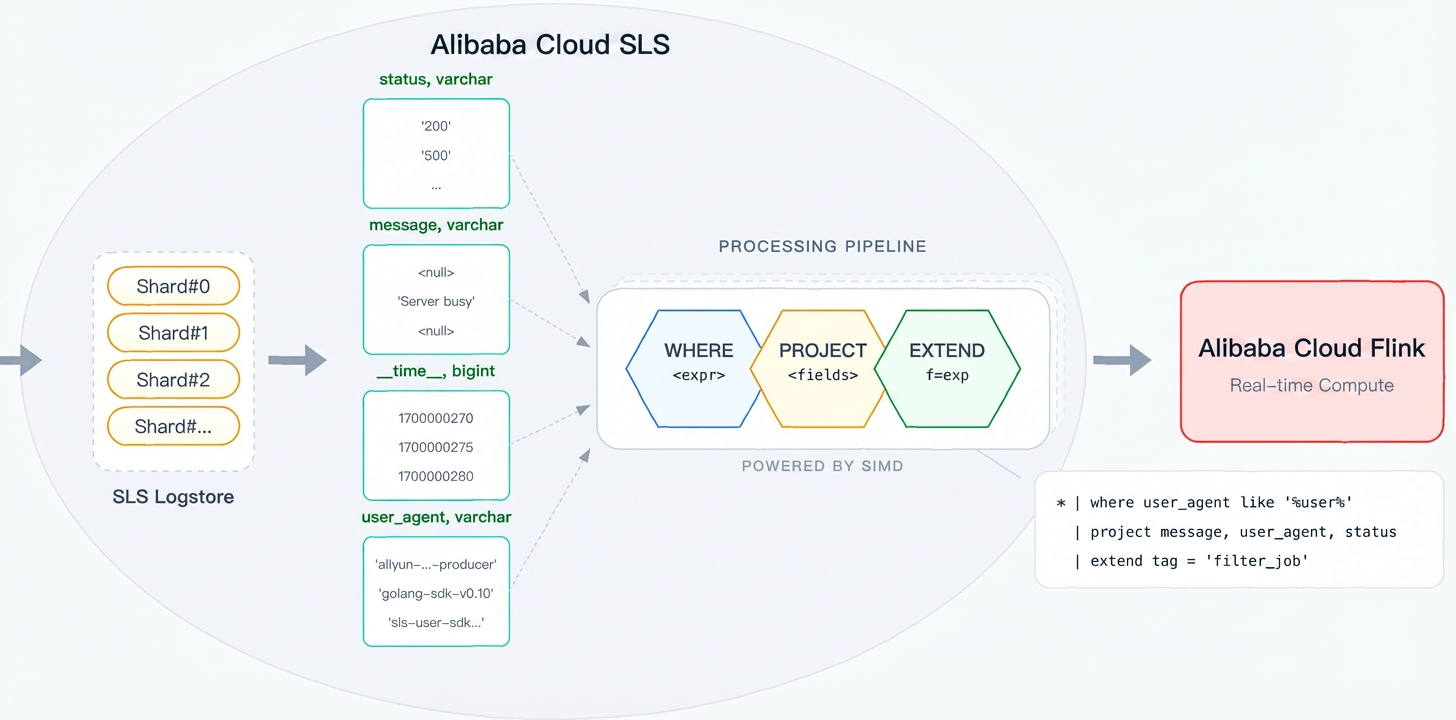
Benefits:
● SIMD vectorization: SPL's vectorized execution engine uses CPU SIMD instructions (e.g., AVX2/AVX-512) for batch data processing, achieving several times the performance of row-by-row processing.
● Local processing: Data processing is completed on the SLS data node. You do not need to transfer raw data across networks, which avoids network I/O from becoming a bottleneck.
● Columnar storage acceleration: SLS's columnar storage, in combination with column pruning on project, reads only necessary column data. This significantly reduces disk I/O.
● Zero-copy transmission: The processed data directly enters consumption, which reduces the memory copy overhead.
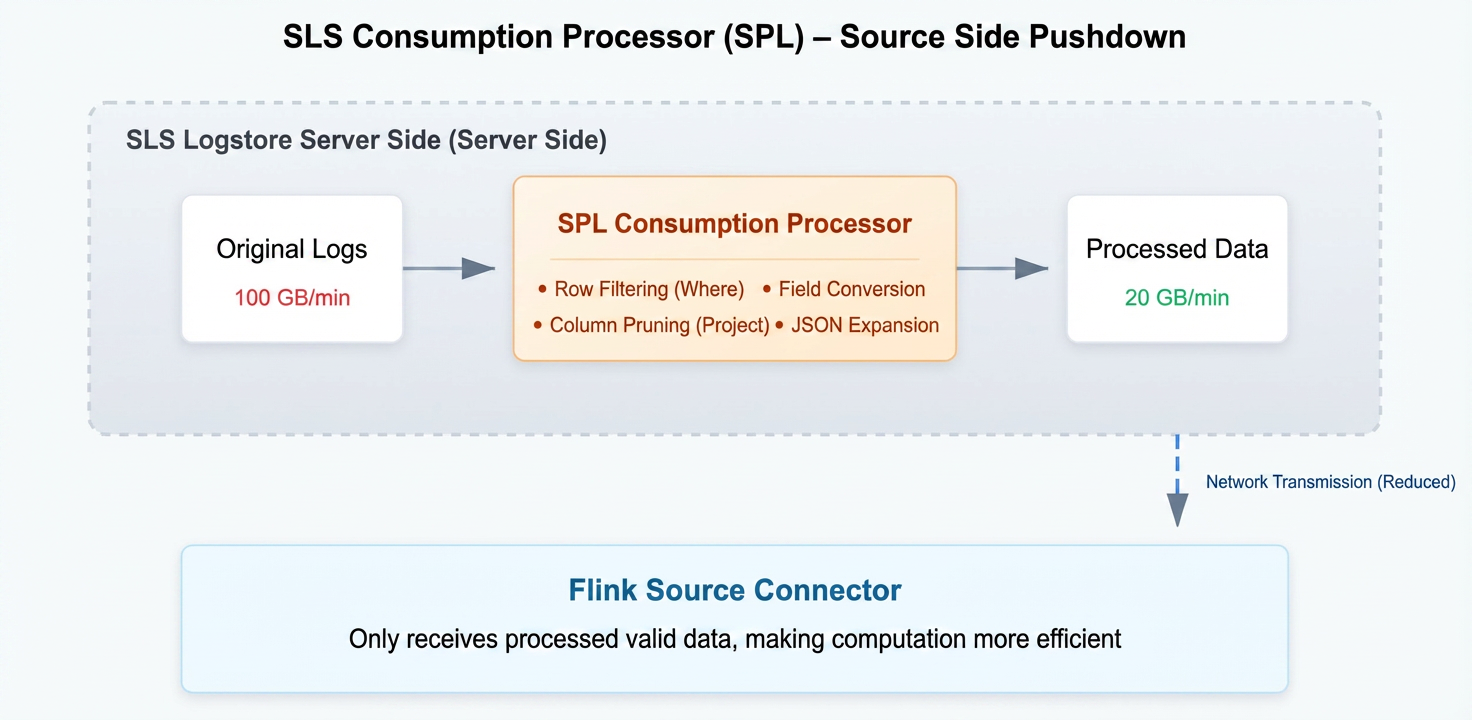
Billing tips:
Non-SPL consumption: billing is based on the transmitted (compressed) data size.
SPL consumption: billing is based on the raw (uncompressed) data size.
For detailed pricing and differences, refer to SLS pricing documentation.
This section introduces filtering data with SPL at the source. Consider the traditional approach:
-- Traditional approach: Pull all data and filter with Flink
SELECT * FROM openapi_log_source
WHERE Domain != 'popwarmup.aliyuncs.com'
  AND JSON_VALUE(Ext5, '$.logRegionId') NOT IN ('cn-shanghai', 'cn-beijing')
After SPL is used, filtering and transform are completed on SLS:
-- 1. Row filtering: Exclude invalid data
*
| where Domain != 'popwarmup.aliyuncs.com'

-- 2. Expand nested JSON
| parse-json -prefix='ext5_' Ext5
| where ext5_logRegionId not in ('cn-shanghai', 'cn-beijing', 'cn-hangzhou')
| parse-json -prefix='callerInfo_' ext5_callerInfo
| parse-json -prefix='headers_' ext5_headers

-- 3. Extract key-value fields
| parse-regexp RequestContent, '[;]RegionId=([^;]*)' as request_regionId

-- 4. Column pruning: Retain necessary fields to reduce output data size
| project LocalIp, Product, Version, Api, Domain, ErrorCode, HttpCode,
         TotalUsedTime, AK, RegionId, ClientIp,
         callerInfo_callerType, callerInfo_callerUid, callerInfo_ownerId,
ext5_regionId, ext5_appGroup, ext5_stage, request_regionIdIn Flink SQL, reference the pre-configured SPL using the processor parameter:
CREATE TABLE openapi_log_source (
  `__time__` BIGINT,
  -- SPL processed fields (JSON object expanded, column pruned)
  LocalIp STRING,
  Product STRING,
  Version STRING,
  Api STRING,
  Domain STRING,
  ErrorCode STRING,
  HttpCode STRING,
  TotalUsedTime BIGINT,
  AK STRING,
  RegionId STRING,
  ClientIp STRING,
  callerInfo_callerType STRING,      -- Get from Ext5.callerInfo
  callerInfo_callerUid STRING,
  callerInfo_ownerId STRING,
  ext5_regionId STRING,              -- Get from Ext5
  ext5_appGroup STRING,
  ext5_stage STRING,
  request_regionId STRING,           -- Get from RequestContent
  ts AS TO_TIMESTAMP_LTZ(`__time__` * 1000, 3),
  WATERMARK FOR ts AS ts - INTERVAL '5' SECOND
) WITH (
  'connector' = 'sls',
  'project' = '****',
  'logstore' = 'pop_rpc_trace_log',
  'endpoint' = 'cn-shanghai-intranet.log.aliyuncs.com',
  'processor' = 'openapi-processor'  -- Use SPL for filter pushdown
);SPL delivers significant improvements in the following areas:
| Optimization | Before optimization | After optimization | Improvement |
|---|---|---|---|
| Data transmission | 100GB/min | 20GB/min | Transmitted data reduced by 80%, and cross-region synchronization overhead significantly reduced |
| Checkpoint size | 100% | 20% | Checkpoint size reduced by 80%, and failover recovery time significantly shortened |
| Job stability | Occasional OOM | Stable | State pressure and GC frequency reduced |
| Development efficiency | Filtering by Flink | Filtering by SLS | SPL syntax is concise, and you do not need to modify Flink job code |
With the cloud-native solution, we have successfully built a real-time monitoring system for Alibaba Cloud API gateway. Recap:
| Challenges | Solutions |
|---|---|
| High concurrency | SLS for high throughput storage + Flink for distributed processing |
| Complex dimensions | Layered aggregation design, which supports multidimensional analysis |
| Freshness | End-to-end latency in seconds, rapid fault discovery |
| Stability | Fully managed, highly available (enabled by checkpointing strategy) |
| Technical points | Common scenarios | Key configuration |
|---|---|---|
| Watermark and event-time processing | Window aggregation of out-of-order logs | WATERMARK FOR ts AS ts - INTERVAL 'X' SECOND |
| Lookup join | Join between stream and lookup tables | FOR SYSTEM_TIME AS OF |
| Layered aggregation design | Resolve data skew | Local aggregation → global aggregation |
| GeminiStateBackend | Large state and storage-compute separation | table.exec.state.backend = gemini |
| Predicate pushdown | Reduce data transmission and processing | SPL |
The technical solution in this article can be promoted to similar scenarios, such as microservice invocation chain monitoring, Alibaba Cloud CDN log analysis, and Internet of Things (IoT) data aggregation.
● Realtime Compute for Apache Flink's SLS connector
Skills Registry Public Beta Launches: Building a Private Skill Management Center for Enterprises
From Observable to Understandable: Building Agent-Native Code Knowledge Graphs with UModel

774 posts | 60 followers
FollowApache Flink Community China - January 11, 2022
Apache Flink Community China - June 28, 2021
Alibaba Cloud Native Community - April 2, 2024
Alibaba Cloud Native - April 26, 2024
Data Geek - May 11, 2024
Alibaba Clouder - April 25, 2021
774 posts | 60 followers
Follow API Gateway
API Gateway provides you with high-performance and high-availability API hosting services to deploy and release your APIs on Alibaba Cloud products.
Learn More Big Data Consulting for Data Technology Solution
Alibaba Cloud provides big data consulting services to help enterprises leverage advanced data technology.
Learn More Big Data Consulting Services for Retail Solution
Alibaba Cloud experts provide retailers with a lightweight and customized big data consulting service to help you assess your big data maturity and plan your big data journey.
Learn More Managed Service for Grafana
Managed Service for Grafana displays a large amount of data in real time to provide an overview of business and O&M monitoring.
Learn MoreMore Posts by Alibaba Cloud Native Community

