With multicloud architectures becoming increasingly popular today, enterprises often face the following scenario: Services on AWS generate a large amount of log data stored in S3, but this data needs to be centralized for analysis and processing in Simple Log Service (SLS) on Alibaba Cloud.
Typical scenarios include:
● AWS Service Log Analysis: CloudTrail audit logs, VPC Flow Logs, ALB access logs, and others need to be centrally analyzed.
● Backflow of Business Data from outside China: Logs generated by services outside China need to flow back to China for compliance audits and analysis.
● Unified Multicloud Operations: Enterprises adopt a multicloud strategy and need to perform log analysis and Alerting on a unified platform.
SLS provides powerful Real-time Analysis capabilities, flexible query syntax, and a comprehensive Alerting mechanism, making it an ideal choice for unified log management. However, how to efficiently and reliably import massive amounts of logs from S3 to SLS remains a challenging technical issue.
Many AWS services (such as CloudTrail and ALB) continuously write small files to S3, potentially generating hundreds or thousands of files per minute. How can you quickly discover these new files and import the files in a timely manner?
The core difficulty is that: The ListObjects API of S3 only supports traversing in lexicographic order and does not support filtering by time. This means that to find the latest files, you may need to traverse the entire folder tree.
For example, assume an S3 bucket already contains hundreds of millions of historical files, and more than 1,000 files are added every minute. If full traversal is used, it may take several minutes to complete one scan, which fails to meet timeliness requirements. However, if only incremental traversal is performed, data may be missed because of irregular file naming.
Service traffic is often volatile. E-commerce sales promotions, Marketing Campaigns, and System failures can all cause the Log Volume to surge instantly.
Real-world scenario: An E-commerce Customer generates 1 GB of logs per minute normally, but this figure soars to 10 GB or even higher during sales promotions. If the import capability cannot scale-out quickly, data backlogs will occur, affecting the Timeliness of Real-time Analysis and Alerting.
The greater challenge is that these traffic spikes are often unpredictable. The System needs to automatically detect traffic changes and complete scale-out within a few minutes, which places high demands on the scheduling system.
Log data in S3 varies widely:
● Compression Format: gzip, snappy, lz4, zstd, and others
● Data format: JSON, CSV, Parquet, plain text, and others
● Data Quality: The data may contain dirty data and require field extraction and transformation.
If you import data into SLS as is and then process the data, extra storage and Compute costs will be incurred. The ideal solution is to complete data cleansing and transformation during the import process.
In the scenario of migration from S3 to SLS, the biggest headache for O&M teams is "how to move data quickly and stably." Traditional solutions often face a dilemma: either fast but prone to missing data, or stable but slow as a snail.
The SLS team's solution is: Why choose? Our solution delivers both.
Through an innovative two-stage parallel architecture:
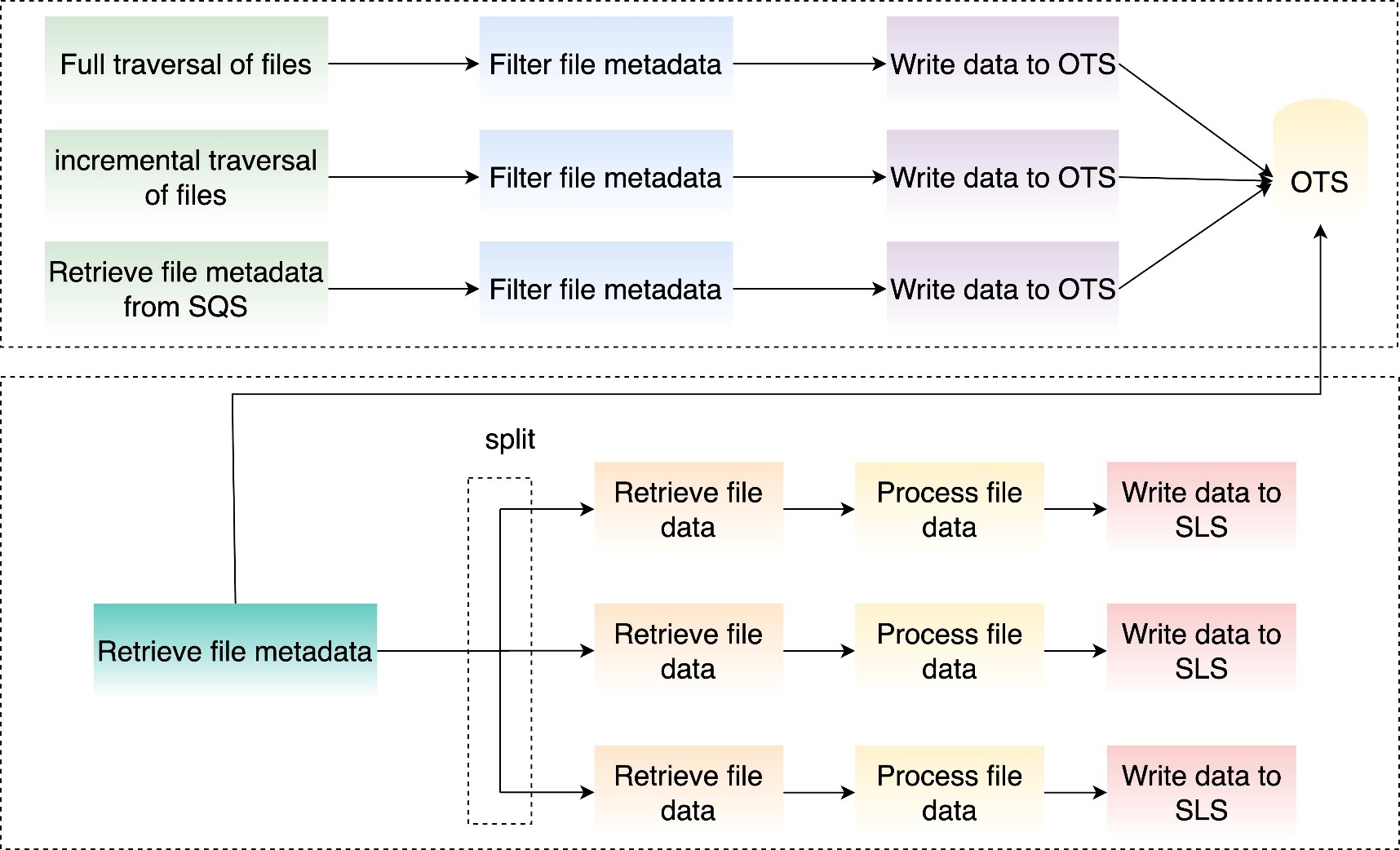
● Phase 1 (File Discovery): Multiple mechanisms are combined, using Real-time event capture + periodic full validation to ensure that "not a single file is missed."
● Phase 2 (Data Pull): Dedicated transmission channels run at full speed, unaffected by file scanning.
● Key innovation: The two phases run independently and in parallel, ensuring both speed and stability.
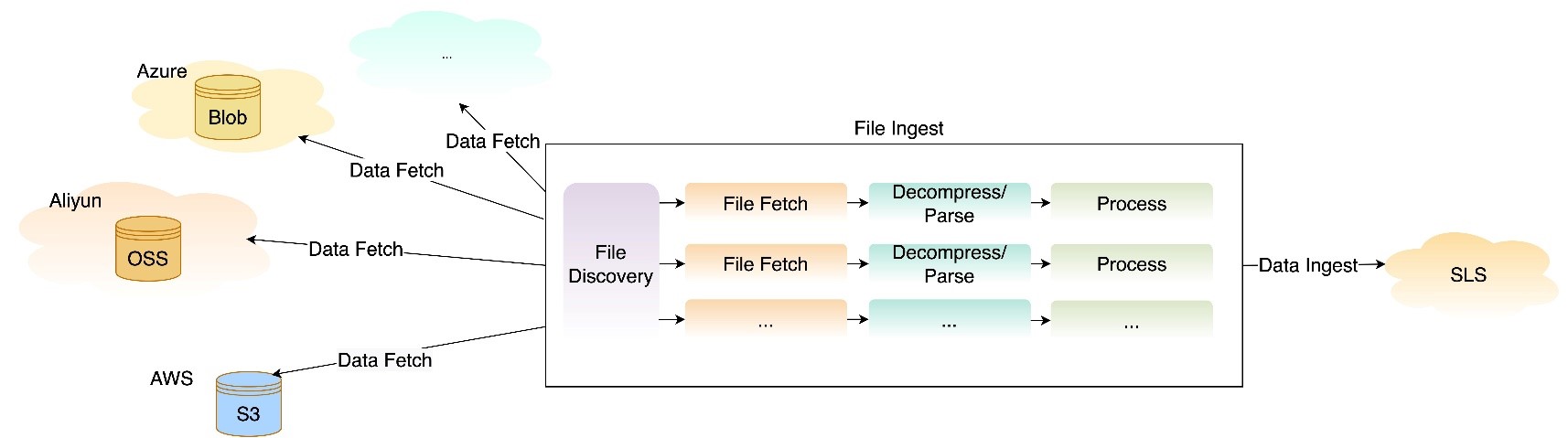
Addressing the file discovery difficulty, we provide two complementary traversal modes:
● Periodically (such as every minute) performs a complete scan of the specified folder.
● Ensures that no files are missed, which is suitable for scenarios with extremely high requirements for data integrity
● Intelligently records imported files to avoid duplicate processing
● Incremental discovery mechanism based on lexicographic order
● Continues to traverse from the last scanned position each time to quickly discover new files
● Suitable for standard scenarios where files are named in chronological order. You can achieve minute-level real-time import
Combination of two modes: Incremental traversal ensures real-time performance, while full traversal acts as a fallback to ensure integrity.
For scenarios with extremely high real-time requirements, we support using Simple Queue Service (SQS) message queues to drive the import flow:
This solution can achieve minute-level import latency. It is particularly suitable for:
● Scenarios where the file creation order is irregular
● Businesses with strict requirements for real-time performance
● Complex scenarios where multiple folders need to be monitored simultaneously
Comparison of solutions:
| Comparison dimension | Dual-mode traversal | SQS Event-driven |
|---|---|---|
| Real-time performance of new file discovery | Minute-level | Second-level |
| Configuration complexity | Simple | S3 events need to be configured |
| Reliability | High (full traversal as fallback) | Relies on SQS reliability |
| Scenarios | Standard log import | High real-time requirements |
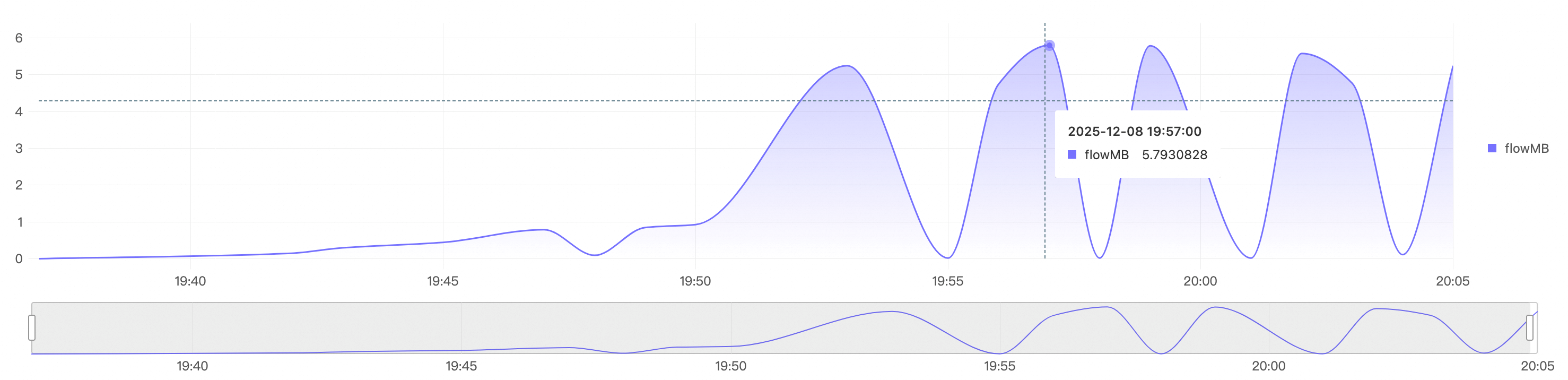
We have implemented three elasticity mechanisms to handle traffic bursts:
● Evaluates the Data Volume to be imported every 5 minutes
● Estimates the required concurrency based on object metadata (size and quantity)
● Automatically scales out or scales in to ensure that the import speed matches the data generation speed
● Ensures that the file volume or file data volume imported by different Jobs is as consistent as possible to avoid latency caused by long-tail issues
● Supports users in submitting tickets to set the import concurrency based on business patterns
● For example: If a user predicts peak traffic during an activity in advance, the user can submit a ticket to SLS to preset the Job concurrency
The following figure shows that in a big data import scenario, the system quickly scales out and in. It quickly scales out to a concurrency of 300 and imports file data at a rate of nearly 5.8 GB/s.
Seamless Support for multiple formats
| Capability Type | Support Scope |
|---|---|
| Compression Format | zip, gzip, snappy, lz4, zstd, no compression, and others |
| Data format | JSON, CSV, Text, multi-line text, CloudTrail, Json array, and others |
| Character encoding | UTF-8, GBK |
Processing before storage: Cost-saving and efficient
The traditional solution is "store first, then process," which incurs unnecessary storage costs. We support processing before Data Ingestion into SLS, including:
● Field extraction: Extracts key fields from unstructured logs
● Data filtering: Discards useless logs to reduce Storage Size
● Field transformation: Format standardization, UNIX timestamp transformation, and so on
● Data Masking: Masking of Sensitive Information

* | parse-csv -delim='\t' content as time,level,order_id,amount,currency,error_code,response_time,status_code,client_id,customer_email,id_card
| project-away content
| extend customer_email = regexp_replace(customer_email, '([\s\S]+)@([\s\S]+)', '****@\2')
| extend id_card = regexp_replace(id_card, '(\d{3,3})(\d+)(\d{3,3})', '\1*****\3')
| extend __time__ = cast(to_unixtime(cast(time as TIMESTAMP)) as bigint) - 28800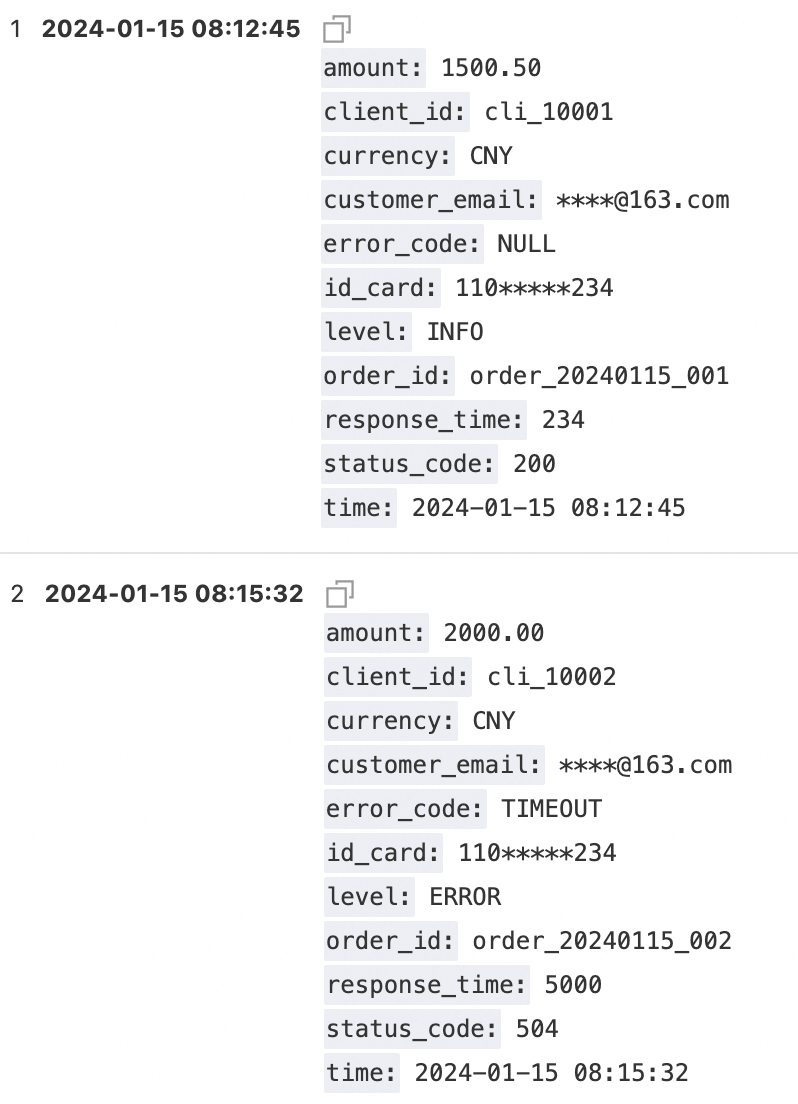
● File-level status tracking: The import status of each file is clearly traceable
● Automatic retry mechanism: Temporary failures are automatically retried without manual intervention
● Integrity validation: Supports import confirmation at the file level
● Alert monitoring: Real-time monitoring of Key Metrics such as import latency and failure rate
● On-demand elasticity: Automatically adjusts resources based on actual traffic to avoid latency growth
● Preprocessing: reduces invalid data storage and lowers storage costs.
● Incremental import: only imports added and Changed files to avoid duplicate imports.
● Visualization Configuration: No-code setup. You can complete the configuration through the console.
● Preset templates: provides out-of-the-box configuration templates for common logs such as CloudTrail and JsonArray.
● Comprehensive documentation: detailed configuration instructions and Best Practices guides.
Typical logs: CloudTrail, VPC Flow Logs, and S3 access logs, in scenarios where file names increment sequentially.
Recommended configuration:
● Configure the new file check cycle to one minute.
● Automatically enable incremental traversal to ensure real-time performance.
● Automatically enable full traversal to ensure Integrity.
● Configure the write processor to fetch key fields.
Effect: Achieve an end-to-end latency of 2 to 3 minutes and 100% data integrity.
Typical scenarios: Application real-time logs, where the file generation rate and file names have no rules, but rapid Alerting is required.
Recommended configuration:
● Configure S3 event Notifications to SQS.
● Use SQS-driven import.
Effect: Achieve an end-to-end latency of within 2 minutes to meet real-time Alerting requirements.
Data Import from S3 to SLS may seem like a simple data transport task, but it’s actually a systems engineering challenge that requires careful design. We solved the file discovery problem through dual-mode Intelligent traversal, automatically handled Traffic bursts through three types of Elasticity mechanisms, and reduced Customer costs through the write processor.
This isn’t just a data import tool; it’s a complete cross-cloud log integration solution. Whether it is standard service logs or complex application logs, we can provide efficient, reliable, and economical import capabilities.
Start now: Log on to the SLS console, select "Import Data > S3 - Data Import", complete the configuration in three steps, and start your cross-cloud log analysis journey.
Team Edition OpenClaw: HiClaw Open Source, Build a One-Person Company in 5 Minutes
Android Crash Monitoring: A Complete Troubleshooting Flow for Production Environment Crashes

774 posts | 60 followers
FollowAlibaba Cloud Native Community - August 11, 2025
Alibaba Cloud Native Community - April 28, 2026
Alibaba Cloud Native Community - April 3, 2026
Bryan, Zhang - June 17, 2026
Alibaba Cloud Community - October 9, 2022
Alibaba Cloud Native Community - August 8, 2025
774 posts | 60 followers
Follow Simple Log Service
An all-in-one service for log-type data
Learn More Data Transport
A secure solution to migrate TB-level or PB-level data to Alibaba Cloud.
Learn More Log Management for AIOps Solution
Log into an artificial intelligence for IT operations (AIOps) environment with an intelligent, all-in-one, and out-of-the-box log management solution
Learn More ECS(Elastic Compute Service)
Elastic and secure virtual cloud servers to cater all your cloud hosting needs.
Learn MoreMore Posts by Alibaba Cloud Native Community

