After an app is published, the situation that a developer fears most is that the application crashes. However, why does an app that worked fine during offline testing crash after being published? How is the crash log information collected?
First, let's look at how a few common oversights during code writing cause the application to crash.
● Array-index out of bounds: When the index is out of bounds when retrieving data, the app will crash.
● Multi-threaded issues: Performing UI updates in a subthread may cause a crash. When multiple threads perform data read operations, a crash may occur because the processing timing is inconsistent. For example, one thread empties data while another thread reads this data.
● No response for the main thread: If the main thread does not respond for longer than the time specified by the system, it will be killed by the watchdog.
● Wild pointer: When a pointer points to a deleted object and accesses a memory region, a wild pointer crash occurs.
To solve this problem, we can explore iOS exception monitoring.
The iOS exception system adopts a layered architecture. From the underlying hardware to the upper-layer application, exceptions are caught and processed at different layers. Understanding the layered structure of the exception system helps us better design and implement exception monitoring solutions. The iOS exception system is mainly divided into the following layers:
1. Hardware-layer exceptions
● CPU exceptions: Exceptions directly generated by hardware, such as illegal instructions and memory access faults.
● This is the lowest-level source of exceptions. All other exceptions ultimately originate from here.
2. System-layer exceptions
● Mach exceptions: The lowest-level exception mechanism of the macOS/iOS System, originating from the Mach microkernel architecture.
● Unix signals: Mach exceptions are transformed into Unix signals, such as SIGSEGV and SIGABRT.
● System-layer exceptions are the main catch points for application-layer exception monitoring.
3. Runtime-layer exceptions
● NSException: Objective-C runtime exceptions, such as array-index out of bounds and null pointers.
● C++ exceptions: Exceptions thrown by C++ code, processed via std::terminate().
● Runtime-layer exceptions are usually caused by programming faults.
4. Application-layer exceptions
● Business logic exceptions: Custom exceptions and faults of the application.
● Performance exceptions: Main thread deadlocks, memory leaks, and so on.
● Zombie object access: Exceptions caused by accessing released objects.
The layered relationship of the exception system is shown in the following graph:
flowchart TD
    % % Direction: top-down
    % =================== L0: Hardware/CPU layer =====================
    subgraph L0 [Hardware/CPU layer]
        A [Hardware-layer exception <br/>CPU failure/Bus error]
    end

    % ================= L1: Kernel/System exception mechanisms Layer ===================
    % % Note: C is defined before D, which helps Mermaid put C on the left
    subgraph L1 [Kernel/System exception mechanism layer]
        direction LR
        C[Mach exception <br/>EXC_BAD_ACCESS, etc.]
        D[Unix signal <br/>SIGSEGV / SIGABRT / SIGBUS]
    end

    % =================== L2: Language runtime exception layer =====================
    subgraph L2 [Language runtime exception layer]
        E [Run time exception abstraction layer br/>Bad access/Stack overflow, etc.]
        F[Objective-C runtime exception <br/>NSException]
        G[C++ Abnormal termination <br/>std::terminate]
    end

    %% ================= L3: Application-layer crash/Error handling layer ===================
    subgraph L3 [Application-layer crash/Error handling layer]
        H [Application-layer exception <br/> Uncaptured exception/Crash point]
    end

    % % =================== L4: Business and quality issues layer =====================
    subgraph L4 [Business and quality issues layer]
        I [Business logic exception <br/> State machine error/Assertion failure]
        J [Performance exception <br/> Stuttering/ANR/Memory leakage]
        K [Illegal object access <br/> Zombie object/Wild pointer]
    end

    % =================== Flow direction relations =======================
    %% Mach exceptions can be converted to Unix signals (converted inside the system layer)
    C -->| Convert | D

    % % Hardware layer to system layer: first define the main path and ensure that C is on the left
    A --> C
    A --> D

    % % System layer to runtime layer: make sure the path is clear
    C --> E
    D --> E

    % % Internal flow at runtime layer
    E --> F
    E --> G

    % % Runtime exception to application layer
    F --> H
    G --> H

    % % Application-layer exception to business layer
    H --> I
    H --> J
    H --> K

    % =================== Background layer (yellow square) =====================
    style L0 fill:#FFF8DC,stroke:#E0D9B5,color:#333
    style L1 fill:#FFF8DC,stroke:#E0D9B5,color:#333
    style L2 fill:#FFF8DC,stroke:#E0D9B5,color:#333
    style L3 fill:#FFF8DC,stroke:#E0D9B5,color:#333
    style L4 fill:#FFF8DC,stroke:#E0D9B5,color:#333

    % % =================== Node color matching: More professional color palette ===================
    % % Hardware layer: Crimson (Fatal/Uncontrollable)
    style A fill:#B53A3A,stroke:#8B2525,color:#ffffff

    % % Kernel Layer: Dark blue (Kernel/OS)
    style C fill:#2E6CA8,stroke:#234F7A,color:#ffffff
    style D fill:#2E6CA8,stroke:#234F7A,color:#ffffff

    % % Runtime layer: Deep purple (VM/Runtime)
    style E fill:#6A4CA3,stroke:#4E387A,color:#ffffff
    style F fill:#6A4CA3,stroke:#4E387A,color:#ffffff
    style G fill:#6A4CA3,stroke:#4E387A,color:#ffffff

    % % Application layer: Dark green (Code execution)
    style H fill:#2F7A54,stroke:#21553A,color:#ffffff

    % % Business and quality layer: Blue-Green (SLO/Quality metrics)
    style I fill:#1D8F87,stroke:#166860,color:#ffffff
    style J fill:#1D8F87,stroke:#166860,color:#ffffff
    style K fill:#1D8F87,stroke:#166860,color:#ffffff
Hierarchy of exception capture:
Exception monitoring policies:
● System-layer monitoring: You can capture all low-level exceptions by capturing Mach exceptions and Unix signals.
● Runtime layer monitoring: You can capture runtime exceptions by setting exception handlers (NSUncaughtExceptionHandler and terminate handler).
● Application-layer monitoring: You can discover potential issues through active detection mechanisms (deadlock detection and zombie object detection).
Understanding this layered system helps us:
● Select appropriate exception capture mechanisms.
● Understand the sources and handling methods of different exception types.
● Design a complete exception monitoring solution.
In the realm of iOS client-side exception monitoring, PLCrashReporter and KSCrash are the two most commonly used core libraries. Both are open-source, production-ready, and adopted by many platform products or SDKs as underlying capabilities.
| Feature | PLCrashReporter | KSCrash |
|---|---|---|
| Open-source protocol | Apache 2.0 | MIT |
| Mach exception | ✅ | ✅ |
| Unix signal capture | ✅ | ✅ |
| NSException | ✅ | ✅ |
| C++ exception | ❌ | ✅ |
| Deadlock detection | ❌ | ✅ |
| Zombie object detection | ❌ | ✅ |
| Memory introspection | ❌ | ✅ |
| Custom extension log | ❌ | ✅ |
| Report format | Apple format | JSON |
| Symbolization | Manual | Runtime/Manual |
Based on the preceding comparative analysis, the core advantages of KSCrash over other crash monitoring frameworks are as follows:
● More comprehensive support for exception type monitoring (the only open-source framework that simultaneously supports C++ exceptions, deadlock detection, and zombie object detection)
● Asynchronous safe design (crash handling is completely async-safe, and dual exception handling threads ensure reliability)
● Obvious technical advantages (stack cursor abstraction, memory introspection, modular architecture, and others)
Based on the advantages above, we choose KSCrash as the core solution for crash exception monitoring.
The exception collection module is a specific implementation of a module in the data collection layer of our SDK, as follows:
@startuml
skinparam backgroundColor #FFFFFF
skinparam componentStyle rectangle
skinparam defaultFontName "PingFang SC, Microsoft YaHei, Arial"
skinparam defaultFontSize 11
skinparam linetype ortho

package "Monitor management" #FFF8DC {
    component [Monitor manager \n manages all monitors in a unified way \n provides a unified exception handling portal] as Manager
}

package "Exception capture layer" #FFF8DC {
    component [Mach anomaly monitor] as MachMonitor
    component [Unix signal monitor] as SignalMonitor
    component [NSException monitor] as NSExceptionMonitor
    component [C++ exception monitor] as CppMonitor
    component [Deadlock detection monitor] as DeadlockMonitor
    component [Zombie object detection monitor] as ZombieMonitor
}

package "Exception handling layer" #FFF8DC {
    component [Crash context builder] as ContextBuilder
    component [Stack collector] as StackCollector
    component [Symbol collector] as SymbolCollector
    component [Memory information collector] as MemoryCollector
}

package "Report generation layer" #FFF8DC {
    component [JSON report generator] as ReportGenerator
}

'Monitor management layer to exception capture layer
Manager --> MachMonitor
Manager --> SignalMonitor
Manager --> NSExceptionMonitor
Manager --> CppMonitor
Manager --> DeadlockMonitor
Manager --> ZombieMonitor

' Exception capture layer to exception handling layer
MachMonitor --> ContextBuilder
SignalMonitor --> ContextBuilder
NSExceptionMonitor --> ContextBuilder
CppMonitor --> ContextBuilder
DeadlockMonitor --> ContextBuilder
ZombieMonitor --> ContextBuilder

ContextBuilder --> StackCollector
ContextBuilder --> SymbolCollector
ContextBuilder --> MemoryCollector

' Exception handling layer to report generation layer
StackCollector --> ReportGenerator
SymbolCollector --> ReportGenerator
MemoryCollector --> ReportGenerator
ContextBuilder --> ReportGenerator

' Style definition
skinparam package {
    BackgroundColor #FFF8DC
    BorderColor #E0D9B5
    FontStyle bold
    FontSize 12
}

skinparam component {
    BackgroundColor #2E6CA8
    BorderColor #234F7A
    FontColor #ffffff
    ArrowColor #2E6CA8
}

@enduml
● Monitor management layer: Centrally manages all monitors and provides a unified exception handling entry point.
● Exception capture layer: Contains multiple monitors to capture different types of exceptions and status information respectively.
● Exception handling layer: Builds crash contexts and collects information such as stack, symbols, and memory.
● Report generation layer: Transforms crash contexts into reports in JSON format.
Next, we describe the capture principles for various types of exceptions and how the corresponding monitors are implemented.
System-layer exceptions include Mach exceptions and Unix signals, which are the main capture points for application-layer exception monitoring. We need to capture both types of exceptions simultaneously to ensure that no underlying exceptions are missed.
Mach exceptions are the lowest-level exception mechanism in the macOS/iOS System, originating from the Mach microkernel architecture. Mach is the foundation of the macOS/iOS kernel and provides core mechanisms for inter-process communication (IPC) and exception handling. Hardware exceptions (CPU exceptions) are caught by the Mach kernel and transformed into Mach exception messages. Mach exceptions are associated with specific threads, which allows for the precise capture of the thread where the exception occurred. Mach exceptions pass exception information asynchronously via Mach messages and require the use of a Mach port as the communication channel for exception handling.
sequenceDiagram
    Participant application layer as the application layer
    Participant kernel as the Mach kernel
    Participant ports as the exception ports
    Participant thread as the exception handling thread

    Note over application layer: initialization phase
    Application layer->> Port: 1. Create an exception port
    Application layer->> Kernel: 2. Register an exception handler
    Application layer->> Thread: 3. Create an exception handling thread
    Thread->> Port: 4. Listen for exception messages

    Note over core and thread: Exception capture phase
    Kernel->> Kernel: 5. Capture hardware exceptions
    Kernel->> Kernel: 6. Convert to Mach exception messages
    Kernel->> Port: 7. Send exception messages
    Port->> Thread: 8. Pass exception messages
    Thread->> Thread: 9. Handle exceptions
Monitoring Mach exceptions involves the following core steps:
1. Create an exception port
// Create a new exception handling port.
mach_port_allocate(mach_task_self(), MACH_PORT_RIGHT_RECEIVE, &g_exceptionPort);
// Request port permissions.
mach_port_insert_right(mach_task_self(), g_exceptionPort, g_exceptionPort, MACH_MSG_TYPE_MAKE_SEND);
To be compatible with third-party SDKs, you need to save the legacy exception handling port before a new exception handling port is created, and recover the legacy exception port after the exception handling is completed.
2. Register an exception handler
You can set the exception handling port to the one just created:
// Set the  exception port to catch all exception types.
task_set_exception_ports(
    mach_task_self(),
    EXC_MASK_ALL,
    g_exceptionPort,
    EXCEPTION_DEFAULT,
    MACHINE_THREAD_STATE
);
3. Create an exception handling thread
To prevent the exception handling thread itself from crashing, you need to create two independent exception handling threads:
● Primary handling thread: handles exceptions normally.
● Secondary handling thread: a backup plan for when the primary handling thread crashes.
// Primary exception handling thread.
pthread_create(&g_primaryPThread, &attr, handleExceptions, kThreadPrimary);
// Secondary exception handling thread. (Prevents the primary thread from crashing)
pthread_create(&g_secondaryPThread, &attr, handleExceptions, kThreadSecondary);
The relationship between the primary and secondary threads is as follows:
sequenceDiagram
    participant application layer as the application layer
    participant primary thread as the primary handling thread
    participant secondary thread as the secondary handling thread
    participant exception port as the exception port

    Application layer->> Primary thread: Create a primary handling thread
    Application layer->> Secondary thread: Create a backup handling thread (suspended)
    Exception port->> Primary thread: Exception messages arrived
    Primary thread->> Secondary thread: Recover the secondary thread
    Primary thread->> Primary thread: Handle exceptions and collect the context
● The secondary handling thread is suspended immediately after creation.
● Before handling the exception, the main thread resumes the secondary thread via the thread_resume() function.
● After the secondary handling thread resumes, it enters mach_msg() to wait.
● If the main thread crashes while handling an exception, the secondary handling thread can continue to process the crash information (because the exception port has been recovered, the secondary thread might not receive the message at this time).
4. Handle exception messages
The exception handling thread receives exception messages via mach_msg():
mach_msg_return_t kr = mach_msg(
    &exceptionMessage.header,
    MACH_RCV_MSG | MACH_RCV_LARGE,
    0,
    sizeof(exceptionMessage),
    g_exceptionPort,
    MACH_MSG_TIMEOUT_NONE,
    MACH_PORT_NULL
);
flowchart TD
    subgraph Phase1["System layer: exception reception and thread management"]
        A [Receive an exception message]
        B [Suspend all threads <br/> Ensure state consistency]
    end

    subgraph Phase2["Runtime layer: state collection and context building"]
        C [Read machine state of the exception thread]
        D [Build exception context <br/> exception type/machine state /address information/stack cursor]
    end

    subgraph Phase3["Application layer: unified processing and recovery"]
        E [Unified exception handling <br/> unified handling of different exception types]
        F [Resume the thread]
    end

    A --> B
    B --> C
    C --> D
    D --> E
    E --> F

    %% System layer: dark blue (Kernel/OS)
    style Phase1 fill:#FFF8DC,stroke:#E0D9B5,color:#333
    style A fill:#2E6CA8,stroke:#234F7A,color:#ffffff
    style B fill:#2E6CA8,stroke:#234F7A,color:#ffffff

    % % Runtime layer: deep purple (VM / Runtime)
    style Phase2 fill:#FFF8DC,stroke:#E0D9B5,color:#333
    style C fill:#6A4CA3,stroke:#4E387A,color:#ffffff
    style D fill:#6A4CA3,stroke:#4E387A,color:#ffffff

    % % Application layer: dark green (code execution)
    style Phase3 fill:#FFF8DC,stroke:#E0D9B5,color:#333
    style E fill:#2F7A54,stroke:#21553A,color:#ffffff
    style F fill:#2F7A54,stroke:#21553A,color:#ffffff
● Suspend all threads: ensure status consistency.
● Mark caught exception: enter asynchronous safe mode.
● Activate the secondary handling thread.
● Read machine status of the exception thread.
● Initialize the stack cursor.
● Build an exception context.
● Unified exception handling: unified handling of different exception types
● Recover the thread.
As a supplement to Mach exception capture, it is also necessary to directly catch Unix signals to ensure that the crash can still be caught when Mach exception handling fails. The capture handling of Unix signals involves:
sequenceDiagram
    participant application layer as the application layer
    participant system as the system kernel
    participant signal processor as the signal processor

    Note over application layer: initialization phase
    Application layer->> System: Install the signal processor
    System->> System: Registered signal processor

    Note over system, signal processor: signal capture phase
    alt from Mach exceptions
        System->> System: Mach exception unhandled <br/> converted to Unix signal
    else directly generated
        System->> system: call abort()<br/> or runtime exception to generate signals
    end

    System->> Signal processor: send signal <br/>SIGSEGV/SIGABRT, etc.
    Signal processor->> Signal processor: collects exception information <br/>sig_num, signal_info, user_context
    Signal processor->> Application layer: trigger the exception handling process
To be able to catch exceptions via Unix signals, you can first install a signal handler:
// Retrieve a signal list.
const int* fatal_signals=signal_fatal_signals();

// Configure signal actions.
struct sigaction action={{0}};
action.sa_flags=SA_SIGINFO | SA_ONSTACK;
action.sa_sigaction = &signal_handle_signals;
// Install the signal processor.
sigaction(fatal_signal, &action, &previous_signal_handler);
The generation of Unix signals mainly includes the following situations:
● From Mach exceptions: If the Mach exception is not handled by the application layer, the system will transform it into the corresponding Unix signal.
● Directly generated: such as invoking abort() to directly generate SIGABRT, or signals generated when an NSException or C++ exception is not caught.
After the signal is generated, the system finds the signal handler installed by us and invokes the signal processing function registered by us:
void signal_handle_signals(int sig_num, siginfo_t *signal_info, void* user_context)
{
  // sig_num: the signal code, such as SIGSEGV=11.
  // signal_info: the detailed information about the signal.
  // - si_signo: signal encoding
  // - si_code: the signal code, such as SEGV_MAPERR
  // - si_addr: exception address
  // user_context: the status of the CPU register.
}
The subsequent handling of the exception follows the same flow as Mach exception handling.
Note: Not all exceptions originate from Mach exceptions. For example, when an NSException is not caught, the system usually invokes abort() to generate a SIGABRT signal. This procedure does not pass through Mach exceptions. Therefore, exception monitoring needs to catch Mach exceptions, Unix signals, and runtime exception handlers simultaneously.
When a crash occurs, stack tracing can help the developer locate the code position where the issue occurred. In scenarios based on Mach or Unix signal catching, you need to recover the complete call stack from CPU registers and stack memory. Core principle: Each function call creates a stack frame on the stack, containing:
● Return address: the address to continue executing after the function returns
● Frame pointer (FP): the pointer pointing to the current stack frame
● Local variables: the local variables of the function
● Parameter: the parameter passed to the function
Taking the ARM64 architecture as an example, the stack layout is as follows:
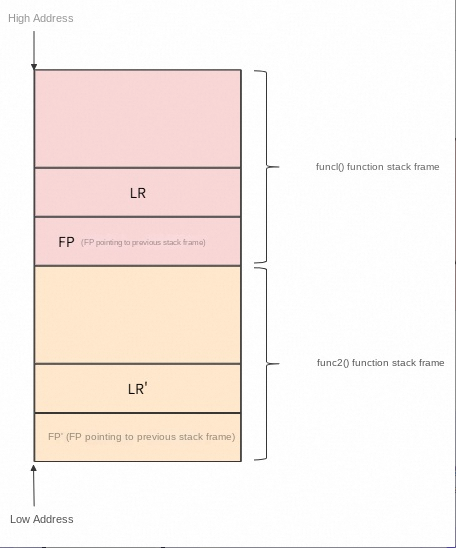
To revert the call stack when a crash occurs, we need to traverse the stack frames. The core principle of stack frame traversal is traversing upward through the frame pointer chain:
The complete flow of stack frame traversal is as follows:
sequenceDiagram
    participant walker as the stack walker
    participant registers as CPU registers
    participant stack as the stack memory

    Traverser->> Registers: Read PC registers
    Register -->> Traverser: 1st frame address

    Traverser->> Registers: Read the LR registers
    Register -->> Traverser: 2nd frame address

    loop traverses subsequent frames
        Traverser->> Stack: Reads previous frame information via FP
        Stack -->> Traverser: Returns address and previous frame FP

        alt FP Valid
            Traverser->> Traverser: Records the address and continues the traversal
        else FP is invalid
            Traverser->> Traverser: Ends traversal
        end
    end

    Note over walker: Returns an array of full stack addresses
During the stack traversal process, the following key points need to be noted:
● When the stack is traversed, memory must be accessed safely to prevent accessing invalid memory, which causes a crash.
● Stack overflow detection prevents infinite traversal when the stack is corrupted.
● Address normalization. Addresses in different CPU architectures may have special marks and need to be normalized.
Runtime exceptions include NSException and C++ exceptions, which are usually caused by programming errors. You need to capture these unhandled exceptions by setting exception handlers.
iOS requires setting NSUncaughtExceptionHandler to capture uncaught NSExceptions.
// Save the previous settings before the exception handler is set.
NSUncaughtExceptionHandler *previous_uncaught_exceptionhandler=NSGetUncaughtExceptionHandler();

// Set our exception handler.
NSSetUncaughtExceptionHandler(&handle_uncaught_exception);
When Objective-C code throws an exception that is not captured by the @catch block, the Objective-C runtime invokes the exception handler that you set. After the NSException is processed, you also need to manually invoke previous_uncaught_exceptionhandler so that other exception handlers can process the exception correctly.
Note: In exception monitoring scenarios, usually you need to manually invoke abort() to stop the program after crash information is collected in the handler. This ensures that the program does not continue to run in an abnormal state.
After an NSException is captured, generally you can obtain the Objective-C call stack information in the following way.
// NSException provides callStackReturnAddresses.
NSArray* addresses = [exception callStackReturnAddresses];
After the return address is obtained via [NSException callStackReturnAddresses], further processing is required, such as filtering out invalid addresses.
You can capture unhandled C++ exceptions by setting a C++ terminate handler. When C++ exceptions are not captured, the C++ runtime invokes std::terminate(). You can capture the exception by intercepting this call.
// Save the original terminate handler.
std::terminate_handler original_terminate_handler = std::get_terminate();
// Set your terminate handler.
std::set_terminate(cpp_exception_terminate_handler);
When the C code throws an exception, the throw statement invokes the __cxa_throw(), and the C runtime searches for a matching catch block. If the exception is not found, it continues to propagate upward. When the exception is not caught:
std::terminate() invokes the registered terminate handler.cpp_exception_terminate_handler that we set is invoked.sequenceDiagram
participant application layer as the application layer
participant CPP code as C++ code
participant runtime as the C++ runtime
participant processor as the terminate handler
Application layer->> runtime: Set the terminate handler
CPP code->> Runtime: Throw an exception
Runtime->> Runtime: The catch block is not found
Runtime->> Handler: Invoke the terminate handler
Processor->> Processor: Collect exception information
Processor->> Application layer: Call the original terminate handlerAfter the exception is processed in your terminate handler, the original terminate handler must also be invoked so that other exception handlers can process the exception correctly.
Application-layer exceptions include business logic exceptions and performance issues, which require active monitoring and detection by the application layer. These mainly include main thread deadlock detection and zombie object detection.
Main thread deadlock is a critical runtime issue in iOS development. It causes the app interface to freeze completely (no response) and is usually forcibly stopped by the system watchdog eventually.
To address this type of issue, a feasible method is to detect main thread deadlocks via the "watchdog" mechanism:

Note:
● False positive threat: If the main thread has a long-running Job, a false positive may occur.
● Timeout: You need to adjust the timeout based on the actual situation of the application to avoid false positives.
The iOS zombie object is one of the most common memory issues in iOS development that cause application crashes. A zombie object refers to a memory block that has been released, but the corresponding pointer still points to this memory, and the code attempts to access it (send a message) via this pointer. Accessing a zombie object may cause a crash, which usually manifests as an EXC_BAD_ACCESS crash.
● This is a memory access fault, meaning that you are attempting to access a block of memory that you cannot access or is invalid.
● Because this memory block may have been revoked by the system and assigned to other objects, or turned into a messy data area, the access result is unpredictable.
The main reasons for the generation of zombie objects are as follows:
● unsafe_unretained or assign pointer: If a property is modified by assign (when modifying an object) or unsafe_unretained, the pointer will not be automatically set to nil (becoming a dangling pointer) when the object is released. Accessing the object again at this point results in a zombie object access.
● Multi-threaded race: Thread A has just released the object, but Thread B attempts to access the object almost simultaneously.
● CoreFoundation and ARC improper bridging: When transformations such as __bridge and __bridge_transfer are used, chaotic ownership management causes objects to be released prematurely.
● Block or Delegate circular reference: In some legacy code, Delegate is still modified using assign.
The main approach for zombie object detection is:
dealloc method of NSObject and NSProxy.flowchart TD
A[Hook dealloc method] --> B [Triggered when object is released]
B --> C [Calculate the object hash and record class information]
C --> D [Exception record table]
E [When an exception occurs] --> F [Calculate the address hash]
F --> G [Find the exception record table]
G --> H [Get class information or exception details]
H --> I [Logged to the crash report]
D -. Share.-> G
style A fill:#3498DB,stroke:#2980B9,color:#fff
style B fill:#3498DB,stroke:#2980B9,color:#fff
style C fill:#2ECC71,stroke:#27AE60,color:#fff
style D fill:#3498DB,stroke:#2980B9,color:#fff
style E fill:#9B59B6,stroke:#8E44AD,color:#fff
style F fill:#9B59B6,stroke:#8E44AD,color:#fff
style G fill:#9B59B6,stroke:#8E44AD,color:#fff
style H fill:#2ECC71,stroke:#27AE60,color:#fff
style I fill:#3498DB,stroke:#2980B9,color:#fff● To reduce CPU and memory usage, the recording limit for zombie objects is 0x8000, which is 32768.
● During hash computing, the calculation is performed using ((uintptr_t)object >> (sizeof(uintptr_t) - 1)) & 0x7FFF.
This is the result of a design trade-off. Because this detection method is not very accurate, it cannot catch all zombie objects. Because the hash calculation generates certain collisions, causing objects to be overwritten, false positives or incorrect types may occur.
In the exception monitoring system, in addition to needing to detect and record exception types (such as zombie object access or main thread deadlocks), it is also necessary to process stack information when an exception occurs. Stack information usually exists in the form of memory addresses, and these addresses are unreadable to developers. To locate issues quickly, we need to transform these memory addresses into readable function names, file names, and line number information. This process is symbolication.
Symbolication is generally divided into two categories:
● Runtime symbolication: Uses dladdr() to retrieve symbol information (such as function names and image names).
● Full symbolication: Uses dSYM files to retrieve file names and line numbers.
Runtime symbolication can only retrieve public symbols.
We mainly discuss how to perform runtime symbolication on the iOS platform. The iOS platform mainly performs runtime symbolication through dladdr(). You can retrieve the following information through dladdr():
● imageAddress: the base address of the image.
● imageName: the path of the image.
● symbolAddress: the symbolic address.
● symbolName: the symbol name.
Because the address of the call instruction is required during symbolication, but the return address is stored on the stack, the address needs to be adjusted.
Function call process:
1. Call instruction: call function_name (address: 0x1000)
2. Function execution: function_name() (address: 0x2000)
3. Return address: 0x 1001 (stored on stack)

The return address (0x1001) is stored on the stack.
However, the address of the call instruction (0x1000) is required, so 1 needs to be subtracted.
Address adjustments vary for different CPU architectures. Take ARM64 as an example:
uintptr_t address = (return_address &~ 3UL) - 1;The complete flow of runtime symbolication is shown in the graph below:
flowchart TD
    A [address adjustment] --> B [Call dladdr resolution]
    B --> C{dladdr success?}
    C -->| Yes | D [Calculate the offset and return the symbolic result]
    C -->| No | E [Return failure]

    style A fill:#6A4CA3,stroke:#4E387A,color:#ffffff
    style B fill:#6A4CA3,stroke:#4E387A,color:#ffffff
    style D fill:#2ECC71,stroke:#27AE60,color:#ffffff
    style E fill:#E74C3C,stroke:#C0392B,color:#ffffff
style C fill:#FFF8DC,stroke:#E0D9B5,color:#333In addition to the above content, when handling exception capture on the iOS platform, we also need to pay attention to asynchronous safety.
In Unix signal handling functions or Mach exception handling, only asynchronous-safe functions can be used, mainly because:
● The system is unstable during a crash.
● Locks may be held, and invoking non-asynchronous-safe functions may lead to deadlocks.
● The heap may be corrupted, and allocating memory at this time may fail.
In general, malloc(), free(), NSLog(), printf(), invocations of Objective-C methods, or any functions that may allocate memory are not allowed to be invoked during the exception handling process.
This article mainly describes the current mainstream iOS exception monitoring solutions and the implementation details of exception monitoring based on KSCrash, including the handling of catching exception types such as Mach, Unix signal, and NSException. The exception monitoring capabilities are still evolving, and there are still many points that can be optimized and improved in the future, such as supporting real-time upload and crash callback, supporting app log recording, and dumping memory near register addresses. Currently, this solution is applied in the Alibaba Cloud Real User Monitoring (RUM) iOS SDK. You can refer to the integration document to experience it. The Alibaba Cloud RUM SDK currently also supports exception monitoring capabilities on platforms such as Android, HarmonyOS, and Web. For related questions, you can join the RUM support group (DingTalk group ID: 67370002064) for consultation.
Team Edition OpenClaw: HiClaw Open Source, Build a One-Person Company in 5 Minutes

774 posts | 60 followers
FollowCommunity Builder - July 13, 2026
OpenAnolis - March 25, 2026
Alibaba Cloud Native Community - March 11, 2026
Alibaba Cloud Native Community - November 11, 2025
Community Builder - June 8, 2026
Alibaba Cloud Native Community - June 3, 2026
774 posts | 60 followers
Follow mPaaS
mPaaS
Help enterprises build high-quality, stable mobile apps
Learn More EMAS Superapp
Build superapps and corresponding ecosystems on a full-stack platform
Learn More Web App Service
Web App Service allows you to deploy, scale, adjust, and monitor applications in an easy, efficient, secure, and flexible manner.
Learn More Web Hosting Solution
Explore Web Hosting solutions that can power your personal website or empower your online business.
Learn MoreMore Posts by Alibaba Cloud Native Community

