In the realm of mobile app development, real-time monitoring of application performance management (APM) and user experience is critical. Traditional monitoring solutions typically require developers to manually add and initialize the software development kit (SDK) in their code, and to manually invoke tracking code at business logic points that need monitoring—such as network requests, page navigation, and user clicks.
This approach has several pain points:
● Intrusive: Monitoring code is tightly coupled with business logic, increasing code complexity and maintenance costs.
● High workload: For large-scale applications, manual tracking is time-consuming and labor-intensive, and critical monitoring points are easily missed.
● Difficult to maintain: Frequent changes to business logic may cause tracking code to become invalid or require synchronized updates, increasing the risk of errors.
● High integration cost: New projects or team members must spend time learning and understanding the tracking specification.

To address these issues and achieve automated, comprehensive monitoring while reducing integration costs, non-intrusive instrumentation solutions have emerged. The core objective is to comprehensively monitor application behavior without modifying the application source code, by automatically injecting monitoring agents during the compile-time packaging process, thereby freeing developers from tedious manual tracking tasks.
When designing and implementing a stable and efficient non-intrusive instrumentation solution, we must confront and resolve the following core challenges:
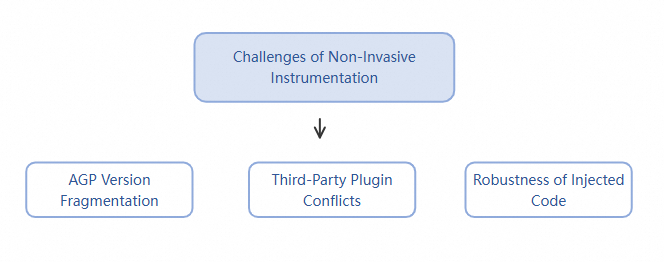
● Fragmentation challenges in the Android ecosystem
The openness of the Android system has led to severe fragmentation, particularly evident in build tools. The Android Gradle Plugin (AGP) undergoes rapid version iterations, and its core compilation APIs change frequently—for example, the migration from the Transform API to the Instrumentation API. The instrumentation solution must dynamically adapt to different AGP versions; otherwise, it will fail to operate correctly in the diverse environments used by developers.
● Compatibility and conflict risks with third-party plugins
Most APM or feature-enhancement plugins on the market (such as other monitoring tools or hotpatching frameworks) use similar bytecode instrumentation techniques. If your instrumentation solution modifies the same code segment at the same location as another plugin, it can easily trigger build failures or runtime conflicts. Therefore, a mechanism must be designed to avoid "duplicate instrumentation" and to coexist peacefully with other plugins whenever possible.
● Robustness and independence of instrumented code
Agents injected into user code via plugins must exhibit high robustness and independence. A common and critical issue arises when a user applies an instrumentation plugin in their project but forgets to initialize the main SDK in their code. In such cases, the injected agent code may cause severe crashes—such as null pointer (NullPointerException)—when attempting to invoke SDK functions due to unmet dependencies. The instrumentation solution must ensure that the application does not crash, even if the main SDK has not been started.
Industry-standard non-intrusive instrumentation solutions primarily focus on modifying code during compilation. Their data collection principles are all based on aspect-oriented programming (AOP). AOP advocates separating "cross-cutting concerns" from business logic and encapsulating them independently into modules called "aspects." Through declarative configuration, the program is instructed on "when" and "where" to execute the logic within these aspects—without requiring any modification to the original business logic source code.
Non-intrusive data collection on Android encompasses a wide variety of approaches, but they all share the core idea of automatically capturing various events and data during application runtime without altering business code. Based on common Android app data collection scenarios, we examine the corresponding solution choices for each.
The goal of this type of collection is to understand how users interact with the app and to track the lifecycle of pages.
● Page (activity/fragment) lifecycle collection
Technical approach:
● User interaction occurrence (click, swipe, etc.)
Technical approach: The mainstream solution is bytecode instrumentation, such as manipulating bytecode through ASM.
The goal is to collect performance metrics and success rates for all HTTP/HTTPS requests sent by the application.
● Technical approach: Bytecode instrumentation is also the primary method here, with hooks implemented for different network libraries.
● Startup time
Technical approach:
● UI stuttering and long-running jobs
Technical approach:
● ANR (Application Not Responding)
● Java/Kotlin crash
● Native (C/C++) crash
● Technical approach: The core technique is JavaScript agent injection.
Summary: Based on scenario analysis of data collection requirements, we find that bytecode instrumentation is the most critical technology for non-intrusive data collection on Android.
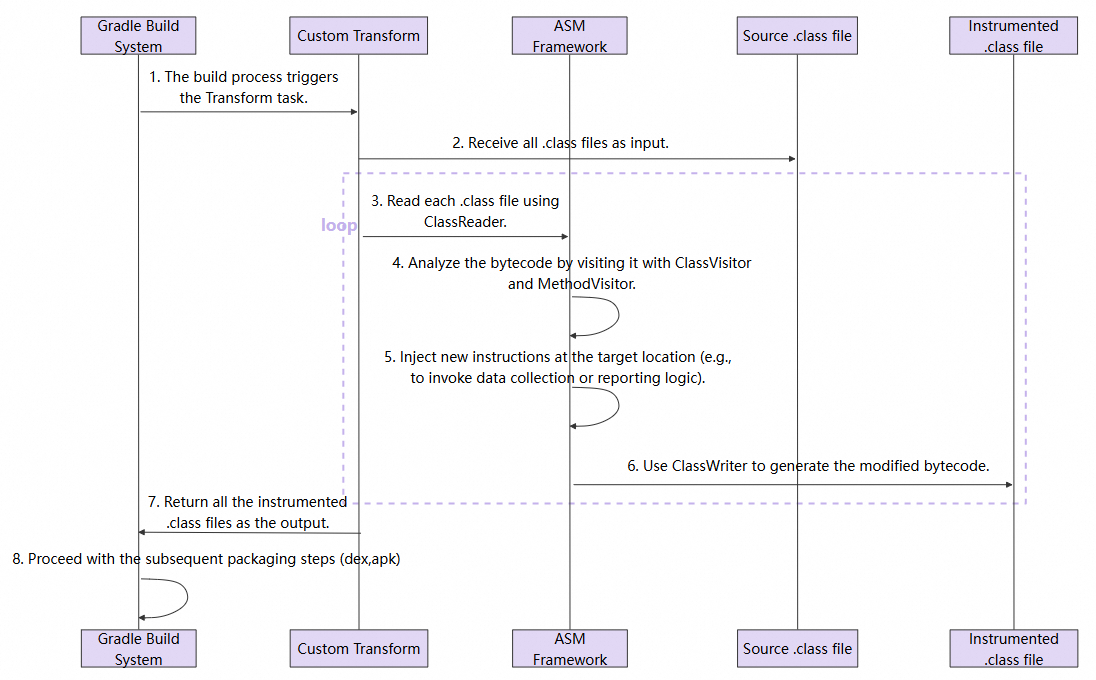
● Technical introduction: This is currently the most mainstream and powerful non-intrusive technology in the Android domain. It leverages APIs provided by the AGP during the compilation process—such as the Transform API or the newer Instrumentation API—to scan and modify bytecode before .class files are compiled into .dex files. Among these, ASM is a high-performance, lightweight Java bytecode manipulation and analysis framework. It offers a rich set of APIs that enable fine-grained addition, deletion, modification, and querying of class structures, fields, methods, and instructions, treating them as manipulable objects.
● Principle:
● Advantages: It provides the finest granularity of control and the most powerful capabilities, enabling injection of virtually any logic. Its performance overhead is extremely low, making it the preferred solution for implementing high-performance monitoring SDKs.
● Build API evolution and compatibility
Based on the above analysis of Android non-intrusive collection solutions, we use bytecode instrumentation technology here, taking click behavior collection as an example, to demonstrate a complete non-intrusive collection implementation.
In Section 1, we mentioned the challenges of non-intrusive collection. Here, we summarize three core concepts to address these challenges.
To accommodate the rapid iteration of the AGP, plugin development must handle compatibility across old and new AGP versions. Taking compatibility characteristics of different AGP versions as an example:
● Legacy AGP: The plugin uses AGP’s legacy Transform API to handle bytecode transformation logic.
● AGP 7+: The plugin adopts Google’s officially recommended Instrumentation API to implement integration with the new API, which is more efficient and stable.
At plugin initialization, the AGP version can be dynamically detected at runtime, and the corresponding implementation is selected transparently to developers. Here, we provide an adaptation strategy for incompatible APIs.
MyApmPluginpublic class MyApmPlugin implements Plugin<Project> {
   @Override
    public void apply(Project project) {
        boolean hasAsmFactory = classExists("com.android.build.api.instrumentation.AsmClassVisitorFactory");
        boolean hasTransform = classExists("com.android.build.api.transform.Transform");

        if (hasAsmFactory) {
            // AGP 7+. Use the Instrumentation API (recommended).
            new Agp7PlusImpl(project).init();
        } else if (hasTransform) {
            // The earlier version. Use the Transform API.
            new LegacyTransformImpl(project).init();
        } else {
            project.getLogger().warn("No supported AGP API found. Plugin disabled.");
        }
    }
}To maximize compatibility with third-party plugins and prevent conflicts, we provide the following solutions:
● Blacklist: Skip system packages, common APM/hotpatching/protection frameworks, and the SDK itself.
● Whitelist: Optional. Only process application or business-related packages to minimize unintended interference and conflicts.
● Idempotent instrumentation: Avoid duplicate injection, such as through tag marks or instanceOf checks.
● Annotation-based control: Optional. Supports annotations such as @NoTrack and @TrackIgnore. During compilation, classes or methods annotated with these are scanned and skipped, providing business-level fallback control.
● Instrumentation failure backoff: If instrumentation fails for a single class, log the failure and revert to the original bytecode so that the build can continue.
The following is a sample code snippet for blacklist filtering:
public class ClassInstrumentChecker {

    private static final List<String> BLACKLISTED_PREFIXES = Arrays.asList(
        // Common system libraries and coroutine should be avoided.
        "java/",
        "javax/",
        "kotlin/",
        "kotlinx/",
        "android/",
        "androidx/",

        "com/my/apm/sdk/" // Its own SDK to avoid recursive processing.

        // Other APM or performance monitoring products.
        "com/networkbench/",
        "com/sensorsdata/",
        "com/tencent/qapmsdk/",

        // Common hotpatching or protection framework.
        "com/tencent/tinker/",
        "com/taobao/sophix/",

        // Its own SDK to avoid recursive processing.
        "com/my/apm/sdk/"
    );

    /**
     * Check whether a class should be instrumented.
     * @param className The name of the class (e.g., "com/example/myapp/MyClass").
     * @return If it should be instrumented, the value true is returned. Otherwise, false is returned.
     */
    public static boolean shouldInstrument(String className) {
        // Exclude R files and BuildConfig.
        if (className.contains("/R$") || className.endsWith("/R") || className.endsWith("/BuildConfig")) {
            return false;
        }

        for (String prefix : BLACKLISTED_PREFIXES) {
            if (className.startsWith(prefix)) {
                return false; // The blacklist is hit. Skip tracking.
            }
        }
        return true; // The blacklist is not hit. Start instrumentation.
    }
}This is the core of ensuring the robustness of our solution. We adhere to the principles of "minimal intrusion" and "absolute safety," guaranteeing that the injected code is stable and free of side effects.
● No replacement of native logic: Our instrumentation always supplements the native method logic either "before" or "after" its execution, rather than replacing it. For example, when listening to a network request, we first invoke the tracking method from the SDK and then proceed with the original network call instruction via super.visitMethodInsn(), ensuring that the application's original functionality remains completely unaffected.
● No introduction of third-party dependencies: The injected bytecode instructions are extremely concise, containing only calls to specific static methods within our own SDK (such as TrackInstrument.trackViewOnClick(...)), without introducing any new external library dependencies, thereby maintaining the purity of the instrumentation points.
● Independent execution and exception isolation of agent code: This is the key to resolving the "SDK not initialized" issue. All injected agents ultimately call utility classes in the SDK (such as TrackInstrument), which strictly follow defensive programming practices. At the entry point of these utility classes, the system first checks whether the main SDK has been successfully initialized. When an exception occurs in the instrumentation code, it does not affect the original business logic; if the SDK is not initialized, all instrumentation code immediately returns silently without performing any substantive operations. This ensures that, even under extreme conditions, the injected agents will never cause a crash.
● Supplementary instrumentation for Kotlin and Jetpack Compose:
Here is a sample instrumentation method that inserts our required log collection code into an OnClick event.
public class OnClickMethodVisitor extends AdviceAdapter {

    public OnClickMethodVisitor(MethodVisitor mv, int access, String name, String desc) {
        super(Opcodes.ASM9, mv, access, name, desc);
    }

    @Override
    protected void onMethodEnter() {
        super.onMethodEnter();

        // Insert code at the entry of the onClick(Landroid/view/View;)V method.
        mv.visitVarInsn(Opcodes.ALOAD, 1); // Load the first parameter (View object) onto the operand stack.

        // Invoke our own static utility method to handle the Click event.
        mv.visitMethodInsn(
            Opcodes.INVOKESTATIC, // Static method invocation.
            "com/my/apm/sdk/TrackInstrument", // Class containing the tracking method.
            "trackViewOnClick", // Method name.
            "(Landroid/view/View;)V", // Method descriptor.
            false // Non-interface method.
        );
    }
}


public class TrackInstrument {
    public static void trackViewOnClick(View view) {
        try {
            // Core safety design: Check whether the SDK has been initialized.
            if (!MyApmAgent.isInitialized() || view == null) {
                return; // If not initialized, return silently without performing any operation.
            }
            // If initialized, execute the normal event collection logic.
            String viewId = getViewId(view);
            MyApmAgent.get().logUserAction("click", viewId);
        } catch (Throwable ignored) {
            // Fully isolate exceptions to avoid impacting business logic.
        }
    }
}Combining the core ideas described above, we fully integrate a data collection solution for onClick events. The core of this solution is a Custom Gradle plugin. After an Android app integrates this plugin, it automatically injects itself into the application's build flow and completes automated code injection during the compilation phase.
Regardless of which AGP API is used, the core bytecode modification logic is driven by the ASM library. The overall flow is as follows:
When the plugin executes, it obtains all .class files in the project, including classes compiled from source code and classes from third-party libraries.
// Code example: Traverse input files in a Gradle Transform.
@Override
public void transform(TransformInvocation transformInvocation) {
    Collection<TransformInput> inputs = transformInvocation.getInputs();
    TransformOutputProvider outputProvider = transformInvocation.getOutputProvider();

    for (TransformInput input : inputs) {
        // Traverse JAR packages.
        for (JarInput jarInput : input.getJarInputs()) {
            File srcJar = jarInput.getFile();
            File destJar = outputProvider.getContentLocation(...);
            processJar(srcJar, destJar);
        }
        // Traverse directories.
        for (DirectoryInput directoryInput : input.getDirectoryInputs()) {
            File srcDir = directoryInput.getFile();
            File destDir = outputProvider.getContentLocation(...);
            processDirectory(srcDir, destDir);
        }
    }
}● Each class file is visited by a ClassAdapter. This class is a ClassVisitor that first performs filtering. It skips instrumentation for system libraries, other APM products, the SDK itself, and certain third-party libraries known to cause conflicts, based on a blacklist in the isClassShouldInstrument method, to ensure stability and compatibility.
● For classes that require processing, the core instrumentation task is handled by MyMethodAdapter, a child class of AdviceAdapter. It traverses every method in the class.
// Code example: responsibility chain of ClassVisitor and MethodVisitor.
public class MyClassAdapter extends ClassVisitor {
    private String className;

    public MyClassAdapter(ClassVisitor classVisitor) {
        super(Opcodes.ASM9, classVisitor);
    }

    @Override
    public void visit(int version, int access, String name, ...) {
        super.visit(version, access, name, ...);
        this.className = name;
    }

    @Override
    public MethodVisitor visitMethod(int access, String name, String descriptor, ...) {
        MethodVisitor mv = super.visitMethod(access, name, descriptor, ...);
        // Check whether this class is in the blacklist.
        if (!ClassInstrumentChecker.shouldInstrument(className)) {
            return mv; // If it is in the blacklist, return the original MethodVisitor without processing.
        }
        // If processing is required, return our custom MethodVisitor.
        return new MyMethodAdapter(mv, access, name, descriptor);
    }
}● The onMethodEnter method of MyMethodAdapter inserts code at the very beginning of the method body.
● The MyHookConfig.java file predefines all target methods that require hooking, such as the onClick method for click behavior.
● When MyMethodAdapter accesses these target methods, it inserts a call to the corresponding tracking method in TrackInstrument (for example, trackViewOnClick) at the start of the method, thereby enabling auto-collection of events such as page lifecycle, user clicks, and menu selections.
● Lambda expression handling: The visitInvokeDynamicInsn instruction provides special handling for Java 8 Lambda expressions, accurately detecting Lambda expressions implemented as listeners (such as view.setOnClickListener(v -> ...)) and correctly instrumenting them.
public class OnClickAdviceAdapter extends AdviceAdapter {
  protected OnClickAdviceAdapter(MethodVisitor mv, int access, String name, String desc) {
  super(Opcodes.ASM9, mv, access, name, desc);
}
@Override protected void onMethodEnter() {
  // Load parameter View(index=1)
visitVarInsn(ALOAD, 1);
// Invoke a static method. TrackInstrument.trackViewOnClick(View)
visitMethodInsn(INVOKESTATIC,
                "com/my/apm/sdk/TrackInstrument",
                "trackViewOnClick",
                "(Landroid/view/View;)V",
                false);
}
}
// Code example: Implementation of MethodVisitor, including Lambda handling.
public class MyMethodAdapter extends AdviceAdapter {
    private final String methodNameDesc;
    private final String className;

    public MyMethodAdapter(MethodVisitor mv, int access, String name, String desc, String className) {
        super(Opcodes.ASM9, mv, access, name, desc);
        this.methodNameDesc = name + desc;
        this.className = className;
    }

    @Override
    protected void onMethodEnter() {
        super.onMethodEnter();
        // Check whether the current method is a regular method or a Lambda method that has already been marked.
        MyHookConfig.HookCell hookCell = MyHookConfig.HOOK_METHODS.get(methodNameDesc);
        if (hookCell == null) {
            hookCell = MyHookConfig.LAMBDA_METHODS_TO_HOOK.get(methodNameDesc);
        }

        if (hookCell != null) {
            // Inject agent code. (see the example in the core idea for this logic)
        }
    }

    @Override
    public void visitInvokeDynamicInsn(String name, String descriptor, Handle bsm, Object... bsmArgs) {
        super.visitInvokeDynamicInsn(name, descriptor, bsm, bsmArgs);
        try {
            // Check whether this is a Lambda expression of interest, such as OnClickListener.
            String samMethodDesc = ((Type) bsmArgs[0]).getDescriptor();
            if ("(Landroid/view/View;)V".equals(samMethodDesc)) {
                // Obtain information about the Lambda method body implementation.
                Handle implMethodHandle = (Handle) bsmArgs[1];
                String lambdaBodySignature = implMethodHandle.getName() + implMethodHandle.getDesc();

                // Mark this Lambda method body as requiring instrumentation, with the value being the HookCell for onClick.
                MyHookConfig.LAMBDA_METHODS_TO_HOOK.put(lambdaBodySignature, MyHookConfig.HOOK_METHODS.get("onClick(Landroid/view/View;)V"));
            }
        } catch (Exception e) {
            // ignore
        }
    }
}

// Code example: Hook configuration class.
public class MyHookConfig {
    public static final Map<String, HookCell> HOOK_METHODS = new HashMap<>();
    // Used to store Lambda method bodies that have been detected and require instrumentation.
    public static final Map<String, HookCell> LAMBDA_METHODS_TO_HOOK = new ConcurrentHashMap<>();

    static {
        HOOK_METHODS.put("onClick(Landroid/view/View;)V", new HookCell("trackViewOnClick", "(Landroid/view/View;)V"));
    }
    // ... Other configurations.
}After all modifications are complete, ClassWriter generates new bytecode to replace the original .class file. These class files, injected with monitoring agents, are eventually packaged into the APK and automatically execute monitoring logic at application runtime.
// Code example: Core logic of ASM for generating new bytecode.
public byte[] processClass(InputStream classInputStream) throws IOException {
    ClassReader classReader = new ClassReader(classInputStream);

    // ClassWriter, positioned at the end of the responsibility chain, writes all modifications into the bytecode.
    ClassWriter classWriter = new ClassWriter(classReader, ClassWriter.COMPUTE_MAXS);

    // Start the visitor chain; MyClassAdapter is our custom visitor.
    classReader.accept(new MyClassAdapter(classWriter), ClassReader.EXPAND_FRAMES);

    // Return the new bytecode containing all modifications.
    return classWriter.toByteArray();
}This topic explores an instrumentation approach based on Gradle plugin + AGP API + ASM bytecode instrumentation, implementing an automated monitoring data collection solution that is non-intrusive to business code, easy to integrate, and safe to run. Alibaba Cloud Real User Monitoring (RUM) provides a non-intrusive SDK for Android to collect data on application performance, stability, and user behavior.
A Practical Guide to SLS Data Masking: Securing Sensitive Data in LLM Applications

774 posts | 60 followers
FollowApsaraDB - June 29, 2020
Alibaba Cloud Native Community - December 10, 2025
ApsaraDB - March 30, 2026
Alibaba Cloud Native Community - March 11, 2026
Alibaba Cloud Native Community - November 11, 2025
Alibaba Cloud Native Community - January 22, 2026
774 posts | 60 followers
Follow Application Real-Time Monitoring Service
Build business monitoring capabilities with real time response based on frontend monitoring, application monitoring, and custom business monitoring capabilities
Learn More Real-Time Livestreaming Solutions
Stream sports and events on the Internet smoothly to worldwide audiences concurrently
Learn More Global Application Acceleration Solution
This solution helps you improve and secure network and application access performance.
Learn More ADAM(Advanced Database & Application Migration)
An easy transformation for heterogeneous database.
Learn MoreMore Posts by Alibaba Cloud Native Community


testeset December 27, 2025 at 10:14 am
great