Quick BI v6.0 improves Smart Q follow-up accuracy, adds AWS and Azure Databricks data sources, introduces synchronized drill-down for dashboards, and expands data dashboard chart types.
Release date
October 30, 2025
Intelligent Q features are currently available only at the China (Hong Kong) and Malaysia sites.
Upgrade highlights
-
Smart Q
-
Q Chat: Enhanced follow-up question capability with significantly improved accuracy.
-
-
Data modeling
-
Data sources: Added AWS Databricks and Azure Databricks data sources.
-
Datasets: Expanded data source support for built-in functions to include Dameng and SAP HANA.
-
Form filling: Custom channel messages for external approval workflows now include data entry content, enabling you to transmit the name, type, and data for each form-filling control.
-
-
Data analytics
-
Dashboards
-
Visualizations
-
Waterfall charts now support setting the range and interval for y-axis values.
-
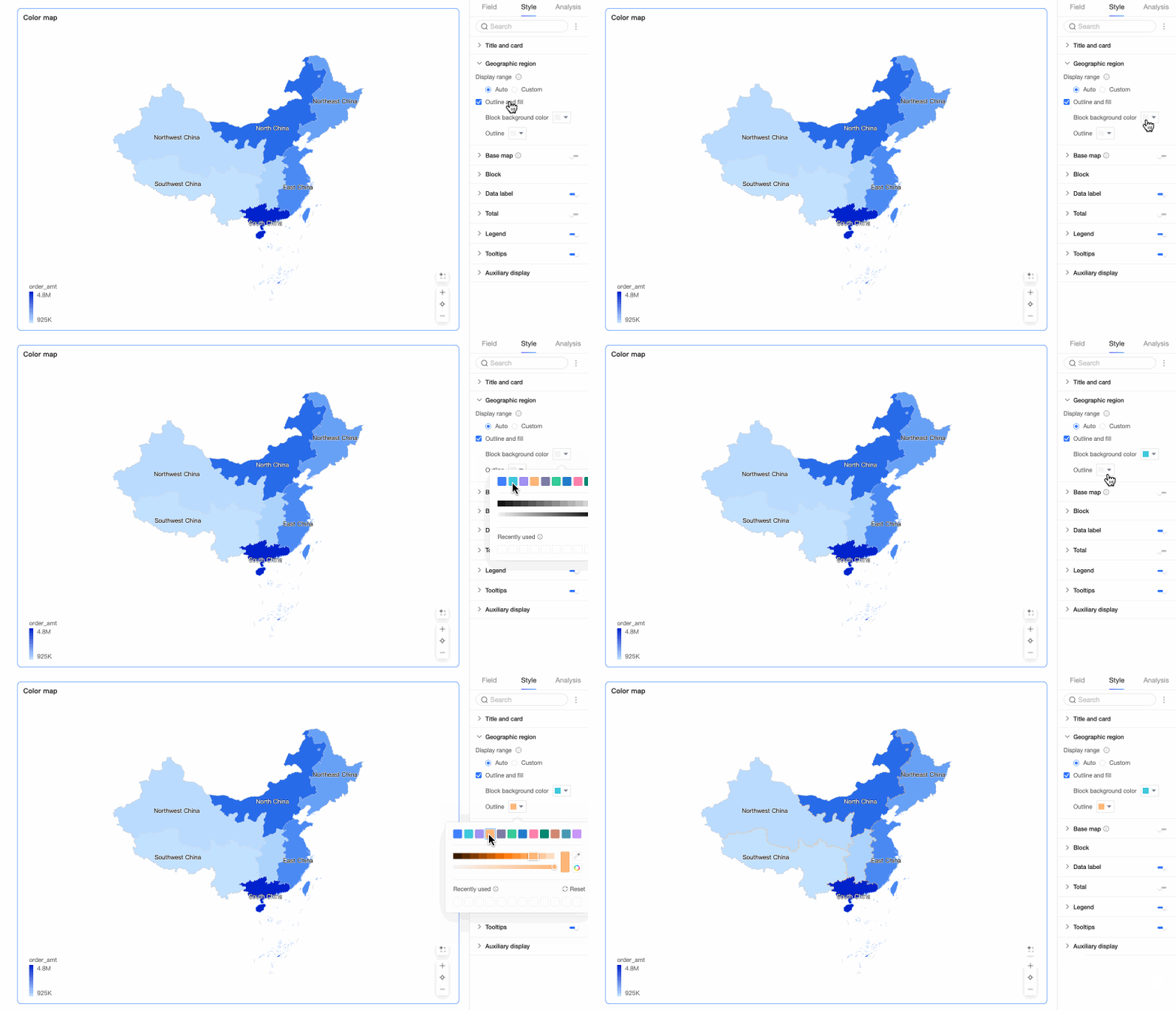
Colored maps and map charts that use custom GeoJSON fields no longer display descriptions when the outline layer is disabled in the style settings.
-
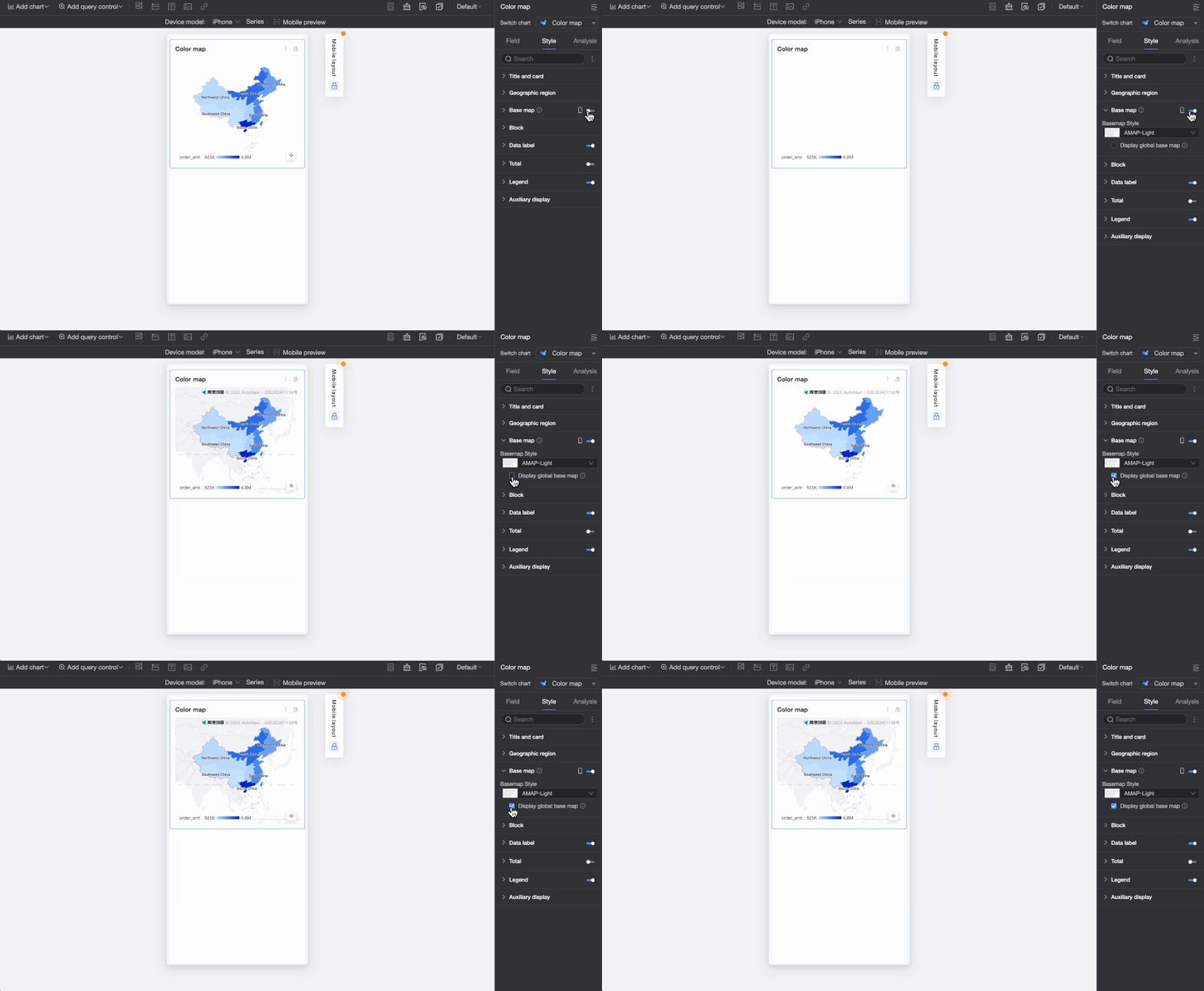
For map charts on mobile devices, you can now choose whether to enable the basemap for colored maps and maps in latitude/longitude mode.
-
-
Interactive analysis: Synchronized drill-down is now supported. A single drill-down operation can trigger synchronized updates across multiple charts configured with filter interactions.
-
Query controls: When a dynamic function is used as the default value, it can now be applied based on the sorting field.
-
Advanced calculations: Multi-field combination calculations are now supported, enabling secondary calculations based on the result values of multiple fields.
-
Tabs: Added support for customizing the spacing between components in a tab.
-
-
Workbooks
-
You can now include spaces in sheet names, but a sheet name cannot consist only of spaces.
-
You can now set query controls to expand all filter conditions by default.
-
-
Data dashboards
-
Added support for bubble charts, Sankey diagrams, and gauges.
-
The maximum number of options in a drop-down list control is now 1,000. Fuzzy search is also available to find options by keyword.
-
-
Export: When exporting files, you can now add a random string to custom file names to prevent duplicates.
-
-
Open Platform
-
The following OpenAPI operations are updated:
-
Add a data source connection (AddDataSource)
-
Check if a given cubeId exists (CheckDatasetExisted)
-
Check if a user belongs to an organization (CheckOrganizationMember)
-
Create a dataset from a custom SQL query (CreateCubeBySql)
-
Create a dataset from a physical table name (CreateDataset)
-
Query all workspace roles for a user (ListWorkspaceUserRolesByUserId)
-
Update a dataset created from a custom SQL query (UpdateCubeBySql)
-
Modify a data source configuration (UpdateDataSource)
-
-
-
Service support
To maintain system performance and stability, v6.0 introduces usage limits for trend analysis and multidimensional analysis tables. These limits prevent individual queries from consuming excessive resources, which can cause lag or system crashes. If your tables report errors after the upgrade due to exceeding these limits, reduce the number of fields or periods. We apologize for any inconvenience.
Change details
-
Smart Q
-
Q Chat: Enhanced follow-up question capability with significantly improved accuracy.
-
-
Data modeling
-
Data sources: Added AWS Databricks and Azure Databricks data sources.
For more information, see AWS Databricks Data Source and Microsoft Azure Databricks.
-
Datasets: Expanded data source support for built-in functions to include Dameng and SAP HANA.
For more information, see Advanced Data Source Features.
-
Form filling: Custom channel messages for external approval workflows now include data entry content, enabling you to transmit the name, type, and data for each form-filling control.
For more information, see Configure a Custom Channel.
-
-
Data analytics
-
Dashboards
-
Visualizations
-
Waterfall charts now support setting the range and interval for y-axis values.
For more information, see Waterfall Chart.
-
Colored maps and map charts that use custom GeoJSON fields no longer display descriptions when the outline layer is disabled in the style settings.
For more information, see Filled Map.
-
For map charts on mobile devices, you can now choose whether to enable the basemap for colored maps and maps in latitude/longitude mode.
For more information, see Filled Map.
-
-
Interactive analysis: Synchronized drill-down is now supported. A single drill-down operation can trigger synchronized updates across multiple charts configured with filter interactions.
 For more information, see Linkage.
 -
Query controls: When a dynamic function is used as the default value, it can now be applied based on the sorting field.
For more information, see Text Query Control.
-
Advanced calculations: Multi-field combination calculations are now supported. You can perform secondary calculations based on the result values of multiple fields, such as arithmetic operations on multiple advanced calculated fields or calculations between fields from different combined datasets.
For more information, see Multi-field Combination.
-
Tabs: Added support for customizing the spacing between components in a tab.
For more information, see Design a theme.
-
-
Workbooks
-
You can now include spaces in sheet names, but a sheet name cannot consist only of spaces.
For more information, see Configure a Workbook.
-
You can now set query controls to expand all filter conditions by default.
For more information, see Add a Query Control.
-
-
Data dashboards
-
Added support for bubble charts, Sankey diagrams, and gauges.
For more information, see Bubble Chart, Sankey Diagram, and Gauge.
-
The maximum number of options in a drop-down list control is now 1,000. Fuzzy search is also available to find options by keyword.

For more information, see Drop-down List.
-
-
Export: When exporting files, you can now add a random string to custom file names to prevent duplicates.
For more information, see Export Control.
-
-
Open Platform
-
The following OpenAPI operations are updated:
-
Add a data source connection (AddDataSource)
-
Check if a given cubeId exists (CheckDatasetExisted)
-
Check if a user belongs to an organization (CheckOrganizationMember)
-
Create a dataset from a custom SQL query (CreateCubeBySql)
-
Create a dataset from a physical table name (CreateDataset)
-
Query all workspace roles for a user (ListWorkspaceUserRolesByUserId)
-
Update a dataset created from a custom SQL query (UpdateCubeBySql)
-
Modify a data source configuration (UpdateDataSource)
-
-
-
Service support
To maintain system performance and stability, v6.0 introduces usage limits for trend analysis and multidimensional analysis tables. These limits prevent individual queries from consuming excessive resources, which can cause lag or system crashes. If your tables report errors after the upgrade due to exceeding these limits, reduce the number of fields or periods. We apologize for any inconvenience.