By Hang Yin
ACK Gateway with AI Extension is a component designed for LLM inference scenarios. It supports traffic routing at Layer 4/7 and provides intelligent load balancing capabilities based on model server load. In addition, InferencePool and InferenceModel custom resources (CRDs) help flexibly define traffic distribution policies for inference services, including model canary release and LLM traffic mirroring.
This article focuses on the canary release of models after the large model inference service is deployed in the cloud and the practices of model canary release based on ACK Gateway with AI Extension. Model canary release scenarios can be further categorized into canary release for the LoRA model and canary release for the foundation model.
Low-Rank Adaptation (LoRA) is a popular fine-tuning technique for Large Language Models (LLMs) that can fine-tune LLMs at a small cost to meet the customization needs of LLMs in vertical industries (such as healthcare, finance, and education). When building an inference service, you can load multiple different LoRA model weights for inference based on the same foundation model. This approach achieves GPU resource sharing across multiple LoRA models, known as a Multi-LoRA technique. Due to its high efficiency, LoRA is widely used in scenarios where customized large models are deployed in vertical industries.
In Multi-LoRA scenarios, multiple LoRA models can be loaded into the same LLM inference service. Requests for different LoRA models are distinguished by the model name in the request. In this way, you can train different LoRA models on the same foundation model and conduct canary testing among different LoRA models to evaluate the fine-tuning effect of the large model.
When deploying Large Language Model (LLM) inference services in a Kubernetes cluster, it has become an efficient and flexible best practice to fine-tune large models and provide customized inference capabilities based on the LoRA technology. With ACK Gateway with AI Extension, the Multi-LoRA-based fine-tuned LLM inference service allows you to specify traffic distribution policies for multiple LoRA models, thereby implementing LoRA model canary release.
ecs.gn7i-c8g1.2xlarge GPU-accelerated node. In this example, a cluster with two ecs.gn7i-c8g1.2xlarge GPU-accelerated nodes is used.The practice involves deploying a vLLM-based Llama2 large model as the foundation model in the cluster with 10 registered LoRA models derived from this model. The models include sql-lora to sql-lora-4 and tweet-summary to tweet-summary-4.
Run the following command to deploy a Llama2 model that loads multiple LoRA models:
kubectl apply -f- <<EOF
apiVersion: v1
kind: Service
metadata:
  name: vllm-llama2-7b-pool
spec:
  selector:
    app: vllm-llama2-7b-pool
  ports:
  - protocol: TCP
    port: 8000
    targetPort: 8000
  type: ClusterIP
---
apiVersion: v1
kind: ConfigMap
metadata:
  name: chat-template
data:
  llama-2-chat.jinja: |
    {% if messages[0]['role'] == 'system' %}
      {% set system_message = '<<SYS>>\n' + messages[0]['content'] | trim + '\n<</SYS>>\n\n' %}
      {% set messages = messages[1:] %}
    {% else %}
        {% set system_message = '' %}
    {% endif %}

    {% for message in messages %}
        {% if (message['role'] == 'user') != (loop.index0 % 2 == 0) %}
            {{ raise_exception('Conversation roles must alternate user/assistant/user/assistant/...') }}
        {% endif %}

        {% if loop.index0 == 0 %}
            {% set content = system_message + message['content'] %}
        {% else %}
            {% set content = message['content'] %}
        {% endif %}
        {% if message['role'] == 'user' %}
            {{ bos_token + '[INST] ' + content | trim + ' [/INST]' }}
        {% elif message['role'] == 'assistant' %}
            {{ ' ' + content | trim + ' ' + eos_token }}
        {% endif %}
    {% endfor %}
---
apiVersion: apps/v1
kind: Deployment
metadata:
  name: vllm-llama2-7b-pool
  namespace: default
spec:
  replicas: 3
  selector:
    matchLabels:
      app: vllm-llama2-7b-pool
  template:
    metadata:
      annotations:
        prometheus.io/path: /metrics
        prometheus.io/port: '8000'
        prometheus.io/scrape: 'true'
      labels:
        app: vllm-llama2-7b-pool
    spec:
      containers:
        - name: lora
          image: "registry-cn-hangzhou-vpc.ack.aliyuncs.com/dev/llama2-with-lora:v0.2"
          imagePullPolicy: IfNotPresent
          command: ["python3", "-m", "vllm.entrypoints.openai.api_server"]
          args:
          - "--model"
          - "/model/llama2"
          - "--tensor-parallel-size"
          - "1"
          - "--port"
          - "8000"
          - '--gpu_memory_utilization'
          - '0.8'
          - "--enable-lora"
          - "--max-loras"
          - "10"
          - "--max-cpu-loras"
          - "12"
          - "--lora-modules"
          - 'sql-lora=/adapters/yard1/llama-2-7b-sql-lora-test_0'
          - 'sql-lora-1=/adapters/yard1/llama-2-7b-sql-lora-test_1'
          - 'sql-lora-2=/adapters/yard1/llama-2-7b-sql-lora-test_2'
          - 'sql-lora-3=/adapters/yard1/llama-2-7b-sql-lora-test_3'
          - 'sql-lora-4=/adapters/yard1/llama-2-7b-sql-lora-test_4'
          - 'tweet-summary=/adapters/vineetsharma/qlora-adapter-Llama-2-7b-hf-TweetSumm_0'
          - 'tweet-summary-1=/adapters/vineetsharma/qlora-adapter-Llama-2-7b-hf-TweetSumm_1'
          - 'tweet-summary-2=/adapters/vineetsharma/qlora-adapter-Llama-2-7b-hf-TweetSumm_2'
          - 'tweet-summary-3=/adapters/vineetsharma/qlora-adapter-Llama-2-7b-hf-TweetSumm_3'
          - 'tweet-summary-4=/adapters/vineetsharma/qlora-adapter-Llama-2-7b-hf-TweetSumm_4'
          - '--chat-template'
          - '/etc/vllm/llama-2-chat.jinja'
          env:
            - name: PORT
              value: "8000"
          ports:
            - containerPort: 8000
              name: http
              protocol: TCP
          livenessProbe:
            failureThreshold: 2400
            httpGet:
              path: /health
              port: http
              scheme: HTTP
            initialDelaySeconds: 5
            periodSeconds: 5
            successThreshold: 1
            timeoutSeconds: 1
          readinessProbe:
            failureThreshold: 6000
            httpGet:
              path: /health
              port: http
              scheme: HTTP
            initialDelaySeconds: 5
            periodSeconds: 5
            successThreshold: 1
            timeoutSeconds: 1
          resources:
            limits:
              nvidia.com/gpu: 1
            requests:
              nvidia.com/gpu: 1
          volumeMounts:
            - mountPath: /data
              name: data
            - mountPath: /dev/shm
              name: shm
            - mountPath: /etc/vllm
              name: chat-template
      restartPolicy: Always
      schedulerName: default-scheduler
      terminationGracePeriodSeconds: 30
      volumes:
        - name: data
          emptyDir: {}
        - name: shm
          emptyDir:
            medium: Memory
        - name: chat-template
          configMap:
            name: chat-template
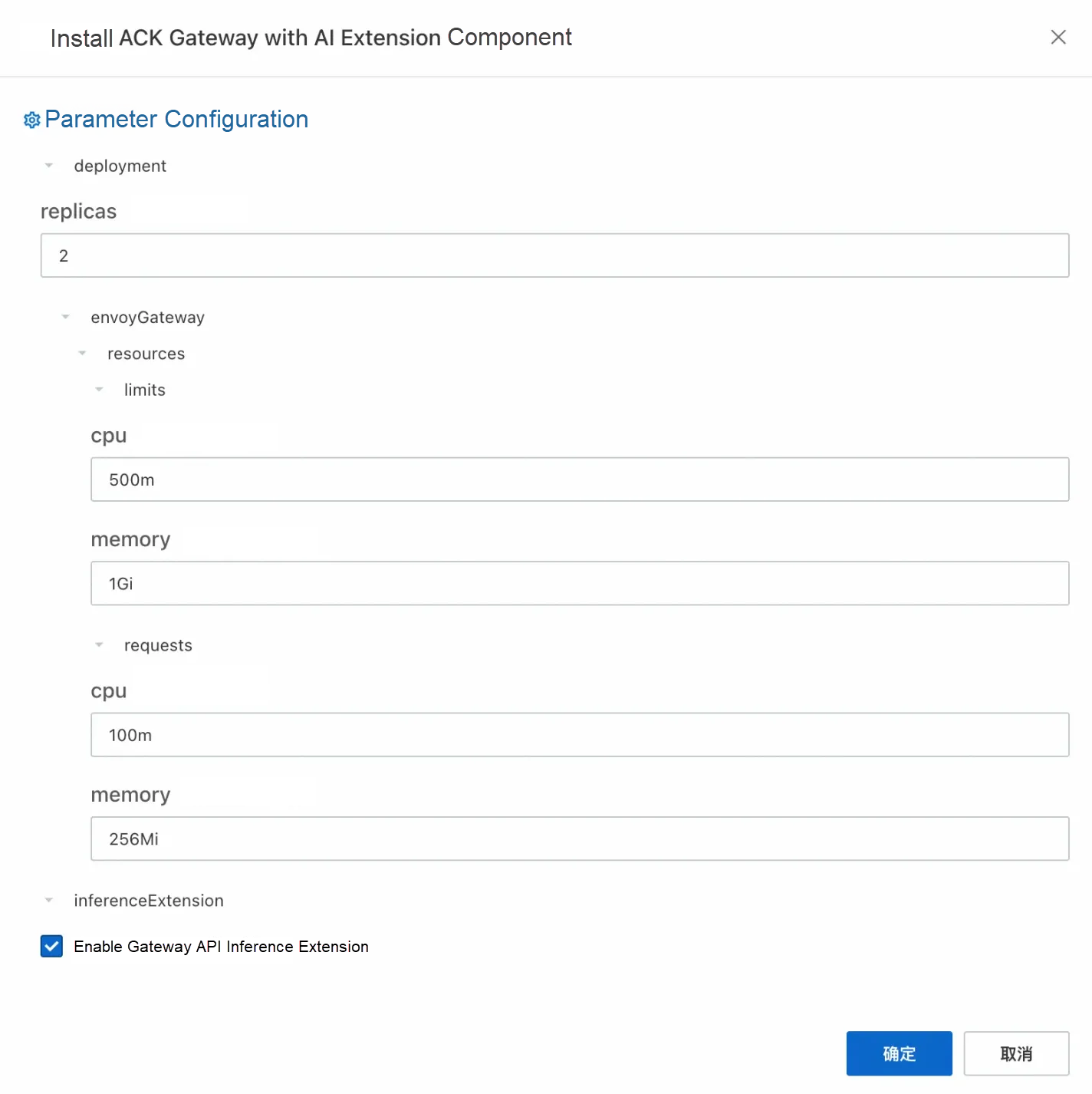
EOF1. Enable the ACK Gateway with AI Extension component in the Components section of the ACK cluster. For more information, see Manage components in ACK managed clusters. Select the Enable Gateway API inference extension option.
2. Create a gateway instance.
kubectl apply -f- <<EOF
apiVersion: gateway.networking.k8s.io/v1
kind: GatewayClass
metadata:
  name: inference-gateway
spec:
  controllerName: gateway.envoyproxy.io/gatewayclass-controller
---
apiVersion: gateway.networking.k8s.io/v1
kind: Gateway
metadata:
  name: inference-gateway
spec:
  gatewayClassName: inference-gateway
  listeners:
    - name: llm-gw
      protocol: HTTP
      port: 8081
EOF
3. Enable inference extension on the gateway port 8081.
Run the following command to create InferencePool and InferenceModel resources. In the CRD provided by the inference extension: The InferencePool resource uses a label selector to declare a set of LLM inference service workloads running in the cluster, while the InferenceModel resource specifies traffic distribution policies for specific models in the InferencePool.
kubectl apply -f- <<EOF
apiVersion: inference.networking.x-k8s.io/v1alpha1
kind: InferencePool
metadata:
  annotations:
    inference.networking.x-k8s.io/attach-to: |
      name: inference-gateway
      port: 8081
  name: vllm-llama2-7b-pool
spec:
  targetPortNumber: 8000
  selector:
    app: vllm-llama2-7b-pool
  extensionRef:
    name: inference-gateway-ext-proc
---
apiVersion: inference.networking.x-k8s.io/v1alpha1
kind: InferenceModel
metadata:
  name: inferencemodel-sample
spec:
  modelName: lora-request
  poolRef:
    group: inference.networking.x-k8s.io
    kind: InferencePool
    name: vllm-llama2-7b-pool
  targetModels:
  - name: tweet-summary
    weight: 50
  - name: sql-lora
    weight: 50
EOF
In the preceding configuration:
• InferencePool instructs a set of model server endpoints that provide LoRA models based on the Llama2 model.
• InferenceModel is configured if the name of the requested model is lora-request, 50% of the requests are routed to the tweet-summary LoRA model for inference, and the remaining requests are directed to the sql-lora LoRA model.
Run the following command multiple times to perform a test:
GATEWAY_IP=$(kubectl get gateway/inference-gateway -o jsonpath='{.status.addresses[0].value}')
curl -H "host: test.com" ${GATEWAY_IP}:8081/v1/completions -H 'Content-Type: application/json' -d '{
"model": "lora-request",
"prompt": "Write as if you were a critic: San Francisco",
"max_tokens": 100,
"temperature": 0
}' -v
You can see output similar to the following content:
{"id":"cmpl-2fc9a351-d866-422b-b561-874a30843a6b","object":"text_completion","created":1736933141,"model":"tweet-summary","choices":[{"index":0,"text":", I'm a newbie to this forum. Write a summary of the article.\nWrite a summary of the article.\nWrite a summary of the article. Write a summary of the article. Write a summary of the article. Write a summary of the article. Write a summary of the article. Write a summary of the article. Write a summary of the article. Write a summary of the article. Write a summary of the article. Write a summary of the article. Write a summary","logprobs":null,"finish_reason":"length","stop_reason":null,"prompt_logprobs":null}],"usage":{"prompt_tokens":2,"total_tokens":102,"completion_tokens":100,"prompt_tokens_details":null}}The model field indicates the model that actually provides the service. After multiple requests, the traffic ratio between tweet-summary and sql-lora models stabilizes at approximately 1:1.
In the Multi-LoRA architecture, you can perform canary release among multiple LoRA models based on the same foundation model. GPU resources are shared among different LoRA models. However, given the rapid advancements in large model technology, the foundation model used by the business may also need to be updated in actual scenarios. In such cases, a canary release process becomes necessary for the foundation model.
Using ACK Gateway with AI Extension, you can also perform a canary release process between two batches of LLM inference services that are loaded with different foundation models. This paper demonstrates the practice process using DeepSeek-R1-Distill-Qwen-7B and QwQ-32B models as an example of canary release.
QwQ-32B is the latest high-efficiency large language model released by Alibaba Cloud. With 3.2 billion parameters, its performance rivals that of DeepSeek-R1 671B. The model performs well on core metrics such as mathematics and code generation, delivering superior inference capabilities with lower resource consumption. The QwQ-32B model supports bf16 precision and requires only 64 GB of GPU memory to run. The minimum configuration is 4xA10 GPU-accelerated nodes.
DeepSeek-R1-Distill-Qwen-7B is a high-efficiency language model introduced by DeepSeek, featuring 7 billion parameters. The inference capabilities of DeepSeek-R1 (671 billion parameters) are migrated to Qwen architecture through knowledge distillation technology. The model performs well in mathematical inference, programming tasks, and logic deduction. It reaches a Pass@1 of 55.5% in the AIME 2024 benchmark test, surpassing similar open-source models, and also achieves a three-fold increase in inference speed through distillation.
ecs.gn7i-c32g1.32xlarge GPU-accelerated node and one ecs.gn7i-c8g1.2xlarge GPU-accelerated node. In this example, a cluster with five ecs.gn7i-c32g1.32xlarge GPU-accelerated nodes and two ecs.gn7i-c8g1.2xlarge GPU-accelerated nodes is used.1. Download the model.
GIT_LFS_SKIP_SMUDGE=1 git clone https://www.modelscope.cn/Qwen/QwQ-32B.git
cd QwQ-32B
git lfs pull
GIT_LFS_SKIP_SMUDGE=1 git clone https://www.modelscope.cn/deepseek-ai/DeepSeek-R1-Distill-Qwen-7B.git
cd DeepSeek-R1-Distill-Qwen-7B
git lfs pull
2. Upload the model to OSS.
ossutil mkdir oss://<Your-Bucket-Name>/QwQ-32B
ossutil cp -r ./QwQ-32B oss://<Your-Bucket-Name>/QwQ-32B
ossutil mkdir oss://<Your-Bucket-Name>/DeepSeek-R1-7B
ossutil cp -r ./DeepSeek-R1-Distill-Qwen-7B oss://<Your-Bucket-Name>/DeepSeek-R1-7B
3. Configure the PV and PVC for the target cluster.
For more information, see Mount a statically provisioned OSS volume.
| Parameter or setting | Description |
|---|---|
| PV Type | OSS |
| Volume Name | llm-model (for QwQ-32B) or llm-model-ds (for DeepSeek-R1-Distill-Qwen-7B) |
| Access Certificate | The AccessKey pair used to access the OSS bucket. The AccessKey pair consists of an AccessKey ID and an AccessKey secret. |
| Bucket ID | Specify the name of the OSS bucket that you created. |
| OSS Path | Select the path of the model, such as /models/QwQ-32B or /models/DeepSeek-R1-7B. |
The following table describes the parameters of a PVC.
| Parameter or setting | Description |
|---|---|
| PVC Type | OSS |
| Volume Name | llm-model (for QwQ-32B) or llm-model-ds (for DeepSeek-R1-Distill-Qwen-7B) |
| Allocation Mode | Select Existing Volumes. |
| Existing Volumes | Click Select PV. In the Select PV dialog box, find the PV that you want to use and click Select in the Actions column. |
4. Deploy QwQ-32B and DeepSeek-R1-Distill-Qwen-7B model inference services.
Run the following command to deploy the QwQ-32B and DeepSeek-R1-Distill-Qwen-7B model inference services that use the vLLM framework.
kubectl apply -f- <<EOF
apiVersion: apps/v1
kind: Deployment
metadata:
  labels:
    app: custom-serving
    release: qwq-32b
  name: qwq-32b
spec:
  progressDeadlineSeconds: 600
  replicas: 5 # Adjust based on the number of ecs.gn7i-c32g1.32xlarge nodes.
  revisionHistoryLimit: 10
  selector:
    matchLabels:
      app: custom-serving
      release: qwq-32b
  strategy:
    rollingUpdate:
      maxSurge: 25%
      maxUnavailable: 25%
    type: RollingUpdate
  template:
    metadata:
      annotations:
        prometheus.io/path: /metrics
        prometheus.io/port: "8000"
        prometheus.io/scrape: "true"
      labels:
        app: custom-serving
        release: qwq-32b
    spec:
      containers:
      - command:
        - sh
        - -c
        - vllm serve /model/QwQ-32B --port 8000 --trust-remote-code --served-model-name
          qwq-32b --tensor-parallel=4 --max-model-len 8192 --gpu-memory-utilization
          0.95 --enforce-eager
        env:
        - name: ARENA_NODE_NAME
          valueFrom:
            fieldRef:
              apiVersion: v1
              fieldPath: spec.nodeName
        - name: ARENA_POD_NAMESPACE
          valueFrom:
            fieldRef:
              apiVersion: v1
              fieldPath: metadata.namespace
        - name: ARENA_POD_NAME
          valueFrom:
            fieldRef:
              apiVersion: v1
              fieldPath: metadata.name
        - name: ARENA_POD_IP
          valueFrom:
            fieldRef:
              apiVersion: v1
              fieldPath: status.podIP
        image: kube-ai-registry.cn-shanghai.cr.aliyuncs.com/kube-ai/vllm:v0.7.2
        imagePullPolicy: IfNotPresent
        name: custom-serving
        ports:
        - containerPort: 8000
          name: restful
          protocol: TCP
        readinessProbe:
          failureThreshold: 3
          initialDelaySeconds: 30
          periodSeconds: 30
          successThreshold: 1
          tcpSocket:
            port: 8000
          timeoutSeconds: 1
        resources:
          limits:
            nvidia.com/gpu: "4"
        terminationMessagePath: /dev/termination-log
        terminationMessagePolicy: File
        volumeMounts:
        - mountPath: /dev/shm
          name: dshm
        - mountPath: /model/QwQ-32B
          name: llm-model
      dnsPolicy: ClusterFirst
      restartPolicy: Always
      schedulerName: default-scheduler
      securityContext: {}
      terminationGracePeriodSeconds: 30
      volumes:
      - emptyDir:
          medium: Memory
          sizeLimit: 30Gi
        name: dshm
      - name: llm-model
        persistentVolumeClaim:
          claimName: llm-model
---
apiVersion: v1
kind: Service
metadata:
  labels:
    app: custom-serving
    release: qwq-32b
  name: qwq-32b
spec:
  ports:
  - name: http-serving
    port: 8000
    protocol: TCP
    targetPort: 8000
  selector:
    app: custom-serving
    release: qwq-32b
---
apiVersion: apps/v1
kind: Deployment
metadata:
  labels:
    app: custom-serving
    release: deepseek-r1
  name: deepseek-r1
  namespace: default
spec:
  replicas: 2 # Adjust based on the number of ecs.gn7i-c8g1.2xlarge nodes.
  selector:
    matchLabels:
      app: custom-serving
      release: deepseek-r1
  template:
    metadata:
      labels:
        app: custom-serving
        release: deepseek-r1
      annotations:
        prometheus.io/path: /metrics
        prometheus.io/port: "8000"
        prometheus.io/scrape: "true"
    spec:
      volumes:
        - name: model
          persistentVolumeClaim:
            claimName: llm-model-ds
        - name: dshm
          emptyDir:
            medium: Memory
            sizeLimit: 30Gi
      containers:
      - command:
        - sh
        - -c
        - vllm serve /models/DeepSeek-R1-1.5B --port 8000 --trust-remote-code --served-model-name deepseek-r1 --max-model-len 8192 --gpu-memory-utilization 0.9 --enforce-eager
        image: registry-cn-hangzhou.ack.aliyuncs.com/dev/vllm:v0.7.2
        name: vllm
        ports:
        - containerPort: 8000
        readinessProbe:
          tcpSocket:
            port: 8000
          initialDelaySeconds: 30
          periodSeconds: 30
        resources:
          limits:
            nvidia.com/gpu: "1"
        volumeMounts:
          - mountPath: /models/DeepSeek-R1-1.5B
            name: model
          - mountPath: /dev/shm
            name: dshm
---
apiVersion: v1
kind: Service
metadata:
  name: deepseek-r1
spec:
  type: ClusterIP
  ports:
  - port: 8000
    protocol: TCP
    targetPort: 8000
  selector:
    app: custom-serving
    release: deepseek-r1
EOF1. Enable the ACK Gateway with AI Extension component in the Components section of the ACK cluster. For more information, see Manage components in ACK managed clusters. Select the Enable Gateway API inference extension option when enabled.
2. Create a gateway instance.
kubectl apply -f- <<EOF
apiVersion: gateway.networking.k8s.io/v1
kind: GatewayClass
metadata:
  name: inference-gateway
spec:
  controllerName: gateway.envoyproxy.io/gatewayclass-controller
---
apiVersion: gateway.networking.k8s.io/v1
kind: Gateway
metadata:
  name: inference-gateway
spec:
  gatewayClassName: inference-gateway
  listeners:
    - name: llm-gw
      protocol: HTTP
      port: 8081
EOF
3. Enable inference extension on the gateway port 8081.
Run the following command to create InferencePool and InferenceModel resources. In the CRD provided by the inference extension: The InferencePool resource uses a label selector to declare a set of LLM inference service workloads running in the cluster, while the InferenceModel resource specifies traffic distribution policies for specific models in the InferencePool.
kubectl apply -f- <<EOF
apiVersion: inference.networking.x-k8s.io/v1alpha1
kind: InferencePool
metadata:
  annotations:
    inference.networking.x-k8s.io/attach-to: |
      name: inference-gateway
      port: 8081
  name: reasoning-pool
spec:
  extensionRef:
    group: ""
    kind: Service
    name: inference-gateway-ext-proc
  selector:
    app: custom-serving
  targetPortNumber: 8000
---
apiVersion: inference.networking.x-k8s.io/v1alpha1
kind: InferenceModel
metadata:
  name: inferencemodel-sample
spec:
  criticality: Critical
  modelName: qwq
  poolRef:
    group: inference.networking.x-k8s.io
    kind: InferencePool
    name: reasoning-pool
  targetModels:
  - name: qwq-32b
    weight: 50
  - name: deepseek-r1
    weight: 50
EOF
In the preceding configuration:
InferencePool instructs a set of service endpoints that provide large model inference services, including inference service endpoints for QwQ-32B and DeepSeek-R1-Distrill-Qwen-7B models.
InferenceModel is configured if the name of the requested model is qwq, 50% of the requests are routed to the QwQ-32B model for inference, and the remaining requests are directed to the deepseek-r1 model.
Run the following command multiple times to perform a test:
GATEWAY_IP=$(kubectl get gateway/inference-gateway -o jsonpath='{.status.addresses[0].value}')
curl -X POST ${GATEWAY_IP}:8081/v1/chat/completions \
-H 'Content-Type: application/json' \
-d '{
    "model": "qwq",
    "messages": [
      {
        "role": "user",
        "content": "Who are you?"
      }
    ]
}' -v
You can see output similar to the following content:
curl -X POST ${GATEWAY_IP}:8081/v1/chat/completions \
-H 'Content-Type: application/json' \
-d '{
    "model": "qwq",
    "messages": [
      {
        "role": "user",
        "content": "Who are you?"
      }
    ]
}'
{"id":"chatcmpl-c84b098e-3eea-4a8f-9a26-2ce86c8f02d7","object":"chat.com pletion","created":1741866637,"model":"qwq-32b","choices":[{"index":0,"message":{"role":"assistant","reasoning_content":null,"content":"Well, the user asks "Who are you?", and I need to answer my identity. According to the previous instructions, keep colloquial, concise, and easy to understand. \n\n First of all, I should clearly state that I am an ultra-large language model independently developed by Tongyi Lab in the Alibaba Group. My name is Tongyi Qianwen and my English name is Qwen. Then mention my functions, such as answering questions, creating text, logical reasoning, and programming, so that users know what I am capable of. \n\n Next, be friendly and invite users to ask questions or give tasks, which can promote further interaction. Be careful not to use complex terms and remain natural. \n\n Maybe the user wants to confirm my capabilities or has any specific needs, so I need to cover the key points concisely while maintaining a cordial tone. Check whether there is any additional information, such as technical support or application scenarios, but don't be too lengthy. \n</think>\n\n Hello! I am Tongyi Qianwen, an ultra-large language model independently developed by Tongyi Lab in the Alibaba Group. You can call me Qwen. My design goal is to be an intelligent assistant that can understand and generate natural language while supporting multiple languages. \n\n I can help you:  \n- **Answer questions** (such as common sense, knowledge, technology, and so on)  \n- **create text** (write stories, official documents, emails, and scripts)  \n- **Express opinions** (share views or analysis on a topic)  \n- **Logical reasoning** and **Programming** (support code understanding and writing to a certain extent)  \n- **Play games** (such as riddles and brain teasers)  \n\n If you have any questions or need help, feel free to tell me anytime! 😊","tool_calls":[]},"logprobs":null,"finish_reason":"stop","stop_reason":null}],"usage":{"prompt_tokens":13,"total_tokens":323,"completion_tokens":310,"prompt_tokens_details":null},"prompt_logprobs":null}%
curl -X POST ${GATEWAY_IP}:8081/v1/chat/completions \
-H 'Content-Type: application/json' \
-d '{
    "model": "qwq",
    "messages": [
      {
        "role": "user",
        "content": "Who are you?"
      }
    ]
}' -v
{"id":"chatcmpl-c80c3414-1a2d-4e90-8569-f480bdfc5621","object":"chat.com pletion","created":1741866652,"model":"deepseek-r1","choices":[{"index":0,"message":{"role":"assistant","reasoning_content":null,"content":"Hello! I am DeepSeek-R1, an intelligent assistant independently developed by China's DeepSeek company. If you have any questions, I will do my best to help you. \n</think>\n\n Hello! I am DeepSeek-R1, an intelligent assistant independently developed by China's DeepSeek company. If you have any questions, I will do my best to help you. ","tool_calls":[]},"logprobs":null,"finish_reason":"stop","stop_reason":null}],"usage":{"prompt_tokens":8,"total_tokens":81,"completion_tokens":73,"prompt_tokens_details":null},"prompt_logprobs":null}%
After multiple requests, it can be seen that the QwQ-32B and DeepSeek-R1 models are serving equally.
The ACK Gateway with AI Extension component not only enables intelligent routing and load balancing across multiple model server endpoints of LLM inference services but also enables model canary release for the LoRA model and foundation model scenarios, providing a better solution for the LLM inference scenario.
If you are interested in ACK Gateway with AI Extension, please refer to the official documentation for further information!
From Minutes to Seconds: Yahaha's Cloud-Native UE5 Game Practice Powered by OpenKruiseGame
ACK Gateway with AI Extension: Intelligent Routing Practice for Kubernetes Large Model Inference

229 posts | 34 followers
FollowAlibaba Container Service - July 10, 2025
Alibaba Container Service - July 25, 2025
Alibaba Container Service - February 25, 2026
Alibaba Cloud Native Community - June 2, 2026
Alibaba Cloud Native Community - June 25, 2026
Alibaba Container Service - April 17, 2025
229 posts | 34 followers
Follow Best Practices
Follow our step-by-step best practices guides to build your own business case.
Learn More QwenWork
QwenWork is dedicated to helping employees strengthen their professional competitiveness in the AI era and to enabling enterprises to improve organizational effectiveness.
Learn More Token Plan
Build more, spend less. One plan, every modality.
Learn More
Alibaba Cloud Model Studio
A one-stop generative AI platform to build intelligent applications that understand your business, based on Qwen model series such as Qwen-Max and other popular models
Learn MoreMore Posts by Alibaba Container Service

