is an application-oriented Serverless PaaS platform. It frees Platform as a Service (PaaS) users from Infrastructure as a Service (IaaS) O&M, lets you use resources on demand with pay-as-you-go billing, and lowers the barrier to migrating applications built with technology stacks such as microservices, Java, and PHP to the cloud. This topic walks you through the deployment workflow of and points you to the practices for each capability area.
Deployment workflow
The following figure shows the SAE workflow.
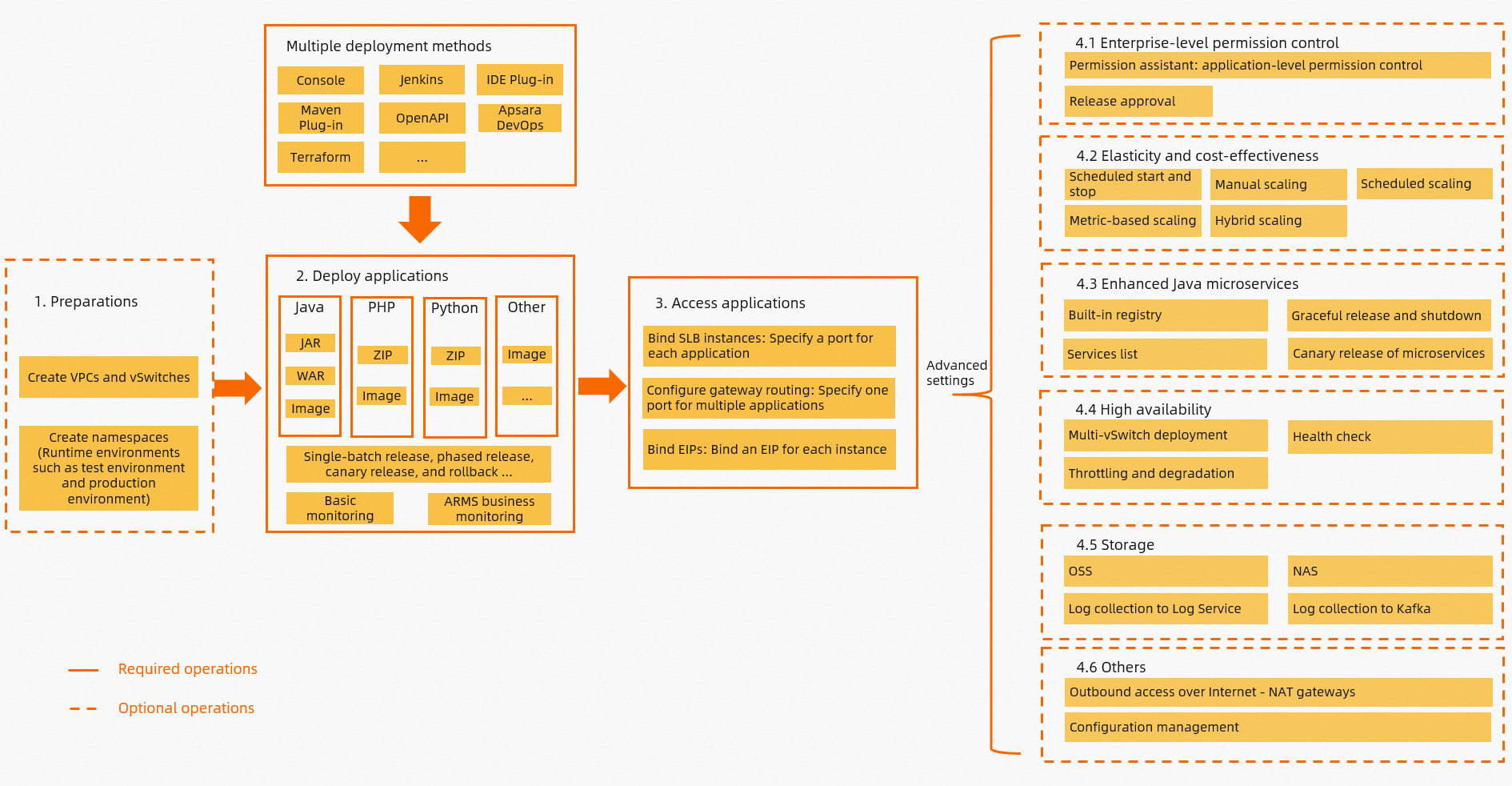
The workflow has four stages. Stages 1 to 3 form the minimum path to a running application. Stage 4 covers the capabilities that you add as your application moves toward production.
Plan resources and complete the preparations. Before you deploy an SAE application for the first time, plan your Virtual Private Cloud (VPC), vSwitches, and namespaces. Namespaces separate environments such as testing, staging, and production. See Before you begin in this topic and Prerequisites.
Deploy your application. Deploy the application in the SAE console. For details, see Application deployment and Deploy an application in this topic. In addition to console-based deployment, SAE supports deployment through Jenkins, IDE plug-ins, Maven plug-ins, Terraform, OpenAPI, Alibaba Cloud DevOps, and the kubectl-sae tool.
NoteIf this is the first time that you deploy an application to SAE, create the application in the SAE console.
Make your application accessible. Choose an access method based on how clients reach the application. For a full comparison of the methods and their implementations, see Application access in this topic.
Ingress (recommended) — One port serves multiple applications, and traffic is routed to different applications based on domain names and paths. For details, see Configure an ingress.
Service — One port serves one application. Use a Service when you need Layer 4 TCP access or when domain-based access is not available. To expose a Service with a Network Load Balancer (NLB) instance, see Bind an NLB instance to an application.
Elastic IP address (EIP) — One instance can be bound to one EIP, which lets the instance both send traffic to and receive traffic from the Internet. For details, see Configure an EIP to enable public access for an SAE instance.
Configure advanced features. The following sections of this topic describe the capabilities that you can add to an SAE application:
Access control: Permission configuration
Elasticity for cost reduction and efficiency: Elasticity
Java microservices enhancements: Microservices
High availability (HA): High availability
Storage: Storage
Before you begin
If you are new to SAE, watch the video to learn about SAE and its basic operations.
For details about the service, see What is Serverless App Engine?.
Prerequisites
Prepare the following items before your first deployment:
Network resources — Plan a VPC and its vSwitches. When you create a vSwitch, plan the number of IP addresses as described in Limits and quotas.
Namespaces — Plan the namespaces that separate your testing, staging, and production environments.
Application source — Prepare a code package or a container image. For the supported sources, see Deployment sources.
Console entry — Create your first application in the SAE console.
For details, see Prerequisites.
Limits and quotas
Account for the following limits during planning. Each one affects whether an application can be created, scaled, or observed.
System disk — SAE provides 20 GB of system disk storage. To read from or write to external storage, use Apsara File Storage NAS or Object Storage Service (OSS). For details, see Storage.
Real-time logs — The real-time log feature displays 500 lines of log data. To view more log data, use file log collection. For details, see Logs.
EIP quantity — When each instance is bound to an EIP, make sure that the number of EIPs is at least the number of instances plus one. If EIPs are insufficient, instance creation fails and the instance cannot serve traffic.
vSwitch IP addresses — Plan 100 or more IP addresses for each vSwitch, because insufficient IP addresses cause creation failures and elastic scaling failures.
Port mapping — A Service exposes one port for one application. An ingress exposes one port for multiple applications.
Deploy an application
This section describes the deployment sources that SAE supports, the settings that you configure at deployment time, the automated delivery channels, and how you release, roll back, and grant access to an application.
Deployment sources
SAE supports code package deployment and image deployment.
Startup command and parameters
The startup command is defined differently for each deployment source.
Image deployment — Define the startup command and its parameters directly in the Dockerfile. You can also override the startup command when you create the application.
Code package deployment — Configure the parameters of the application startup command. For Java applications, the default command format is
java [-Options] -jar jarfile [arg...], in which you can customize the[-Options]and[arg...]parameters.
Environment variables
An application requires specific environment variables to run in the system before its commands can run. Environment variables are stored as key-value pairs. Each application has its own environment variables, which do not affect other applications. For details, see Configure environment variables.
Hosts binding
With Hosts binding, an SAE application can use a domain name instead of an IP address to access external services.
Database whitelist
Compared with deploying applications directly on Elastic Compute Service (ECS) instances, SAE runs applications in containers, so the IP address can change each time you deploy an application. The CIDR block of the vSwitch that the application is bound to does not change, so add the vSwitch CIDR block to the database whitelist. For details, see Access Alibaba Cloud databases from applications.
CI/CD and deployment plug-ins
In addition to console and API deployment, SAE integrates with many CI/CD tools, typically Alibaba Cloud DevOps and Jenkins, so that deployment starts automatically after a code commit. If you use Java, SAE also provides a set of deployment plug-ins, including plug-ins for Maven, IntelliJ IDEA, and Eclipse. For details, see Overview of application hosting.
To manage SAE resources as code, use Terraform. For details, see terraform-provider-alicloud and Terraform overview.
For local development and joint debugging against services that already run on the cloud, see Microservices development.
Release and rollback
SAE supports single-batch release, phased release, and canary release. If a release causes a problem, you can roll the application back to a historical version. For details, see Upgrade and roll back an application.
Permission configuration
SAE supports fine-grained access control at the namespace, application, and read/write levels, and the permission assistant simplifies the configuration process. For details, see SAE permission assistant.
Application access
This section covers the networking concepts that SAE builds on, the access methods for each traffic direction, and the comparisons that help you choose between them. For details, see Application access and traffic management.
In SAE, a Service is exposed with an NLB or a Classic Load Balancer (CLB) instance, whereas an ingress is implemented with an API Gateway, an Application Load Balancer (ALB), or an MSE cloud-native gateway.
Networking concepts
The following figure shows how these Alibaba Cloud network resources relate to each other.
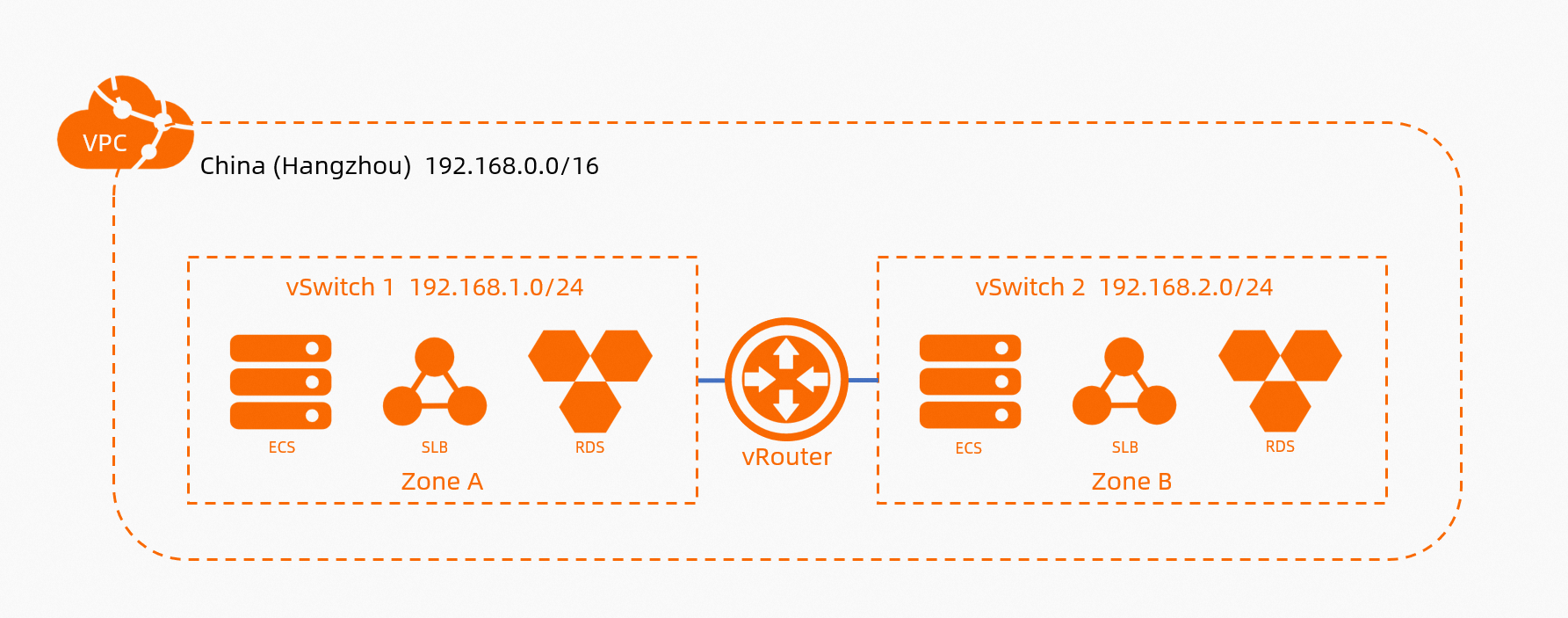
VPC — A custom private network that you create on Alibaba Cloud. VPCs are completely isolated from each other at the logical layer.
NoteBy default, a private network cannot access the Internet.
vSwitch — A basic network device of a VPC that corresponds to a physical data center. When you create a cloud resource in a VPC, you must specify the vSwitch that the resource connects to.
EIP — An Elastic IP address that can be bound to only one resource, such as an ECS instance or an SAE instance. The bound resource can both send traffic to and receive traffic from the Internet.
NAT Gateway — Allows resources in a VPC to access the Internet through SNAT. The key difference from an EIP is that an Internet NAT gateway serves all resources in a VPC, whereas an EIP serves only one resource in a VPC.
Access methods by traffic direction
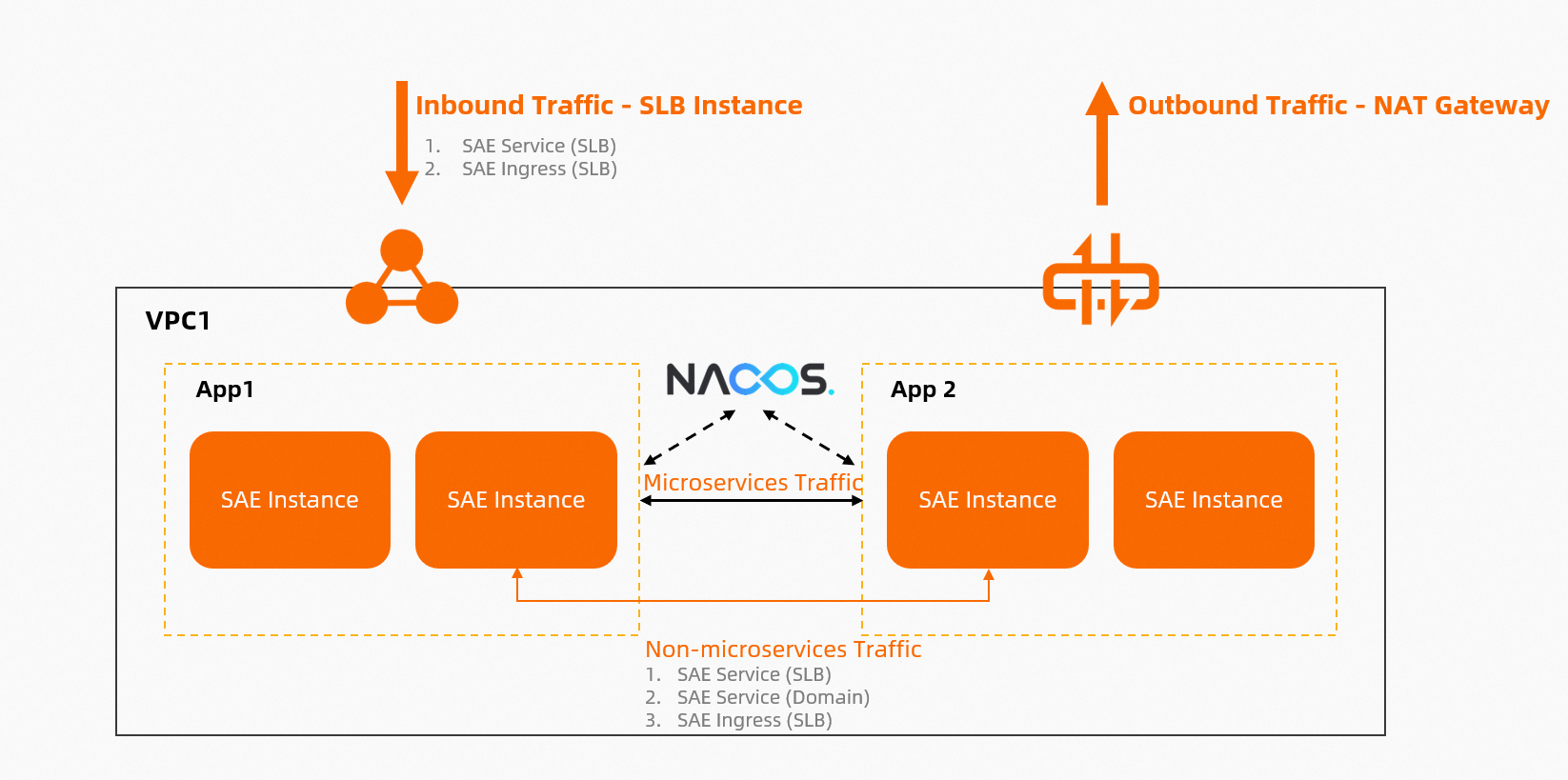
After you deploy an application to SAE, you may encounter the following network access requirements. The following figure shows the concepts.
Inbound access from the Internet
An SAE application that must be reachable over the Internet can use the following methods.
SAE Service: access the application through a Service, which you can expose with a public-facing NLB or a public-facing CLB.
SAE Ingress: access the application through an ingress, which you can implement with a public-facing API Gateway, a public-facing ALB, or a public-facing MSE cloud-native gateway. This method routes traffic to different SAE applications based on domain names and paths.
SAE EIP: bind an EIP to each instance of an SAE application so that the instance can both send traffic to and receive traffic from the Internet.
Outbound access to the Internet
An SAE application that must reach the Internet can use the following methods.
NAT Gateway: configure an Internet NAT gateway for the VPC associated with the SAE application so that all related SAE applications can access the Internet.
SAE EIP: bind an EIP to each instance of an SAE application so that the instance can both send traffic to and receive traffic from the Internet.
Mutual access between applications
Each deployment generates a new internal IP address, so SAE applications cannot access each other directly by instance IP address. Use the following methods instead.
SAE Service: access the application through a Service, which you can expose with an internal-facing NLB or an internal-facing CLB.
SAE Ingress: access the application through an ingress, which you can implement with an internal-facing API Gateway, an internal-facing ALB, or an internal-facing MSE cloud-native gateway. This method routes traffic to different SAE applications based on domain names and paths.
For mutual access between microservice applications through a service registry, see Service registry and configuration center.
Access to other resources in a VPC
SAE is built on the Alibaba Cloud VPC network, so it can access resources in the same VPC, such as ECS instances, ApsaraDB RDS, and ApsaraDB for Tair (Redis-compatible), without extra configuration. Conversely, Alibaba Cloud resources in the same VPC can also access SAE.
Confirm that the security group and the whitelist of the destination service allow the traffic. If access still fails, see Troubleshooting.
Compare the access methods
Service or ingress
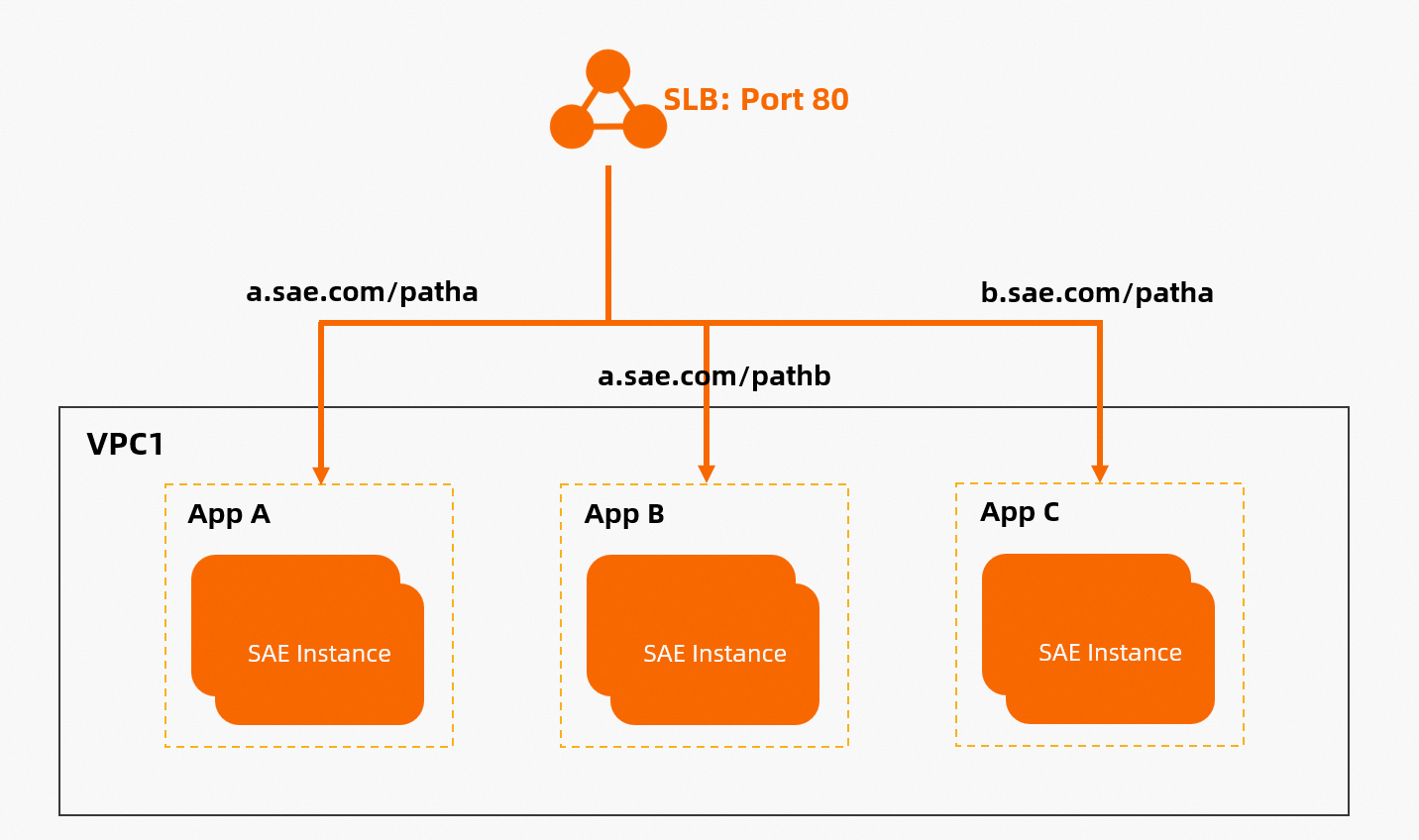
An SAE ingress routes traffic to different applications based on domain names and paths, as shown in the following figure, whereas a Service does not. Use an ingress first if it meets your requirements. Use a Service when you need Layer 4 TCP access or when domain-based access is not available.
ALB ingress or CLB ingress
ALB is an Alibaba Cloud load balancing service designed for application-layer scenarios such as HTTP, HTTPS, and QUIC. For ingress scenarios, use an ALB first. For details, see Introduction to the Server Load Balancer (SLB) product family.
NAT-based or EIP-based Internet access
The following figure shows EIP-based Internet access, where each instance is bound to one EIP. If EIPs are insufficient, instance creation fails and the instance cannot serve traffic.
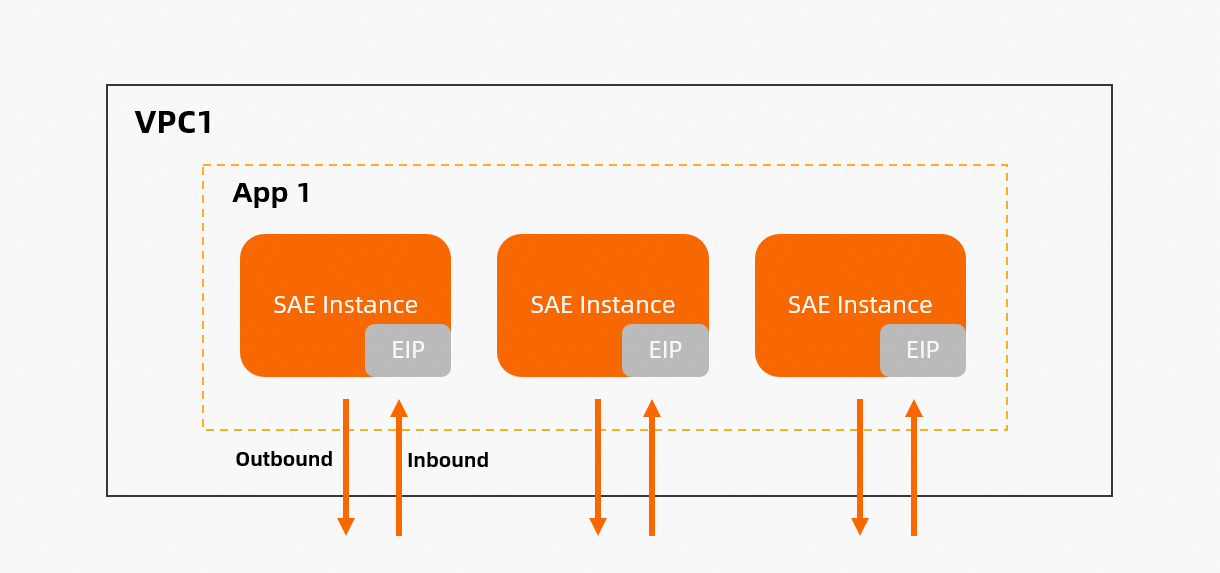
The following table describes the main differences between the NAT mode and the EIP mode.
Comparison item | NAT | EIP |
Effective scope | A NAT gateway can be controlled at the VPC or vSwitch level and provides a proxy service for all instances without a public IP address in the VPC or vSwitch. You need only one NAT gateway for a VPC or vSwitch, and all its instances can then access the Internet. | An EIP works at the instance level. For example, 10 instances require 10 EIPs. After an EIP is bound to an instance, the instance can both send traffic to and receive traffic from the Internet. |
Static public IP address | Yes. | No. SAE destroys the original instance and unbinds the original EIP only after the new instance is bound to an EIP. Therefore, make sure that the number of EIPs is at least the number of instances plus one. EIPs change and come from an IP address pool. |
Typical scenarios | The application scales automatically, new instances require outbound Internet access by default, and a static IP address is required. | Changing EIPs are acceptable and you need to connect to instances directly, such as for online meetings. You also want fine-grained control over the lifecycle of each instance. |
Billing | For billing details, see NAT Gateway billing. | For billing details, see EIP billing. EIPs are more cost-effective when you have no more than 20 instances. |
Microservices
SAE provides microservices enhancements for service registration and discovery, configuration management, development efficiency, and service governance.
Service registry and configuration center
SAE applications register with and discover each other through a service registry. Choose an implementation based on your requirements.
MSE Nacos (recommended) — Use the Nacos service registry of MSE, which serves as both a microservice registry and a configuration center.
Built-in Nacos service registry — The Nacos service registry that is built into SAE. For applications that use it, SAE provides basic service list query capabilities.
Built-in configuration management — The distributed configuration management (ACM) feature built into SAE, which serves as a configuration center.
For details about registration and discovery, including support for other service registries, see Service registration and discovery based on Nacos and other service registries.
Microservices development
Automatic deployment from an IDE
Compared with repackaging and redeploying an application each time, one-click deployment from an IDE reduces deployment time and improves development efficiency. For details, see Use Alibaba Cloud Toolkit to automatically deploy a microservice to SAE.
On-premises and cloud interconnection
After you adopt a microservices architecture, the number of applications grows. In extreme cases, local development and joint debugging require you to start all related microservice applications. To address this pain point, use the on-premises and cloud interconnection capability of the Alibaba Cloud Toolkit plug-in. For example, you can connect a local consumer directly to a provider deployed in SAE, so that you do not need to start the provider locally. This reduces development and debugging costs. For details, see Use Cloud Toolkit to implement interconnection between on-premises and cloud applications (IntelliJ IDEA).
Service governance
Service list
For applications that use the built-in Nacos service registry, SAE provides basic service list query capabilities. If you use a self-managed service registry or an MSE service registry, log on to the corresponding console to query services instead of viewing them in the SAE console. For details, see View the service list.
Microservice canary release
SAE manages the application lifecycle and also provides canary release capabilities for the release phase of microservice applications. For details, see Manage canary release rules and Perform a canary release for an application.
Multi-language support
PHP runtime support
SAE supports the following deployment methods for PHP applications.
Image: any PHP application architecture.
PHP ZIP package: any online application that uses a PHP-FPM and Nginx architecture.
SAE provides a PHP runtime environment by default.
PHP remote debugging
SAE has a built-in Xdebug plug-in that you can enable for remote debugging. To move files between an instance and your local machine while you debug, see Upload and download files.
Logs
SAE collects two kinds of logs: business file logs, which are logs in the container log path, and container standard output (stdout) logs. Choose a destination based on how much log data you need and how you want to analyze it.
Real-time logs in the console — The real-time log feature of SAE displays 500 lines of log data. Use it to quickly inspect log output.
Simple Log Service (SLS) — SAE sends logs to SLS, where you can view an unlimited number of log lines, aggregate and analyze logs on your own, and integrate business logs with ease. To send stdout logs to SLS, first redirect the standard output to a file and then configure file collection.
Kafka — SAE sends logs to Kafka. Use Kafka when SLS collection does not fit your setup, for example when a Resource Access Management (RAM) user does not have the permissions to view SLS logs.
File logs
SAE integrates SLS log collection, and you need only to enable it in the SAE console. Compared with deploying applications directly on ECS instances, where you maintain the list of collection machines manually, SAE connects to SLS log collection automatically on each deployment and scale-out after you configure the collection directory or collection file. You can then search logs by keyword in the SLS console. For details, see Configure log collection to SLS.
To configure collection, go to the Log Configurations page and do the following:
Turn on Enable SLS Log Service.
Select Create New SLS Resources or Use Existing SLS Resources.
In the collection configuration table, select a Log Type, such as Container Standard Output, and set the Log Source, such as
stdout.log.Click Add to add more collection rules.
Log sources support wildcards. For example,
/tmp/log/*.logcollects all files that end with.login the/tmp/logdirectory and its subdirectories.
You can also set Logtail startup parameters with environment variables. For details, see Improve Logtail collection performance.
If you import the logs to Kafka instead, you can deliver the Kafka data to another persistent store, such as Elasticsearch, based on your business scenario, which makes it easier to manage and analyze logs centrally. For details, see Configure log collection to Kafka.
Real-time logs
SAE collects standard output logs automatically, retains the latest 500 entries, and lets you view them in the SAE console. For details, see View real-time logs.
On the Real-time Logs page, select an instance from the Pod Name drop-down list and set the Real-time Log Refresh Rate, which is 15s by default.
To keep standard output logs beyond the latest 500 entries, redirect them to a file:
In the args field of Startup Command Settings, enter
>> /tmp/stdout.log 2>&1to redirect the standard output to the/tmp/stdout.logfile.Configure file collection for
/tmp/stdout.logas described in File logs. You can also view the file online through Webshell, which is available only when the instance runs normally.
Storage
Each SAE instance has a system disk. If you need to read from or write to external storage, use Apsara File Storage NAS or OSS. With NAS and OSS, SAE also supports independent hosting of static files: it persists code, templates, and uploaded files generated at runtime, and shares files across instances. For the system disk capacity, see Limits and quotas.
In logging scenarios, use SLS instead of NAS or OSS. For details, see Configure log collection to SLS.
NAS
SAE supports Apsara File Storage NAS, which solves data persistence for application instances and data distribution between instances. NAS storage is accessible only after you mount it to an ECS instance or to SAE. For details, see Configure NAS storage.
OSS
OSS provides convenient tools and a console for visual bucket management. OSS suits read-intensive scenarios, such as mounting configuration files or front-end static files. After you configure OSS storage when you deploy an application in the SAE console, you can access the data in the OSS console. For details, see Configure OSS storage.
The ossfs tool cannot be used in log writing scenarios. For details, see ossfs 1.0.
Upload and download files
To download a file from an SAE instance to your local machine, log on to the instance through Webshell and use the built-in file upload and download feature. For details, see Upload and download files using Webshell.
In addition to NAS and OSS storage, you can use ossutil. NAS and OSS also simplify code development and debugging. You can diagnose an SAE application through routine checks or by uploading logs to OSS. For information about how to upload and download logs with Alibaba Cloud OSS, see Diagnose applications through routine checks.
Elasticity
SAE supports elastic policies such as manual scaling, scheduled scaling, metric-based scaling, hybrid scaling, and scheduled start and stop. Elasticity is a typical feature of cloud-native architectures and applications: it reduces machine costs and improves O&M efficiency.
Manual scaling
Manual scaling suits scenarios with manual O&M. Compared with scaling applications deployed directly on ECS instances, SAE scaling is based on container images and is faster. For details, see Manual scaling.
Scheduled scaling
Scheduled scaling suits scenarios with predictable traffic. For example, the catering and education industries have clear morning and evening business peaks every day, so you can configure different numbers of instances for different time periods to align server resources with actual business traffic. For details, see Configure an auto-scaling policy.
Metric-based scaling
Metric-based scaling suits scenarios with relatively unpredictable traffic. It currently supports metrics such as CPU, memory, TCP connections, QPS, and response time (RT). For details, see Configure an auto-scaling policy.
Hybrid scaling
Hybrid scaling suits scenarios that require both burst traffic handling and scheduled scaling, such as the Internet, education, and catering industries, where you adjust the number of instances at a fine granularity for known time periods.
For example, you set the maximum number of elastic instances to max and the minimum to min on workdays. If you do not need to keep min instances on weekends, configure another number of instances for weekends to reduce min. For details, see Configure an auto-scaling policy.
Scheduled start and stop
The scheduled start and stop feature starts and stops applications in batches by namespace on a schedule. For example, you can start and stop all applications in a development or test environment on a schedule. If a development or test environment is needed only from 08:00 to 20:00 every day and is idle for the rest of the time, configure scheduled start and stop in SAE to reduce costs. For details, see Create a scheduled start and stop rule.
Monitoring and alerts
SAE provides built-in infrastructure monitoring and ARMS Business Monitoring for Java and PHP. Alert management provides alert aggregation, notification, automatic escalation, and other features that help you detect and fix business alerts quickly.
Infrastructure monitoring
Infrastructure monitoring covers CPU, load, memory, disk, network, and TCP connections. For details, see Infrastructure monitoring. Infrastructure monitoring is currently powered by Alibaba Cloud CloudMonitor, so you can also log on to the CloudMonitor console to configure a custom monitoring dashboard.
Application monitoring
In a microservices architecture, a missing monitoring system makes it hard to detect and diagnose problems. SAE integrates Application Real-Time Monitoring Service (ARMS) to provide application dashboards, JVM monitoring, slow call monitoring, trace analysis, and alerting, which lowers the barrier for enterprises to adopt a microservices architecture. For details, see Application Monitoring.
The ARMS edition that an application integrates, and the fees that apply, depend on the application edition.
Professional Edition applications of SAE integrate the ARMS Premium Edition application monitoring feature. After you enable application monitoring, no extra fees are incurred and your application is monitored in real time. For details, see Professional Edition application monitoring.
Standard Edition applications of SAE integrate ARMS Basic Edition monitoring, which is free of charge after you enable application monitoring. Standard Edition also provides an entry point for enabling ARMS Premium Edition monitoring. After you enable ARMS Premium Edition on a Standard Edition application, extra fees are incurred and you must view the data in the ARMS console. For details, see Standard Edition application monitoring.
Alert settings
SAE lets you configure alerts for all the preceding monitoring items. For details, see Alert management.
High availability
After you deploy an application in SAE, three capabilities safeguard its availability: health checks tell you whether application instances and services run normally and help you locate problems when exceptions occur, multi-vSwitch deployment handles data center-level failures, and throttling and degradation protect the application from burst traffic.
Multi-vSwitch deployment
To handle data center-level failures, configure multiple vSwitches for production-grade SAE applications. When you create a vSwitch, plan a sufficient number of IP addresses, 100 or more, because insufficient IP addresses cause creation failures or elastic scaling failures. For details, see Switch vSwitches.
With multiple vSwitches, SAE scales resources automatically across multiple zones, so you do not need to track how resources are distributed and the overall resource pool stays available. For example, when a single point of failure or a zone failure occurs, SAE migrates the same number of faulty instances to healthy nodes or other zones.
Configure multiple vSwitches in either of the following ways.
At creation — Select two or more vSwitches in different zones to achieve multi-zone disaster recovery.
After creation — On the Application Information page, click the Multi-vSwitch Deployment link and add a vSwitch.
When you add a vSwitch, update the database whitelist accordingly. For details, see Access Alibaba Cloud databases from applications.
Graceful start and shutdown
When you deploy an application in SAE, the process usually scales out first and then scales in. Graceful start and shutdown of traffic involves two major pain points.
Whether a newly scaled-out instance is ready to handle traffic.
How to destroy an old instance gracefully.
SAE is built on Kubernetes and provides two health checks: the liveness probe for application instances and the readiness probe for application services. To address the two pain points, SAE supports the readiness probe. The readiness probe checks periodically whether an instance is ready, and SAE routes traffic to a new instance only after the instance is ready. If the check fails, SAE does not route traffic to the instance. Before an old instance is destroyed, it is removed from the traffic side, and you can configure a shutdown script and a wait time before the instance is destroyed. For details, see Configure health checks.
The liveness probe also checks periodically whether an instance has started. If the check fails, SAE restarts the container automatically. This feature supports automated O&M for exception scenarios, but it may lose the failure context and prevent you from investigating the cause. Decide whether to configure the liveness probe based on your scenario.
In addition to the readiness probe and the liveness probe, microservices scenarios require graceful shutdown for microservices to solve the caching problem of the service registry. Because the consumer client caches data, it cannot receive the offline notification of a microservice provider in time. As a result, you usually need to deregister the provider instance from the service registry and wait for the consumer cache to refresh. To solve this problem, SAE integrates with the graceful shutdown feature of Microservices Engine (MSE) and turns this process into a product capability.
In a production environment, features such as automatic elastic scaling and rollback or upgrade may cause short-term service unavailability or a large number of business monitoring errors. To address these pain points, SAE supports graceful start for microservices. A consumer can call a microservice provider as soon as the provider is registered with the service registry. At that point, however, the provider may still need further initialization, such as initializing the database connection pool. Enable graceful start for microservice applications with heavy traffic. For details, see Configure graceful start and shutdown.
Throttling and degradation
Whether an application uses a microservices or a monolithic architecture, it may crash suddenly when it faces burst traffic, such as in a flash sale, and a microservice application may also cause a cascading failure. For these high-traffic scenarios, SAE integrates the traffic protection capability of Microservices Engine (MSE), which lets you configure and manage throttling and degradation rules for Java applications with ease and safeguards application availability. For details, see Traffic protection.
Troubleshooting
Use the following entry points when an application does not run or cannot be reached.
Check whether instances and services run normally — Configure health checks, and view the results to locate problems when exceptions occur. For details, see Graceful start and shutdown.
Check the application output — View the latest standard output entries on the Real-time Logs page, or search collected logs in the SLS console. For details, see Logs.
Check network connectivity — Confirm that the security group and the whitelist of the destination service allow the traffic. For more troubleshooting steps, see FAQs.
Check a Java microservice registry or configuration center — Verify the nacos-client version, verify the configuration of the built-in configuration center (ACM) or the MSE configuration center, and make sure that namespace names are consistent.
Next steps
After your application runs, continue with the path that matches your goal:
Harden the release process and access control: see Deploy an application.
Add observability: see Logs and Monitoring and alerts.
Prepare for production-grade availability: see High availability.
Control the cost of a test environment: use Scheduled start and stop or Manual scaling to release instances that you no longer need.
For various business requirements, SAE provides related best practices. In addition to the elasticity, networking, storage, and Alibaba Cloud database access topics covered in this topic, the best practices also cover images, application acceleration, and JVM parameter configuration. For more common scenarios, see Best practices.