Application Real-Time Monitoring Service (ARMS) Alert Management provides alert convergence, notification, and automatic escalation to help you quickly detect and resolve business alerts.
Background information
Serverless App Engine (SAE) integrates ARMS Alert Management. The new version of ARMS Alert Management is available only to Alibaba Cloud accounts that activated SAE after 00:00 on April 30, 2021.
Architecture
Alert Management consists of five core modules: integration management, alert event management, notification policy management, collaborative alert handling, and alert handling analysis.

Integration management
Alert Management supports two types of integrations: default alert integration and third-party service integration.
Default alert integration
Default integrations are available for alerts from various ARMS services, such as Application Monitoring, browser monitoring, Managed Service for Prometheus, and synthetic monitoring. These integrations use periodic tasks to check your monitoring data for anomalies. When an anomaly is detected, these integrations send an alert event to the event management center through a default channel.
Third-party product integration
You can configure integrations to receive alerts from any third-party source. This allows you to centralize alert management in ARMS, providing a central location to handle alerts from all your systems, whether they are on-premises or in the cloud. Alert Management processes any alert sent to it as an alert event. An alert event has the following structure and constraints:
Data structure of an alert event
The data structure of an ARMS alert event is based on the open-source AlertManager format and includes the following fields:
Labels: A set of key-value pairs that represent the alert's metadata. A unique set of labels identifies a single alert event. Events with the same set of labels are merged. For example:
"alertname: High CPU Utilization".Annotations: A set of key-value pairs that provide additional, non-identifying information about the alert. For example:
"message: Alert content".StartsAt: The time when the alert event started.
EndsAt: The time when the alert event ended.
GeneratorUrl: A URL that links back to the source of the alert event.
Differences between labels and annotations
The set of labels uniquely defines an alert event. If any label value changes, a new alert event is generated.
Example:
The label set
{"hostname":"prod-host-01", "alertname":"High CPU Utilization", "ip":"192.168.0.3"}represents a specific alert (high CPU utilization on host 192.168.0.3). If the ip label changes, as in{"hostname":"prod-host-01", "alertname":"High CPU Utilization", "ip":"192.168.0.4"}, it creates a new and distinct alert (high CPU utilization on host 192.168.0.4).Changes in annotations do not create a new alert event. Multiple events with the same labels but different annotations are considered updates to the same alert.
Example:
If an alert with the annotation
{"value":"85", "message":"Host 192.168.0.3 CPU utilization is 85%, which exceeds the 80% threshold."}is sent again with a new annotation, such as{"value":"86", "message":"Host 192.168.0.3 CPU utilization is 86%, which exceeds the 80% threshold."}, it does not generate a new alert. Both events are treated as updates to the same ongoing alert.
You can configure deduplication fields for an integration. When specified, only these fields are used as labels to uniquely identify an alert event from that integration. If you do not configure deduplication fields, all labels are used to identify a unique alert event.
Alert event management
The alert event management module provides two ways to process events from alert sources:
Use an event processing flow to build simple processing pipelines. This allows you to reprocess alert events from any source to meet different data handling requirements.
Use event management features to perform deduplication, compression, denoising, and silencing on alert events. This helps consolidate alerts and reduce alert storms.
Event compression
By default, the alert event management module compresses events in two ways: by label and by time. The following sections describe how each method works.
Label-based compression
When an alert event triggers a notification, the system compresses it based on the grouping policy defined in the notification policy. If multiple events that match the policy share the same values for the specified grouping labels, the system automatically compresses them into a single notification. The following figure shows how three different events are compressed using two different grouping labels:

Time-based compression
Each alert event has a start time and an end time. If alert events with the same labels have overlapping time ranges, the system merges them into a single event. The start and end times of the merged event become the union of the original events' time ranges.

Notification policy management
A notification policy is essentially a subscription rule. You configure matching rules, and when an alert event meets the conditions, ARMS sends notifications according to the policy.
The following figure shows the relationship between event processing flows, event management, and notification policies.

Collaborative alert handling
You can handle alerts in the Alibaba Cloud Management Console or through DingTalk, WeCom, and Lark. Alert Management also supports group message synchronization, on-call scheduling, and escalation policies for collaborative alert handling. The following figure shows the alert handling process. For more information, see Handle alerts in an alert notification group.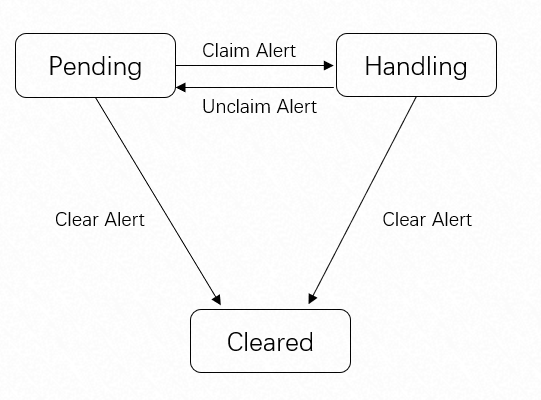
Benefits
When you deploy your services on Alibaba Cloud and use ARMS for monitoring, Alert Management helps you improve your operational efficiency in the following ways.
Globalized operations
Global templates allow you to manage alert rules for all regions from a single location.
Configure contacts and notification policies once and have them take effect globally.
Efficient, centralized management
Alert Management provides one-click integrations for common Alibaba Cloud monitoring tools and supports manual integration for other tools, making it easy to centralize maintenance.
The event ingestion module is stable and provides 24/7, uninterrupted event processing.
The system ensures low latency when processing large volumes of event data.
Timely and accurate notifications
Configure notification rules to merge events before sending notifications, which helps reduce alert fatigue for your operations staff.
Choose different notification methods, such as email, SMS, phone, or DingTalk, based on the urgency of the alert to notify the right contacts.
Use an escalation policy to send repeated reminders for alerts that remain unhandled after a specified period, ensuring timely resolution.
Fast and convenient alert management
Contacts can handle alerts at any time through DingTalk.
A common alert format allows contacts to analyze alerts more effectively.
Multiple contacts can work together to resolve alerts through DingTalk.
Real-time statistics and status analysis help you continuously improve alert resolution efficiency.