By Chenyu
The PolarDB-X JDBC driver implements high availability detection and seamless switching features on the application client. This allows applications to efficiently implement automatic high availability perception and switching without using components such as SLB or Proxy, thereby reducing service unavailable time.
The minimum system of the Standard Edition is implemented by three PolarDB-X nodes. Among the three nodes, the leader node provides read/write services, and the remaining two nodes can be two follower nodes or one follower node plus one logger node. The three nodes form a paxos group, and writing (transaction commit) can be completed only when the majority passes.
On the leader node, you can view cluster information through information_schema.alisql_cluster_global:
mysql> select * from information_schema.alisql_cluster_global;
+-----------+---------------------+-------------+------------+----------+-----------+------------+-----------------+----------------+---------------+------------+--------------+---------------+------------------+-----------+-------------+
| SERVER_ID | IP_PORT             | MATCH_INDEX | NEXT_INDEX | ROLE     | HAS_VOTED | FORCE_SYNC | ELECTION_WEIGHT | LEARNER_SOURCE | APPLIED_INDEX | PIPELINING | SEND_APPLIED | INSTANCE_TYPE | DISABLE_ELECTION | SERVER_IP | SERVER_PORT |
+-----------+---------------------+-------------+------------+----------+-----------+------------+-----------------+----------------+---------------+------------+--------------+---------------+------------------+-----------+-------------+
|         1 | 11.167.60.147:15791 |      335832 |          0 | Leader   | Yes       | No         |               9 |              0 |        335832 | No         | No           | Normal        | No               |           |           0 |
|         2 | 11.167.60.147:15792 |      335832 |     335833 | Follower | Yes       | No         |               9 |              0 |        335832 | Yes        | No           | Normal        | No               |           |           0 |
|         3 | 11.167.60.147:15793 |      335832 |     335833 | Follower | Yes       | No         |               1 |              0 |        335832 | Yes        | No           | Log           | No               |           |           0 |
+-----------+---------------------+-------------+------------+----------+-----------+------------+-----------------+----------------+---------------+------------+--------------+---------------+------------------+-----------+-------------+
3 rows in set (0.00 sec)
On any node, you can view the current node information through information_schema.alisql_cluster_local:
mysql> select * from information_schema.alisql_cluster_local;
+-----------+--------------+---------------------+--------------+---------------+----------------+--------+-----------+------------------+---------------------+---------------+------------------+---------------+-----------+-------------+
| SERVER_ID | CURRENT_TERM | CURRENT_LEADER      | COMMIT_INDEX | LAST_LOG_TERM | LAST_LOG_INDEX | ROLE   | VOTED_FOR | LAST_APPLY_INDEX | SERVER_READY_FOR_RW | INSTANCE_TYPE | DISABLE_ELECTION | APPLY_RUNNING | LEADER_IP | LEADER_PORT |
+-----------+--------------+---------------------+--------------+---------------+----------------+--------+-----------+------------------+---------------------+---------------+------------------+---------------+-----------+-------------+
|         1 |           20 | 11.167.60.147:15791 |       335832 |            20 |         335832 | Leader |         1 |           335832 | Yes                 | Normal        | No               | No            |           |           0 |
+-----------+--------------+---------------------+--------------+---------------+----------------+--------+-----------+------------------+---------------------+---------------+------------------+---------------+-----------+-------------+
1 row in set (0.00 sec)
IP_PORT and CURRENT_LEADER are the direct connection IP of the corresponding node and the paxos protocol port. This address is configured through the cluster_info configuration item when the cluster is initialized, and it is fixed and cannot be modified after cluster initialization.
cluster_id is a unique ID configured through the cluster_id configuration item when the cluster is initialized. This value must be globally unique and cannot be the same as other clusters. It is fixed and cannot be modified after cluster initialization. port is the MySQL service port. It is recommended that the difference between this port value and the paxos port value described above is 8000, such as 7791+8000=15791 shown below. Every node in the cluster must meet this condition. If the difference is incorrect, the leader node address cannot be found through the follower node.
mysql> select version(), @@cluster_id, @@port;
+----------------------------------+--------------+--------+
| version()                        | @@cluster_id | @@port |
+----------------------------------+--------------+--------+
| 8.0.32-X-Cluster-8.4.20-20241014 |         7790 |   7791 |
+----------------------------------+--------------+--------+
1 row in set (0.00 sec)The Enterprise Edition consists of stateless compute nodes and multiple stateful data nodes. The data nodes are the Standard Edition mentioned above.
On any compute node, you can view the current cluster node information through the show mpp instruction:
mysql> show mpp;
+-------------------+------------------+------+--------+-------------+-------------+
| ID                | NODE             | ROLE | LEADER | SUB_CLUSTER | LOAD_WEIGHT |
+-------------------+------------------+------+--------+-------------+-------------+
| polardbx-polardbx | 30.221.98.5:8527 | W    | Y      |             | 100         |
+-------------------+------------------+------+--------+-------------+-------------+
1 row in set (0.03 sec)
NODE is the direct connection IP and service port of the corresponding node. The ROLE field indicates the role of the current node, which may be roles such as W (read/write node) or R (read-only node). SUB_CLUSTER indicates the sub-cluster to which the current node belongs. LOAD_WEIGHT indicates the percentage of traffic that the current node should bear.
As a standard JDBC driver, the PolarDB-X driver implements the java.sql.Driver API. When the application invokes DriverManager.getConnection, it returns the Connection object of the corresponding node in the cluster described by the corresponding JDBC URL, and the application performs a series of operations. The flow from URL to Connection is described in detail below:
jdbc:polardbx://192.168.1.100:3306,192.168.1.101:3306,192.168.1.102:3306/test_db?
clusterId=-1&
haCheckConnectTimeoutMillis=3000&
haCheckSocketTimeoutMillis=3000&
haCheckIntervalMillis=5000&
slaveRead=false&
smoothSwitchover=true&
ignoreVip=trueInput: JDBC URL and connection parameters provided by the user
Procedure:
• Detect URL prefix jdbc:polardbx://
• Parse address list: 192.168.1.100:3306,192.168.1.101:3306,192.168.1.102:3306
• Fetch database name: test_db
• Parse high availability parameters: connection timeout, detection interval, smoothing switch, etc.
The address list fetched from the JDBC URL and the clusterId (if any) form a feature label, which uniquely identifies the high availability manager of the cluster.
• If the corresponding high availability manager exists, the system returns the existing one and updates the relevant configurations in the high availability manager by using the new JDBC URL parameters and attribute configuration.
• If the high availability manager does not exist, the system initializes a new high availability manager by using the JDBC URL and relevant attribute configuration, and caches the high availability manager.
When the application accesses a JDBC URL for the first time, the high availability manager needs to be initialized. This process involves the following cases:
• If a valid clusterId is specified in the JDBC URL, the system considers that this is a connection string connected to the Standard Edition.
• If no valid clusterId is specified in the JDBC URL, the cluster Basic Information probing flow is triggered.
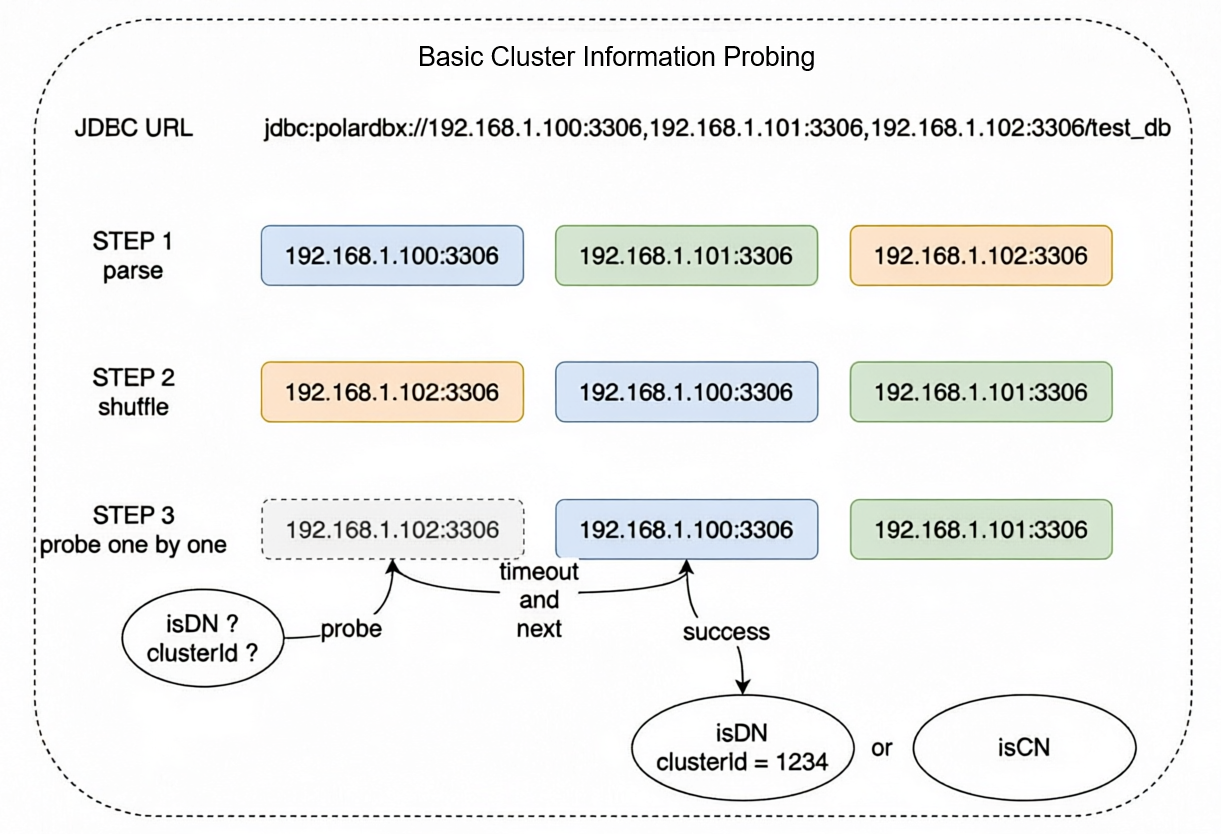
• Randomly shuffle the order of the address List fetched from the JDBC URL.
• Perform serial probing to mainly obtain the following two pieces of information:
• The probing flow is to establish a connection and execute a probing SQL statement. The connection and query execution timeouts are specified by haCheckConnectTimeoutMillis and haCheckSocketTimeoutMillis. The default values are both 3 s.
• Once valid information is detected, the probing flow ends.
• If the cluster is Standard Edition:
{java.io.tmpdir} folder using XCluster-{clusterId}-{address_list}-IPv[4|6].json as the file name.• If the cluster is Enterprise Edition:
{java.io.tmpdir} folder using PolarDB-X-{address_list}.json as the file name.• Only when a valid clusterId is provided, the driver can determine that the driver is connected to a Standard Edition cluster, and the driver can initialize the high availability manager without additional probing.
• In any other case, the cluster Basic Information probing flow is triggered when the application accesses a JDBC URL for the first time.
To reduce the probing storm on the cluster during a batch restart of the application:
• Under normal circumstances, the cluster Basic Information probing takes {connect_rt} + {request_rt} time to complete, which is several milliseconds under default configurations.
• If unreachable nodes exist, the host has not enabled the ICMP host unreachable detection service, and the Target host has not enabled the feature of returning RST packets for closed ports, the system needs to wait until the connection timeout before probing the next node. The duration is n * {haCheckConnectTimeoutMillis} + {connect_rt} + {request_rt}, where n is the quantity of unreachable nodes before the Normal node in the probing order. For example, if 3 IPs are configured and the first 2 are unreachable, the process takes 2 * 3 = 6 s under default configurations.
• In extreme cases, if all requests are stuck and completed before the timeout border, the worst-case duration is m * ({haCheckConnectTimeoutMillis} + {haCheckSocketTimeoutMillis}), where m is the quantity of addresses in the address list. For example, if 3 nodes are configured, the longest time required is 3*(3 + 3) = 18 s under default configurations.
The last step is to obtain the conditional node collection from the high availability manager, select a suitable node using the load balancing algorithm to establish a connection, and return the connection to the application. The specific details are as follows:
• Obtain the connectTimeout value passed in the JDBC URL or properties.
• If the high availability manager has not obtained active nodes (in the asynchronous probing flow), adjust connectTimeout to at least 3* ({haCheckConnectTimeoutMillis} + {haCheckSocketTimeoutMillis}).
• Retrieve active nodes from the high availability detector (for Standard Edition, this is the active leader node; for Enterprise Edition, this is the active compute node collection). Filter them according to the parameter conditions in the JDBC URL. If no node meets the requirements, wait for a maximum of the time specified by connectTimeout.
• If a timeout occurs, an exception in the following format is thrown:
Communications link failure

No available nodes meet the conditions in {timeout} ms.The high availability manager is a singleton for each backend cluster, distinguished by the feature labels described earlier. The high availability manager is a background asynchronous detection job that periodically refreshes information.
• If there is currently a known leader node:
• If there is no known leader node, the all-node parallel probe flow is triggered.
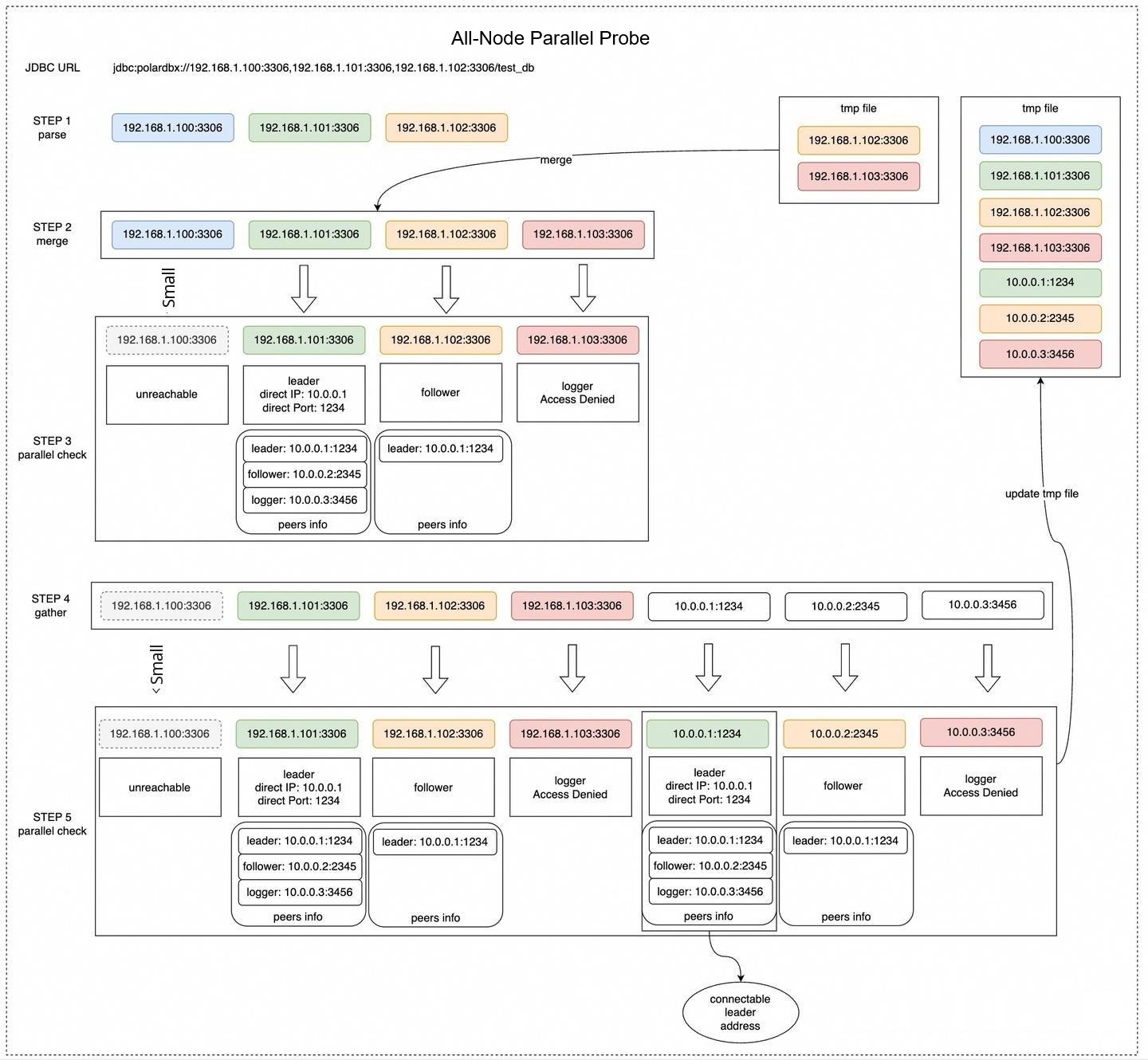
This flow sends probe instructions to all known nodes, Filters the correct nodes based on the clusterId, collects and integrates the cluster status, and perceives the topology information of the cluster. The main flow is as follows:
• Read the cluster cache information in the tmp folder and obtain the union with the node addresses in the JDBC URL.
• Probe the address union in parallel and record the following information:
If the Target node is a leader node:
If the target node is a follower node:
• Based on the probe information above, obtain the union of all cache address information, node addresses in the JDBC URL, and inferred node address information to organize the complete cluster topology information.
• Serialize the cluster topology information and persist it to the cache file. An example of the cache file content is as follows:
[
  {
    "tag": "10.0.84.238:3001",
    "connectable": false,
    "host": "10.0.84.238",
    "port": 3001,
    "paxos_port": 11001,
    "role": "Follower",
    "version": "8.0.41-X-Cluster-8.4.20-20250916",
    "cluster_id": 81,
    "update_time": "2025-10-28 23:08:21 GMT+08:00"
  },
  {
    "tag": "10.0.84.238:33090",
    "connectable": true,
    "host": "10.0.84.251",
    "port": 3001,
    "paxos_port": 11001,
    "role": "Leader",
    "peers": [
      {
        "tag": "10.0.84.238:3001",
        "connectable": false,
        "host": "10.0.84.238",
        "port": 3001,
        "paxos_port": 11001,
        "role": "Follower",
        "version": "8.0.41-X-Cluster-8.4.20-20250916",
        "cluster_id": 81,
        "update_time": "2025-10-28 23:08:21 GMT+08:00"
      },
      {
        "tag": "10.0.84.239:3001",
        "connectable": false,
        "host": "10.0.84.239",
        "port": 3001,
        "paxos_port": 11001,
        "role": "Follower",
        "version": "8.0.41-X-Cluster-8.4.20-20250916",
        "cluster_id": 81,
        "update_time": "2025-10-28 23:08:21 GMT+08:00"
      },
      {
        "tag": "10.0.84.251:3001",
        "connectable": false,
        "host": "10.0.84.251",
        "port": 3001,
        "paxos_port": 11001,
        "role": "Leader",
        "version": "8.0.41-X-Cluster-8.4.20-20250916",
        "cluster_id": 81,
        "update_time": "2025-10-28 23:08:21 GMT+08:00"
      }
    ],
    "version": "8.0.41-X-Cluster-8.4.20-20250916",
    "cluster_id": 81,
    "update_time": "2025-10-28 23:08:21 GMT+08:00"
  },
  {
    "tag": "10.0.84.239:3001",
    "connectable": false,
    "host": "10.0.84.239",
    "port": 3001,
    "paxos_port": 11001,
    "role": "Follower",
    "version": "8.0.41-X-Cluster-8.4.20-20250916",
    "cluster_id": 81,
    "update_time": "2025-10-28 23:08:21 GMT+08:00"
  },
  {
    "tag": "10.0.84.251:3001",
    "connectable": false,
    "host": "10.0.84.251",
    "port": 3001,
    "paxos_port": 11001,
    "role": "Leader",
    "version": "8.0.41-X-Cluster-8.4.20-20250916",
    "cluster_id": 81,
    "update_time": "2025-10-28 23:08:21 GMT+08:00"
  }
]
• First, scan the topology to find the node where {host}:{port} == {tag} and {role} == "Leader" and {connectable} == true. This node is a directly connectable leader node. Update it to the active leader node record of the high availability manager.
• If no directly connectable leader node is found and the ignoreVip parameter configuration in the JDBC URL is false, find the node where {role} == "Leader" and {connectable} == true. This node is a reachable non-directly connectable leader node. Update it to the active leader node record of the high availability manager.
• If no active leader node is found, wait for a period of time and then continue to trigger the complete all-node parallel probe. The specific waiting time is as follows:
• If a leader node is found, wait for 10 ms, then attempt to Enabled a persistent connection and enter the leader ping probe pattern.
• If the leader ping pattern cannot be entered, wait for 3 s and then continue to trigger the complete all-node parallel probe.
After the high availability manager is initialized, as long as the leader address has been retrieved before, the current or most recently active leader address is returned instantly. A wait time is required to perceive the leader node only during initialization. The analysis by case is as follows:
• In the following situations, when the direct connection address is reachable, only one round of parallel liveness detection is required to obtain an active leader address. The duration is {connect_rt} + {request_rt}.
When ignoreVip=true, which is the default configuration.
When ignoreVip=false (must be specified in the JDBC URL).
• In the following situations, when the direct connection address is reachable, two rounds of parallel liveness detection are required to obtain an active leader address. The duration is 2 * ({connect_rt} + {request_rt}) + 500 ms.
ignoreVip=true, which is the default configuration, the application is starting for the first time (or the tmp folder does not contain valid cached cluster topology information), and the JDBC URL does not contain the direct connection address of the leader node.If the IP address is unreachable (for example, dirty IP addresses exist in the JDBC URL or cluster cached topology information), the host has not enabled the ICMP host unreachable detection service, and the target host has not enabled the feature of returning RST packets when closing ports, the system must wait until the connection times out before proceeding to the next round of liveness detection. Consequently, the time to detect the leader node will be extended to:
• One round of liveness detection: max({haCheckConnectTimeoutMillis}, {request_rt}). In the default configurations, this is 3 s.
• Two rounds of liveness detection: 2 * max({haCheckConnectTimeoutMillis}, {request_rt}) + 500 ms. In the default configurations, this is 2 * 3 + 0.5 = 6.5 s.
In extreme cases, if all Requests are stuck and complete just before the timeout boundary, the worst-case scenario is as follows:
• One round of liveness detection: max({haCheckConnectTimeoutMillis} + {haCheckSocketTimeoutMillis}, {request_rt}). In the default configurations, this is 3 + 3 = 6 s.
• Two rounds of liveness detection: 2 * max({haCheckConnectTimeoutMillis} + {haCheckSocketTimeoutMillis}, {request_rt}) + 500 ms. In the default configurations, this is 2 * (3 + 3) + 0.5 = 12.5 s.
Liveness detection in the Enterprise Edition is relatively simple. It involves a timed loop to refresh active nodes. The main flow is as follows:
• Read the cluster cache information in the tmp folder and obtain the union with the node addresses in the JDBC URL.
• Perform parallel liveness detection on the union of addresses and record the following information:
• Obtain the union of all show mpp Results and persist it to the cache file. The Content of the cache file is as follows:
{
    "PolarDB-X": [
        "30.221.98.5:8527#W#polardbx-polardbx##100"
    ]
}
• When ignoreVip=true, which is the default configuration, only the node address information in the collection returned by show mpp that contains the current connection address (that is, all direct connection addresses) is recorded as the active node addresses.
• When ignoreVip=false (must be specified in the JDBC URL), all nodes that can be connected and on which show mpp can be successfully executed (that is, all reachable addresses) are recorded as active node addresses.
• When there are no active nodes, wait for 500 ms to trigger liveness detection again. Otherwise, wait for 5 s to trigger liveness detection again.
After the high availability manager is initialized, as long as a Compute node address has been obtained and there are still alive Compute nodes, the system returns instantly. Only during initialization does the system need to wait for a period of time to detect Compute nodes. The following is an analysis based on different situations:
• In the following situations, when the direct connection address is reachable, only one round of parallel liveness detection is required to obtain an active Compute node address. The Duration is {connect_rt} + {request_rt}.
When ignoreVip=true, which is the default configuration.
tmp folder, containing the direct connection addresses of active compute nodes.ignoreVip=false (must be specified in the Java Database Connectivity (JDBC) URL)
tmp folder, containing the direct connection addresses or non-direct connection addresses (Kubernetes NodePort or VIP) of active compute nodes.• In the following cases, when the direct connection address is reachable, two rounds of parallel probing are required to retrieve the active compute node address. The duration is 2 * ({connect_rt} + {request_rt}) + 500 ms.
ignoreVip=true, which is the default configuration, the application is started for the first time (or there is no valid cluster topology information cached in the tmp folder), and the JDBC URL does not contain the direct connection addresses of valid compute nodes.The durations for one round and two rounds in cases where the IP address is unreachable and in extreme cases are the same as those in the Standard Edition. Therefore, the details are not described again in this article.
This article systematically describes the core mechanism of the PolarDB-X JDBC driver for implementing high availability probing and imperceptible switchover on the client side. It covers the complete flow from connection URL parsing, cluster type detection, and topology information probing to node status maintenance and connection routing selection. This design enables applications to quickly detect cluster status changes and automatically reconnect to the currently active service node in abnormal scenarios such as primary/secondary switchover, node failure, or network jitter in the database, without relying on external Server Load Balancers (such as SLB) or intermediate agent layers (such as Proxy). This significantly reduces the service interruption time and improves the availability and resilience of the overall system.
Specifically:
• For the Standard Edition (centralized architecture), the driver dynamically builds and maintains the cluster topology by parsing the information_schema.alisql_cluster_global and alisql_cluster_local system tables and combining the Leader/Follower role information in the Paxos protocol. By using the caching mechanism (local tmp file) and asynchronous probing jobs, the driver can complete the discovery and switchover of the Leader node in "seconds" or even "milliseconds" in most cases. It performs particularly well when the application is not started for the first time or when no valid direct connection address exists in the URL.
• For the Enterprise Edition (distributed architecture), the driver retrieves the compute node list by executing the SHOW MPP instruction and strategically filters active nodes based on parameters such as ignoreVip. Its probing logic is more lightweight, but it also possesses cache reuse, parallel probing, and failed retry capabilities. This ensures that stable connections are maintained after the scaling of compute nodes or failover.
In addition, the driver effectively mitigates the "probing storm" that may be caused when a large-scale application restarts. This is achieved through precise timeout control (such as haCheckConnectTimeoutMillis and haCheckSocketTimeoutMillis), address shuffling, and a reasonable combination of serial/parallel probing policies. This balances probing efficiency and cluster load pressure.
In actual production environments, we recommend that users:
clusterId (for the Standard Edition) to skip the initial probing phase and accelerate the first connection.ignoreVip=true: Only direct connection addresses are used. This applies to environments where the target host IP address can be directly connected. If you use a Kubernetes service, VIP, or cloud vendor load balancer, you must set this parameter to false to include virtual addresses.In summary, the high availability probing mechanism of the PolarDB-X driver is a key manifestation of its "client smart routing" capability. It not only simplifies the application architecture but also provides robust data access assurance for business scenarios with strict requirements for high availability, such as finance and E-commerce. In the future, with the evolution of capabilities such as multi-active architecture and cross-region disaster recovery, this mechanism is expected to be further extended to support more complex failover and QoS policies.
From Storage Engines to Binlogs: Why MySQL’s DuckDB Integration is More Elegant than PostgreSQL’s
ApsaraDB - June 12, 2026
ApsaraDB - May 16, 2025
ApsaraDB - January 29, 2026
ApsaraDB - August 13, 2024
ApsaraDB - March 27, 2024
ApsaraDB - November 1, 2022
 Application High Availability Service
Application High Available Service is a SaaS-based service that helps you improve the availability of your applications.
Learn More PolarDB for MySQL
Alibaba Cloud PolarDB for MySQL is a cloud-native relational database service 100% compatible with MySQL.
Learn More Time Series Database (TSDB)
TSDB is a stable, reliable, and cost-effective online high-performance time series database service.
Learn MoreMore Posts by ApsaraDB


