By Huaxiong Song

Following the previous article "Stop Complaining About MySQL! When DuckDB Embraces MySQL in the AI Era" and the AliSQL Innovate User Community conference, we officially launch the "DuckDB Technical Interpretation" series. This topic is the first in the series. It focuses on data compression and archiving capabilities. It explains how AliSQL natively supports high-density storage and efficient analysis by deeply integrating DuckDB while maintaining compatibility with the MySQL ecosystem.
As businesses grow, storage overhead and the analyzability of historical data often become bottlenecks at the same time. On one hand, InnoDB uses row store and index pages as its core organization method. This causes disk usage to increase rapidly in wide table, log, and analytical query scenarios. On the other hand, users want to retain data for longer periods for analytical processing (AP) analysis and tracing. They want to query and reuse archived data at any time.
AliSQL introduces DuckDB as a storage engine. This gives MySQL stronger compression and scanning capabilities in archiving and analysis scenarios. Data is organized and stored in a columnar format. During the checkpoint write phase, the system executes adaptive encoding and compression selection for each column. This significantly reduces the storage volume and improves the efficiency of columnar scanning queries. Building on this, AliSQL further optimizes the DuckDB compression procedure. It combines the hardware compression capabilities of the storage tier to further reduce storage costs. This topic briefly analyzes the compression principles of DuckDB. It also explains the value of the AliSQL DuckDB storage engine for archiving and AP analysis through comparisons and practices.
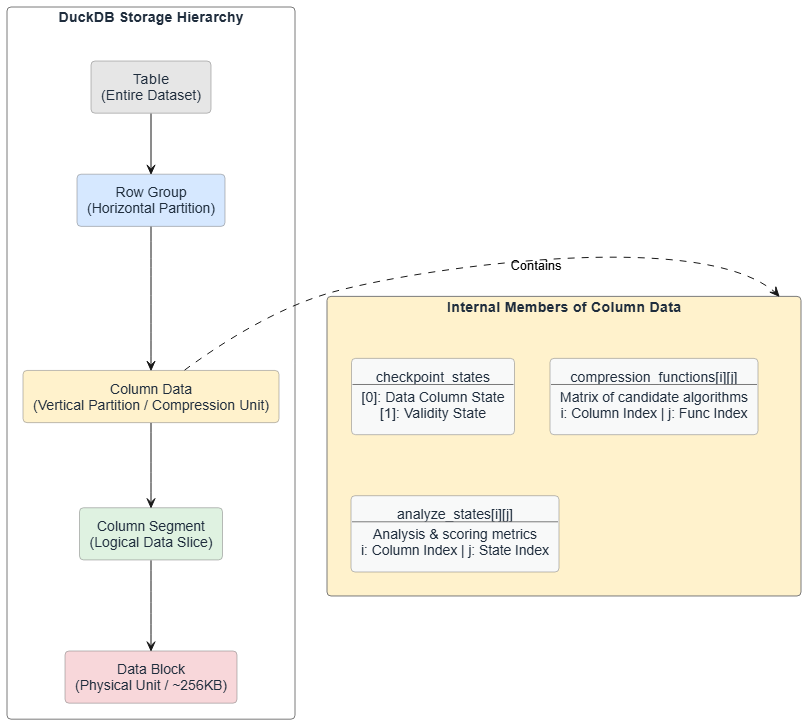
The table storage file format in DuckDB can be abstracted into four levels. A table is first horizontally chunked by row to form multiple row groups. Each row group is then vertically chunked by column into multiple column data. Each column data is further horizontally chunked by row into multiple column segments. A column segment corresponds to the actual data unit stored on disk. It is usually mapped to a data block of about 256 KB. In some cases, it may share the same data block with other column segments.
In the levels of the table storage file format, the processing unit for DuckDB data compression is column data. Inside a column data, three main members are closely related to compression: the checkpoint state set checkpoint_states, the compression function set compression_functions, and the compression analysis state set analyze_states. The checkpoint_states set saves the context information of the column during the checkpoint procedure. In a general column data, the size of checkpoint_states is usually 2. checkpoint_states[0] is associated with the data column itself. checkpoint_states[1] is associated with the validity column. The compression_functions set is a two-dimensional array. It saves the list of available candidate compression functions for each column. It is denoted as compression_functions[i]j. The analyze_states set is also a two-dimensional structure. It saves the analysis state or compression effect information of a specific column under a specific compression algorithm. It is denoted as analyze_states[i]j.
Before executing compression, DuckDB first determines the best compression algorithm for each column through scan analysis. For a column data, the main flow of selecting the best compression algorithm is as follows:
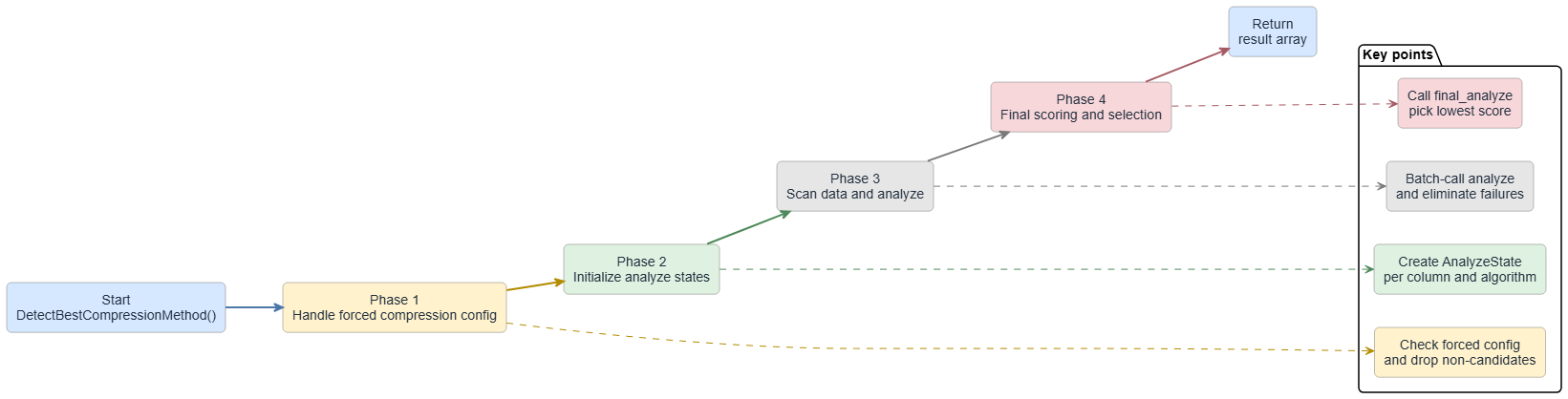
The available compression algorithms for each column depend on the column data type and configurations. We omit the details here. The following simplified example illustrates how DuckDB compresses data. Assume that a table contains only an id column of the INT type. The compression flow is as follows:
ColumnDataCheckpointer adds the data column and validation column of the id column to checkpoint_states.id data column may include UncompressedFun, RLEFun, BitpackingFun, and ZSTDFun. The candidate compression functions for the id validation column may include UncompressedFun and RoaringFun.init_analyze API of the compression function sets for the id data column and id validation column. This populates the two-dimensional array analyze_states.id data column using the four compression functions. Analyze the id validation column using the two compression functions. Save the analysis results to the analysis state set. Then, traverse the analysis state set to determine and save the optimal compression algorithm for each column.• Numeric and Boolean types
| Algorithm | Principle | Scenarios |
|---|---|---|
| RLE | Compresses consecutive identical values into (value, repeat count) pairs. When scanning data, it maintains the current value and repeat counter. When the value changes, it writes the RLE entry for the previous value. It uses a 16-bit counter and supports up to 65,535 repeats. | Suitable for data with many consecutive identical values. |
| Bitpacking | Dynamically selects the minimum number of bits for storage based on the data range. It supports four patterns: CONSTANT (constant value), CONSTANT_DELTA (constant difference), FOR (Frame-of-Reference, subtracting the minimum), and DELTA_FOR (increment + FOR). It selects the optimal pattern by analyzing the data distribution. | Suitable for data with a limited range, such as enumerations and counters. |
| Constant | All values in the entire segment are the same or all NULL. It stores only the constant value and quantity. It does not compress data. Instead, it evaluates using statistics information and directly pads constant values during a scan. | This applies to constant columns. |
| Uncompressed | It directly stores raw data and performs no compression. | It serves as a fallback for all compression algorithms. Use it when a compression algorithm does not apply or the compression overhead exceeds the benefits. |
• String
| Algorithm | Principle | Scenarios |
|---|---|---|
| Dictionary | Build a string dictionary. Override strings with integer indexes. Maintain a hash table for quick lookups. Store the dictionary from back to front. Compress the index array using bit packaging. This is valid when the total size of the dictionary and index is less than the original strings. | This applies when a string column contains many duplicate values. Use DICT_FSST. |
| FSST | Build a static symbol table. Map common character sequences (2 to 8 bytes) to short encodings (1 byte). Build an optimal symbol table by analyzing string data. Then, encode all strings. Revert the strings quickly using the symbol table during decoding. | This applies when strings contain duplicate character patterns. Use DICT_FSST. |
| DICT_FSST | This combines dictionary compression and secondary compression using Fast Static Symbol Table (FSST). First, build a dictionary. When the dictionary size exceeds the threshold (4096 bytes), compress the dictionary using FSST. FSST builds a symbol table and replaces common character sequences with short encodings. | This applies to data that has both duplicate strings and internal string patterns. |
| ZSTD | General compression algorithm. | This applies to all data types and serves as a fallback. It offers good generality. However, it might not perform as well as dedicated algorithms for specific data types. |
• Floating-point number
| Algorithm | Principle | Scenarios |
|---|---|---|
| ALP | Compress data using the local linear attribute of floating-point numbers. Transform floating-point numbers into integers using multiplication factors and exponents. Then, use bit packaging. For values that cannot be precisely transformed, store them as abnormal values. | This applies to floating-point numbers that change regularly. |
| ALPRD | Based on ALP compression, apply delta encoding and run-length encoding (RLE) to the transformed integer sequence. First, transform floating-point numbers into integers using ALP. Then, compute the delta (difference between adjacent values). Apply RLE to the delta sequence. This combines the trend prediction of ALP and duplicate value compression of RLE. | This applies to floating-point data with both trends and duplicate values. |
| Chimp | Use XOR operations to compress floating-point numbers. Perform an XOR operation between the current value and a reference value (usually the previous value). The XOR result usually contains many leading zeros and trailing zeros. Store only the valid bytes of the XOR result, along with the quantity of leading zeros and trailing zeros. | This applies to floating-point data with similar adjacent values. |
| Patas | This is similar to Chimp, but it uses a ring buffer to maintain multiple reference values. For the current value, find the most similar reference value in the ring buffer for XOR compression. Improve the compression ratio by maintaining recent values as candidate references. | This applies to floating-point data with periodic patterns or local similarities. |
• Validation type
| Algorithm | Principle | Scenarios |
|---|---|---|
| Roaring | Use the Roaring Bitmap algorithm to compress sparse bitmaps. Divide the bitmap into fixed-size containers (default 1024 bits). Each container selects a storage method based on density. Use a bitset for dense data, an array for sparse data, and run-length encoding for data with runs. It automatically selects the optimal representation. | This applies to sparse bitmap optimization, such as data that is mostly NULL or mostly valid. |
| Empty | This is a special case of a bitmap. If the validation column is all NULL or all valid, use a special mark. Do not store actual bitmap data. Evaluate quickly using statistics information. | This applies when the validation column is all NULL or all valid. |
DuckDB uses columnar storage and adaptive encoding and compression to significantly reduce the size of flushed data. This directly lowers storage costs and O&M costs. For example, in a sysbench scenario with 25 tables and 20 million rows per table, InnoDB requires about 127 GB of storage. DuckDB requires only 43 GB. In a TPC-H SF100 scenario, InnoDB requires about 168 GB. DuckDB requires only 26 GB. In larger production data archiving scenarios, a local lifestyle service platform archived about 133 TB of InnoDB data to DuckDB. The data size dropped to about 66 TB. A consumer finance platform on the Internet reduced its data size from about 94 TB to about 49 TB. These platforms use DuckDB as an archive vault to handle analytical processing (AP) queries. They maintain their MySQL usage habits. A higher compression rate provides lower storage usage and better cost-effectiveness per unit of capacity. This makes the analysis and query of long-term historical data more cost-effective.
In MySQL, business tables use the InnoDB engine for storage by default. InnoDB is a row store engine that uses B+Tree pages as its core organization form. Compression is generally not enabled under default configurations. Therefore, data and indexes often occupy a large amount of disk space in analytical or wide table scenarios. InnoDB supports features such as ROW_FORMAT=COMPRESSED and transparent page compression. However, you must balance compression benefits, CPU overhead, and write amplification. These features are generally not enabled in production environments.
HBase, ClickHouse, and Doris (SelectDB) use an analysis-oriented and compression-friendly storage organization. However, their implementations differ. HBase uses the Log-Structured Merge-tree (LSM-tree) structure with MemStore and HFile. The system sorts and encodes data before flushing the data to HFile. General compression, such as LZ4, ZSTD, and Snappy, is enabled at the block level. Compression mainly occurs at the block layer. The benefits are relatively stable and depend on data repetition and sorting features. ClickHouse uses columnar storage. It persists column data streams or parts. ClickHouse implements compression by combining column-level codecs, such as Delta, Gorilla, and Dictionary encodings, with underlying general compression algorithms. It first encodes column-level data to better fit data distribution features. Then, it uses general compression algorithms to further compress the data. This provides better space efficiency and scan performance. Doris (SelectDB) organi
zes data in columnar segments or pages. It applies suitable encodings, such as dictionary and Run-Length Encoding (RLE), based on different data types and data distributions. It combines these encodings with general compression to write data to disks at a higher density. This provides excellent space savings on typical analytical datasets.
OceanBase has a finer hierarchical design for "encoding + compression" at the storage tier. Inside its SSTable, a micro block serves as the basic organizational unit. It performs encoding (encoding/transformation based on type and distribution features) on columnar data within the micro block. This improves compressibility and scan efficiency. When micro blocks aggregate and write to a macro block, it applies general compression. The goal is to minimize disk space usage while maintaining read and write efficiency.
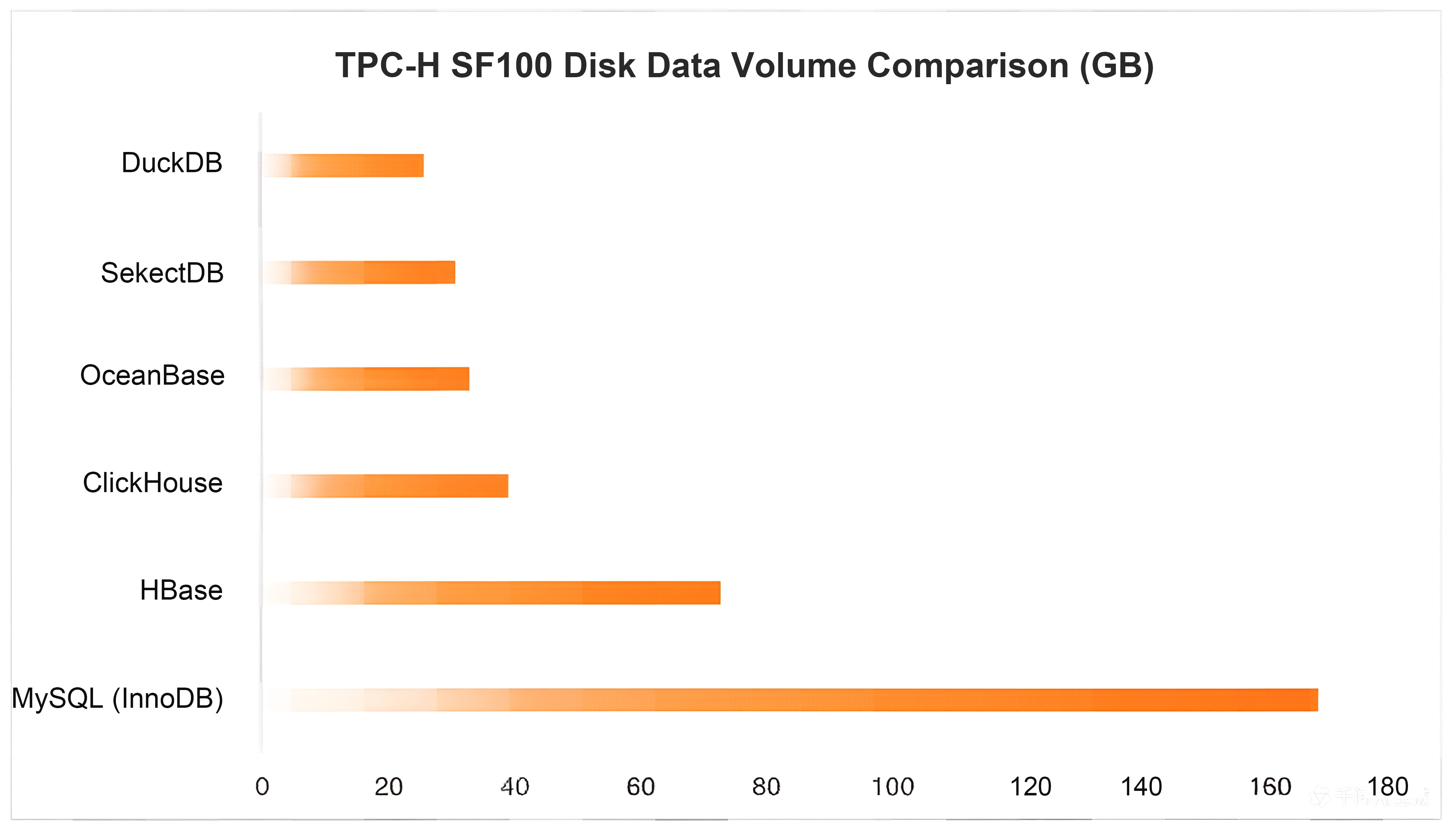
For example, with TPC-H SF100, the data volume on disk varies greatly across systems. MySQL (InnoDB) uses about 168 GB. Columnar storage systems use much less space. HBase uses about 73 GB. ClickHouse uses about 39 GB. OceanBase uses about 33 GB. SelectDB (Doris) uses about 31 GB. For the same dataset and size, DuckDB uses only about 26 GB. This saves about 6.5 times the space compared to InnoDB. DuckDB also has the smallest disk footprint among mainstream analytical systems. This reduces storage costs for archiving and analysis scenarios. It also increases the data capacity per disk.
After AliSQL uses DuckDB as the MySQL storage engine, it further optimizes the DuckDB compression path. It focuses on improving throughput and concurrent efficiency during the write and build stages. This includes:
In addition, AliSQL supports compressing user data at the storage tier. This reduces the data volume written to the storage medium and saves storage space. It can reduce the storage cost per unit capacity by up to 50%. This feature relies on intelligent, self-developed hardware chips and enterprise-grade NAND flash memory media. It provides real-time compression and decompression at the physical disk level. It does not consume extra instance compute resources. When enabled, it has almost no impact on database performance. It also ensures data durability and stability.
The compression advantage of DuckDB comes from the combination of "columnar organization + adaptive algorithm selection". It uses column data as the decision unit. During the checkpoint process, it builds a collection of candidate compression functions for data columns and validation columns. It determines the final plan through scan and analysis. It uses dedicated encoding methods such as RLE, Bitpacking, Dictionary/FSST, ALP/Chimp, and Roaring for different types and distribution features. This writes data to disk at a higher density. It also reduces I/O and decoding costs for analytical queries. This is the main reason why DuckDB has a much smaller data volume on disk than InnoDB in large-scale production archiving.
AliSQL further optimizes the efficient compression of DuckDB. It solidifies policies and uses a cache to reduce CPU overhead and latency jitter from repeated probing. It uses parallelization and lock contention optimization to improve throughput during the write and build stages. It can also use hardware compression at the storage tier to further compress the data volume on disk. The AliSQL DuckDB engine provides lower storage usage and more controllable build costs for Historical Data archiving. It also gives archived data the query efficiency to directly support AP analysis. This lets you achieve long-term storage of Historical Data and low-cost analytical queries through a unified MySQL entry point and user experience.
When MySQL Meets the Columnar Storage Engine DuckDB in the AI Era
[Infographic] Highlights | Database New Features in April 2026
ApsaraDB - May 13, 2026
ApsaraDB - September 10, 2025
ApsaraDB - June 4, 2026
ApsaraDB - August 19, 2026
ApsaraDB - November 26, 2025
ApsaraDB - August 21, 2024
 ApsaraDB for HBase
ApsaraDB for HBase is a NoSQL database engine that is highly optimized and 100% compatible with the community edition of HBase.
Learn More Best Practices
Follow our step-by-step best practices guides to build your own business case.
Learn More PolarDB for MySQL
Alibaba Cloud PolarDB for MySQL is a cloud-native relational database service 100% compatible with MySQL.
Learn More AnalyticDB for MySQL
AnalyticDB for MySQL is a real-time data warehousing service that can process petabytes of data with high concurrency and low latency.
Learn MoreMore Posts by ApsaraDB


