Target Audience
This guide is designed for technical professionals, database administrators (DBAs), site reliability engineers (SREs), backend architects, system architects and and DevOps engineers who manage high-concurrency Tair/Redis® clusters. It is particularly valuable for teams struggling with intermittent latency spikes, memory instability, and challenges related to large keys and hot keys in high-concurrency environments, or those seeking to move beyond basic monitoring toward data-driven, long-term governance. It offers insights into proactive governance strategies to mitigate risks and streamline operations.
Overview
Redis instability often stems from Big Keys and Hot Keys, yet traditional monitoring offers only static snapshots with limited history. By integrating Alibaba Cloud DAS (Database Autonomy Service) with SLS (Simple Log Service), you can transform discrete monitoring data into a long-term, queryable time-series audit system. This enables proactive risk prevention, precise root cause analysis, and a closed-loop governance strategy.
Redis governance must evolve from static monitoring to dynamic auditing. The core risks of Big Keys and Hot Keys stem from localized resource overload and single-thread blocking. Without long-term, granular data, traditional monitoring creates significant blind spots and related issues remain hidden until they cause outages.
In high-concurrency production environments, Big Keys and Hot Keys are the primary triggers for cluster jitter or even collapse.
Big Keys (Resource Blocking):
Keys that consume significantly more memory than average or contain an excessive number of members.
Hot Keys (Single-Point Performance Bottleneck):
Specific keys accessed with extremely high frequency within a short period.
Basic Top Key monitoring usually provides only static snapshots (e.g., redis-cli --bigkeys) with limited historical retention (typically 7 days). This creates significant logical gaps in complex production environments:
In actual O&M, DBAs need answers to high-precision, long-cycle audit questions:
Simply put: Basic snapshot monitoring only reaches the accident scene. Time-series auditing reconstructs the truth and predicts future risks.
To shift from "firefighting" to "proactive governance", Alibaba Cloud offers a deep integration of Database Autonomy Service (DAS) and Simple Log Service (SLS). This solution transforms discrete monitoring snapshots into traceable, aggregatable time-series metrics.
This deeply integrated solution provides the following technical benefits.
Programmable Governance (SQL-Driven): Leveraging SLS’s SQL analysis capabilities moves governance from "visual inspection" to "computational precision."
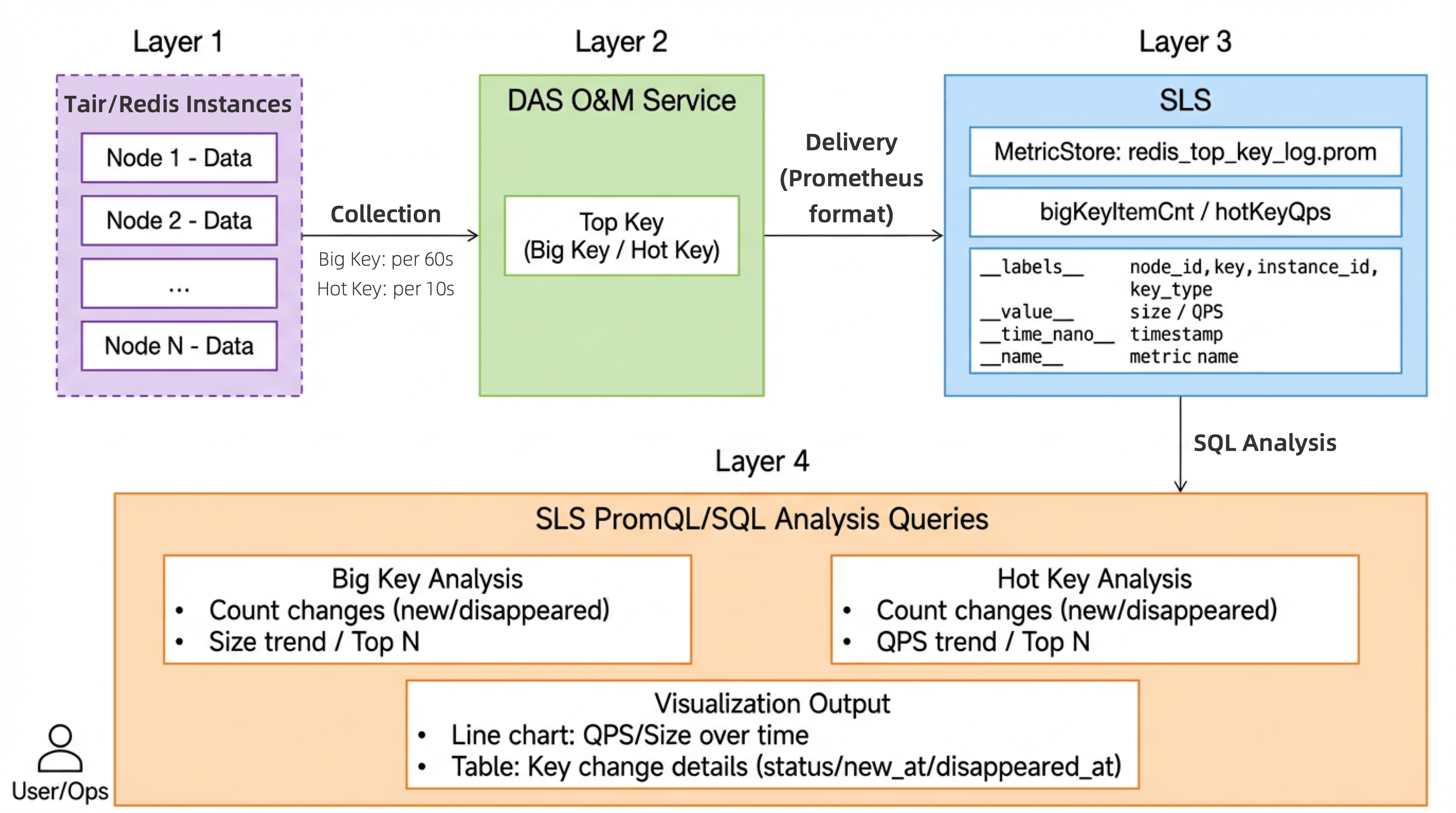
The data flow consists of four layers, ensuring seamless collection, storage, and analysis.
| Layer | Component/Product | Description |
|---|---|---|
| Data Collection | DAS O&M Service | Collects Top Key data from Tair/Redis® instances. - Big Key Interval: 60s - Hot Key Interval: 10s |
| Data Delivery | DAS O&M Service | Delivers Top Key data in Prometheus format. |
| Storage | SLS MetricStore | Stores data in the redis_top_key_log time-series Metricstore. |
| Analysis | SLS SQL Query | Supports Prometheus Query Language (PromQL), SQL analysis, and visualization. |
Key fields delivered to SLS include:
| Field | Description |
|---|---|
__labels__ |
Label set containing instance_id, node_id, key, key_type, topkey_type. |
__value__ |
Metric value (Size in bytes for Big Keys; QPS for Hot Keys). |
__time_nano__ |
Timestamp (millisecond precision). |
__name__ |
Metric name: bigKeyItemCnt (Big Key) or hotKeyQpsLowerBound (Hot Key). |
Based on the data delivered to SLS, you can easily perform:
This section outlines practical steps for implementing the DAS and SLS solution for effective key governance.
This solution requires:
DAS O&M Service enabled (Paid feature).
Activate Alibaba Cloud DAS O&M Service with one click in the console as follows:
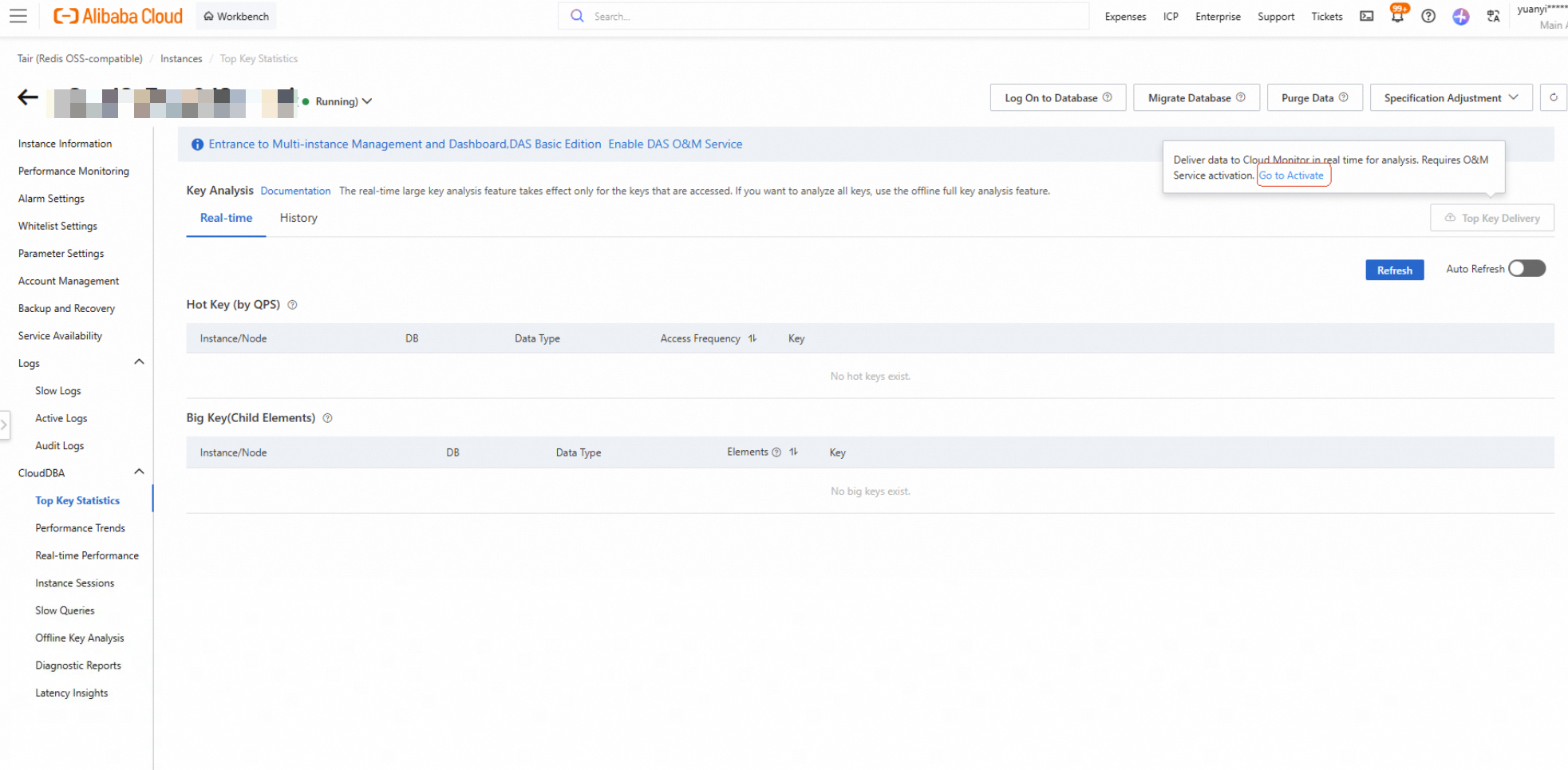
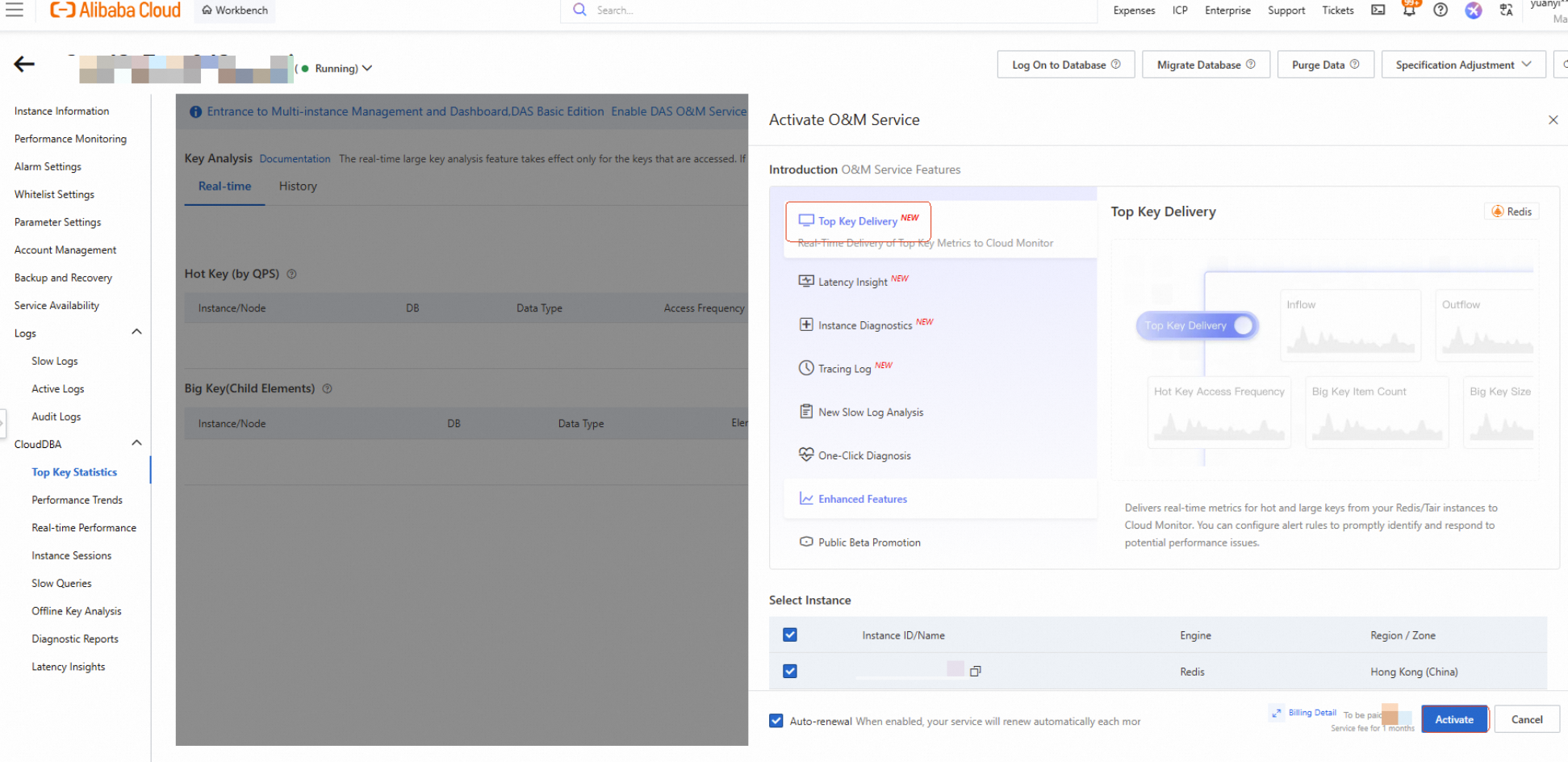
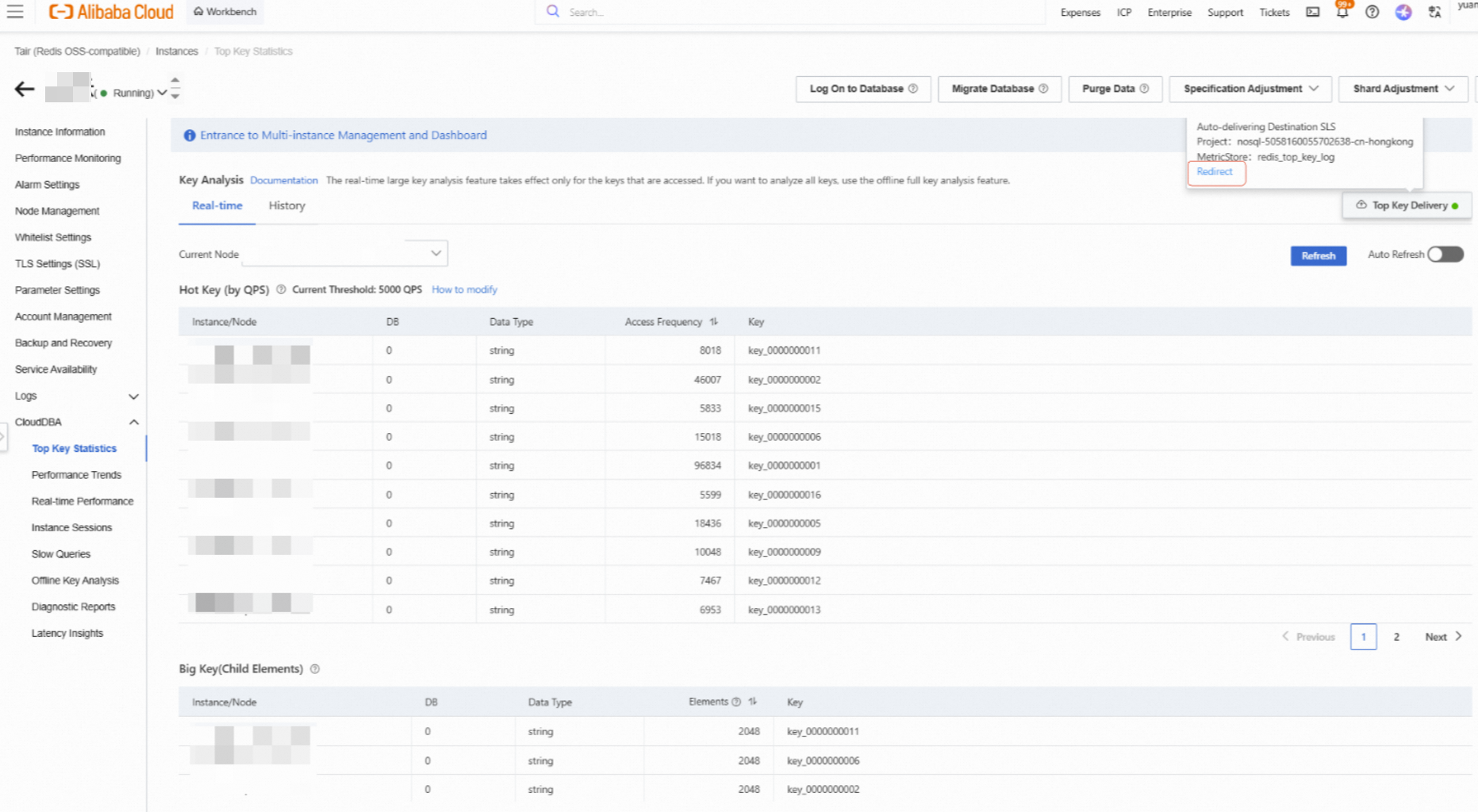
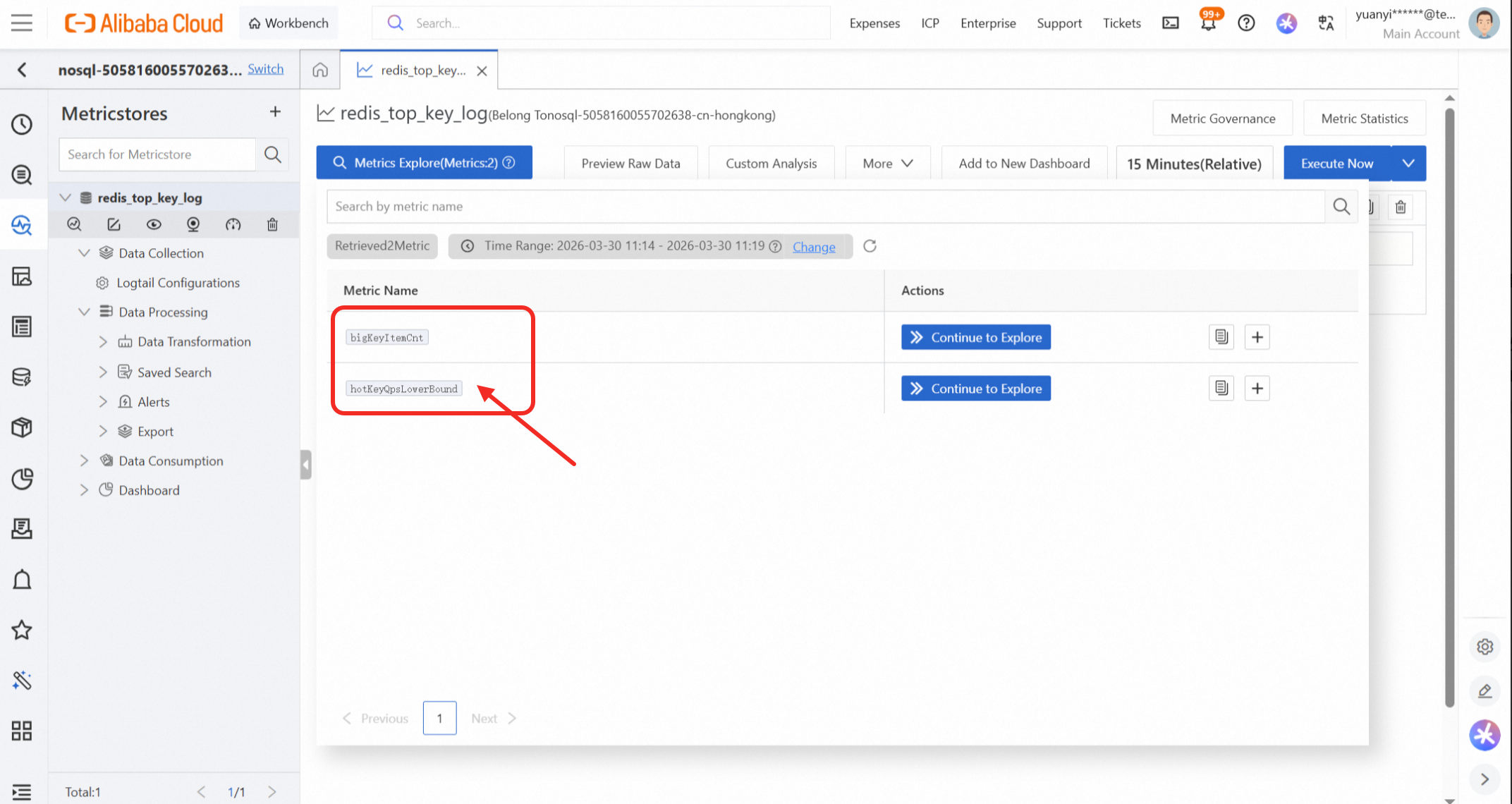
After configuration, check the SLS Console. If you see the redis_top_key_log MetricStore containing metrics bigKeyItemCnt and hotKeyQpsLowerBound, delivery is successful.
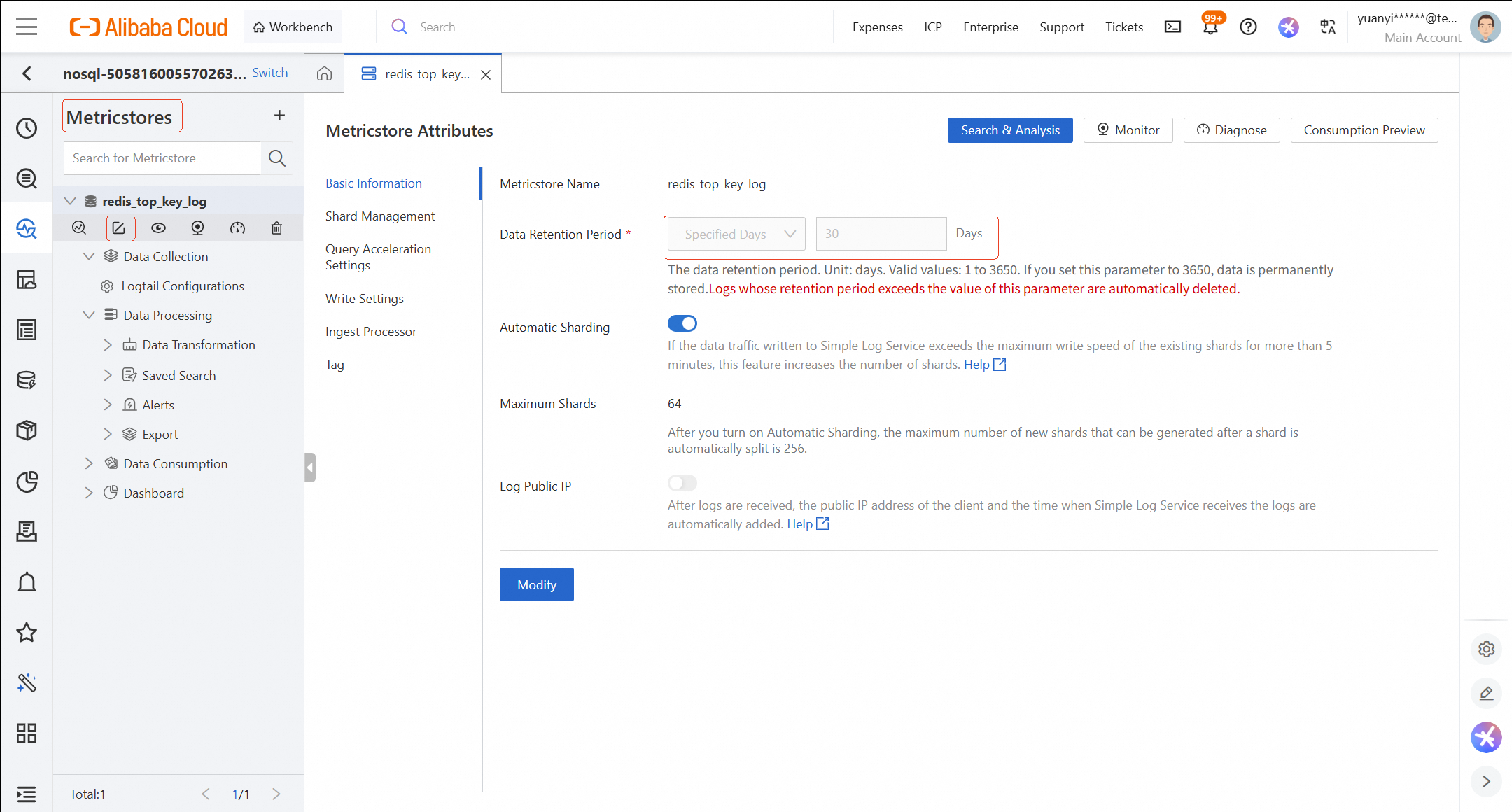
Data Retention Policy: Default is 30 days. You can modify this to up to 10 years depending on compliance and audit needs. Change the retention period as follows:
SLS supports two query languages for analysis: PromQL (for trends) and SQL (for details).
Scenarios: Use this method when you need a visualization to view Big/Hot Key trends over a period to roughly estimate governance effectiveness.
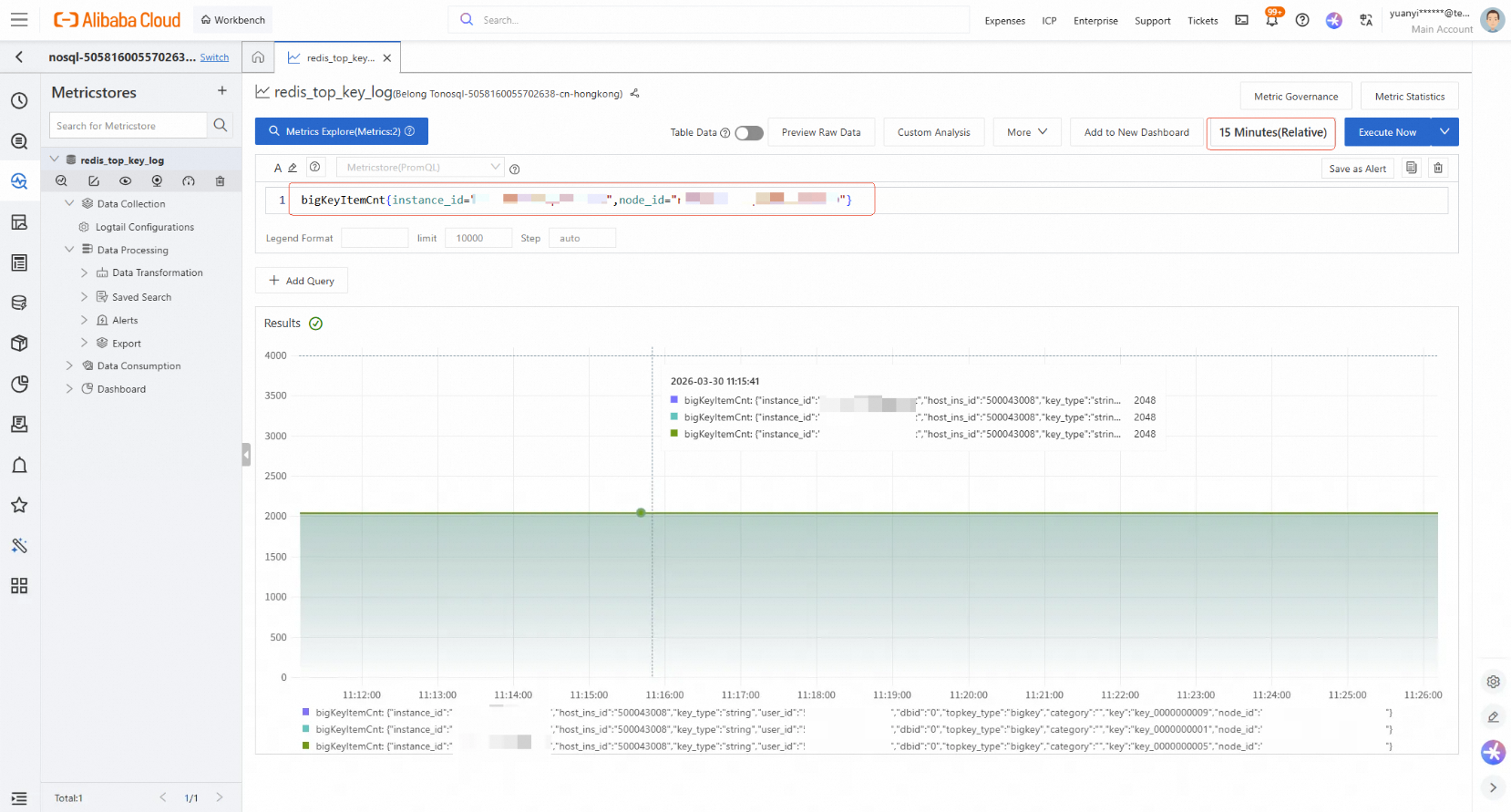
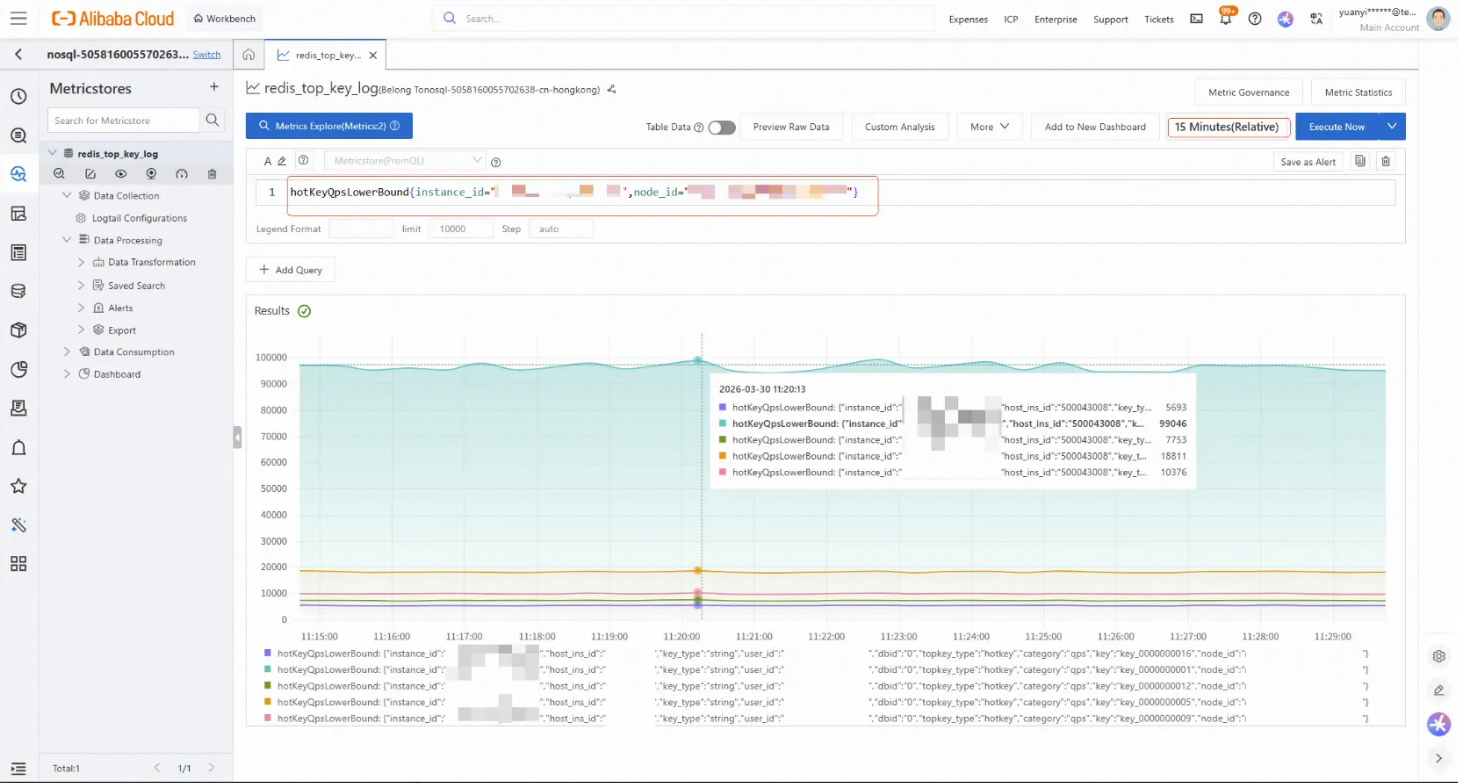
Basic usage (PromQL statements):
bigKeyItemCnt{instance_id="xxx", node_id="xxx"}
hotKeyQpsLowerBound{instance_id="xxx", node_id="xxx"}
Steps: Select time range (e.g., last 15 mins) -> Input PromQL -> View trend graph.
Scenarios: Use this method when understanding the overall trend is insufficient. You can drill down into detailed data, query the quantity changes of Top Keys (e.g, deep diving into specific Keys to identify increments, decrements), or compute the week-over-week and month-over-month comparisons of Top Keys over a period of time.
Common Uses: Use SQL queries to find out how many new Top Keys appeared in a specific period and how certain Top Keys formed. For example, did they appear suddenly and persist, or appear suddenly and disappear?
Logic of Design:
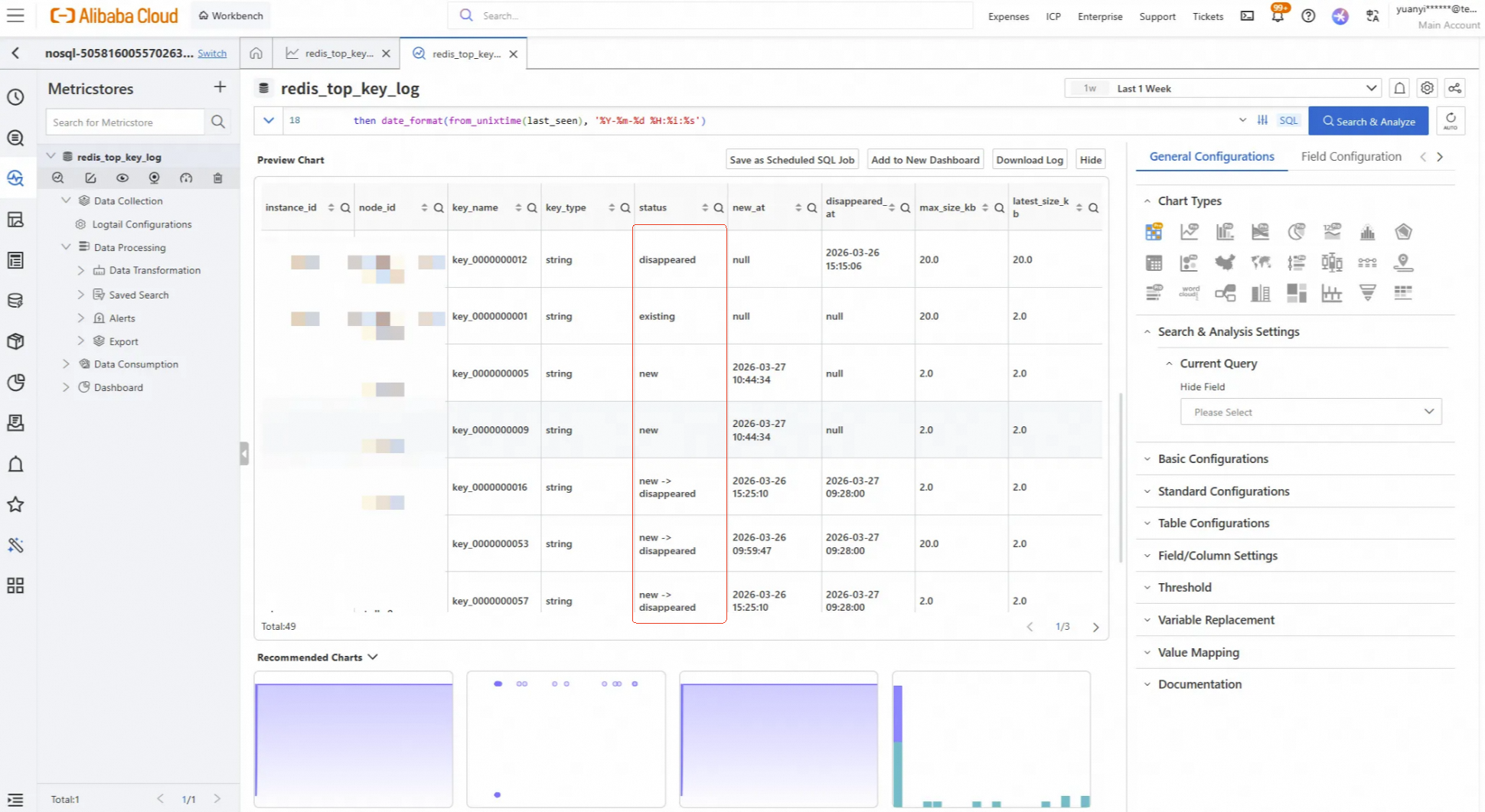
For a given time range, we determine a Key’s status by comparing its first_seen and last_seen timestamps against the query window boundaries (t_start,t_end, adding a tolerance buffer (2 collection cycles) to avoid boundary errors.
Status Definitions:
Timeline:  t_start                                          t_end
            |──────────────────────────────────────────|

existing:   |■■■■■■■■■■■■■■■■■■■■■■■■■■■■■■■■■■■■■■■■■■|  Present at start and end
new:                    |■■■■■■■■■■■■■■■■■■■■■■■■■■■■■■|  Appeared midway, present at end
disappeared:|■■■■■■■■■■■■■■■■■■■■|                        Present at start, disappeared midway
new->disappeared:             |■■■■■■■■■■■■|              Appeared midway, disappeared midway
first_seen ≤ t_start + tolerance indicates that the Key already existed at the start of the period (within the tolerance).
last_seen ≥ t_end - tolerance indicates that the key still exists at the end of the time period (within the tolerance).
Tolerance: Add 2 collection cycles to avoid boundary misjudgment.
The following section uses Top Key change analysis as a typical scenario to show how to query Top Keys using SQL.
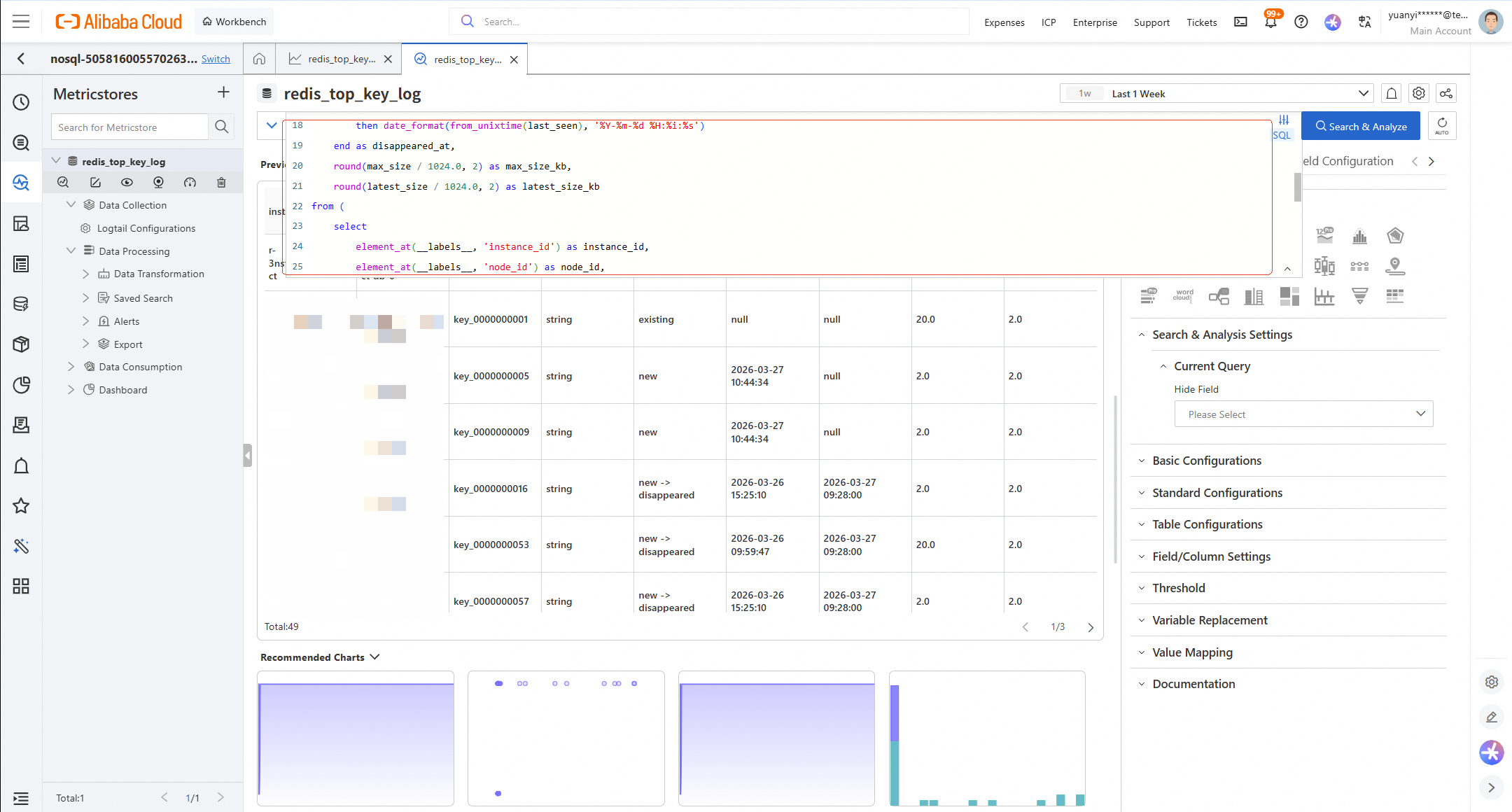
Display of results:
SQL Implementation:
Based on the logic of design, write the following SQL to detect the new, missing, and persistent states of Big Keys within a specified time period:
* | select
    instance_id,
    node_id,
    key_name,
    key_type,
    case
        when first_seen <= t_start + 120 and last_seen >= t_end - 120 then 'existing'
        when first_seen > t_start + 120 and last_seen < t_end - 120 then 'new -> disappeared'
        when first_seen > t_start + 120 then 'new'
        when last_seen < t_end - 120 then 'disappeared'
    end as status,
    case
        when first_seen > t_start + 120
        then date_format(from_unixtime(first_seen), '%Y-%m-%d %H:%i:%s')
    end as new_at,
    case
        when last_seen < t_end - 120
        then date_format(from_unixtime(last_seen), '%Y-%m-%d %H:%i:%s')
    end as disappeared_at,
    round(max_size / 1024.0, 2) as max_size_kb,
    round(latest_size / 1024.0, 2) as latest_size_kb
from (
  select
  element_at(__labels__, 'instance_id') as instance_id,
  element_at(__labels__, 'node_id') as node_id,
  element_at(__labels__, 'key') as key_name,
  arbitrary(element_at(__labels__, 'key_type')) as key_type,
  min(__time_nano__ / 1000000) as first_seen,
  max(__time_nano__ / 1000000) as last_seen,
  max(__value__) as max_size,
  max_by(__value__, __time_nano__) as latest_size,
  arbitrary(t_start) as t_start,
  arbitrary(t_end) as t_end
  from "redis_top_key_log.prom"
  cross join (
    select
    to_unixtime(timestamp '2026-03-27 00:00:00') as t_start,      -- Set Start Time
    to_unixtime(timestamp '2026-03-27 15:00:00') as t_end         -- Set End Time
  ) t
  where __name__ = 'bigKeyItemCnt'
  and element_at(__labels__, 'instance_id') = '<your_instance_id>'
  and __time_nano__ / 1000000 >= t_start
  and __time_nano__ / 1000000 <  t_end
  group by instance_id, node_id, key_name
)
order by instance_id, node_id, status, key_name
Parameters:
t_start and t_end to define your analysis window.<your_instance_id>with your actual Instance ID.Display of results:
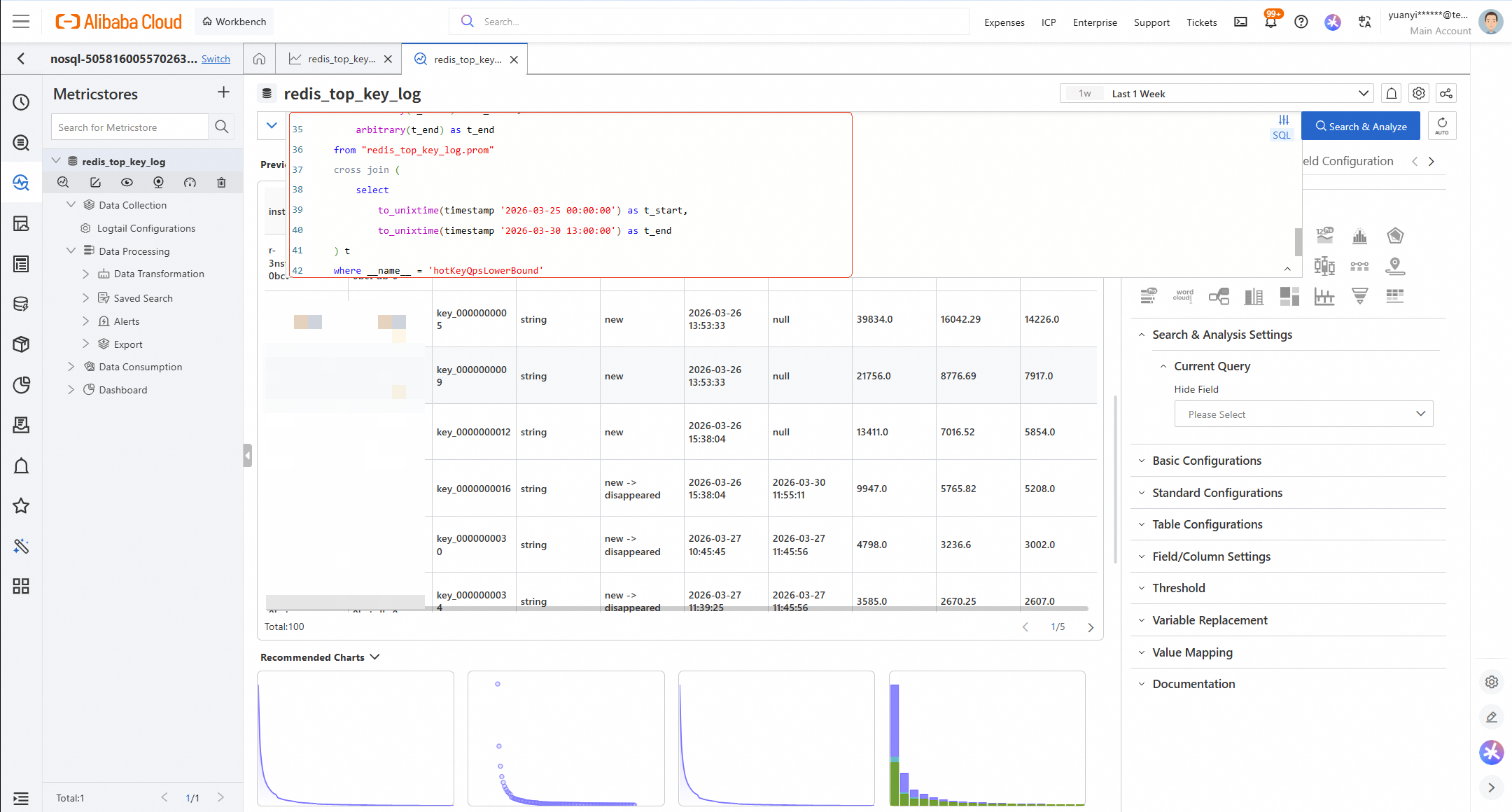
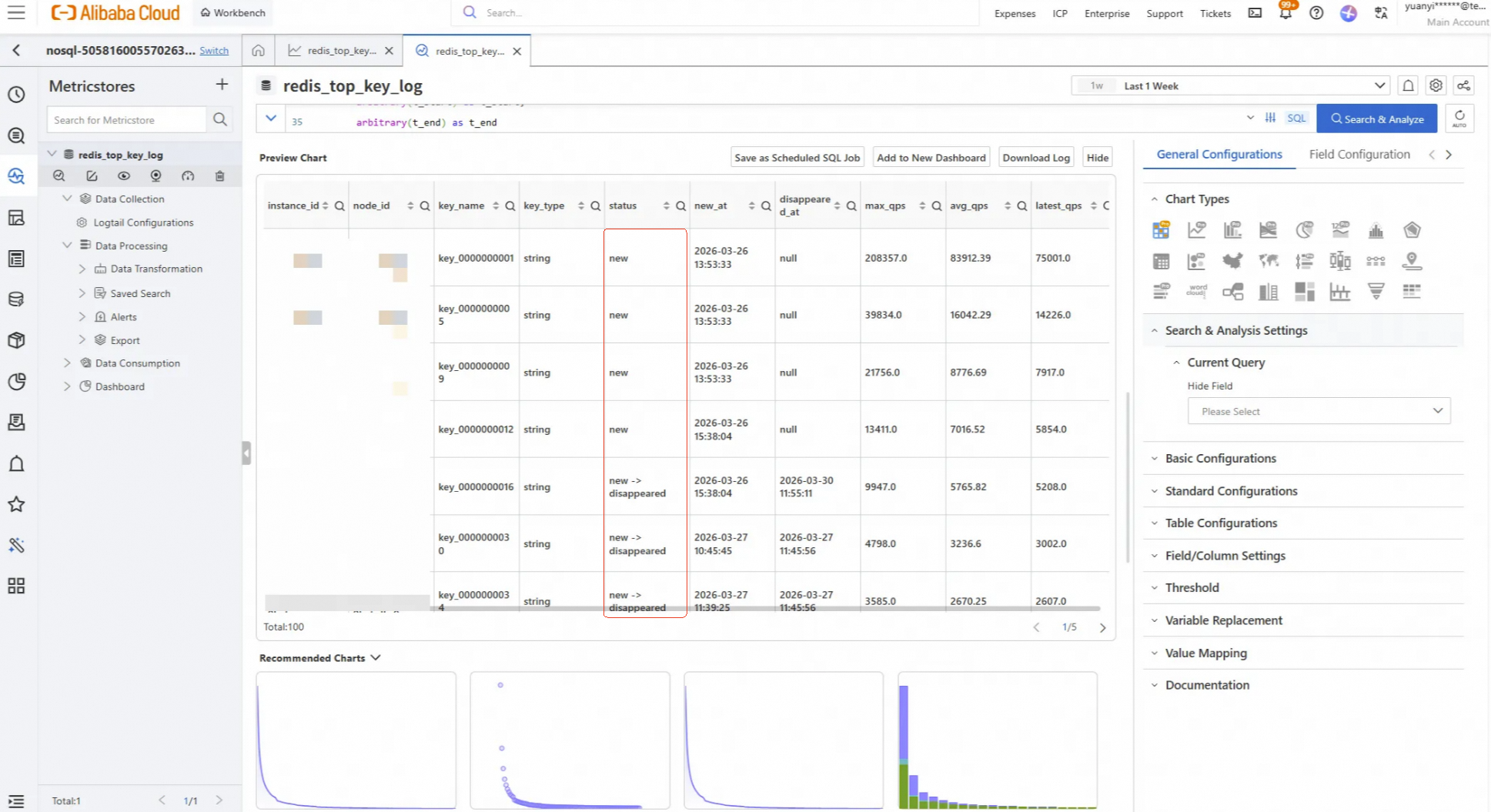
QPS Fields in the Results:
SQL Implementation:
Based on the logic of design, write the following SQL to detect the new, missing, and persistent states of Hot Keys within a specified time period:
* | select
    instance_id,
    node_id,
    key_name,
    key_type,
    case
        when first_seen <= t_start + 20 and last_seen >= t_end - 20 then 'existing'
        when first_seen > t_start + 20 and last_seen < t_end - 20 then 'new -> disappeared'
        when first_seen > t_start + 20 then 'new'
        when last_seen < t_end - 20 then 'disappeared'
    end as status,
    case
        when first_seen > t_start + 20
        then date_format(from_unixtime(first_seen), '%Y-%m-%d %H:%i:%s')
    end as new_at,
    case
        when last_seen < t_end - 20
        then date_format(from_unixtime(last_seen), '%Y-%m-%d %H:%i:%s')
    end as disappeared_at,
    round(max_qps, 2) as max_qps,
    round(avg_qps, 2) as avg_qps,
    round(latest_qps, 2) as latest_qps
from (
  select
  element_at(__labels__, 'instance_id') as instance_id,
  element_at(__labels__, 'node_id') as node_id,
  element_at(__labels__, 'key') as key_name,
  arbitrary(element_at(__labels__, 'key_type')) as key_type,
  min(__time_nano__ / 1000000) as first_seen,
  max(__time_nano__ / 1000000) as last_seen,
  max(__value__) as max_qps,
  avg(__value__) as avg_qps,
  max_by(__value__, __time_nano__) as latest_qps,
  arbitrary(t_start) as t_start,
  arbitrary(t_end) as t_end
  from "redis_top_key_log.prom"
  cross join (
    select
    to_unixtime(timestamp '2026-03-27 00:00:00') as t_start,       -- Set Start Time
    to_unixtime(timestamp '2026-03-27 15:00:00') as t_end          -- Set End Time
  ) t
  where __name__ = 'hotKeyQpsLowerBound'
  and element_at(__labels__, 'instance_id') = '<your_instance_id>'
  and __time_nano__ / 1000000 >= t_start
  and __time_nano__ / 1000000 <  t_end
  group by instance_id, node_id, key_name
)
order by instance_id, node_id, status, key_name
Parameters:
t_start and t_end to define your analysis window.<your_instance_id>with your actual Instance ID.To maximize the value of this solution, we recommend leveraging SLS's scheduled inspection and alerting features for automated operations.
Scenarios: Use the Alert Configuration of SLS to receive proactive notifications when the instance experiences the following conditions.
Proactively notify your team when:
References: https://www.alibabacloud.com/help/sls/alarm-settings-quick-start
Configuration method: Configure alert rules, notification recipients, and notification policies through the Alert Center.
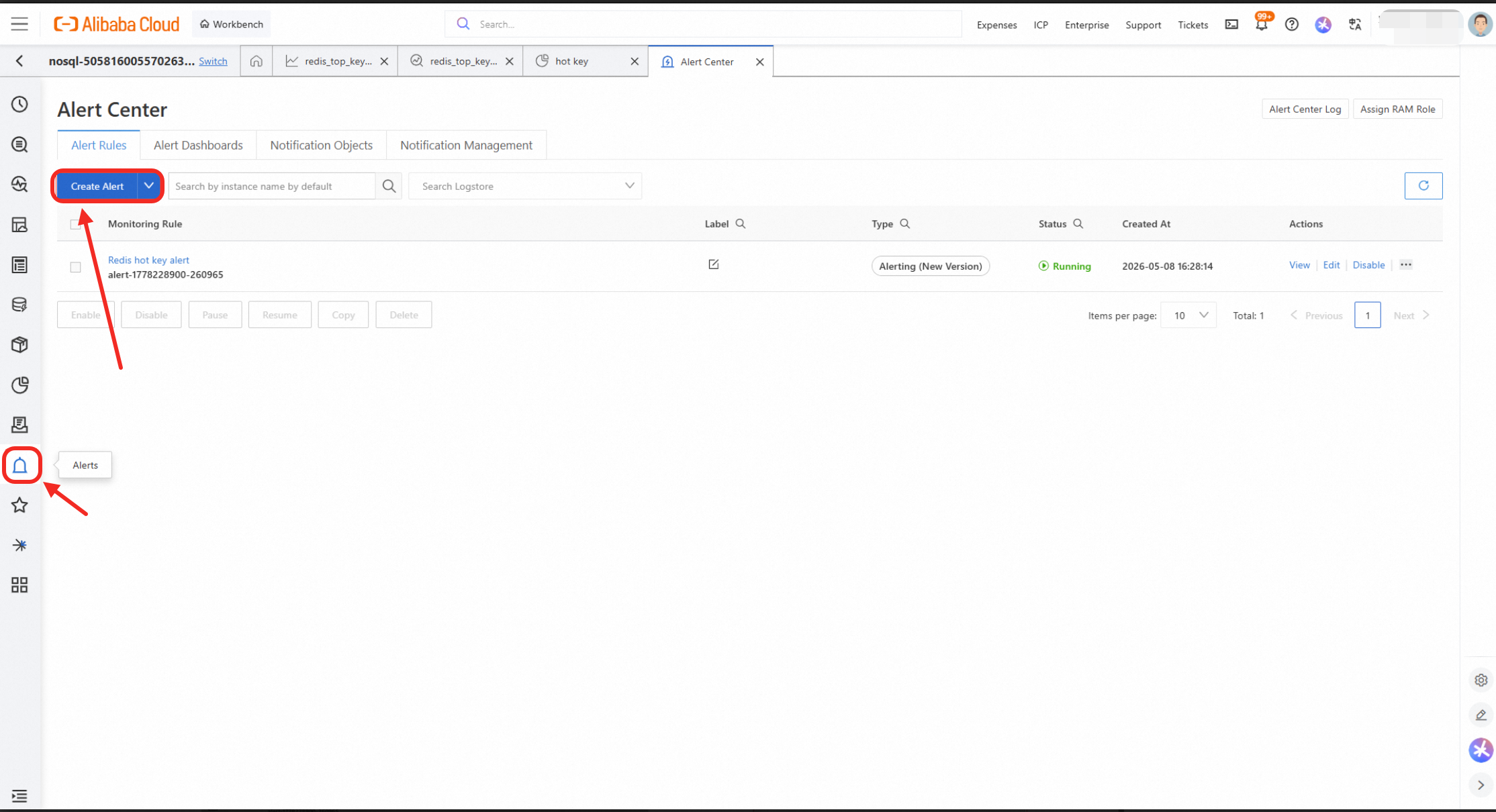
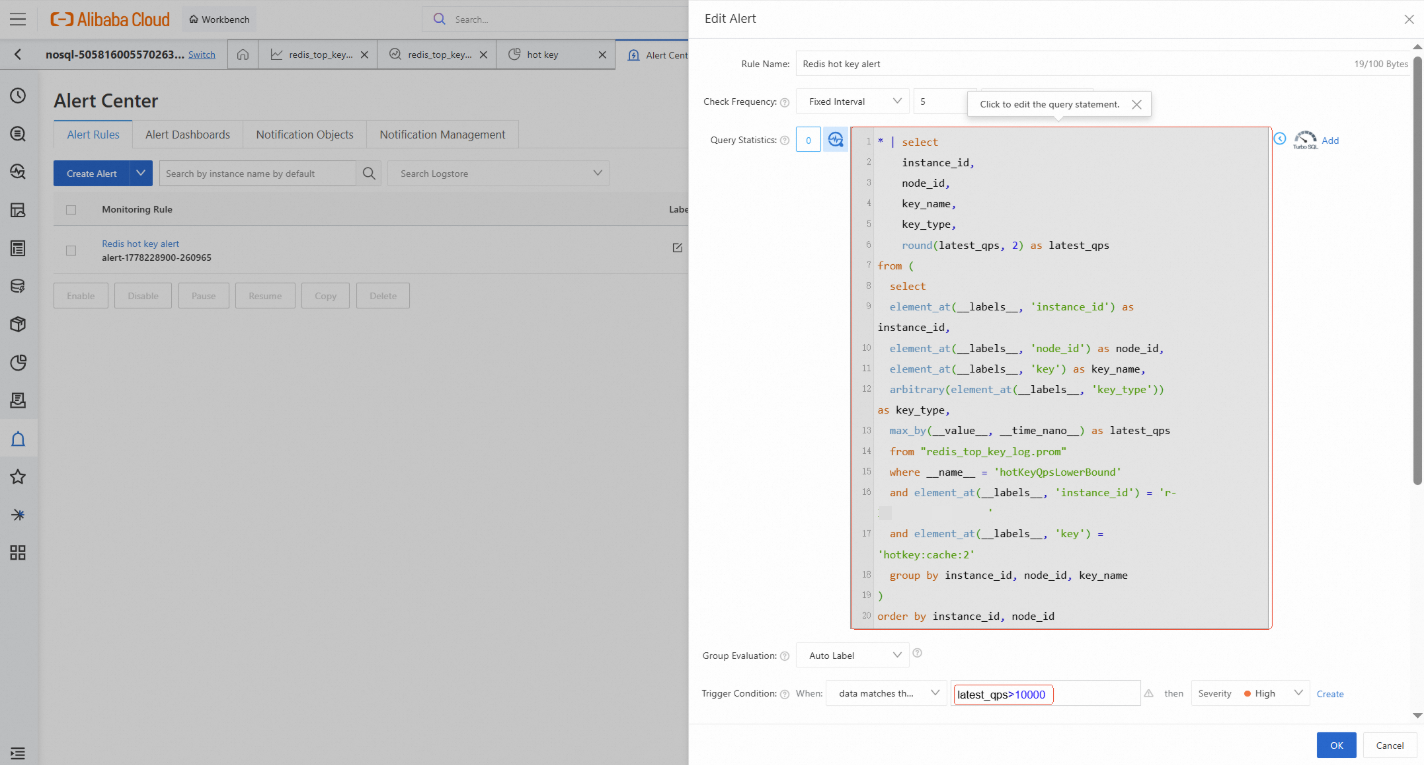
Example Alert SQL (QPS Spike > 10,000):
The following is the sample SQL in the preceding figure. It triggers an alert when the QPS of a key suddenly exceeds 10,000.
| select
  instance_id,
  node_id,
  key_name,
  key_type,
  round(latest_qps, 2) as latest_qps
from (
select
element_at(labels, 'instance_id') as instance_id,
element_at(labels, 'node_id') as node_id,
element_at(labels, 'key') as key_name,
arbitrary(element_at(labels, 'key_type')) as key_type,
max_by(value, time_nano) as latest_qps
from "redis_top_key_log.prom"
where name = 'hotKeyQpsLowerBound'
and element_at(labels, 'instance_id') = '<your_instance_id>'
and element_at(labels, 'key') = '<key_name>'
group by instance_id, node_id, key_name
)
order by instance_id, node_idSave common queries as SLS Dashboards for daily health checks and troubleshooting. This provides a visual overview of cluster health and key trends.
References: https://www.alibabacloud.com/help/sls/dashboard-overview
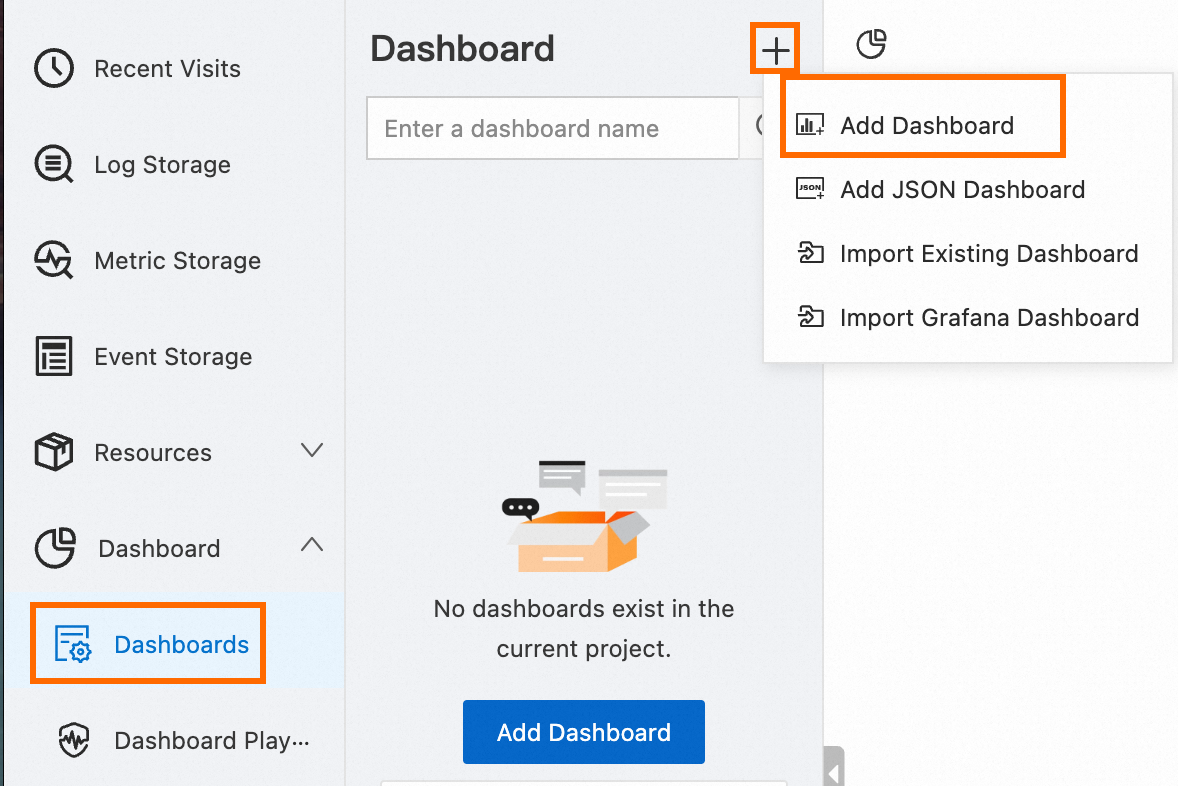
Display of results:
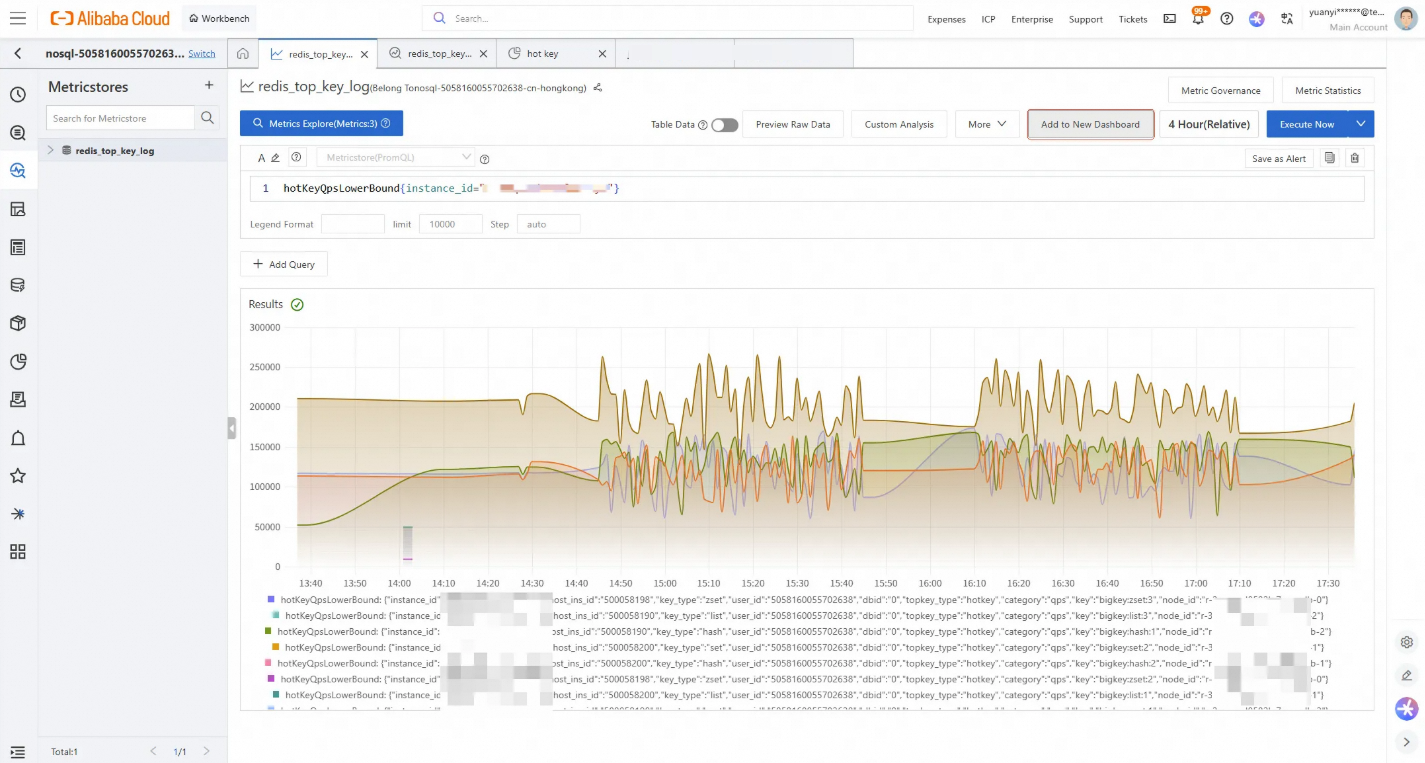
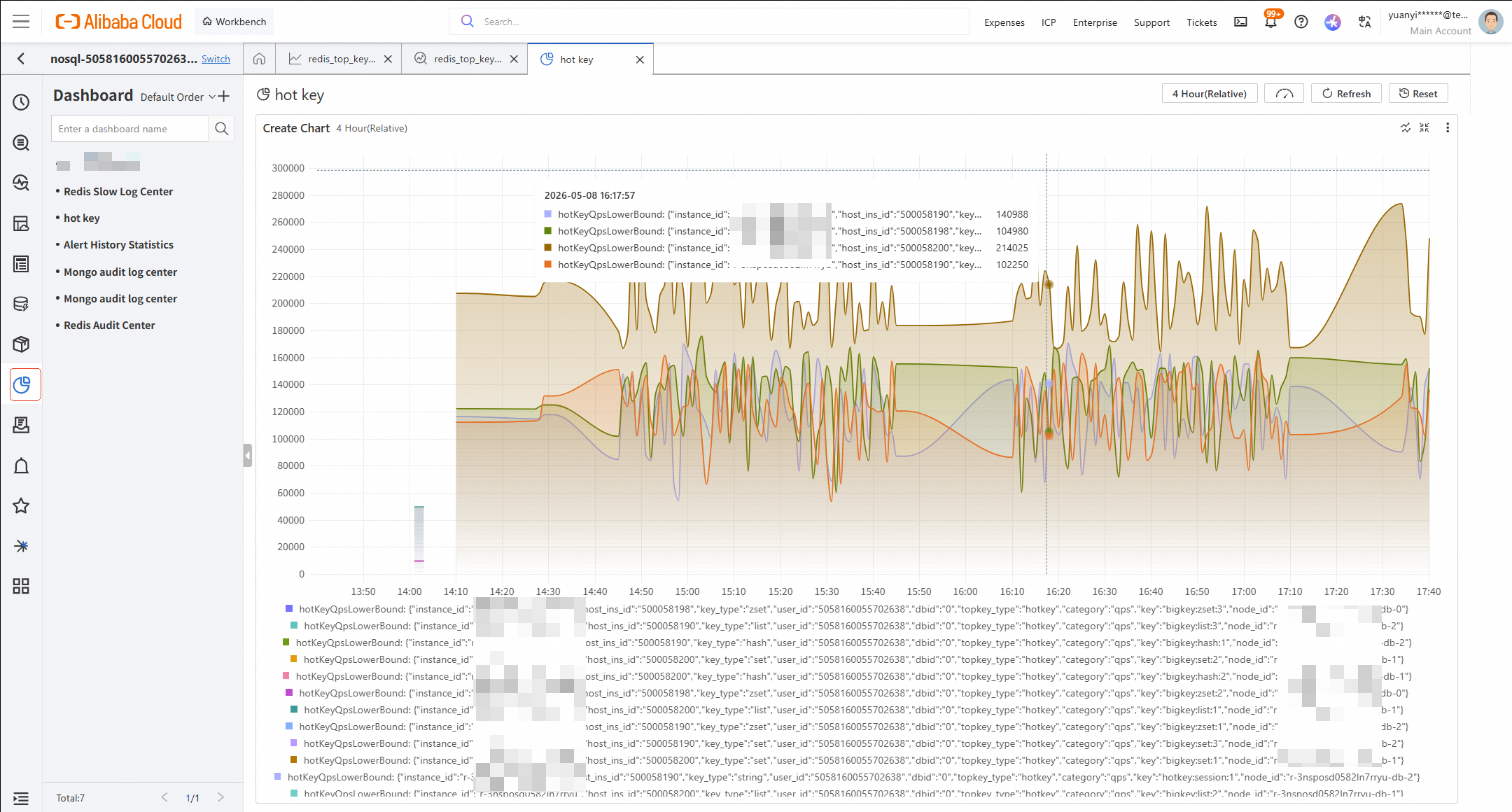
Configuration method:
The combined solution of Database Autonomy Service (DAS) and Simple Log Service (SLS) enables full traceability of Tair/Redis® keys. This prevents and cleans up threats before they break out to impact your business, and makes the management of Big/Hot Keys in Tair/Redis® easier.
Comparison: Basic Monitoring vs. DAS+SLS Solution
| Comparison Item | Basic Monitoring on Redis® Console | DAS + SLS Solution |
|---|---|---|
| View Current Top Keys | ✅ | ✅ |
| Historical Trend Analysis | ❌ | ✅ (PromQL + SQL) |
| Identify New/Disappeared Keys | ❌ | ✅ (via status field) |
| Big Key Size Changes | ❌ | ✅ (max_size_kb / latest_size_kb) |
| Hot Key QPS Changes | ❌ | ✅ (max_qps / avg_qps / latest_qps) |
| Custom Time Range Query | ❌ | ✅ (Parameterized via SQL) |
| Long-term Data Retention | ❌ | ✅ (Up to 10 Years) |
Solution Cost:
If you are interested in this solution or have any questions, contact us.
[Infographic] Highlights | Database New Features in April 2026
Alibaba Cloud Indonesia - March 20, 2026
ApsaraDB - May 11, 2026
ApsaraDB - January 23, 2026
Alibaba Cloud Native Community - March 30, 2026
Alibaba Cloud Native Community - August 25, 2026
ApsaraDB - October 21, 2020
 AgentLoop
An Agent self-evolution platform designed to make your Agents progressively smarter and more attuned to users.
Learn More Database for FinTech Solution
Leverage cloud-native database solutions dedicated for FinTech.
Learn More Oracle Database Migration Solution
Migrate your legacy Oracle databases to Alibaba Cloud to save on long-term costs and take advantage of improved scalability, reliability, robust security, high performance, and cloud-native features.
Learn More Database Migration Solution
Migrating to fully managed cloud databases brings a host of benefits including scalability, reliability, and cost efficiency.
Learn MoreMore Posts by ApsaraDB


