By Jingqi Tian
DuckDB is widely known in the database community for its exceptional data querying and analysis capabilities. Its high-performance execution layer is a textbook-level engineering achievement, with clearly defined boundaries between its various modules. We can use the following diagram to summarize the complete execution flow of an SQL query in DuckDB:
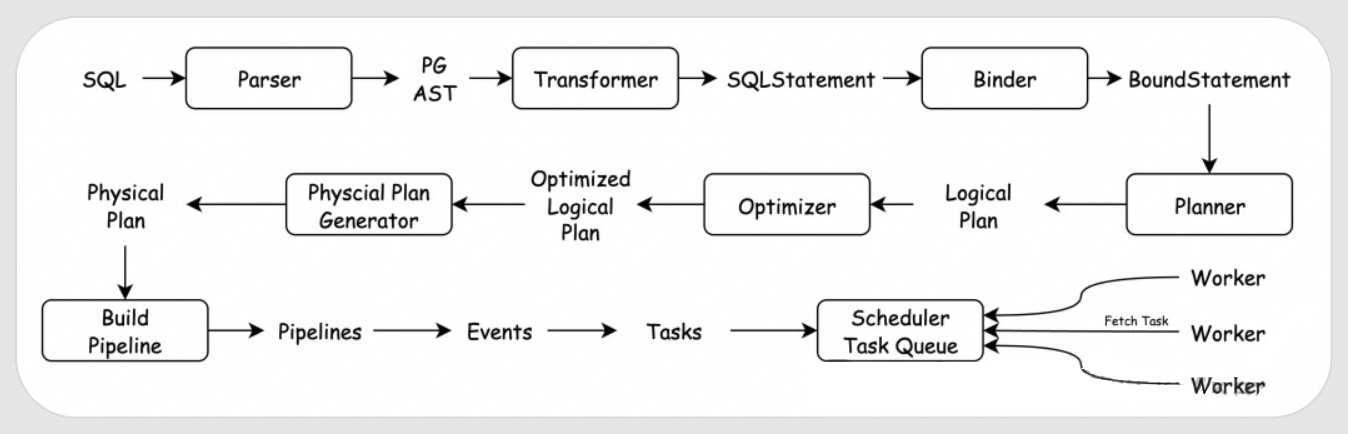
An SQL query first goes through the Parser for syntactic analysis. Since DuckDB directly uses PostgreSQL's parser, it produces an Abstract Syntax Tree (AST) in the PG format. This PG-format AST is then converted by the Transformer into DuckDB's own AST format, the SQLStatement. The SQLStatement is then passed to the Binder, which binds it to database objects like tables, columns, and functions, resulting in a BoundStatement. This BoundStatement is used by the Planner to generate a tree structure composed of logical operators, known as the Logical Plan. The Logical Plan is then optimized by the Optimizer to produce an Optimized Logical Plan. This optimized logical plan is then used by the Physical Plan Generator to create the actual Physical Plan. The Physical Plan is divided into multiple Pipelines, which are executed in several stages. Each stage is abstracted as an Event. Each Event generates one or more Tasks based on its degree of parallelism and adds them to the Task Queue within the Scheduler. Worker threads then fetch Tasks from the Task Queue for execution. In DuckDB, all SQL statements—be they DDL, DML, or variable settings—follow this unified flow. This uniform implementation of the execution layer is exceptionally elegant and features a very clear code structure.
In this article, we will briefly introduce the main concepts involved in each module of the execution layer, giving readers a general understanding of what each module does. For the core modules of DuckDB's execution layer—the optimizer and the executor—we will dedicate more articles to a detailed explanation of their core code and algorithms. We will then briefly cover the implementation of other modules in the execution layer and finally use the complete execution process of a single SQL query to tie everything together. In addition to this article, we have planned the following articles for a more in-depth discussion:
DuckDB uses PostgreSQL's parser. The main code for the parser is located in the third-party library under the third_party/libpg_query folder. You can modify the SQL syntax by editing the scan.l and grammar/statements/*.y files within it. The compiled libpg_query provides the PostgresParser class, whose Parse function is responsible for parsing SQL into a PG-format AST, stored in the parse_tree member variable.
namespace duckdb {
class PostgresParser {
public:
    PostgresParser();
    ~PostgresParser();

    bool success;
    duckdb_libpgquery::PGList *parse_tree;
    std::string error_message;
    int error_location;
public:
    void Parse(const std::string &query);
    static duckdb::vector<duckdb_libpgquery::PGSimplifiedToken> Tokenize(const std::string &query);

    static duckdb_libpgquery::PGKeywordCategory IsKeyword(const std::string &text);
    static duckdb::vector<duckdb_libpgquery::PGKeyword> KeywordList();

    static void SetPreserveIdentifierCase(bool downcase);
};

}
In DuckDB, PostgresParser is further wrapped by another layer, adding some helper functions to create the Parser class. However, most of its functions are implemented by directly calling the interfaces of PostgresParser:
class Parser {
public:
    explicit Parser(ParserOptions options = ParserOptions());

    //! The parsed SQL statements from an invocation to ParseQuery.
    vector<unique_ptr<SQLStatement>> statements;

public:
    //! Attempts to parse a query into a series of SQL statements. Returns
    //! whether or not the parsing was successful. If the parsing was
    //! successful, the parsed statements will be stored in the statements
    //! variable.
    void ParseQuery(const string &query);

    //! Tokenize a query, returning the raw tokens together with their locations
    static vector<SimplifiedToken> Tokenize(const string &query);
    ...
};The main code for the Transformer is located in the src/include/duckdb/parser and src/parser folders, where the Transformer class is implemented. This class implements a series of TransformXXX functions to convert the PG-format AST into DuckDB's AST format:
class Transformer {
    ...
private:
    //! Transforms a Postgres statement into a single SQL statement
    unique_ptr<SQLStatement> TransformStatement(duckdb_libpgquery::PGNode &stmt);
    //! Transforms a Postgres statement into a single SQL statement
    unique_ptr<SQLStatement> TransformStatementInternal(duckdb_libpgquery::PGNode &stmt);
    //===--------------------------------------------------------------------===//
    // Statement transformation
    //===--------------------------------------------------------------------===//
    //! Transform a Postgres duckdb_libpgquery::T_PGSelectStmt node into a SelectStatement
    unique_ptr<SelectStatement> TransformSelectStmt(duckdb_libpgquery::PGSelectStmt &select, bool is_select = true);
    unique_ptr<SelectStatement> TransformSelectStmt(duckdb_libpgquery::PGNode &node, bool is_select = true);
    ...
}
Simply put, DuckDB's AST is represented by four base classes: SQLStatement, QueryNode, TableRef, and ParsedExpression. SQLStatement corresponds to a complete SQL statement, QueryNode corresponds to a complete SELECT statement, TableRef corresponds to a table, and ParsedExpression corresponds to an expression.
The main code for the Binder is located in the src/include/duckdb/binder and src/binder folders, where the Binder class is implemented. This class implements a series of Bind functions that interact with DuckDB's Catalog to bind TableRefs, ParsedExpressions, etc., to the correct tables and functions:
class Binder : public enable_shared_from_this<Binder> {
    ...
    template <class T>
    BoundStatement BindWithCTE(T &statement);
    BoundStatement Bind(SelectStatement &stmt);
    BoundStatement Bind(InsertStatement &stmt);
    BoundStatement Bind(CopyStatement &stmt, CopyToType copy_to_type);
    BoundStatement Bind(DeleteStatement &stmt);
    ...
}
Only after binding can we determine if the tables, columns, and expressions in the SQL are valid. For example, selecting a column that does not exist in a table will result in an error during the binding process. The AST after binding is represented by data structures like BoundStatement, BoundQueryNode, BoundTableRef, and BoundExpression.
DuckDB implements a Planner class, but this class does not contain the actual planner logic. Its CreatePlan function is a direct call to Binder::Bind.
class Planner {
    friend class Binder;
    ...
public:
    void CreatePlan(unique_ptr<SQLStatement> statement);
    static void VerifyPlan(ClientContext &context, unique_ptr<LogicalOperator> &op,
                           optional_ptr<bound_parameter_map_t> map = nullptr);

private:
    void CreatePlan(SQLStatement &statement);
    shared_ptr<PreparedStatementData> PrepareSQLStatement(unique_ptr<SQLStatement> statement);
};
The actual planner logic resides in a series of CreatePlan functions within the Binder class. This leads to a somewhat strange call flow: Planner::CreatePlan calls Binder::Bind, and after binding is complete, Binder::Bind calls Binder::CreatePlan to return the logical plan.
class Binder : public enable_shared_from_this<Binder> {
    ...
    unique_ptr<LogicalOperator> CreatePlan(BoundRecursiveCTENode &node);
    unique_ptr<LogicalOperator> CreatePlan(BoundCTENode &node);
    unique_ptr<LogicalOperator> CreatePlan(BoundCTENode &node, unique_ptr<LogicalOperator> base);
    unique_ptr<LogicalOperator> CreatePlan(BoundSelectNode &statement);
    unique_ptr<LogicalOperator> CreatePlan(BoundSetOperationNode &node);
    unique_ptr<LogicalOperator> CreatePlan(BoundQueryNode &node);
    ...
}
Binder::CreatePlan builds an initial logical plan for the bound BoundQueryNode. The logical plan is a complex tree structure composed of multiple LogicalOperators. Different types of logical operators all inherit from the base class LogicalOperator. The CreatePlan function returns the top-level LogicalOperator. The children member variable of a logical operator points to its child nodes. Logically, computing the entire logical operator tree from the bottom up yields the result of the SQL query.
The main code for the Optimizer is located in the src/include/duckdb/optimizer and src/optimizer folders, where the Optimizer class is implemented.
class Optimizer {
public:
    Optimizer(Binder &binder, ClientContext &context);

    //! Optimize a plan by running specialized optimizers
    unique_ptr<LogicalOperator> Optimize(unique_ptr<LogicalOperator> plan);
    //! Return a reference to the client context of this optimizer
    ClientContext &GetContext();
    //! Whether the specific optimizer is disabled
    bool OptimizerDisabled(OptimizerType type);
    static bool OptimizerDisabled(ClientContext &context, OptimizerType type);

public:
    ClientContext &context;
    Binder &binder;
    ExpressionRewriter rewriter;
    ...

private:
    void RunBuiltInOptimizers();
    void RunOptimizer(OptimizerType type, const std::function<void()> &callback);
    ...
};
The main logic of the optimizer is implemented through the Optimize function. This function takes the top-level logical operator of a logical plan as input, applies various rules to optimize the plan, and returns the top-level logical operator of the optimized logical plan.
The main code for the PhysicalPlanGenerator is located in the src/execution/physical_plan folder, where the PhysicalPlanGenerator class is implemented. For each logical operator, the PhysicalPlanGenerator has an overloaded CreatePlan function to generate the corresponding physical operator. Calling the CreatePlan function can generate the corresponding physical operator based on the logical operator:
class PhysicalPlanGenerator {
    ...
protected:
    PhysicalOperator &CreatePlan(LogicalAggregate &op);
    PhysicalOperator &CreatePlan(LogicalAnyJoin &op);
    PhysicalOperator &CreatePlan(LogicalColumnDataGet &op);
    PhysicalOperator &CreatePlan(LogicalComparisonJoin &op);
    PhysicalOperator &CreatePlan(LogicalCopyDatabase &op);
    PhysicalOperator &CreatePlan(LogicalCreate &op);
    ...
}
Here's a brief explanation of the difference between logical and physical operators. A logical operator only represents a relational algebra operation in a logical sense but does not specify the actual computation method. A physical operator, on the other hand, must provide the actual computation method. For example, to fetch data from a table where id is within a certain range, a logical operator only needs to express that the returned data satisfies this condition. It doesn't care whether the data is obtained through a full table scan followed by a filter or through an index. A physical operator, however, must specify the actual method of data retrieval.
Pipeline, Event, and Task are three concepts closely related to the pipeline execution engine. The main logic for this part is in the src/include/duckdb/parallel and src/parallel folders. In the pipeline execution engine, the physical plan is divided into multiple Pipelines based on pipeline breakers. A pipeline breaker can be understood as an operator whose result can only be obtained after its child nodes have finished processing all their data. The simplest example is the ORDER BY operator; we can only get the correct sorted result after all the data to be sorted is ready.
The entry point for building pipelines is the Executor::InitializeInternal function. All physical operators implement the BuildPipelines function. By calling BuildPipelines on the top-level physical operator of the physical plan, the entire plan is divided into multiple Pipelines. There are dependencies between these Pipelines; a Pipeline can only be executed after all the Pipelines it depends on have completed.
After the pipelines are divided, each Pipeline needs to generate Events. This is because, generally, a global thread synchronization is needed at the beginning and end of a pipeline's execution. Therefore, DuckDB divides the execution of a Pipeline into four stages, corresponding to four Events: PipelineInitializeEvent, PipelineEvent, PipelineFinishEvent, and PipelineCompleteEvent. There are also dependencies between Events; an Event can only be executed after all the Events it depends on have completed.
With Events, we still need to solve the issue of parallelism for each Event. Therefore, each Event generates a different number of Tasks based on its required degree of parallelism and adds them to the Task Queue. The objects that Worker threads actually execute are Tasks.
At this point, the logic is a bit convoluted, so let's summarize:
• A physical plan corresponds to multiple Pipelines because it contains pipeline breakers, which must wait for their children to process all data.
• A Pipeline corresponds to four Events because the start and end of a pipeline's execution often require a global thread synchronization, so Events are divided according to the four execution stages.
• An Event corresponds to multiple Tasks because an Event needs to be executed concurrently by multiple threads.
We will cover this part in detail in the article about the pipeline execution engine.
After the client thread has finished generating the Events, it schedules the Events that have no dependencies to start executing. These Events will add Tasks to the Task Queue according to their parallelism needs. Both the client thread and background threads can then try to fetch Tasks from the Task Queue for execution. The difference is that the client thread only fetches tasks it generated itself, while background threads do not distinguish. After fetching a Task, the Task::Execute function is called to actually execute it.
When all Tasks generated by an Event have been completed, the last thread to finish a Task for that Event will schedule new Events to start executing based on the dependencies between Events.
This article has briefly explained some of the concepts in DuckDB's execution layer. We hope it gives you a general sense of DuckDB's execution layer. Many details have not been elaborated on, and specific algorithms have not been covered. These topics will be covered in detail in future articles.
ApsaraDB - February 5, 2026
ApsaraDB - February 5, 2026
ApsaraDB - November 18, 2025
ApsaraDB - November 12, 2025
ApsaraDB - September 3, 2025
ApsaraDB - February 24, 2026
 PolarDB for PostgreSQL
Alibaba Cloud PolarDB for PostgreSQL is an in-house relational database service 100% compatible with PostgreSQL and highly compatible with the Oracle syntax.
Learn More Database for FinTech Solution
Leverage cloud-native database solutions dedicated for FinTech.
Learn More Oracle Database Migration Solution
Migrate your legacy Oracle databases to Alibaba Cloud to save on long-term costs and take advantage of improved scalability, reliability, robust security, high performance, and cloud-native features.
Learn More Database Migration Solution
Migrating to fully managed cloud databases brings a host of benefits including scalability, reliability, and cost efficiency.
Learn MoreMore Posts by ApsaraDB


