By Wumu
In the MySQL ecosystem, Data Definition Language (DDL) operations are highly complex. They are time-consuming, resource-intensive, and may involve table locking. Inappropriate DDL may affect business operations or even lead to system failures or catastrophic consequences. Therefore, during daily database operations, users are generally cautious about DDL operations. Users worry that metadata locks (MDLs) may be held for a long time during the execution of DDL operations. This may cause table locking issues, thus affecting normal business operations.
To address the table locking issues involved in DDL operations, Alibaba Cloud has been optimizing the kernel of PolarDB for Xscale (PolarDB-X). By providing features such as MDL preemption, dual-version MDLs, and lock-free column type changes, PolarDB-X greatly improves the efficiency and security of DDL operations. This article describes the best practices of performing lock-free DDL operations in PolarDB-X. This helps you get rid of table locking issues to ensure the smooth operation of your business.
We will walk through a specific case study to detail the best practices and critical steps for performing DDL operations. The table schema for this case is:
CREATE TABLE `t1` (
  `a` int(11) NOT NULL AUTO_INCREMENT,
  `b` varchar(10) DEFAULT NULL,
  `c` int(11) DEFAULT NULL,
  PRIMARY KEY (`a`)
) ENGINE = InnoDB DEFAULT CHARSET = utf8mb4
PARTITION BY RANGE(`a`)
(PARTITION `p1` VALUES LESS THAN (1000000) ENGINE = InnoDB)DDL operations can be divided into the following two types based on whether they lock tables (all add, delete, and modify operations performed on the tables are blocked):
• Online DDL operations (tables not locked): During the execution of online DDL operations, all add, delete, and modify operations performed on the tables are temporarily blocked only in the metadata operation phase. During most of the execution period, you can still perform add, delete, and modify operations on the tables.
• Non-online DDL operations (tables locked): The tables are locked throughout the operation execution process. The tables are read-only, and you cannot perform add, delete, and modify operations on the tables.
The application scope of online DDL is specified in the MySQL official documentation and PolarDB-X official documentation. However, it is difficult to distinguish the locking behavior of different types of DDL operations based on the documentation due to the variety of DDL operations. It is also difficult to evaluate the impacts of executing DDL operations.
To help you better evaluate the execution methods of DDL operations and whether table locking is involved, PolarDB-X provides the EXPLAIN ONLINE_DDL feature. Similar to an EXPLAIN SQL statement, an EXPLAIN ONLINE_DDL statement can explain a DDL statement before executing the DDL statement. This way, the execution information about the DDL operation is obtained. This helps you evaluate the impacts of the DDL operation on your business.
The EXPLAIN ONLINE_DDL statement uses the following syntax:
EXPLAIN ONLINE_DDL ALTER TABLE ...
The return result contains the fields that are described in the following table.
| Field | Description |
|---|---|
| DDL TYPE | The type of the DDL operation. DDL operations are divided into two types based on whether they lock tables. |
| ALGORITHM | The execution algorithm that is used by the DDL operation. |
The following table describes the valid values of the response parameters and the impacts on your business.
| DDL TYPE | Impact on business | ALGORITHM | Description |
|---|---|---|---|
| ONLINE_DDL(Does not lock the table, and is completed within seconds.) | Small | INSTANTMETA_ONLYDEFAULT | Only metadata needs to be modified. |
| ONLINE_DDL(Does not lock the table, but needs to copy data.) | Small | INPLACEOMCOSC | During the execution of the operation, some disk, I/O, and CPU resources of the data node are occupied. |
| LOCK_TABLE (Locks the table) | Big | COPY | The table will be locked. During the execution of the operation, you cannot perform write operations on the table. |
• The instance must be a PolarDB-X instance and must be of V5.4.20-20241224 or later.
• The EXPLAIN ONLINE_DDL statement does not perform an actual DDL operation, and data is not affected.
• Execute the following EXPLAIN ONLINE_DDL statement to explain a statement that adds a column:
EXPLAIN ONLINE_DDL ALTER TABLE t1 ADD COLUMN d int;The following result is returned:
+------------+-----------+
| DDL TYPE   | ALGORITHM |
+------------+-----------+
| ONLINE_DDL | INSTANT   |
+------------+-----------+
According to the return result, the value of the DDL TYPE field is ONLINE_DDL, which indicates that the column addition operation does not lock the table. The value of the ALGORITHM field is INSTANT, which indicates that the column addition operation supports the INSTANT algorithm. The operation usually can be completed within seconds.
• Execute the following EXPLAIN ONLINE_DDL statement to explain a statement that changes a column type:
EXPLAIN ONLINE_DDL ALTER TABLE t1 MODIFY COLUMN c bigint;The following result is returned:
+------------+-----------+
| DDL TYPE   | ALGORITHM |
+------------+-----------+
| LOCK_TABLE | COPY      |
+------------+-----------+
According to the return result, the value of the DDL TYPE field is LOCK_TABLE, which indicates that the operation locks the table. The value of the ALGORITHM field is COPY, which indicates that the COPY algorithm is used and the table needs to be recreated. Meanwhile, the operation blocks Data Manipulation Language (DML) operations and has significant impacts on your business.
• Execute the following EXPLAIN ONLINE_DDL statement to explain a statement that adds a partition:
EXPLAIN ONLINE_DDL ALTER TABLE t1 ADD PARTITION (PARTITION p2 VALUES LESS THAN (2000000));The following result is returned:
+------------+-----------+
| DDL TYPE   | ALGORITHM |
+------------+-----------+
| ONLINE_DDL | META_ONLY |
+------------+-----------+
According to the return result, the value of the DDL TYPE field is ONLINE_DDL, which indicates that the partition addition operation does not lock the table. The value of the ALGORITHM field is META_ONLY, which indicates that the partition addition operation supports the META_ONLY algorithm. Only the metadata needs to be modified. The operation usually can be completed within seconds.
After you use the EXPLAIN ONLINE_DDL feature to obtain the execution information about a DDL operation, do you know how to correctly perform the DDL operation without locking the table?
You can perform one of the following operations based on the return result of the EXPLAIN statement:
• If you find that the DDL operation to be executed does not lock the table, directly use the original SQL statement.
• If you find that the DDL operation to be executed locks the table, it is obvious that direct execution may have great impacts on online business. Therefore, further processing is required.
To ensure that DDL operations do not lock tables, PolarDB-X provides the lock-free column type change feature. This prevents the impacts of table locking on your business and improves the efficiency and stability of user operations. For more information about how to change column types without locking tables, see Change the data type of a column without locking the table. In short, when you execute the ALTER TABLE statement, you can specify ALGORITHM=OMC in the ALTER TABLE statement to enable the lock-free column type change feature. This prevents the impacts of table locking on your business.
• Assume that you want to change the b column of the t1 table from the VARCHAR type to the TEXT type. After the EXPLAIN ONLINE_DDL statement is executed, you find that the column type change operation locks the table. Therefore, you must specify ALGORITHM=OMC in the ALTER TABLE statement to enable the lock-free column type change feature. This ensures that the table is not locked during the operation.
> EXPLAIN ONLINE_DDL ALTER TABLE t1 MODIFY COLUMN b text;
+------------+-----------+
| DDL TYPE   | ALGORITHM |
+------------+-----------+
| LOCK_TABLE | COPY      |
+------------+-----------+
After you specify ALGORITHM=OMC in the SQL statement, execute the EXPLAIN ONLINE_DDL statement again:
> EXPLAIN ONLINE_DDL ALTER TABLE t1 MODIFY COLUMN b text, ALGORITHM=OMC;
+------------+-----------+
| DDL TYPE   | ALGORITHM |
+------------+-----------+
| ONLINE_DDL | OMC       |
+------------+-----------+
According to the return result, the Online Modify Column (OMC) execution method is used after ALGORITHM=OMC is specified. After the OMC algorithm is used, the table is not locked and the impacts on your business are small.
After the previous two steps are performed, you get a DDL operation that theoretically does not lock a table. However, can you directly execute the DDL operation? The answer is no. Before you perform the DDL operation, you must check whether the table has long-running transactions or large queries that are not committed.
Users familiar with MySQL may know that after a DDL operation is initiated, if the table has long-running transactions or large queries that are not committed, the DDL operation keeps waiting for an MDL. During this period, all new transactions on the table are blocked. This may seriously affect business operations.
To prevent new transactions from being blocked, PolarDB-X optimizes MDLs. For more information, see MDL optimization on the Alibaba Cloud official website. The following items are optimization items of PolarDB-X:
MDL optimization resolves the issue that new transactions are blocked. However, by default, a connection of a long-running transaction or large query that lasts more than 15 seconds is killed. Long-running transactions or large queries usually occur in data export tasks, such as data synchronization tasks of DataWorks, data synchronization tasks of Data Transmission Service (DTS), and data export tasks of mysqldump. If these tasks are important and cannot tolerate interruptions, do not perform DDL operations during the execution of these tasks.
PolarDB-X provides POLARDBX_TRX views to display the details of the running transactions in real time, including the transaction ID, connection ID, transaction type, and transaction start time. With the views, you can easily check whether a long-running transaction exists. For example, execute the following query statement to filter all transactions whose transaction duration exceeds 15 seconds:
SELECT
    TRX_ID AS 'Transaction ID',
    PROCESS_ID AS 'Connection ID',
    SCHEMA AS 'Database name',
    START_TIME AS 'Transaction start time',
    ROUND(DURATION_TIME / 1000 / 1000, 3) AS 'Transaction duration (seconds)',
    ROUND(ACTIVE_TIME / 1000 / 1000, 3) AS 'Transaction active time (seconds)',
    ROUND(IDLE_TIME / 1000 / 1000, 3) AS 'Transaction idle time (seconds)',
    SQL AS 'Executed SQL statement'
FROM
     INFORMATION_SCHEMA.POLARDBX_TRX
WHERE
     DURATION_TIME > 15 * 1000 * 1000;
The transaction duration indicates the total amount of time from the start time of the transaction to the current time. The active time of the transaction indicates the total amount of time that the database actually takes to process the transaction. The idle time of the transaction indicates the total amount of time that the client does not interact with the database in the transaction. In most cases, the idle time of the transaction is equivalent to the time that the client processes its own business logic.
After long-running transactions are located, how do you determine which table MDLs are held by the transactions?
PolarDB-X provides METADATA_LOCK views to display the information about MDLs held by the running transactions in real time. With the views, you can easily view the information about MDLs held by transactions. For example, execute the following query statement to query the information about all MDLs held by the transaction whose transaction ID is 19cb35fdcf41c000:
SELECT
     LOWER(HEX(TRX_ID)) AS 'Transaction ID',
     CONN_ID AS 'Connection ID',
     SUBSTRING_INDEX(SUBSTRING_INDEX(TABLE, '#', 1), '.', 1) AS 'Database name',
     SUBSTRING_INDEX(SUBSTRING_INDEX(TABLE, '#', 1), '.', -1) AS 'Table name ',
     SUBSTRING_INDEX(FRONTEND, '@', 1) as 'Username',
     SUBSTRING_INDEX(FRONTEND, '@', -1) as 'Client IP address',
     TYPE as 'MDL type'
FROM
     INFORMATION_SCHEMA.METADATA_LOCK
WHERE
     TABLE NOT LIKE 'tablegroupid%'
     AND LOWER(HEX(TRX_ID)) = '19cb3df29ac1c000';
The username and client IP address can help you determine the business scenario to which the long-running transaction belongs. To learn more about the SQL statements executed by the transaction, use the SQL Explorer feature to query and analyze the SQL statements.
Assume that you want to perform modify operations on the t1 table. You can perform the following steps to find all long-running transactions on the t1 table:
• Use POLARDBX_TRX views to find all long-running transactions whose transaction duration exceeds 15 seconds.
*************************** 1. row ***************************
Transaction ID: 19cb3e859f81b000
Connection ID: 48265366
Database name: wumu
Transaction start time: 2025-05-12 14:38:02
Transaction duration (seconds): 85.784
Transaction active time (seconds): 0.000
Transaction idle time (seconds): 85.784
Executed SQL statement: select * from t1
*************************** 2. row ***************************
Transaction ID: 19cb3df29ac1c000
Connection ID: 48261207
Database name: wumu
Transaction start time: 2025-05-12 14:36:46
Transaction duration (seconds): 162.028
Transaction active time (seconds): 0.000
Transaction idle time (seconds): 162.028
Executed SQL statement: insert into t2 values(now(),100)
• According to the query results, the SQL statement executed by the transaction whose transaction ID is 19cb3e859f81b000 is select * from t1 and involves the t1 table. The SQL statement executed by the transaction whose transaction ID is 19cb3df29ac1c000 does not involve the t1 table. Therefore, further analysis is required.
• Use METADATA_LOCK views to query the information about MDLs held by the transaction whose transaction ID is 19cb3df29ac1c000.
*************************** 1. row ***************************
Transaction ID: 19cb3df29ac1c000
Connection ID: 48261207
Database name: wumu
Table name: t2
Username: wumu
Client IP address: x.x.x.x:yyyy
MDL type: MDL_SHARED_WRITE
*************************** 2. row ***************************
Transaction ID: 19cb3df29ac1c000
Connection ID: 48261207
Database name: wumu
Table name: t1
Username: wumu
Client IP address: x.x.x.x:yyyy
MDL type: MDL_SHARED_WRITE
• According to the query results, the transaction whose transaction ID is 19cb3df29ac1c000 holds MDLs of tables named t2 and t1. In this case, you can use the username and client IP address to preliminarily determine the importance of the long-running transaction and whether the interruption of the long-running transaction is acceptable.
• To learn more about the transaction details, log in to the PolarDB-X 2.0 console, choose Diagnostics and Optimization > SQL Insight and Stress Testing (New Version), and then go to the Search tab. You need to only specify a transaction ID (such as 19cb3df29ac1c000) in the Transaction ID field and click Query to query all SQL statements in the transaction. As shown in the following figure, the transaction contains SQL statements that involve the t1 table.
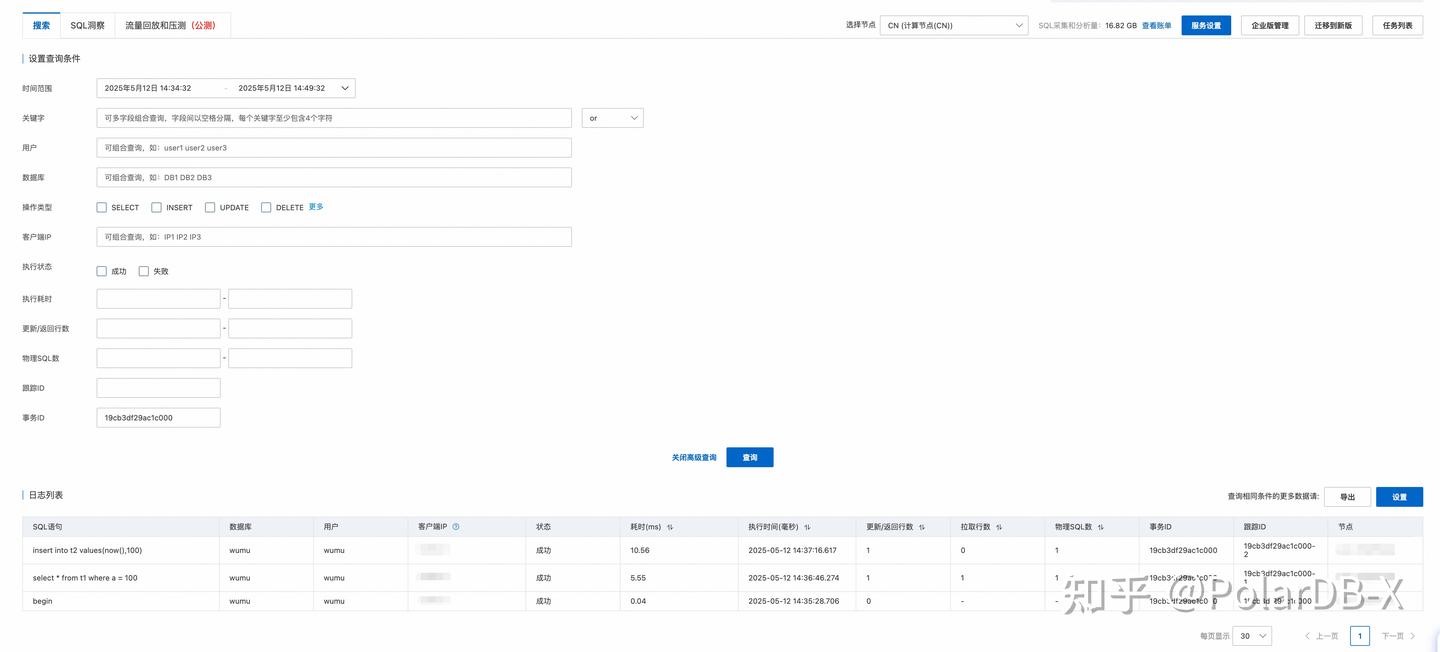
After the preceding steps are performed, it is found that the t1 table has two long-running transactions. You can use the SQL Explorer feature to check the execution details of the long-running transactions. If the long-running transactions do not meet business expectations, we recommend that you check whether a transaction is not committed for a long time in the business logic. After the issue is resolved, perform DDL operations. If the long-running transactions meet business expectations and have a high priority, do not perform DDL operations to prevent affecting business operations. If the long-running transactions meet business expectations and have a low priority, you can perform DDL operations. Take note that the connections of the long-running transactions are killed during the execution of the DDL operations.
Before you perform a DDL operation, manually execute the EXPLAIN ONLINE_DDL statement to check whether the operation locks the table. If the table may be locked, rewrite the SQL statement and specify the OMC execution method. Although this method is effective, it is cumbersome to operate. To ensure that a DDL operation does not lock the table, is there a more convenient way for the system to automatically select the optimal execution policy based on the original DDL statement?
The answer is yes. The lock-free column type change feature of PolarDB-X is now integrated into the lock-free change module of Data Management (DMS). When you use the lock-free change feature of DMS, the system automatically determines whether a DDL operation locks the table and intelligently selects the optimal execution policy. This ensures the security and efficiency of the operation.
• The instance must be a PolarDB-X instance and must be of V5.4.20-20241224 or later.
• After the lock-free change feature of DMS is enabled, regular data change tickets have the same effect as lock-free change tickets and DDL operations are executed without locking the table.
Q: If the version of my instance is earlier than V5.4.20-20241224, how do I determine whether a DDL operation locks a table?
A: You can refer to Online DDL on the Alibaba Cloud official website to determine whether a DDL operation locks a table. For a DDL operation of the ALTER TABLE type, you can add LOCK=NONE to the end of the ALTER TABLE statement to specify that the DDL operation is executed without locking tables. We recommend that you perform tests in a test instance or test table. If the DDL operation is performed properly, the DDL operation supports online execution and does not lock the table. If an error is returned after the DDL operation is performed, the DDL operation does not support online execution and locks the table.
Q: My instance is a PolarDB-X Standard Edition instance, an ApsaraDB RDS instance, or an open source MySQL instance instead of a PolarDB-X Enterprise Edition instance. How do I determine whether a DDL operation locks a table?
A: You can refer to the Online DDL Operations chapter of the MySQL 5.7 Reference Manual or MySQL 8.0 Reference Manual on the MySQL official website to determine whether a DDL operation locks a table. For a DDL operation of the ALTER TABLE type, you can also add LOCK=NONE to the end of the ALTER TABLE statement to determine whether the DDL operation locks the table.
Q: Why not use lock-free column type changes as the default preferred execution policy of the ALTER TABLE statement?
A: Although lock-free column type changes effectively prevent table locking issues, the execution speed is relatively slow and a large number of resources are consumed. Therefore, in most scenarios, we recommend that you preferentially use the online DDL feature of MySQL to perform change operations. You can use lock-free column type changes as an alternative solution only when you need to prevent table locking issues.
Q: Is there a way to accelerate the execution of a DDL operation and shorten the window period of executing the DDL operation?
A: Yes. PolarDB-X supports the parallel DDL feature. When hardware resources are idle, you can adjust the degree of parallelism (DOP) of the DDL statement to accelerate the execution of the DDL operation, thus shortening the window period of the change. For more information about how to control the DOP of DDL statements, see Parallel DDL on the Alibaba Cloud official website. The parallel DDL feature will be introduced in another best practice article.
Best Practices for Setting Up Your Own Webhook Bot for Alibaba Cloud Resource Notifications
ApsaraDB - January 17, 2025
ApsaraDB - October 17, 2024
ApsaraDB - December 12, 2025
ApsaraDB - April 16, 2025
ApsaraDB - December 21, 2022
ApsaraDB - April 20, 2023
 Data Transmission Service
Supports data migration and data synchronization between data engines, such as relational database, NoSQL and OLAP
Learn More PolarDB for MySQL
Alibaba Cloud PolarDB for MySQL is a cloud-native relational database service 100% compatible with MySQL.
Learn More Time Series Database (TSDB)
TSDB is a stable, reliable, and cost-effective online high-performance time series database service.
Learn More AnalyticDB for MySQL
AnalyticDB for MySQL is a real-time data warehousing service that can process petabytes of data with high concurrency and low latency.
Learn MoreMore Posts by ApsaraDB


