By Zongzhi Chen, Manager of Alibaba Cloud RDS Team
In the previous article, we provided an overview of the DuckDB file format and metadata storage, omitting the details of the table storage format due to its complexity. This article provides a detailed analysis of the table storage format based on the DuckDB v1.3.1 source code. A TL;DR summary is available at the end.
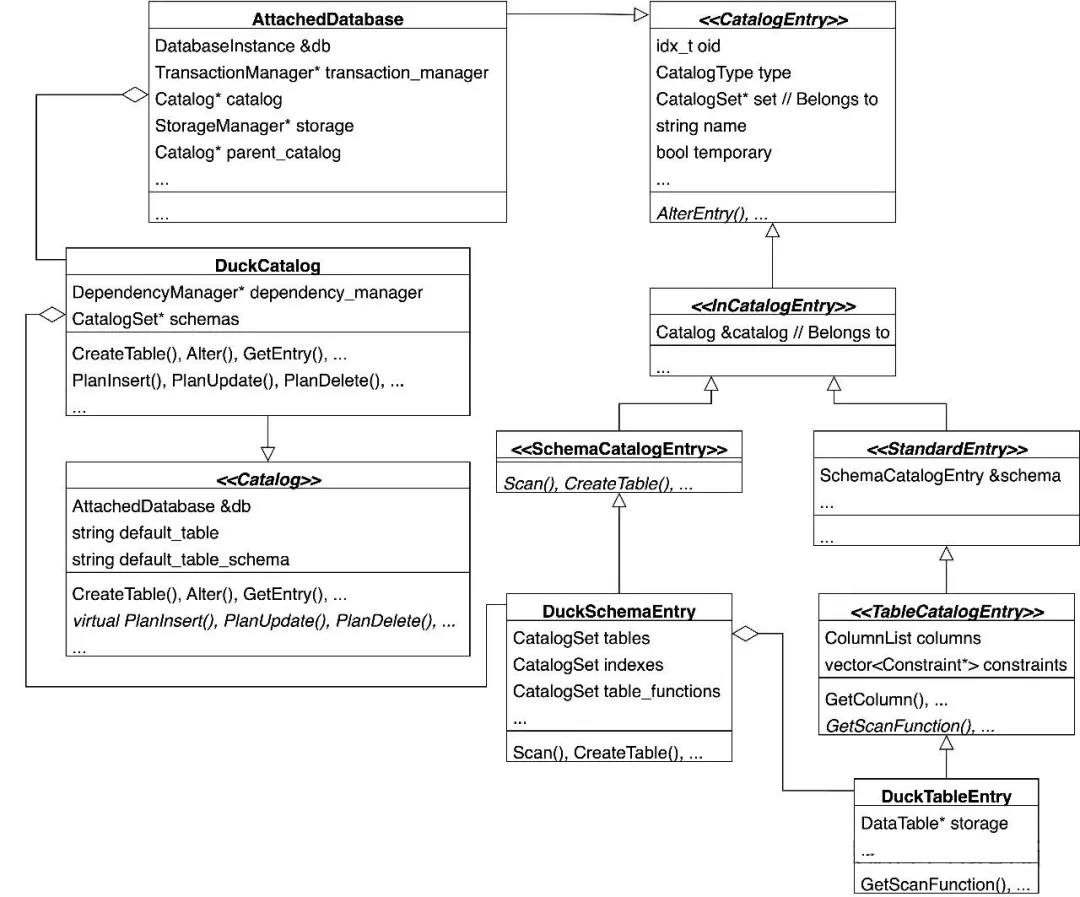
Before analyzing table data storage, it is essential to understand the data structures related to the catalog. The catalog is the primary entry point for accessing a DuckDB file, and it manages various CatalogEntry objects in memory. Tables are represented by a DuckTableEntry, which contains a crucial pointer to a DataTable object. The following sections focus on the DataTable class to explain its data structures and on-disk storage format.
• An AttachedDatabase (corresponding to a database file) contains a Catalog.
• A Catalog (corresponding to the data dictionary) contains multiple Schemas.
• A Schema (similar to a database in MySQL) contains multiple tables, indexes, functions, and other objects.
• The focus of this article, the table, is represented in the catalog as a DuckTableEntry object. It contains a crucial member variable: a pointer to a DataTable class. The following sections will revolve around the DataTable class to explain the table's data structures and its storage format in the file.
From a high-level perspective, table storage is organized into a four-layer hierarchy:
• A Table is horizontally partitioned by rows into multiple Row Groups.
• A Row Group is vertically partitioned by columns into multiple Column Data objects.
• A Column Data object is further horizontally partitioned by rows into multiple Column Segments.
• A Column Segment represents the actual stored data. It typically corresponds to a single 256-KB Data Block but may also share a block with other segments.
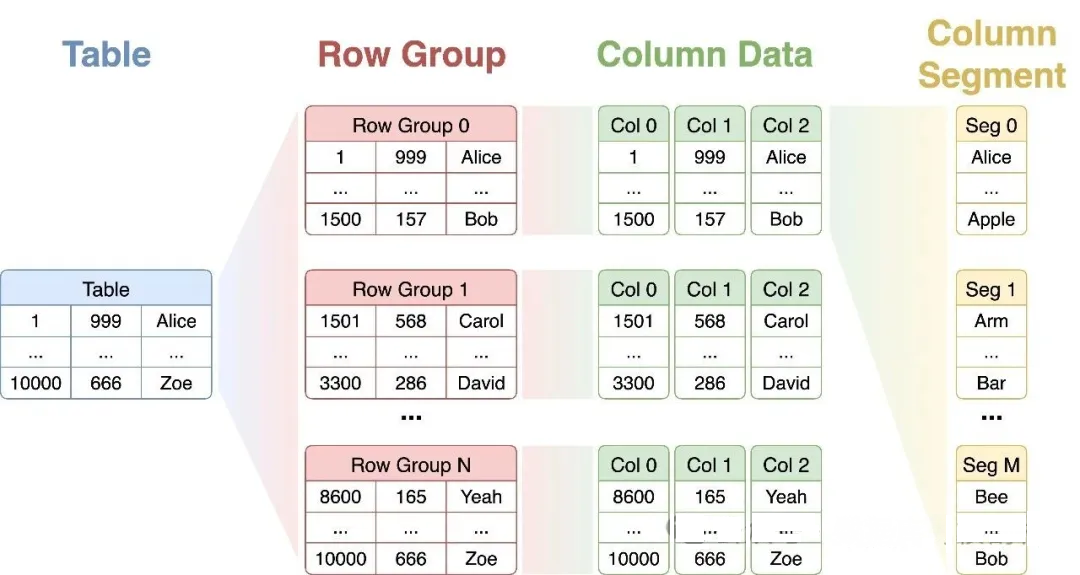
Note: The visual ordering of columns in diagrams is for clarity only. In practice, all column data is stored according to the row order, identified by a Row ID. This allows for precisely locating all data for a given row, a key dependency for the Segment Tree discussed later.
Mapping these concepts to the source code reveals the following data structures:
• A Table corresponds to a DataTable object, which contains a pointer to a RowGroupCollection. This collection uses a RowGroupSegmentTree to manage the table's RowGroup objects (horizontal partitioning).
• A RowGroup contains an array of ColumnData objects, one for each column in the table (vertical partitioning).
• ColumnData has several subclasses, such as StandardColumnData, ValidityColumnData, and ListColumnData. A StandardColumnData object also contains a ValidityColumnData object. This "validity column" stores the NULL status for the main data column and has its own separate Column Data and Column Segments.
A ColumnData object uses a ColumnSegmentTree to manage its ColumnSegment objects (horizontal partitioning).
A (block_id, offset) pair specifies the location of a ColumnSegment within a data block.
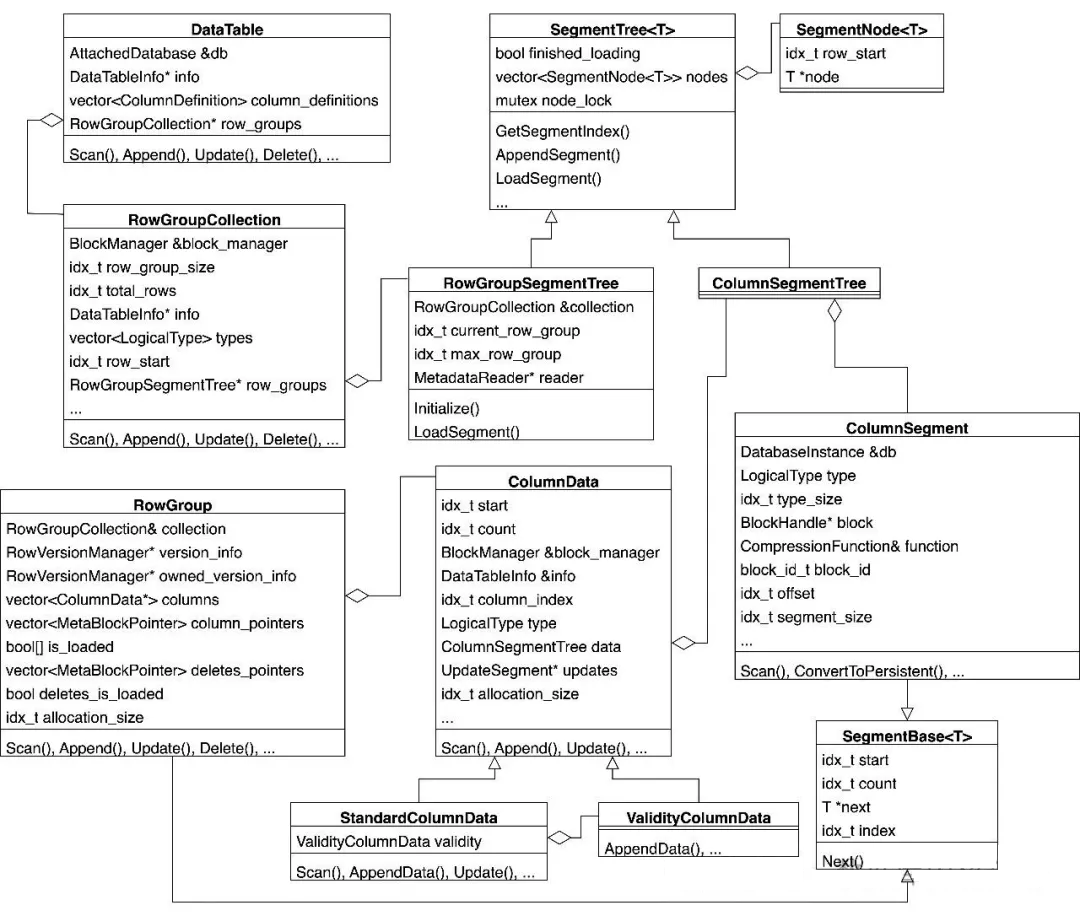
As shown, both horizontal partitioning steps use a Segment Tree to manage the subsequent level of the hierarchy. RowGroup and ColumnSegment both inherit from SegmentBase<T>, allowing them to function as nodes within a SegmentTree. The SegmentBase class contains two key fields:
Each node in a SegmentTree represents a range of rows. The SegmentTree itself is not a tree but an ordered array, enabling fast binary searches on Row ID to locate the correct segment node.

bool TryGetSegmentIndex(SegmentLock &l, idx_t row_number, idx_t &result) {
    ... /* In lazy loading mode, loads SegmentNodes until row_number is covered. */
    idx_t lower = 0;
    idx_t upper = nodes.size() - 1;

    /* Binary search to locate the SegmentNode containing the row_number. */
    while (lower <= upper) {
        idx_t index = (lower + upper) / 2;
        auto &entry = nodes[index];
        if (row_number < entry.row_start) {
            upper = index - 1;
        } else if (row_number >= entry.row_start + entry.node->count) {
            lower = index + 1;
        } else {
            result = index;
            return true;
        }
    }
    return false;
}
The primary difference between RowGroupSegmentTree and ColumnSegmentTree is that the former supports lazy loading of metadata, while the latter does not. This behavior is controlled by a template parameter. "Loading" here refers to metadata (pointers), not the data blocks themselves.
template <class T, bool SUPPORTS_LAZY_LOADING = false>
class SegmentTree {
    /* With SUPPORTS_LAZY_LOADING, lazy loading is triggered. */
    /* RowGroupSegmentTree implements its own LoadSegment method. */
    bool LoadNextSegment(SegmentLock &l) {
        if (!SUPPORTS_LAZY_LOADING) {
            return false;
        }
        if (finished_loading) {
            return false;
        }
        auto result = LoadSegment();
        if (result) {
            AppendSegmentInternal(l, std::move(result));
            return true;
        }
        return false;
    }
};

/* SUPPORTS_LAZY_LOADING=true, allows lazy loading. */
class RowGroupSegmentTree : public SegmentTree<RowGroup, true> {
    ...
    unique_ptr<RowGroup> LoadSegment() override;
    ...
};

/* SUPPORTS_LAZY_LOADING=false. All ColumnSegment metadata is loaded on initialization.*/
    -> RowGroup::GetColumn()
    --> ColumnData::Deserialize()
    ---> ColumnData::InitializeColumn()
    ----> ColumnData::AppendSegment() */
class ColumnSegmentTree : public SegmentTree<ColumnSegment> {};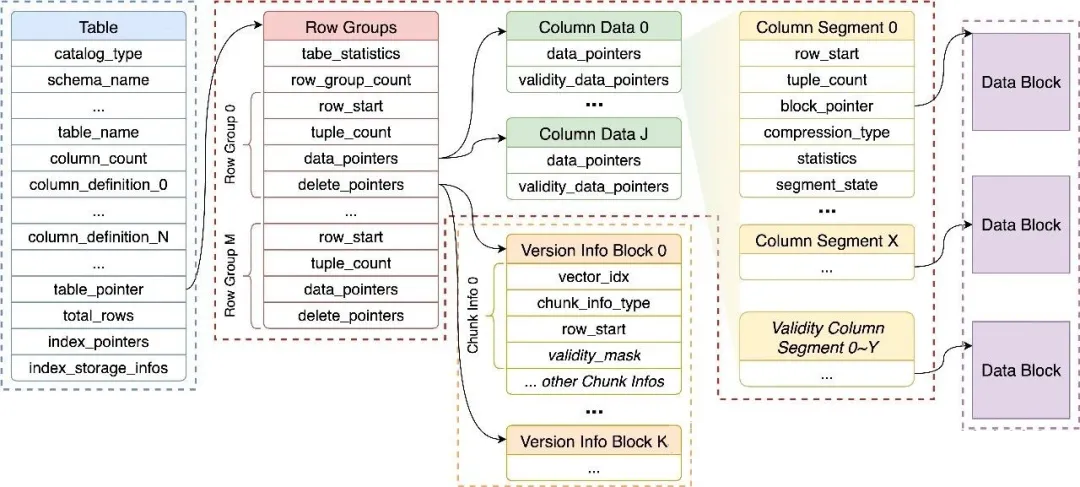
A table's data is physically stored across four distinct locations:
During a checkpoint, two MetadataWriter instances are used: metadata_writer for catalog entries and table_metadata_writer for detailed table metadata. Note that the similar names can be a point of confusion.
void SingleFileCheckpointWriter::CreateCheckpoint() {
    ...
    /* 1. Create two MetadataWriter objects for the catalog and table metadata.*/


    metadata_writer = make_uniq<MetadataWriter>(metadata_manager);
    table_metadata_writer = make_uniq<MetadataWriter>(metadata_manager);

    /* 2. Scan to get all Catalog Entries.*/
    ...

    /* 3. Serialize all Catalog Entries using the metadata_writer.*/


    BinarySerializer serializer(*metadata_writer, SerializationOptions(db));
    serializer.Begin();
    serializer.WriteList(100, "catalog_entries", catalog_entries.size(), [&](Serializer::List &list, idx_t i) {
        auto &entry = catalog_entries[i];
        list.WriteObject([&](Serializer &obj) { WriteEntry(entry.get(), obj); });
    });
    serializer.End();
    ...
}
As the code below shows, table_metadata_writer is passed during the initialization of both SingleFileTableDataWriter and SingleFileRowGroupWriter. Therefore, table_metadata_writer will be used to serialize table metadata in both RowGroup::Checkpoint and SingleFileTableDataWriter::FinalizeTable.
unique_ptr<TableDataWriter> SingleFileCheckpointWriter::GetTableDataWriter(TableCatalogEntry &table) {
    return make_uniq<SingleFileTableDataWriter>(*this, table, *table_metadata_writer);
}

unique_ptr<RowGroupWriter> SingleFileTableDataWriter::GetRowGroupWriter(RowGroup &row_group) {
    return make_uniq<SingleFileRowGroupWriter>(table, checkpoint_manager.partial_block_manager, *this,
                                               table_data_writer);
}SingleFileCheckpointWriter::WriteTable
├── TableDataWriter::WriteTableData
│ └── DataTable::Checkpoint
│ ├── RowGroupCollection::Checkpoint
│ │ ├── CheckpointTask::ExecuteTask
│ │ │ └── RowGroup::WriteToDisk
│ │ │ └── StandardColumnData::Checkpoint
│ │ │ ├── ColumnDataCheckpointer::Checkpoint // Checks for modifications, returns if none.
│ │ │ │ └── ColumnDataCheckpointer::WriteToDisk
│ │ │ │ ├── ColumnDataCheckpointer::DropSegments
│ │ │ │ ├── ColumnDataCheckpointer::ScanSegments
│ │ │ │ └── UncompressedFunctions::FinalizeCompress
│ │ │ └── ColumnDataCheckpointer::FinalizeCheckpoint
│ │ └── RowGroup::Checkpoint
│ └── SingleFileTableDataWriter::FinalizeTable
└── PartialBlockManager::FlushPartialBlocksThe call stack for writing table data is top-down, but the data flow is bottom-up, as lower-level components must return pointers to the upper levels.
• ColumnDataCheckpointer::WriteToDisk handles data block operations. It scans existing column segments, applies compression, merges segments, and writes new ones. It generates DataPointer objects that add them to ColumnCheckpointState::data_pointers, constituting the Column Data's metadata.
• RowGroup::Checkpoint serializes the data_pointers for all its columns into the table meta block list and serializes version info into a separate list. It constructs a RowGroupPointer object containing pointers to this metadata.
• RowGroupCollection::Checkpoint collects the RowGroupPointer from each row group.
• SingleFileTableDataWriter::FinalizeTable serializes all RowGroupPointers and table statistics. Finally, it writes a pointer to this metadata block into the TableCatalogEntry.
To pass serialization results (pointers) from the bottom to the top, DuckDB uses a series of XXXCheckpointState classes to store context. The UML diagram below shows the relationship between these classes.
• CollectionCheckpointState corresponds to a Row Group Collection and contains multiple RowGroupWriteData objects.
• RowGroupWriteData corresponds to a Row Group and contains multiple ColumnCheckpointState objects.
• ColumnCheckpointState corresponds to a Column Data and contains multiple DataPointer objects. Each DataPointer represents a ColumnSegment and points to its storage location in a data block.
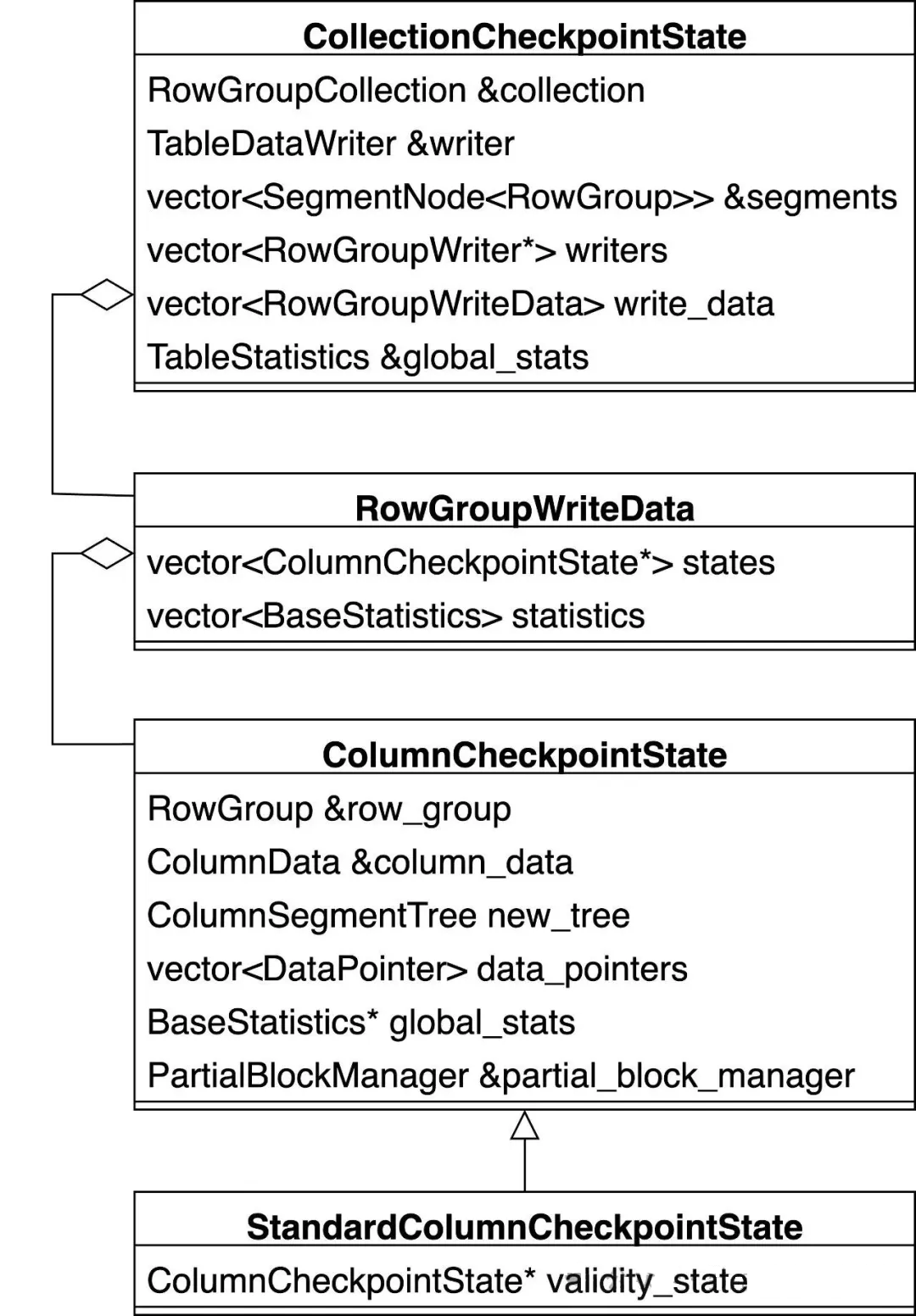
This stage generates DataPointer objects, each representing a ColumnSegment. The process starts at ColumnDataCheckpointer::WriteToDisk. The call stack is as follows:
ColumnDataCheckpointer::WriteToDisk
├── ColumnDataCheckpointer::DropSegments
│   └── ColumnSegment::CommitDropSegment
│       └── SingleFileBlockManager::MarkBlockAsModified // Marks old data blocks as modified.
├── ColumnDataCheckpointer::ScanSegments
│   ├── ColumnData::CheckpointScan // Scans in chunks of 2048 rows.
│   │   └── UpdateSegment::FetchCommittedRange
│   │       └── GetFetchCommittedRangeFunction
│   │           └── TemplatedFetchCommittedRange
│   │               └── MergeUpdateInfoRange // Applies committed updates.
│   └── callback -> UncompressedFunctions::Compress // Loads data into a new Column Segment.
│       ├── UncompressedCompressState::FlushSegment // Flushes a full segment to a disk-backed data block.
│       │   └── ColumnCheckpointState::FlushSegmentInternal
│       │       ├── PartialBlockManager::GetBlockAllocation
│       │       │   └── PartialBlockManager::AllocateBlock
│       │       └── PartialBlockManager::RegisterPartialBlock
│       └── UncompressedCompressState::CreateEmptySegment // Allocates a new segment and a 256KB in-memory block.
└── UncompressedFunctions::FinalizeCompress // Finalizes the last segment, essentially calling FlushSegment.
    └── UncompressedCompressState::Finalize
        └── UncompressedCompressState::FlushSegment
The entry function ColumnDataCheckpointer::WriteToDisk is straightforward:
UncompressedFunctions::Compress as an example, this is a simple append. When a segment is full, a new one is allocated with a temporary 256-KB in-memory data block.UncompressedCompressState::Finalize, this essentially calls FlushSegment.void ColumnDataCheckpointer::WriteToDisk() {
/* 1. Mark all data blocks of old column segments as modified.*/
/* These blocks will be added to the free list and discarded.*/
DropSegments();
/* 2. Detect and determine the compression algorithm. We will assume uncompressed.*/
...
/* 3. Iterate over existing column segments, reading in chunks, applying updates,*/
/* and then calling a callback to append data to new column segments.*/
ScanSegments([&](Vector &scan_vector, idx_t count) {
for (idx_t i = 0; i < checkpoint_states.size(); i++) {
if (!has_changes[i]) {
continue;
}
auto &function = analyze_result[i].function;
auto &compression_state = compression_states[i];
function->compress(*compression_state, scan_vector, count);
}
});
/* 4. Finalize the last column segment.*/
for (idx_t i = 0; i < checkpoint_states.size(); i++) {
if (!has_changes[i]) {
continue;
}
auto &function = analyze_result[i].function;
auto &compression_state = compression_states[i];
function->compress_finalize(*compression_state);
}
}When a column segment is full (typically 256 KB) or at the end of the process, ColumnCheckpointState::FlushSegmentInternal is called:
1. Merge statistics: Merge the segment's statistics into the parent Column Data's statistics.
2. Check for constants: If a segment contains only constant values, only its statistics but not the data are stored. This occurs in two cases:
• A validity column that is either all NULL or all not NULL.
• A numeric column where all values are identical.
3. For non-constant segments, the data must be written to a data block:
4. If a data block becomes full and will not be reused, it is flushed to the file immediately. Otherwise, it is registered with the PartialBlockManager and flushed later during PartialBlockManager::FlushPartialBlocks.
5. Construct a DataPointer that points to the data. This represents the ColumnSegment and includes statistics, a block pointer (Block ID, offset), Start Row ID, and Count. This pointer is then added to the data_pointers array, preparing the metadata for the Column Data.
void ColumnCheckpointState::FlushSegmentInternal(unique_ptr<ColumnSegment> segment, idx_t segment_size){
    ...
    /* 1. Merge the segment's statistics into the column data's global statistics.*/
    global_stats->Merge(segment->stats.statistics);
    ...

    unique_lock<mutex> partial_block_lock;
    /* 2. Check if the segment stores a constant value.
          - A validity column (all NULLs or all non-NULLs).
          - A numeric column (all values are the same).
    if (!segment->stats.statistics.IsConstant()) {
        partial_block_lock = partial_block_manager.GetLock();

        /* 3. For non-constant segments, decide whether to allocate a new data block based on size.
              If the segment size is greater than 80% of 256 KB, a new block is required. Otherwise, try to fit it into a partial block. */
        PartialBlockAllocation allocation =
            partial_block_manager.GetBlockAllocation(NumericCast<uint32_t>(segment_size));
        block_id = allocation.state.block_id;
        offset_in_block = allocation.state.offset;

        if (allocation.partial_block) { /* Reuse an existing partial block */
            auto &pstate = allocation.partial_block->Cast<PartialBlockForCheckpoint>();
            auto old_handle = buffer_manager.Pin(segment->block);
            auto new_handle = buffer_manager.Pin(pstate.block_handle);
            /* Copy the content */
            memcpy(new_handle.Ptr() + offset_in_block, old_handle.Ptr(), segment_size);
            pstate.AddSegmentToTail(column_data, *segment, offset_in_block);
        } else { /* Allocate a new disk-backed data block */
            if (segment->SegmentSize() != block_size) {
                segment->Resize(block_size);
            }
            allocation.partial_block = make_uniq<PartialBlockForCheckpoint>(column_data, *segment, allocation.state,
                                                                            *allocation.block_manager);
        }

        /* 4. If the block is full, flush it. Otherwise, register it with the PartialBlockManager
              to be flushed later in PartialBlockManager::FlushPartialBlocks. */
        partial_block_manager.RegisterPartialBlock(std::move(allocation));
    } else {
        /* For constant segments, no data block is needed. */
        segment->ConvertToPersistent(nullptr, INVALID_BLOCK);
    }

    /* 5. Construct a DataPointer to the column segment, including stats, block pointer,
          start row, and count, and add it to the data_pointers array. */
    DataPointer data_pointer(segment->stats.statistics.Copy());
    data_pointer.block_pointer.block_id = block_id;
    data_pointer.block_pointer.offset = offset_in_block;
    data_pointer.row_start = row_group.start;
    if (!data_pointers.empty()) {
        auto &last_pointer = data_pointers.back();
        data_pointer.row_start = last_pointer.row_start + last_pointer.tuple_count;
    }
    data_pointer.tuple_count = tuple_count;
    ...
    new_tree.AppendSegment(std::move(segment));
    data_pointers.push_back(std::move(data_pointer));
}The metadata for Column Data is persisted within RowGroup::Checkpoint. During serialization, pointers to the serialized content are generated and added to a RowGroupPointer, which is then returned to the upper layer. The function is simple:
1. Merge the statistics of all Column Data into the table's global statistics.
2. For each ColumnCheckpointState corresponding to a Column Data:
3. Serialize the row group's version info (which tracks deleted rows) into a new, separate meta block list, and store pointers to all of its meta blocks in row_group_pointer.deletes_pointers.
RowGroupPointer RowGroup::Checkpoint(RowGroupWriteData write_data, RowGroupWriter &writer,
                                     TableStatistics &global_stats){
    RowGroupPointer row_group_pointer;

    auto lock = global_stats.GetLock();
    /* 1. Merge all column data statistics into the table's global statistics. */
    for (idx_t column_idx = 0; column_idx < GetColumnCount(); column_idx++) {
        global_stats.GetStats(*lock, column_idx).Statistics().Merge(write_data.statistics[column_idx]);
    }

    row_group_pointer.row_start = start;
    row_group_pointer.tuple_count = count;
    /* 2. Iterate over all ColumnCheckpointState objects. */
    for (auto &state : write_data.states) {
        /* This is the table_metadata_writer. */
        auto &data_writer = writer.GetPayloadWriter();
        auto pointer = data_writer.GetMetaBlockPointer();

        /* 2.i Add the meta block pointer to row_group_pointer.data_pointers. */
        row_group_pointer.data_pointers.push_back(pointer);

        /* 2.ii Serialize the column data metadata into the table_metadata_writer's meta block list. */
        auto persistent_data = state->ToPersistentData();
        BinarySerializer serializer(data_writer);
        serializer.Begin();
        persistent_data.Serialize(serializer);
        serializer.End();
    }

    /* 3. Serialize the row group's version info into a new meta block list and
          store the pointers in row_group_pointer.deletes_pointers. */
    row_group_pointer.deletes_pointers = CheckpointDeletes(writer.GetPayloadWriter().GetManager());
    Verify();
    return row_group_pointer;
}
The specific content of the Column Data metadata consists of two parts:
• The data_pointers array, where each DataPointer object represents a ColumnSegment and contains:
• The metadata for the validity column, which is also a DataPointer array with the same structure.
void PersistentColumnData::Serialize(Serializer &serializer) const{
    serializer.WritePropertyWithDefault(100, "data_pointers", pointers);
    if (child_columns.empty()) {
        return;
    }
    serializer.WriteProperty(101, "validity", child_columns[0]);
    ... /* For ARRAY and LIST types */
}

void DataPointer::Serialize(Serializer &serializer) const{
    serializer.WritePropertyWithDefault<uint64_t>(100, "row_start", row_start);
    serializer.WritePropertyWithDefault<uint64_t>(101, "tuple_count", tuple_count);
    serializer.WriteProperty<BlockPointer>(102, "block_pointer", block_pointer);
    serializer.WriteProperty<CompressionType>(103, "compression_type", compression_type);
    serializer.WriteProperty<BaseStatistics>(104, "statistics", statistics);
    serializer.WritePropertyWithDefault<unique_ptr<ColumnSegmentState>>(105, "segment_state", segment_state);
}SingleFileTableDataWriter::FinalizeTable can be seen as the final step in writing table metadata. It includes persisting row group metadata and serializing the final TableCatalogEntry. Note that steps 2-3 and step 4 write to different meta block lists:
void SingleFileTableDataWriter::FinalizeTable(const TableStatistics &global_stats, DataTableInfo *info,
                                              Serializer &serializer){
    /* 1. Get the current meta block pointer from table_data_writer. */
    auto pointer = table_data_writer.GetMetaBlockPointer();

    /* 2. Serialize the table's global statistics into table_data_writer's meta block list. */
    BinarySerializer stats_serializer(table_data_writer, serializer.GetOptions());
    stats_serializer.Begin();
    global_stats.Serialize(stats_serializer);
    stats_serializer.End();

    /* 3. Serialize the row group count and all RowGroupPointers into
          table_data_writer's meta block list. */
    table_data_writer.Write<uint64_t>(row_group_pointers.size());
    idx_t total_rows = 0;
    for (auto &row_group_pointer : row_group_pointers) {
        auto row_group_count = row_group_pointer.row_start + row_group_pointer.tuple_count;
        if (row_group_count > total_rows) {
            total_rows = row_group_count;
        }

        BinarySerializer row_group_serializer(table_data_writer, serializer.GetOptions());
        row_group_serializer.Begin();
        RowGroup::Serialize(row_group_pointer, row_group_serializer);
        row_group_serializer.End();
    }

    /* 4. Serialize the meta block pointer from step 1, total row count, and index info
          into metadata_writer's meta block list (the Catalog). */
    serializer.WriteProperty(101, "table_pointer", pointer);
    serializer.WriteProperty(102, "total_rows", total_rows);
    ...
    auto index_storage_infos = info->GetIndexes().GetStorageInfos(options);
    vector<BlockPointer> compat_block_pointers; /* Serialize an empty array for backward compatibility */
    serializer.WriteProperty(103, "index_pointers", compat_block_pointers);
    serializer.WritePropertyWithDefault(104, "index_storage_infos", index_storage_infos);
}
The specific content of the Row Group metadata consists of four parts:
• Start Row ID
• Row count
• An array of meta block pointers to all Column Data metadata.
• An array of meta block pointers to all Version Info blocks.
void RowGroup::Serialize(RowGroupPointer &pointer, Serializer &serializer) {
    serializer.WriteProperty(100, "row_start", pointer.row_start);
    serializer.WriteProperty(101, "tuple_count", pointer.tuple_count);
    serializer.WriteProperty(102, "data_pointers", pointer.data_pointers);
    serializer.WriteProperty(103, "delete_pointers", pointer.deletes_pointers);
}CheckpointWriter::WriteEntry
└── SingleFileCheckpointWriter::WriteTable
├── CatalogEntry::Serialize // Deep call stack, actual method is shown below:
│ ├── TableCatalogEntry::GetInfo
│ └── CreateTableInfo::Serialize
└── TableDataWriter::WriteTableData
└── DataTable::Checkpoint
└── SingleFileTableDataWriter::FinalizeTableThe process of writing a TableCatalogEntry to the Catalog is distributed. The code snippets below are combined to show the full picture of its components:
1. The Catalog Entry type, which is TABLE_ENTRY.
2. The serialized DuckTableEntry object, which includes:
3. After the row group metadata is written, the pointer to it is recorded as table_pointer, along with the total row count and index information.
void CheckpointWriter::WriteEntry(...){
    /* 1. Catalog Entry type, such as TABLE_ENTRY */
    serializer.WriteProperty(99, "catalog_type", entry.type);
    ...
}

void SingleFileCheckpointWriter::WriteTable(...){
    /* 2. Serialize the DuckTableEntry object. */
    serializer.WriteProperty(100, "table", &table);
    ...
}

void CreateTableInfo::Serialize(Serializer &serializer) const{
    /* 2.i Common CatalogEntry properties, such as schema name. */
    CreateInfo::Serialize(serializer);

    /* 2.ii Table name, column definitions, constraints, ... */
    serializer.WritePropertyWithDefault<string>(200, "table", table);
    serializer.WriteProperty<ColumnList>(201, "columns", columns);
    serializer.WritePropertyWithDefault<vector<unique_ptr<Constraint>>>(202, "constraints", constraints);
    serializer.WritePropertyWithDefault<unique_ptr<SelectStatement>>(203, "query", query);
}

void SingleFileTableDataWriter::FinalizeTable(...){
    ...
    /* 3. After writing row group metadata, record its pointer as table_pointer, along with row count and index info.*/
    serializer.WriteProperty(101, "table_pointer", pointer);
    serializer.WriteProperty(102, "total_rows", total_rows);
    ...
    auto index_storage_infos = info->GetIndexes().GetStorageInfos(options);
    vector<BlockPointer> compat_block_pointers; /* Serialize an empty array for backward compatibility */
    serializer.WriteProperty(103, "index_pointers", compat_block_pointers);
    serializer.WritePropertyWithDefault(104, "index_storage_infos", index_storage_infos);
}This article focused on the table storage format. The key takeaways include:
• A table's storage is organized into a 4-level hierarchy:
• A table's data is stored in four distinct locations on disk:
• Table data is persisted during a checkpoint, with the process integrated into the serialization of its TableCatalogEntry.
ApsaraDB - September 3, 2025
ApsaraDB - November 13, 2025
ApsaraDB - February 5, 2026
ApsaraDB - November 18, 2025
ApsaraDB - February 5, 2026
ApsaraDB - May 13, 2026
 Database for FinTech Solution
Leverage cloud-native database solutions dedicated for FinTech.
Learn More Oracle Database Migration Solution
Migrate your legacy Oracle databases to Alibaba Cloud to save on long-term costs and take advantage of improved scalability, reliability, robust security, high performance, and cloud-native features.
Learn More Database Migration Solution
Migrating to fully managed cloud databases brings a host of benefits including scalability, reliability, and cost efficiency.
Learn More DBStack
DBStack is an all-in-one database management platform provided by Alibaba Cloud.
Learn MoreMore Posts by ApsaraDB


