By Zongzhi Chen, Manager of Alibaba Cloud RDS Team
DuckDB is renowned for its high query performance. However, due to DuckDB's relatively short development history, there aren't many articles that deeply analyze its various modules. This series of articles will dissect DuckDB from the source code level. This article, as the first in the DuckDB source code analysis series, will begin by introducing the file format, focusing on the storage of metadata, while subsequent articles will examine table data storage. All analysis in this article is based on DuckDB version 1.3.1 source code, and the TL;DR is found at the end of the article.
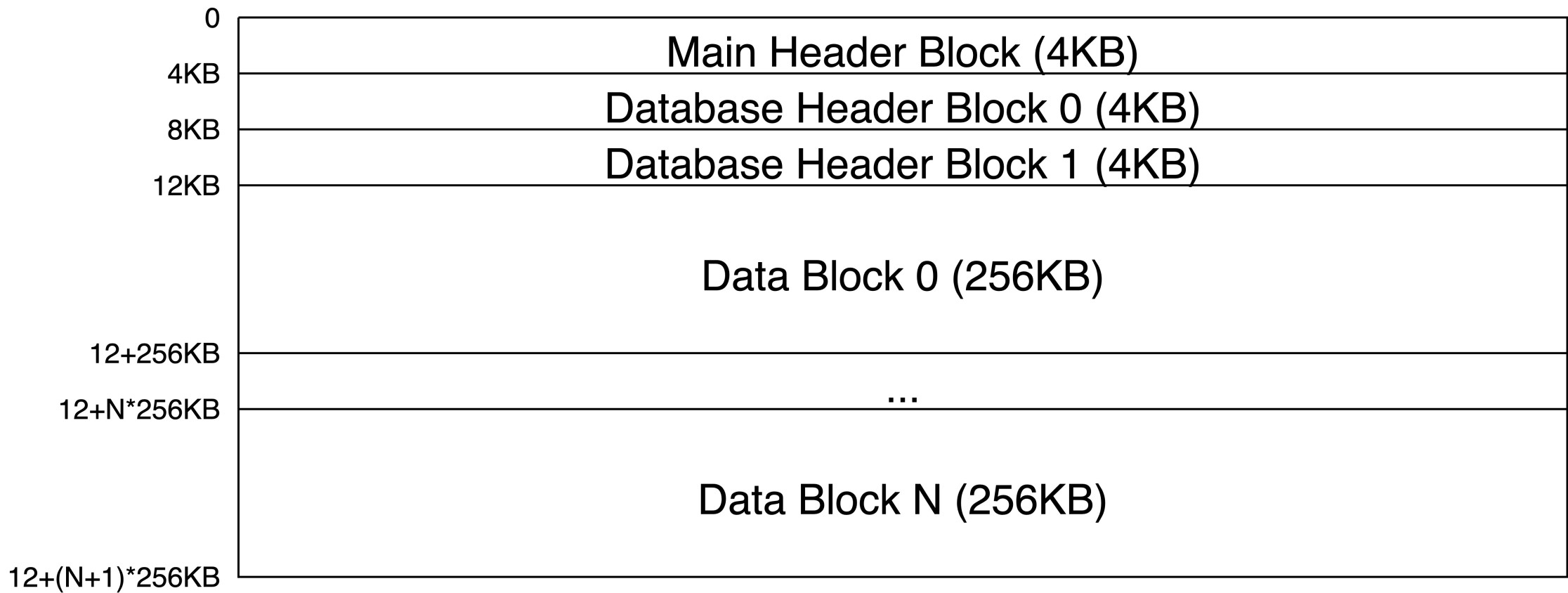
Typically, all table data in DuckDB is stored in a single file, and the format is quite simple, consisting of three types of Blocks:
The previous introduction revealed that there are two types of Header Blocks: Main Header Block and Database Header Block, both 4KB in size. This is because modern file systems and disks generally support 4KB atomic writes. The atomic write of Database Header Block is key to DuckDB’s Checkpoint mechanism, which will be introduced in future articles. This article focuses on the file format itself.
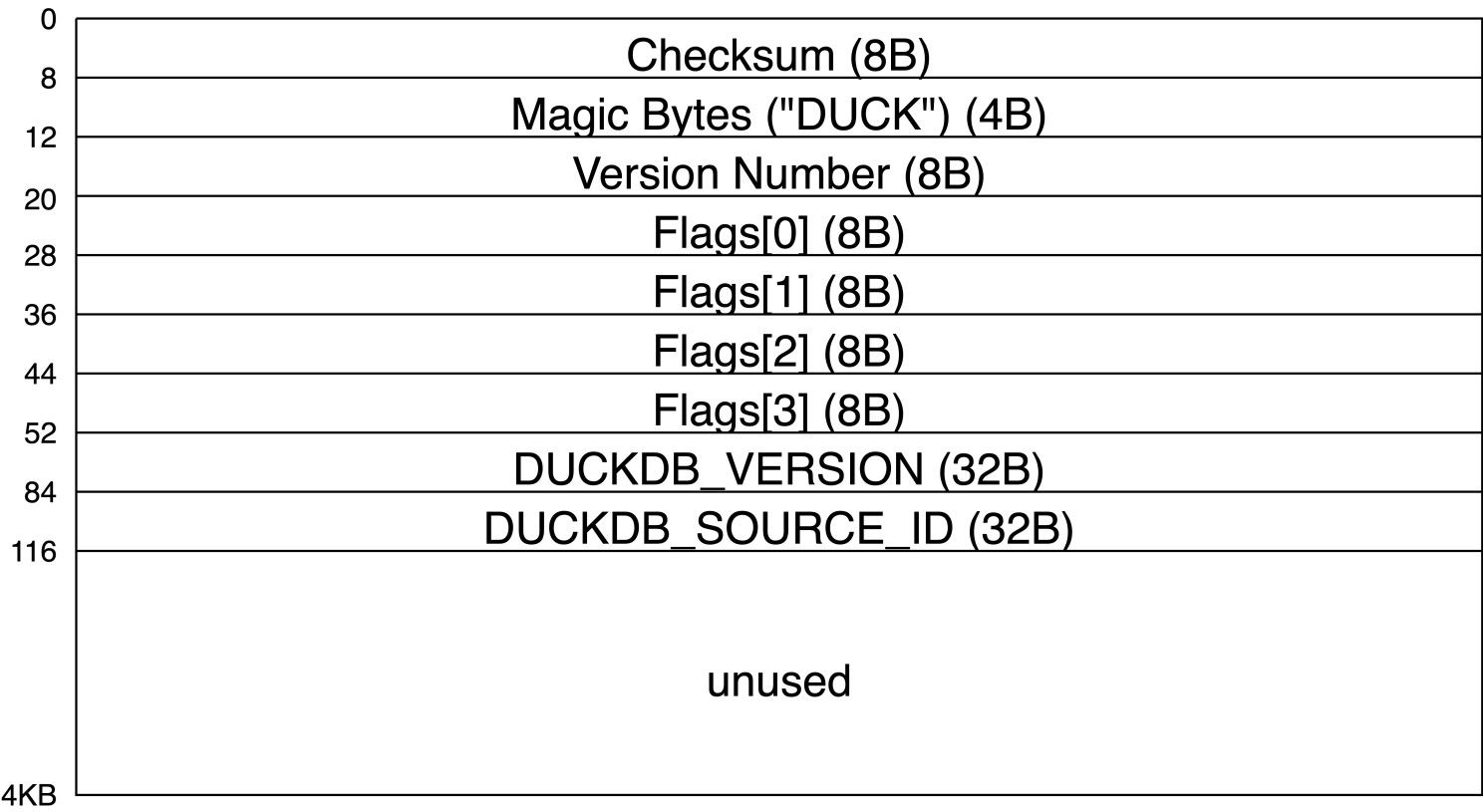
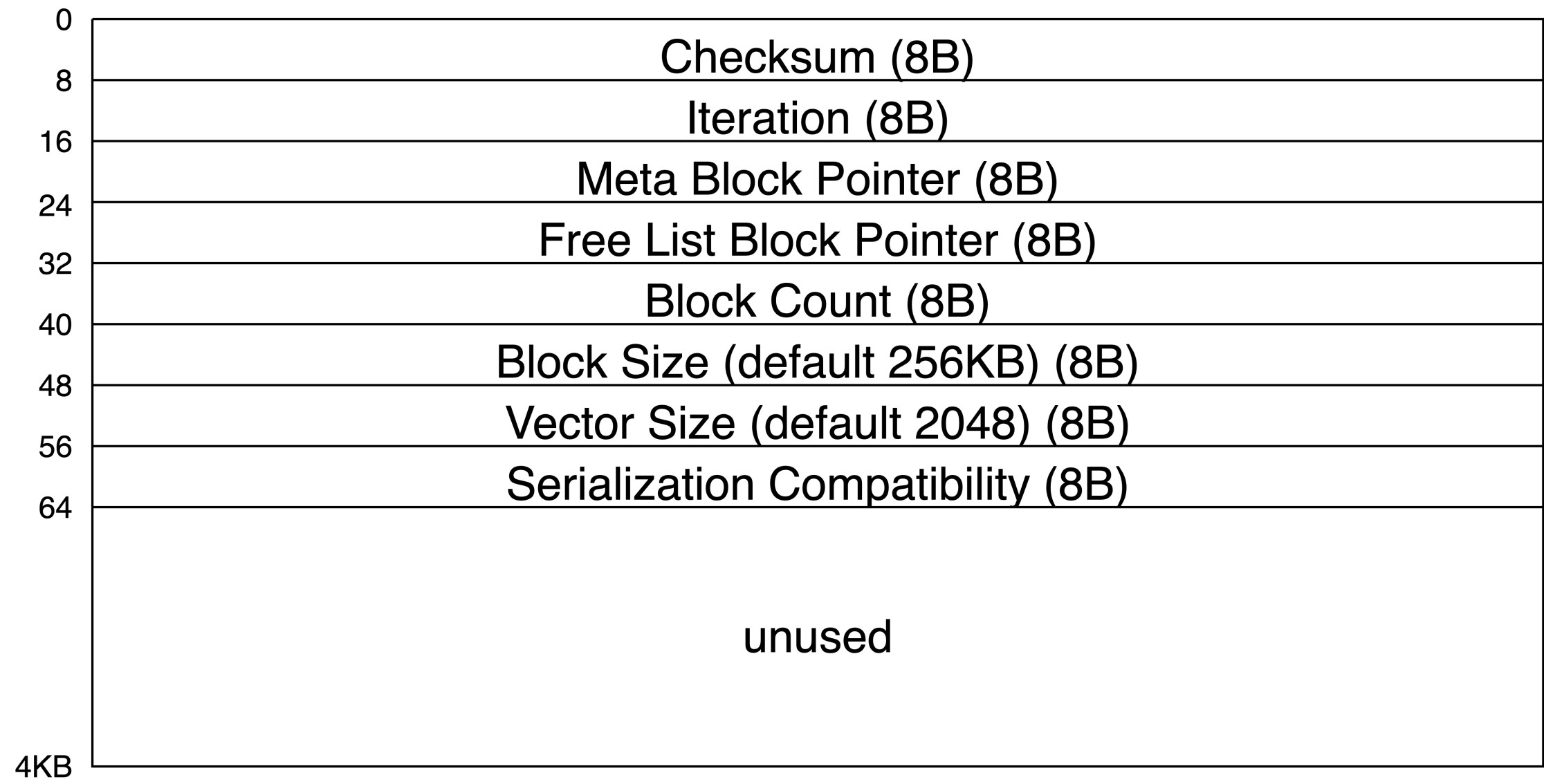
Let’s look at how the Main Header Block and Database Header Block are initialized from the code level. This logic is in the SingleFileBlockManager::CreateNewDatabase function, with the following steps:
void SingleFileBlockManager::CreateNewDatabase() {
    auto flags = GetFileFlags(true);

    /* 1. Create and open the file */
    auto &fs = FileSystem::Get(db);
    handle = fs.OpenFile(path, flags);

    /* Header Buffer size is 4KB, i.e., Storage::FILE_HEADER_SIZE */
    header_buffer.Clear();

    options.version_number = GetVersionNumber();
    db.GetStorageManager().SetStorageVersion(options.storage_version.GetIndex());
    AddStorageVersionTag();

    /* 2. Initialize the Main Header and write it to the file */
    MainHeader main_header = ConstructMainHeader(options.version_number.GetIndex());
    ...
    SerializeHeaderStructure<MainHeader>(main_header, header_buffer.buffer);
    ChecksumAndWrite(header_buffer, 0, true);

    /* 3. Initialize the two Database Headers and write them to the file */
    DatabaseHeader h1;
    h1.iteration = 0;
    h1.meta_block = idx_t(INVALID_BLOCK); /* -1 */
    h1.free_list = idx_t(INVALID_BLOCK);  /* -1 */
    h1.block_count = 0;
    h1.block_alloc_size = GetBlockAllocSize(); /* Default 256KB */
    h1.vector_size = STANDARD_VECTOR_SIZE; /* Default 2048 */
    h1.serialization_compatibility = options.storage_version.GetIndex(); /* Default 1 */
    SerializeHeaderStructure<DatabaseHeader>(h1, header_buffer.buffer);
    ChecksumAndWrite(header_buffer, Storage::FILE_HEADER_SIZE); /* Write to 4KB */

    DatabaseHeader h2;
    ... /* Similar to h1 */
    ChecksumAndWrite(header_buffer, Storage::FILE_HEADER_SIZE * 2ULL); /* Write to 8KB */

    /* 4. Flush to disk */
    handle->Sync();

    /* 5. Initialize setting Active Header to h2 so the first write later will
          rotate to use h1, essentially starting with h1 */
    iteration_count = 0;
    active_header = 1;
    max_block = 0;
}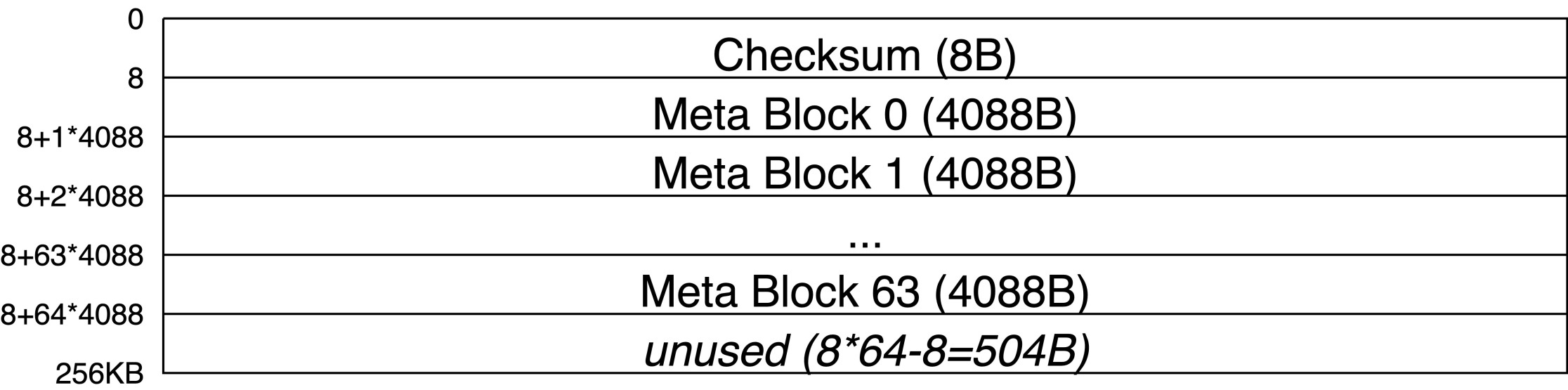
In DuckDB, there are numerous places involving metadata storage, ultimately stored in files using Meta Blocks. Previously, we discussed that each Data Block is 256KB, but each Meta Block is only 4088B. As illustrated in the following diagram, every 64 Meta Blocks share one 256KB Data Block, tightly arranged (storing with an 8B interval so each Meta Block occupies its own 4KB page might be better):
The calculation logic for the 4088B Meta Block is as follows:
idx_t MetadataManager::GetMetadataBlockSize() const {
    /* (256KB-8B)/64=4095B, modulus down to 8 yields 4088B */
    return AlignValueFloor(block_manager.GetBlockSize() / METADATA_BLOCK_COUNT);
}
The method for calculating the position of the index-th Meta Block within a Data Block naturally follows, as shown:
data_ptr_t MetadataReader::BasePtr() {
    /* block.handle.Ptr() has already offset from the Data Block start by 8B
       (Checksum), further offset by index*4088B */
    return block.handle.Ptr() + index * GetMetadataManager().GetMetadataBlockSize();
}The answer to this question lies in the format of the Meta Block itself. A 4088B Meta Block consists of an 8B Meta Block Pointer and 4080B of content. The pointer, as previously introduced, is a (Block ID, Index) tuple. Through pointers, multiple Meta Blocks can be linked into a chain (as illustrated in the following diagram), with a pointer value of -1 indicating the end of the chain.
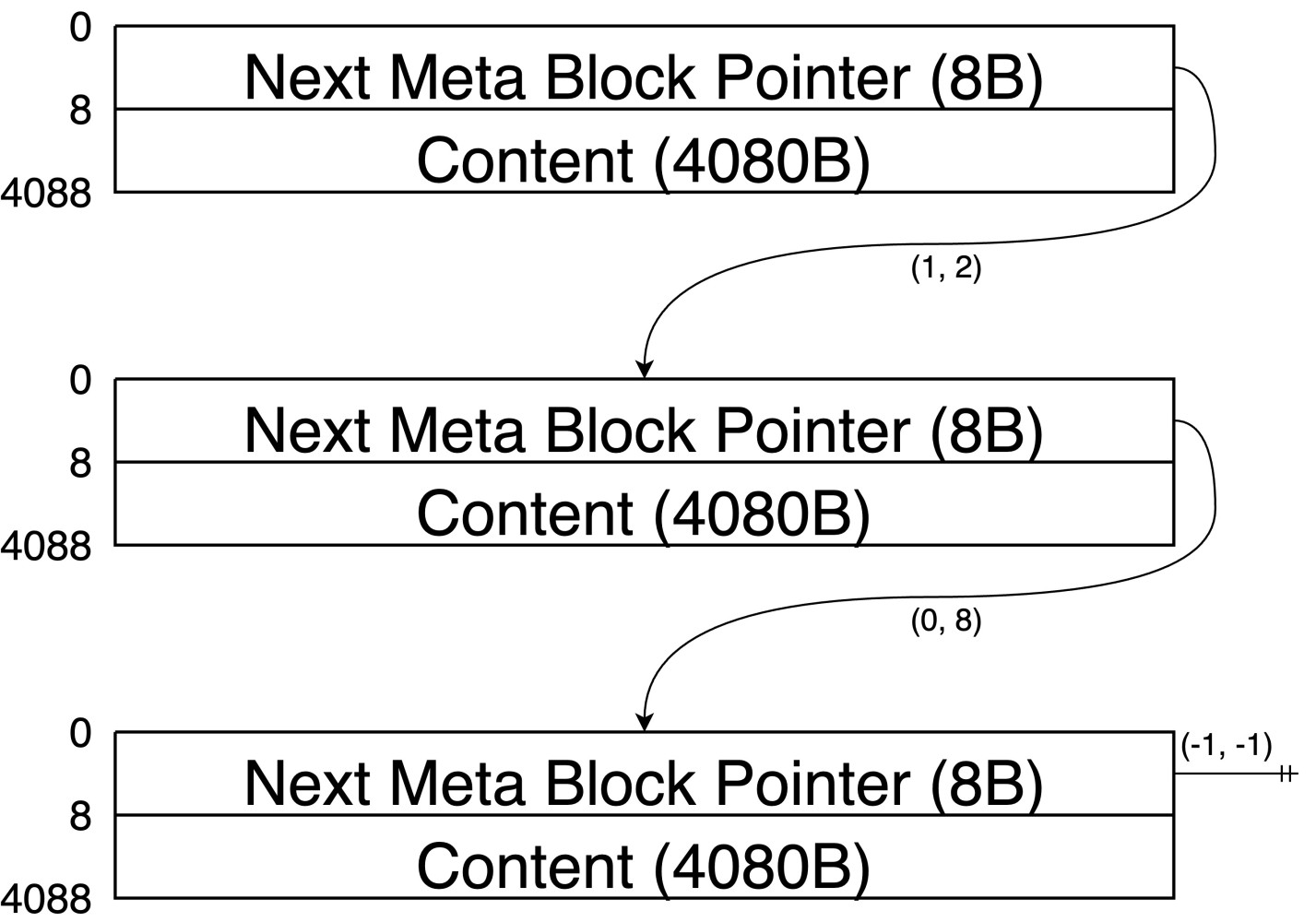
By traversing the chain and concatenating all Contents, we obtain the actual stored metadata content within this sequence of Meta Blocks. DuckDB has the following typical metadata, each corresponding to an independent Meta Block chain:
Let’s examine from the source level how Meta Blocks are allocated during writes. Below is an overview of the call stack:
WriteStream::Write
└── MetadataWriter::WriteData
    └── MetadataWriter::NextBlock
        └── MetadataWriter::NextHandle
            └── MetadataManager::AllocateHandle
                └── MetadataManager::AllocateNewBlock
WriteStream::Write passes the call to MetadataWriter::WriteData. Its logic is straightforward: if a Meta Block is full, allocate a new Meta Block and continue writing:
void MetadataWriter::WriteData(const_data_ptr_t buffer, idx_t write_size) {
    while (offset + write_size > capacity) {
        /* Current Meta Block isn't enough; write as much as possible, then allocate
           a new Meta Block to continue */
        idx_t copy_amount = capacity - offset;
        if (copy_amount > 0) {
            memcpy(Ptr(), buffer, copy_amount);
            buffer += copy_amount;
            offset += copy_amount;
            write_size -= copy_amount;
        }
        NextBlock();
    }
    memcpy(Ptr(), buffer, write_size);
    offset += write_size;
}
In the MetadataWriter::NextBlock function, you can see the initialization of Meta Blocks and the building of the chain:
void MetadataWriter::NextBlock() {
    /* 1. Allocate a new Meta Block */
    auto new_handle = NextHandle();

    /* 2. capacity=0 marks the chain has no Meta Block yet. Otherwise, store the
          next MetaBlock position in the first 8B */
    if (capacity > 0) {
        auto disk_block = manager.GetDiskPointer(new_handle.pointer);
        Store<idx_t>(disk_block.block_pointer, BasePtr());
    }

    /* 3. Initialize the new Meta Block */
    block = std::move(new_handle);
    current_pointer = block.pointer;
    offset = sizeof(idx_t); // Reserve the first 8B for pointer
    capacity = GetManager().GetMetadataBlockSize(); // 4088B
    Store<idx_t>(static_cast<idx_t>(-1), BasePtr()); // Fill the first 8B with -1, indicating the end of the chain

    if (written_pointers) {
        written_pointers->push_back(manager.GetDiskPointer(current_pointer));
    }
}
In the MetadataManager::AllocateHandle function, a Meta Block (4088B) is allocated. If the current MetadataManager's existing Data Block (256KB) has no free Meta Blocks, a new Data Block (256KB) will be allocated, from which a Meta Block can then be allocated. The overall flow is as follows:
MetadataHandle MetadataManager::AllocateHandle() {
    block_id_t free_block = INVALID_BLOCK;

    /* 1. blocks maintain a map from Block ID to Data Block (256KB). Traverse this
          map to find a Block with free Meta Blocks */
    for (auto &kv : blocks) {
        auto &block = kv.second;
        if (!block.free_blocks.empty()) {
            free_block = kv.first;
            break;
        }
    }

    if (free_block == INVALID_BLOCK || free_block > PeekNextBlockId()) {
        /* 2. If the first step finds none, allocate a new Data Block */
        free_block = AllocateNewBlock();
    }

    MetadataPointer pointer;
    pointer.block_index = UnsafeNumericCast<idx_t>(free_block); // Block ID

    auto &block = blocks[free_block];
    if (block.block->BlockId() < MAXIMUM_BLOCK) {
        /* 3. If Data Block exists on the disk (in step 2 the newly created Data
              Block does not meet this condition), convert it to a transient Block
              prior to modification */
        ConvertToTransient(block);
    }

    /* 4. Select a Free Meta Block (4088B) from the Data Block (256KB). Free Blocks
          are stored in descending order, hence the earlier position is preferred */
    pointer.index = block.free_blocks.back(); // Index
    block.free_blocks.pop_back();

    /* 5. Pin the Data Block (256KB) from which the Meta Block was obtained */
    return Pin(pointer);
}
The MetadataManager::AllocateNewBlock function handles the allocation and initialization of a Data Block (256KB) as follows:
block_id_t MetadataManager::AllocateNewBlock() {
    /* Allocate a new Block ID from block_manager */
    auto new_block_id = GetNextBlockId();

    MetadataBlock new_block;
    /* Allocate an in-memory Data Block. Effectively, new_block.block.block_id is
       auto-incremented by temporary_id, starting from MAXIMUM_BLOCK, so earlier
       step 3 in AllocateHandle function doesn't hit newly allocated Block */
    auto handle = buffer_manager.Allocate(MemoryTag::METADATA, &block_manager, false);
    new_block.block = handle.GetBlockHandle();
    new_block.block_id = new_block_id;

    /* Insert 64 Meta Block indexes in descending order into free_blocks for management */
    for (idx_t i = 0; i < METADATA_BLOCK_COUNT; i++) {
        new_block.free_blocks.push_back(NumericCast<uint8_t>(METADATA_BLOCK_COUNT - i - 1));
    }

    /* Initialize all zeroes */
    memset(handle.Ptr(), 0, block_manager.GetBlockSize());
    /* Add into blocks map */
    AddBlock(std::move(new_block));
    return new_block_id;
}SingleFileStorageManager::CreateCheckpoint
└── SingleFileCheckpointWriter::CreateCheckpoint
├── DuckCatalog::ScanSchemas
├── GetCatalogEntries
├── Serializer::WriteList // Write Catalog
│ └── CheckpointWriter::WriteEntry
│ └── SingleFileCheckpointWriter::WriteTable // Write Table Data
│ └── TableDataWriter::WriteTableData
├── WriteAheadLog::WriteCheckpoint // Write Checkpoint mark in WAL
├── SingleFileBlockManager::WriteHeader
│ ├── FreeListBlockWriter::FreeListBlockWriter // Write Free List
│ ├── MetadataManager::Flush
│ ├── DatabaseHeader::Write // Write Database Header
│ └── SingleFileBlockManager::TrimFreeBlocks
└── StorageManager::ResetWALThe metadata writing process is strongly associated with the Checkpoint mechanism and needs to be introduced alongside the Checkpoint process. Enter the overall flow with the SingleFileCheckpointWriter::CreateCheckpoint function as the entry point:
void SingleFileCheckpointWriter::CreateCheckpoint() {
    auto &config = DBConfig::Get(db);
    auto &storage_manager = db.GetStorageManager().Cast<SingleFileStorageManager>();
    if (storage_manager.InMemory()) { return; }
    auto &block_manager = GetBlockManager();
    auto &metadata_manager = GetMetadataManager();

    /* 1. Create metadata_writer and table_metadata_writer as two MetadataWriter
          objects representing two Meta Block Lists. metadata_writer is used to
          record the Catalog, and table_metadata_writer is used to record the
          metadata of table */
    metadata_writer = make_uniq<MetadataWriter>(metadata_manager);
    table_metadata_writer = make_uniq<MetadataWriter>(metadata_manager);

    /* 2. Allocate the first Meta Block for the Catalog Meta Block List, returning a
          pointer to this Meta Block (Block ID, Index) */
    auto meta_block = metadata_writer->GetMetaBlockPointer();

    vector<reference<SchemaCatalogEntry>> schemas;
    /* 3. Scan the DB to gather all Schemas into the schemas array */
    auto &catalog = Catalog::GetCatalog(db).Cast<DuckCatalog>();
    catalog.ScanSchemas([&](SchemaCatalogEntry &entry) { schemas.push_back(entry); });

    catalog_entry_vector_t catalog_entries;
    auto &dependency_manager = *catalog.GetDependencyManager();
    /* 4. Traverse all schemas to collect SCHEMA_ENTRY, TYPE_ENTRY, SEQUENCE_ENTRY,
          TABLE_ENTRY, VIEW_ENTRY, MACRO_ENTRY, TABLE_MACRO_ENTRY, INDEX_ENTRY type
          CatalogEntry into catalog_entries */
    catalog_entries = GetCatalogEntries(schemas);
    dependency_manager.ReorderEntries(catalog_entries);

    BinarySerializer serializer(*metadata_writer, SerializationOptions(db));
    serializer.Begin();
    /* 5. Traverse catalog_entries to serialize all CatalogEntry sequentially into
          Meta Blocks */
    serializer.WriteList(100, "catalog_entries", catalog_entries.size(), [&](Serializer::List &list, idx_t i) {
        auto &entry = catalog_entries[i];
        list.WriteObject([&](Serializer &obj) { WriteEntry(entry.get(), obj); });
    });
    serializer.End();

    /* Despite being labeled as Flush, it merely releases memory usage; the actual
       flush to disk occurs later in WriteHeader */
    metadata_writer->Flush();
    table_metadata_writer->Flush();

    /* 6. Record a Checkpoint mark in the WAL log, storing the initial Meta Block
          pointer of Catalog */
    bool wal_is_empty = storage_manager.GetWALSize() == 0;
    if (!wal_is_empty) {
        auto wal = storage_manager.GetWAL();
        wal->WriteCheckpoint(meta_block);
        wal->Flush();
    }

    /* 7. Write Free List to metadata and rotate update the Database Header */
    DatabaseHeader header;
    header.meta_block = meta_block.block_pointer;
    header.block_alloc_size = block_manager.GetBlockAllocSize();
    header.vector_size = STANDARD_VECTOR_SIZE;
    block_manager.WriteHeader(header);
    ...

    /* 8. Truncate the tail free Blocks from the data file and clear WAL logs */
    block_manager.Truncate();
    if (!wal_is_empty) {
        storage_manager.ResetWAL();
    }
}
The above flow shows that after the Checkpoint mark is added in the WAL log in step 6, the Free List is written and the Database Header is updated. Wouldn't this affect Crash Recovery? The answer is no (refer to the WriteAheadLog::ReplayInternal function):
Serializer::WriteList
└── Serializer::List::WriteObject
    └── CheckpointWriter::WriteEntry
        └── CheckpointWriter::WriteSchema\WriteType\WriteSequence\...
            └── Serializer::WriteProperty
                └── Serializer::WriteValue(const T *ptr)
                    └── Serializer::WriteValue(const T &value)
                        └── CatalogEntry::Serialize
                            ├── SchemaCatalogEntry::GetInfo
                            └── CreateSchemaInfo::Serialize
                                └── CreateInfo::Serialize
As seen earlier, writing the Catalog involves sequentially writing all Catalog Entries. This serialization process is widely used across DuckDB's code to convert memory objects into disk storage formats. This logic has quite a deep function call stack, and the stack above exemplifies the serialization of a SCHEMA_ENTRY type CatalogEntry, depicting the overall serialization flow; similar processing applies for other types (except TABLE_ENTRY, detailed in subsequent articles).
Here's a specific example to help understand the relationship between the serialized result and the function call stack. The example involves creating a Schema named db1 in a new DuckDB file (implicitly creating main Schema); using hexdump, view the stored result of Catalog's Meta Block as follows:
$duckdb/build/debug/duckdb my_duck
DuckDB v1.3.1 (Ossivalis) 2063dda3e6
Enter ".help" for usage hints.
D create schema db1;
D .exit

$hexdump -v -C -s 12288 -n 128 my_duck
00003000  f1 f5 9a 84 cf ec fe 93  ff ff ff ff ff ff ff ff  |................|
00003010  64 00 02 63 00 02 64 00  01 64 00 02 66 00 03 64  |d..c..d..d..f..d|
00003020  62 31 69 00 00 ff ff ff  ff 63 00 02 64 00 01 64  |b1i......c..d..d|
00003030  00 02 66 00 04 6d 61 69  6e 69 00 00 ff ff ff ff  |..f..maini......|
00003040  ff ff 00 00 00 00 00 00  00 00 00 00 00 00 00 00  |................|
00003050  00 00 00 00 00 00 00 00  00 00 00 00 00 00 00 00  |................|
00003060  00 00 00 00 00 00 00 00  00 00 00 00 00 00 00 00  |................|
00003070  00 00 00 00 00 00 00 00  00 00 00 00 00 00 00 00  |................|
00003080
Below, to aid understanding, the hexdump output is aligned with the function call stack:
 f1 f5 9a 84 cf ec fe 93 // Checksum, 8B
    ff ff ff ff ff ff ff ff // Next Meta Block Pointer, 8B, -1 indicates end of chain
->Serializer::WriteList
    64 00       // OnPropertyBegin, 2B, 0x0064=100, writing "catalog_entries"
    02          // OnListBegin, 1B, 0x02=2, list length 2
-->Serializer::List::WriteObject
--->CheckpointWriter::WriteEntry
    63 00 02    // WriteProperty(99, "catalog_type", entry.type), 2B+1B, 0x0063=99 is Field ID, 0x02=2 represents CatalogType::SCHEMA_ENTRY
---->CheckpointWriter::WriteSchema
----->Serializer::WriteProperty
    64 00       // OnPropertyBegin, 2B, 0x0064=100 is Field ID, writing "schema"
------>Serializer::WriteValue(const T *ptr)
    01          // OnNullableBegin, 1B, 0x01=1 indicates non-null pointer
------->Serializer::WriteValue(const T &value)
-------->CatalogEntry::Serialize
--------->CreateSchemaInfo::Serialize
---------->CreateInfo::Serialize
    64 00 02    // WriteProperty<CatalogType>(100, "type", type), 2B+1B, 0x0064=100 is Field ID, 0x02=2 represents CatalogType::SCHEMA_ENTRY
    66 00 03 64 62 31   // WritePropertyWithDefault<string>(102, "schema", schema), 2B+1B+3B, 0x0066=102 is Field ID, 0x03=3 is string length 3, subsequent 3B bytes for "db1"
    69 00 00    // WriteProperty<OnCreateConflict>(105, "on_conflict", on_conflict), 2B+1B, 0x0069=105 is Field ID, 0x00=0 indicates on_conflict value
<----------CreateInfo::Serialize
<---------CreateSchemaInfo::Serialize
<--------CatalogEntry::Serialize
    ff ff       // OnObjectEnd, indicates end of object serialization
<-------Serializer::WriteValue(const T &value)
<------Serializer::WriteValue(const T *ptr)
<-----Serializer::WriteProperty
<----CheckpointWriter::WriteSchema
<---CheckpointWriter::WriteEntry
    ff ff       // OnObjectEnd, indicates end of object serialization
<--Serializer::List::WriteObject
-->Serializer::List::WriteObject
    63 00 02 64 00 01 64 00 02 66 00 04 6d 61 69 6e 69 00 00 ff ff ff ff    // "main" schema's write process similar to "db1", detailed process omitted
<--Serializer::List::WriteObject
<-Serializer::WriteList
->BinarySerializer::End
    ff ff       // OnObjectEnd, indicates end of serialization
<-BinarySerializer::EndDuckDB relies on the Free List for space managementd. The logic of Free List persistence is implemented in the SingleFileBlockManager::WriteHeader function, where the logic of rotate the Database Header is also implemented, as follows:
void SingleFileBlockManager::WriteHeader(DatabaseHeader header) {
    /* 1. Calculate the number of Meta Blocks needed for Free List persistence and
          complete the Meta Block allocation for use in subsequent writes */
    auto free_list_blocks = GetFreeListBlocks();

    auto &metadata_manager = GetMetadataManager();
    /* 2. Check if there are blocks belonging to metadata_manager that can be released */
    metadata_manager.MarkBlocksAsModified();

    lock_guard<mutex> lock(block_lock);
    /* Increment new Database Header's Iteration */
    header.iteration = ++iteration_count;

    /* 3. Add modified Data Block IDs to the Free List, as DuckDB doesn't modify
          in-place, allowing obsolete Blocks to be free */
    for (auto &block : modified_blocks) {
        free_list.insert(block);
        newly_freed_list.insert(block);
    }
    modified_blocks.clear();

    if (!free_list_blocks.empty()) {
        /* 4. Create a new Meta Block List, storing the Free List, Multi-Use Blocks,
              and metadata_manager.blocks, with the Free List Block Pointer in the
              Database Header pointing to the first Meta Block */
        FreeListBlockWriter writer(metadata_manager, std::move(free_list_blocks));
        auto ptr = writer.GetMetaBlockPointer();

        /* Free List Block Pointer in the Database Header points to the first Meta Block */
        header.free_list = ptr.block_pointer;

        writer.Write<uint64_t>(free_list.size());
        for (auto &block_id : free_list) {
            writer.Write<block_id_t>(block_id);
        }
        writer.Write<uint64_t>(multi_use_blocks.size());
        for (auto &entry : multi_use_blocks) {
            writer.Write<block_id_t>(entry.first);
            writer.Write<uint32_t>(entry.second);
        }
        GetMetadataManager().Write(writer);
        writer.Flush();
    } else {
        /* -1 indicates Free List empty */
        header.free_list = DConstants::INVALID_INDEX;
    }

    /* 5. Write and flush all blocks in metadata_manager.blocks to the disk */
    metadata_manager.Flush();
    header.block_count = NumericCast<idx_t>(max_block);
    header.serialization_compatibility = options.storage_version.GetIndex();
    handle->Sync();

    header_buffer.Clear();
    MemoryStream serializer(Allocator::Get(db));
    header.Write(serializer);
    memcpy(header_buffer.buffer, serializer.GetData(), serializer.GetPosition());
    /* 6. Rotate the Database Header, writing and flushing the new Database Header
          to the file */
    ChecksumAndWrite(header_buffer, active_header == 1 ? Storage::FILE_HEADER_SIZE : Storage::FILE_HEADER_SIZE * 2);
    active_header = 1 - active_header;
    handle->Sync();

    /* 7. Punch all Free Data Blocks to release storage space */
    TrimFreeBlocks();
}Previously, Meta Blocks weren’t pre-calculated and allocated when writing the Catalog. Why is this necessary for the Free List?
Below, observe the pre-calculation logic, which in fact estimates serialized size within the while loop and allocates new Meta Blocks until serialization requirements are met:
vector<MetadataHandle> SingleFileBlockManager::GetFreeListBlocks() {
    vector<MetadataHandle> free_list_blocks;
    auto &metadata_manager = GetMetadataManager();

    auto block_size = metadata_manager.GetMetadataBlockSize() - sizeof(idx_t);
    idx_t allocated_size = 0;
    while (true) {
        auto free_list_size = sizeof(uint64_t) + sizeof(block_id_t) * (free_list.size() + modified_blocks.size());
        auto multi_use_blocks_size =
            sizeof(uint64_t) + (sizeof(block_id_t) + sizeof(uint32_t)) * multi_use_blocks.size();
        auto metadata_blocks =
            sizeof(uint64_t) + (sizeof(block_id_t) + sizeof(idx_t)) * GetMetadataManager().BlockCount();
        /* Estimate size after serialization */
        auto total_size = free_list_size + multi_use_blocks_size + metadata_blocks;
        if (total_size < allocated_size) {
            break;
        }
        /* Allocate if insufficient, this might affect prior size calculation */
        auto free_list_handle = GetMetadataManager().AllocateHandle();
        free_list_blocks.push_back(std::move(free_list_handle));
        allocated_size += block_size;
    }

    return free_list_blocks;
}Releasing ordinary Data Block space is straightforward, as DuckDB doesn’t modify in-place, allowing obsolete Blocks to be released. However, 64 Meta Blocks share a single Data Block, making old Meta Block releases slightly complex. From the earlier introduction to the Checkpoint mechanism, DuckDB's metadata follow an “out with the old, in with the new” cycle, with each new Checkpoint entirely utilizing new Meta Blocks, so the previous ones can be discarded. This logic is implemented in MetadataManager::MarkBlocksAsModified, as follows:
void MetadataManager::MarkBlocksAsModified() {
    /* 1. modified_blocks represents the blocks' usage from the last Checkpoint */
    for (auto &kv : modified_blocks) {
        auto block_id = kv.first;
        /* 1.i Obtain the Meta Block usage from the last Checkpoint within the Data
               Block; for this Checkpoint, it represents the Meta Block to be
               released */
        idx_t modified_list = kv.second;
        auto entry = blocks.find(block_id);
        auto &block = entry->second;
        /* 1.ii current_free_blocks represents the current free state of Meta Block
                within the Data Block */
        idx_t current_free_blocks = block.FreeBlocksToInteger();
        /* 1.iii The Meta Block used during the last Checkpoint can be discarded, t
                 the union of both yields the current free state of Meta Block */
        idx_t new_free_blocks = current_free_blocks | modified_list;

        if (new_free_blocks == NumericLimits<idx_t>::Maximum()) {
            /* 1.iv If all Meta Blocks in the Data Block are free, the entire Data
                    Block can be released, marked as modified by block_manager for
                    subsequent addition to free_list */
            blocks.erase(entry);
            block_manager.MarkBlockAsModified(block_id);
        } else {
            /* 1.iv Update the Meta Block's free state within the Data Block,
                    effectively releasing the old Meta Block */
            block.FreeBlocksFromInteger(new_free_blocks);
        }
    }

    modified_blocks.clear();
    /* 2. Save the usage state of all Data Blocks within blocks during the current
          Checkpoint to modified_blocks */
    for (auto &kv : blocks) {
        auto &block = kv.second;
        idx_t free_list = block.FreeBlocksToInteger();
        idx_t occupied_list = ~free_list;
        modified_blocks[block.block_id] = occupied_list;
    }
}This article primarily focused on the file format overview and metadata storage. The storage format of table data will be introduced in subsequent article — stay tuned!
AnythingLLM Builds Personal Knowledge Bases with RDS PostgreSQL's PGVector Plug-in
PolarDB-DDB: A High-Performance, Cost-Effective Cloud-Native Alternative to DynamoDB
ApsaraDB - November 13, 2025
ApsaraDB - November 12, 2025
ApsaraDB - February 5, 2026
ApsaraDB - November 18, 2025
ApsaraDB - February 5, 2026
ApsaraDB - May 13, 2026
 Database for FinTech Solution
Leverage cloud-native database solutions dedicated for FinTech.
Learn More Oracle Database Migration Solution
Migrate your legacy Oracle databases to Alibaba Cloud to save on long-term costs and take advantage of improved scalability, reliability, robust security, high performance, and cloud-native features.
Learn More Database Migration Solution
Migrating to fully managed cloud databases brings a host of benefits including scalability, reliability, and cost efficiency.
Learn More DBStack
DBStack is an all-in-one database management platform provided by Alibaba Cloud.
Learn MoreMore Posts by ApsaraDB


5187557703054536 September 12, 2025 at 6:52 pm
Great breakdown of file format design and how it drives OLAP performance. One question I had: when balancing metadata storage with checkpoint mechanisms, how do you prioritize performance gains versus storage efficiency in real-world workloads?
ApsaraDB November 3, 2025 at 4:17 am
During checkpointing, most of the metadata needs to be updated, but since metadata accounts for only a small portion of the total data, the overhead is actually quite limited.