By Mengshi
A partitioning scheme for a table includes:
• Select a partition key, the number of partitions, and a partitioning algorithm.
• Determine whether to create global secondary indexes (GSIs) and which GSIs to create.
• Design a reasonable change process.
A good partitioning scheme makes your system deliver better performance and extensibility at lower costs and is a top priority for using a distributed database. Regarding the claims made by some databases about "requiring no partition design" or being "completely transparent to the business," the following articles discuss this topic, so we will not elaborate further here:
The possibilities for partition design are endless. This article cannot list all scenarios, but it provides some of the most commonly used principles and design steps. In actual use, flexibility and adaptation are required.
This article provides a case study of a specific business table and describes how to design a partitioning scheme for the table step by step.
Suggestion to readers: Readers can design a partitioning scheme based on the table schema and SQL Explorer results provided in the case study and then compare the designed scheme with that provided in this article. This achieves better results.
Some background knowledge is required. If readers are unfamiliar with the concepts of PolarDB-X, such as partitioning algorithms and global indexes, see the "Appendix: Related Background Knowledge" section of this article.
The following example shows how to design a partitioning scheme for a table. In this example, a non-partitioned table named account is used. Part of the table schema:
CREATE TABLE `account` (
    `account_id` BIGINT UNSIGNED NOT NULL AUTO_INCREMENT,
    `account_name` VARCHAR(128),
    `account_abc` VARCHAR(128),
    `address_category` INT UNSIGNED NOT NULL,
    `decimal_value` INT UNSIGNED NOT NULL,
    `base_account_id` INT UNSIGNED NOT NULL,
    `exchange_account_id` INT UNSIGNED NOT NULL,
    `address` VARCHAR(16) NOT NULL,
    `ranking` INT UNSIGNED NOT NULL,
    `visibility` INT NOT NULL,
    `image_link` VARCHAR(128) NOT NULL,
    `gmt_created` BIGINT UNSIGNED NOT NULL,
    `gmt_modified` BIGINT UNSIGNED NOT NULL,
    `deletion_status` INT UNSIGNED NOT NULL,
    `version` BIGINT UNSIGNED NOT NULL,
    `default_status` INT UNSIGNED NOT NULL,
    `kw_class` INT NOT NULL,
    `kw_location` VARCHAR(128) NOT NULL,
    PRIMARY KEY (`account_id`),
    UNIQUE KEY `uk_exchange_account_id` (`exchange_account_id`),
    KEY `idx_address` (`address`),
    KEY `idx_gmt_modified` (`gmt_modified`),
    KEY `idx_kw_location` (`kw_location`)
);You must enable SQL Explorer. If you are concerned about costs, you can enable SQL Explorer for a period of time (such as one week) and then disable SQL Explorer after the required data is collected. You do not need to enable SQL Explorer all the time.
The information about a table, such as the SQL templates, number of executions, number of rows returned, and read/write ratio, is an important basis for partition design. You can use one of the following methods to obtain the information:
• Obtain the information based on the analysis results of the business side. However, according to experience, the obtained information is usually not accurate and has large differences from real business information. Unless you are particularly confident, we recommend that you do not use this method.
• Obtain the information by using SQL Explorer of the production instance. We recommend that you use this method.
For more information about how to enable SQL Explorer, visit https://www.alibabacloud.com/help/en/polardb/polardb-for-xscale/sql-explorer
Search for the table name and sort the SQL templates by number of executions.
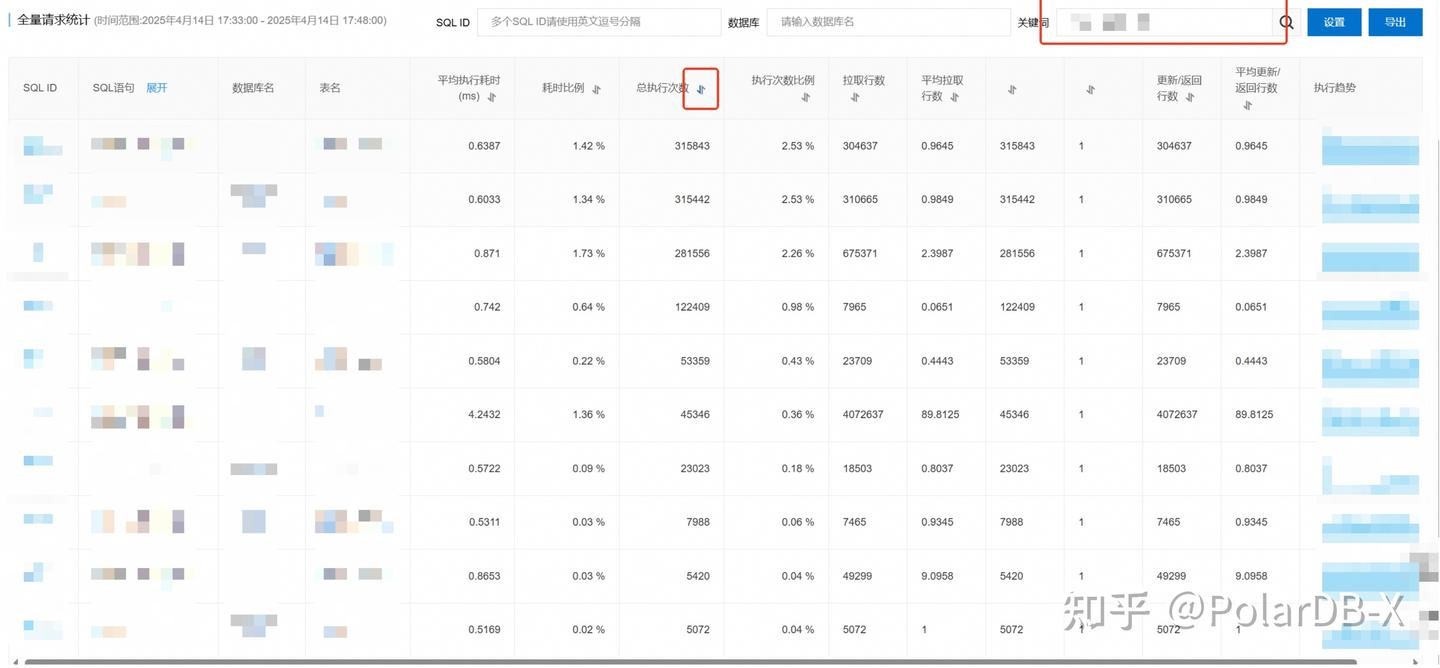
We recommend that you click Export to download the file about the SQL templates. The file is saved in the CSV format.
| SQL template ID | SQL statement | Number of executions | Number of rows returned |
|---|---|---|---|
| template1 | SELECT * FROM account WHERE account_id=? AND deletion_status=? | 365820 | 0.9642 |
| template2 | SELECT * FROM account WHERE base_account_id=? AND kw_location=? AND deletion_status=? | 360075 | 0.9859 |
| template3 | SELECT * FROM account WHERE deletion_status=? AND (base_account_id,address) IN (?) | 323844 | 2.4016 |
| template4 | SELECT * FROM account WHERE base_account_id=? AND address=? AND deletion_status=? LIMIT ? | 140843 | 0.0642 |
| template5 | SELECT * FROM account WHERE base_account_id=? AND address=? AND deletion_status=? | 61708 | 0.446 |
| template7 | SELECT * FROM account WHERE base_account_id=? AND address=? | 25905 | 0.7934 |
| template8 | SELECT * FROM account WHERE base_account_id=? AND address=? AND deletion_status=? | 9213 | 0.9353 |
| template9 | SELECT * FROM account WHERE account_id IN (?) | 6298 | 9.1075 |
| template10 | SELECT * FROM account WHERE (account_id IN (?) AND deletion_status=?) | 3119 | 6.294 |
| template12 | SELECT * FROM account WHERE deletion_status=? AND some_type=? AND account_id>? ORDER BY account_id LIMIT ? | 814 | 199.6855 |
| template13 | UPDATE account SET xxxxx WHERE account_id=? | 553 | 1 |
| template14 | SELECT * FROM account WHERE account_id IN (?) AND deletion_status=? | 208 | 6.6923 |
| template16 | SELECT * FROM account WHERE deletion_status=? AND some_type=? AND account_id>? ORDER BY account_id LIMIT ? | 82 | 991.122 |
| template18 | SELECT * FROM account WHERE account_type=? AND gmt_modified>=? ORDER BY gmt_modified ASC ,account_id DESC LIMIT ? | 75 | 1.0267 |
| template19 | SELECT * FROM account WHERE exchange_account_id=? AND version>? AND deletion_status=? | 74 | 1 |
| template20 | UPDATE account SET xxxxx WHERE account_id=? | 71 | 1 |
| template21 | INSERT INTO account(xxxxxx) VALUES (xxxxxx) | 69 | 0.971 |
| template22 | UPDATE account SET xxxxx WHERE account_id=? | 51 | 1 |
| template23 | UPDATE account SET account_id=?,gmt_modified=? WHERE account_id=? | 50 | 1 |
| template24 | SELECT DISTINCT(version) FROM account WHERE version!=? ORDER BY version DESC | 43 | 95 |
| template25 | SELECT * FROM account WHERE account_abc=? AND aggregation_flag=? | 42 | 3.2143 |
| template27 | SELECT * FROM account WHERE deletion_status=? AND some_type=? AND base_account_id IN (?) ORDER BY account_id LIMIT ? | 30 | 62.5625 |
| template30 | SELECT * FROM account WHERE base_account_id=? | 29 | 142 |
| template29 | SELECT MIN(exchange_account_id) FROM account; | 3 | 1 |
| template31 | INSERT INTO account(xxxxxx) VALUES (xxxxxx) | 2 | 1 |
| template32 | SELECT gmt_modified FROM account WHERE some_type=? ORDER BY gmt_modified DESC LIMIT ?; | 1 | 1 |
You can select a partition key based on the following basic principles:
• You can select a field as the partition key if SQL queries that use equality conditions on the field account for a higher percentage in all SQL queries. The higher the percentage, the better.
• You can select a field as the partition key if the field has a higher cardinality. This means the field has enough distinct values and no significant hotspots for specific values.
• If the field is a primary or unique key, selecting it as the partition key will naturally maintain its global uniqueness. Meanwhile, primary and unique keys inherently have the highest cardinality, leading to the most uniform data distribution. Therefore, being a primary or unique key is a significant plus factor when selecting a partition key.
You can select global indexes based on the following basic principles:
• You can determine the number of global indexes based on the volume of data that is written to a table.
• Use clustered global indexes in one-to-many scenarios. This effectively reduces the cost of table lookups. For more information about clustered global indexes, visit: https://www.alibabacloud.com/blog/global-secondary-index-in-polardb-x_601540
• If a field (such as the gender or province field) has a low cardinality and very few distinct values, you cannot create a global index for the field.
• You cannot create a global index for a time or date field. You can create a local index for a time or date field.
• You can create a global index for the primary key (ID) field. The reason is that hot spots will not occur and the primary key field and the primary table have a one-to-one relationship. If one of your tables is partitioned by the primary key (ID) and a global index is created on another column such as the C1 column, the reverse configuration is generally better. In other words, use the C1 column as the partition key, and create a global index for the primary key (ID).
• You can use the index diagnostics feature (by executing the INSPECT INDEX statement) to find redundant and unused global indexes. This prevents unnecessary space and resource consumption. https://www.alibabacloud.com/help/en/polardb/polardb-for-xscale/index-diagnostics
According to the results of SQL Explorer, the following items can be found:
• Four SQL templates (template1, template9, template10, and template14) contain equality conditions on the account_id field and account for about 33% of all SQL queries.
• All UPDATE operations are performed based on the account_id field.
• Eight SQL templates (template2, template3, template4, template5, template7, template8, template27, and template30) contain equality conditions on the base_account_id field and account for about 75% of all SQL queries.
• One SQL template (template2) contains an equality condition on the kw_location field and accounts for about 30% of all SQL queries.
• Five SQL templates (template3, template4, template5, template7, and template8) contain equality conditions on the address field and account for about 50% of all SQL queries.
Obviously, the recommended fields for a partition key and a GSI are account_id (33%), base_account_id (75%), kw_location (30%), and address (50%).
The following items are the analysis results of partition key selection:
• The query percentage of the base_account_id field is the highest among the preceding four fields. However, from the business perspective, this field has a small number of distinct values (in the thousands). More importantly, obvious hot spots will occur with a large amount of data concentrated on a few values. If the field is selected as a partition key, obvious data skew occurs. Therefore, the field cannot be used as a partition key.
• As the primary key, the account_id field has a higher query percentage. Therefore, the field can be used as a partition key.
According to experience, you can determine that the base_account_id field may have hotspots based on the column name ("base" included in base_account_id). This technique is suitable for advanced players. This is also a huge advantage that AI may have in this domain.
According to the results of SQL Explorer, the volume of data that is written to the table is about thousands of times per hour, which is low compared with the number of queries. For this type of table, you can create global indexes as required and do not need to consider how to optimize the table to reduce the use of global indexes. Therefore, for other fields that are frequently queried, you can create global indexes for them to optimize the query performance:
• The kw_location and address fields have high query percentages. Therefore, you can create regular global indexes for them. Why do you create regular global indexes instead of clustered global indexes for the fields? The following items are the reasons:
• The queries do not contain the exchange_account_id field, but the field is a unique key. Therefore, you can create a globally unique index for the field.
• The query percentage of the base_account_id field is high. However, from SQL templates, it is found that the base_account_id field always appears together with the kw_location or address field in SQL templates that are frequently queried. Therefore, you do not need to create a global index for the base_account_id field.
According to the "PolarDB-X subpartitioning" topic (at https://www.alibabacloud.com/help/en/polardb/polardb-for-xscale/overview-secondary-partitions ), PolarDB-X supports 56 partitioning algorithms (7 × 7 + 7 = 56). However, the most common partitioning algorithms are generally one of the following:
• Level-1 hash partitioning (choice of 90% business)
• Level-1 co_hash partitioning
• Level-1 hash partitioning and level-2 range (on a time field) partitioning (generally used for the business whose data is cleared by time)
• Level-1 list partitioning and level-2 hash partitioning (generally used for the business that has a multi-tenant concept)
For most business, you can select one from the preceding partitioning algorithms. Unless you are particularly confident, you can select one from the 56 partitioning algorithms.
In this example, level-1 hash partitioning is selected.
Pay attention to hash partitioning and key partitioning in PolarDB-X.
• When a partition key has only one field, hash partitioning and key partitioning are synonyms and have no difference. You can use either one of them.
• When a partition key has multiple fields, hash partitioning and key partitioning are different. For more information about the differences, visit: https://www.alibabacloud.com/help/en/polardb/polardb-for-xscale/partition-table-types-and-policies#32d96a8d6c203
Best practices:
• Nearly no business needs to use multiple fields as a hash partition key. You can select the field with the highest cardinality from the preceding fields as the hash partition key.
• Key partitioning on multiple columns is most commonly used in hotspot splitting scenarios. A partition key consists of a partition field and a primary key, such as partition by key(some_column,pk). For more information, visit: https://www.alibabacloud.com/help/en/polardb/polardb-for-xscale/hot-data-partition-splitting
You can select the number of partitions based on the following basic principles:
• You do not need to carefully calculate the number of partitions. Most business uses 256 partitions.
• If the number of partitions is too small, it is more likely to cause data skew. Before expansion, the table may need to be repartitioned. The number of partitions should be at least several times the number of data nodes (DNs).
• There is no specific requirement for the data volume of a single partition, as there are many variables. However, it is generally considered that you will have better experience if the data volume of a single partition does not exceed 100 million rows. This mainly considers O&M convenience, such as the time consumption of a single partition during the execution of a DDL operation.
• It is meaningless to create excessive partitions. At present, many business can use 256 partitions to store tens of billions of data records.
• There is no need for precision in the selection of the number of partitions.
For the table in this case, you can select 256 partitions.
After the preceding steps are performed, the following partitioning scheme is obtained:
alter table account partition by hash(account_id) partitions 256;
create global unique index ugsi_exchange_account_id on account (exchange_account_id) partition by hash(exchange_account_id) partitions 256;
create global index gsi_address on account (address) partition by hash(address) partitions 256;
create global index gsi_kw_location on account (kw_location) partition by hash(kw_location) partitions 256;
However, if you first change the partitions of the table and then create global indexes on the table, the global indexes and globally unique indexes are missing during the preceding operations. If this is the case, the query performance or data uniqueness issue may occur.
We recommend that you follow the following process to change a non-partitioned table to a partitioned table:
• Change a non-partitioned table to a partitioned table that has one partition. This way, the unique key of the partitioned table remains globally unique, same as that in the non-partitioned table. Then, you can create global indexes and globally unique indexes on the partitioned table.
alter table account partition by hash(account_id) partitions 1;• Create global indexes and globally unique indexes on the table as required.
create global unique index ugsi_exchange_account_id on account (exchange_account_id) partition by hash(exchange_account_id) partitions 256;
create global index gsi_address on account (address) partition by hash(address) partitions 256;
create global index gsikw_location on account (kw_location) partition by hash(kw_location) partitions 256;
• Change the partitioned table that has one partition to a partitioned table that has the specified number of partitions.
alter table account partition by hash(account_id) partitions 256;The exchange_account_id field remains unique throughout the process.
In addition, you should design a corresponding rollback scheme to handle unexpected conditions.
Q: Do I need to partition only tables that have a large amount of data?
A: No. Tables that are frequently accessed can also be partitioned. This way, more nodes can handle the traffic of the tables.
Q: Are foreign keys supported in partitioned tables?
A: Yes, partitioned tables support foreign keys. However, we recommend that you do not use experimental features in the production environment. Therefore, we recommend that you delete foreign key constraints in advance.
Q: When a non-partitioned table is changed to a partitioned table, will the table lock issue occur?
A: The table lock issue will not occur because the change is an online process.
Q: Should all query conditions hit a partition key or a GSI?
A: No. Partition design is pragmatic work. It does not matter how many partitions in which an SQL template with a low query percentage resides. Therefore, you do not need to worry about it. For example, for template18, you do not need to create a global index for the account_type field based on the number of queries. The SQL template of a non-partitioned table becomes a cross-shard SQL template.
• The increase in response time is usually limited (generally less than double), because queries performed on each shard are parallel.
• The cost of the cross-shard SQL template is indeed higher. The cost must be related to the queries per second (QPS). You can calculate the total cost by using the following formula: Total cost = Cost of the cross-shard SQL template × QPS. If the QPS is low, the increase in the total cost is limited.
Q: According to the article, GSIs seem to have great impacts on performance. Can I use GSIs?
A: Yes, you can use global secondary indexes. In addition to the preceding usage principles of GSIs, the following items are supplemented:
• To determine the impacts on performance, you must distinguish between the volume of data that is read and the volume of data that is written. For read-heavy scenarios, the cost of added writes is not a big deal.
• Even if a large amount of data is written, GSIs are the only regular solution to resolve multi-dimensional query issues. If you have no other way to implement multi-dimensional queries, GSIs are the only answer. In this case, you should resolutely use GSIs and configure appropriate machine resources.
Q: What are the impacts of the change process on my business?
A: It has the following impacts on the database:
• Some read and write I/O resources are consumed.
• Write operations have some additional locks. The change process has little impact on tables that have a large number of read operations and a small number of write operations.
• During the creation process, long-running transactions (lasting more than 15 seconds) in the table may be interrupted.
• The table is not locked.
• The change process has almost no impact on read operations.
PolarDB-X supports the conversion between partitioning algorithms. Examples:
• Supports the conversion among non-partitioned tables, partitioned tables, and broadcast tables.
• Adjusts the number of partitions.
• Supports the conversion between partitioning algorithms. For example, hash partitioning is converted to range partitioning.
For more information about the syntax, visit: https://www.alibabacloud.com/help/en/polardb/polardb-for-xscale/change-the-type-and-partitioning-rule-of-a-table
In PolarDB-X, changing a non-partitioned table to a partitioned table is regarded as an online DDL operation.
Here is a brief description of the process.
In this example, the table named t is used.
CREATE TABLE `t` (
        `id` int(11) NOT NULL,
        `c1` int(11) DEFAULT NULL,
        `c2` int(11) DEFAULT NULL,
        `c3` int(11) DEFAULT NULL,
        PRIMARY KEY (`id`),
        UNIQUE KEY `uk1` (`c1`, `c2`),
        UNIQUE KEY `uk2` (`c2`),
        UNIQUE KEY `uk3` (`c1`, `c3`)
) ENGINE = InnoDB DEFAULT CHARSET = utf8mb4
SINGLE;
Execute the following statement to change the table named t to a partitioned table:
alter table t partition by key(c2) partitions 32;Core steps:
• Create a temporary clustered global secondary index on the table named t. The partition key column of the table is c2. Sample code:
create clustered index tmp_gsi_c2 on t (c2) partition by hash(c2) 32;• Write incremental data to both the primary table and the index named tmp_gsi_c2 by using a distributed transaction. Sample code:
## Received statement:
insert into t (id, c1, c2, c3) values (1, "abc", 1, 1)

## Statements executed during the change:
begin;
insert into t (id, c1, c2, c3) values (1, "abc", 1, 1);
insert into tmp_gsi_c2 (id, c1, c2, c3) values (1, "abc", 1, 1);
commit;
Therefore, during the change, the write response time is increased and the duration of holding locks becomes longer.
• Read full data from the primary table and write the data to the index named tmp_gsi_c2. This is known as data backfilling.
• Take note that the dual-writing operation of incremental data and backfilling of full data are performed concurrently. If backfilling is complete, the data reaches a consistent state and no latency exists.
• Swap the primary table with the index named tmp_gsi_c2. Take note that this step is lock-free because the primary table and the index named tmp_gsi_c2 are consistent at all times.
• Clear the index named tmp_gsi_c2 after the swap.
A global index can be understood as "an independent partitioned table". The following example provides an intuitive feel.
In this example, the table named t1 is used.
CREATE TABLE `t1` (
        `id` int(11) NOT NULL,
        `c1` int(11) DEFAULT NULL,
        `c2` int(11) DEFAULT NULL,
        `c3` int(11) DEFAULT NULL,
        `c4` int(11) DEFAULT NULL,
        PRIMARY KEY (`id`),
        CLUSTERED INDEX `cgsi2` (`c1`)
                PARTITION BY KEY(`c1`)
                PARTITIONS 32,
        UNIQUE CLUSTERED INDEX `cugsi4` (`c1`, `c3`)
                PARTITION BY KEY(`c3`)
                PARTITIONS 32,
        GLOBAL INDEX `gsi1` (`c1`)
                PARTITION BY KEY(`c1`)
                PARTITIONS 32,
        UNIQUE GLOBAL INDEX `ugsi3` (`c1`, `c3`)
                PARTITION BY KEY(`c3`)
                PARTITIONS 32,
        KEY `idx1` (`c2`)
) ENGINE = InnoDB DEFAULT CHARSET = utf8mb4
PARTITION BY KEY(`c2`)
PARTITIONS 32
According to the preceding code, the following types of GSIs are created:
• Regular global index named gsi1
• Clustered global index named cgsi2
• Globally unique index named ugsi3
• Clustered globally unique index named cugsi4
Execute the following "show full create table" statement to query the complete table information:
show full create table t1\G
*************************** 1. row ***************************
       Table: t1
Create Table: CREATE TABLE `t1` (
        `id` int(11) NOT NULL,
        `c1` int(11) DEFAULT NULL,
        `c2` int(11) DEFAULT NULL,
        `c3` int(11) DEFAULT NULL,
        `c4` int(11) DEFAULT NULL,
        PRIMARY KEY (`id`),
        CLUSTERED INDEX /* cgsi2_$81db */ `cgsi2` (`c1`)
                PARTITION BY KEY(`c1`)
                PARTITIONS 32,
        UNIQUE CLUSTERED INDEX /* cugsi4_$5cf2 */ `cugsi4` (`c1`, `c3`)
                PARTITION BY KEY(`c3`)
                PARTITIONS 32,
        GLOBAL INDEX /* gsi1_$ba4f */ `gsi1` (`c1`) COVERING (`c2`)
                PARTITION BY KEY(`c1`)
                PARTITIONS 32,
        UNIQUE GLOBAL INDEX /* ugsi3_$a77b */ `ugsi3` (`c1`, `c3`) COVERING (`c2`)
                PARTITION BY KEY(`c3`)
                PARTITIONS 32,
        LOCAL KEY `idx1` (`c2`)
) ENGINE = InnoDB DEFAULT CHARSET = utf8mb4
PARTITION BY KEY(`c2`)
PARTITIONS 32
/* tablegroup = `tg87069` */
1 row in set (0.01 sec)
The commented part in the GSI definition (such as cgsi2_$81db) is the name of the partitioned table of the GSI. You can execute the "show full create table" statement to query the underlying table schema.
For the regular global index named gsi1 (c1):
show full create table gsi1_$ba4f\G
*************************** 1. row ***************************
       Table: gsi1_$ba4f
Create Table: CREATE TABLE `gsi1_$ba4f` (
        `id` int(11) NOT NULL,
        `c1` int(11) DEFAULT NULL,
        `c2` int(11) DEFAULT NULL,
        PRIMARY KEY (`id`),
        LOCAL KEY `auto_shard_key_c1` USING BTREE (`c1`)
) ENGINE = InnoDB DEFAULT CHARSET = utf8mb4
PARTITION BY KEY(`c1`)
PARTITIONS 32
/* tablegroup = `tg87069` */
According to the preceding code, its underlying table contains the index column named c1, the primary key column named id, and the c2 partition key column of the primary table. The c1 column has a local index named auto_shard_key_c1.
Therefore, if a query uses the regular global index named gsi1 and the return columns include c3 (or c4), a table lookup operation is required. If a single value of c1 corresponds to many values of c3, the cost of the table lookups can be very high.
For the clustered global index named cgsi2 (c1):
show full create table cgsi2_$81db\G
*************************** 1. row ***************************
       Table: cgsi2_$81db
Create Table: CREATE TABLE `cgsi2_$81db` (
        `id` int(11) NOT NULL,
        `c1` int(11) DEFAULT NULL,
        `c2` int(11) DEFAULT NULL,
        `c3` int(11) DEFAULT NULL,
        `c4` int(11) DEFAULT NULL,
        PRIMARY KEY (`id`),
        LOCAL KEY `idx1` (`c2`),
        LOCAL KEY `auto_shard_key_c1` USING BTREE (`c1`)
) ENGINE = InnoDB DEFAULT CHARSET = utf8mb4
PARTITION BY KEY(`c1`)
PARTITIONS 32
/* tablegroup = `tg87069` */
According to the preceding code, unlike the regular global index named gsi1, the underlying table of the clustered global index named cgsi2 contains the c3 and c4 columns and the idx1 local index on the primary table.
A clustered global index has the following characteristics:
• Contains all the columns of the table.
• Contains all local indexes of the primary table.
• The clustered global index is modified if you perform one of the following operations on the primary table: adding or removing columns of the table, changing column types of the table, and adding or removing local indexes of the table.
For the globally unique index named ugsi3 (c1, c3):
show full create table ugsi3_$a77b\G
*************************** 1. row ***************************
       Table: ugsi3_$a77b
Create Table: CREATE TABLE `ugsi3_$a77b` (
        `id` int(11) NOT NULL,
        `c1` int(11) DEFAULT NULL,
        `c2` int(11) DEFAULT NULL,
        `c3` int(11) DEFAULT NULL,
        UNIQUE LOCAL KEY `auto_shard_key_c1_c3` USING BTREE (`c1`, `c3`),
        LOCAL KEY `_gsi_pk_idx_` USING BTREE (`id`),
        LOCAL KEY `auto_shard_key_c3` USING BTREE (`c3`)
) ENGINE = InnoDB DEFAULT CHARSET = utf8mb4
PARTITION BY KEY(`c3`)
PARTITIONS 32
/* tablegroup = `tg87069` */
According to the preceding code, the underlying table has a local unique index named auto_shard_key_c1_c3. The local unique index contains the c3 partition key column. Therefore, the local unique index remains globally unique. All entries with the same value for c3 will be routed to the same partition, where the local unique index can then ensure uniqueness.
For the clustered globally unique index named cugsi4:
show full create table cugsi4_$5cf2\G
*************************** 1. row ***************************
       Table: cugsi4_$5cf2
Create Table: CREATE TABLE `cugsi4_$5cf2` (
        `id` int(11) NOT NULL,
        `c1` int(11) DEFAULT NULL,
        `c2` int(11) DEFAULT NULL,
        `c3` int(11) DEFAULT NULL,
        `c4` int(11) DEFAULT NULL,
        PRIMARY KEY (`id`),
        UNIQUE LOCAL KEY `auto_shard_key_c1_c3` USING BTREE (`c1`, `c3`),
        LOCAL KEY `idx1` (`c2`),
        LOCAL KEY `auto_shard_key_c3` USING BTREE (`c3`)
) ENGINE = InnoDB DEFAULT CHARSET = utf8mb4
PARTITION BY KEY(`c3`)
PARTITIONS 32
/* tablegroup = `tg87069` */
Same as the clustered global index named cgsi2, the underlying table of the clustered globally unique index named cugsi4 contains the idx1 local index and all the columns. We will not elaborate further here.
When a non-partitioned table is changed to a partitioned table, a secondary index (including the unique index) becomes a local index. The following items are related to the unique index:
• If a partition key column is included in the unique index, the unique index is globally unique.
• If a partition key column is not included in the unique index, the unique index is unique only within a partition.
For example, the table named t used earlier contains the following unique keys:
• uk1 (c1, c2): The c2 partition key column is included in the unique key. After the table type change, the unique key remains globally unique.
• uk2 (c2): The c2 partition key column is included in the unique key. After the table type change, the unique key remains globally unique.
• uk3 (c1, c3): The c2 partition key column is not included in the unique key. After the table type change, the unique key is unique only within the same partition. In other words, the following two records may exist at the same time.
| Partition | ID | c1 | c2 | c3 |
|---|---|---|---|---|
| p0 | 1 | abc | 1 | 1 |
| p1 | 2 | abc | 2 | 1 |
The values of the c1 and c3 columns whose primary key IDs are 1 and 2 are (abc, 1). However, the values of the c2 column are different, and therefore, the two records reside in different partitions. As a result, the uniqueness cannot be guaranteed.
If your business needs to depend on the uniqueness of (c1, c3), you must add a globally unique index for (c1, c3).
create global unique index cugsi on t (c1, c3) partition by hash(c3) partitions 32;However, within the interval of executing the ALTER PARTITION statement and executing the "create clustered unique index" statement, the uniqueness of (c1, c3) cannot be guaranteed. Therefore, duplicate data may be written within the interval.
If duplicate data occurs, the "create clustered unique index" statement cannot be executed successfully. You can create a clustered unique index only after the duplicate data is cleared.
In addition, a global index requires information such as the partition key of the primary table. Therefore, you cannot create a global index on the non-partitioned table, and the uniqueness of (c1, c3) cannot be guaranteed by creating a global index on the non-partitioned table in advance.
As shown in the best practices, the issue can be resolved by designing a change process.
PolarDB-X Best Practice Series (8): Lock-free DDL Operation Guide
ApsaraDB - April 10, 2024
ApsaraDB - June 18, 2026
ApsaraDB - April 16, 2025
ApsaraDB - April 30, 2026
ApsaraDB - April 10, 2024
ApsaraDB - April 20, 2023
 Best Practices
Follow our step-by-step best practices guides to build your own business case.
Learn More ApsaraDB RDS for SQL Server
An on-demand database hosting service for SQL Server with automated monitoring, backup and disaster recovery capabilities
Learn More Database for FinTech Solution
Leverage cloud-native database solutions dedicated for FinTech.
Learn More Oracle Database Migration Solution
Migrate your legacy Oracle databases to Alibaba Cloud to save on long-term costs and take advantage of improved scalability, reliability, robust security, high performance, and cloud-native features.
Learn MoreMore Posts by ApsaraDB


