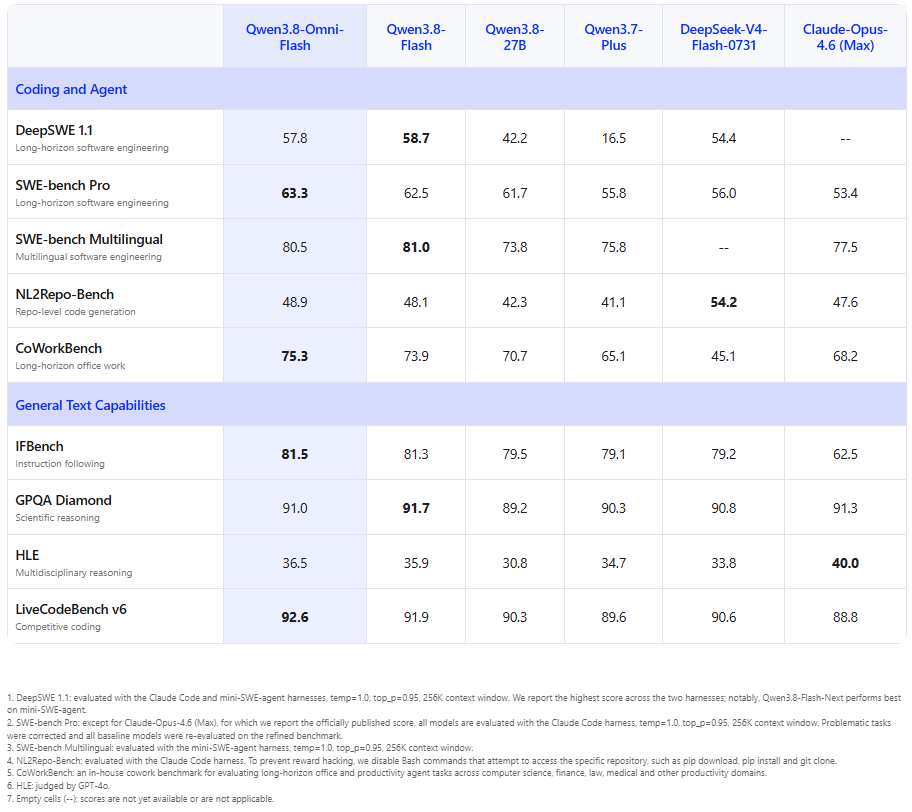
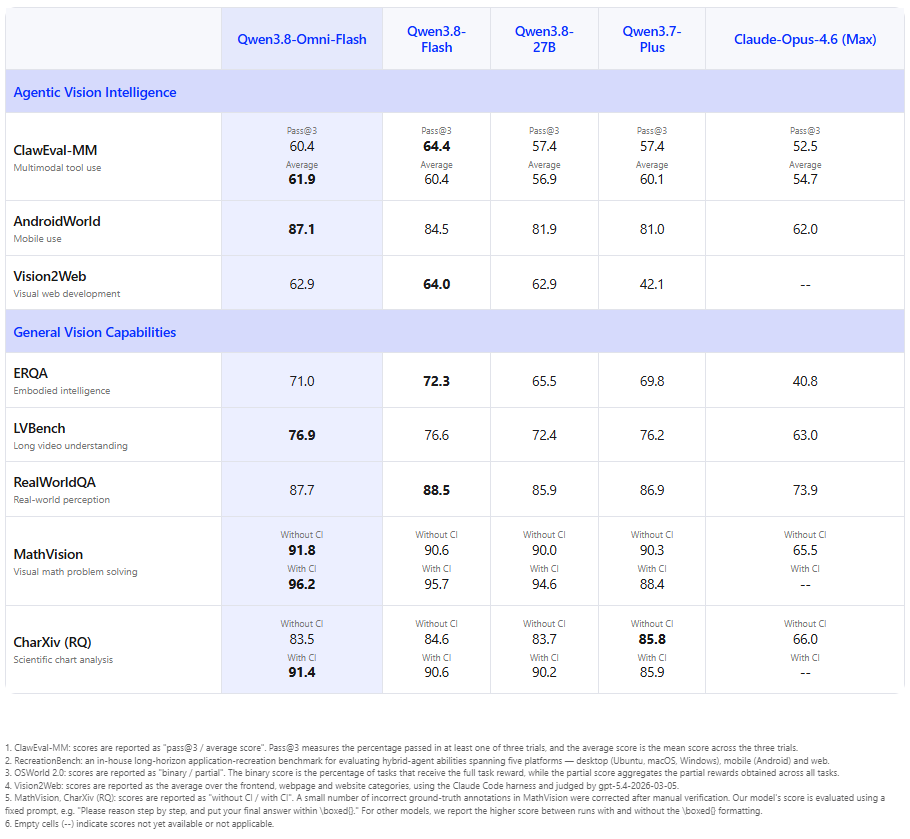
Today, we are launching Qwen3.8-Omni-Flash, our next-generation native omnimodal model. Its core objective is to strengthen agent capabilities in real-world productivity scenarios, advancing omnimodal models from “understanding omnimodal content” to “planning tasks, calling tools, and completing creative work.” Building on general agentic capabilities in coding, text-based knowledge work, and GUI operation, Qwen3.8-Omni-Flash further extends agentic applications centered on audio and video, delivering strong results across workflows such as video editing, music video creation, film production and commentary, audio-visual summarization, and real-time conversations.
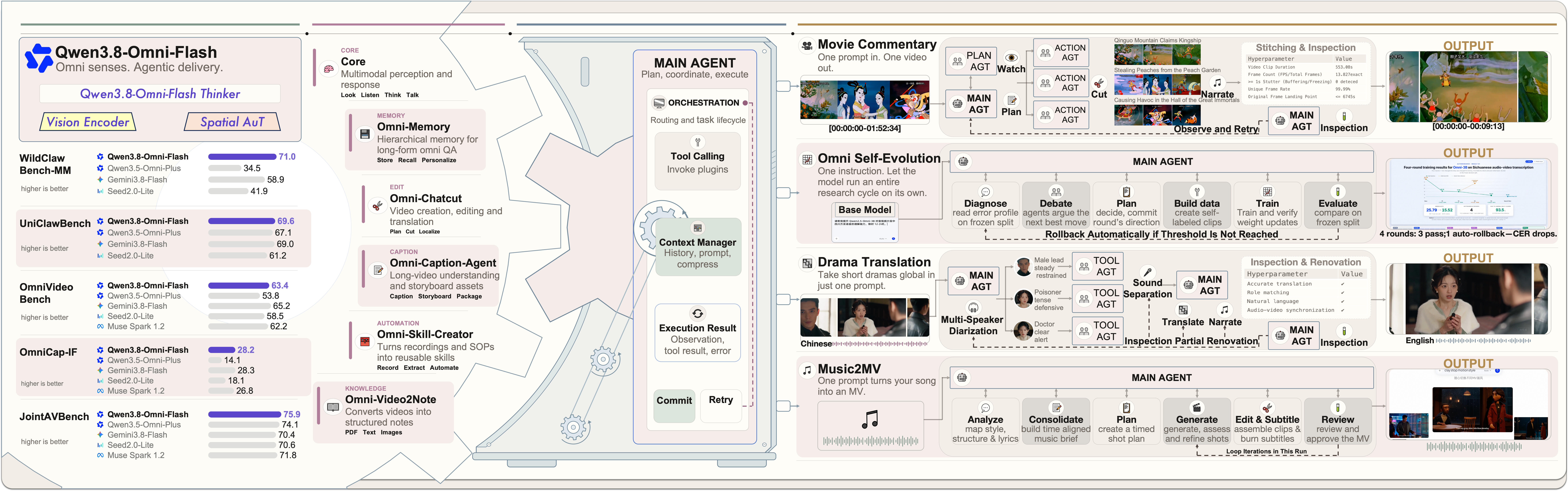
Figure 1. Qwen3.8-Omni-Flash and its applications in production.
Qwen3.8-Omni-Flash — now available on the Qianwen AI Platform:
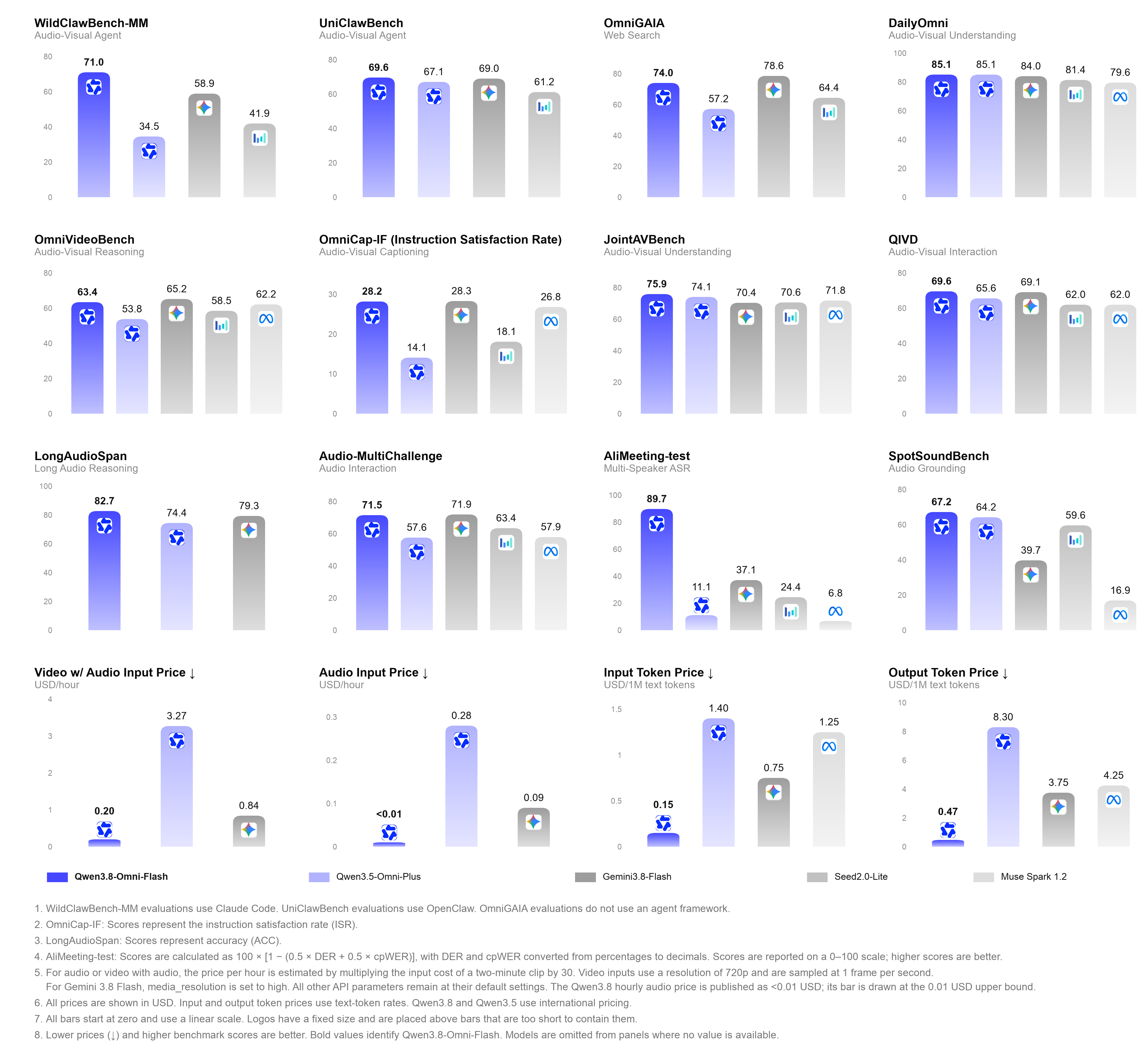
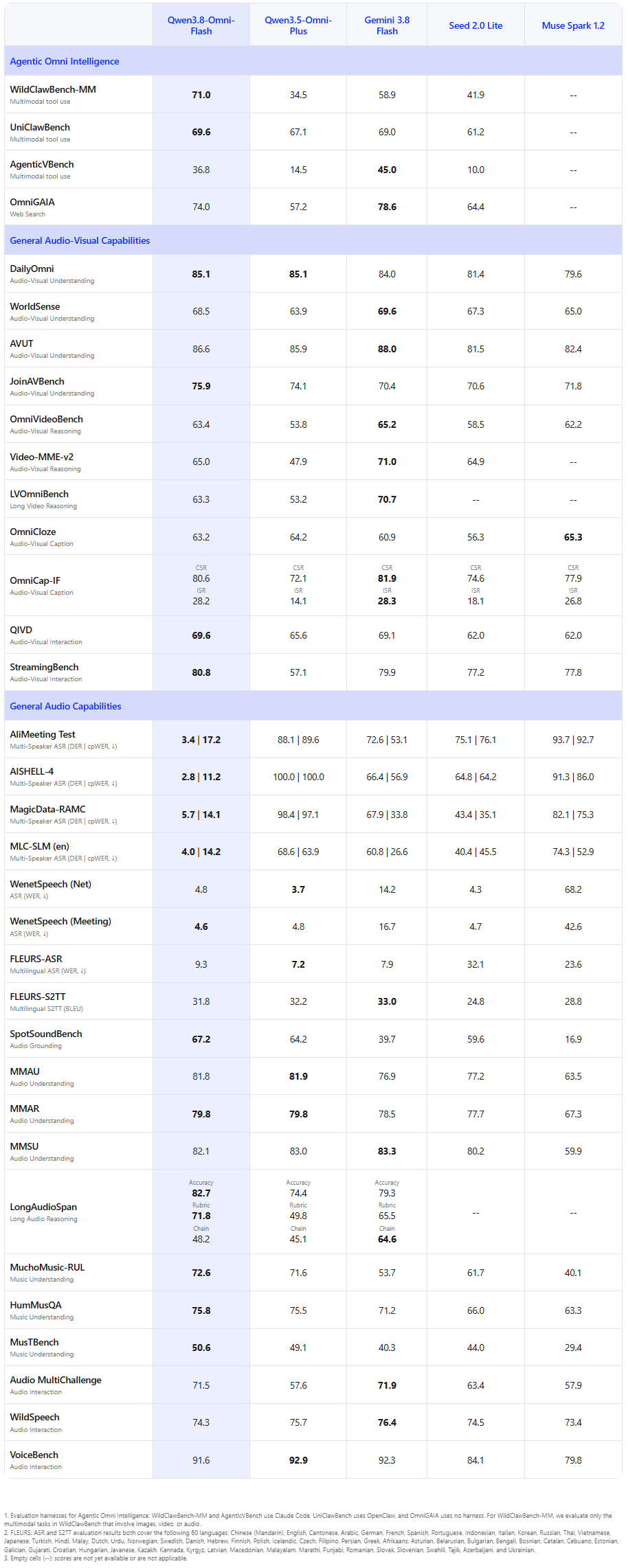
Qwen3.8-Omni-Flash supports a 1M-token context window while maintaining text performance comparable to a text-only model of the same size and delivering significant improvements in omnimodal capabilities. Across 29 evaluations1, its average score improves by more than 25% over Qwen3.5-Omni-Plus; the API price per hour of audio input decreases by more than 98%, and the price per hour of audio-visual input decreases by more than 93%2. For audio-visual agents, coding, and long-horizon tasks, the model improves by 36.5 points on WildClawBench-MM and 22.3 points on AgenticVBench, while scoring a strong 69.6 on UniClawBench. Its core capabilities also improve significantly in long-form audio and audio-visual understanding, audio-visual reasoning, audio-visual captioning, and multi-speaker recognition. For example, it gains 8.3 points on LongAudioSpan and 9.6 points on OmniVideoBench; its OmniCap-IF CSR and ISR improve by 8.5 and 14.1 points, respectively; and its AliMeeting DER and cpWER decrease from 88.11 / 89.61 to 3.35 / 17.18. By scaling data, context, and agentic environments, Qwen3.8-Omni-Flash achieves audio-visual performance close to Gemini 3.8 Flash and overall audio performance that exceeds Gemini 3.8 Flash. These advances also mean that audio and video are evolving from perceptual inputs into core media through which agents understand their environment, reason, and execute tasks.
*1. The scope includes audio reasoning benchmarks: AliMeeting-test, AISHELL-4, MagicData-RAMC, MLC-SLM (en), WenetSpeech (Net | Meeting), FLEURS-60 ASR, FLEURS-60 S2TT, SpotSoundBench, MMAU, MMAR, MMSU, MuchoMusic-RUL, HumMusQA, MusTBench, Audio-MultiChallenge, WildSpeech, and VoiceBench; audio-visual reasoning benchmarks: DailyOmni, WorldSense, AVUT, JointAVBench, OmniCloze, OmniCap-IF, QIVD, OmniVideoBench, and StreamingBench; and audio-visual agent benchmarks: WildClawBench-MM, UniClawBench, and OmniGAIA.
Audio and video are important media for bringing agents into real-world productivity scenarios, but they also introduce a new set of system-level challenges. Long-form audio and video are costly to store, transmit, and process across multiple rounds of inference; existing agent harness frameworks lack native support for these modalities; and workflows that connect omnimodal understanding with end-to-end task execution are still at an early stage. Addressing these challenges requires models, harness tools, and runtime environments to evolve together.
To address these challenges, we use Qwen3.8-Omni-Flash to explore how to connect source understanding, task planning, tool execution, and result delivery into a complete pipeline. It supports end-to-end, long-horizon workflows such as video editing, translation, film commentary, and content creation, advancing Omni from audio-visual understanding toward autonomous action and task completion.
To this end, we have further expanded Qwen-MM-Plugins with on-demand perception, tool use, and workflow execution for long-form audio and video. We have also open-sourced Qwen-Live Harness as a native runtime for continuous, real-time omnimodal interaction. Together, they address long-horizon workflows and real-time interaction while continuing to expand the capabilities of omnimodal agents alongside the model.
Qwen3.8-Omni-Flash brings a major upgrade to long-form audio-visual understanding—from controllable descriptions and agentic evidence gathering, to understanding meetings and advancing follow-up tasks, and finally to producing video-centered deep research reports. It does not merely process longer content, but finds relevant evidence more precisely, reasons more deeply, and acts more efficiently.
There is no single answer to how a video should be described. Content creation prioritizes narrative, footage retrieval focuses on specific segments, and asset management depends on structure. Different applications need different video descriptions. In Qwen3.8-Omni-Flash, we have upgraded video captioning from answering "what the model saw" to understanding "what the user wants to know." Users can freely specify the subject, time range, level of detail, and output format. For the same video, the model can provide an overview, locate key segments, or analyze character actions, camera shots, lighting, and sound in depth, producing structured results as needed. You define what to look at, how closely to look, and how to present it.
For videos lasting several hours, conventional approaches require the model to process the entire recording from beginning to end, even when the answer appears in only a few minutes of footage. The native Qwen3.8-Omni-Flash agent starts from the question, independently decides what to watch and listen to, and locates key information through multiple rounds of coarse-to-fine evidence gathering. Without processing every frame, it can focus limited compute and token budgets on the relevant segments, enabling more efficient long-form video understanding. On OmniVideoBench, Agentic Understanding improves accuracy from 63.4 to 67.8 while reducing token consumption from 145,736 to 79,117, a reduction of approximately 45.7%. The table below compares the accuracy and token consumption of Static Understanding and Agentic Understanding on OmniVideoBench:
| Static Understanding | Agentic Understanding | |
|---|---|---|
| Accuracy (↑) | 63.4 | 67.8 |
| Tokens per query (↓) | 145,736 | 79,117 |
Note: Agentic mode preserves context across turns.
Multi-participant meetings are among the most complex audio-visual understanding scenarios: speakers take turns and overlap, while identities, references, and discussion topics continuously change. Qwen3.8-Omni-Flash jointly recognizes speakers across audio and video and natively supports up to one hour of audio-visual input. It can perform speaker segmentation, content transcription, and identity alignment end to end. Given a complete meeting video and a request, the model can map participant relationships, generate meeting minutes, identify action items, and analyze project risks, using visual information to resolve references and entity ambiguity in the audio. Combined with agents and tool use, it can also send emails, organize tasks, and even begin coding in response to meeting requirements—moving from understanding a meeting to acting on it.
When users watch a video with a specific question in mind, the answer often extends beyond the video itself. Qwen3.8-Omni-Flash combines the user’s needs with the video content to identify questions worth deeper investigation, organize the key material, and search multimodal sources across the web—including images, videos, and documents. It then produces a video-centered, richly illustrated research report that helps users understand the content and solve practical problems. For example, when a user encounters color fringing around a Photoshop hair cutout, the model can break down the tutorial steps, study the principles behind Multiply and Screen blend modes, compare alternative edge-repair techniques, and explain which approach best fits the user’s situation.
Qwen3.8-Omni-Flash is taking audio-visual agents into a new stage: from understanding sounds and images to independently planning, calling tools, and delivering finished videos, bringing omnimodal intelligence into professional audio-visual content production workflows.
For music video (MV) creation, Qwen3.8-Omni-Flash can understand the structure, rhythm, mood, vocals, and instrumental changes of a user-provided song in fine detail, informing the design of characters, scenes, and shots. It can also output line-level lyrics with timestamps to align singing, subtitles, and visuals. Combined with creative tools such as Qwen-MM-Plugins, the model supports the complete workflow from music understanding and creative planning to final quality review, demonstrating strong audio-visual understanding, reasoning, and creation capabilities.
Traditional video translation often requires repeatedly switching between transcription, translation, dubbing, and editing platforms. This complicates API calls and workflow coordination and makes it difficult to maintain consistency across character voices, dialogue duration, and visual pacing. With an agent built on Qwen3.8-Omni-Flash, users can describe their needs in a single sentence to perform speaker-aware dialogue recognition, conversational translation, character voice cloning and dubbing, audio remixing, and final quality review. These otherwise fragmented localization steps become a complete workflow, enabling automated delivery of short dramas for international audiences.
Producing commentary videos for full-length films of two or three hours often requires repeatedly watching the film and reconstructing its plot, followed by shot selection, scriptwriting, voiceover, music, and editing. This is a complex and time-consuming process. With an agent built on Qwen3.8-Omni-Flash, users need only provide a film and describe their creative requirements in one sentence to perform long-form video understanding, key-plot extraction, commentary planning, voiceover and music production, editing, rendering, and final quality review. The agent can also intelligently interleave original dialogue with commentary, automatically adjusting speech rate and volume so that narration, original audio, background music, and visuals flow naturally together, creating a more authentic, immersive, and cinematic commentary video.
Real-world multimodal applications are often complex and cost-sensitive, requiring models to balance quality, latency, compute, and deployment costs.
Customizing smaller models for specific scenarios is therefore an important path to deploying applications at scale. Yet traditional workflows involve data construction, problem diagnosis, multiple rounds of training, and evaluation, making them time-consuming and heavily dependent on human expertise. This time, we extend Qwen3.8-Omni-Flash into model development itself, exploring a new approach in which large models drive research and development while smaller models serve business needs.
We gave Qwen3.8-Omni-Flash a task: improve Qwen2.5-Omni-3B's Sichuan dialect speech recognition within 12 hours and deliver a usable model. It independently selected the WenetSpeech-Chuan evaluation set, fixed the evaluation criteria, and established a baseline. It then listened directly to audio samples, diagnosed problems using the recognition results, and constructed targeted training data. Across four consecutive rounds of experiments, the agent created 3,413 training examples, adjusted its approach based on evaluation feedback, retained effective improvements, and rolled back unsuccessful attempts. Qwen2.5-Omni-3B's character error rate on the same evaluation set ultimately fell from 25.79% to 15.30%, a relative reduction of approximately 40.7%.
This experiment demonstrates another possibility for model evolution: general-purpose multimodal models understand data, plan experiments, and drive iteration, while smaller models acquire specialized capabilities for specific applications. Agents can go beyond using models to help solve practical business problems.
Audio and video carry rich information, but their linear, unstructured form makes retrieval and reuse difficult. Qwen3.8-Omni-Flash understands content across sound, visuals, and timelines, using an agentic workflow to extract information, reorganize its structure, and verify results. It transforms the core knowledge and practical experience in long videos into denser information assets that are easier to consume and reuse.
To turn video knowledge into structured resources, we have open-sourced Video2Note in Qwen-MM-Plugins. Drawing on Qwen3.8-Omni-Flash's joint understanding of speech, visuals, and procedures, it automatically organizes knowledge, breaks down key steps, selects representative frames, and generates PDF notes with corresponding text and images. Automated review and iterative correction further condense hours of video into clear, readable documents that are easy to revisit.
Videos record not only "how to do something," but also the practical expertise accumulated by specialists. With this in mind, we introduce Omni Skill Creator as a new open-source capability in Qwen-MM-Plugins. It can extract standard operating procedures (SOPs) from demonstrations to perform reusable automated work, or learn tool usage, decision criteria, and key insights from expert instruction. A single demonstration becomes an agent skill that has been verified and evaluated, enabling reusable, shareable skills built from omnimodal content.
Qwen3.8-Omni-Flash is designed for deep understanding and creation with complete audio-visual content. For continuous, low-latency interaction, we further introduce Qwen3.8-Omni-Flash-Realtime. It perceives and responds while receiving live audio-visual streams, and uses real-time context to call tools and execute tasks, taking omnimodal capabilities from “understanding a piece of content” to “participating in an interaction.”
Spoken language has no standard input. Accents, vowel and consonant substitutions, and tonal deviations can cause word-for-word transcription to diverge from the intended meaning. Qwen3.8-Omni-Flash-Realtime jointly models pronunciation and semantics, understands nonstandard expressions affected by accents, aligns them with the correct words, and generates standard-pronunciation demonstrations in real time. Across multiple practice turns, the model updates its judgment with new audio, correcting errors that affect understanding while preserving natural rhythm, tone, and emotion.
In real-world spaces, sound provides another coordinate axis beyond vision. Qwen3.8-Omni-Flash-Realtime combines spatial sound with visual information to continuously determine the direction and distance of sound sources while perceiving obstacles, navigable areas, and changes in the scene, making it the first omnimodal model capable of locating targets by sound.
For instructions such as “come over here” or “go see what is making that sound,” the model can isolate voices and target sounds from environmental noise, ground their meaning in the surrounding space, and call tools to perform localization, search, path planning, and navigation—from hearing a target to reaching it.
Real-time interaction requires not only low latency, but also the ability to load knowledge and behavior dynamically for each application. Qwen3.8-Omni-Flash-Realtime supports injecting identity settings, expression styles, business knowledge, and interaction rules through Skills, while tool use extends these capabilities into task execution.
In scenarios such as customer service, the model can load brand language and service procedures in real time, understand the user's speech, visuals, and context, generate responses that follow business requirements, and execute actions. The same real-time model can therefore take on different knowledge, roles, and ways of acting.
Key information in long audio and video recordings is often scattered across different segments, while complex questions require multiple steps of reasoning across sound and images. Agentic Omni Understanding enables the model to start from the question, plan its approach, call tools, and progressively locate and verify evidence. By focusing computation on relevant content, it improves the accuracy and efficiency of long-form audio-visual understanding. To evaluate this capability, we compare Qwen3.8-Omni-Flash and Gemini 3.8 Flash on OmniVideoBench, Video-MME-v2, and LVOmniBench under two settings: Static, where the model directly interprets the input, and an agent mode using Qwen Code. This comparison shows how introducing agent workflows affects each model’s performance.
| Qwen3.8-Omni-Flash (Static) | Qwen3.8-Omni-Flash (Qwen Code) | Gemini 3.8 Flash (Static) | Gemini 3.8 Flash (Qwen Code) | |
|---|---|---|---|---|
|
OmniVideoBench Audio-Visual Reasoning |
63.4 | 67.8 | 65.2 | 70.1 |
|
Video-MME-v2 Audio-Visual Reasoning |
65.0 | 71.3 | 71.0 | 72.7 |
|
LVOmniBench Long Video Reasoning |
63.3 | 73.6 | 70.7 | 70.7 |
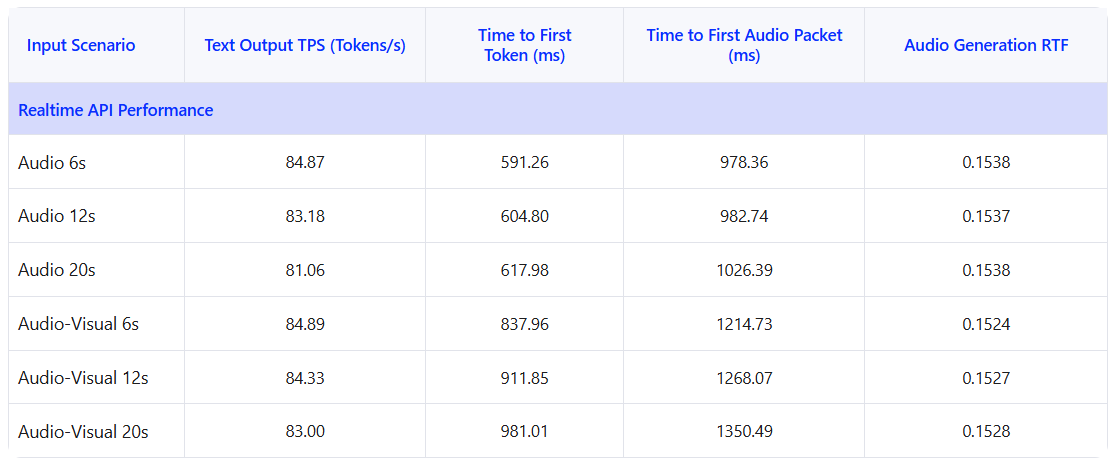
The following results show the observed throughput and latency of the Qwen3.8-Omni-Flash-Realtime API under different input conditions, reflecting the performance users experience in production environments.
| Capability | Languages | Chinese Dialects |
|---|---|---|
| Speech Recognition | 74 languages: Afrikaans, Arabic, Asturian, Azerbaijani, Basque, Belarusian, Bengali, Bosnian, Bulgarian, Cantonese, Catalan, Cebuano, Chinese, Croatian, Czech, Danish, Dutch, English, Esperanto, Estonian, Filipino, Finnish, French, Galician, Georgian, German, Greek, Hebrew, Hindi, Hungarian, Icelandic, Indonesian, Interlingua, Italian, Japanese, Javanese, Kannada, Kazakh, Korean, Kyrgyz, Lingala, Latvian, Lithuanian, Macedonian, Malay, Malayalam, Maltese, Maori, Marathi, Mongolian, Norwegian Bokmål, Norwegian Nynorsk, Oriya, Persian, Polish, Portuguese, Punjabi, Romanian, Russian, Serbian, Slovak, Slovenian, Spanish, Swahili, Swedish, Tajiki, Tamil, Telugu, Thai, Turkish, Ukrainian, Urdu, Uyghur, and Vietnamese | 39 dialects: Northeastern Mandarin, Guizhou dialect, Guangdong Cantonese, Henan dialect, Hong Kong Cantonese, Shanghainese, Shaanxi dialect, Tianjin dialect, Taiwanese Mandarin, Yunnan dialect, Anhui dialect, Fujian dialect, Gansu dialect, Guangdong Mandarin, Hubei dialect, Hunan dialect, Jiangxi dialect, Shandong dialect, Shanxi dialect, Sichuanese, Guangxi dialect, Hainan dialect, Chongqing dialect, Changsha dialect, Hangzhou dialect, Hefei dialect, Yinchuan dialect, Zhengzhou dialect, Shenyang dialect, Wenzhou dialect, Wuhan dialect, Kunming dialect, Taiyuan dialect, Nanchang dialect, Jinan dialect, Lanzhou dialect, Nanjing dialect, Hakka, and Southern Min |
| Speech Generation | 29 languages: Chinese, English, German, Italian, Portuguese, Spanish, Japanese, Korean, French, Russian, Thai, Indonesian, Arabic, Vietnamese, Turkish, Finnish, Polish, Hindi, Dutch, Czech, Urdu, Tagalog, Swedish, Danish, Hebrew, Icelandic, Malay, Norwegian, and Persian | 7 dialects: Sichuanese, Beijing dialect, Tianjin dialect, Nanjing dialect, Shaanxi dialect, Cantonese, and Southern Min |
Qwen3.8-Omni-Flash officially supports reasoning_effort to adjust reasoning depth and control costs:
xhigh (default): for complex tasks that require in-depth analysis.medium: balances accuracy and speed.low: efficient reasoning optimized for speed and cost.In addition, preserve_thinking is enabled by default across all scenarios for the best out-of-the-box experience.
Qwen3.8-Omni-Flash supports industry-standard protocols, including OpenAI-compatible Chat Completions and Responses APIs. Examples follow:
"""
Environment variables:
  DASHSCOPE_API_KEY: Your API Key from https://platform.qianwenai.com/home
  DASHSCOPE_BASE_URL: (optional) Base URL for compatible-mode API.
    - Beijing: https://dashscope.aliyuncs.com/compatible-mode/v1
    - Singapore: https://dashscope-intl.aliyuncs.com/compatible-mode/v1
"""
from openai import OpenAI
import os

api_key = os.environ.get("DASHSCOPE_API_KEY")
if not api_key:
    raise ValueError(
        "DASHSCOPE_API_KEY is required. "
        "Set it via: export DASHSCOPE_API_KEY='your-api-key'"
    )

client = OpenAI(
    api_key=api_key,
    base_url=os.environ.get(
        "DASHSCOPE_BASE_URL",
        "https://dashscope-intl.aliyuncs.com/compatible-mode/v1",
    ),
)

messages=[
    {
        "role": "user",
        "content": [
            {
                "type": "image_url",
                "image_url": {
                    "url": "https://help-static-aliyun-doc.aliyuncs.com/file-manage-files/zh-CN/20241022/emyrja/dog_and_girl.jpeg"
                },
            },
            {
                "type": "input_audio",
                "input_audio": {
                    "data": "https://help-static-aliyun-doc.aliyuncs.com/file-manage-files/zh-CN/20250211/tixcef/cherry.wav",
                    "format": "wav"
                },
            },
            {"type": "text", "text": "Please describe the image and tell me what is being said in the audio."},
        ],
    },
]

completion = client.chat.completions.create(
    model="qwen3.8-omni-flash",
    messages=messages,
    extra_body={
        "enable_thinking": True,
        # "preserve_thinking": True,
    },
    reasoning_effort="xhigh",  # supported levels are xhigh, medium, and low
    stream=True,
)

reasoning_content = ""
answer_content = ""
is_answering = False
print("\n" + "=" * 20 + "Reasoning" + "=" * 20 + "\n")

for chunk in completion:
    if not chunk.choices:
        print("\nUsage:")
        print(chunk.usage)
        continue

    delta = chunk.choices[0].delta

    if hasattr(delta, "reasoning_content") and delta.reasoning_content is not None:
        if not is_answering:
            print(delta.reasoning_content, end="", flush=True)
        reasoning_content += delta.reasoning_content

    if hasattr(delta, "content") and delta.content:
        if not is_answering:
            print("\n" + "=" * 20 + "Answer" + "=" * 20 + "\n")
            is_answering = True
        print(delta.content, end="", flush=True)
answer_content += delta.contentContent organization and level of detail: Organize video descriptions, OCR extraction, audio descriptions, and speech transcripts into sections covering visuals, speech, music, sound effects, and ambient sounds. Preserve the original text, speaker identities, and corresponding time ranges to make retrieval and verification easier. Specify a target length in the prompt to control detail, for example, Describe the video in approximately 2000–3000 words., and adjust it to the video’s duration and information density.
Structured output and schema constraints: Include task instructions and a complete JSON Schema in the prompt, specifying field meanings, types, required fields, and constraints to support programmatic parsing and downstream use.
Qwen-MM-Plugins is a multimodal plugin suite for agent harnesses. It gives agents the ability to understand images, audio, video, and documents, as well as maintain memory for long-form video and create content. It supports agent harnesses including Codex, Claude Code, Qwen Code, Gemini CLI, Qoder, CodeBuddy, and OpenClaw. We also welcome contributions from community developers.
You can enter the following request directly in your usual office agent:
Help me install the core, api, and omni-related plugins from https://github.com/QwenLM/Qwen-MM-Plugins.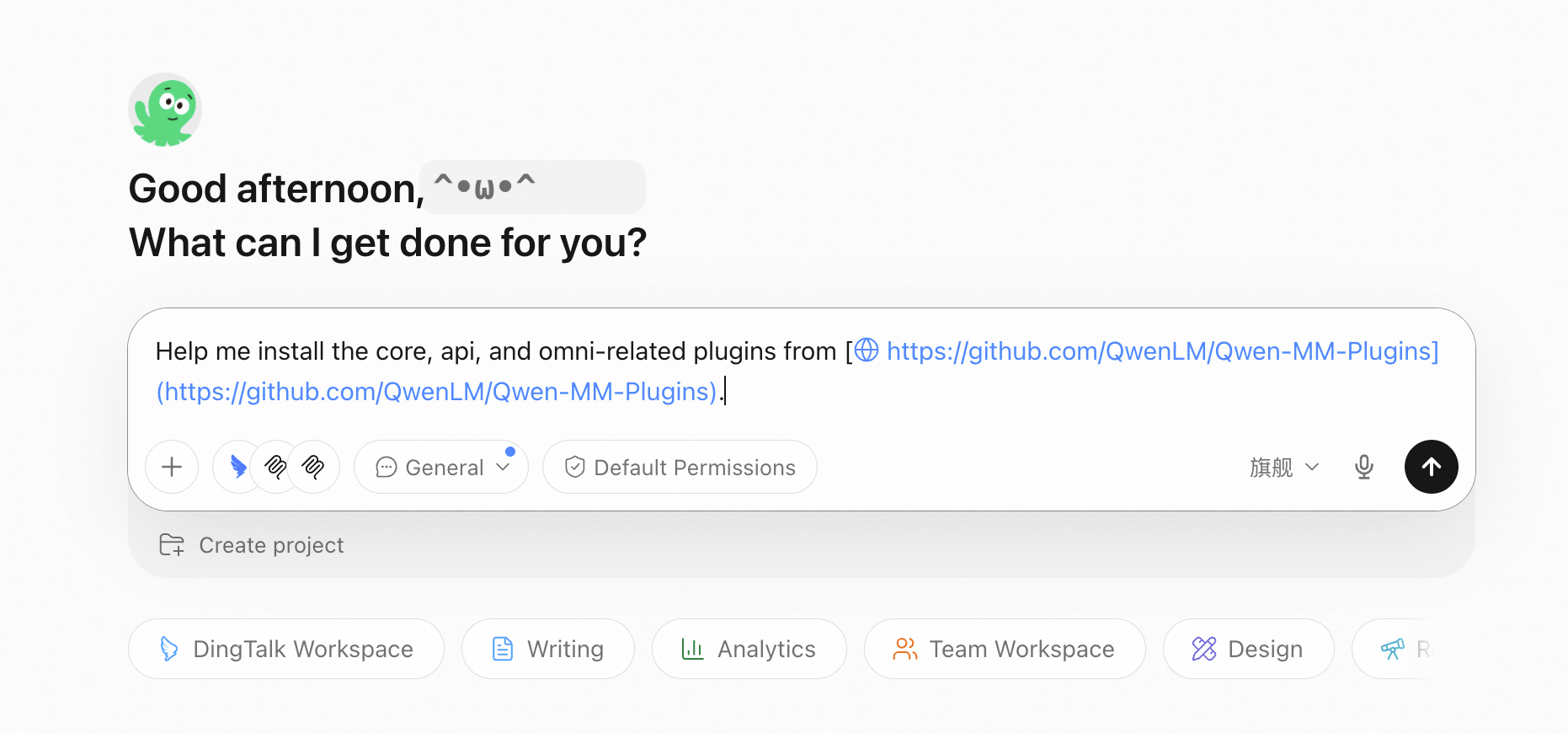
Alternatively, install from the command line:
# Run the official guided installer:
curl -fsSL https://raw.githubusercontent.com/QwenLM/Qwen-MM-Plugins/main/install.sh | bash
In the menu, select:
| Plugin | Capability |
|---|---|
core |
Read images, video frames, PDFs, Office documents, code, data, and 3D files |
api |
Image understanding, OCR, object localization, audio-visual transcription, speaker diarization, event analysis, and image segmentation |
omni-chatcut |
Create MVs, long-form film commentary, and video speech translations |
omni-video2note |
Turn video tutorials into PDF notes with key screenshots |
omni-skill-creator |
Turn instructional videos, screen recordings, or operation demonstrations into reusable Agent Skill.md files |
omni-memory |
Build memory for people, dialogue, sounds, and events in long-form videos |
After installation, restart the agent harness or create a new task.
@song.mp3 Generate a complete MV based on the song's rhythm and content.
@short_drama.mp4 Translate the video into English while preserving the original speakers' voice characteristics where possible.
@movie.mp4 Create a film commentary video with Chinese narration and subtitles.

@weekly_report_sop.mp4 Turn this screen recording of writing a weekly report into a Skill.md file.
@tutorial.mp4 Turn the tutorial into PDF notes with key screenshots, timestamps, and step-by-step instructions.
@documentary.mp4 Build audio-visual memory that records people, dialogue, sounds, and important events.Qwen3.8-Omni-Flash-Realtime supports connections over WebSocket and WebRTC. Running the basic examples below opens the camera and microphone for a real-time audio-visual conversation. We recommend using headphones.
# Run pip install websocket-client pyaudio dashscope opencv-python -U to install dependencies
"""
Environment variables:
  DASHSCOPE_API_KEY: Your API Key from https://platform.qianwenai.com/home
  DASHSCOPE_BASE_URL: (optional) Base URL for realtime API.
    - Beijing: wss://dashscope.aliyuncs.com/api-ws/v1/realtime
    - Singapore: wss://dashscope-intl.aliyuncs.com/api-ws/v1/realtime
"""
import os
import base64
import time
import pyaudio
import cv2
from dashscope.audio.qwen_omni import MultiModality, AudioFormat,OmniRealtimeCallback,OmniRealtimeConversation
import dashscope

url = f'wss://dashscope-intl.aliyuncs.com/api-ws/v1/realtime'
dashscope.api_key = os.getenv('DASHSCOPE_API_KEY')
# Determine the voice
voice = 'Tina'
# Determine the model
model = 'qwen3.8-omni-flash-realtime'
# Determine the model role
instructions = "You are Qwen-Omni, a helpful assistant."
video_fps = 1
video_size = (1280, 720)
class SimpleCallback(OmniRealtimeCallback):
    def __init__(self, pya):
        self.pya = pya
        self.out = None
    def on_open(self):
        # Initialize audio output stream
        self.out = self.pya.open(
            format=pyaudio.paInt16,
            channels=1,
            rate=24000,
            output=True
        )
    def on_event(self, response):
        if response['type'] == 'response.audio.delta':
            # Play audio
            self.out.write(base64.b64decode(response['delta']))
        elif response['type'] == 'conversation.item.input_audio_transcription.delta':
            # Streaming preview: text is the confirmed prefix, stash is the confirmed suffix
            preview = response.get('text', '') + response.get('stash', '')
            print(f"\r[User] {preview}", end='', flush=True)
        elif response['type'] == 'conversation.item.input_audio_transcription.completed':
            # Transcription completed, print the final text and a new line
            print(f"\r[User] {response['transcript']}")
        elif response['type'] == 'response.audio_transcript.done':
            # Print the assistant's response text
            print(f"[LLM] {response['transcript']}")

# 1. Initialize audio device
pya = pyaudio.PyAudio()
# 2. Create callback function and session
callback = SimpleCallback(pya)
conv = OmniRealtimeConversation(model=model, callback=callback, url=url)
# 3. Establish connection and configure session
conv.connect()
conv.update_session(output_modalities=[MultiModality.AUDIO, MultiModality.TEXT], voice=voice, instructions=instructions)
# 4. Initialize audio input stream
mic = pya.open(format=pyaudio.paInt16, channels=1, rate=16000, input=True)
camera = cv2.VideoCapture(0)
next_frame_at = 0.0
# 5. Main loop to process audio and video input
try:
    if not camera.isOpened():
        raise RuntimeError("Cannot open camera 0.")
    camera.set(cv2.CAP_PROP_FRAME_WIDTH, video_size[0])
    camera.set(cv2.CAP_PROP_FRAME_HEIGHT, video_size[1])
    camera.set(cv2.CAP_PROP_BUFFERSIZE, 1)
    print(f"Conversation started with camera ({video_fps} fps, {video_size[0]}x{video_size[1]}), speak into the microphone (Ctrl+C to exit)...")
    while True:
        audio_data = mic.read(3200, exception_on_overflow=False)
        conv.append_audio(base64.b64encode(audio_data).decode())
        success, frame = camera.read()
        if not success:
            raise RuntimeError("Cannot read a camera frame.")
        if time.monotonic() >= next_frame_at:
            frame = cv2.resize(frame, video_size)
            success, image = cv2.imencode('.jpg', frame, [cv2.IMWRITE_JPEG_QUALITY, 80])
            if not success:
                raise RuntimeError("Cannot encode a camera frame.")
            conv.append_video(base64.b64encode(image).decode())
            next_frame_at = time.monotonic() + 1 / video_fps
        time.sleep(0.01)
except KeyboardInterrupt:
    pass
finally:
    # Clean up resources
    camera.release()
    conv.close()
    mic.close()
    if callback.out:
        callback.out.close()
    pya.terminate()
    print("\nConversation ended")
Qwen-Live Harness is a comprehensive open-source harness designed around the Qwen3.8-Omni-Flash-Realtime API. It can be installed with a single command and integrated into mainstream agent workflows. It supports task delegation, proactive interaction, long-term memory, and context management, and welcomes contributions from the community.
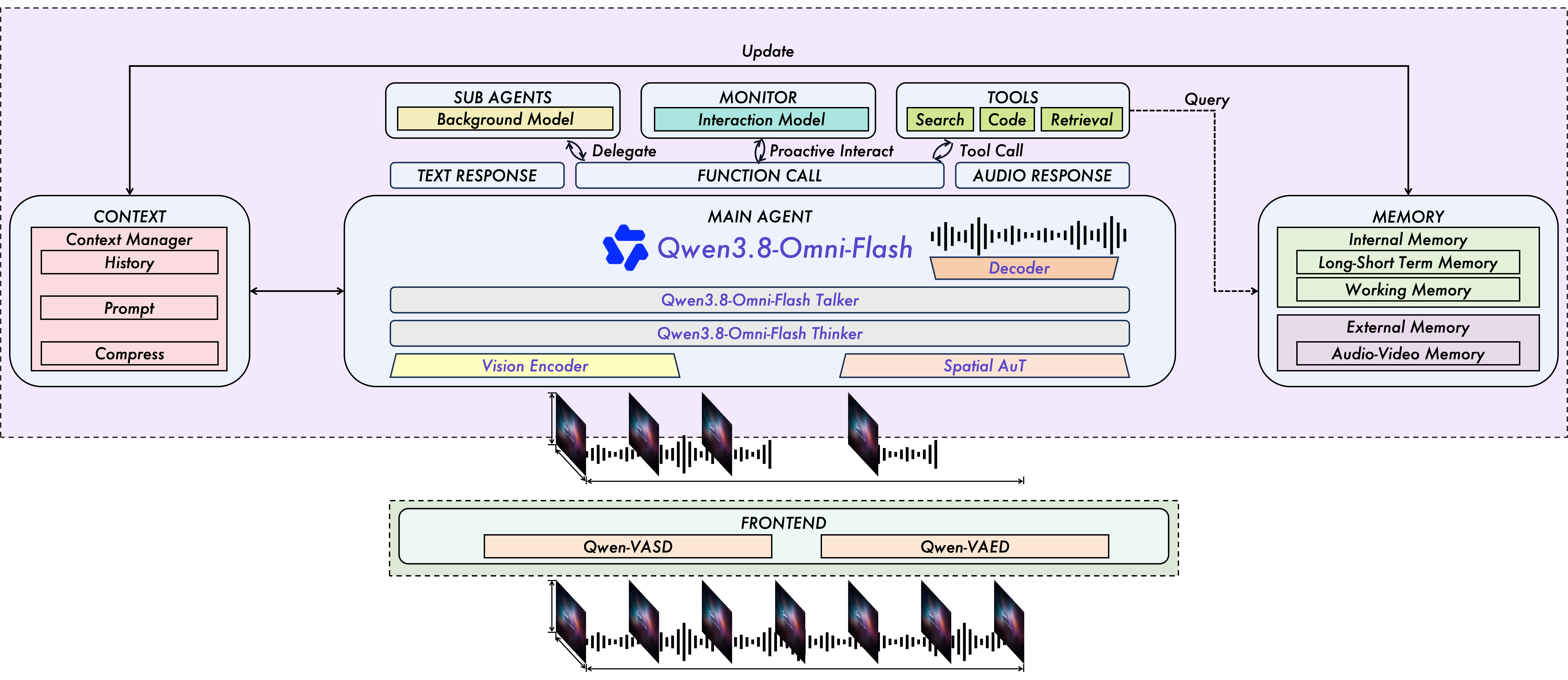
Figure 2. Qwen-Live Harness Interaction Framework.
Install and get started:
npm install -g qwen-live-harness
qwen-live-harness init
qwen-live-harness@misc{qwen38omniflash,
title = {Qwen3.8-Omni-Flash: Omni Senses. Agentic Delivery.},
url = {https://qwen.ai/blog?id=qwen3.8-omni-flash},
author = {{Qwen Team}},
month = {September},
year = {2026}
}Alibaba Cloud Named a Leader in Gartner® Magic Quadrant™ for Generative AI Model Providers
Qwen3.8-LiveTranslate: Names the Speaker. Carries the Meaning.

1,596 posts | 525 followers
FollowAlibaba Cloud Community - April 24, 2026
Alibaba Cloud Community - June 18, 2026
Alibaba Cloud Community - September 27, 2025
CloudSecurity - April 9, 2026
Alibaba Cloud Community - June 22, 2026
Alibaba Cloud Community - May 21, 2026
1,596 posts | 525 followers
Follow Token Plan
Build more, spend less. One plan, every modality.
Learn More Qwen
Qwen
Full-range, open-source, multimodal, and multi-functional
Learn More
Alibaba Cloud Model Studio
A one-stop generative AI platform to build intelligent applications that understand your business, based on Qwen model series such as Qwen-Max and other popular models
Learn More QwenWork
QwenWork is dedicated to helping employees strengthen their professional competitiveness in the AI era and to enabling enterprises to improve organizational effectiveness.
Learn MoreMore Posts by Alibaba Cloud Community

