Why doesn’t faster model output always mean faster task completion? And why is Qoder introducing a Fast tier rather than simply adding a speed toggle to every model? This article explains when to use Fast, how it accelerates the workflow, and what our initial tests show.
Adding a speed toggle to a model solves a clear problem: the user has already chosen a model and wants it to respond faster.
But many users start somewhere else: “I want to quickly try out this idea.” They haven’t chosen a model, and they don’t want to first study each model’s speed variants, reasoning settings, and version differences.
Fast goes one step further: it lets users choose the overall experience best suited to their current task with a single click.
Fast is therefore more than a model choice. It is a different way of working, enabled by coordinated optimization across three layers: the model mix, the Agent, and the network.
Model output speed affects only part of a task. The complete workflow also involves preparing context, making multiple rounds of model requests, calling tools, processing results, and transmitting data over the network. That is why even the same model can take different amounts of time to complete a task in different products. Across the full workflow, several factors can add to the wait:
| Stage | What Slows Things Down |
|---|---|
| Model selection and requests | A mismatch between the model and the task; repeatedly asking the model to decide steps that have already been determined. |
| Context processing | Sending too much input in every round; recomputing content that could be reused. |
| Tool execution | Running independent operations sequentially; repeated retries after failures. |
| Network | Connection setup, transmission, and routing overhead; occasional latency spikes that prolong the task. |
The simplified workflow below shows where these optimizations take place:
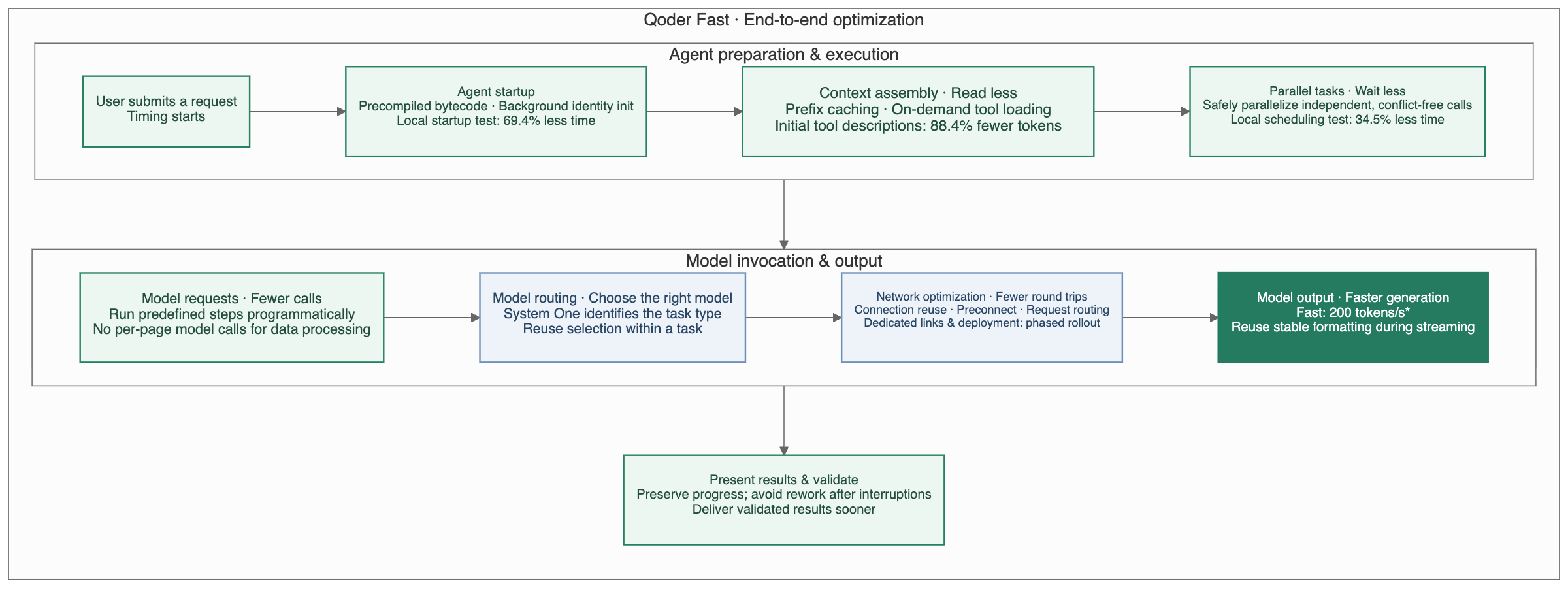
“Explain why this function throws an error” and “Refactor this module’s dependencies” are both coding tasks, but they require different capabilities. The first calls for quick understanding and a clear explanation. The second requires assessing cross-file effects and verifying the changes.
Fast uses a routing model to identify the task in a structured way, distinguishing between code explanation, code modification, refactoring, testing, architecture design, and other task types. The routing system then adjusts the priority of candidate models accordingly, selecting a model that better fits the task while meeting its capability requirements.
The Harness is the execution engine behind Qoder’s Agent. It coordinates model requests, tool calls, context management, and multi-turn execution. Once a model has been selected, this layer organizes how the task gets done.
A request travels from the user to the model through several stages, including DNS resolution, connection establishment, security handshakes, and request routing. By optimizing these stages individually, we aim not only to make Fast faster, but also to reduce occasional long waits. Users should encounter fewer moments of “Why is the same small task taking so much longer this time?” Similar tasks should deliver a more predictable experience.
Many tasks at work and in everyday life do not follow a fixed plan from start to finish. We turn ideas into products or other tangible results by asking questions, trying things, observing, and making changes. Often, requesting a revision takes only a few dozen seconds, while waiting for the result takes longer. It becomes easy to switch to something else. When we return, we have to remember what we just changed, what we intended to check, and what we wanted to try next.
Fast aims to shorten that gap so feedback can keep pace with your thoughts. Consider building a small tool to answer the daily question, “What should we have for lunch?” There are three stages where Fast is a good fit.
At the beginning, you do not need a complete product plan. You just need something to pick up your idea and help you think it through: “I never know what to have for lunch. Any fun ways to decide?” “What if I don’t want to fill in lots of preferences?” “What if a few coworkers are eating together?”
After a few short exchanges, three directions emerge: a random spin wheel, budget-based recommendations, and a group vote. Each answer only needs to support the next decision. When feedback arrives promptly, you can follow one question with the next and stay in the flow of exploration.
Once you have a few directions, the next goal is not to build three complete products at once. It is to create small, clearly scoped prototypes that help you decide which direction is worth pursuing. Spinning the wheel, adjusting a budget, or casting a vote makes those choices easier to evaluate. While the experience is still fresh, you can add, “Show everyone’s choices directly in the voting version,” and move into another round of validation. Fast reduces both the wait and the effort required to get from an idea to its first test.
Once the full version is running, Fast can be your responsive partner for repeated refinement: “Fit the voting setup on a single screen.” “Highlight the restaurant with the most votes.” “Change the button label to ‘Let’s eat here.’” You can keep making changes and checking them against the preview, staying focused on the details in front of you.
We selected ten general-purpose tasks suited to Fast, ran each task three times under each test configuration, and compared output quality, completion time, and output speed.
Output quality: On a five-point scale, Fast averaged 4.94, compared with 4.93 for Performance—essentially on par.
Completion time and output speed: Fast’s end-to-end task completion time was approximately 50% of Auto’s. Compared with other Agent products, it took roughly one-third to one-half as long as their Fast modes. Output speed increased by 152% over the previous Performance tier, reaching approximately three times the speed of competing Agent products in their standard modes.
Turning Fast into a product tier serves another goal: helping users allocate resources according to the task and achieve more stable, controllable results.
Neither the number of tokens generated nor the number generated per second can, on its own, explain task efficiency. Extra model rounds, irrelevant context, and repeated calls to the same tools can all consume more resources and increase waiting time.
Token efficiency asks a different question: how many resources does it take to complete a task that meets its requirements? For Fast, this comes down to three things:
A tier’s positioning depends on this ongoing work: revalidating after model updates, monitoring the effects of strategy changes, and finding the next bottleneck in real tasks. When users choose Fast, they should have an increasingly clear understanding of what it can accomplish—and the time and resources it will require.
For users, the goal is straightforward: less waiting, fewer distractions, and feedback that keeps pace with your thoughts.
Qoder Cloud Agents: An Evaluation Loop for Reliable, Continuous Agent Improvement
Introducing Qoder Lite: Start creating with Qoder for $10 a month

1,596 posts | 525 followers
FollowNeel_Shah - May 20, 2025
CloudSecurity - July 24, 2026
Alibaba Cloud Native Community - October 12, 2026
Alibaba Cloud Community - October 19, 2026
Alibaba Cloud Community - July 31, 2026
Alibaba Cloud Community - November 2, 2026
1,596 posts | 525 followers
Follow Qoder
From Assisted to Autonomous — Adapting to Every Programming Need
Learn More QwenWork
 is dedicated to helping employees strengthen their professional competitiveness in the AI era and to enabling enterprises to improve organizational effectiveness.
Learn More Qwen
Full-range, open-source, multimodal, and multi-functional
Learn More Wan3.0
Unleash Your Creativity Try Wan 3.0 now — longer narratives, greater control, endless creativity.
Learn MoreMore Posts by Alibaba Cloud Community

