In Qoder, Fast is a model tier designed for quick responses. When using Fast, we want the agent to understand the request, reach a decision, and start working as early as possible.
Fixing an API bug usually involves reading code, locating the problem, modifying files, and running tests. If a test fails, the agent needs to use that result to investigate further. Faster responses in each model round help reduce waiting. Environment preparation, tool execution, and the overhead between rounds also affect when the task is completed.
Qoder has made a range of engineering improvements in the harness around Fast. Some work happens before startup, some requests can be avoided, and some tools can run together. When execution is interrupted, the harness also needs to preserve completed progress where possible so the task can continue without starting over.
The model reasons from context and decides what to do next: which files to read, how to modify the code, and whether further validation is needed.
The harness carries out these actions in the actual environment. It organizes each model request, manages context, validates and executes tools, and returns the results to the model. Continuing the task, completing it, or entering recovery are also handled within this execution process.
Choosing Fast selects the model tier. How many rounds a task requires, how much content each request carries, and when tools start running depend on how the harness organizes execution.
In Qoder, these capabilities are mainly hosted by Qoder CLI. The CLI provides terminal interaction and also runs the agent loop, context management, tool scheduling, permissions, and recovery mechanisms. The harness describes this set of engineering responsibilities; Qoder CLI is the program that hosts them.
Terminal users can use the CLI directly. Desktop clients and custom applications can also use Qoder Agent SDK to connect to a CLI process or a persistent daemon, submit tasks, receive streaming results, and handle permission requests.
The SDK handles the integration protocol. Tasks still advance through the CLI's session executor: assemble a model request, receive the response, execute tools, record results, and move to the next round. Integrations can start a process for each session or use a persistent daemon to manage multiple sessions. Multiple rounds within the same session reuse the existing execution process, so the CLI does not need to restart for every round.
Different entry points can therefore share the same harness capabilities. The following optimizations take place within that shared execution process.
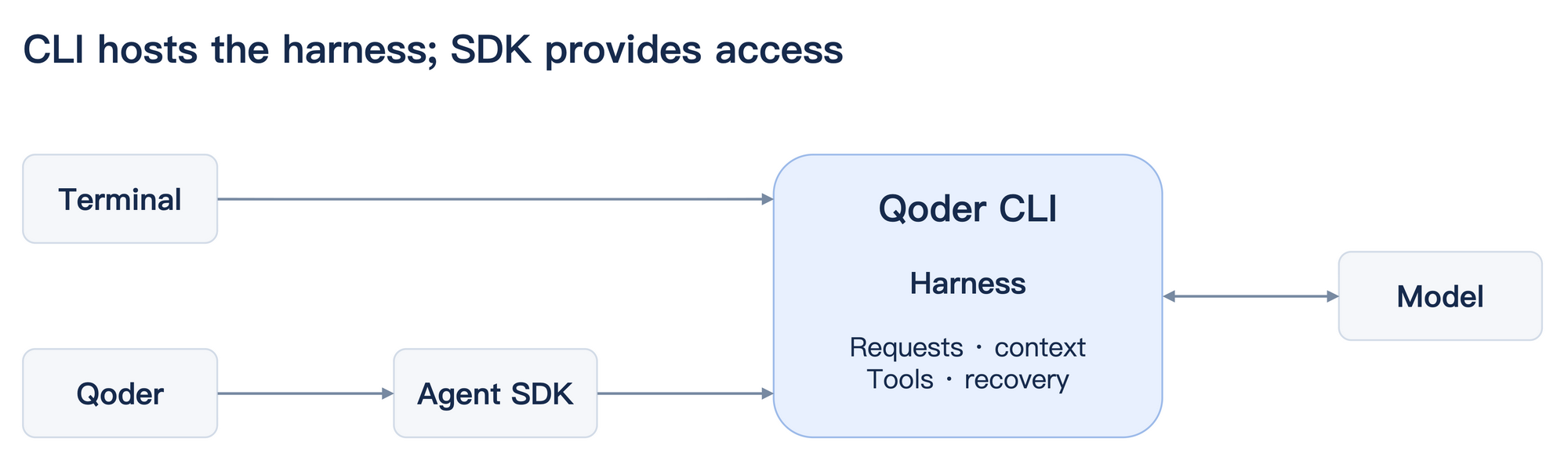
Figure 1: The relationship between Qoder CLI, the SDK, and the harness.
Before the program can begin useful work, it needs to load code, prepare configuration, and initialize the execution environment. If these steps run one after another, the first request has to wait for all of them.
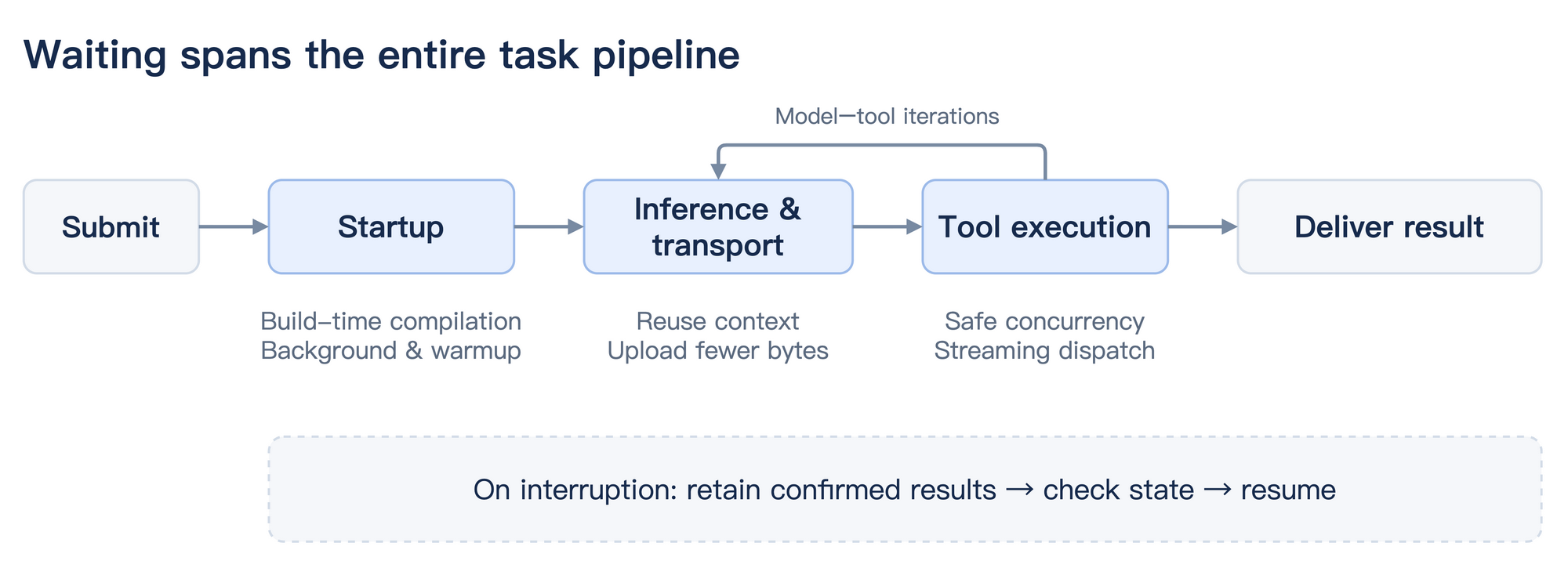
Figure 2: The agent task pipeline and opportunities to reduce waiting at each stage.
Qoder moves some computation to the build stage. Without bytecode, the runtime needs to parse and compile the JavaScript payload during startup. Binary builds generate bytecode by default, completing this work when the release artifact is built so it can be loaded directly at startup.
Other initialization can run in the background. For example, some identity and device initialization and user-state refresh work starts asynchronously. The interactive interface also starts without waiting for the configuration service to finish initializing. Interface startup can overlap with this preparation.
Necessary dependencies still apply. If the first model request needs configuration that is not ready, it must wait for that configuration to finish loading.
Some preparation can also happen while the user is typing a request. Once configuration initialization finishes, the program attempts to warm up the Bash execution environment and collect the Git context needed by the system prompt. Eligible interactive entry points also prepare runtime components used for code search.
How much waiting warmup saves depends on how early it starts. If preparation has finished by the time the user submits, the first round can use the prepared resources immediately. If it has not, execution can reuse the completed portion or wait for the remaining work.
Git warmup runs only in trusted directories. Its cache is associated with the working directory to prevent information from an old repository from being carried over after a directory change. Unfinished warmup tasks are canceled when the program exits.
A task may call the model several times. Each round requires preparing input, uploading the request, waiting for processing, and receiving the output. Here, the harness mainly reduces repeated processing and controls input size.
Sometimes a tool's output is already suitable for the main model to use, so an additional model call to summarize it is unnecessary.
WebFetch includes such a path. After a successful fetch, it checks whether the URL is preapproved, the content type is supported, and the content fits within the size limit. Eligible Markdown content, or a plain-text index at a URL ending in /llms.txt, is returned directly as a tool result. Explicit HTTP errors also return diagnostics directly.
This avoids auxiliary processing after the fetch. The webpage still needs to be fetched, and other pages may still require content conversion and model processing.
Webpage summaries, title generation, and sub-agent tasks have different requirements. The harness can choose faster models and suitable reasoning budgets for these calls, leaving stronger models available for the main task.
Budget allocation depends on whether the result is sufficient. History summaries need to retain the information required for later work, and complex sub-agents still need to complete their own reasoning. Simply reducing the budget can turn time saved now into rework later.
When generating a history summary, a derived request processes content already sent by the main session. The harness reuses the main session's system prompt, tool definitions, and request prefix, keeping chunk boundaries consistent where possible. This gives the backend an opportunity to reuse previously processed prefixes.
A summarization request can carry tool definitions while actual tool execution remains disabled. This preserves a consistent request representation and retains execution restrictions.
Whether a request hits the cache, and how much time that saves, depend on backend capabilities and the actual request. Frequent changes near the beginning of the prefix also reduce the portion that can be reused.
When hundreds of external tools are connected, including every parameter definition in every round means that tools the task does not currently need still occupy context.
On-demand loading separates the steps: use a catalog to find candidate tools, retrieve their parameter definitions when needed, and then call them. Frequently used tools can still be exposed directly. Omitting entries from the displayed catalog does not remove tools actually available on the server.
With many tools, this reduces the input that stays in context. It can also add a round trip to discover a tool and retrieve its definition before use. Whether the feature is enabled depends on the entry point and configuration.
Longer sessions accumulate more code, logs, and tool results. The harness first handles oversized tool outputs, then uses the actual context state to determine whether a history summary is needed. Subsequent requests continue with the summary and retained content.
Large tool results can also be written to disk, leaving only a preview and a location for reading the full result in context. The tool-output budget applies to the aggregate size within a single message, preventing multiple results from collectively expanding the input.
History compaction itself requires a model call and can omit details. It shortens later context, but whether it makes the entire task faster depends on how that information is used afterward.
The transport layer can also compress request bodies. Compression is attempted only when the feature is enabled, the transport supports it, and the request meets the size threshold. If compression does not make the payload smaller, the original content is sent.
The server decompresses the payload back to the original request, so the model receives the same number of input tokens. The saving is in uploaded bytes. For small requests or fast networks, the reduction in waiting time is limited.
After the model generates a tool call, argument parsing, permission checks, queueing, and execution still take time. Operations that do not depend on one another can sometimes start together.
Consider this sequence: read A, read B, modify A, then read A again to validate the result. The first two reads can run in parallel. The modification waits for the reads to finish, and the final validation waits for the modification.
Whether calls can run concurrently depends on the tool's concurrency contract and validation of the current arguments. When safe concurrency cannot be confirmed, the call runs exclusively. Exclusive operations form a barrier that prevents later calls from passing a write. Tools can overlap in the background while their results are collected in submission order.
Streaming execution lets tools start earlier. While the model continues generating later calls, an earlier call with complete arguments can enter the scheduler without waiting for the entire response to finish.
Incomplete arguments are not filled in speculatively. Before execution, each call still passes through argument checks and the permission process. Model generation and tool execution can therefore overlap while retaining the necessary execution constraints.
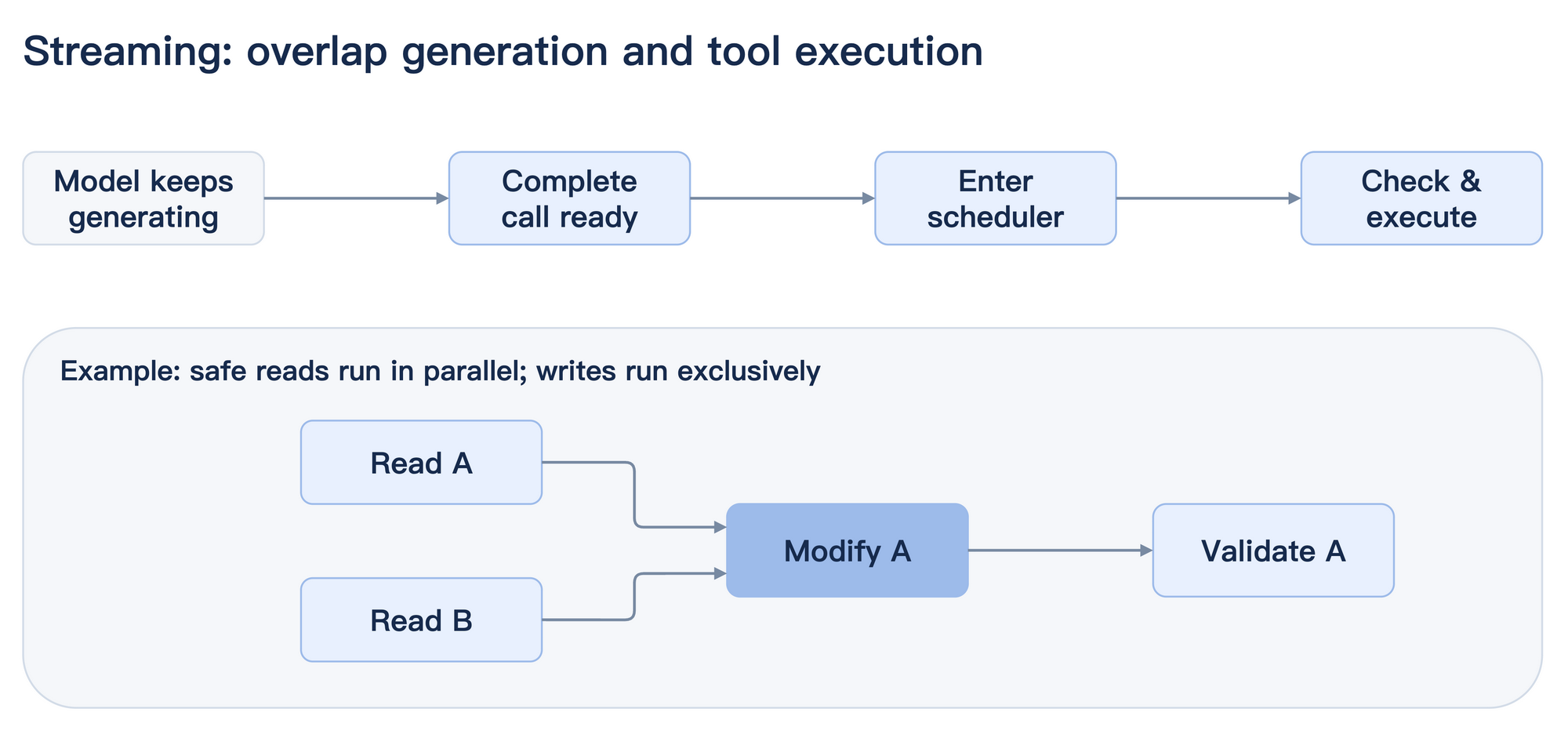
Figure 3: Streaming tool scheduling and safe concurrency.
Suppose the agent has finished reading A and written a change to B when the model response stream is interrupted. The network interruption does not automatically roll back the file change. Running the task again without checking its state could repeat a modification or trigger an external side effect again.
The harness collects results for dispatched tools by call ID, distinguishing confirmed results, calls that were not dispatched, and calls whose results remain unknown. Confirmed results are written back into history. A recovery message tells the model what completed and what was not executed. Calls whose arguments were never completed do not enter execution.
Recoverable interruptions continue from these records, subject to a bounded number of recovery attempts. When a result is unknown, execution does not resume automatically, and the record retains the possibility that a side effect may already have occurred.
When the user cancels or the task is being finalized, waiting for tool results also has a deadline. Callbacks arriving after that deadline are isolated so they cannot continue affecting a process that has already ended.
After a temporary MCP disconnection, the next authorized call waits for reconnection and tool rediscovery. Multiple calls can share the recovery process. Canceling one call ends only that call's wait.
After reconnection, the harness checks tool names, parameter definitions, and permission-related contracts again. If a contract has changed, the definition needs to be retrieved again and a new call issued. Restoring the channel does not establish that the previous call completed, so requests with unknown results are not automatically replayed.
Usage patterns affect the size of each round's input and how many steps a task needs.
Keep frequently used MCP tools and skills available, and enable the rest on demand. Start a new session for an unrelated task. Use /btw for a side question to avoid expanding the main task's context. Stable preferences and project background can be stored in memory to reduce repeated explanations.
Hooks on the critical path are also worth reviewing. Establish which ones must finish before execution, then consider caching, combining work, or background processing where behavior and ordering permit. Frequently triggered synchronous work can add up to substantial waiting.
If the agent has misunderstood the task, intervene or interrupt promptly. Letting it finish in the wrong direction and then starting over usually takes longer.
Fast's model responses and these harness optimizations together affect how long a coding task takes. The engineering work ultimately needs to show up in everyday use: less waiting for the first round, fewer repeated requests, earlier tool starts, and continuing from confirmed progress after interruptions where possible.
Fast is now available across the Qoder product family. Choose Fast in the Qoder product you already use and try it on your own projects.
Your Database's Biggest User Is Now an Agent — and That Changes Security

1,593 posts | 525 followers
FollowApache Flink Community - September 11, 2026
Alibaba Clouder - December 10, 2019
Alibaba EMR - November 18, 2020
Alibaba Developer - January 10, 2020
Neel_Shah - April 11, 2025
ApsaraDB - August 1, 2022
1,593 posts | 525 followers
Follow Qoder
From Assisted to Autonomous — Adapting to Every Programming Need
Learn More QwenWork
 is dedicated to helping employees strengthen their professional competitiveness in the AI era and to enabling enterprises to improve organizational effectiveness.
Learn More AgentCore
 unifies agent construction, governance, and execution capabilities so enterprises can deploy diverse agents with confidence.
Learn More AgentBay
Multimodal cloud-based operating environment and expert agent platform, supporting automation and remote control across browsers, desktops, mobile devices, and code.
Learn MoreMore Posts by Alibaba Cloud Community

