By Zhang Xizhe and Chen Zongzhi
In our previous article on the transaction lifecycle, we discussed two key members within a transaction object: LocalStorage and UndoBuffer. This article focuses on LocalStorage, a data structure that is tightly coupled with INSERT operations within a transaction. Since OLAP databases frequently need to import data in bulk, LocalStorage is specifically optimized for such scenarios. All analysis in this article is based on the DuckDB 1.4.0 source code. A TL;DR summary is provided at the end.
In DuckDB, inserting a row does not directly modify the source table, as is the case in MySQL. Instead, the data is first written to the transaction's LocalStorage. Only when the transaction is committed are the contents of LocalStorage merged into the source table. When we first encountered DuckDB's approach to handling INSERT operations, several questions naturally arose. We list them below, along with their explanations:
• Why is DuckDB able to accumulate inserted data and merge it into the source table only at commit time?
• How does DuckDB enforce primary key uniqueness?
• What are the benefits of this design? (The authors have identified the following advantages; additional insights are welcome.)
LocalStorage. No synchronization is required between sessions; each can proceed independently.LocalStorage can simply be discarded, without touching the source table. This greatly reduces interference between concurrent sessions.Differences in WAL Handling Between DuckDB and Row-oriented Storage Engines
DuckDB's primary write path is largely similar to that of most storage engines, such as InnoDB and RocksDB. Once a write has been recorded in the Write-Ahead Log (WAL) and the WAL has been flushed to disk, the write is considered complete. The actual persistence of most data from memory to disk then happens asynchronously during later dirty-page flushing or compaction.
The only scenario in which DuckDB differs in a noticeable way is bulk write workloads.
In fact, the WAL mechanisms used by all row-oriented storage engines all suffer from an inherent issue: write amplification. Data is first written to the WAL, and then written again to data pages when dirty pages are flushed. In other words, the same data is effectively written twice. This level of write amplification is generally acceptable in OLTP workloads, because OLTP operations typically involve very small data modifications.
However, in OLAP workloads, this becomes much harder to tolerate. In OLAP systems, throughput itself is often the primary bottleneck, and doubling the write volume is usually unacceptable. As a result, most OLAP systems adopt a different approach: data is written directly to data pages at write time, while the WAL only records the locations of the affected data pages. This design significantly reduces I/O bandwidth consumption during large-scale bulk imports.
After introducing the overall concept, let's take a look at the UML overview of LocalStorage. It consists of two layers:
• LocalStorage and its internal LocalTableManager form the entry layer. LocalTableManager is essentially a map that associates DataTable objects with pointers to LocalTableStorage instances.
• LocalTableStorage is where the actual data is stored. For each table that a transaction inserts into, a LocalTableStorage object is created, which contains several key fields:
row_groups: As mentioned in the previous article about the RowGroupCollection class, DuckDB manages table data through RowGroupCollection objects. Here, this effectively creates a shadow table that has the same schema as the source table. All insert operations are performed on this shadow table, and its contents are merged into the source table at the end of the transaction.append_indexes and delete_indexes: As discussed earlier in the explanation of how DuckDB enforces uniqueness constraints, these two fields are ART indexes created for that purpose. Since indexing is not the focus of this article, it will be covered in a future article.optimistic_collections: This is an array of pointers to RowGroupCollection objects. DuckDB includes optimizations for parallel execution in large-scale insert scenarios, and this array is used when inserts are performed by multiple threads. Each thread is assigned its own RowGroupCollection, which can be viewed as a "shadow table of the shadow table (row_groups)." During the insert (Sink) phase, each thread operates exclusively on its own RowGroupCollection. Only during the final Combine phase is all threads' data merged into row_groups.optimistic_writer: The OptimisticDataWriter class is also designed to optimize large-scale data import. Transferring data from row_groups into the source DataTable requires reading and writing the data again, incurring additional overhead. To avoid this cost, for data imports that meet certain conditions, DuckDB incrementally persists data to disk during insertion. In the final step, DuckDB only needs to attach data pointers and in-memory objects to the source table. This process avoids a substantial amount of I/O and will be explained in detail later.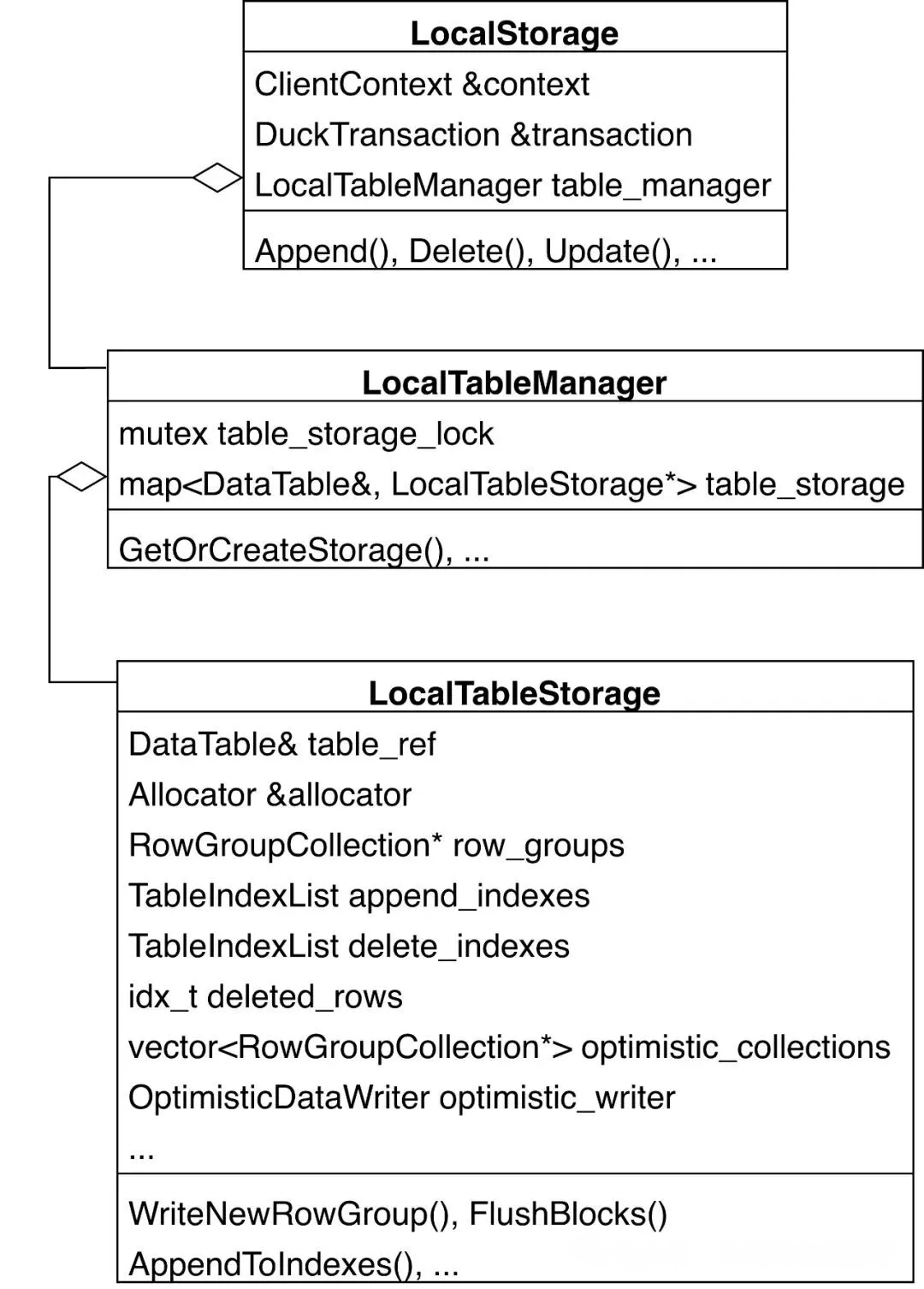
Next, let's examine the overall execution flow of an INSERT statement. The following stack trace outlines the main steps involved:
PhysicalInsert object and configure a set of options, including whether the operation runs in parallel, constraint checks, and ON CONFLICT handling.InsertGlobalState object that is used by all threads. This object contains a lock that synchronizes multiple threads during parallel insertion.InsertLocalState object, so that during parallel insertion, each thread operates exclusively on its own RowGroupCollection.LocalStorage, which will be described in detail later.row_groups, which will be explained in detail later.row_groups into the source DataTable. This step will also be covered in detail later.ClientContext::Query
├── ClientContext::PendingQueryInternal
│ └── ClientContext::PendingStatementOrPreparedStatementInternal
│ └── ClientContext::PendingStatementOrPreparedStatement
│ └── ClientContext::PendingStatementInternal
│ ├── ClientContext::CreatePreparedStatement
│ │ └── ClientContext::CreatePreparedStatementInternal
│ │ └── PhysicalPlanGenerator::Plan
│ │ └── PhysicalPlanGenerator::ResolveAndPlan
│ │ └── PhysicalPlanGenerator::PlanInternal
│ │ └── PhysicalPlanGenerator::CreatePlan
│ │ └── PhysicalPlanGenerator::CreatePlan
│ │ └── DuckCatalog::PlanInsert // 1. Construct a `PhysicalInsert` object and configure a set of options.
│ └── ClientContext::PendingPreparedStatementInternal
│ └── Executor::Initialize
│ └── Executor::InitializeInternal
│ └── Executor::ScheduleEvents
│ └── ... ExecutorTask::Execute
│ └── PipelineInitializeTask::ExecuteTask
│ └── Pipeline::ResetSink
│ └── PhysicalInsert::GetGlobalSinkState // 2. Construct a shared InsertGlobalState object that is used by all threads.
└── ClientContext::ExecutePendingQueryInternal
└── PendingQueryResult::ExecuteInternal
└── PendingQueryResult::ExecuteTaskInternal
└── ClientContext::ExecuteTaskInternal
└── Executor::ExecuteTask
└── ExecutorTask::Execute
└── PipelineTask::ExecuteTask
├── PipelineExecutor::PipelineExecutor
│ └── PhysicalInsert::GetLocalSinkState // 3. Each thread constructs its own `InsertLocalState` object.
└── PipelineExecutor::Execute
├── PipelineExecutor::ExecutePushInternal
│ └── PipelineExecutor::Sink
│ └── PhysicalInsert::Sink // 4. Insert data into `LocalStorage`.
└── PipelineExecutor::PushFinalize
└── PhysicalInsert::Combine // 5. (Parallel insertion only) Combine the data inserted by each thread
...
DuckTransactionManager::CommitTransaction
└── DuckTransaction::WriteToWAL
└── LocalStorage::Commit
└── LocalStorage::Flush // 6. At transaction commit time, merge the contents of `row_groups` into the source `DataTable`First, let's examine how data is inserted into LocalStorage. The entry point for this process is the PhysicalInsert::Sink function. Within this function, different logic paths are taken depending on whether the insertion is executed in parallel. Here, we first focus on the simpler single-threaded insertion path; the multi-threaded parallel insertion process will be introduced later based on this foundation. From the code snippet below, it is clear that single-threaded insertion essentially involves a call to the DataTable::LocalAppend function.
SinkResultType PhysicalInsert::Sink(ExecutionContext &context, DataChunk &insert_chunk,
                                    OperatorSinkInput &input) const {
    auto &gstate = input.global_state.Cast<InsertGlobalState>();
    auto &lstate = input.local_state.Cast<InsertLocalState>();
    auto &table = gstate.table;
    auto &storage = table.GetStorage();
    insert_chunk.Flatten();

    if (!parallel) { /* Single-threaded mode. */
        ... /* Uniqueness constraints and other checks; not covered in this article. */
        /* Call the `DataTable::LocalAppend` function. */
        storage.LocalAppend(table, context.client, insert_chunk, bound_constraints);
        ...
        return SinkResultType::NEED_MORE_INPUT;
    }
    ...
}
Next, let's focus on the call stack starting from the DataTable::LocalAppend function. Overall, the process can be divided into the following steps:
1. Construct a LocalAppendState object to handle the current insertion.
2. If this is the first insertion into a table, create a LocalTableStorage object for that table.
3. Initialize append states layer by layer. The hierarchy is as follows:
LocalAppendState (corresponding to LocalTableStorage) -> TableAppendState (corresponding to RowGroupCollection) -> RowGroupAppendState (corresponding to RowGroup) -> ColumnAppendState (corresponding to ColumnData)4. Insert data by calling the Append method layer by layer. During this process, new ColumnSegments (default size limit: 256 KB) or RowGroups (default row limit: 122,880) may be created if the current segments or groups are full.
5. If a new RowGroup is created, the previous one has reached its capacity and is flushed to disk. This is an optimization for bulk data import.
6. Attach version information to the newly inserted rows, which is used to determine visibility under MVCC.
DataTable::LocalAppend(TableCatalogEntry &table, ...) // 1. Construct a `LocalAppendState` object to handle the current insertion
├── DataTable::InitializeLocalAppend
│   └── LocalStorage::InitializeAppend
│       ├── LocalTableManager::GetOrCreateStorage // 2. If this is the first insertion into a table, create a `LocalTableStorage` object for that table.
|       |   └── LocalTableStorage::LocalTableStorage
│       └── RowGroupCollection::InitializeAppend // 3. Initialize layer by layer
│           └── RowGroup::InitializeAppend
│               └── StandardColumnData::InitializeAppend
│                   └── ColumnData::InitializeAppend
│                       └── ColumnSegment::InitializeAppend
├── DataTable::LocalAppend(LocalAppendState &state, ...)
│   └── LocalStorage::Append
│       ├── RowGroupCollection::Append // 4. Insert data by calling the Append method layer by layer
│       │   └── RowGroup::Append
│       │       └── ColumnData::Append(ColumnAppendState &state, ...)
│       │           └── ColumnData::Append(BaseStatistics &append_stats, ...)
│       │               └── StandardColumnData::AppendData
│       │                   └── ColumnData::AppendData
│       │                       └── ColumnSegment::Append
│       └── LocalTableStorage::WriteNewRowGroup // 5. If a new RowGroup is created, the previous one has reached its capacity and is flushed to disk
└── DataTable::FinalizeLocalAppend
    └── LocalStorage::FinalizeAppend
        └── RowGroupCollection::FinalizeAppend
└── RowGroup::AppendVersionInfo // 6. Attach version information to the newly inserted rows.Let's take a closer look at the layered initialization process from LocalTableStorage to ColumnSegment, in which each layer initializes its corresponding XXXAppendState.
Within LocalStorage::InitializeAppend, a LocalAppendState object is initialized. This process involves obtaining or creating a LocalTableStorage object and then calling the InitializeAppend method for the next layer (the RowGroupCollection):
void LocalStorage::InitializeAppend(LocalAppendState &state, DataTable &table) {
    /* 1. Obtain or create a `LocalTableStorage` object. */
    state.storage = &table_manager.GetOrCreateStorage(context, table);
    /* 2. Call the `InitializeAppend` method for the `RowGroupCollection`. */
    state.storage->row_groups->InitializeAppend(TransactionData(transaction), state.append_state);}
When a transaction inserts data into a table for the first time, a LocalTableStorage object is created for that table and registered in LocalTableManager::table_storage. This allows subsequent inserts within the same transaction to retrieve the object directly. During the construction of a LocalTableStorage object, the following steps are performed, including the creation of an empty RowGroupCollection.
LocalTableStorage::LocalTableStorage(ClientContext &context, DataTable &table)
    : table_ref(table), allocator(Allocator::Get(table.db)), deleted_rows(0), optimistic_writer(context, table),
      merged_storage(false) {
    auto types = table.GetTypes();
    auto data_table_info = table.GetDataTableInfo();
    auto &io_manager = TableIOManager::Get(table);
    /* Set the start row of `row_groups` to MAX_ROW_ID and the count to 0. */
    row_groups = make_shared_ptr<RowGroupCollection>(data_table_info, io_manager, types, MAX_ROW_ID, 0);
    /* Initialize statistics. */
    row_groups->InitializeEmpty();
    ... /* Handle uniqueness and other constraints. */
}Within RowGroupCollection::InitializeAppend, a TableAppendState object is initialized, which involves the following steps:
DataChunk (typically 2,048 rows) being inserted and initialize both the current row ID and the append count.RowGroup object to accommodate subsequent inserted data.RowGroup and call the InitializeAppend method for it.void RowGroupCollection::InitializeAppend(TransactionData transaction, TableAppendState &state) {
/* 1. Obtain the start row ID for the current `DataChunk` (typically 2,048 rows) being inserted and initialize both the current row ID and the append count. */
state.row_start = UnsafeNumericCast<row_t>(total_rows.load());
state.current_row = state.row_start;
state.total_append_count = 0;
auto l = row_groups->Lock();
/* 2. If this is the first insertion, create an empty `RowGroup` object to accommodate subsequent inserted data. */
if (IsEmpty(l) || requires_new_row_group) {
AppendRowGroup(l, row_start + total_rows);
}
/* 3. Set the current `RowGroup` and call the `InitializeAppend` method for it. */
state.start_row_group = row_groups->GetLastSegment(l);
state.start_row_group->InitializeAppend(state.row_group_append_state);
state.transaction = transaction;
/* 4. Initialize an empty set of statistics. */
state.stats = TableStatistics();
state.stats.InitializeEmpty(types);}Within RowGroup::InitializeAppend, a RowGroupAppendState object is initialized. The implementation is simple:
void RowGroup::InitializeAppend(RowGroupAppendState &append_state) {
    /* 1. Set the current `RowGroup` to itself and record the current offset within the group. */
    append_state.row_group = this;
    append_state.offset_in_row_group = this->count;
    /* 2. Create a `ColumnAppendState` object for each column and call the `InitializeAppend` method on each `ColumnData`. */
    append_state.states = make_unsafe_uniq_array<ColumnAppendState>(GetColumnCount());
    for (idx_t i = 0; i < GetColumnCount(); i++) {
        auto &col_data = GetColumn(i);
        col_data.InitializeAppend(append_state.states[i]);
    }
}Within ColumnData::InitializeAppend, a ColumnAppendState object is initialized. The implementation is simple:
1. Set the current ColumnSegment, which can fall into one of three scenarios:
ColumnSegment, create an empty ColumnSegment object. This typically happens during the first insertion into an empty RowGroup.ColumnSegment has already been persisted to disk, create an empty ColumnSegment object in memory. This is necessary because DuckDB's data blocks cannot be modified in place.ColumnSegment is already in memory, simply use it.2. Call the InitializeAppend method on the ColumnSegment object obtained in step 1.
void ColumnData::InitializeAppend(ColumnAppendState &state) {
    auto l = data.Lock();
    /* 1. Set the current `ColumnSegment`. */
    if (data.IsEmpty(l)) {
        /* 1.i. If the column contains no existing `ColumnSegment`, create an empty `ColumnSegment` object. */
        AppendTransientSegment(l, start);
    }
    auto segment = data.GetLastSegment(l);
    if (segment->segment_type == ColumnSegmentType::PERSISTENT || !segment->GetCompressionFunction().init_append) {
        /* 1.ii. If the last `ColumnSegment` has already been persisted to disk, create an empty `ColumnSegment` object in memory. */
        auto total_rows = segment->start + segment->count;
        AppendTransientSegment(l, total_rows);
        state.current = data.GetLastSegment(l);
    } else {
        /* 1.iii. If the last `ColumnSegment` is already in memory, simply use it. */
        state.current = segment;
    }

    /* 2. Call the `InitializeAppend` method on the `ColumnSegment` object obtained in step 1. */
    state.current->InitializeAppend(state);
}Within ColumnSegment::InitializeAppend, the method essentially calls the init_append callback. In the current version of the implementation, the AppendTransientSegment function determines that this callback uses the Uncompressed algorithm (which involves no compression). The purpose of this callback is to pin the in-memory data block corresponding to the ColumnSegment in the buffer pool, ensuring that it is not evicted while new data is being appended.
void ColumnSegment::InitializeAppend(ColumnAppendState &state) {
    ...
    state.append_state = function.get().init_append(*this);
}Let's now take a closer look at the layered insertion process from RowGroupCollection down to ColumnSegment.
Within RowGroupCollection::Append, besides updating some state information (such as total_append_count), the main logic consists of a loop with two key steps:
Append method of the current RowGroup to insert data. Since the default row_group_size is 122,880 rows, it is possible that the current row group reaches its limit before all data is inserted, in which case only part of the data is inserted.RowGroup and continue inserting the remaining data.bool RowGroupCollection::Append(DataChunk &chunk, TableAppendState &state){
const idx_t row_group_size = GetRowGroupSize(); /* Default value: 122880. */
bool new_row_group = false;
idx_t total_append_count = chunk.size();
idx_t remaining = chunk.size();
state.total_append_count += total_append_count;
while (true) {
auto current_row_group = state.row_group_append_state.row_group;
/* Calculate the number of rows to insert: min(remaining space in RowGroup, remaining rows to insert). */
idx_t append_count =
MinValue<idx_t>(remaining, row_group_size - state.row_group_append_state.offset_in_row_group);
if (append_count > 0) {
auto previous_allocation_size = current_row_group->GetAllocationSize();
/* 1. Call the `Append` method of the current `RowGroup` to insert data. */
current_row_group->Append(state.row_group_append_state, chunk, append_count);
allocation_size += current_row_group->GetAllocationSize() - previous_allocation_size;
current_row_group->MergeIntoStatistics(stats);
}
remaining -= append_count;
if (remaining > 0) {
/* Extract the remaining data to be inserted. */
if (remaining < chunk.size()) {
chunk.Slice(append_count, remaining);
}
new_row_group = true;
auto next_start = current_row_group->start + state.row_group_append_state.offset_in_row_group;
auto l = row_groups->Lock();
/* 2. Create a new `RowGroup` and continue inserting the remaining data. */
AppendRowGroup(l, next_start);
auto last_row_group = row_groups->GetLastSegment(l);
last_row_group->InitializeAppend(state.row_group_append_state);
continue;
} else {
break;
}
}
state.current_row += row_t(total_append_count);
... /* Statistics-related; not covered in this article. */
return new_row_group;
}Because the append_count has already been determined in RowGroupCollection::Append, inserting data within RowGroup::Append will never exceed the row group limit (122,880 rows). As a result, the function simply iterates over each column (ColumnData) and calls its Append method to insert the data.
void RowGroup::Append(RowGroupAppendState &state, DataChunk &chunk, idx_t append_count) {
    for (idx_t i = 0; i < GetColumnCount(); i++) {
        auto &col_data = GetColumn(i);
        auto prev_allocation_size = col_data.GetAllocationSize();
        col_data.Append(state.states[i], chunk.data[i], append_count);
        allocation_size += col_data.GetAllocationSize() - prev_allocation_size;
    }
    state.offset_in_row_group += append_count;
}The ColumnData::Append function essentially forwards the operation to ColumnData::AppendData. The main logic of this function is a loop, which can be described in two steps:
Append method on the current ColumnSegment, which effectively calls the append callback of the Uncompressed algorithm. For example, for an INT column, each 4-byte integer is stored sequentially. If the data block reaches its capacity limit (typically 256 KB), only part of the data can be inserted at this time.ColumnSegment and continue inserting the remaining data.void ColumnData::AppendData(BaseStatistics &append_stats, ColumnAppendState &state, UnifiedVectorFormat &vdata,
idx_t append_count) {
idx_t offset = 0;
this->count += append_count;
while (true) {
/* 1. Call the `Append` method on the current `ColumnSegment`. */
idx_t copied_elements = state.current->Append(state, vdata, offset, append_count);
append_stats.Merge(state.current->stats.statistics);
if (copied_elements == append_count)
break;
{
auto l = data.Lock();
/* 2. If there is remaining data after step 1, create a new `ColumnSegment` and continue inserting the remaining data. */
AppendTransientSegment(l, state.current->start + state.current->count);
state.current = data.GetLastSegment(l);
state.current->InitializeAppend(state);
}
offset += copied_elements;
append_count -= copied_elements;
}
}DuckTransactionManager::CommitTransaction
└── DuckTransaction::WriteToWAL
└── LocalStorage::Commit // Iterate over each `LocalTableStorage` and `flush` its contents.
└── LocalStorage::Flush // Merge data from `LocalTableStorage` into the target table.During a transaction, all inserted data resides in LocalStorage, so other sessions cannot see it. Once the transaction is committed, these changes need to become visible to other sessions. This requires transferring data from LocalStorage to the target table. The entry point for this process is LocalStorage::Flush, which proceeds as follows:
TableAppendState object for inserting data into the target table. Add an append_lock on the table to prevent concurrent merges by multiple sessions. The AppendLock also initializes the TableAppendState object, including the start row ID.INSERT_TUPLE undo entry to the UndoBuffer. This entry will be used later for writing to the WAL.LocalTableStorage is persisted and then linked directly to the target table.LocalTableStorage are discarded. The data is rescanned and inserted into the target table in smaller chunks (2,048 rows).void LocalStorage::Flush(DataTable &table, LocalTableStorage &storage, optional_ptr<StorageCommitState> commit_state){
if (storage.is_dropped) {
/* The table was dropped; no merge needed. */
return;
}
if (storage.row_groups->GetTotalRows() <= storage.deleted_rows) {
/* All inserted rows in this transaction were deleted; release data blocks without merging. */
storage.Rollback();
return;
}
auto append_count = storage.row_groups->GetTotalRows() - storage.deleted_rows;
const auto row_group_size = storage.row_groups->GetRowGroupSize();
/* 1. Construct a `TableAppendState` object for inserting data into the target table. Add an `append_lock` on the target table to prevent concurrent merges
by multiple sessions. The `AppendLock` also initializes the `TableAppendState` object. */
TableAppendState append_state;
table.AppendLock(append_state);
/* 2. Add an `INSERT_TUPLE` undo entry to the UndoBuffer. This entry will be used later for writing to the WAL. */
transaction.PushAppend(table, NumericCast<idx_t>(append_state.row_start), append_count);
if ((append_state.row_start == 0 || storage.row_groups->GetTotalRows() >= row_group_size) &&
storage.deleted_rows == 0) {
/* 3.i. Optimistic case: "The target table is empty, or the just-inserted batch exceeds 122,880 rows," and "none of the inserted rows have been deleted." */
/* Persist all data in `LocalTableStorage`. */
storage.FlushBlocks();
... /* Insert data into secondary indexes; not covered in this article. */
/* Link data to the target table. */
table.MergeStorage(*storage.row_groups, storage.append_indexes, commit_state);
} else {
/* 3.ii. Pessimistic case */
/* Discard any already-persisted data blocks in `LocalTableStorage`. */
storage.Rollback();
/* Rescan the data and insert it into the target table in chunks of 2,048 rows. */
storage.AppendToIndexes(transaction, append_state, true);
}
}As discussed earlier, compared with pessimistic merging, optimistic merging eliminates the need for an additional "rescan + insert" phase. Since the logic of pessimistic merging is relatively straightforward, we will not cover it in detail here. Instead, we focus on how optimistic merging is implemented. DataTable::MergeStorage forwards the call to RowGroupCollection::MergeStorage. Before examining this function, it is useful to summarize the two optimizations enabled by optimistic merging:
• It avoids an extra "scan + insert" process and links the data directly into the target table.
• It reduces WAL write overhead. Because the data has already been persisted, the WAL only needs to record pointers to the data instead of rewriting the inserted data itself.
The RowGroupCollection::MergeStorage function implements the first optimization and prepares the groundwork for the second:
1. Compute the current highest row ID of the target table, which will be used as the start row ID for this merge operation.
2. Iterate over the inserted RowGroup objects to determine how many rows have already been persisted (in the optimistic case, this should include all rows). This step prepares the information required for WAL write optimization.
3. Iterate over the inserted RowGroup objects, and for each RowGroup object:
RowGroup level down to each ColumnSegment.RowGroup object to the RowGroupCollection of the target table, thereby directly linking the data into the table.4. Record the collected data pointers in commit_state. This step also prepares for WAL write optimization.
5. Merge statistics into the target table.
void RowGroupCollection::MergeStorage(RowGroupCollection &data, optional_ptr<DataTable> table,
                                      optional_ptr<StorageCommitState> commit_state){
    /* 1. Compute the current highest row ID of the target table, which will be used as the start row ID for this merge operation. */
    auto start_index = row_start + total_rows.load();
    auto index = start_index;
    auto segments = data.row_groups->MoveSegments();

    unique_ptr<PersistentCollectionData> row_group_data;
    idx_t optimistically_written_count = 0;
    if (commit_state) {
        /* 2. Iterate over the inserted RowGroup objects to determine how many rows have already been persisted. */
        for (auto &entry : segments) {
            auto &row_group = *entry.node;
            if (!row_group.IsPersistent())
                break;
            optimistically_written_count += row_group.count;
        }
        if (optimistically_written_count > 0) {
            row_group_data = make_uniq<PersistentCollectionData>();
        }
    }

    /* 3. Iterate over the inserted `RowGroup` objects. */
    for (auto &entry : segments) {
        auto &row_group = entry.node;
        /* 3.i. Update the start row ID from top to bottom, from the `RowGroup` level down to each `ColumnSegment`. */
        row_group->MoveToCollection(*this, index);

        if (commit_state && (index - start_index) < optimistically_written_count) {
            /* 3.ii. Collect pointers to the persisted data. */
            auto persistent_data = row_group->SerializeRowGroupInfo();
            persistent_data.types = types;
            row_group_data->row_group_data.push_back(std::move(persistent_data));
        }
        index += row_group->count;
        /* 3.iii. Append the current `RowGroup` object to the `RowGroupCollection` of the target table. */
        row_groups->AppendSegment(std::move(row_group));
    }
    if (commit_state && optimistically_written_count > 0) {
        /* 4. Record the collected data pointers in `commit_state`. */
        commit_state->AddRowGroupData(*table, start_index, optimistically_written_count, std::move(row_group_data));
    }
    /* 5. Merge statistics into the target table. */
    stats.MergeStats(data.stats);
    total_rows += data.total_rows.load();
}DuckTransactionManager::CommitTransaction
├── DuckTransaction::WriteToWAL
│ ├── LocalStorage::Commit
│ │ └── LocalStorage::Flush // Merge data from `LocalTableStorage` into the target table.
│ ├── UndoBuffer::WriteToWAL
│ │ └── WALWriteState::CommitEntry
│ │ └── DataTable::WriteToLog // Write WAL records for INSERT_TUPLE undo entries.
│ └── SingleFileBlockManager::FileSync // In the optimistic merge case, ensure that data is actually flushed from the page cache to disk.
└── DuckTransaction::Commit
└── SingleFileStorageCommitState::FlushCommit
└── WriteAheadLog::Flush
└── BufferedFileWriter::Sync // Flush WAL records from the page cache to disk. This ensures that the data will exist during crash recovery.For cases where a WAL write is required, the preceding stack trace shows the execution order of an append operation during transaction commit. After the LocalStorage::Flush function merges the data into the target table, DuckDB proceeds to write the corresponding WAL records. Within DataTable::WriteToLog, DuckDB handles optimistic and pessimistic merge scenarios differently:
• Optimistic merge: Write only the data pointers recorded in commit_state to the WAL.
• Pessimistic merge: Scan all rows inserted by the current transaction and write them to the WAL in batches of 2,048 rows.
void DataTable::WriteToLog(DuckTransaction &transaction, WriteAheadLog &log, idx_t row_start, idx_t count,
                           optional_ptr<StorageCommitState> commit_state) {
    log.WriteSetTable(info->schema, info->table);
    if (commit_state) {
        idx_t optimistic_count = 0;
        auto entry = commit_state->GetRowGroupData(*this, row_start, optimistic_count);
        if (entry) {
            /* Optimistic merge: Write only the data pointers recorded in commit_state to the WAL. */
            log.WriteRowGroupData(*entry);
            ...
            row_start += optimistic_count;
            count -= optimistic_count;
            if (count == 0) { /* In the normal case, count should be 0 here. */
                return;
            }
        }
    }

    /* Pessimistic merge: Scan all rows inserted by the current transaction and write them to the WAL in batches of 2,048 rows. */
    ScanTableSegment(transaction, row_start, count, [&](DataChunk &chunk) { log.WriteInsert(chunk); });
}In the previous sections, for the sake of clarity, we intentionally skipped the discussion of parallel inserts. We now return to this topic to examine how DuckDB performs multi-threaded inserts—specifically, how individual threads independently process data during the Sink phase and how their results are eventually aggregated during the Combine phase.
The core logic of parallel inserts resides in PhysicalInsert::Sink, as shown below:
RowGroupCollection, create an empty RowGroupCollection object. Under the protection of gstate.lock, register and manage this object in LocalTableStorage::optimistic_collections.RowGroupCollection. The insertion logic itself is essentially identical to the single-threaded case; the only difference is that each thread operates on a different RowGroupCollection.SinkResultType PhysicalInsert::Sink(ExecutionContext &context, DataChunk &insert_chunk,
OperatorSinkInput &input) const {
auto &gstate = input.global_state.Cast<InsertGlobalState>();
auto &lstate = input.local_state.Cast<InsertLocalState>();
auto &table = gstate.table;
auto &storage = table.GetStorage();
insert_chunk.Flatten();
... /* Single-threaded insert. */
auto &data_table = gstate.table.GetStorage();
if (!lstate.collection_index.IsValid()) {
/* 1. If the current thread has not yet been assigned a dedicated `RowGroupCollection`, create one. */
auto table_info = storage.GetDataTableInfo();
auto &io_manager = TableIOManager::Get(table.GetStorage());
/* Create an empty `RowGroupCollection` object. */
auto max_row_id = NumericCast<idx_t>(MAX_ROW_ID);
auto collection = make_uniq<RowGroupCollection>(std::move(table_info), io_manager, insert_types, max_row_id);
collection->InitializeEmpty();
collection->InitializeAppend(lstate.local_append_state);
/* Under the protection of `gstate.lock`, register and manage the `RowGroupCollection` object
in `LocalTableStorage::optimistic_collections`. */
lock_guard<mutex> l(gstate.lock);
lstate.optimistic_writer = make_uniq<OptimisticDataWriter>(context.client, data_table);
lstate.collection_index = data_table.CreateOptimisticCollection(context.client, std::move(collection));
}
/* Constraint checks; not covered in this article. */
OnConflictHandling(table, context, gstate, lstate, insert_chunk);
/* 2. The thread inserts data into its own `RowGroupCollection`. */
auto &collection = data_table.GetOptimisticCollection(context.client, lstate.collection_index);
auto new_row_group = collection.Append(insert_chunk, lstate.local_append_state);
if (new_row_group) {
lstate.optimistic_writer->WriteNewRowGroup(collection);
}
return SinkResultType::NEED_MORE_INPUT;
}The Combine phase is responsible for merging data from each thread's dedicated RowGroupCollection into LocalTableStorage::row_groups. In implementation, this process closely mirrors the earlier workflow of merging data from LocalStorage into the target table.
FinalizeAppend method on the thread-local RowGroupCollection, which attaches version information to the appended data.gstate.lock to prevent contention among multiple threads.RowGroupCollection into LocalTableStorage::row_groups, with different strategies applied depending on the volume of inserted data:SinkCombineResultType PhysicalInsert::Combine(ExecutionContext &context, OperatorSinkCombineInput &input) const{
auto &gstate = input.global_state.Cast<InsertGlobalState>();
auto &lstate = input.local_state.Cast<InsertLocalState>();
/* Single-threaded insert mode: nothing to combine. */
if (!parallel || !lstate.collection_index.IsValid())
return SinkCombineResultType::FINISHED;
auto &table = gstate.table;
auto &storage = table.GetStorage();
const idx_t row_group_size = storage.GetRowGroupSize();
/* 1. Call the `FinalizeAppend` method on the thread-local `RowGroupCollection`, which attaches version information to the appended data. */
TransactionData tdata(0, 0);
auto &data_table = gstate.table.GetStorage();
auto &collection = data_table.GetOptimisticCollection(context.client, lstate.collection_index);
collection.FinalizeAppend(tdata, lstate.local_append_state);
auto append_count = collection.GetTotalRows();
/* 2. Acquire `gstate.lock` to prevent contention among multiple threads. */
lock_guard<mutex> lock(gstate.lock);
gstate.insert_count += append_count;
/* 3. Merge the thread-local `RowGroupCollection` into `LocalTableStorage::row_groups`. */
if (append_count < row_group_size) {
/* Small data volume: merge via scan + insert. */
LocalAppendState append_state;
storage.InitializeLocalAppend(append_state, table, context.client, bound_constraints);
auto &transaction = DuckTransaction::Get(context.client, table.catalog);
collection.Scan(transaction, [&](DataChunk &insert_chunk) {
storage.LocalAppend(append_state, context.client, insert_chunk, false);
return true;
});
storage.FinalizeLocalAppend(append_state);
} else {
/* At least one RowGroup has already been persisted: use optimistic linking. */
lstate.optimistic_writer->WriteLastRowGroup(collection);
lstate.optimistic_writer->FinalFlush();
gstate.table.GetStorage().LocalMerge(context.client, collection);
auto &optimistic_writer = gstate.table.GetStorage().GetOptimisticWriter(context.client);
optimistic_writer.Merge(*lstate.optimistic_writer);
}
return SinkCombineResultType::FINISHED;
}• During transaction execution, DuckDB inserts data into a transaction-private LocalStorage, which effectively serves as a shadow table of the source table. The data is merged into the source table only when the transaction is committed.
• DuckDB applies dedicated optimizations for bulk import workloads. While inserting data into LocalStorage, fully-filled RowGroup objects (122,880 rows) are flushed to disk. During the final merge into the source table, these persisted RowGroup objects can be linked directly. At the same time, in this optimistic insert path, writing to the WAL only requires recording pointers to the persisted data, rather than rewriting the raw data.
• For non-optimistic insert paths, both merging into the source table and writing to the WAL require a full "scan + write" process, which can lead to a substantial degradation in insert performance.
• DuckDB supports multi-threaded parallel execution for bulk INSERT statements. Each thread performs its insertion (Sink) into a private RowGroupCollection, and once all threads complete, their data is merged (Combine) into a shared RowGroupCollection.
ApsaraDB - February 5, 2026
ApsaraDB - February 24, 2026
ApsaraDB - November 13, 2025
ApsaraDB - September 3, 2025
ApsaraDB - November 18, 2025
ApsaraDB - November 12, 2025
 Database for FinTech Solution
Leverage cloud-native database solutions dedicated for FinTech.
Learn More Oracle Database Migration Solution
Migrate your legacy Oracle databases to Alibaba Cloud to save on long-term costs and take advantage of improved scalability, reliability, robust security, high performance, and cloud-native features.
Learn More Database Migration Solution
Migrating to fully managed cloud databases brings a host of benefits including scalability, reliability, and cost efficiency.
Learn More DBStack
DBStack is an all-in-one database management platform provided by Alibaba Cloud.
Learn MoreMore Posts by ApsaraDB


