This topic describes how to split a hot data partition in PolarDB-X.
As a distributed database, PolarDB-X distributes the partitions of a partitioned table across different storage nodes as evenly as possible. This approach improves resource utilization and helps prevent single points of failure. For tables that use RANGE or LIST partitioning, data is divided based on user-defined rules. For tables that use HASH partitioning, PolarDB-X uses a consistent hashing algorithm. This algorithm maps partition key values to a specific hash value, which in turn determines the corresponding partition in the hash space. If the partition key values are well-distributed, such as when using a primary key for HASH partitioning, PolarDB-X spreads data evenly across all partitions. Otherwise, data may be unevenly distributed across partitions, and severe data skew can occur.
This section uses an orders table to illustrate how data skew can occur in a table that uses HASH partitioning. The primary key of this table is an auto-incrementing ID. The table is defined as follows:
CREATE TABLE orders (
id int(11) NOT NULL AUTO_INCREMENT,
seller_id int(11) DEFAULT NULL,
PRIMARY KEY (id)
)
To achieve a uniform data distribution, you might choose the primary key (id) as the partition key for HASH partitioning. Because the primary key is unique and PolarDB-X uses a consistent hashing algorithm, data is distributed evenly across all partitions. However, business queries are typically not based on an auto-incrementing ID. Instead, you typically query data by seller. For example, when you query with a condition like WHERE seller_id = 88, the system cannot perform partition pruning based on seller_id. This requires a full partition scan, which is highly inefficient. 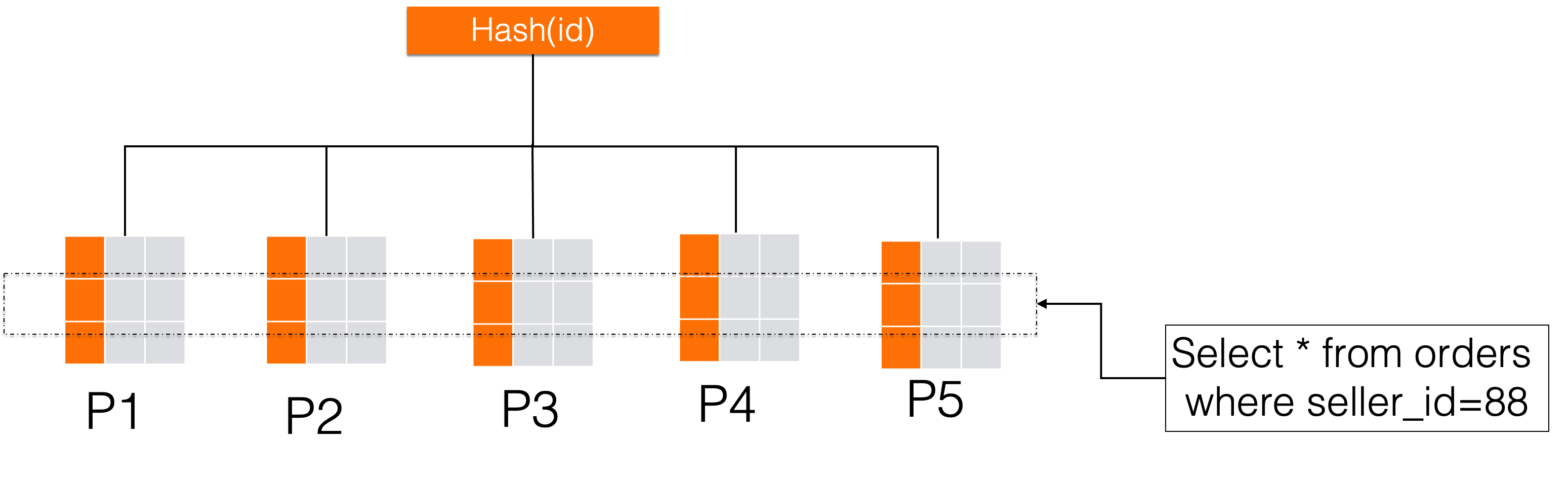
A natural next step is to change the partition key to seller_id and use HASH partitioning. This approach allows the optimizer to use partition pruning when you query by seller, scanning only the relevant partitions and significantly improving query performance. However, this strategy has a major drawback. Because data for the same seller is mapped to the same partition, partitions containing data for large sellers can become disproportionately large. This severe data skew creates a write hotspot. For example, all data for a large seller might end up in a single partition, such as P5 in the following diagram, creating a performance bottleneck. 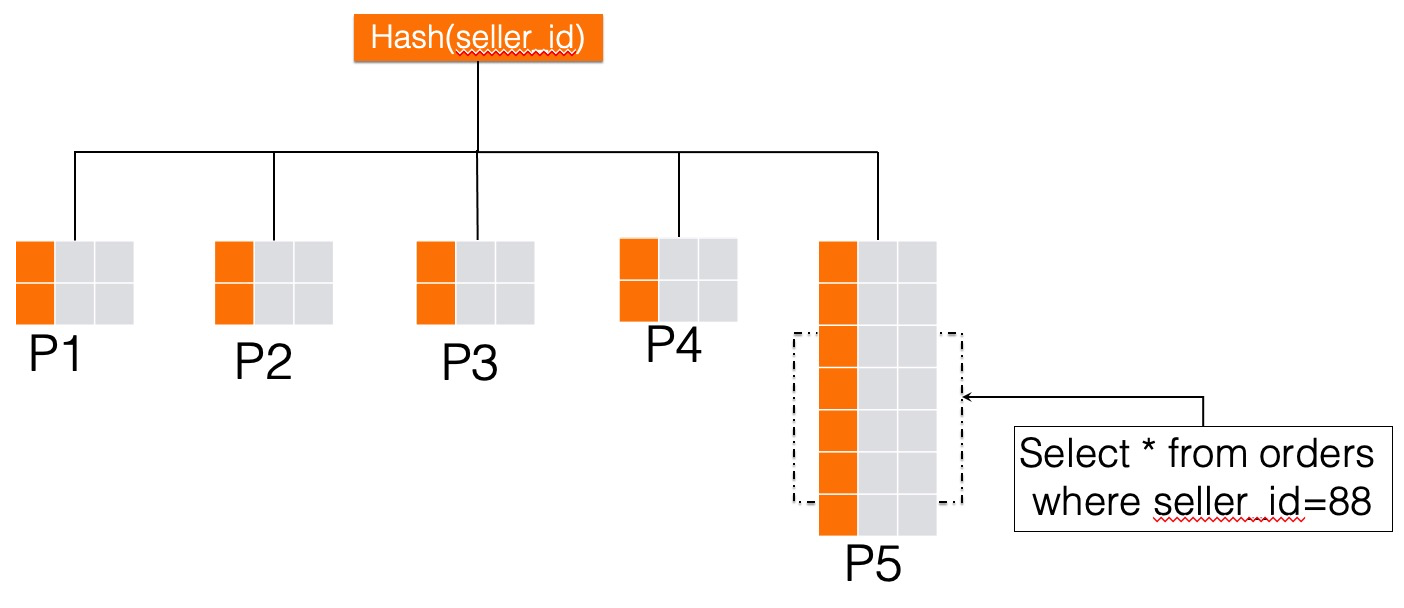
How PolarDB-X addresses data hotspots
First, add a second column to the partition key.
alter table orders partition by key(seller_id,id) partitions 5This change does not alter the data distribution of the orders table. No data is rehashed, and the number of partitions remains five. It simply adds the id column as a second partition key by modifying the table's partition metadata. This is a very low-cost operation. At this point, the id column does not participate in routing calculations and acts only as a placeholder in the partition key.
The following examples compare the hash space of the partitions in the orders table before and after adding the id column as a second partition key.
Before adding the second partition key:
PARTITION `p1` VALUES LESS THAN (-5534023222112865481)
PARTITION `p2` VALUES LESS THAN (-1844674407370955159)
PARTITION `p3` VALUES LESS THAN (1844674407370955163)
PARTITION `p4` VALUES LESS THAN (5534023222112865485)
PARTITION `p5` VALUES LESS THAN (9223372036854775807)
After adding the second partition key:
PARTITION `p1` VALUES LESS THAN (-5534023222112865481, 9223372036854775807)
PARTITION `p2` VALUES LESS THAN (-1844674407370955159, 9223372036854775807)
PARTITION `p3` VALUES LESS THAN (1844674407370955163, 9223372036854775807)
PARTITION `p4` VALUES LESS THAN (5534023222112865485, 9223372036854775807)
PARTITION `p5` VALUES LESS THAN (9223372036854775807, 9223372036854775807)
With a single partition key, if a partition becomes hot, it means a large volume of data is concentrated on a specific hash value, not a range. This prevents further splitting. By adding a second partition key, the hash space transforms from one-dimensional to two-dimensional. In PolarDB-X, this transformation allows you to split a hot partition by its hot value using the second partition key. For example, the data for the large seller with seller_id = 88 is concentrated in the P5 partition. You can run the following command to distribute this hot data:
alter table orders split into H88_ partitions 2 by hot value(88)The following diagram shows the result after the split:
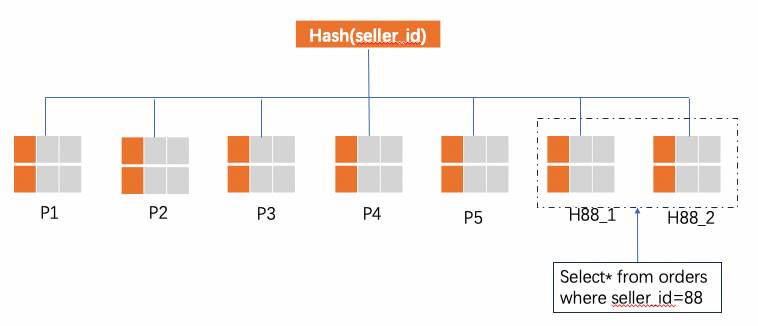
This split operation separates data where seller_id = 88 from the P5 partition and then divides it into N new partitions based on the second partition key, id. In this example, N is 2, creating two new partitions: H88_1 and H88_2.
This split does not affect data for other sellers. Data that was in P1 remains in P1, and data in P2 remains in P2. Only the hot data is rerouted. Before the split, requests for seller_id = 88 were routed to partition P5. After the split, they are routed to H88_1 and H88_2.
Limitations
You can perform hot data partition splitting only on tables that use KEY partitioning. KEY partitioning is a type of HASH partitioning.