By Li Guangshui and Huang Yongzhuo
Note: In this article, SysOM refers to the O&M component of the Alibaba Cloud OS Console. As one of the AI computing O&M features in SysOM, AI Profiling focuses primarily on performance analysis scenarios for AI jobs.
Do any of these sound familiar? A training task runs for hours before you notice GPU utilization is under 30%. An inference service goes live and its GPU memory creeps up for no obvious reason until it hits out-of-memory (OOM). A handful of cards in a thousand-GPU cluster suffer communication latency that drags down the whole training run — and you have no idea where to start looking.
SysOM AI Profiling (hereinafter AI Profiling) was built to solve exactly these problems. It is a full-lifecycle performance observation and diagnostic tool designed for AI applications — from training to inference, from a single card to a thousand-GPU cluster, from the Python layer down to the GPU kernel layer — so you can see what happens in every microsecond.
Before AI Profiling, performance observation on large-scale clusters relied on several classes of existing industry tools. Some capture CUDA streams, kernels, and the execution of related operators at fine granularity on the GPU and output the results in Trace format. Some report monitoring data by Kubernetes Pod and by GPU. Some use eBPF to collect CPU, memory, and system call traces from the kernel layer. Others capture fairly rich data at the framework layer (such as Torch) and the kernel layer. Each has its strengths, but on complex AI jobs they run into the same limits: they are relatively intrusive, better suited to short-duration batch analytics, hard to use for iteration-level collection, and tightly coupled to a specific runtime environment or framework version. Most also cover only a single dimension and are difficult to make compatible across vendors. The result is incomplete information, data that is hard to correlate, and inefficient diagnosis.
A new generation of intelligent analysis tools therefore needs to be zero-intrusion, cover the full lifecycle, and work across vendors, so that teams can optimize resource utilization and improve system stability more effectively. That is precisely the gap AI Profiling sets out to fill.
Just enter an instance ID and a GPU process, and AI Profiling handles collection, upload, and analysis end to end. There is no code to change, no process to restart, and no need to copy trace files into Chrome Tracing by hand — a built-in TimeLine view renders the results directly in the frontend.
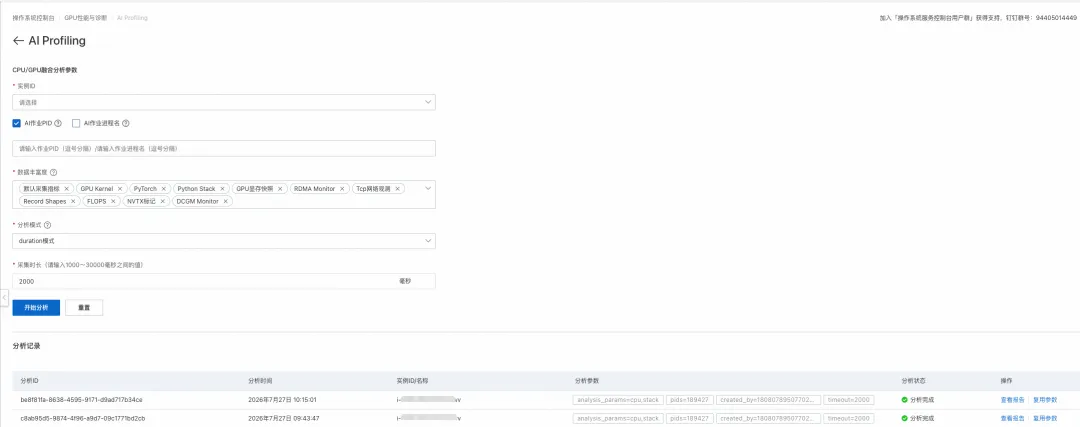
AI Profiling collects Python call stacks, CPU data, GPU operators, Torch-layer calls, GPU memory, FLOPS, RDMA communication, TCP network, and other dimensions at the same time. You can view the overall distribution of time spent and drill down to fine-grained information at the GPU kernel level.
Specifically, you get two views: multi-process aggregation and single process.
• Basic overview — the list of processes collected in this run, the card numbers used, GPU memory usage, total card memory, and the entry point to the single-process report view.

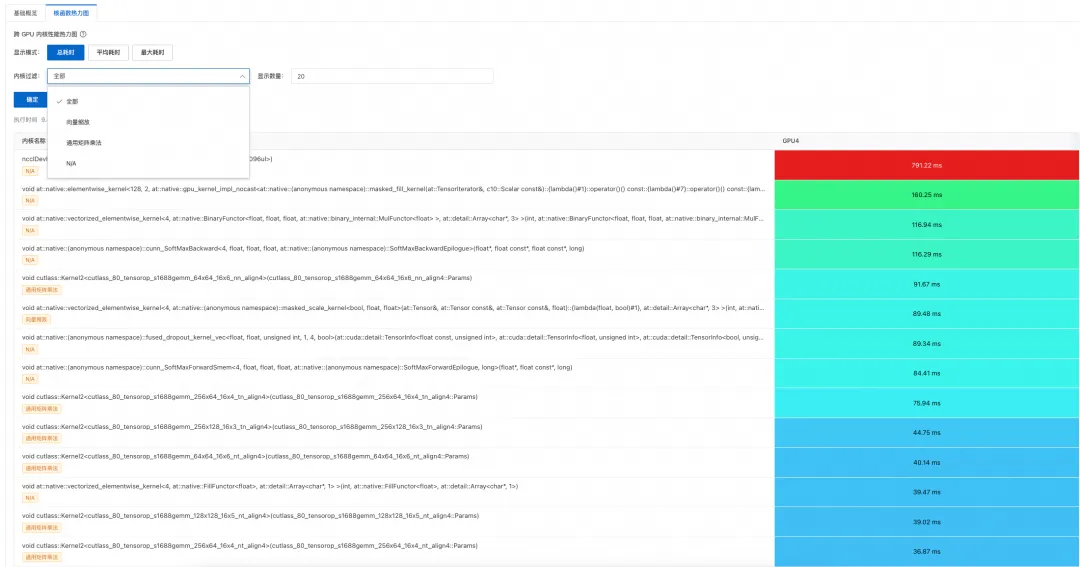
• Kernel function heatmap — a heatmap of how every GPU kernel function in this collection was invoked on the GPU.
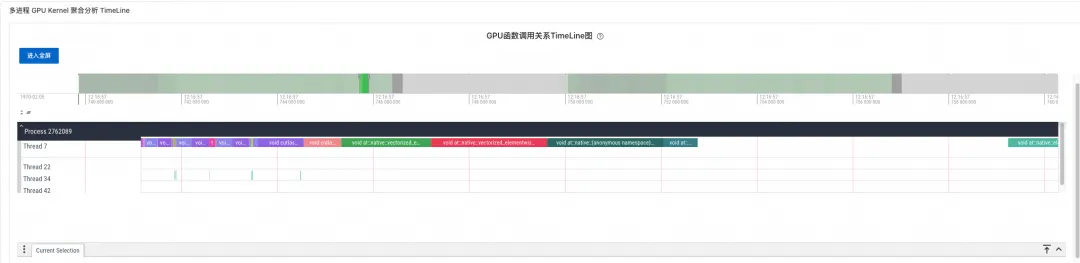
• Multi-process GPU Kernel analysis timeline — aggregates the GPU kernel functions of all processes collected in this run onto a single timeline, so you can observe GPU execution across processes.
• Overall performance overview — key metrics at a glance, including device and GPU memory summary, GPU utilization, and the time share of each stage.
!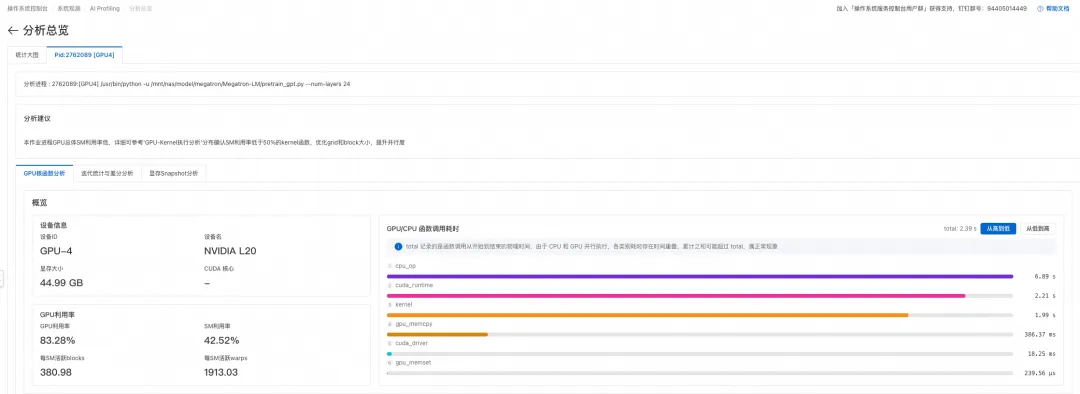
(Figure: "CPU/GPU Summary" Panel)
• GPU operator analysis — shows the time share of GPU compute, communication, memory, and idle, helping you quickly judge how well a job uses available computing power.
• Detailed GPU kernel function statistics — per-kernel-function statistics on call counts, duration distribution, and resource usage, making hot-spot kernel functions easy to locate.
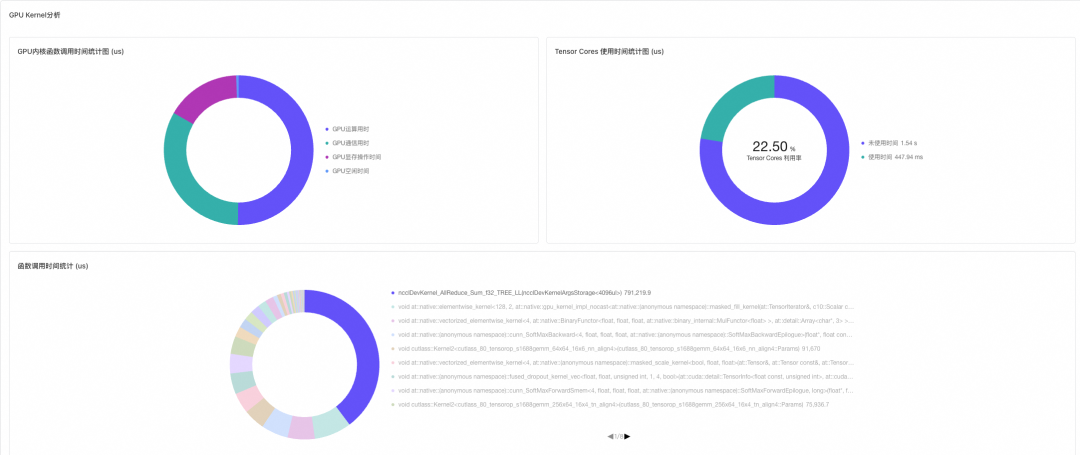
(Figure: "GPU Kernel Analysis" Panel)
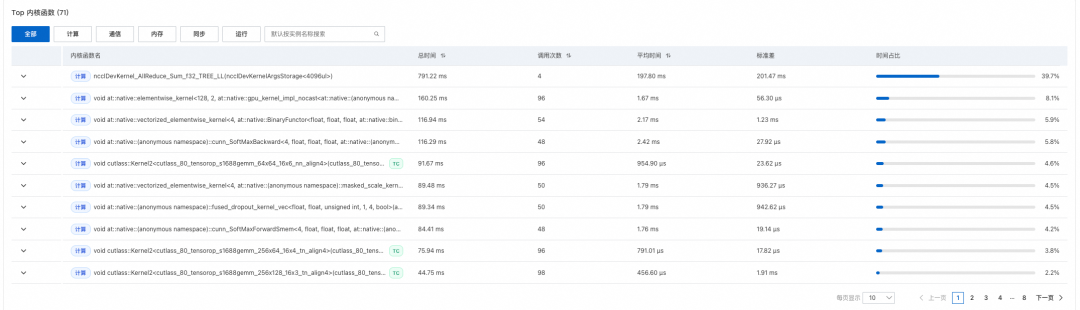
(Figure: "Top Kernel Functions" Panel)
• Iteration time and loss accuracy statistics — per-iteration statistics on the time share of each stage and on loss accuracy; both training and inference jobs are split into iterations automatically, and a custom iteration entry point is supported.
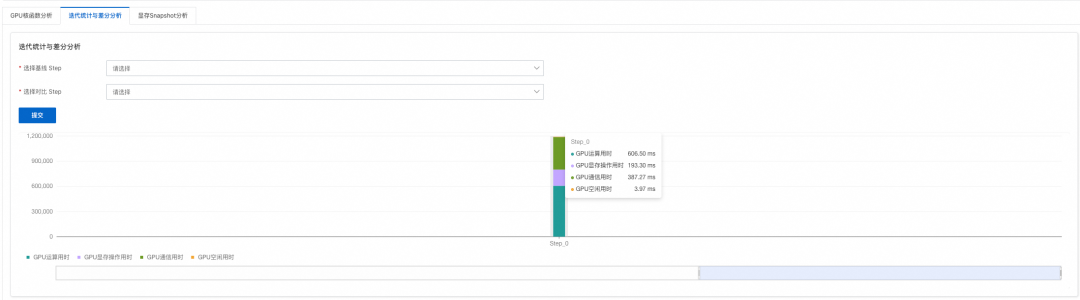
(Figure: "Iteration Statistics and Differential Analysis" Panel)
• TimeLine raw data display — no need to open Perfetto/Chrome Tracing anymore.
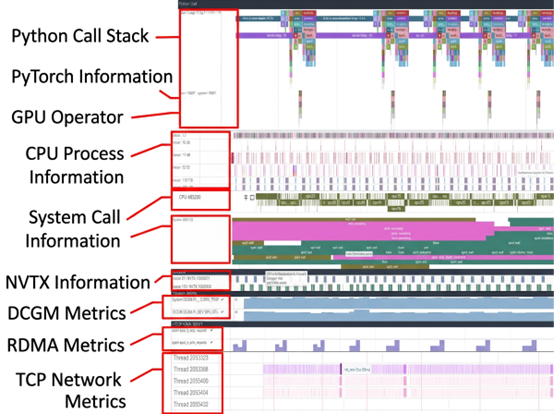
(Figure: TimeLine with fused heterogeneous data sources)
At a fine-grained level, it shows the size, allocation and release, and lifecycle of every memory block within the sampling window, giving you a clear picture of how GPU memory changes over time.
Once you have identified a specific iteration or a suspicious block, you can drill into its call stack to trace the source of the memory anomaly.
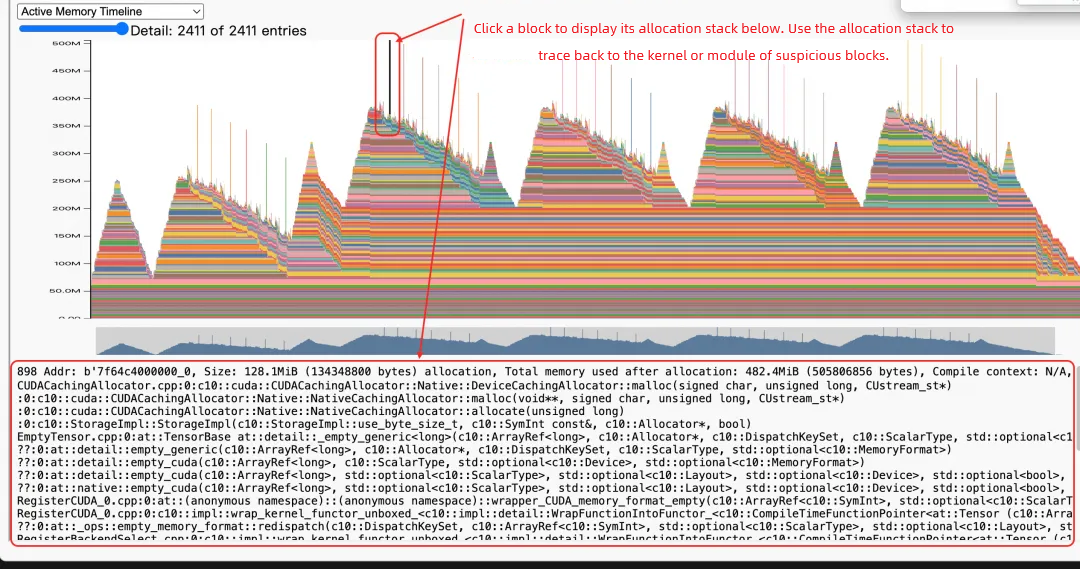
(Figure: "GPU Memory Timeline" Panel)
In large-scale AI training and inference, the Timeline data collected by AI Profiling is typically complex and large — often several GB — which makes performance analysis and anomaly localization difficult. Traditional methods struggle to identify the key differences efficiently, especially during performance comparison or root cause analysis.
AI Profiling embeds iteration markers into the training or inference flow, dividing the entire execution precisely into discrete iteration units, and records key metrics for each iteration such as loss value, compute time, storage overhead, and communication latency. It then visualizes these metrics as column charts and similar views, so you can spot outlier iterations at a glance — a loss spike caused by gradient explosion, for example, or an iteration where the communication share is unusually high.
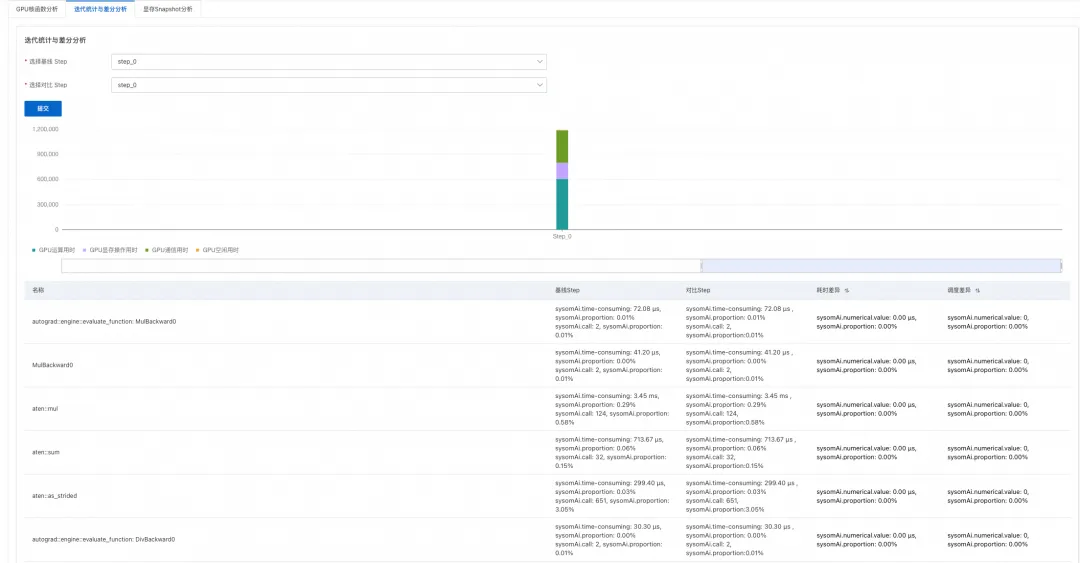
(Figure: Iteration-based statistics)
Zero intrusion, invisible to your workload — non-intrusive profiling technology means no container changes and no restarts.
Cross-vendor compatibility — supports NVIDIA, PPU, AMD, and other device types, so you don't switch observation tools for each hardware platform.
Very low overhead — with existing industry profiling tools, job performance rarely returns to pre-collection levels; with AI Profiling, workload performance recovers quickly once collection ends, keeping the lasting impact on production jobs under control.
Richness — supports on-demand collection of Python call stacks, CPU information, GPU operators, Torch, GPU memory, FLOPS, RDMA, TCP, and other metrics. GPU/CPU monitoring metrics can also be collected on demand.
End-to-end automation — the whole flow completes automatically in minutes. Configure an instance ID in the frontend and AI Profiling starts on its own; when collection finishes, the data is uploaded to the central side, and when analysis finishes, a report is generated and displayed in the frontend. The built-in TimeLine view removes any need to copy data into components such as Chrome Tracing or Perfetto.
Multi-process aggregation and analysis — supports multi-process collection and merged observation and analysis of GPU kernels across processes.
Multi-dimensional collection — supports collection by time and collection by iteration. Advanced configuration such as a custom iteration entry point and skipping the first n iterations is also supported.
Advantages over industry tools — beyond GPU kernel and Torch-layer data, it also covers RDMA communication, system calls, DCGM monitoring, and NVTX markers. It collects data from both Python and C++ application processes, and can monitor non-GPU processes in the same place.
Problem background: A user deployed an LLM inference service with vLLM. Although GPU memory was pre-allocated, the service hit an out-of-memory (OOM) error while running, and GPU memory usage was clearly growing.
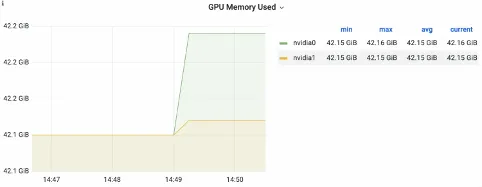
(Figure: GPU memory growth observed in dcgm-exporter monitoring)

(Figure: vLLM logs show that KV cache utilization was not saturated)
Tracing GPU Memory Allocation with AI Profiling
1. Go to Alibaba Cloud OS Console -> GPU Performance and Diagnostics -> AI Profiling.
2. Enter the target instance ID, run AI Profiling against the live vLLM inference service, configure the profiling collection items and analysis mode, and click Start Analysis.
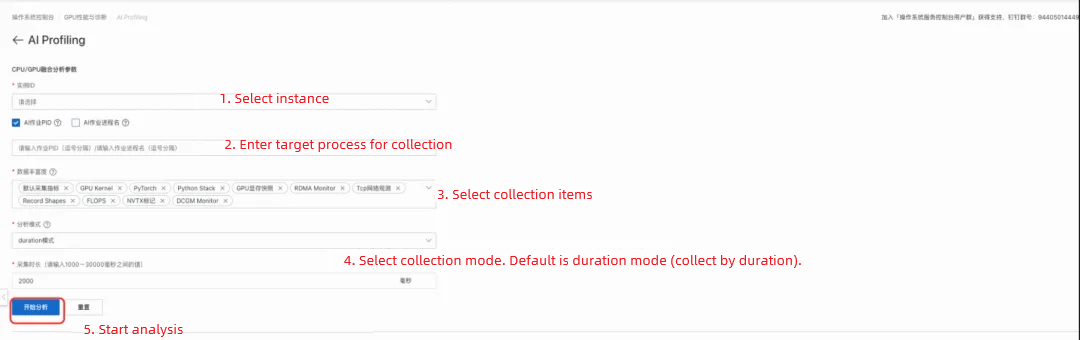
3. The system completes collection, data upload, and central-side analysis automatically, with no manual intervention. Once collection finishes, view the generated analysis report in the frontend.

The GPU Kernel Timeline in the AI Profiling report shows that the peak of GPU memory growth occurs in memory allocation (cudaMalloc) operations. After pinpointing the corresponding moment on the Timeline, we drilled down into the Python call stack and traced the cause to the framework's context management logic, which dynamically reserves extra GPU memory while handling inference requests. Even though vLLM pre-allocates GPU memory at service startup, this dynamic reservation during inference still pushed total usage past the expected threshold and eventually triggered OOM.
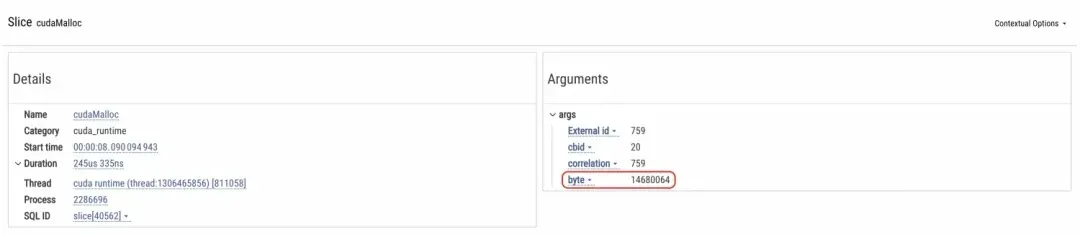
(Figure: Locating the GPU memory peak growth)
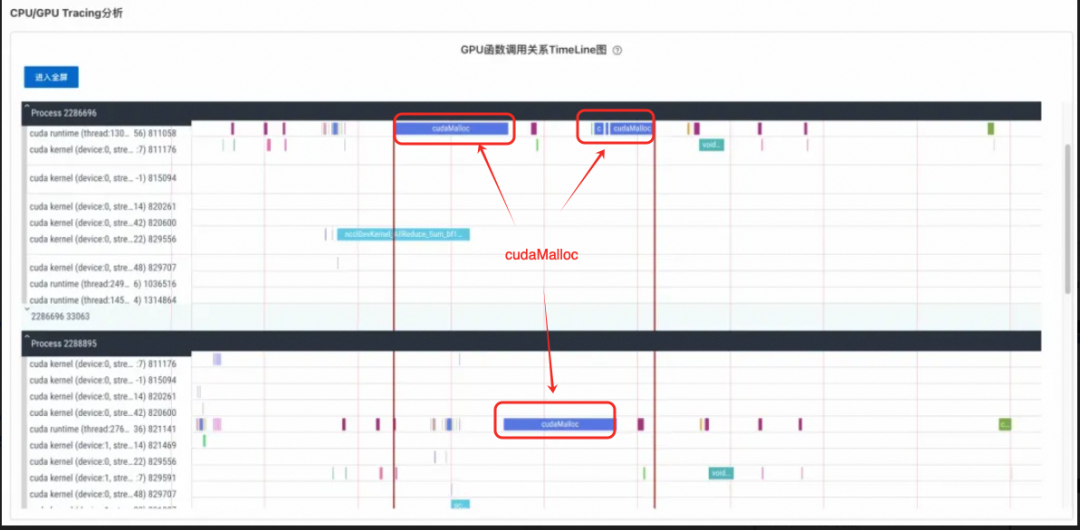
(Figure: Annotating the located cudaMalloc time segment on the TimeLine)

(Figure: Drilling down layer by layer through the Python call stack to the exact method that triggers the extra GPU memory allocation)
This also needs to be read alongside the PyTorch memory caching mechanism. PyTorch manages GPU memory in blocks and caches released blocks to reduce the overhead of frequent CUDA memory allocation, but the size and number of these cached blocks change dynamically with the complexity of model inference. When memory usage approaches the threshold, accumulated cache blocks can push consumption beyond expectations. The GPU memory usage reported by nvidia-smi, for example, includes both reserved_memory (cached blocks) and allocated_memory (actually in use), and their sum can far exceed the initial reservation.
Solutions and optimization suggestions:
max_split_size_mb through the environment variable CUDA_PYTORCH_CUDA_ALLOC_CONF to limit the impact of fragmentation.max_split_size_mb, you can reduce GPU memory fragmentation in other ways, such as using GPU memory cleanup calls (for example, torch.cuda.empty_cache()) or adjusting the model and data loading policy.As in Case 1, go to Alibaba Cloud OS Console -> GPU Performance and Diagnostics -> AI Profiling, launch an AI Profiling analysis, and obtain the analysis report.
SGLang inference: the Timeline from GPU/CPU tracing analysis reveals these distinctive characteristics:
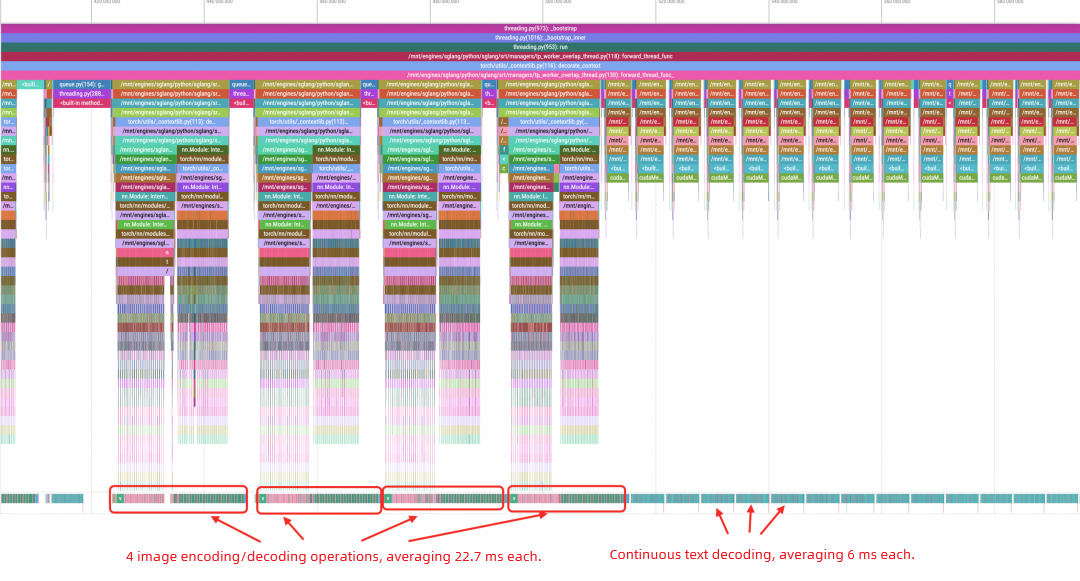
(Figure: SGLang Python function call stack analysis)
vLLM pipeline: the Timeline from GPU/CPU tracing analysis reveals the following characteristics of the vLLM pipeline:
• Image encoding: a single pass takes slightly longer than SGLang's single-request image encoding.
• Text decoding: a single pass is broadly on par with SGLang, though slightly longer.
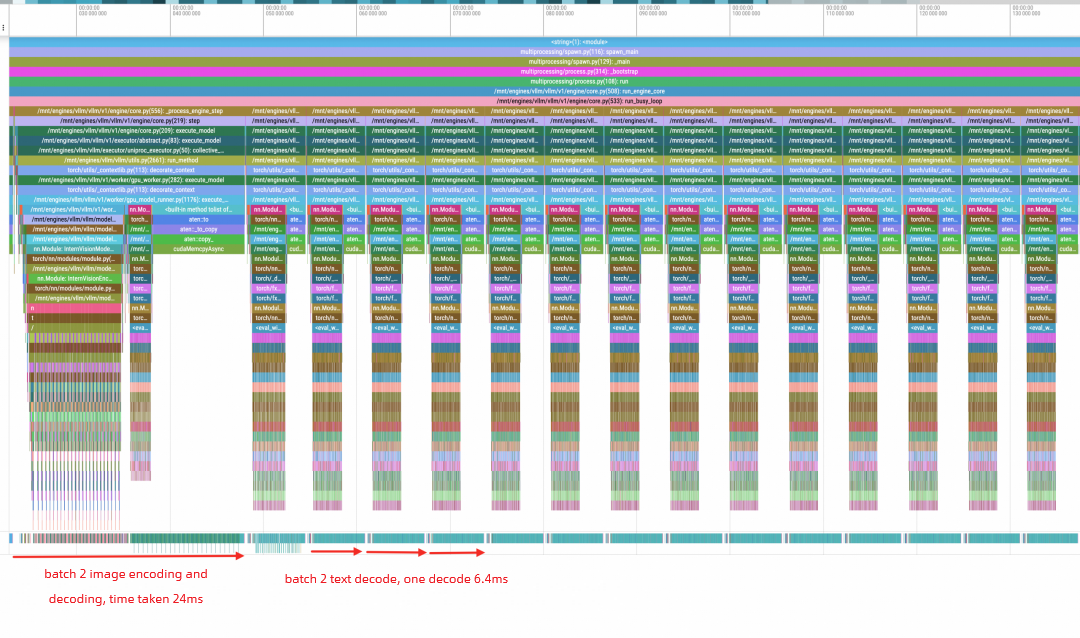
(Figure: vLLM Python function call stack analysis)
AI Profiling entry link: https://alinux.console.aliyun.com/sysom-ai/ai-infra-observation
From training to inference, from a single card to a thousand-GPU cluster, from the Python layer to the GPU kernel layer, AI Profiling brings performance problems that were once impossible to see into full view — with zero intrusion, low overhead, and cross-vendor compatibility. One-click collection returns results in minutes, multi-dimensional observation goes deep, and GPU memory snapshots plus differential analysis based on iteration anchors turn low GPU utilization, abnormal GPU memory growth, and cluster communication tail latency into problems you can actually trace. All of this has already been validated in real scenarios, including locating a vLLM GPU memory leak and comparing SGLang and vLLM performance.
Building on the full-lifecycle collection and observation capabilities of AI Profiling, we have gone a step further and built the Profiling Agent (also called the performance profiling agent). It is designed to deliver source-code-level problem analysis and resolution, closing the loop from detection to diagnosis to analysis to remediation advice.
What you have seen so far is how clearly and completely AI Profiling collects and surfaces data. The Profiling Agent tackles the next step: having the machine read that data on its own, pinpoint the root cause, and recommend a fix — extending observation into an end-to-end intelligent loop. Stay tuned.
In the Age of AI Agents, What Should the Next Shell Look Like?
STAROps Intelligent Host Inspection: A 24/7 AI Doctor for Your ECS Instances

124 posts | 6 followers
FollowAlibaba Container Service - July 25, 2025
Alibaba Cloud Native Community - September 8, 2025
Community Builder - August 18, 2026
Alibaba Container Service - November 15, 2024
ApsaraDB - May 22, 2026
Alibaba Container Service - January 15, 2026
124 posts | 6 followers
Follow QwenWork
QwenWork is dedicated to helping employees strengthen their professional competitiveness in the AI era and to enabling enterprises to improve organizational effectiveness.
Learn More Token Plan
Build more, spend less. One plan, every modality.
Learn More
Alibaba Cloud Model Studio
A one-stop generative AI platform to build intelligent applications that understand your business, based on Qwen model series such as Qwen-Max and other popular models
Learn More Log Management for AIOps Solution
Log into an artificial intelligence for IT operations (AIOps) environment with an intelligent, all-in-one, and out-of-the-box log management solution
Learn MoreMore Posts by OpenAnolis

