By Abhishek Gupta, Alibaba Cloud MVP
This blog provides a practical guide to deploying and scaling generative AI applications globally using Alibaba Cloud PAI and Elastic Algorithm Service (EAS). It covers model deployment, Global Accelerator (GA) for low-latency worldwide access, GPU auto-scaling for cost optimization, and integration with Python and LangChain. The article serves as an end-to-end reference for building resilient, high-performance AI inference platforms that deliver consistent user experiences across regions.
Deploying generative AI models like Qwen or Llama for global users comes with severe infrastructure challenges: expensive GPU provisioning, complex auto-scaling, and high latency for cross-border API calls. When requests must traverse public networks across continents, the resulting latency jitter can render interactive LLM applications unusable. For engineering teams looking for high-performance, cost-effective alternatives to Western-centric AI APIs, Alibaba Cloud provides a robust ecosystem natively built to handle global traffic dynamically.
In this guide, we will walk through building and deploying a low-latency LLM API globally using Alibaba Cloud's Platform for AI (PAI), Elastic Algorithm Service (EAS), and Global Accelerator.
By following this architectural blueprint, your readers and engineering teams will achieve:
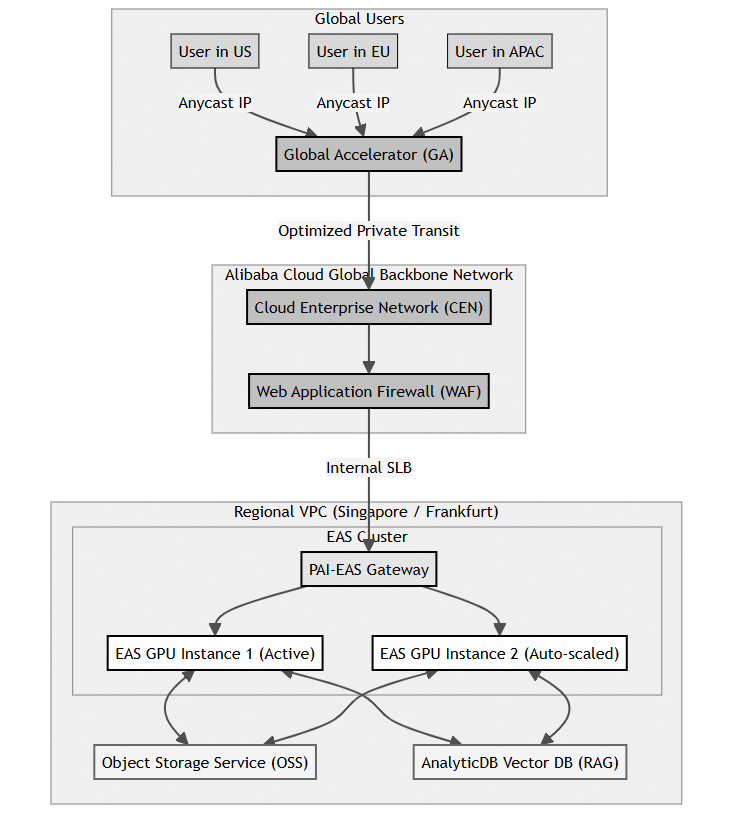
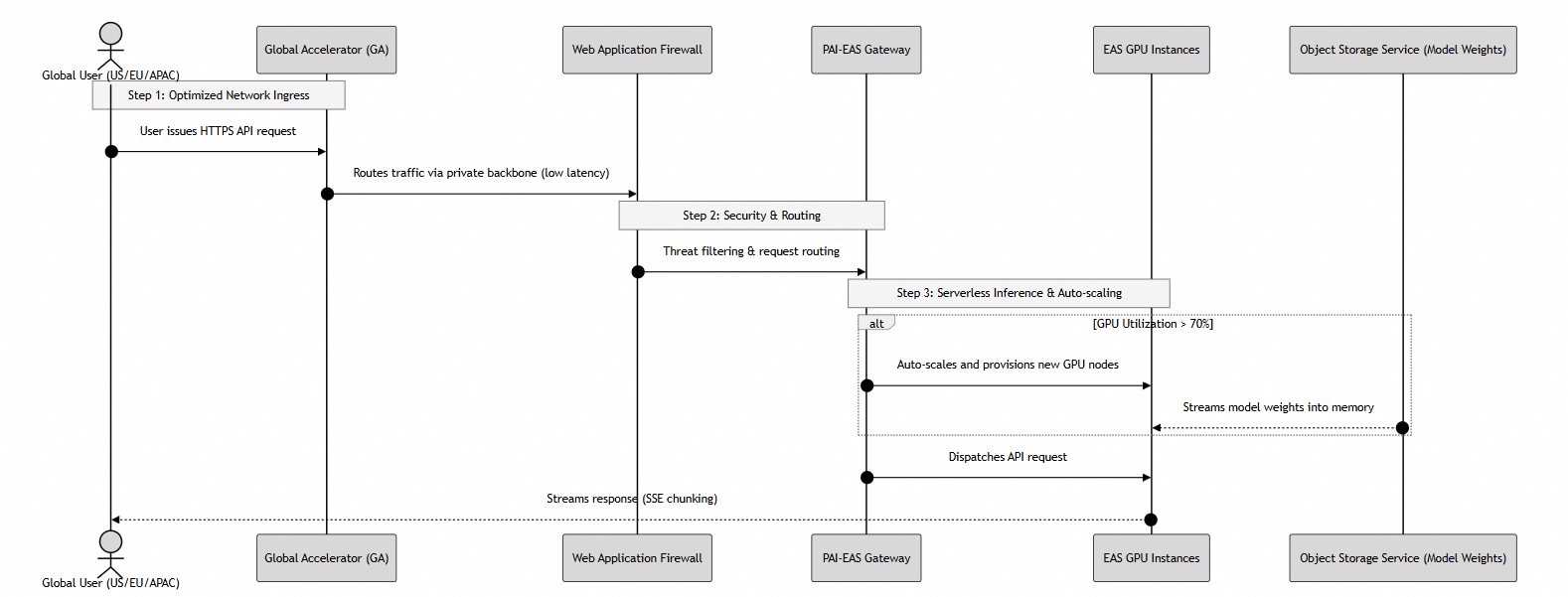
To fully understand how traffic traverses the globe to reach your model, we must look at both the network routing architecture and the dynamic request execution flow.
The diagram below illustrates how users worldwide bypass the unpredictable public internet by connecting to nearby edge points of presence (POPs), routing over Alibaba Cloud's private transit network directly into the host VPC.
The following sequence details how requests are authorized, routed, and streamed back to the end user, highlighting the automatic scaling trigger:
Alibaba Cloud's Platform for AI (PAI) provides an end-to-end AI engineering platform. You can leverage the PAI Model Gallery which wraps EAS and allows you to deploy open-source large models without writing code. Alternatively, you can use PAI-DSW (Data Science Workshop) to fine-tune your model first.
To prepare for deployment, organize your Hugging Face or ModelScope weights and upload them to an Alibaba Cloud Object Storage Service (OSS) bucket. This acts as a centralized model registry.
Elastic Algorithm Service (PAI-EAS) is a fully managed inference service that allows organizations to rapidly deploy machine learning models as high-performance APIs.
Download and initialize the command-line utility eascmd for your environment:
# Download the client tool (Example for Linux)
wget http://atp-public.oss-cn-hangzhou.aliyuncs.com/eascmd/eascmd64
chmod +x eascmd64
mv eascmd64 /usr/local/bin/eascmd

# Configure your credentials
eascmd config -i  \
              -k  \
-e Create a deployment configuration JSON file (eas_config.json) defining the GPU instance type, OSS model storage paths, and auto-scaling boundaries:
{
  "name": "qwen_global_api",
  "model_path": "oss://your-bucket-name/models/qwen2.5-7b-instruct/",
  "processor": "huggingface_llm",
  "metadata": {
    "instance": 1,
    "gpu": 1,
    "resource": "eas.vm.gpu.a10",
    "cuda": "12.1",
    "enable_stream": true
  },
  "scaling": {
    "min_replica": 1,
    "max_replica": 5,
    "target_tracking": {
      "metric_type": "gpu_utilization",
      "target_value": 70
    }
  }
}Run the creation command. EAS will automatically reserve the nodes, pull the container runtime environment, stream the weights from OSS, and expose a secure API endpoint:
eascmd create eas_config.jsonTo build an interactive interface, you must configure Server-Sent Events (SSE) streaming. Below are the implementation steps for developers using Python to process low-latency token streams.
This snippet uses standard requests to process raw SSE streams directly from the EAS endpoint:
import json
import requests

def stream_eas_prediction(prompt):
    url = "http://.aliyuncs.com/api/predict/qwen_global_api"

    headers = {
        "Authorization": "Bearer ",
        "Content-Type": "application/json",
        "Accept": "text/event-stream"
    }

    payload = {
        "prompt": prompt,
        "temperature": 0.7,
        "max_new_tokens": 512,
        "stream": True
    }

    # Make the streaming request
    response = requests.post(
        url,
        headers=headers,
        json=payload,
        stream=True
    )

    print("AI Response: ", end="", flush=True)

    for line in response.iter_lines():
        if line:
            decoded_line = line.decode("utf-8")

            if decoded_line.startswith("data:"):
                try:
                    data_json = json.loads(decoded_line[5:])
                    token = data_json.get("text", "")
                    print(token, end="", flush=True)

                except json.JSONDecodeError:
                    pass

    print()


stream_eas_prediction(
    "Describe the architectural layout of global cloud routing."
)PAI-EAS integrates seamlessly with popular AI orchestration frameworks. You can use the official integration found in the Alibaba Cloud - Docs by LangChain directly inside your agentic workflows:
from langchain_community.chat_models import PaiEasChatEndpoint
from langchain_core.messages import HumanMessage

# Initialize the EAS Chat Endpoint
chat = PaiEasChatEndpoint(
    eas_service_url="http://.aliyuncs.com/api/predict/qwen_global_api",
    eas_service_token=""
)

# Invoke with standard message schemas
response = chat.invoke([
    HumanMessage(
        content="Explain the benefits of global acceleration."
    )
])

print(response.content)Implementing this globally accelerated PAI-EAS architecture directly solves critical challenges in several industries:
Once the basic pipeline is running, you can scale up the deployment with these advanced configurations:
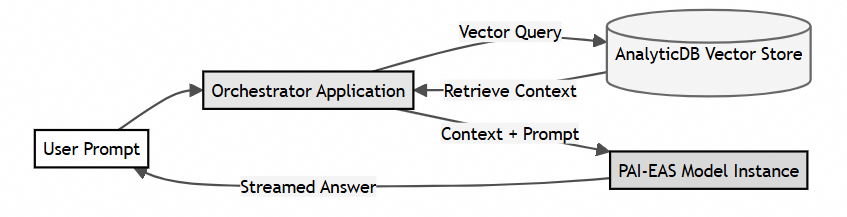
To feed your GenAI models proprietary business data, connect PAI-EAS to AnalyticDB for PostgreSQL (vector database engine). Keep your vector embeddings indexed globally and query them inside your LangChain application for real-time, context-aware answers.
Instead of running stock weights, compile your model using PAI-Blade. PAI-Blade applies hardware-level optimizations (such as dynamic computational graph pruning, FP16/INT8 quantization, and layer fusion) which can improve throughput by up to 2x without degrading accuracy.
Avoid paying for idle GPU instances during late-night cycles. Configure an intelligent routing layer in Function Compute 3.0 (Serverless). When EAS scales down to 0 replicas to save costs, the first few requests can be seamlessly served by a CPU-based Function Compute container, masking the model "cold start" latency of the main GPU cluster.
To ensure that your infrastructure is operating as expected:
1. Simulate Regional Load: Use a distributed testing tool like Locust or wrk deployed across different international regions to issue concurrent requests to your Global Accelerator IP.
2. Track Network Latency: Confirm latency optimization by running comparative network traces:
# Trace route via public internet vs Global Accelerator
traceroute 'your-public-eas-endpoint'

traceroute 'your-global-accelerator-ip'
3. Verify Scaling Thresholds: Check the Application Real-Time Monitoring Service (ARMS) or the EAS dashboard to verify that your cluster successfully spins up additional replica pods when the GPU utilization crosses 70%.
Hands-On Lab: Building Autonomous Code-Optimizing Agents with Qwen3.7-Max
Zero-ETL Affiliate Fraud Detection: Sub-Second Analytics with Hologres and Flink

16 posts | 1 followers
FollowFarruh - November 23, 2023
Alibaba Cloud Community - July 2, 2025
Justin See - November 7, 2025
Farruh - August 11, 2023
Farruh - October 1, 2023
Regional Content Hub - January 19, 2024
16 posts | 1 followers
Follow QwenWork
QwenWork is dedicated to helping employees strengthen their professional competitiveness in the AI era and to enabling enterprises to improve organizational effectiveness.
Learn More Token Plan
Build more, spend less. One plan, every modality.
Learn More
Alibaba Cloud Model Studio
A one-stop generative AI platform to build intelligent applications that understand your business, based on Qwen model series such as Qwen-Max and other popular models
Learn More Global Accelerator
Provides network acceleration service for your Internet-facing application globally with guaranteed bandwidth and high reliability.
Learn MoreMore Posts by Community Builder

