By Wang Yangke
OpenAnolis community SkillHub — the AI agent Skill platform focused on the infrastructure layer — has already received several hundred Skills, and they're going live one batch at a time. Every week we also get best-practice write-ups from Skill authors. This time we're featuring a hands-on article about the AnolisOS-SysDiag Skill from Wang Yangke. He has ten years of mobile development behind him and now works as a research Forward Deployed Engineer (FDE). He previously led stability work on an app with 600,000 daily active users (DAU), so he has chased down plenty of out-of-memory and crash incidents in production, and he's a regular in developer communities such as Shanghai GDG and HDG. With AnolisOS-SysDiag, he took the troubleshooting experience he earned the hard way and cut it into a Skill an AI agent can call directly, so the rest of us can skip a few detours.
Here's his story:
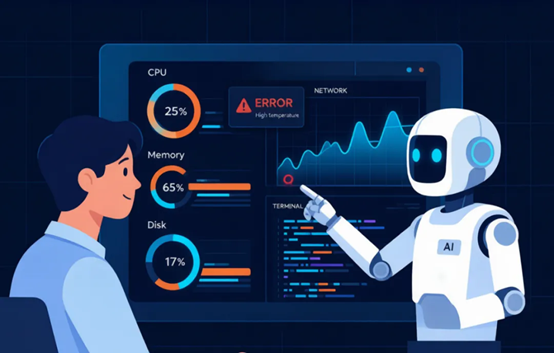
You may not believe this, but the idea for this Skill came from an alert text message that blew up my phone at two in the morning.
Server CPU had spiked to 95% and the group chat was scrolling. Half asleep, I opened my laptop, connected the VPN, and typed top, then iostat, then vmstat, flipping between seven or eight terminal windows. It took me nearly forty minutes to find it: a script in a scheduled task had filled the disk, and iowait was spinning the CPU.
The problem itself wasn't complicated. The process was exhausting. I've probably run through that same routine a few hundred times. Every step is mechanical labor, and the part that actually needs a brain — correlating the signals — took only the last five minutes. That's when it hit me: if something could run the commands, read the output, and tie the CPU, I/O and memory data together for me, leaving me only the final call, I'd be far faster.
Right around then, the OpenAnolis community and AMD opened submissions for the Skill Creation Camp. I saw that the theme was operating system O&M and thought, that's exactly what I've been wanting to build. So AnolisOS-SysDiag happened.
Over the past two years, AI agents have matured at the application layer. Skills that write code, query a database or build slide decks are everywhere. Drop down to the operating system layer, though, and the agent's capability falls off a cliff.
Ask it "check why this box is so slow" and about all it can do is say, awkwardly, "I suggest running top to view CPU usage." That's it? Then what do I need it for?
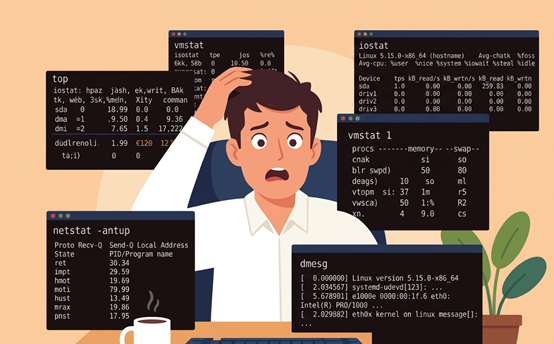
Boiled down, three things drive me up the wall:
1. Troubleshooting means stacking up commands by hand. CPU is high, run top. Memory is short, run free. Disk is slow, run iostat. Network looks off, run ss. You run a dozen commands in turn, each printing a different output format, and then you draw on experience to assemble the fragments in your head and guess at the root cause. Honestly, without three to five years under your belt you can't do this job.
What's it like to get dragged out of bed at three in the morning to debug something? If you know, you know. Mean Time To Repair (MTTR) starts at half an hour, easily — and that's assuming you're experienced.
2. Once you've located the problem, there's no remediation guidance. Say you do pin it down to page cache eating too much memory. You still don't know whether vm.vfs_cache_pressure should be 200 or 500, and you don't know whether your current Anolis OS version has known compatibility issues here.
Those answers are scattered across /etc/sysctl.conf, /proc/sys/, kernel documentation and community threads. No single place just tells you "change this parameter, to this value, and check this afterward." And the Anolis OS kernel carries a fair amount of customization — Group Identity scheduling, the SLO scheduler, cgroup v2 enhancements — so generic Linux tuning advice isn't necessarily optimal on Anolis, and can even backfire.
3. And the part that frustrates me most: do this long enough and you get dumber. I'm not joking. Think about it — where does a senior O&M engineer spend most of the day? Typing vmstat, typing iostat, typing netstat. Not to put too fine a point on it, a script could do all of that.
What's actually valuable? Designing for high availability. Doing capacity planning ahead of time. Strangling problems in the crib before they ever happen. Instead, endless hand-driven troubleshooting eats all of that time.
The one-line version: you tell it "diagnose this machine," it runs every command that should be run, analyzes every data point that should be analyzed, and hands you back a report — root cause and fix, spelled out in one shot.
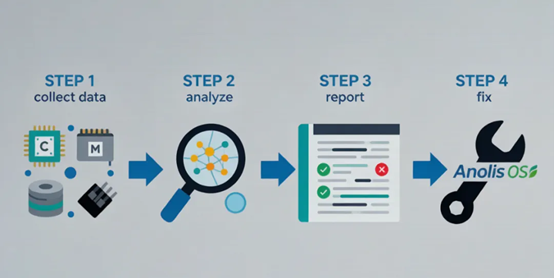
Spelled out, that's four capabilities:
CPU, memory, disk I/O, network — the big four of O&M diagnosis, collected in one pass. You don't memorize commands, don't fuss with parameters, don't open seven or eight terminal windows.
| Dimension | What it collects | What it reveals |
|---|---|---|
| CPU | Usage, load, context switches, software interrupts, run queue | Who's eating the CPU, whether scheduling is delayed, whether software interrupts are causing trouble |
| Memory | Usage, cache, swap, out-of-memory records, page faults | Whether there's a memory leak, whether cache has taken over, whether swap is thrashing |
| Disk I/O | Input/output operations per second (IOPS), throughput, latency, queue depth, utilization | Which disk is busiest, what the I/O pattern is, whether latency is abnormal |
| Network | Bandwidth, connections, retransmission rate, packet loss, latency | Whether TCP is congested, whether connections look abnormal, whether NIC interrupts are unbalanced |
This is the part I put the most thought into.
Plenty of monitoring tools out there collect data, but all they do is collect and display. CPU is high, they tell you CPU is high. Disk is slow, they tell you disk is slow. That's a symptom, not a diagnosis.
What actually helps is correlation analysis. For example: high CPU iowait + high disk await + an abnormal page cache share of memory = this isn't a CPU problem, it's I/O jitter caused by too-frequent memory reclaim. That kind of cross-dimensional reasoning used to live in an engineer's head. Now the Skill does it for you.
This is the biggest difference from other diagnostic tools.
The Skill ships with kernel knowledge specific to Anolis OS. Once it detects that it's running on Anolis, it automatically takes the dedicated tuning path. For example:
Instead of a generic line like "consider raising vm.swappiness," it gives you the specific parameter name, the recommended value, which configuration file to change it in, and how to verify the result afterward.
It supports mainstream agent clients such as Claude Code, Cursor, Gemini CLI, Windsurf and OpenCode. The tools portion of the Skill can be exposed as an MCP server, so it isn't tied to any one framework and doesn't reinvent the wheel.
Scenario 1: Production suddenly slows down, conclusion in 3 minutes
It used to go like this:
Alert fires → log on to the server → glance at top → glance at vmstat
→ glance at iostat → glance at ss → frown and think for a bit
→ no luck, run them again → finally guess roughly what's wrong → start fixing
Half an hour, more or less, gone.
Now it goes like this:
Alert fires → tell the agent "diagnose this machine" → report in your hands 3 minutes later.The report looks like this:
✅ CPU: Normal
⚠️ Memory: page cache at 78%, available memory below 5%, 3 memory reclaim events occurred
⚠️ Disk I/O: await averaging 45 ms, clearly on the high side
✅ Network: Normal

📌 Root cause: the file system buffer is taking up excessive memory, frequently triggering memory reclaim,
which indirectly drives up disk I/O latency

🔧 Suggested actions:
1. sysctl -w vm.vfs_cache_pressure=200
2. sysctl -w vm.min_free_kbytes=524288
3. Restart the related services, then monitor for 10 minutes to confirm recovery
Honestly, once you're getting output at that level, do you still need to go dig through the documentation yourself?
I've mentored a lot of newcomers, and teaching troubleshooting is the worst part. It isn't that they aren't smart — this stuff runs on experience. It's hard to explain in one sentence why high CPU means you look at iostat, or why high await sends you to the page cache.
With this Skill, a newcomer says one sentence and gets a diagnosis, and senior engineers get to step out of repetitive troubleshooting and do work that matters more. Call it knowledge equality: good troubleshooting experience shouldn't travel with people; it should travel with tools.
Combined with the management capability of SysOM Agent (the intelligent assistant in SysOM), you can build a complete automation loop:
SysOM detects an anomaly → the Agent automatically triggers a diagnosis → the report is pushed to the DingTalk groupWhat lands in the group isn't useless noise like "CPU usage 95%," but "the dd process filled /data/logs; suggest killing it and adjusting the log rotation policy."
It doesn't push alerts, it pushes root cause plus fix. A human only makes the decision at the last step — that's what automation is supposed to look like.
Before writing any code, I asked myself four questions:
• What does it solve? Quick diagnostics for the four resources — not an all-purpose toolbox.
• Who uses it? Anolis OS O&M engineers, site reliability engineers (SREs) and system administrators.
• How is it different from existing tools? It isn't another top. It lets the agent run the commands, read them and analyze them for you.
• Where's the Anolis angle? Kernel-level dedicated tuning, not vague Linux suggestions.
The hardest part of this stage was subtracting. At first I wanted to cram in process diagnosis, cgroup analysis and eBPF tracing. Then it clicked: one Skill should do one thing well. Bite off too much and you choke — and users just get confused.
The core of writing a Skill isn't really technical, it's expression: how do you turn a veteran engineer's troubleshooting instincts into instructions an agent can execute step by step?
Three suggestions:
• Write the description so one glance tells you when to use it. I rewrote mine seven or eight times before settling on: "Use this Skill when a user reports abnormal CPU/memory/disk/network performance; it automatically collects metrics, locates bottlenecks, and outputs Anolis OS tuning recommendations."
• Structure the workflow; don't let the agent improvise. Which command to run at each step, how to interpret the output, what format to produce — the clearer you write it, the more consistently the agent executes.
• The context is where the real value is. Anyone can search for a command list. But "the known issue with a given kernel parameter on Anolis OS 23," or "compatibility data for a given class of I/O scheduler on NVMe drives" — that's your exclusive value.
I followed the PR flow for the Anolis code repository: fork anolis-skills, drop SKILL.md in, open a PR. The community's AI review checks format and conventions automatically, so as long as your SKILL.md is sound, the PR clears review almost instantly.
• Don't try to do everything: one Skill, one job. I originally wanted a "system diagnosis bundle," then split it into four independent Skills — each more focused and easier to maintain.
• The interpretation logic must go in: telling the agent to run iostat -x 1 5 isn't enough. You have to spell out that "await > 10ms means I/O latency is high" and "%util > 80% means the disk is near saturation" — that's the key step in encoding experience.
• Be explicit about the boundaries: state clearly in SKILL.md what your Skill can and can't do. Let the agent know when to say "that's outside my scope."
Three things in the near term:
• Hook in eBPF for non-intrusive kernel-level diagnosis — see what's happening inside the kernel without installing an agent
• Add historical comparison — not just the current snapshot, but a comparison against the same moment yesterday, to tell a burst from a trend
• Batch diagnosis — scan a whole cluster in one go, instead of logging on box by box
Further out, I'd like this Skill to work together with other community Skills. Diagnose "a memory leak in some process," for instance, and it automatically recommends a Memory Analysis Skill to dig deeper — diagnosis → analysis → fix, end to end.
What I'm looking forward to most, of course, is getting it into the Agentic OS preinstall pool, so every Anolis server ships with an "AI O&M assistant" out of the box. That, to me, is the direction the operating system should evolve in.
If you spend your days with servers too, you know exactly what I'm talking about.
An O&M veteran who has typed at a command line for ten years has piled up a lot of troubleshooting knowledge: which parameters to tune, which traps to avoid, which I/O pattern breaks under which conditions. Right now, though, all of it passes on person to person.
Skills give that knowledge a completely new outlet. Not written into a wiki waiting for someone to look it up, but cut into packages an agent can load, call and execute directly.
The value of O&M isn't how fast you can type vmstat 1 10. It's what kind of system you can design and what kind of judgment you can make.
If you've got troubleshooting insights of your own, or notes from potholes you've fallen into, try writing them up as a Skill and submitting it to SkillHub. One good article, one good Skill — these things carry further than you'd think.
AnolisOS-SysDiag Skill — feel free to try it:
https://skillhub.openanolis.cn/skill/anolisos-sysdiag
SkillHub official site link:
https://skillhub.openanolis.cn
People and Agents Finally Share One CLI — Announcing ANOLISA v1.0

124 posts | 6 followers
FollowAlibaba Cloud Community - August 31, 2026
Alibaba Cloud Native Community - April 10, 2026
OpenAnolis - July 14, 2026
OpenAnolis - September 8, 2026
OpenAnolis - July 8, 2022
Alibaba Cloud Community - September 5, 2022
124 posts | 6 followers
Follow Bastionhost
A unified, efficient, and secure platform that provides cloud-based O&M, access control, and operation audit.
Learn More Managed Service for Grafana
Managed Service for Grafana displays a large amount of data in real time to provide an overview of business and O&M monitoring.
Learn More Alibaba Cloud Linux
Alibaba Cloud Linux is a free-to-use, native operating system that provides a stable, reliable, and high-performance environment for your applications.
Learn More Log Management for AIOps Solution
Log into an artificial intelligence for IT operations (AIOps) environment with an intelligent, all-in-one, and out-of-the-box log management solution
Learn MoreMore Posts by OpenAnolis

