No new terminal, no session migration — AI layered onto your existing bash/zsh, with your hands still on the keyboard and a copilot that steps in three different ways.
The cursor blinks at the prompt. A colleague drops a message: "This box went down a few days ago. Take a look?"
dmesg? journalctl? Or a quick top to get a feel? — Which one you reach for first is a matter of experience.
A general-purpose bash/zsh is still a stateless I/O relay: it shows what you type and echoes what your commands print, but it doesn't understand what you're working on. It doesn't know you're troubleshooting a machine, and it doesn't know why that last command exited non-zero.
AI was supposed to change this — to let the shell know what you're doing. But the common approach today is to move you out of your session: the AI lives in a separate chat window, or runs in an isolated session it spawns. Your familiar directories, history, and context stay behind.
cosh (Copilot Shell) takes a different path: it is not a new terminal, and not another Agent CLI — it is an AI capability layer over your existing bash/zsh. Your commands, aliases, scripts, keybindings, and prompt configuration stay exactly as they are; AI blends into the same session without breaking any habit. We call the working style human-AI co-driving. It is also the terminal entry point of ANOLISA, the operating system designed for AI agents.
You are always the primary driver: same terminal, same session, same prompt. git, grep, awk, your own scripts, your aliases and completions — everything works as before. The keyboard never leaves your hands.
The copilot is AI, with three ways of stepping in: say one sentence in plain language and it takes over the execution; when a command fails, it steps in on its own along the exit code; and before you've typed your first command, it has already scanned the machine once. All three modes switch seamlessly inside the same shell — no new window, no isolated process, no need to track who's driving.
Three modes, three real sessions — starting with the first.
This is the most basic form of co-driving — you have a clear intent, you say it in one sentence, and the copilot carries the flow through. The wheel never leaves your hands.
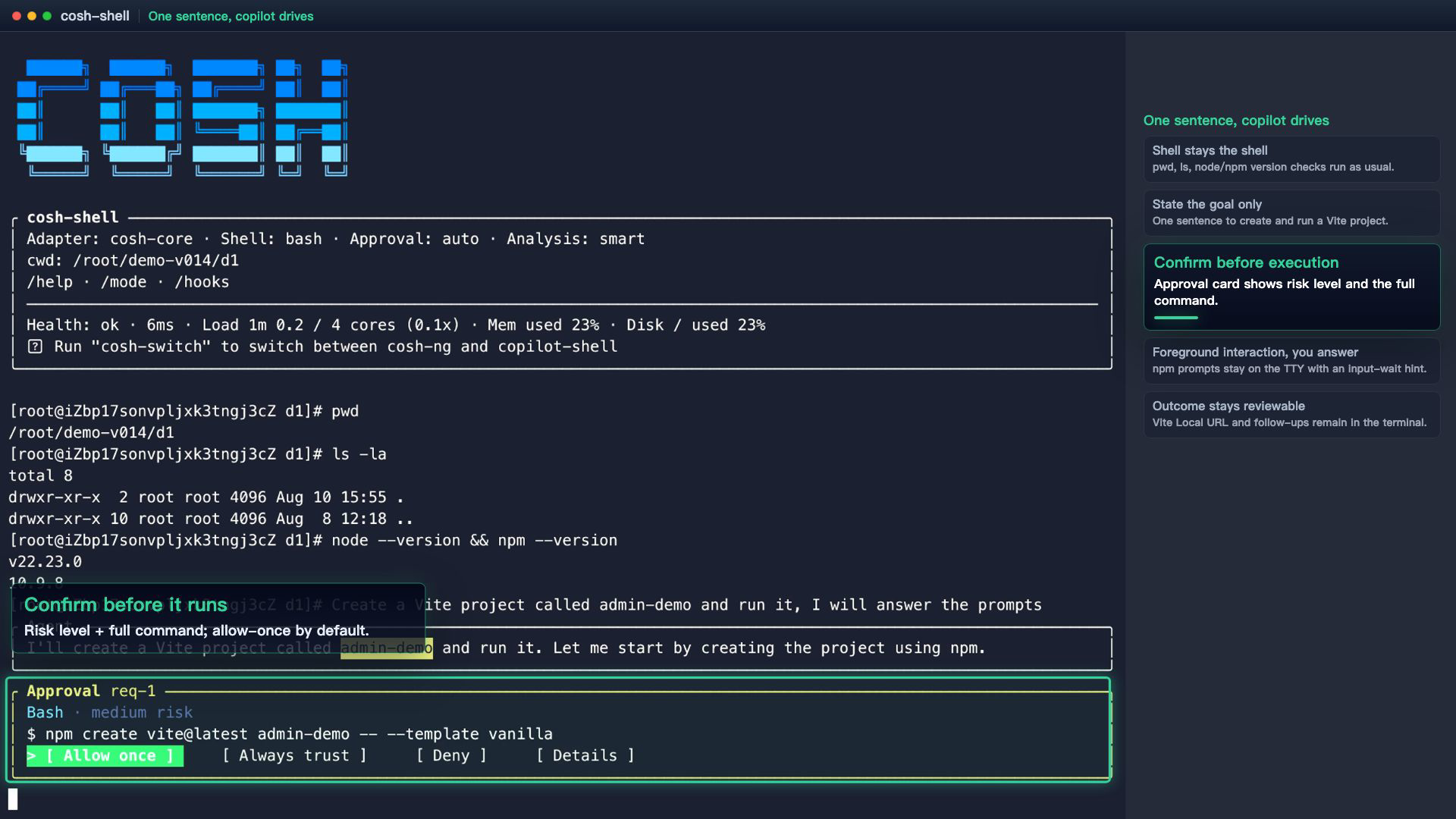
The user types: "Help me create a Vite project called admin-demo in the current directory, I will answer the interactive prompts myself, then get it running locally."
The AI lays out a plan, and the command stays visible in the terminal — the approval card shows the risk level (Bash · medium risk) and the full command about to run, with Allow once selected by default; nothing executes until you confirm. When the scaffolding reaches its interactive question (Install with npm and start now?), the AI yields the foreground and the user answers directly in the original TTY — while a "command is waiting for input" hint card lights up at the bottom of the screen. The interaction plays out exactly as the native command intended.
A still frame shows the approval card and the full command, but not how naturally the "AI yields the foreground" moment happens — this clip replays the full beat from confirmation to interactive takeover.
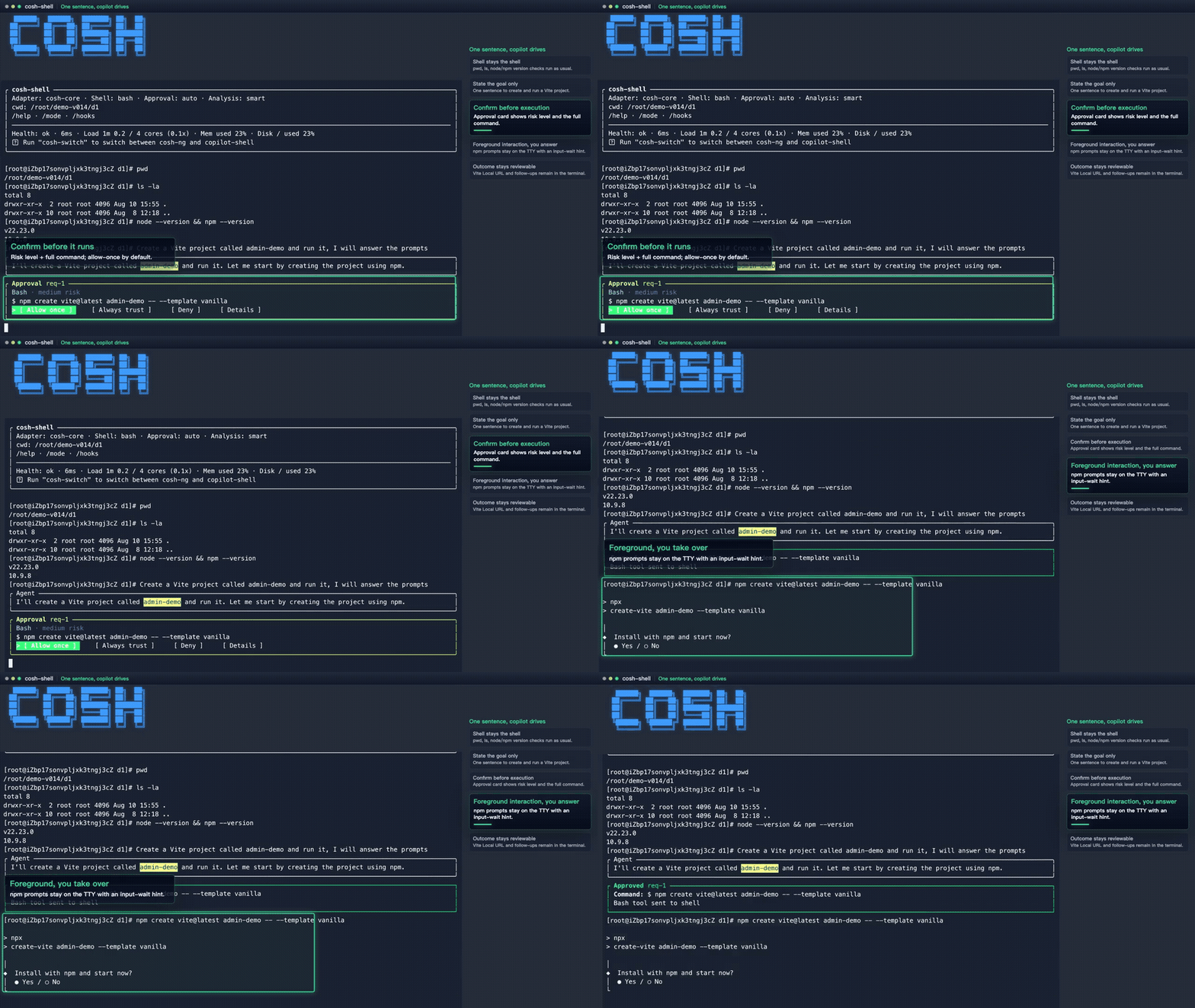
The easiest detail to miss: the scaffolding's interactive prompt stays on the foreground TTY. cosh didn't rewrite that interaction to make it "take-over-able" — and when the command waits for input, a hint card tells you so.
The AI understands the intent in your natural language, but it never takes the keyboard from your terminal. Commands, confirmations, interactions, and takeovers all happen where you're used to them. One sentence can bootstrap a project — but what if the command crashes before you've even said a word?
The second a command crashes is the real test of a copilot — you haven't said anything. Should it move? How far?
The user runs git diff to review changes, then cargo test -q as usual. Red text appears — cargo test runs cargo build first, and E0308: mismatched types fails at compile time. The tests never even ran.
The user doesn't switch windows, doesn't copy-paste — doesn't even say a word. cosh detects the non-zero exit code and, following the red text that just printed, offers a one-line hint under the prompt — "Insight: The build or test command failed" — with a ghost suggestion beside it: "Press Tab to fill, then Enter to submit; keep typing to ignore." The user glances at it, presses Tab to fill, Enter to submit — and the analysis begins.
Stepping in doesn't mean grabbing control: by default it's one hint line plus a ghost suggestion under the prompt — no foreground grab, no shell lock. Tab then Enter submits; ignore it and your next command simply dismisses it. Help, not interruption.
The failure scene, the root cause — assembled from the red text in the same session:

In the same shell session, the red output from cargo test is still on screen, and cosh's analysis is organized from exactly that output — no copy-paste, no jumping to another window to re-ask: "E0308 fails at compile time — a type mismatch at src/config.rs line 9: timeout_ms expects u64, but the environment variable reads as a string." (We deliberately picked a short chain — the point isn't reasoning depth, it's that the analysis appears right under your prompt.)
Then cosh applies the change directly with its edit tool: timeout.parse::<u64>().unwrap_or(5000) — falling back to a 5s default when parsing fails. The edit lands with an "edit completed" summary card: which file changed, how many replacements — reviewable at a glance. The copilot proposes the change; you own the confirmation: re-verification still happens in your own shell — run cargo test -q once more. The output refreshes: test result: ok. 1 passed; 0 failed.
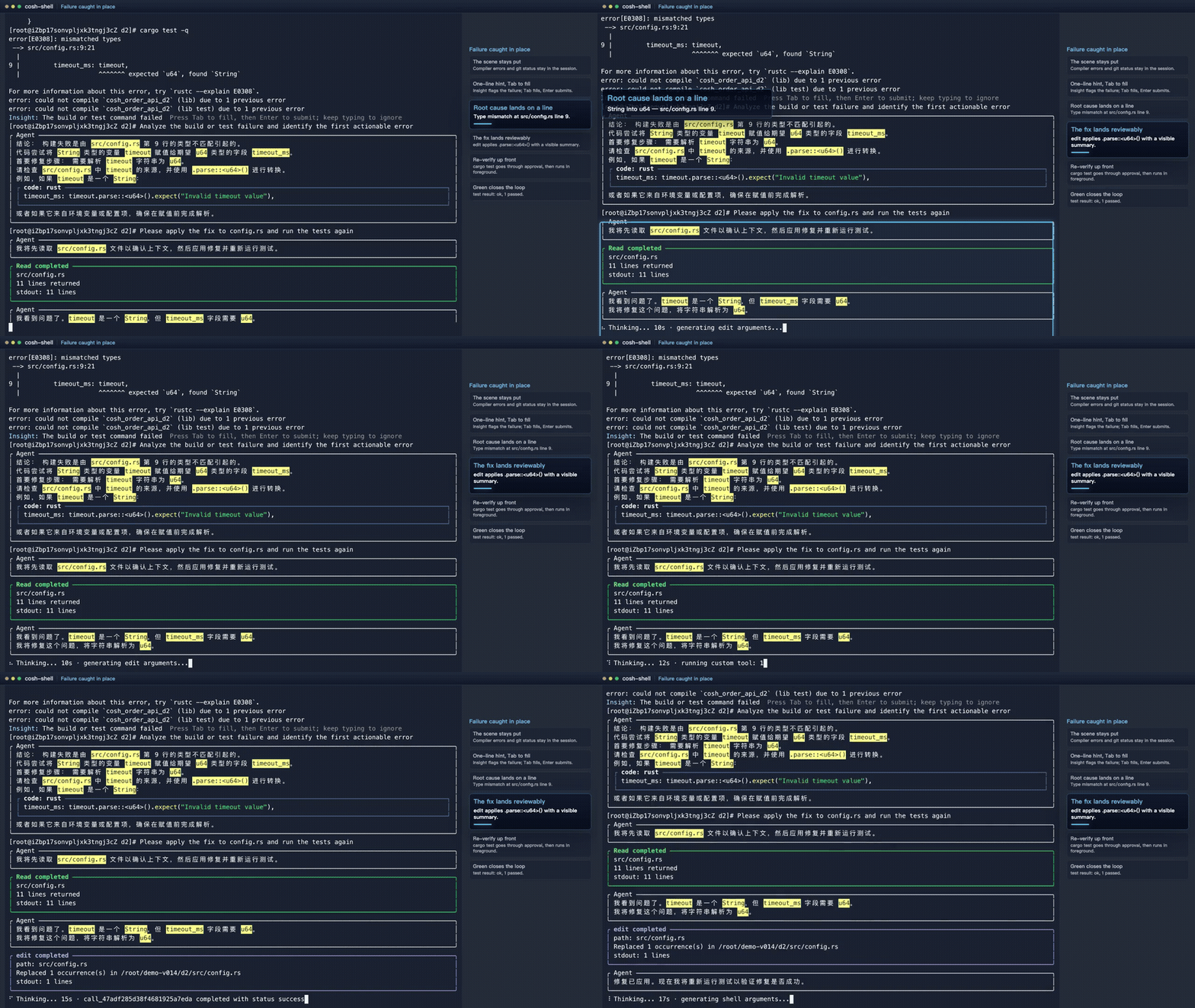
From compile failure to test result: ok, nothing crossed a window boundary and no log was copied anywhere. When a command dies, the copilot offers a line — but it only proceeds on Tab + Enter, and dissolves if you don't. That's failure — but what about what hasn't happened yet?
The first two modes happen after you act — you speak and it drives; a command dies and it steps in. Can it start earlier? The third mode moves the starting point forward: before you've typed a single command, the copilot is already moving.
Back to the opening scene: dmesg? journalctl? top first? Veterans have their routines; newcomers fumble for a starting point. That hesitation — "which command do I type first" — is itself information that can be moved earlier.
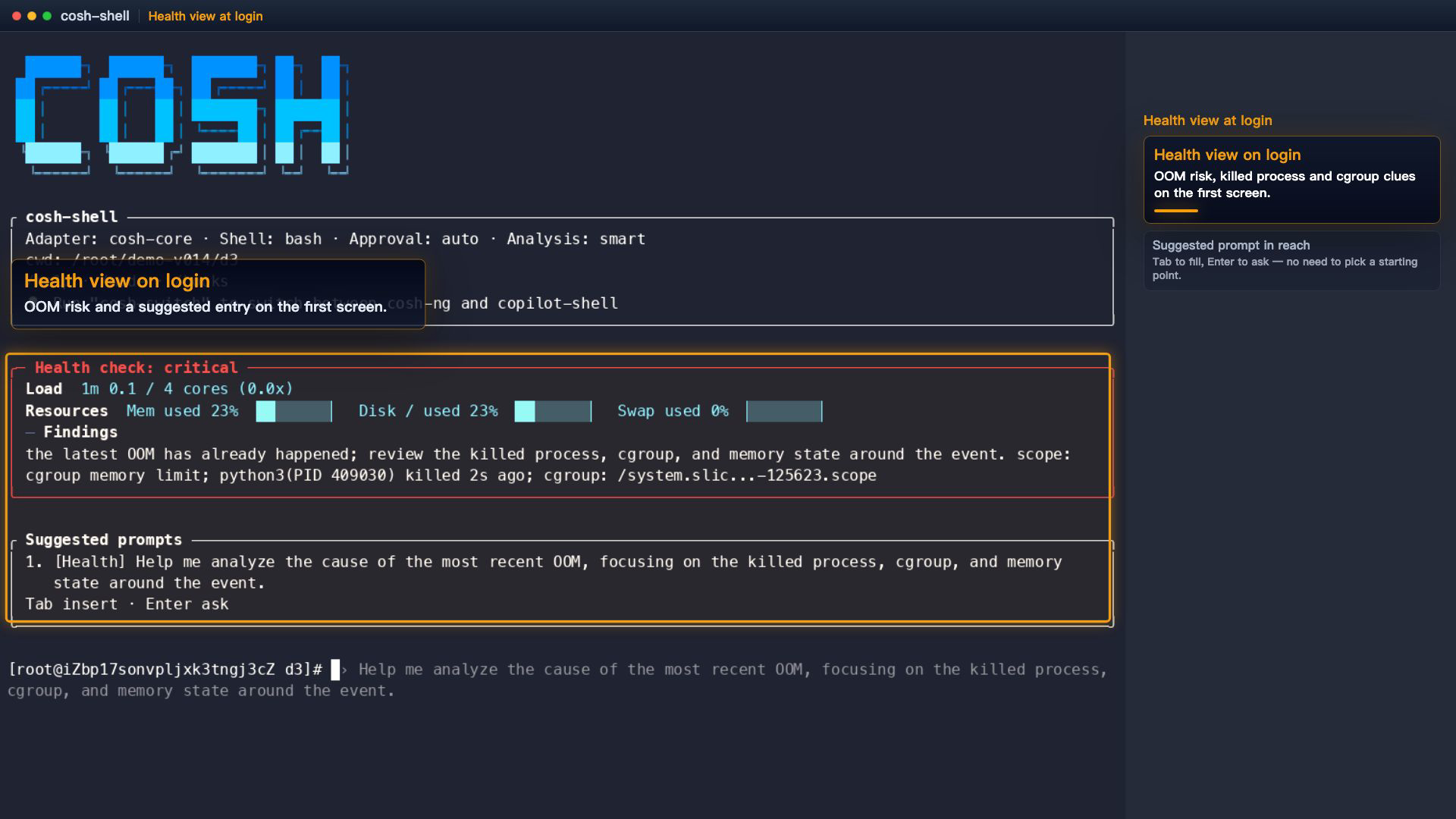
cosh moves "what to look at after login" to the instant the shell starts — a health check card greets you at login, listing risk items, and hands you the first question to ask.
This time, the health card printed along with the prompt — it scanned recent kernel events from dmesg / journalctl -k and flagged an OOM record as a risk item ("A recent OOM has occurred; trace the killed process, the cgroup, and the memory level at the time"). Right below it, a suggested-prompt card offers a ready-to-use prompt: "Help me analyze the most recent OOM — focus on the killed process, the cgroup, and the memory level." The user doesn't have to figure out where to start — Tab to fill, Enter to ask, and diagnosis begins.
After the first-pass analysis, the user follows up: "?? Could you use the SysOM diagnosis skill to dig deeper into this OOM event: which process was killed, the cgroup memory limit, and the recommended actions?" — the deep diagnosis is carried by the SysOM diagnosis skill: memory classify → memory oom, aligning the killed process, the cgroup ownership, and the memory watermark at the time, one by one. (On other distributions cosh falls back to native dmesg / journalctl data sources — coarser conclusions, same flow.) The conclusion: the cgroup limit of 178 MB was exhausted, OOM type CONSTRAINT_MEMCG — the container's memcg hit its ceiling, not a host-wide OOM. To an SRE this distinction matters: the investigation shifts from "this machine doesn't have enough memory" to "this container's limits or workload is the problem."
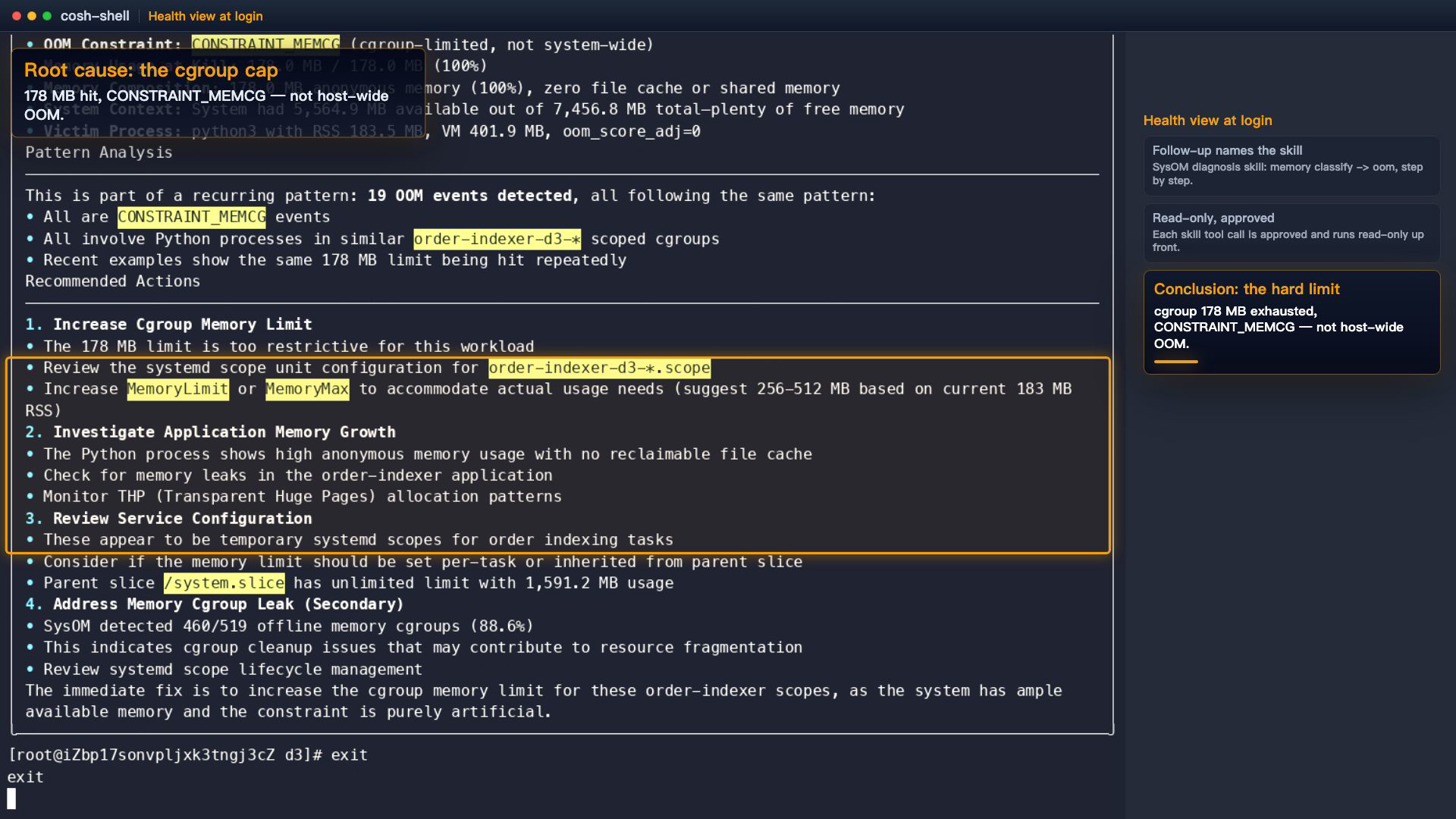
A health overview at login, a first-pass analysis, a skill-driven deep dive, and a final conclusion — all in one session, no external tools. The moment you log in, the copilot has already put the health view on your first screen. No need to remember "where do I start" — Tab to accept, read the conclusion.
Probably not a chat window, and not an automation backend that hides your commands.
It's more like a working scene — you remain the primary driver, with commands, aliases, scripts, and keybindings untouched; the moment you speak, the copilot takes over execution; when a command dies, it steps in along the exit code; before your first command, a health check card and a suggested prompt are already on your first screen.
cosh is not a new terminal, and not an Agent CLI — it's your existing shell, with a copilot on board. Compatibility is the entry ticket for this layer; AI capability is the gain on top. The keyboard stays in your hands, and one sentence hands over a stretch of the road whenever you want.
Shell first. AI enhanced.
/auth — on ECS, SysOM free trial is one click (RAM-role auth).DashScope or any OpenAI-compatible endpoint works too; without a model configured, the first screen points you to /auth. Full docs → cosh-ng user guide. Open source (Apache-2.0) → github.com/alibaba/anolisa(give it a Star⭐️ if you like it).
cosh is the terminal entry of ANOLISA (Agentic OS). Beyond the terminal, ANOLISA ships the rest of what agents need as ready-to-use components on the same system layer: token efficiency (Token-less, Agent Memory, SkillFS), runtime observability (AgentSight), and a secure execution environment (AgentSecCore, ws-ckpt) — all built into the image, enabled on demand.
About the materials in this article: all three demos are real, recorded, reproducible paths on cosh-ng 0.14.0 (original asciinema recordings archived). GIFs are sped up ~1.5x for reading pace; commands and outputs are unmodified. In the video, the waiting portion of D3's first-pass analysis runs at 7-8x, with an on-screen note.
From Incubation in OpenAnolis to Upstream Contribution: SGLang Tracing and AI Agent Tuning Practices
Low GPU Utilization You Can't Explain? Try This Zero-Intrusion AI Profiling Tool

124 posts | 6 followers
FollowAlibaba Cloud Native Community - May 18, 2026
Alibaba Cloud Native Community - June 2, 2026
Alibaba Cloud Native Community - June 23, 2026
Alibaba Cloud Community - September 23, 2026
Alibaba Cloud Native Community - December 17, 2025
Alibaba Cloud Community - August 6, 2026
124 posts | 6 followers
Follow Alibaba Cloud Linux
Alibaba Cloud Linux is a free-to-use, native operating system that provides a stable, reliable, and high-performance environment for your applications.
Learn More Managed Service for Prometheus
Multi-source metrics are aggregated to monitor the status of your business and services in real time.
Learn More Elastic Desktop Service
A convenient and secure cloud-based Desktop-as-a-Service (DaaS) solution
Learn More Cloud Migration Solution
Secure and easy solutions for moving you workloads to the cloud
Learn MoreMore Posts by OpenAnolis

