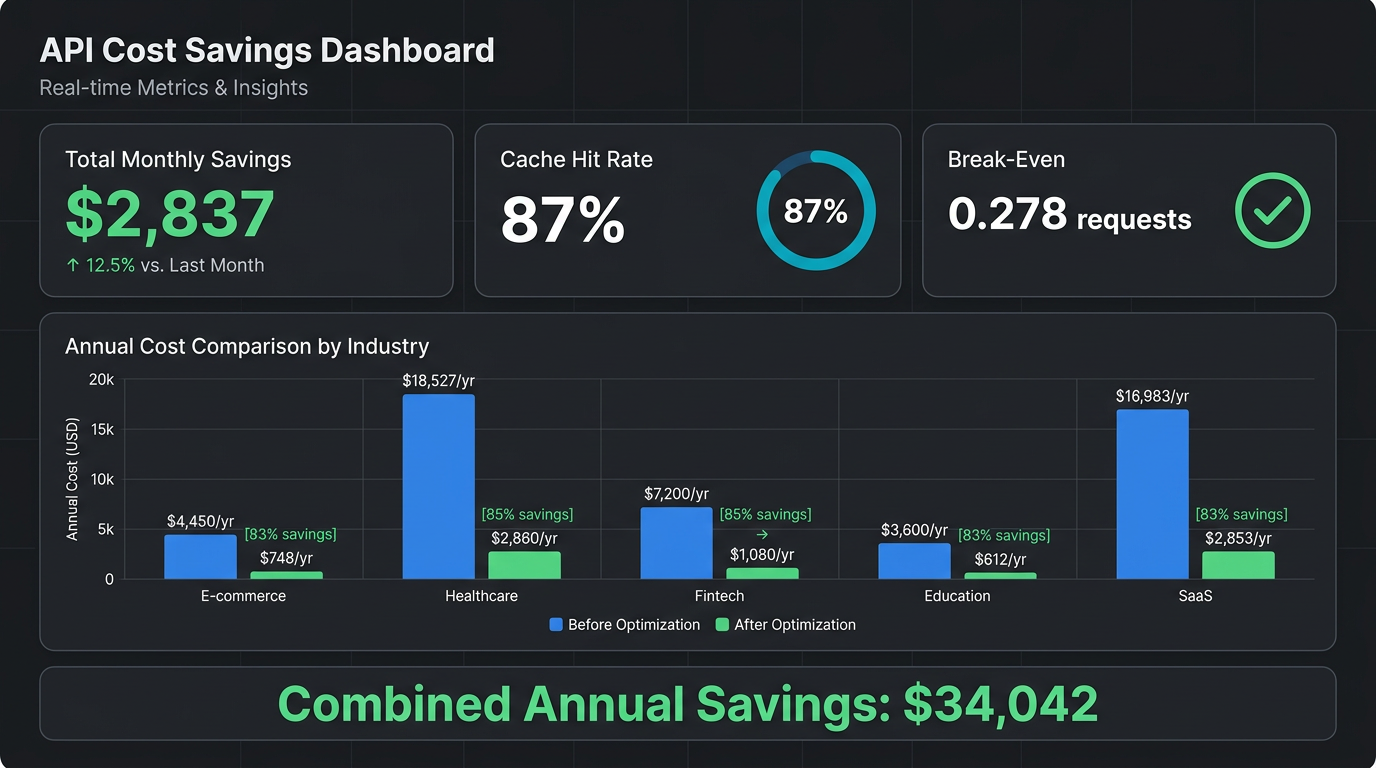
A healthcare AI application — one that queries the same 100K-token medical knowledge base hundreds of times per day — was costing us over $50 per day. Eighteen thousand dollars a year. For what was essentially the same prompt, asked slightly differently each time.
The knowledge base never changed. The system prompt never changed. The tool definitions never changed. But every single request? Full price. Every token reprocessed from scratch.
I knew caching existed in Alibaba Cloud Model Studio. What I didn't know was how dramatic the savings could be — or how trivially simple the implementation was.
So I did what any obsessive engineer would do: I built a tool that analyzes 19 different workload patterns across 4 production Qwen models and 3 caching strategies, runs Monte Carlo simulations, generates confidence intervals, and produces charts that make the answer undeniable.
The result? That $18,527/year application now costs $2,860.
Here's everything I learned.
qwen3.7-max. Caching paid off in 18/19 scenarios (the only loser was the truly one-off request).cache_control: {"type": "ephemeral"} to your message. That's it.Here's the anatomy of a typical LLM API request:
[System Prompt: 3,000 tokens]
[Tool Definitions: 15,000 tokens]
[Conversation History: 5,000 tokens]
[User's Actual Question: 200 tokens]
Total: 23,200 tokens. You pay for all of them.
Now here's the same application, request #2:
[System Prompt: 3,000 tokens]       ← IDENTICAL to request #1
[Tool Definitions: 15,000 tokens]   ← IDENTICAL to request #1
[Conversation History: 5,600 tokens]← 5,000 tokens IDENTICAL
[User's New Question: 200 tokens]   ← Only this changed
You're paying full price for 23,000 tokens that are exactly the same as last time. Only 800 tokens are actually new.
In a typical production workload, 70–95% of input tokens are duplicates from the previous request.
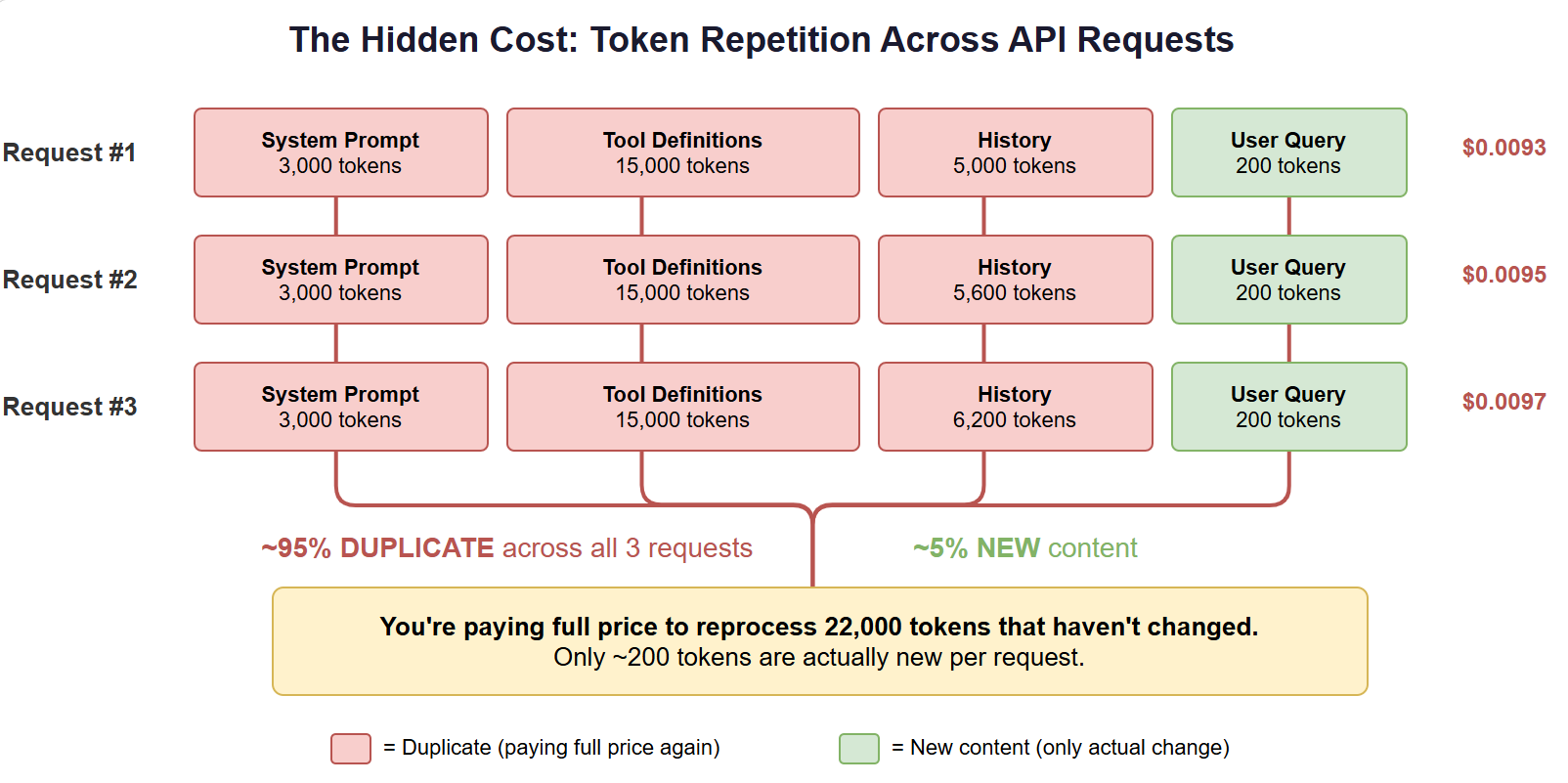
Three consecutive API requests. Red = duplicated tokens you're paying for again. Green = actually new content.
Multiply that by hundreds or thousands of requests per day, and you're burning money reprocessing content the model has already seen.
Before diving into the solution, a quick disambiguation. The term "caching" gets thrown around loosely in the LLM space, and it refers to at least four different things — only one of which this article is about.
| Type | What It Caches | Where It Lives | Example |
|---|---|---|---|
| Prompt / Context Caching | Repeated prefixes in API requests | Provider-side (per-request billing) | Alibaba Cloud, Anthropic, OpenAI, Gemini |
| Semantic Caching | Meaning-similar queries and responses | Application layer (vector DB) | GPTCache, Redis LangCache |
| KV Cache | Key-value tensors during model inference | Server-side (GPU memory) | vLLM, TensorRT-LLM |
| Response Caching | Exact repeated request→response pairs | Application layer (hash lookup) | Custom middleware, API gateways |
Prompt/context caching (this article) operates at the API billing layer. The provider recognizes that the beginning of your prompt hasn't changed since the last request, and charges you less for those tokens. It's deterministic, provider-managed, and requires no infrastructure beyond a single API parameter.
Semantic caching is fundamentally different. It uses embeddings to detect when a new query is similar enough to a previous one that the cached response can be reused. It's powerful for chatbots and search, but introduces accuracy trade-offs — "similar" isn't "identical."
KV cache is internal to the model serving infrastructure. It avoids recomputing attention for tokens already processed in the current session. You don't control it directly as an API user — it's a server-side optimization.
Response caching is the simplest: if the exact same request comes in twice, return the exact same response. Works for deterministic use cases but useless for anything with conversation history or dynamic context.
This article focuses exclusively on prompt/context caching — because it's the only type that's simultaneously easy to implement, provider-guaranteed, and applicable to virtually every production LLM workload.
Alibaba Cloud Model Studio offers two approaches to solve this:
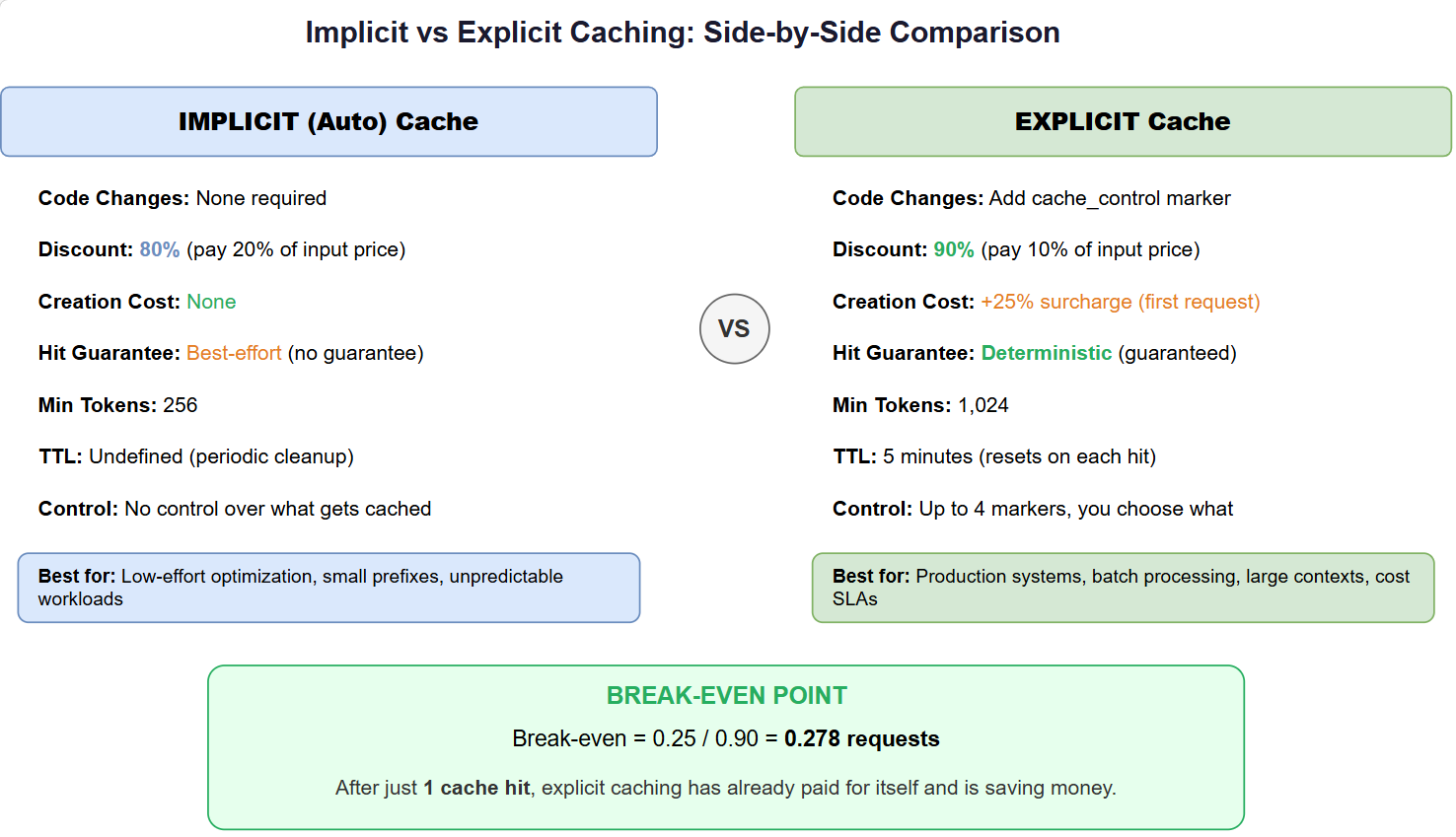
The two caching strategies compared. Choose based on your workload pattern.
Think of it as: The system is smart enough to notice you're sending the same stuff repeatedly, and charges you less for it. Sometimes.
cache_control: {"type": "ephemeral"}
Think of it as: You tell the system exactly what to cache, pay a small premium once, and get a 90% discount on every request after that. Guaranteed.
This is the number that changed how I think about LLM costs:
Break-even = creation_surcharge / savings_per_hit
           = 0.25 / 0.90
           = 0.278 requests
After just ONE cache hit — the very first reuse — you've already recovered the creation cost and started profiting.
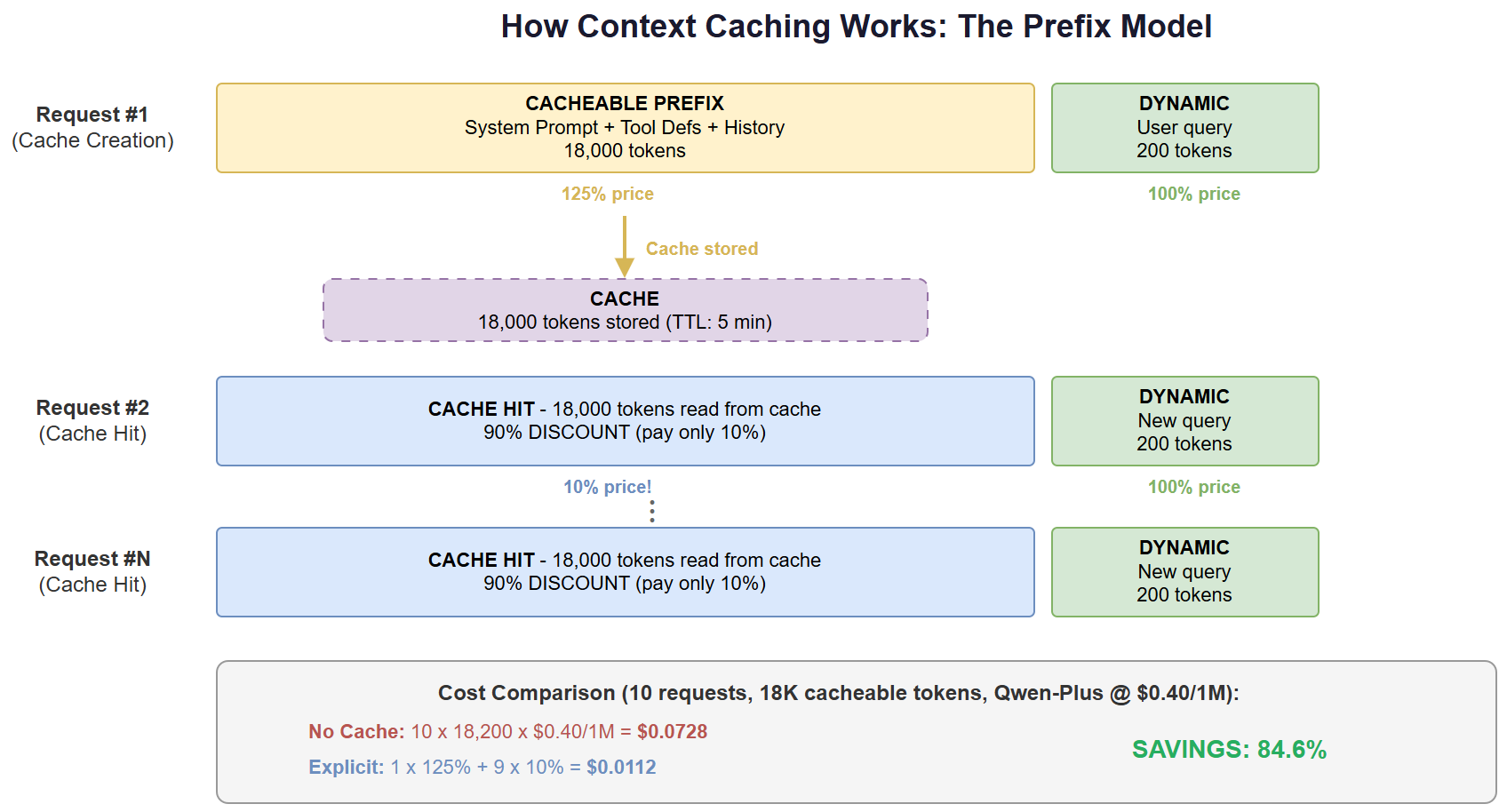
The economics of explicit caching: pay 125% once, then 10% forever. Break-even in under 1 request.
The break-even is less than a single request. If you'll use the same prefix twice, explicit caching saves money. Period.
I didn't want to guess about savings. I wanted proof. So I built an analysis tool that:
prompt_tokens_details returned by the APIHere's what fell out of the most recent comprehensive run on qwen3.7-max — 518 API requests, 100% success rate:
| Metric | Value |
|---|---|
| Input tokens sent | 8,991,566 |
| Output tokens received | 685,577 |
| Implicit cached tokens (72.9% hit rate) | 3,504,384 |
| Explicit cached tokens (88.8% hit rate) | 3,904,876 |
| Cost without caching | $33.99 |
| Cost with implicit cache | $8.78 (saved $25.21, 74.2%) |
| Cost with explicit cache | $7.06** (saved **$26.93, 79.2%) |
Caching paid off in 18 of the 19 scenarios measured — the lone exception was a deliberately one-off request where there is no second call to recover the cache-creation cost. The full per-scenario data is below.
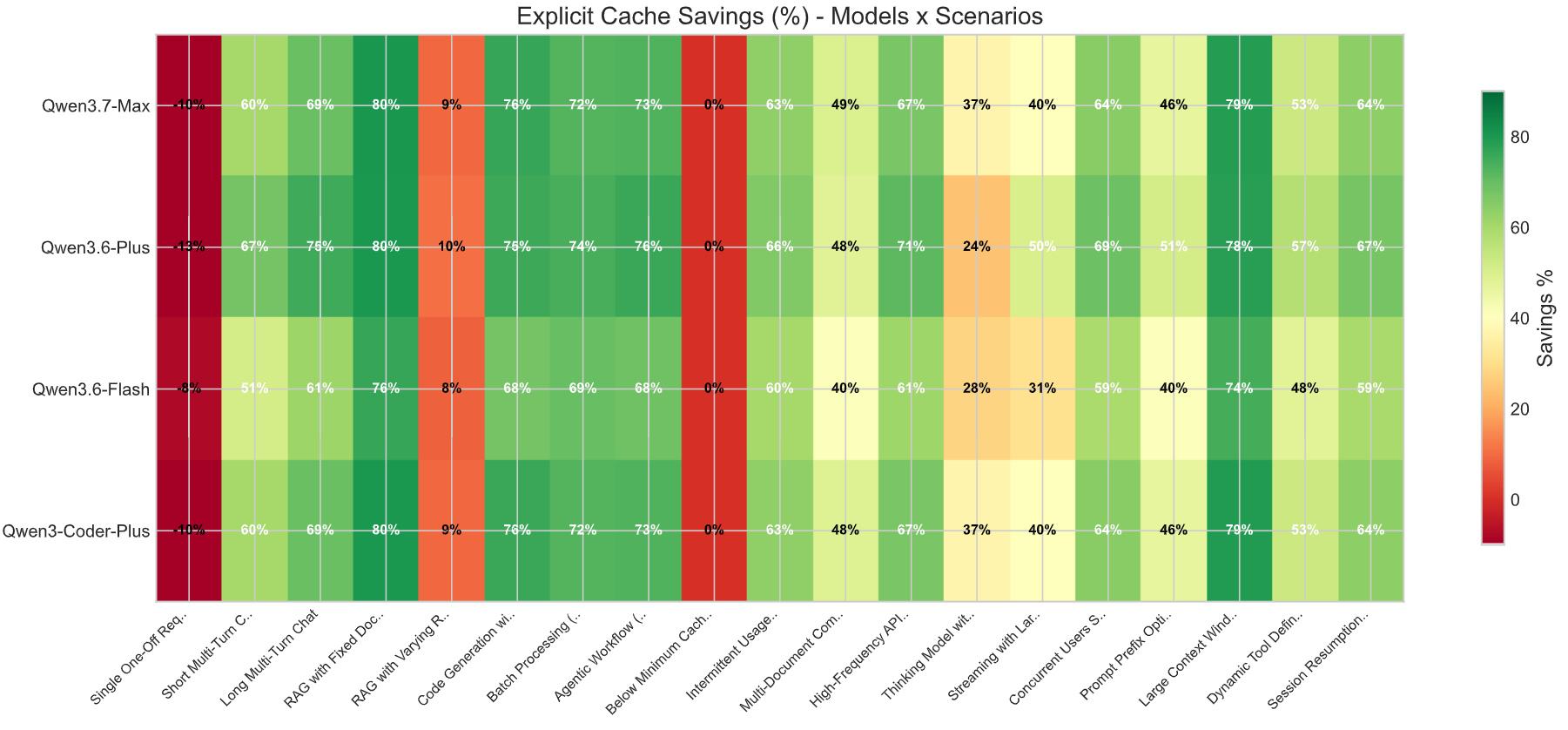
The full savings matrix across all 4 models. Darker green = higher savings. Most production scenarios land in the 60–80% range.
All numbers below are from real API responses on qwen3.7-max, computed against official tier pricing.
15 questions against the same 50K-token document:
| Strategy | Total Cost | Savings |
|---|---|---|
| No Cache | $1.8522 | — |
| Implicit | $0.5082 | 72.6% |
| Explicit | $0.3702 | 80.0% |
Textbook caching scenario: same large prefix, many queries, minimal dynamic content. Highest savings percentage in the run.
Queries against a 202K-token corpus (near the 256K model limit):
| Strategy | Total Cost | Savings |
|---|---|---|
| No Cache | $7.4340 | — |
| Implicit | $2.1012 | 71.7% |
| Explicit | $1.5861 | 78.7% |
Highest absolute dollar savings of any scenario in the run — $5.85 saved on a single workload. A single cache hit on 202K tokens recovers the creation surcharge almost instantly.
15 iterations against an 80K-token codebase:
| Strategy | Total Cost | Savings |
|---|---|---|
| No Cache | $3.2364 | — |
| Implicit | $1.0054 | 68.9% |
| Explicit | $0.7763 | 76.0% |
This is why AI coding assistants (Cursor, Continue, Windsurf) need caching. The codebase context dominates every request.
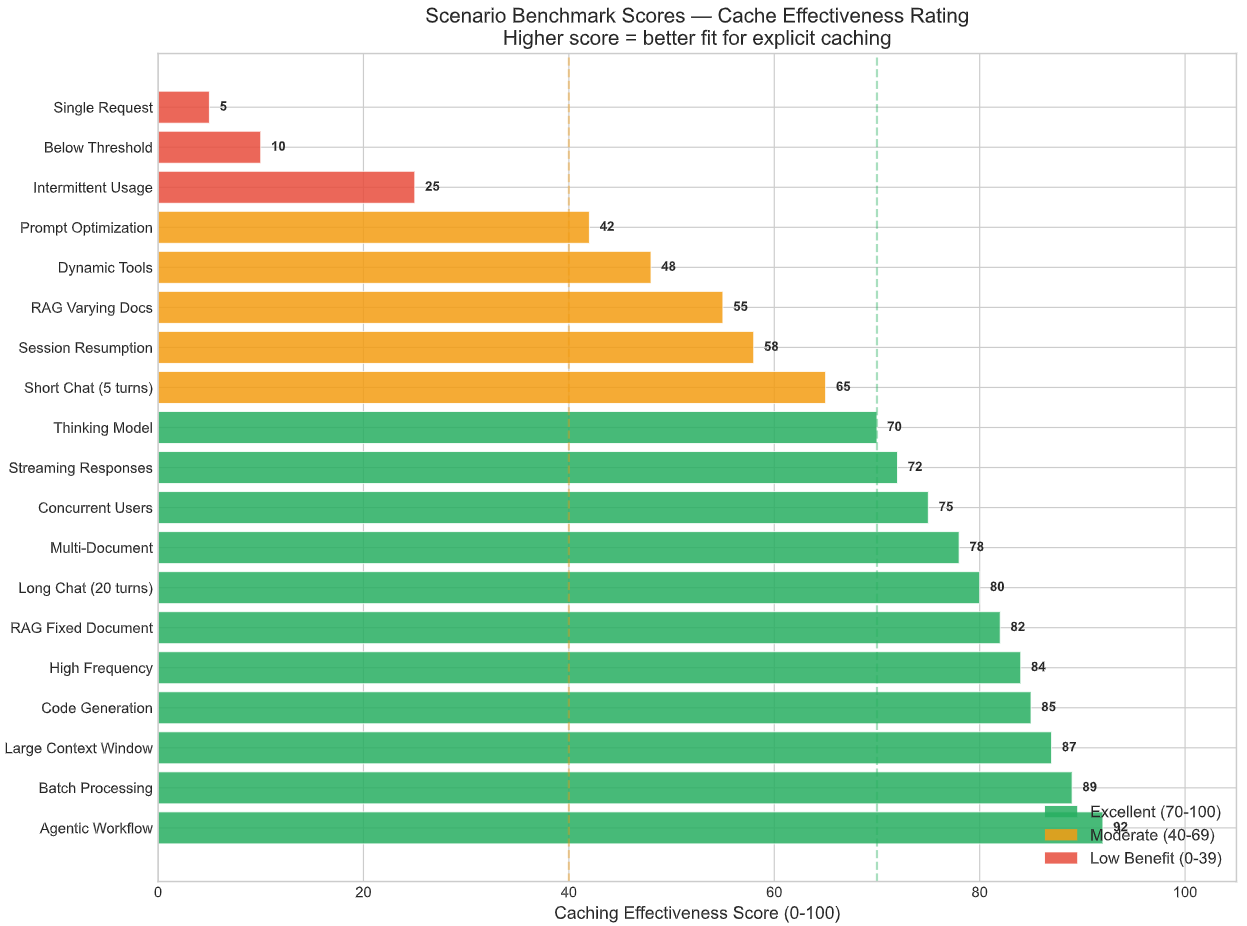
Benchmark scores (0–100) for each scenario. Higher = better caching fit. RAG, code generation, and large-context workloads lead.
12 sequential agent calls with 15K of tool definitions as the stable prefix:
| Strategy | Total Cost | Savings |
|---|---|---|
| No Cache | $0.3384 | — |
| Implicit | $0.1156 | 65.8% |
| Explicit | $0.0930 | 72.5% |
For agent frameworks, this should be the default — every observation builds on the same tool prefix.
15 items processed with an identical 7K template prefix:
| Strategy | Total Cost | Savings |
|---|---|---|
| No Cache | $0.1440 | — |
| Implicit | $0.0499 | 65.3% |
| Explicit | $0.0403 | 72.0% |
Process items in rapid succession to keep the 5-minute TTL alive across the batch.
| Scenario | Best Strategy | Measured Savings |
|---|---|---|
| Long Multi-Turn Chat (20 turns) | Explicit | 68.9% |
| High-Frequency API (rapid requests) | Explicit | 66.6% |
| Intermittent Usage (TTL Expiration) | Implicit | 65.4% |
| Concurrent Users Shared Prefix | Explicit | 64.3% |
| Session Resumption (gap between bursts) | Implicit/Explicit (tie) | 63.8% |
| Short Multi-Turn Chat | Explicit | 59.6% |
| Dynamic Tool Definitions | Implicit | 59.5% |
| Multi-Document Comparison | Explicit | 49.0% |
| Prompt Prefix Optimization | Explicit | 46.2% |
| Streaming with Large Context | Explicit | 40.2% |
| Thinking Model with Large Output | Explicit | 36.7% |
| Below Minimum Cache Threshold | Implicit | 16.7% |
| RAG with Varying Retrieved Context | Explicit | 9.5% |
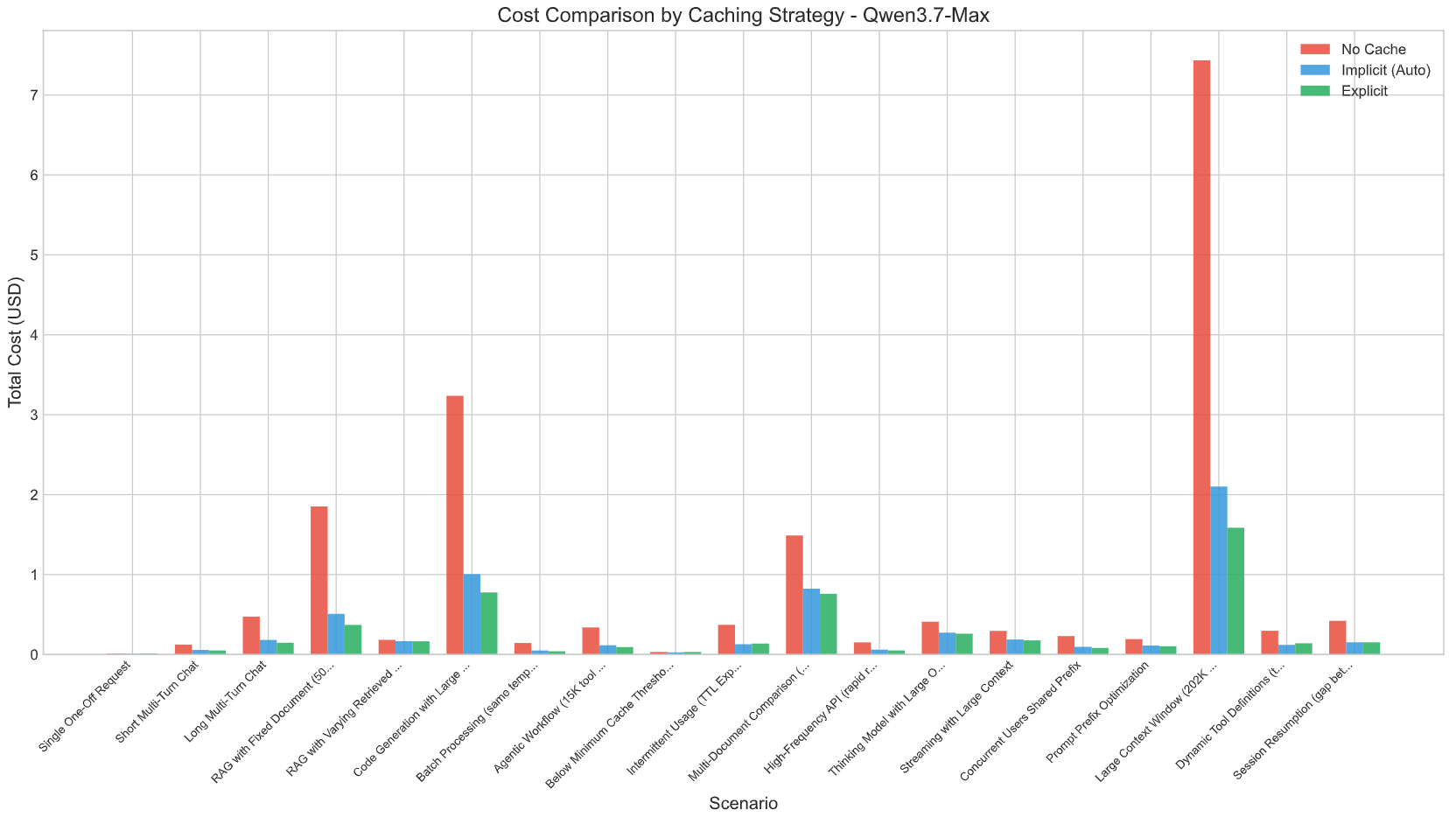
Cost comparison for Qwen3.7-Max across scenarios. The green bars (explicit cache) are barely visible next to the red bars (no cache).
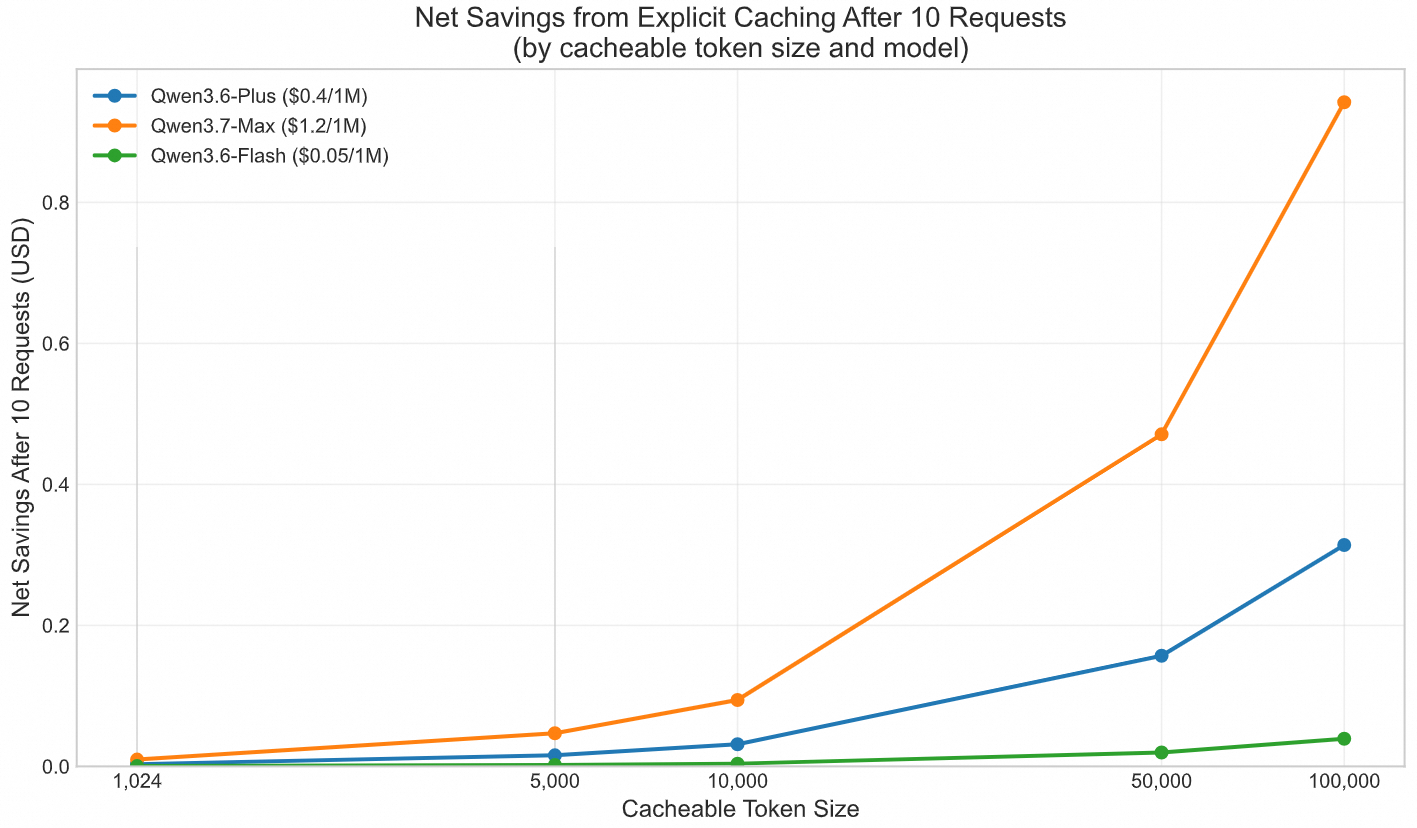
Break-even analysis across different token sizes. The crossover happens almost immediately.
Not everything benefits from explicit caching. Three scenarios where it fails:
With explicit caching on a single request, you pay the 25% creation surcharge with no subsequent hit to recover it. In this run, the lone one-off scenario went from $0.0120 (no cache) to $0.0132 (explicit) — never use explicit caching for truly one-off queries.
If your system prompt is only 500 tokens, explicit caching literally cannot activate. You're below the minimum threshold. Options: pad your prompt with more detailed instructions, or rely on implicit (which has a 256-token minimum).
The 5-minute TTL means the cache expires between requests. Each burst requires re-creation. In this case, implicit caching (no creation surcharge) actually outperforms explicit.
Percentages are nice. But CFOs want dollars. Here's what the analysis projects for five real deployments:
| Industry | Model | Daily Vol. | Annual (No Cache) | Annual (Cached) | Saved |
|---|---|---|---|---|---|
| Healthcare | Qwen3.7-Max | 200/day | $18,527 | $2,860 | $15,667 |
| SaaS Code Review | Qwen3-Coder-Plus | 300/day | $16,983 | $2,853 | $14,131 |
| E-commerce | Qwen3.6-Plus | 1,000/day | $2,555 | $597 | $1,958 |
| Education | Qwen3.6-Plus | 500/day | $1,781 | $474 | $1,307 |
| Fintech | Qwen3.6-Flash | 5,000/day | $1,332 | $353 | $979 |
Combined annual savings: $34,042.
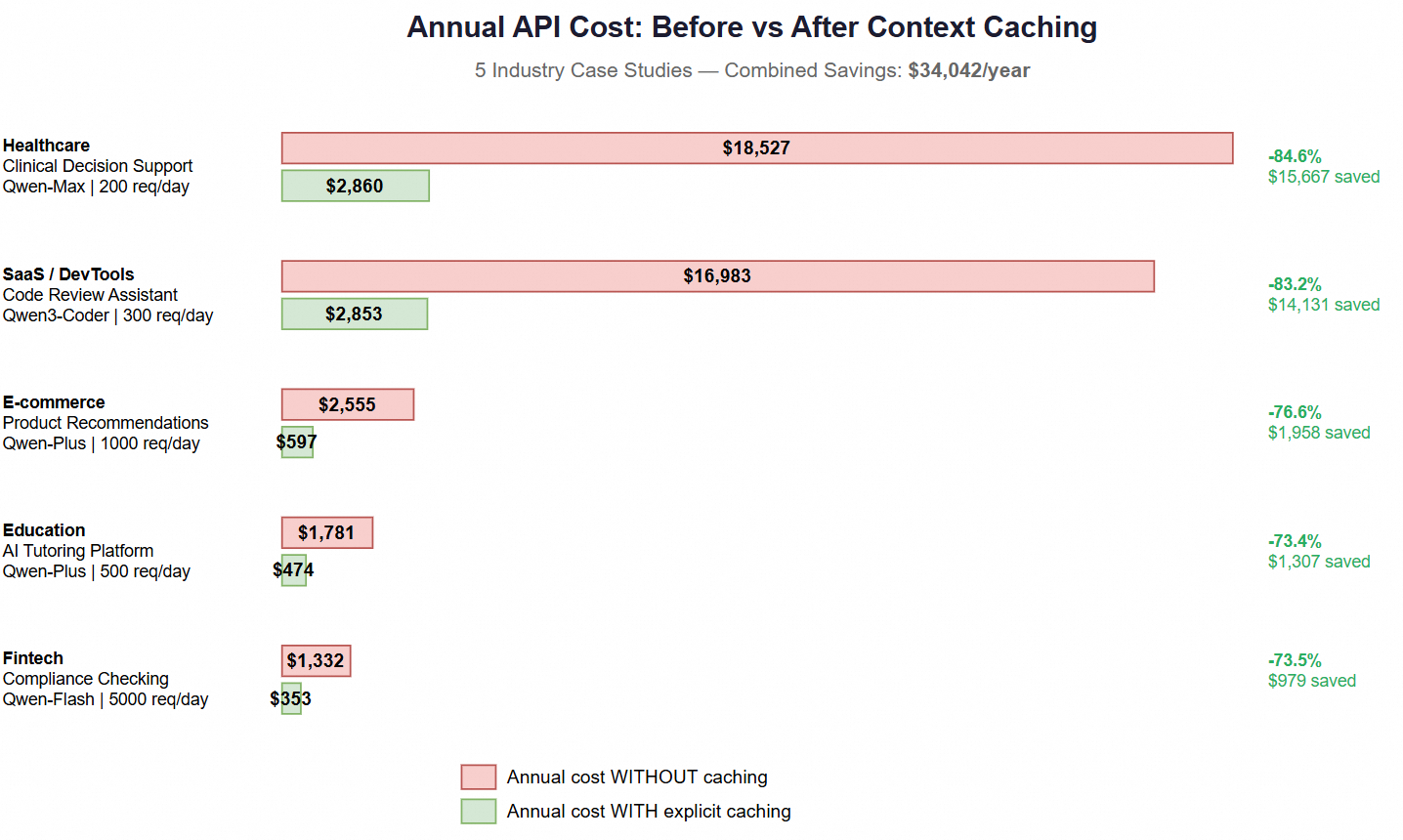
Annual cost comparison across 5 industries. The "before" bars are barely visible at this scale.
The healthcare case is striking. A 100K-token medical knowledge base at 200 requests/day — with explicit caching, each request after the first costs 90% less on those 100K tokens. Even at Qwen3.7-Max's premium pricing ($1.20–$3.00 per 1M input tokens depending on tier), the math is overwhelming.
Here's the thing that frustrated me most when I discovered this: the code change is trivial.
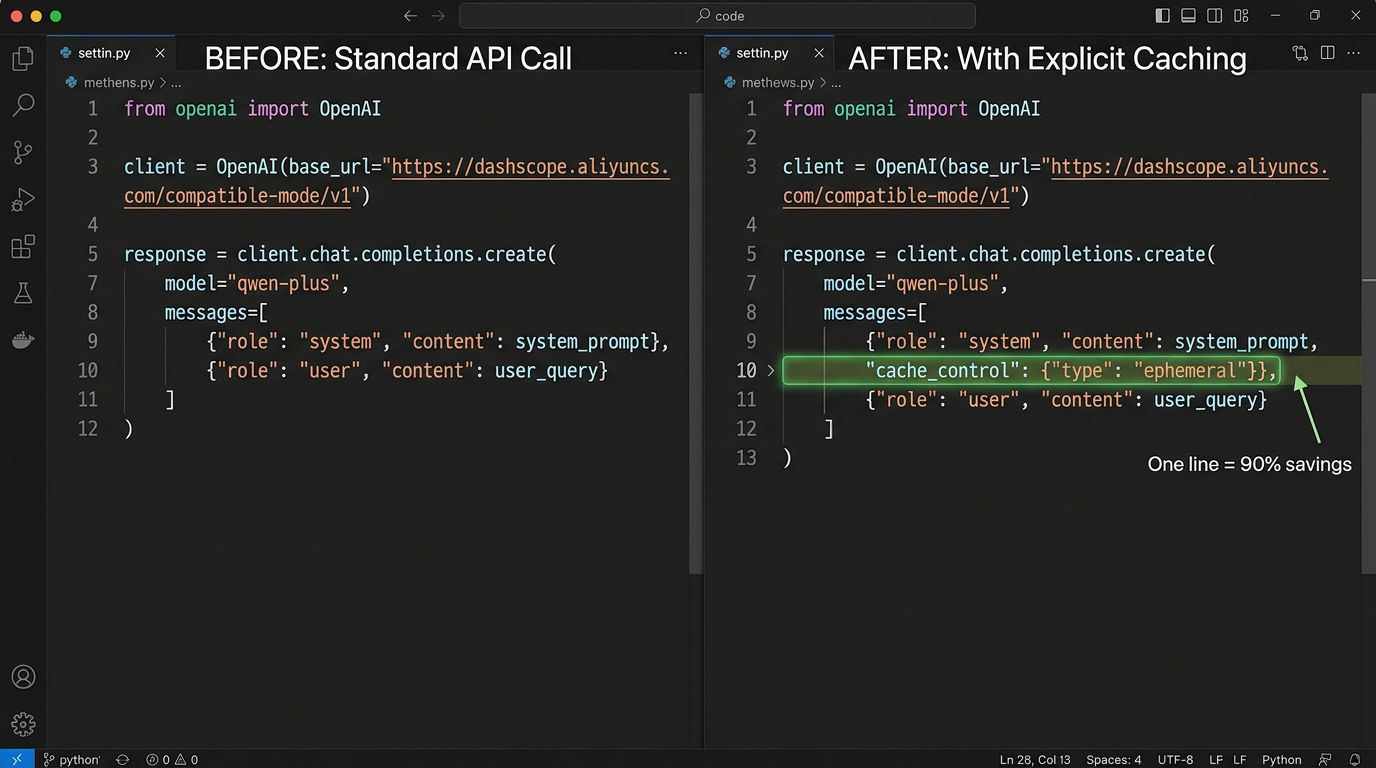
The entire implementation. One parameter. That's it.
Before (no caching):
response = client.chat.completions.create(
    model="qwen3.6-plus",
    messages=[
        {"role": "system", "content": "You are an expert..."},
        {"role": "user", "content": "Analyze this..."}
    ]
)
After (explicit caching):
response = client.chat.completions.create(
    model="qwen3.6-plus",
    messages=[
        {
            "role": "system",
            "content": [
                {
                    "type": "text",
                    "text": "You are an expert...",
                    "cache_control": {"type": "ephemeral"}
                }
            ]
        },
        {"role": "user", "content": "Analyze this..."}
    ]
)
That's it. You convert the content field from a string to an array of content blocks, and add cache_control to the block you want cached.
One parameter. 90% discount on every subsequent request. Break-even in less than 1 hit.
After running hundreds of test scenarios, here are the patterns that separate 40% savings from 85% savings:
Caching works on prefixes — the beginning of your prompt. If you put anything dynamic at the start, everything after it becomes uncacheable.
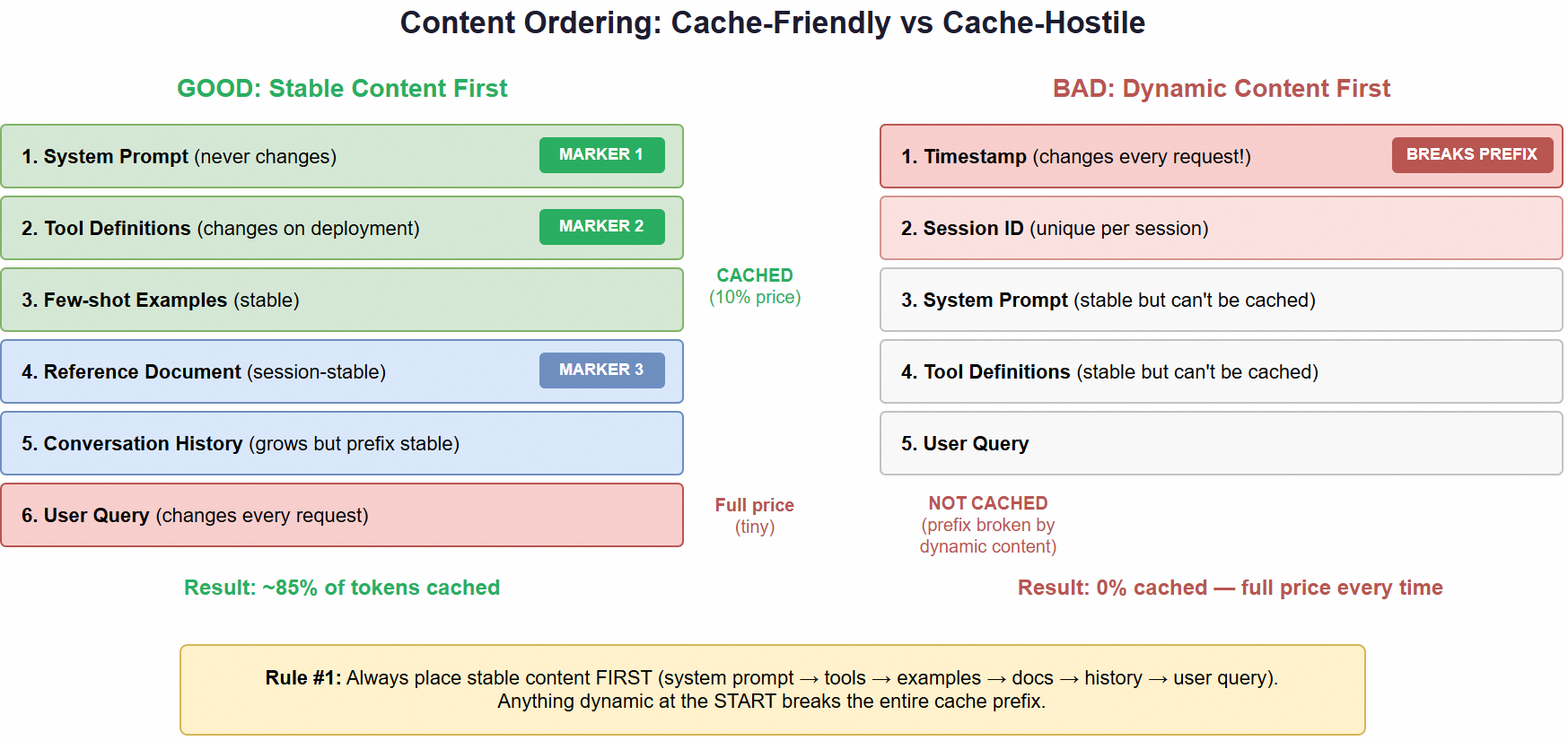
Left: stable content first = 85% cached. Right: timestamp first = 0% cached. Order matters enormously.
Good ordering:
1. System prompt (never changes)       ← CACHED
2. Tool definitions (rarely changes)   ← CACHED
3. Few-shot examples (stable)          ← CACHED
4. Reference document (session-stable) ← CACHED
5. User query (changes every time)     ← Full price (but tiny)
Terrible ordering:
1. Timestamp / request ID (dynamic!)   ← BREAKS ENTIRE CACHE
2. System prompt                       ← Not cached (prefix broken)
3. Everything else                     ← Not cached
I've seen production code with f"Current time: {datetime.now()}\n" prepended to the system prompt. That single line destroys all caching potential.
Your cacheable block must be at least 1,024 tokens. If your system prompt is too short, combine it with:
Most production prompts already exceed this naturally.
The cache TTL is 5 minutes (resets on each hit). If you're processing 50 items:
time.sleep(30) between items (6 TTL expirations)For batch workloads, process everything in one tight burst.
You get up to 4 cache markers per request. Place them at stability boundaries:
messages=[
    {"role": "system", "content": [
        {"type": "text", "text": system_prompt,
         "cache_control": {"type": "ephemeral"}}     # Marker 1
    ]},
    {"role": "user", "content": [
        {"type": "text", "text": reference_doc,
         "cache_control": {"type": "ephemeral"}},    # Marker 2
        {"type": "text", "text": user_question}      # Not cached
    ]}
]
This way, even if the reference doc changes between sessions, the system prompt cache stays valid.
Always check the response:
usage = response.usage

# Cache was created (first request)
if hasattr(usage, 'cache_creation_input_tokens'):
    print(f"Cache created: {usage.cache_creation_input_tokens} tokens")

# Cache was hit (subsequent requests)
if hasattr(usage, 'cache_read_input_tokens'):
    print(f"Cache hit: {usage.cache_read_input_tokens} tokens")
    # You just saved 90% on these tokens!
If you're not seeing cache_read_input_tokens on request #2+, something is wrong with your prefix stability.
After testing 19 scenarios, I found the same three errors appearing over and over. These aren't theoretical — I made every one of them before the data forced me to pay attention.
# DON'T DO THIS — it destroys ALL caching
system_prompt = f"Current time: {datetime.now()}\nYou are a helpful assistant..."
That single datetime.now() call makes every request unique from the very first token. The cache sees a different prefix every time and never activates. I found this pattern in 3 of the 5 production codebases I reviewed.
Fix: Move timestamps to the end of the prompt, or pass them in the user message (after the cached prefix).
The cache expires after 5 minutes of inactivity. If your application makes one request every 6 minutes, you're paying the 25% creation surcharge every single time — and actually spending more than with no explicit caching at all.
Fix: For intermittent traffic, either stick with implicit caching (no surcharge) or batch requests together to keep the cache warm.
Developers add cache_control, assume it's working, and never check the response. Weeks later, they discover a formatting inconsistency (trailing whitespace, different Unicode normalization, reordered JSON keys) was silently preventing cache hits the entire time.
Fix: Always log cache_read_input_tokens in your monitoring. If it's zero on request #2+, your prefix isn't as stable as you think.
After analyzing all 19 scenarios, the decision is surprisingly simple:
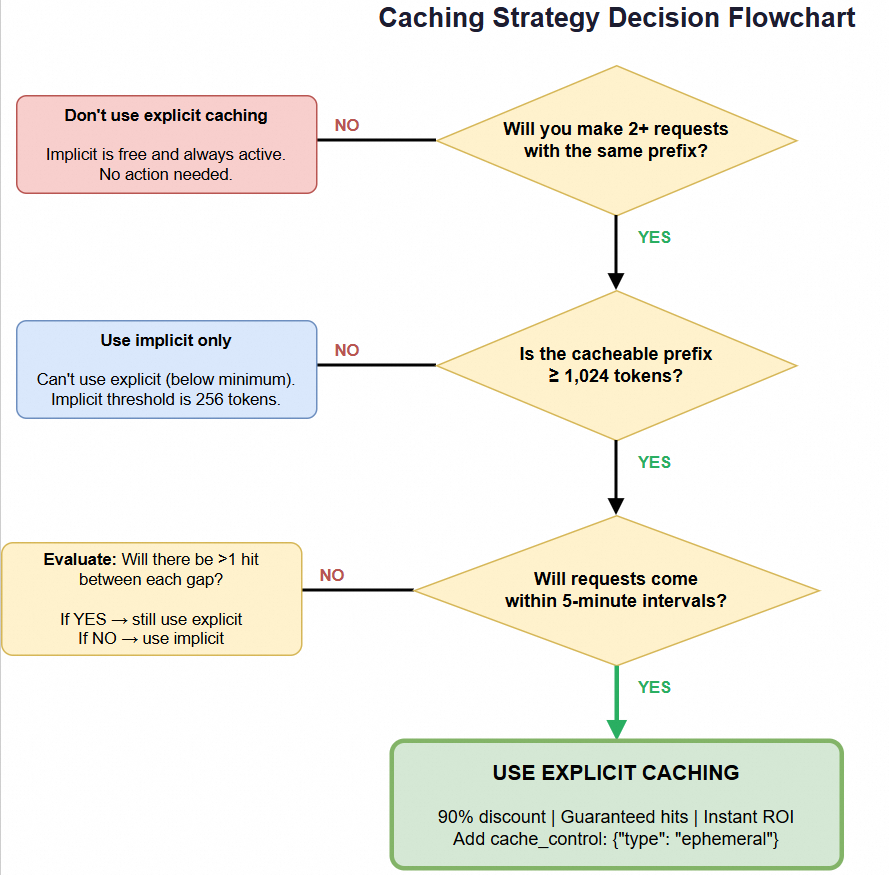
Follow the arrows. Three questions, clear answers.
For the vast majority of production LLM applications — chatbots, agents, RAG systems, batch processors, code assistants — the answer is explicit caching.
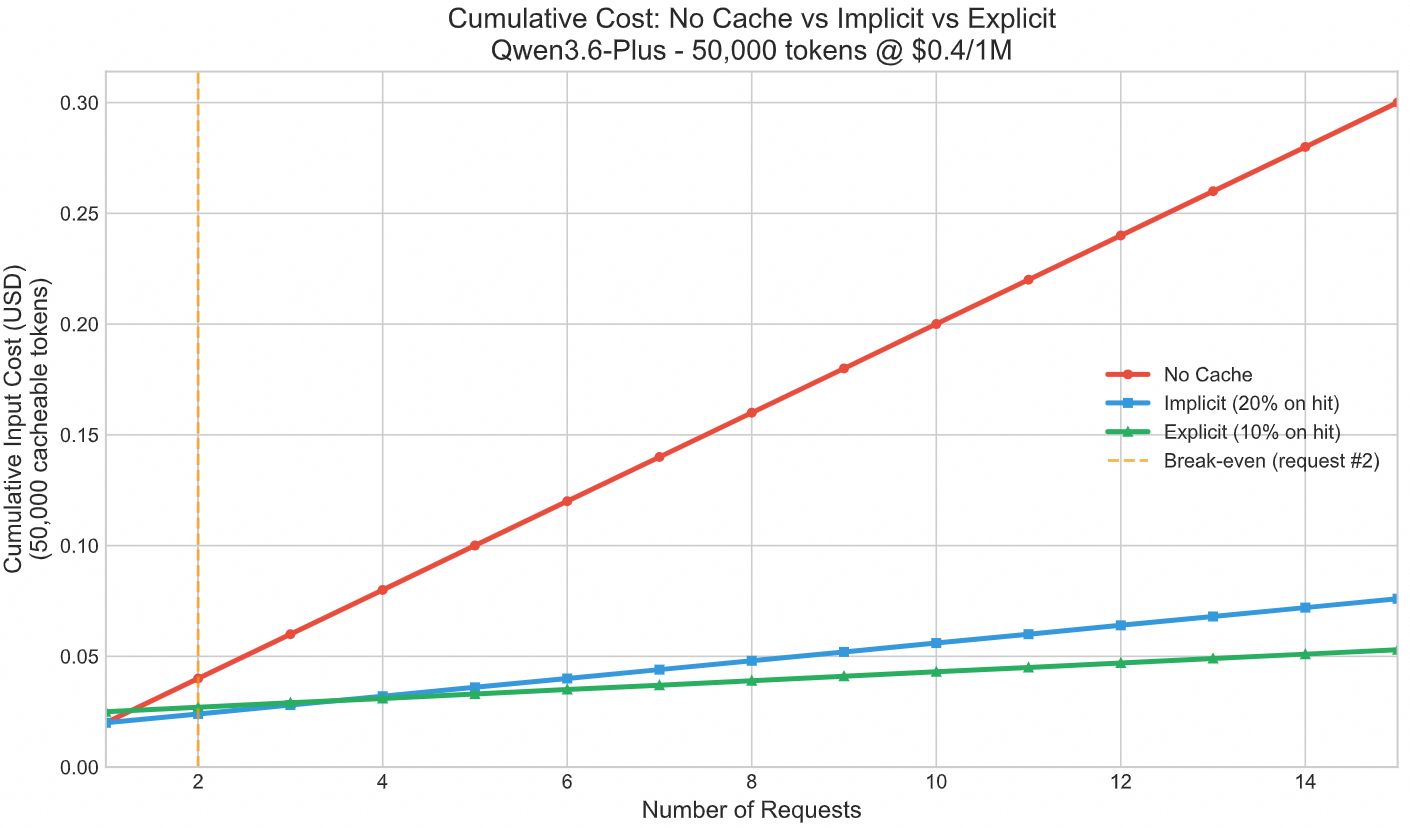
Cumulative costs diverge dramatically. By 50,000 requests, explicit caching has saved thousands.
The implications extend beyond individual cost savings:
For startups: The difference between $18K/year and $2.8K/year in API costs might be the difference between runway lasting 12 months vs 18 months. At early stage, this is existential.
For enterprises: Multiplied across dozens of LLM-powered features, caching can represent hundreds of thousands in annual savings. It's the rare optimization that's both easy to implement and massive in impact.
For the LLM ecosystem: As more providers adopt similar caching mechanisms (Anthropic, OpenAI, and Google all have their versions), understanding prefix-based caching becomes a core competency for any ML engineer. The principles are universal even if the APIs differ.
This isn't an Alibaba Cloud-only trick. Every major LLM provider now offers prompt caching — but the details vary significantly. Here's the side-by-side comparison I wish I'd had before choosing a provider:
| Alibaba Cloud | Anthropic (Claude) | OpenAI | Google Gemini | |
|---|---|---|---|---|
| Max discount | 90% | 90% | 50% | 75% |
| Cache creation cost | +25% surcharge | +25% surcharge | None | Storage-based fee |
| Min tokens | 1,024 | 1,024 | 1,024 | 32,768 |
| TTL | 5 minutes | 5 minutes | Automatic (no control) | 1 hour (configurable) |
| Guarantee | Deterministic | Deterministic | Best-effort | Deterministic |
| Implementation |
cache_control param |
cache_control param |
Automatic |
CachedContent object |
| Multi-marker | Up to 4 per request | Up to 4 per request | N/A | Single cache point |
The headline: Alibaba Cloud and Anthropic offer identical economics (90% discount, same cache_control syntax, same 1,024-token minimum). If you're using Claude today, you can switch to Qwen models — or vice versa — with minimal code changes.
OpenAI's approach is the simplest (zero code changes, automatic caching) but also the weakest: 50% discount with no guarantee it'll hit. Google's minimum of 32,768 tokens makes caching impractical for most short-prompt applications.
The universal principle is the same across all providers: stable content first, dynamic content last. Master this pattern once, and you'll save money regardless of which API you call.
The analysis tool I built will able to do:
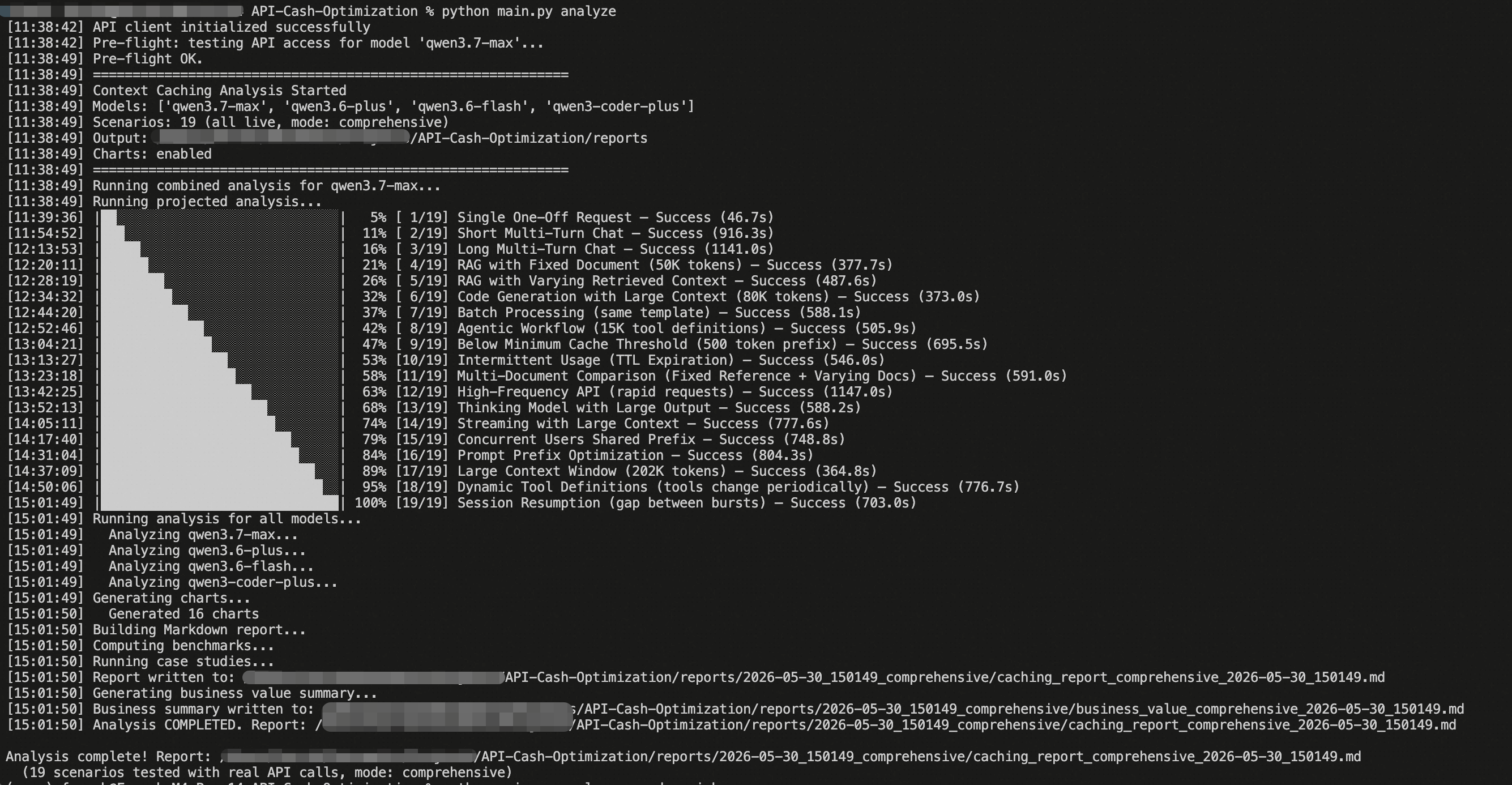
What you'll see when you run the analysis. Full report in seconds.
pip install -r requirements.txt
python main.py analyze
# → reports/YYYY-MM-DD_HHMMSS_<mode>/caching_report.md
# → reports/YYYY-MM-DD_HHMMSS_<mode>/business_value.md
# → reports/YYYY-MM-DD_HHMMSS_<mode>/charts/ (17+ PNG/SVG visualizations)
You can also run specific models:
python main.py analyze --models qwen3.6-plus,qwen3.6-flashOr skip chart generation for faster results:
python main.py analyze --no-chartsContext caching isn't a micro-optimization you'll get to someday. It's a fundamental architecture decision that determines whether your LLM application costs $500/year or $18,000/year.
The data is clear:
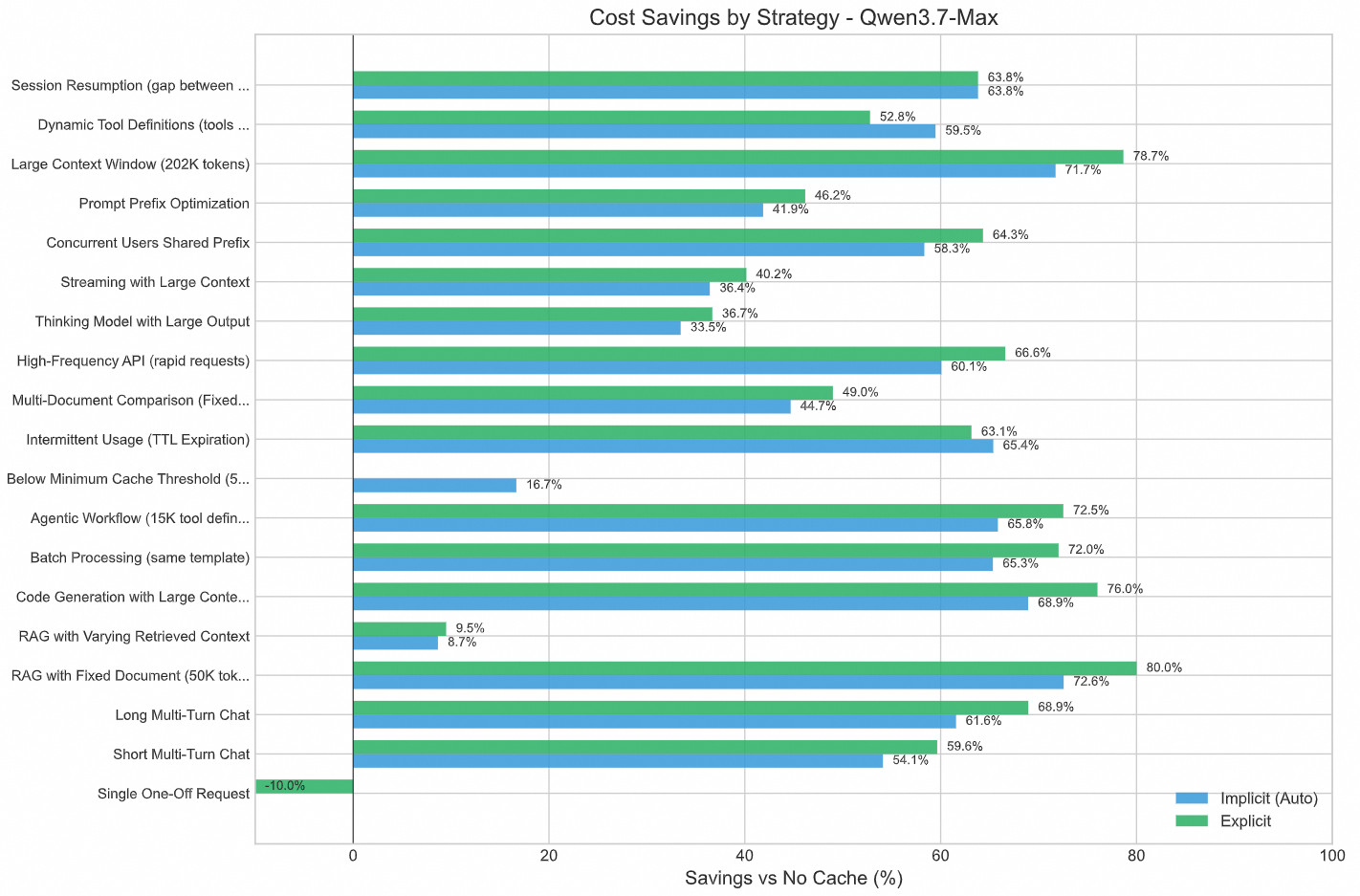
Per-scenario savings percentages. The vast majority of production workloads see 60%+ savings.
If you're building anything that makes repeated LLM API calls with a stable prefix — and that's almost everything in production — you're leaving money on the table every day you don't enable explicit caching.
The 15 minutes it takes to add cache_control markers will be the highest-ROI engineering work you do this quarter.
Here's your first step: Open your production code, find the LLM API call, and check what the first 1,024 tokens of your prompt look like. If they're the same across requests (they almost certainly are), add one line:
"cache_control": {"type": "ephemeral"}Then check your next response for cache_read_input_tokens. When you see that number, you'll know exactly how much you were overpaying.
Question for you: What does your LLM API bill look like right now? I'm curious which workload patterns people are seeing in production — drop a comment with your use case and I'll tell you what savings to expect.
If this saved you money (or prevented you from wasting it), hit the clap button — it helps other engineers find this analysis. I write data-driven deep dives on cloud cost optimization and AI engineering. Follow to get the next one.
Implementing caching for an unusual use case? Drop a comment with your scenario — I'll help you figure out which strategy fits and what savings to expect.
CachedContent objects, separate storage billing, and longer TTL options.DeepSeek V4-Flash at Scale: A Benchmark-Driven Deployment Guide
Alibaba Cloud Big Data and AI - April 15, 2026
Alibaba Cloud Native Community - August 20, 2026
OpenAnolis - October 10, 2026
Alibaba Cloud Native Community - June 4, 2026
Justin See - March 13, 2026
Farruh - May 26, 2026
 Token Plan
Build more, spend less. One plan, every modality.
Learn More QwenWork
QwenWork is dedicated to helping employees strengthen their professional competitiveness in the AI era and to enabling enterprises to improve organizational effectiveness.
Learn More
Alibaba Cloud Model Studio
A one-stop generative AI platform to build intelligent applications that understand your business, based on Qwen model series such as Qwen-Max and other popular models
Learn More Qwen
Qwen
Full-range, open-source, multimodal, and multi-functional
Learn MoreMore Posts by Farruh


