When facing complex microservice operations and volatile AI traffic patterns, building an elastic, maintenance-free "compute foundation" is also crucial.This article expands the scope from data architecture to full-stack infrastructure, introducing the ultimate production-grade solution built on Alibaba Cloud SAE × SLS.
With the explosive growth of LLM-powered applications, Dify—with its powerful workflow orchestration and user-friendly visual interface—is becoming the go-to platform for building enterprise AI applications. However, when applications move from local demos to large-scale production, developers often hit two "hidden" challenges: skyrocketing operational complexity and data architecture performance bottlenecks.
This article provides a deep analysis of these architectural bottlenecks and introduces the joint solution built on Alibaba Cloud SAE (Serverless App Engine) and SLS (Simple Log Service). Through the dual engines of "fully managed compute" and "storage-compute separation," we build a highly elastic, cost-efficient Dify production environment with deep data insights.
During the single-machine demo phase, deploying with Docker Compose and the default PostgreSQL storage is perfectly adequate. But once you enter production, these two pieces of infrastructure are often the first to become performance and scalability bottlenecks.
Dify is a microservice architecture composed of multiple components: API service, Worker, Web frontend, KV cache, relational database, and vector database. In production, this architecture poses significant operational challenges:
· Lack of resource elasticity: AI applications typically exhibit pronounced traffic peaks and valleys. With self-managed Kubernetes or ECS clusters, scaling responses lag behind demand—users queue during peaks, while massive resource waste occurs during off-peak hours, driving up costs.
· High maintenance costs: Ensuring high availability, configuring load balancing, handling node failures, and performing blue-green or canary deployments—this foundational infrastructure work carries a high technical bar and consumes significant engineering effort that should be spent on business innovation.
· Performance bottlenecks: The default deployment provides limited QPS capacity, making it difficult to support high-concurrency scenarios—especially under inference-intensive workloads, where it easily becomes a system bottleneck.
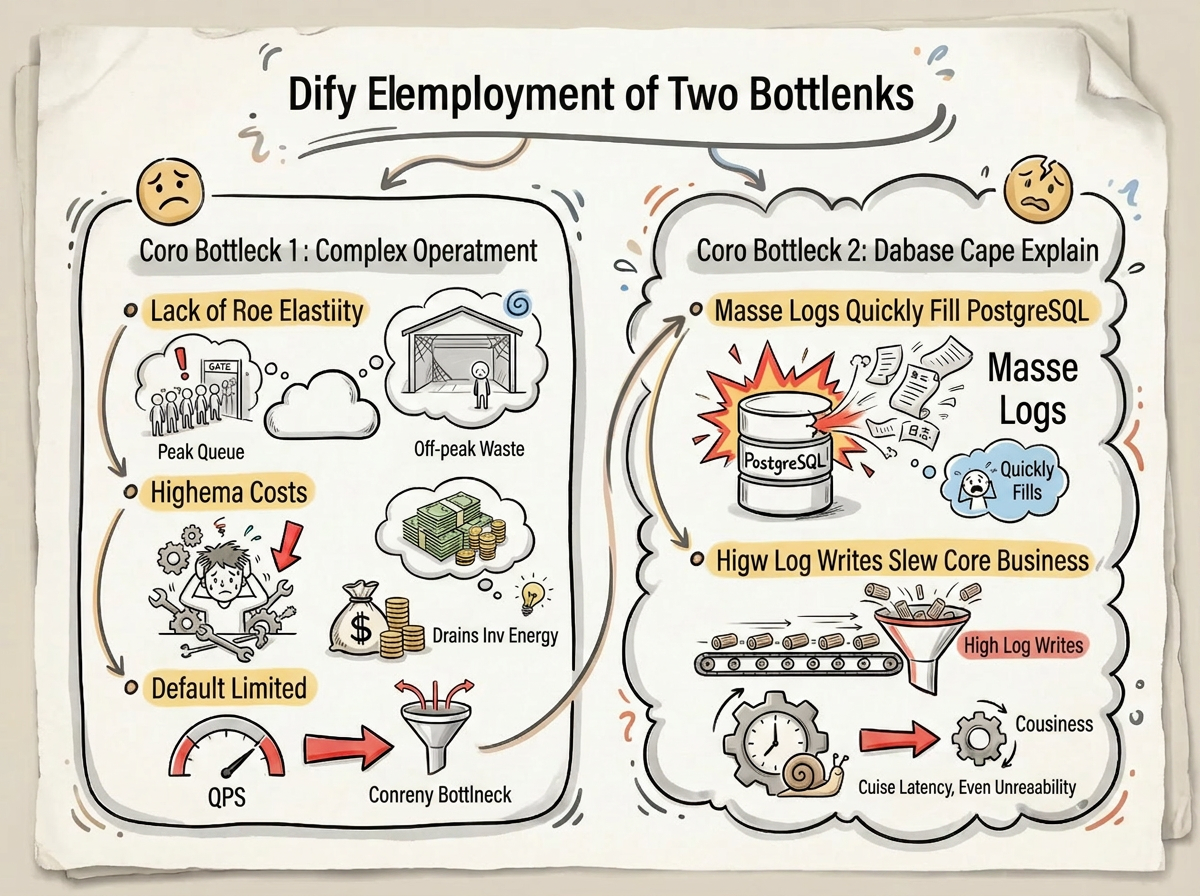
By default, Dify stores all data—including business metadata and runtime logs—in PostgreSQL. As business volume grows, the mismatch between data characteristics and the storage engine becomes increasingly apparent:
• Logs "bloat" the database: Every workflow node execution generates a complete record of inputs, outputs, prompts, reasoning processes, and token statistics. In high-concurrency production scenarios, this data consumes the vast majority of database resources, causing tablespace to expand rapidly.
• Core business degradation: High-frequency, high-throughput log writes consume database connection pools and I/O resources, severely interfering with core business operations (such as creating applications, knowledge base retrieval, and conversation context management), leading to response delays, timeouts, and even service unavailability.
To address these bottlenecks, SAE and SLS work in tandem—SAE focuses on elastic compute scheduling, while SLS specializes in massive log storage—together building a high-performance, highly available runtime foundation for Dify.
SAE handles more than just orchestrating Dify's core microservices (API, Worker, Sandbox). Through one-click templates, it integrates the complete cloud ecosystem required to run Dify.
• One-click full-stack delivery: Developers no longer need to manually build complex environments. Using pre-built templates, you can deploy a complete microservice cluster with a single click, automatically creating and integrating SLS (workflow log storage), Tablestore (vector storage), Redis (caching), and RDS for PostgreSQL (metadata storage)—no need to purchase and configure each service individually, delivering a "production-ready out of the box" experience.
• Enterprise-grade high availability: Instances are automatically distributed across multiple availability zones, combined with health checks and self-healing mechanisms to prevent single points of failure. Canary deployments ensure smooth, seamless traffic shifts during frequent workflow iterations.
• Sub-second compute elasticity: A perfect fit for the "tidal" characteristics of AI workloads. SAE supports auto-scaling based on CPU/memory utilization or QPS metrics. During inference peaks, Worker instances spin up in seconds to absorb pressure; during off-peak periods, idle resources are automatically released, keeping compute costs strictly within the "actual usage" range.
• Deep performance tuning: SAE has applied end-to-end, code-and-architecture-level tuning to Dify—not only patching Redis cluster compatibility and slow SQL issues at the infrastructure layer, but also fine-tuning runtime parameters and aligning resource specifications. This full-stack optimization drives a 50x throughput leap from 10 QPS to 500 QPS, ensuring silky-smooth AI responses.
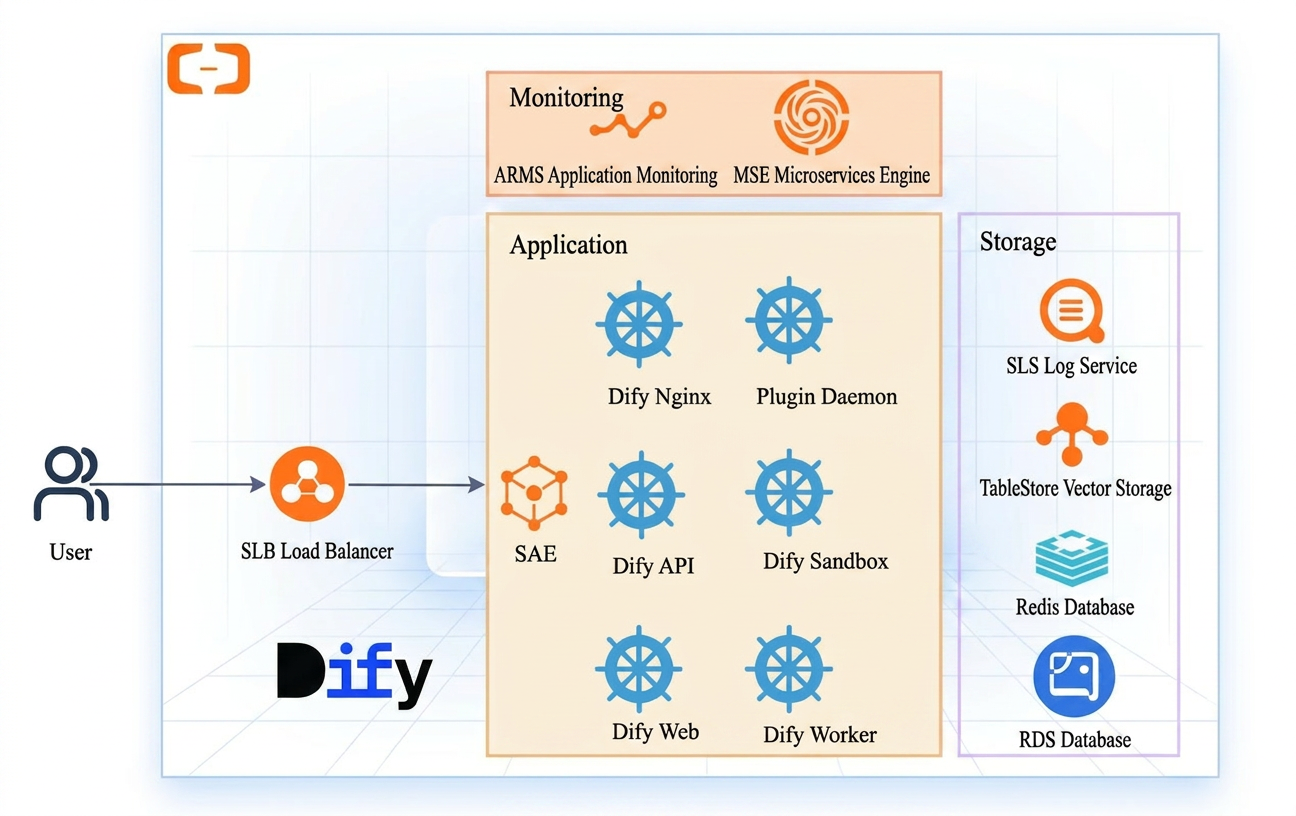
SLS is not simply a database replacement—it is cloud-native infrastructure purpose-built for log scenarios. Compared to PostgreSQL, SLS delivers architectural upgrades across four dimensions in the Dify context:
• Extreme storage elasticity: Unlike databases that require resource provisioning based on peak loads, SLS as a SaaS service natively supports sub-second elastic scaling. Whether it's a late-night trough or a sudden inference spike, it adapts automatically—no need to worry about sharding or capacity limits.
• Architectural decoupling and load isolation: By leveraging append-only write patterns, SLS avoids the random I/O and lock contention common in databases, easily supporting 10,000+ TPS throughput. By completely offloading the log workload to the cloud, it ensures that massive log writes do not affect Dify's core business response times.
• Tiered storage for cost-efficient retention: Powered by high compression ratios, hot data is analyzed in real time while cold data automatically sinks to archive storage. This meets long-term audit and retrospective needs at costs far below database SSD pricing.
• Out-of-the-box business insights: The built-in OLAP analysis engine supports real-time SQL queries, visual dashboards, and alert monitoring, helping developers transform dormant log data into actionable business insights.
The SAE App Center includes a deeply optimized Dify production template. With simple parameter configuration, you can deploy a highly available runtime environment in a single click—no more tedious YAML writing and environment debugging.
Log on to the SAE console, go to the App Center, and select "Dify Community Edition - Serverless Deployment."
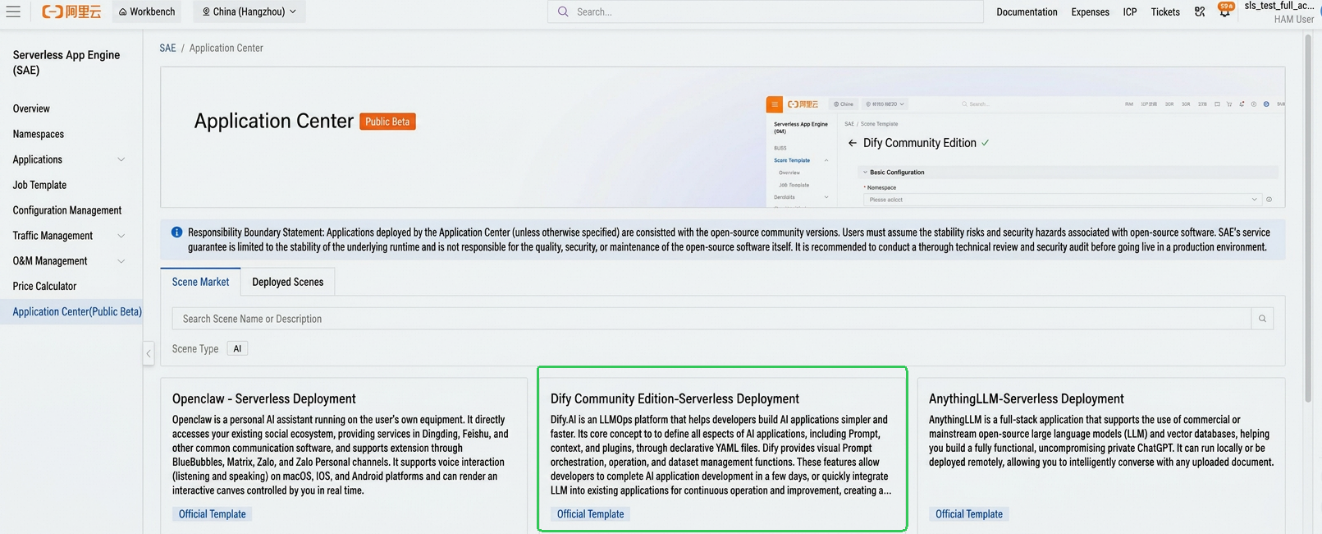
Three templates are currently available: Dify High-Performance Edition, Dify High-Availability Edition, and Dify Test Edition.
For high-concurrency production scenarios, we recommend the Dify High-Performance Edition, which includes deep optimizations specifically for the api image and plugin-daemon image, resulting in higher runtime efficiency. Configuration is streamlined—simply fill in the passwords for each cloud service and select the VPC and vSwitch. The system then provides a total estimated price for the selected cloud resources, ensuring cost transparency.
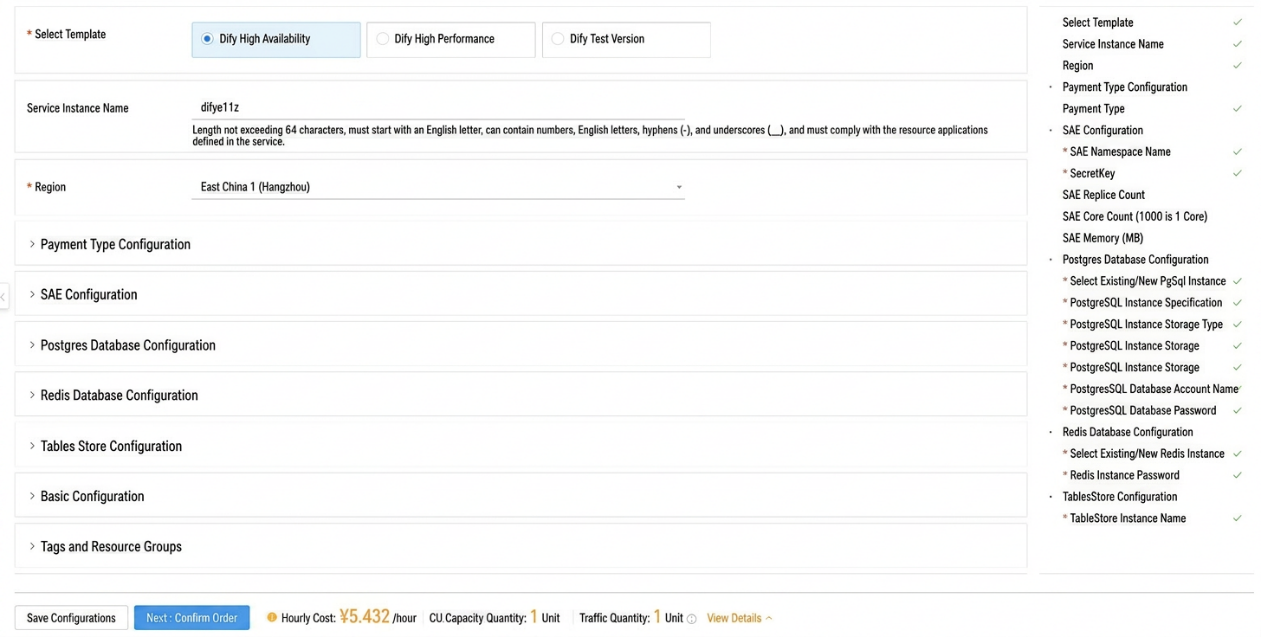
Click Submit, and the system automatically completes the deployment of core services and cloud resource associations.
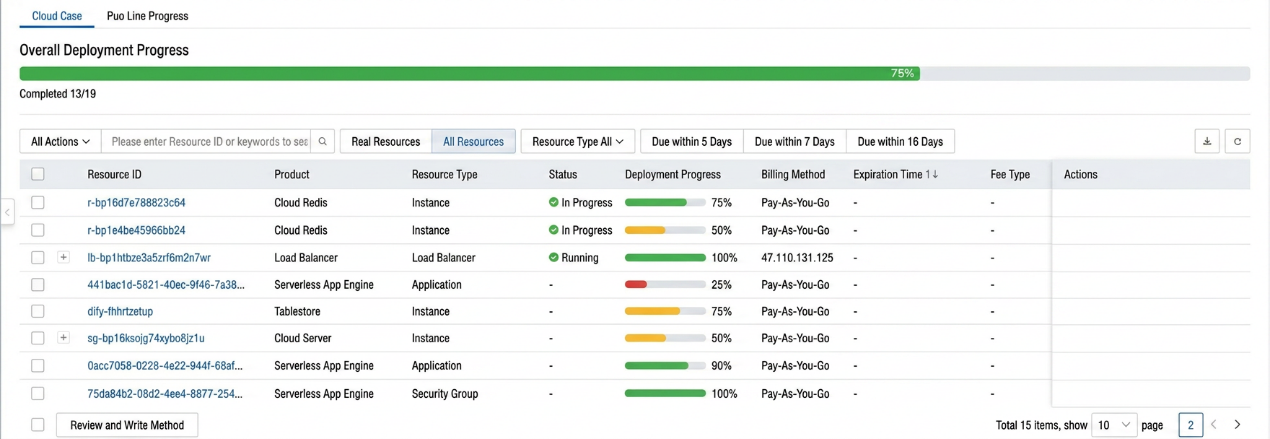
After deployment, enter the service address provided by the console—${EXTERNAL-IP}:${PORT}—directly in your browser to begin your Dify application orchestration journey.
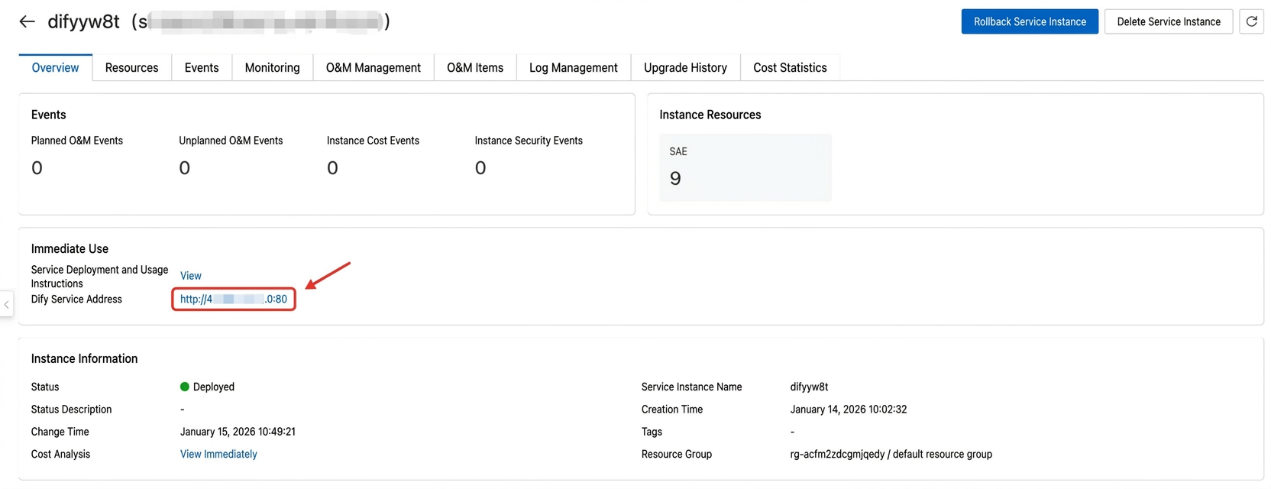
Note: After Dify starts and is running, the SLS plugin automatically creates the relevant logstores and index configurations. No manual intervention is required—simply navigate to the corresponding project in the SLS console to query and analyze workflow logs in real time.
Dify Community Edition's default configuration supports only 10 QPS, but that's just the starting point. Scaling from "getting started" to 500 QPS production capacity isn't a matter of simply throwing more server resources at the problem—it's a step-by-step "boss fight." Every time you try to increase throughput, you hit a new invisible ceiling—from basic parameter limits to deep architectural bottlenecks. The SAE team used full-stack load testing to map out and conquer the two core checkpoints on this progression, making high-performance deployment a well-charted path.
Dify Community Edition's default configuration is designed for quick developer tryout, not large-scale production. The default parameters for its core component dify-api are extremely conservative:
SERVER_WORKER_AMOUNT (worker processes): 1
SERVER_WORKER_CONNECTIONS (max connections per process): 10
These two parameters directly cap the throughput of a single node. But in production, you cannot simply "multiply by ten"—increasing application-layer concurrency immediately triggers a chain reaction in downstream databases.
As QPS grows, components like dify-api and dify-plugin-daemon open massive numbers of connections to PostgreSQL. Without end-to-end parameter coordination, the system easily collapses:
• Connection exhaustion: PostgreSQL has a finite total connection limit. Blindly increasing component concurrency drains database connections, causing subsequent requests to fail outright.
• Connection contention between components: SQLAlchemy's connection pool uses a "lazy loading" mechanism, and idle connections are not released until they expire. If misconfigured, non-critical components can hoard large numbers of idle connections while critical components starve for resources during peak traffic.
To prevent users from falling into a cumbersome parameter trial-and-error cycle, the SAE team conducted multiple rounds of full-stack load testing in real production environments. They identified the production-grade configuration matrix mapping API concurrency, database connection pool sizes, and component resource specifications across different traffic tiers. Users don't need to worry about parameter calculations—simply select the specification tier matching your estimated traffic to ensure every unit of compute translates into actual business throughput.
Note: The load testing scenarios do not include the code execution (Code Sandbox) path. Please evaluate and adjust the specifications and quantity of the dify-sandbox component based on the complexity of code execution in your actual business.
Configuration reference: https://help.aliyun.com/zh/sae/dify-performance-optimization
After optimizing database connections and stabilizing QPS at 200, the system throughput could not be pushed further. To locate the bottleneck, the SAE team used ARMS application monitoring deeply integrated into the SAE platform to perform trace analysis on the dify-plugin-daemon component—on the SAE console's application details page, click "Application Monitoring" to view the slowest call chains.
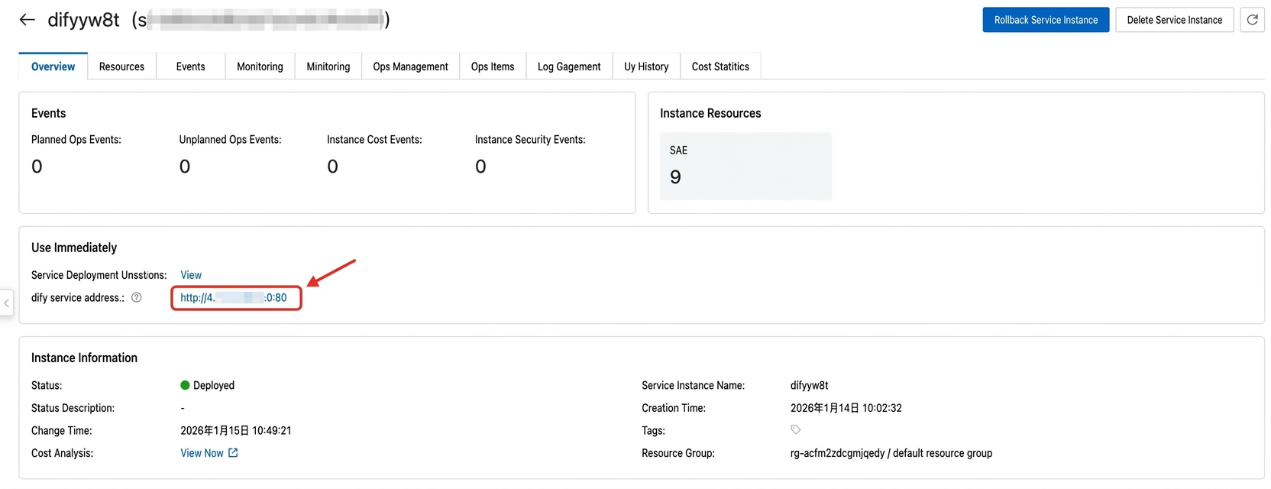
Trace data revealed that downstream Redis SET/DEL operations were failing frequently. The SAE team attempted to vertically scale the Redis instance to the maximum specification (64 cores), but the effect was minimal: the QPS ceiling did not improve, indicating that the bottleneck was not in capacity, but in the single-point architecture itself.
Code analysis revealed that this was a conflict between Dify's business logic and Redis's single-point architecture:
• dify-plugin-daemon generates a new Session ID for every data pipeline request and writes it to Redis. This session data is then read and verified on every subsequent request. This creates a pattern of high-frequency, small-payload read-write operations concentrated on a single key space.
• In the default architecture, all session read-write requests are concentrated on a single Redis node. Under 200+ QPS high-concurrency pressure, the single node becomes a throughput bottleneck—not due to insufficient memory, but because the network I/O and single-threaded command processing of a standalone Redis instance cannot handle the concurrent connection load.
To break through the single-machine architecture limitation, the SAE team went deep into the component internals and performed cluster adaptation for dify-plugin-daemon:
• Cluster protocol support: To address the native component's lack of Redis Cluster support, the SAE team modified the underlying code to fully support the Redis Cluster protocol, including hash-slot-aware key routing and cluster node auto-discovery.
• Read-write separation: Through architectural upgrade, the massive requests originally concentrated on a single machine were distributed across the cluster. The cluster's multi-node characteristics enable load distribution and read-write separation.
This transformation completely eliminated the single-point bottleneck, successfully supporting a smooth throughput increase from 200 QPS to 500 QPS.
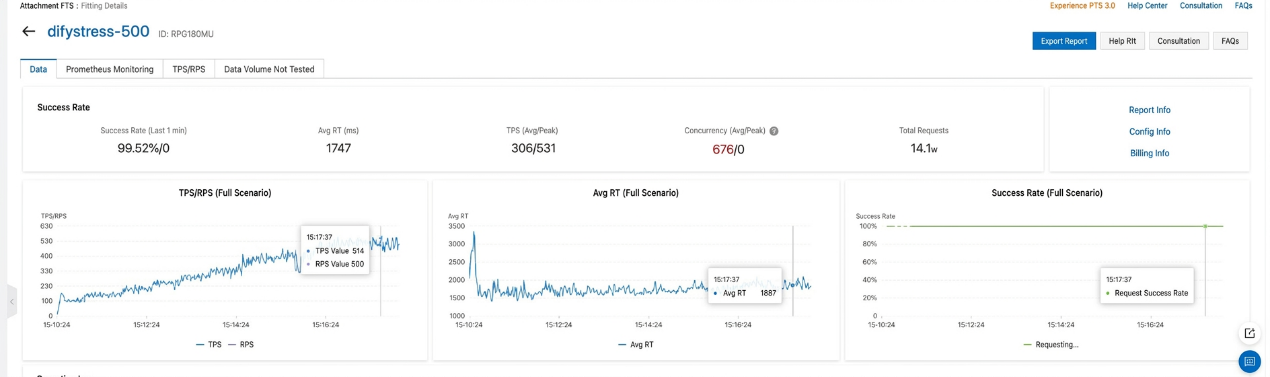
Once Dify is live, how do you assess model costs and performance? How do you analyze business trends? Powered by SLS's robust OLAP analysis engine, you can perform deep mining of Dify's workflow logs without pre-defining table schemas, building comprehensive dashboards covering both technical and business metrics.
For Dify's LLM nodes, the process_data field in workflow_node_execution logs contains detailed model invocation data, enabling sub-second multi-dimensional analysis of model usage.
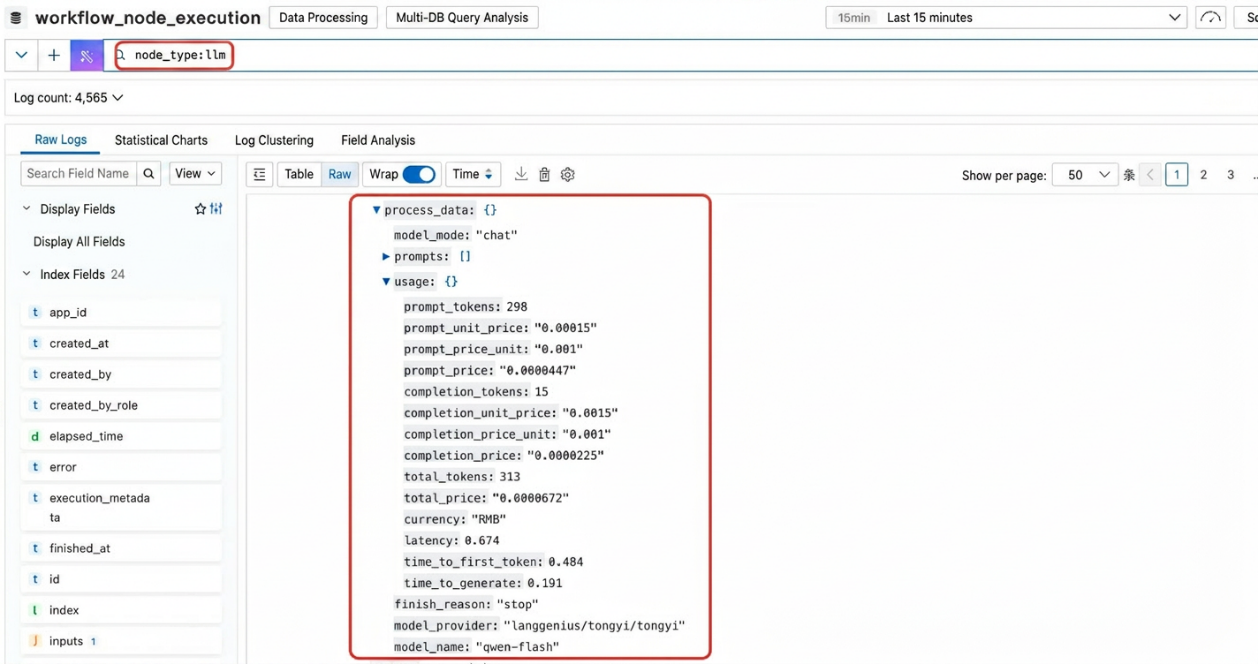
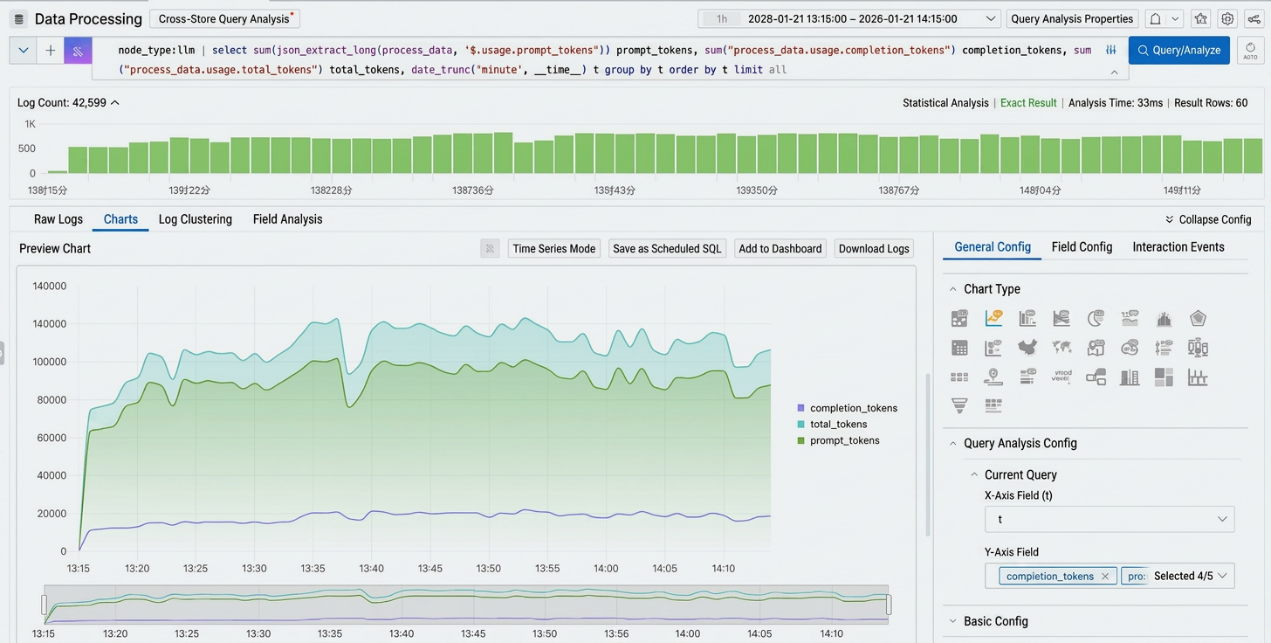
Real-time monitoring of token consumption trends is key to controlling AI costs. You can track input tokens (prompt_tokens), output tokens (completion_tokens), and total tokens over time, precisely identifying anomalous traffic.
Sample SQL:
node_type:llm | select
  sum(
json_extract_long(process_data, '$.usage.prompt_tokens')
) prompt_tokens,
sum("process_data.usage.completion_tokens") completion_tokens,
sum("process_data.usage.total_tokens") total_tokens,
date_trunc('minute', __time__) t
group by
  t
order by
  t
limit
  all
Note: Fields within JSON can be extracted directly in SQL using json_extract_xxx functions, such as json_extract_long(process_data, '$.usage.prompt_tokens'). For frequently used fields, we recommend creating additional JSON sub-indexes so you can reference the column name directly in SQL, such as "process_data.usage.completion_tokens", for more efficient statistical analysis.
LLM response speed directly impacts user experience. By analyzing the P50, P90, and P99 percentiles of time_to_first_token, you can objectively evaluate model response stability under different loads, providing data support for model routing or inference acceleration decisions.
Sample SQL:
node_type:llm| select
  date_format(__time__-__time__ % 60, '%m-%d %H:%i') as time,
  approx_percentile("process_data.usage.time_to_first_token", 0.25) as Latency_p25,
  approx_percentile("process_data.usage.time_to_first_token", 0.50) as Latency_p50,
  approx_percentile("process_data.usage.time_to_first_token", 0.75) as Latency_p75,
  approx_percentile("process_data.usage.time_to_first_token", 0.99) as Latency_p99,
  min("process_data.usage.time_to_first_token") as Latency_min
group by
  time
order by
  time
limit
  all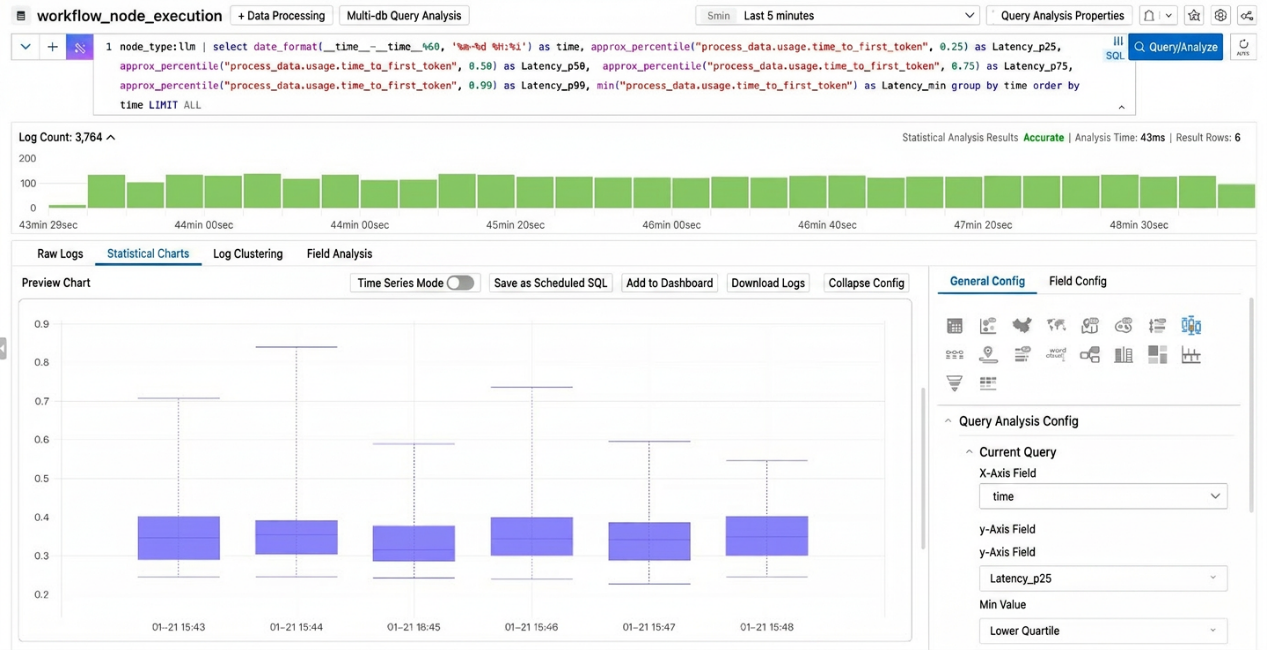
Beyond low-level model metrics, SLS can help you understand business logic at a deeper level. Using an "e-commerce AI customer service assistant" Dify application as an example, you can use SQL to dissect workflow node inputs and outputs to support operational decisions.
By analyzing the output of the "intent recognition" node in the workflow, you can quantify the most frequent user inquiry categories (e.g., returns/exchanges, shipping inquiries, coupons), and observe how these demands change over time—guiding knowledge base optimization efforts.
Sample SQL:
* and title: User intent recognition | select
  json_extract(outputs, '$.text') as "user intent",
  count(1) as pv
group by
  "user intent"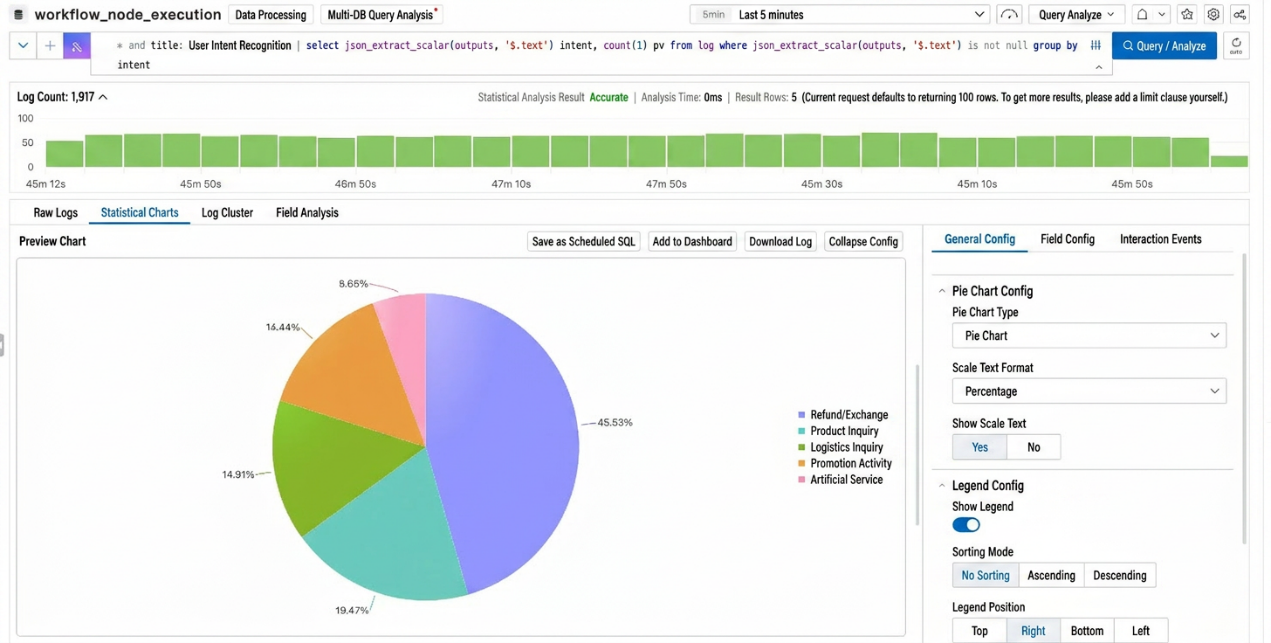
By tracking error rates for specific nodes or analyzing the downstream flow of specific intents, you can build funnel charts to quickly identify nodes causing user drop-off. For example, analyzing the "empty result" rate of the "product search" node can indicate whether the product knowledge base needs expansion.
You can use funnel charts to analyze and observe which intermediate workflow nodes have a high failure rate.
Sample SQL:
status:succeeded | select
title,
count(distinct workflow_run_id) cnt
group by
  title
order by
  cnt desc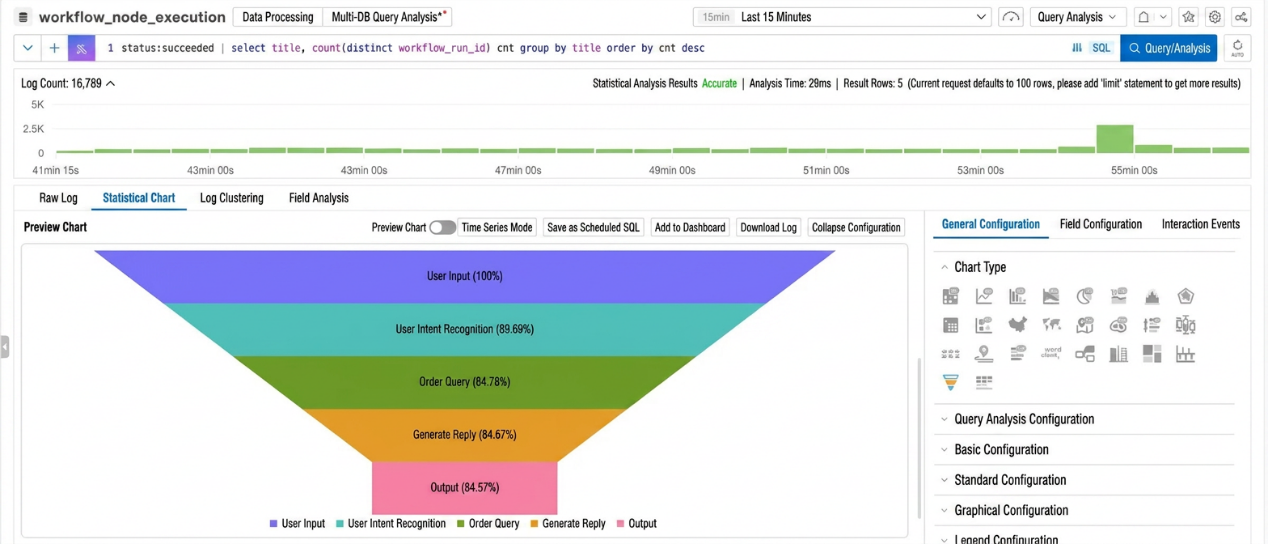
From "functional" to "production-ready," Dify's journey to production-grade deployment requires solid infrastructure support. The SAE × SLS joint solution is not just a simple combination of two cloud products—it delivers a full-stack Serverless architectural transformation for Dify through deep integration of "compute management" and "storage decoupling":
• Full-stack elasticity: The compute layer scales in seconds with traffic, the storage layer handles burst throughput effortlessly—a perfect match for the tidal characteristics of AI workloads.
• Structural cost reduction: Eliminates idle resource waste completely. Replaces expensive database expansion with low-cost tiered storage, maximizing ROI.
• Extreme stability: A fully managed, maintenance-free foundation combined with physical I/O isolation completely eliminates single-point-of-failure risks and database performance black holes.
• Deep insights: Breaks the "black box" between infrastructure monitoring and business data analytics, using token cost and user intent data to fuel business evolution.
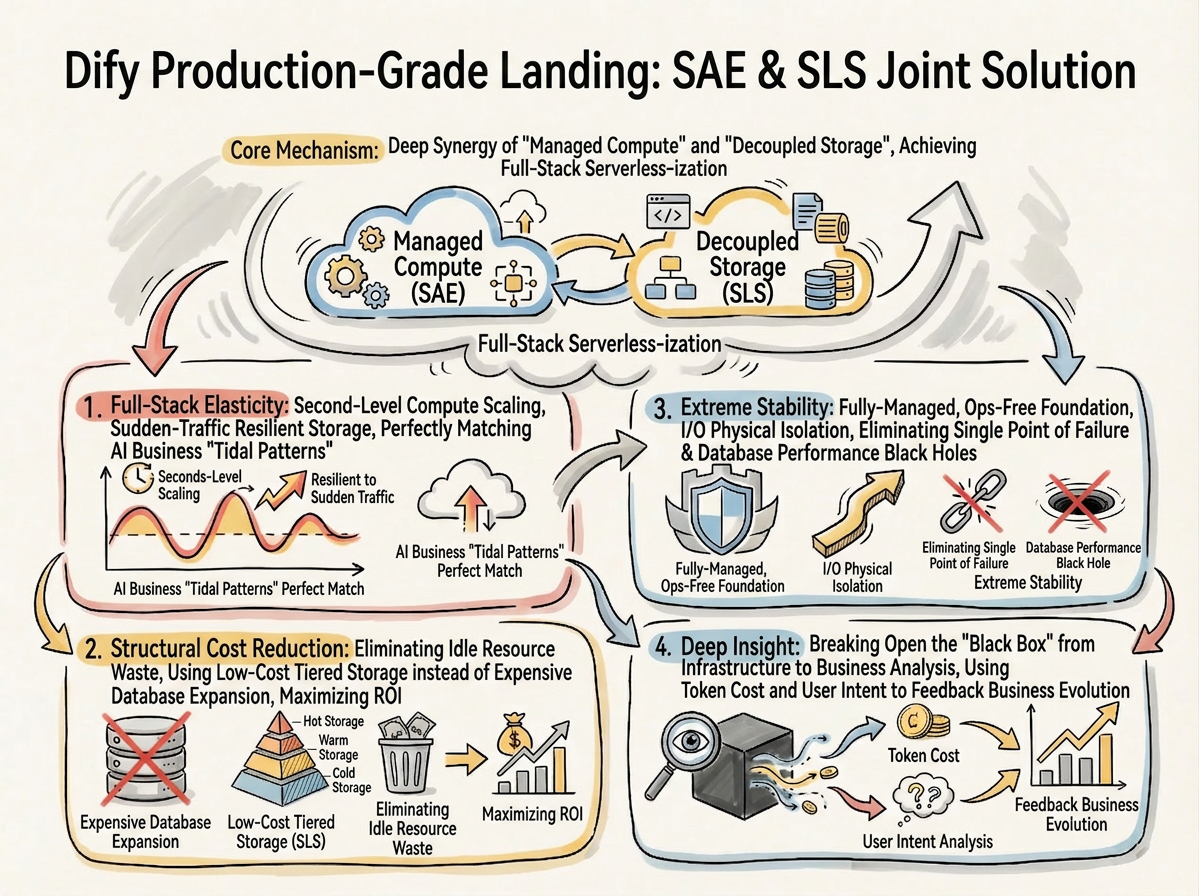
With this solution jointly released by SAE and SLS, Dify developers no longer need to worry about underlying resources and architecture. A single, simple configuration gives you a highly available, high-performance, cost-efficient AI application environment—allowing you to truly focus on business innovation and prompt tuning.
Get started now: Log on to the Alibaba Cloud SAE console[1], go to the App Center, search for the Dify template, select the Dify High-Performance Edition, and start your one-click managed deployment journey.
Alibaba Cloud Serverless App Engine (SAE) is a one-stop containerized application hosting platform built for the AI era, with the core philosophy of "supporting traditional applications and accelerating AI innovation." It simplifies operations, ensures stability, reduces costs by up to 75% through idle resource optimization, and enhances operational efficiency through an AI-powered assistant.
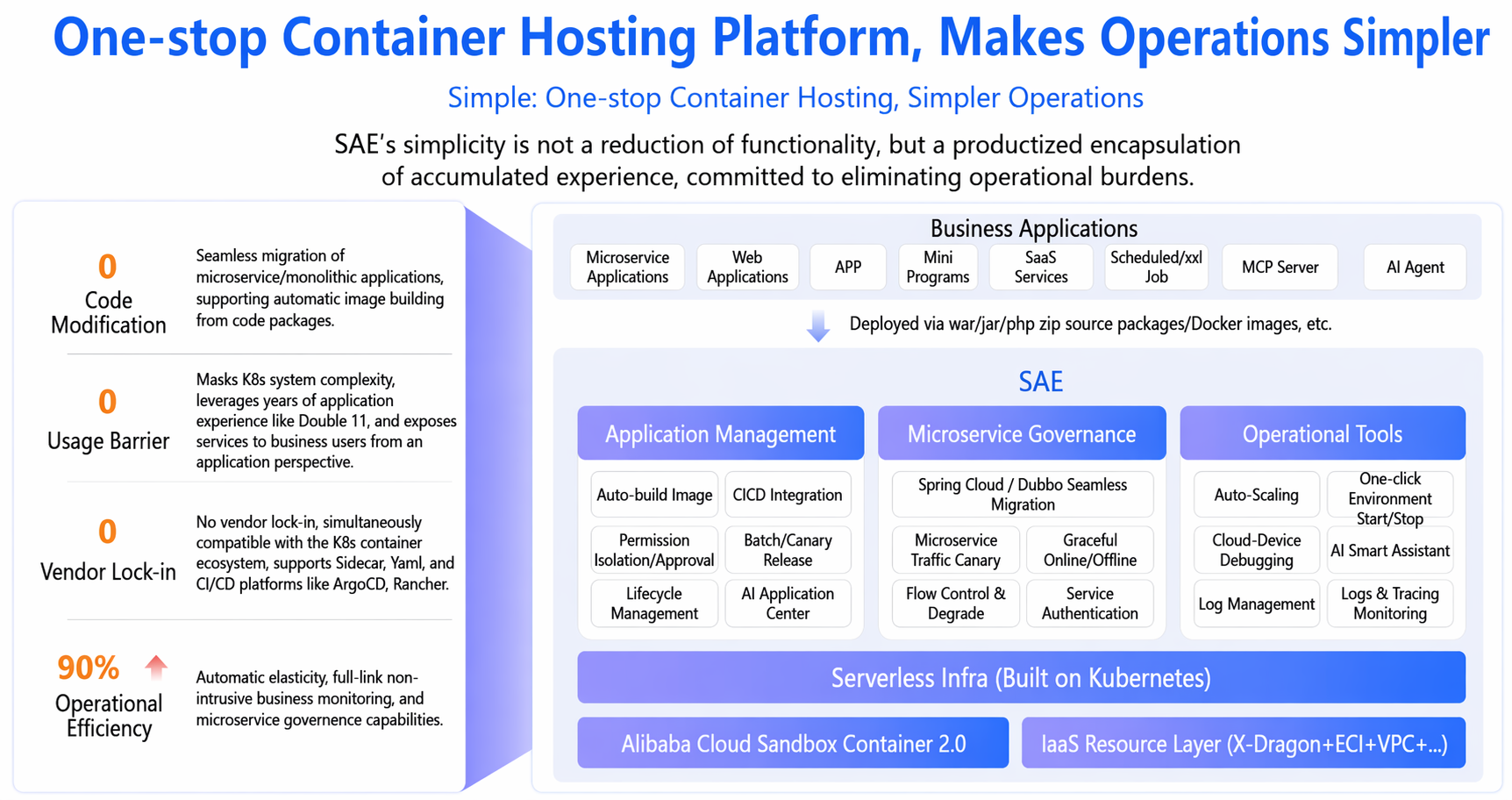
For AI workloads, SAE integrates mainstream frameworks like Dify, supporting one-click deployment and elastic scaling. In the Dify scenario, it achieves a 50x performance improvement and over 30% cost optimization.
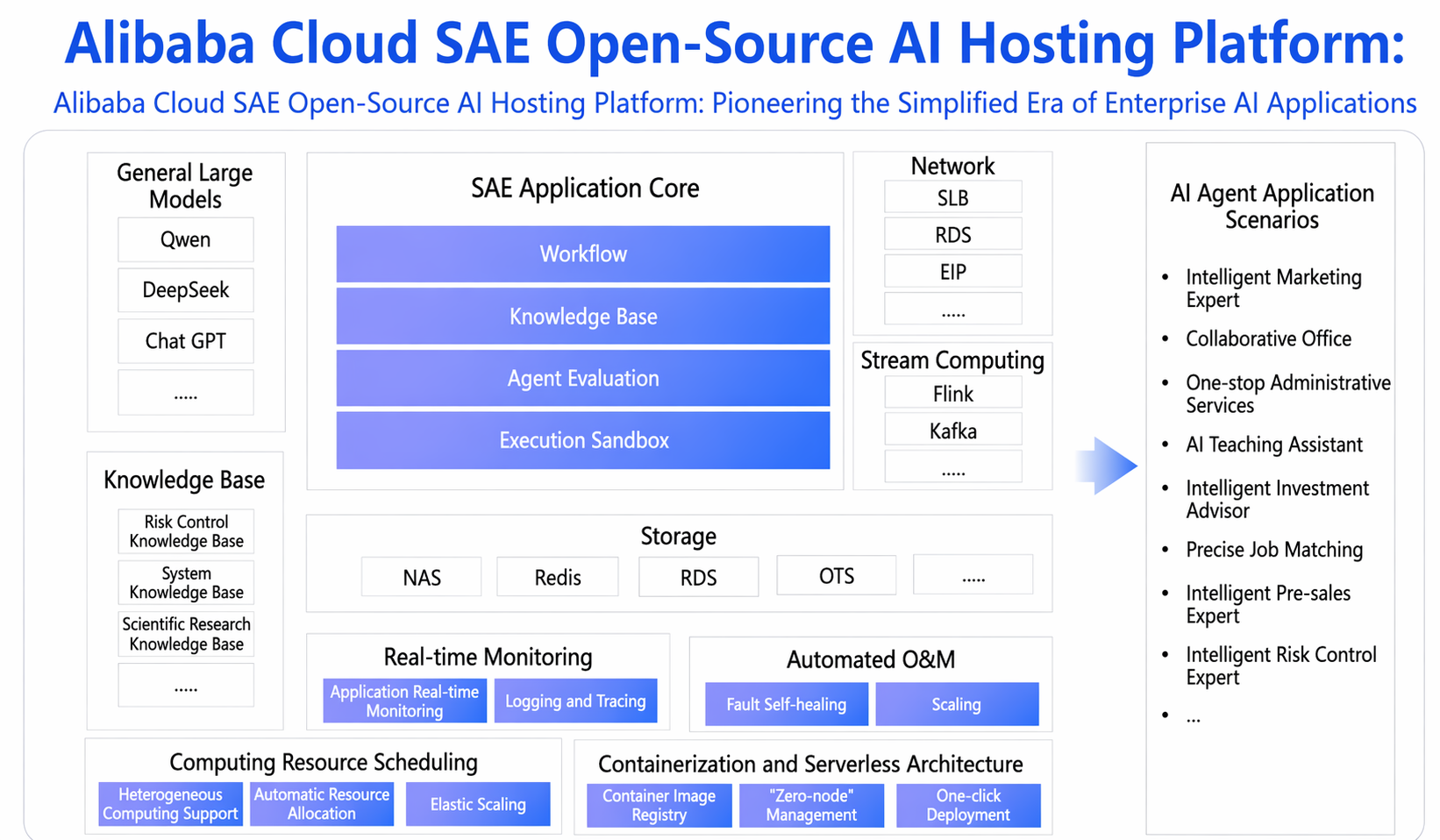
With eight years of technical refinement, SAE was named a Global Leader in the 2025 Gartner Magic Quadrant for Cloud-Native Platforms—ranked #1 in Asia—helping enterprises achieve zero node management and focus purely on business innovation. SAE serves as both a "hosting platform" for traditional application modernization and an "acceleration engine" for large-scale AI application deployment.
1. Traditional Application Operations: The "Simplify, Stabilize, Save" Approach
• Simplify: Zero operational overhead — focus on business innovation
• Stabilize: Enterprise-grade high availability with built-in comprehensive protection
• Save: Extreme elasticity that brings costs down to measurable levels
2. Accelerating AI Innovation: From Rapid Exploration to Efficient Deployment
• Rapid exploration: Built-in templates for Dify, RAGFlow, OpenManus, and other popular AI applications — ready out of the box, with POC up and running in minutes;
• Reliable deployment: Production-grade AI runtime with performance optimizations (e.g., 50x performance boost for Dify), seamless upgrades, and multi-version management for enterprise-grade reliable delivery;
• Easy integration: Deep integration with gateways, ARMS, metering, and auditing capabilities to accelerate the intelligent transformation of traditional applications.
✅ Startups: No dedicated ops team, need to launch quickly
✅ SMBs: Looking to cut costs and embrace cloud-native
✅ Large enterprises: Requiring enterprise-grade stability and compliance
✅ Global businesses: Needing China + worldwide deployment
✅ AI innovation teams: Looking to rapidly deploy AI applications
Product page: https://www.alibabacloud.com/product/severless-application-engine
[1] Alibaba Cloud SAE console
https://saenext.console.aliyun.com/overview?accounttraceid=db100a4af9c7405e88dcfb89e81c5281ibby

780 posts | 60 followers
FollowAlibaba Cloud Native Community - November 20, 2025
Alibaba Cloud Native Community - April 15, 2025
Alibaba Cloud Native Community - September 9, 2025
Alibaba Cloud Native Community - January 16, 2023
Alibaba Cloud Serverless - February 28, 2023
Alibaba Cloud Native Community - September 4, 2025
780 posts | 60 followers
Follow Simple Log Service
An all-in-one service for log-type data
Learn More Auto Scaling
Auto Scaling automatically adjusts computing resources based on your business cycle
Learn More Log Management for AIOps Solution
Log into an artificial intelligence for IT operations (AIOps) environment with an intelligent, all-in-one, and out-of-the-box log management solution
Learn More Conversational AI Service
This solution provides you with Artificial Intelligence services and allows you to build AI-powered, human-like, conversational, multilingual chatbots over omnichannel to quickly respond to your customers 24/7.
Learn MoreMore Posts by Alibaba Cloud Native Community

