A hands-on tutorial comparing Token API, PTU, Model Unit, and Bare Metal GPU for production LLM inference. Real numbers. Real deployments.
It was a Tuesday afternoon when Sarah, the engineering lead at a fast-growing fintech startup, slammed her laptop shut.
Her team had spent two weeks integrating DeepSeek V4-Flash into their customer support chatbot. The model worked beautifully in testing. Responses were fast, reasoning was sharp, and hallucination rates were lower than anything they had tried before. The demo went perfectly.
Then they looked at the cloud bill.
At their current traffic — roughly 8 million tokens per day — the Token API costs were eating their AI budget alive. And it was only going to get worse as they rolled out to more customers.
Sarah had four options on the table. But here is the thing: every blog post she read and every vendor deck she sat through claimed their option was "the best." Token API was "the fastest to start." PTU was "the most predictable." Model Unit was "the most cost-efficient at scale." And her lead engineer was whispering about just renting GPUs and running everything themselves.
The problem? Nobody had actually benchmarked all four against each other on the same model, with the same workload, on the same cloud.
So we did.
This article is the full walkthrough of what we found — complete with step-by-step deployment instructions, real benchmark numbers, and a clear decision framework you can use for your own workload.
Before we touch a single line of code, you need to understand the four deployment models available on Alibaba Cloud. They are not just different pricing tiers. They are fundamentally different engineering and economic models.
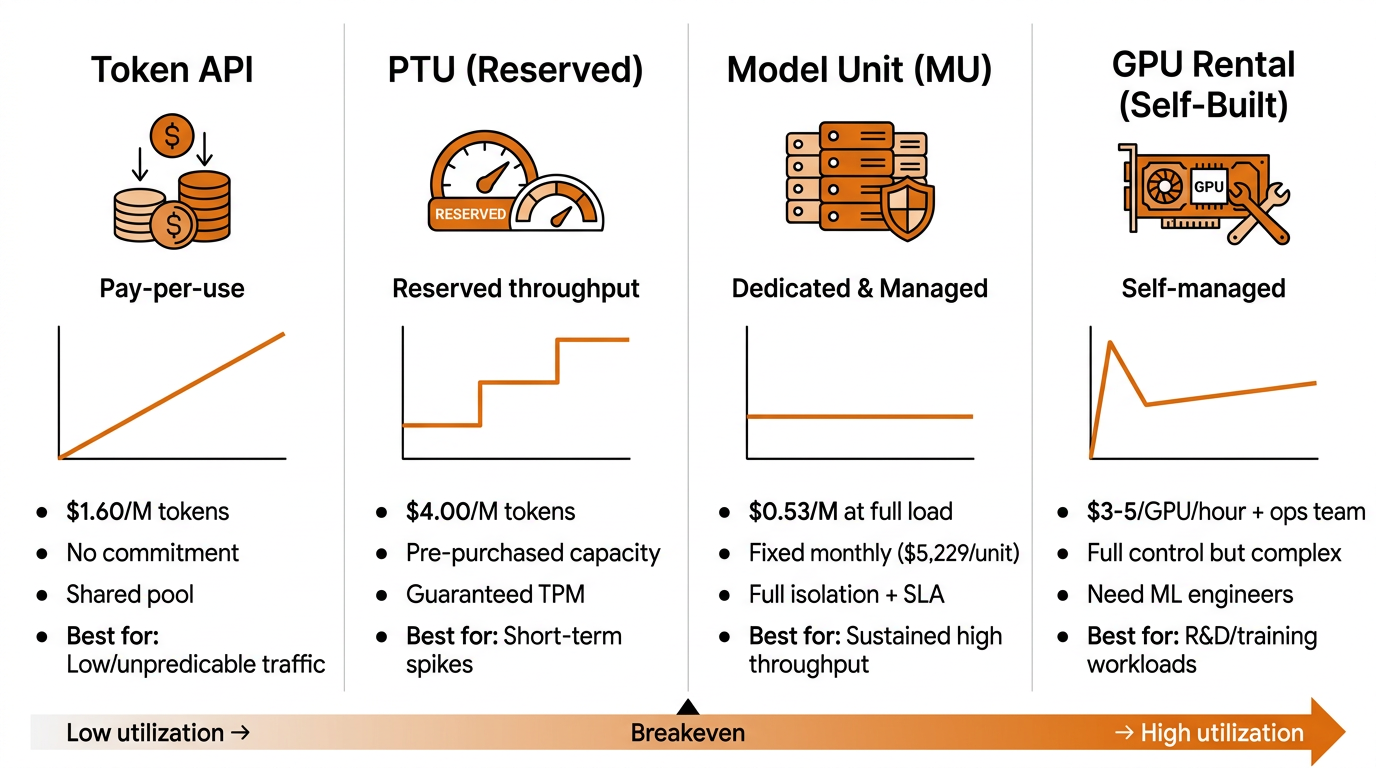
Note: All prices shown are estimated and taken from publicly available sources. Actual pricing may vary depending on region, contract terms, and promotional offers.
This is the default entry point. You call an API endpoint, send your prompt, receive a completion, and pay for every token that flows through the system.
PTU is Alibaba Cloud's answer to the predictability problem. Instead of paying per token, you pre-purchase a guaranteed throughput tier measured in tokens per minute (TPM).
This is where things get interesting. Model Unit gives you a dedicated cluster of GPUs exclusively for your workload, fully managed by Alibaba Cloud.
The nuclear option. You rent raw GPU instances (H20, H200, or soon B300) and deploy your own inference stack.
Let us start with the easiest option. If you have never used Alibaba Cloud's AI services before, this is where you begin.
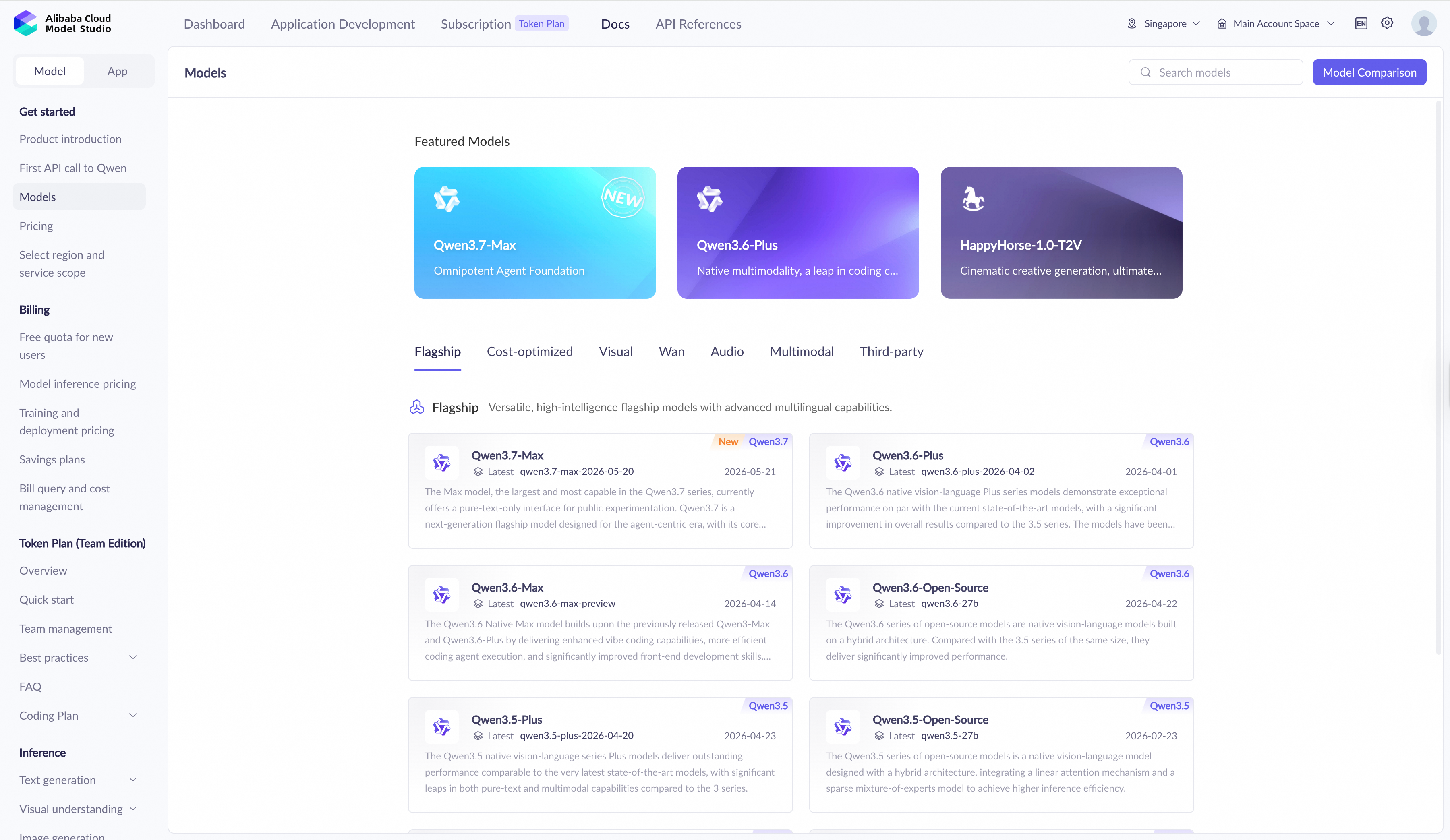
Log into the Alibaba Cloud console and navigate to Model Studio. This is the unified model marketplace and API gateway for all Alibaba Cloud AI services.
In the model catalog, search for DeepSeek V4-Flash. You will see it listed alongside other popular models like Qwen3, GLM, and Wan.

Click into the DeepSeek V4-Flash model page. You will see a Get API Key button. Click it, create a new API key, and copy it to your clipboard.
Store this key securely. It is your authentication token for all API calls.
Here is a minimal Python script to verify everything works:
import requests

API_KEY = "your-api-key-here"
ENDPOINT = "https://dashscope.aliyuncs.com/compatible-mode/v1/chat/completions"

headers = {
    "Authorization": f"Bearer {API_KEY}",
    "Content-Type": "application/json"
}

payload = {
    "model": "deepseek-v4-flash",
    "messages": [
        {"role": "system", "content": "You are a helpful assistant."},
        {"role": "user", "content": "Explain quantum computing in one paragraph."}
    ],
    "max_tokens": 256
}

response = requests.post(ENDPOINT, headers=headers, json=payload)
print(response.json()["choices"][0]["message"]["content"])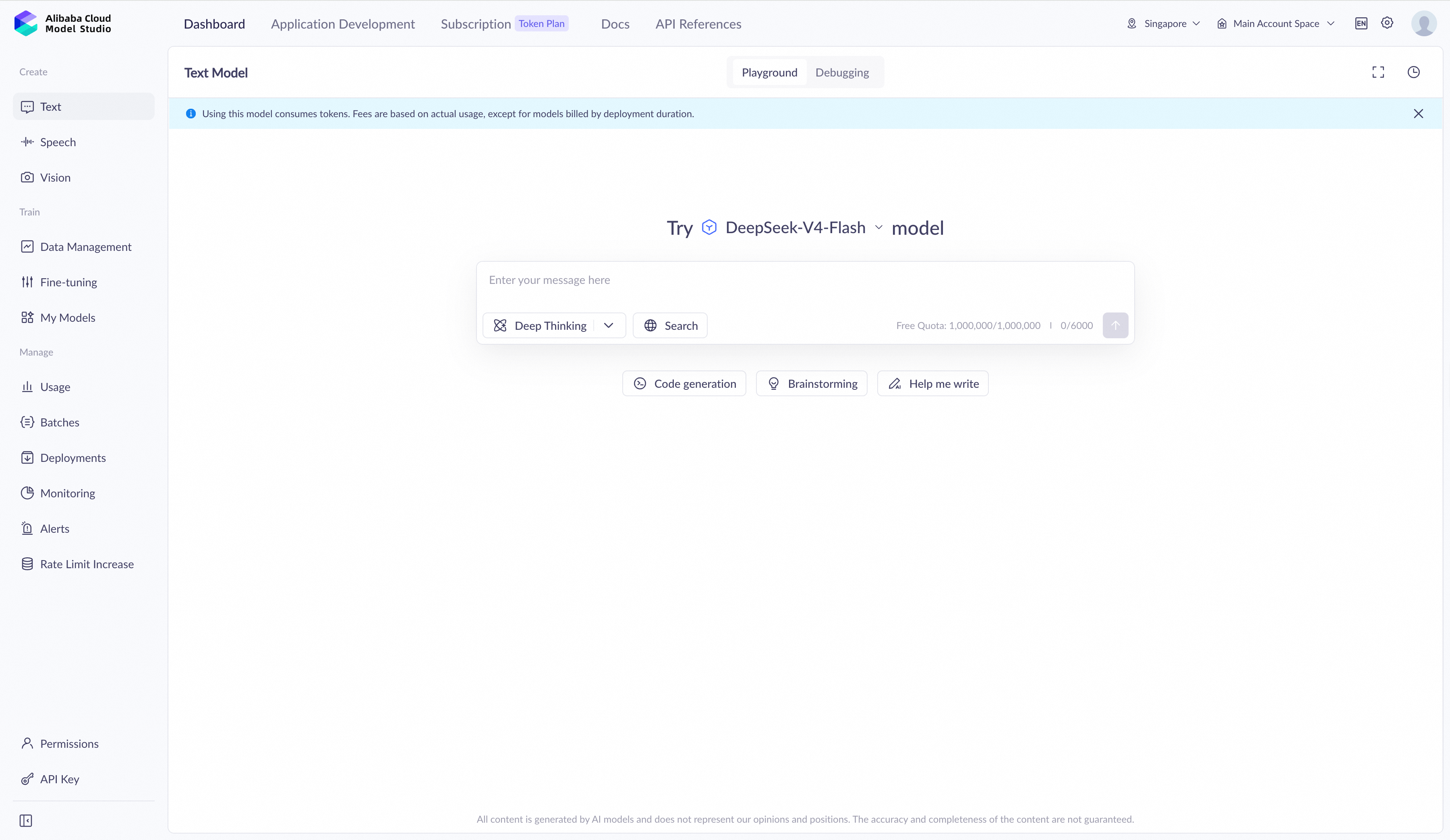
Run it. If you see a coherent paragraph about quantum computing, congratulations — you are now calling DeepSeek V4-Flash through the Token API.
Token API pricing follows a simple per-token model. You pay separately for input and output tokens, with output tokens typically costing ~4x more than input tokens.
For a typical chat interaction with a 2K input prompt and 1K output response, the cost per request is fractions of a cent. At low volumes (e.g., 10,000 requests/day), monthly costs stay modest. But costs scale linearly — and that is the problem.
That is fine for prototyping. But what happens at 100,000 requests per day? Or 1 million?
Let us illustrate the scaling pattern:
| Daily Requests | Avg Tokens/Request | Relative Monthly Cost |
|---|---|---|
| 10,000 | 3K | 1x (baseline) |
| 50,000 | 3K | ~5x |
| 100,000 | 3K | ~10x |
| 500,000 | 3K | ~50x |
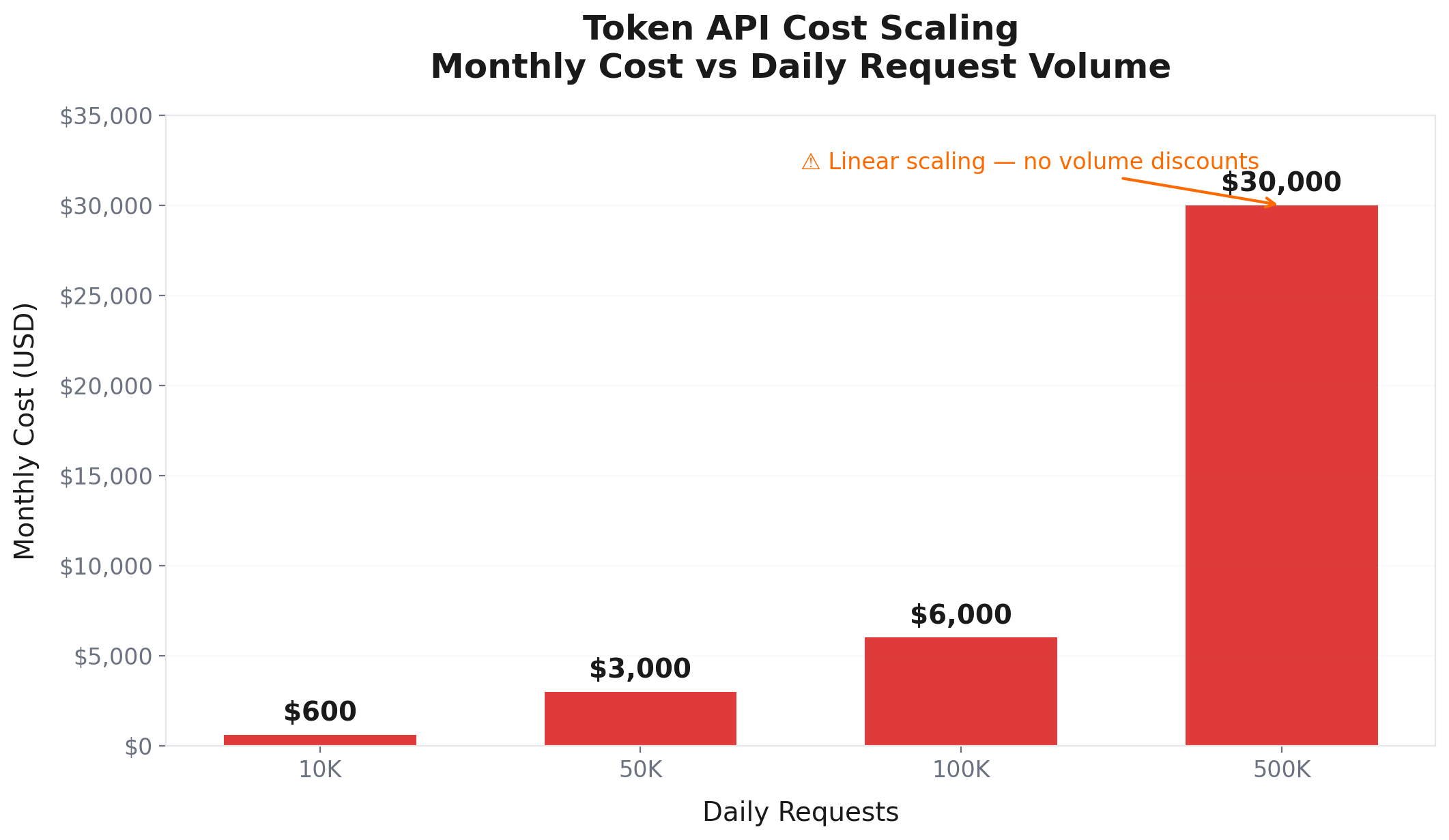
The numbers get painful fast. This is exactly what Sarah saw in her fintech startup.
Let us say your traffic is not random. You have a SaaS product with 10,000 daily active users, and usage peaks predictably between 9 AM and 6 PM. You know you need roughly 500,000 tokens per minute during peak hours.
PTU is designed for this.
Instead of paying per token, you purchase a PTU tier that guarantees a certain throughput. Alibaba Cloud reserves GPU capacity for your workload. During peak hours, your requests bypass the shared pool and go straight to your reserved capacity.
The pricing model has two components:
If you exceed your reserved capacity, overflow requests fall back to Token API pricing.
PTU starts making financial sense when your daily token volume is high enough that the reservation fee plus reduced usage rate beats the pure Token API cost. The break-even point depends on your specific tier and negotiated rates, but as a rough rule of thumb:
For Sarah's team, PTU would have been a step up from Token API. But it still had a ceiling. Once they outgrew their reserved tier, costs would spike again. And they were planning to 10x their user base in the next quarter.
This is where we get to the main event. Sarah's team needed something that could scale with them without bankrupting them. They needed dedicated resources, guaranteed performance, and a pricing model that got cheaper the more they used it.
They needed Model Unit.
Here is the key insight that makes Model Unit different from everything else: fixed cost.
You pay a flat monthly fee per Model Unit. It does not matter if you process 1 million tokens or 1 billion tokens. The cost is the same.
For DeepSeek V4-Flash, a typical configuration uses 4x MU1 units on H20-141G GPUs. Based on rough estimates from publicly available sources:
Now compare that to Token API at the same volume. At ~500 million tokens per day (roughly what 4x MU1 can handle at peak), Token API would cost approximately:
The takeaway: at sustained high throughput, Model Unit can deliver roughly 40–50% savings over equivalent Token API spend — and you get dedicated resources with guaranteed SLA.
Note: These figures are rough estimates for illustrative purposes only. Actual pricing depends on region, commitment terms, and volume. Always confirm with official pricing before making procurement decisions.
But here is the even more interesting number: the effective cost per million tokens.
At 100% utilization of 4x MU1 (Peak TPM ~550,000):
Of course, no one runs at 100% utilization 24/7. Let us look at this from a more practical angle. Most production workloads run during business hours, maybe 8-12 hours per day, with variable load.
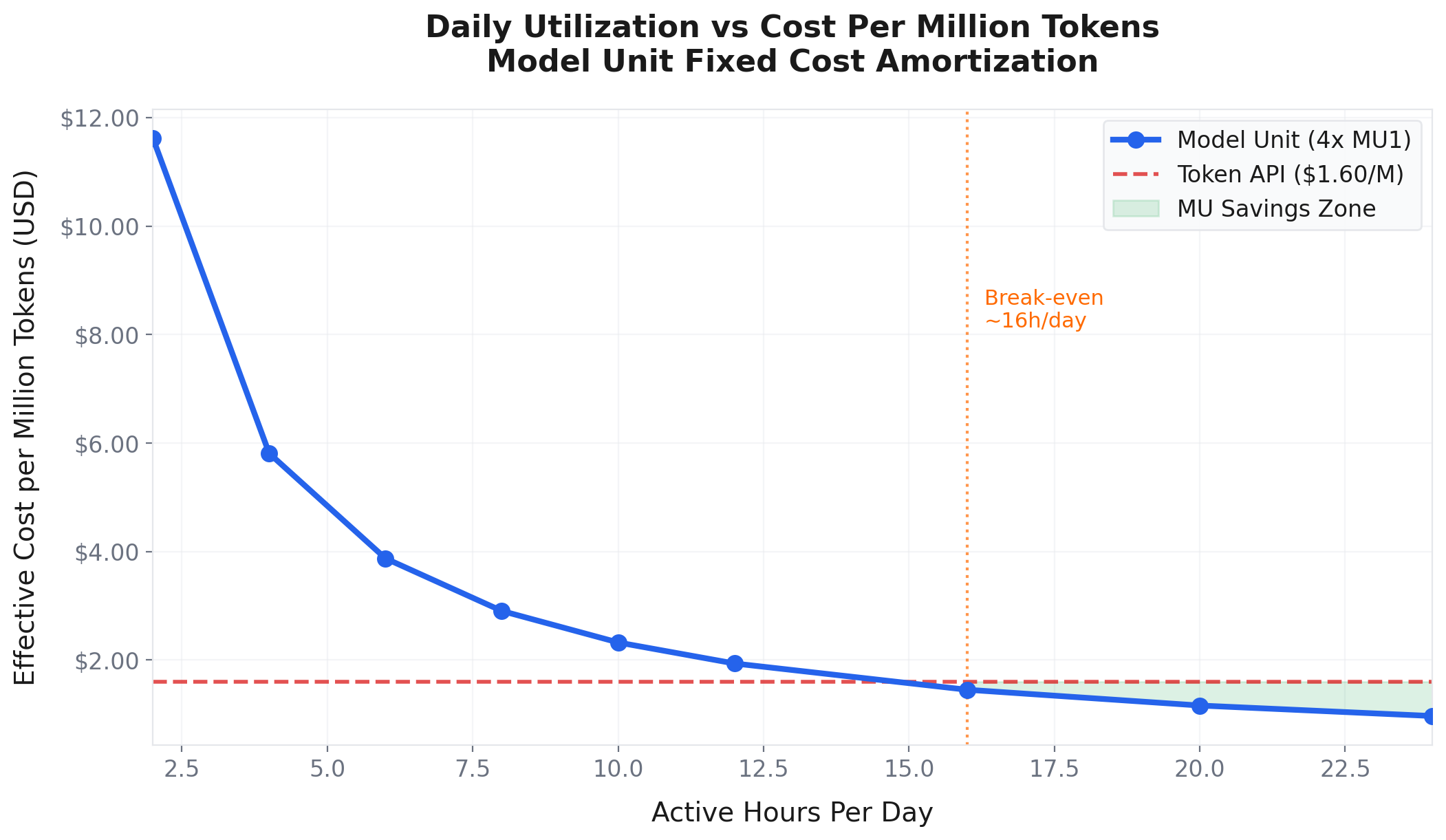
The chart above shows the effective cost per million tokens at different daily utilization levels. At 4 hours per day of active usage, your effective cost is still competitive with Token API. At 12+ hours per day, Model Unit becomes dramatically cheaper.
And here is the monthly cost comparison:
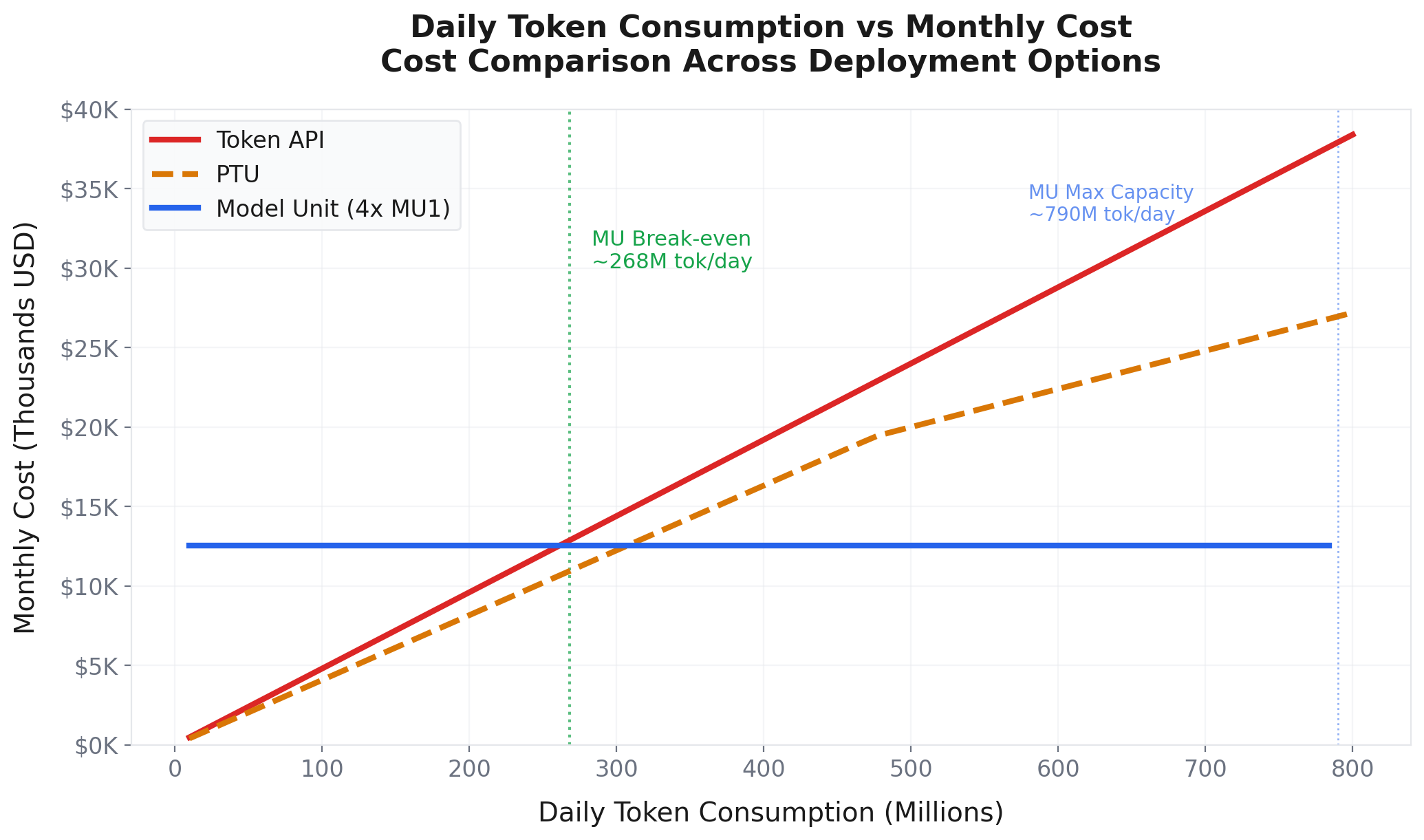
The break-even point against Token API is roughly 2.6 million tokens per day. Below that, Token API is cheaper. Above that, Model Unit wins decisively.
Model Unit is not just about price. It is about what you can do with dedicated infrastructure:
For Sarah's fintech application, that last point alone was worth the switch. Financial data cannot touch a shared pool.
Before we deploy anything, let us acknowledge the elephant in the room. Why not just rent GPUs and run everything yourself?
It is a fair question. And for some teams, it is absolutely the right answer.
You rent H20 or H200 GPU instances. You install vLLM or SGLang. You download the DeepSeek V4-Flash weights. You configure tensor parallelism, pipeline parallelism, quantization, and KV cache settings. You set up load balancing, monitoring, autoscaling, and failover.
Then you maintain it.
The GPU rental is not the real cost. The real cost is the team:
Even if the GPU rental is slightly cheaper on paper than Model Unit, the fully loaded cost of the team (often 2-3x the GPU rental itself) almost always makes Model Unit the better economic choice for production inference.
Where bare metal wins:
For Sarah's team, bare metal was off the table. They needed to ship features, not manage GPU clusters.
Now let us get our hands dirty. This is the step-by-step deployment walkthrough.
A quick note before we start: PAI-EAS deployment is not the same as a Model Unit deployment. PAI-EAS is the general-purpose managed serving platform, and Model Unit is just one of several resource and billing models you can run on top of it. The walkthrough below covers a standard PAI-EAS deployment of DeepSeek V4-Flash, where you choose the instance type that fits your workload (or accept the recommendation on the Model Gallery). If you specifically want the dedicated MU pricing model, you would select Model Unit resources at the resource configuration step instead.
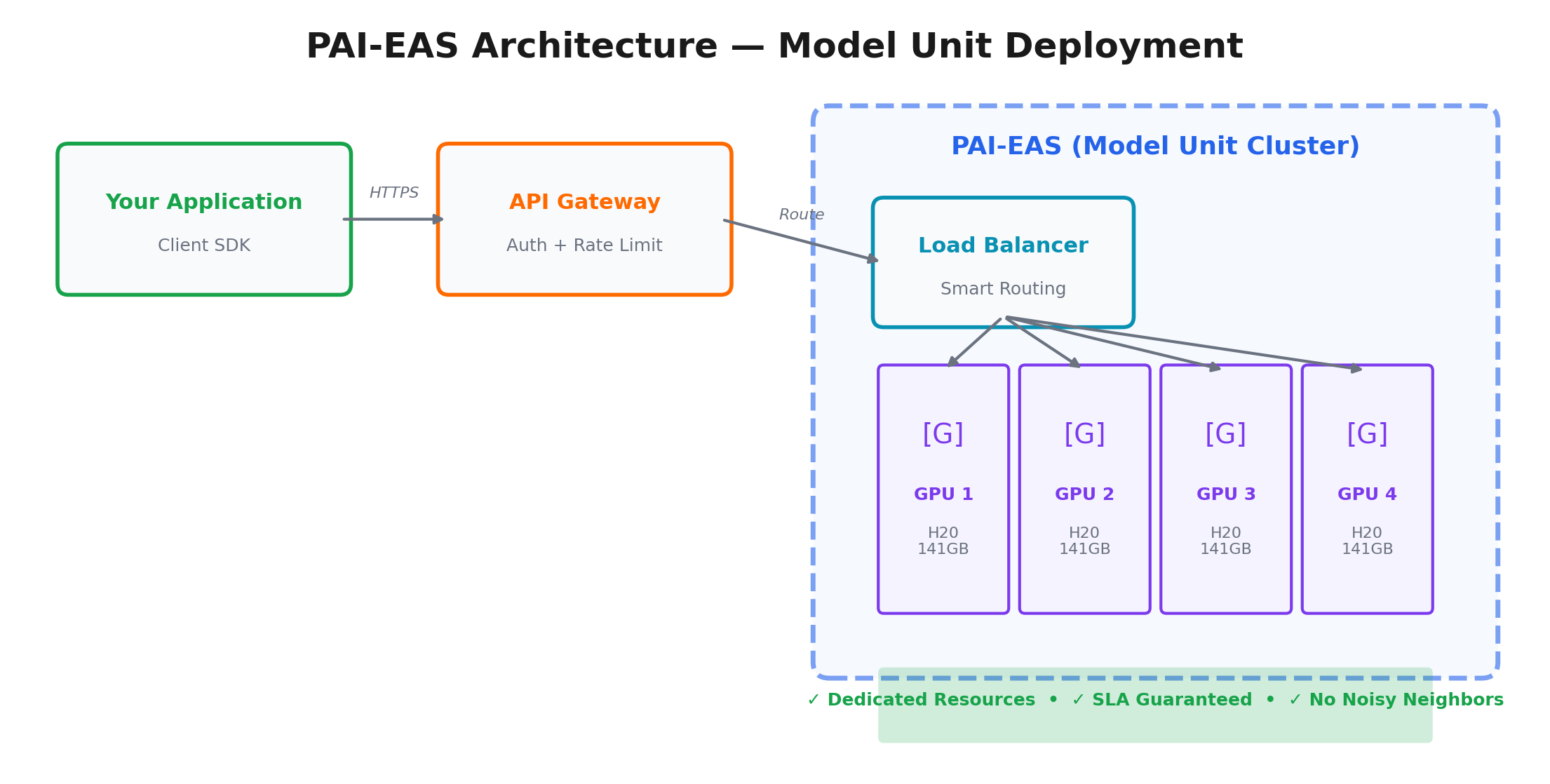
PAI-EAS (Elastic Algorithm Service) is Alibaba Cloud's managed model serving platform. It hosts any supported model on dedicated GPU instances and handles load balancing, autoscaling, monitoring, and endpoint management for you.
PAI-EAS supports multiple resource backends: regular pay-as-you-go GPU instances, subscription GPU instances, and Model Unit (MU) capacity. In other words, PAI-EAS is the platform; Model Unit is one of several ways to pay for and consume capacity on it. The deployment flow that follows is the same regardless of which backend you pick.
Before deploying, you need to decide on your configuration:
For this tutorial, we will deploy 4 instances of the recommended GPU type from the Model Gallery in the Singapore region.
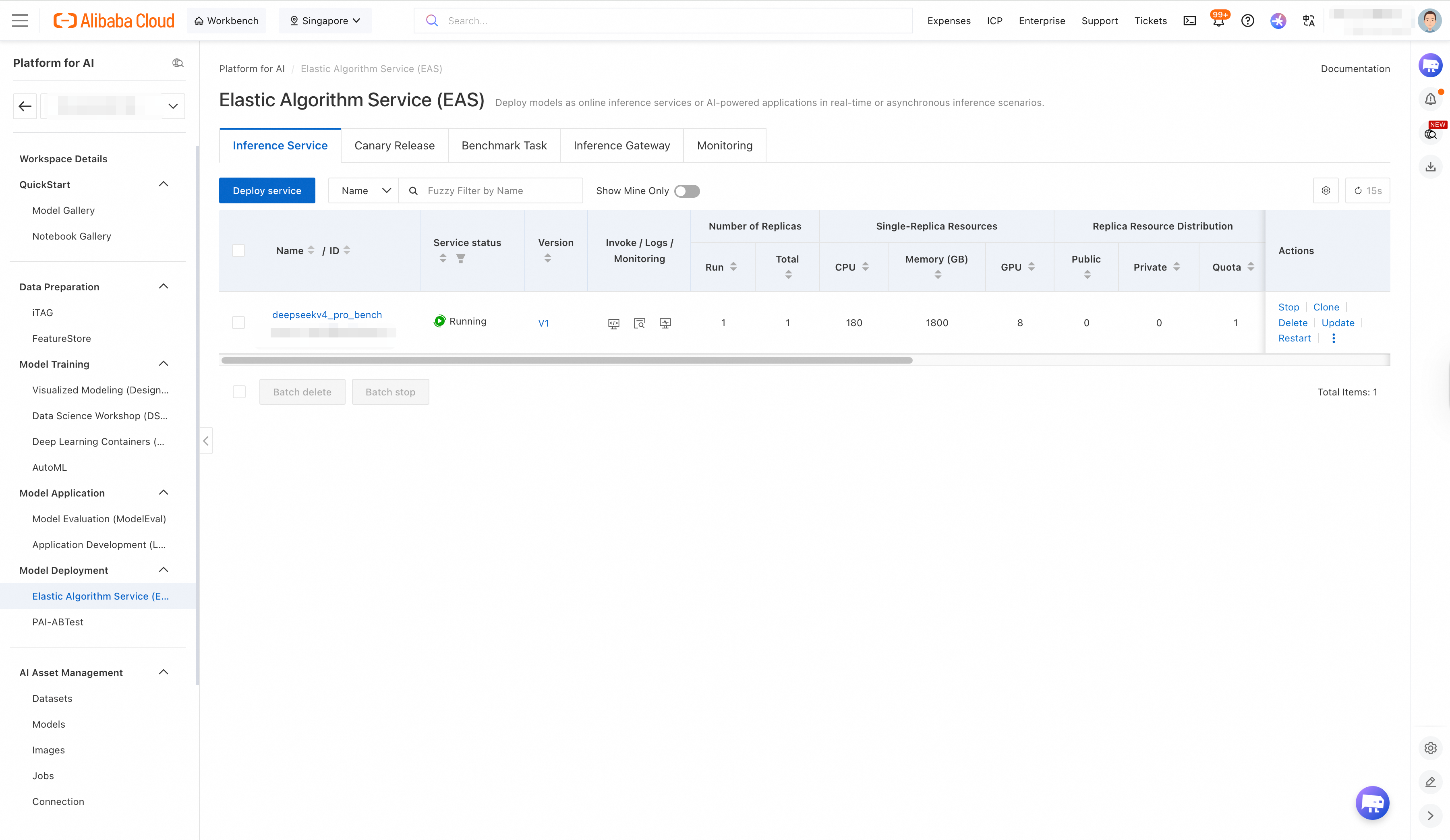
Navigate to the PAI console and select EAS from the left menu.
Click Create Service. You will see a deployment wizard.
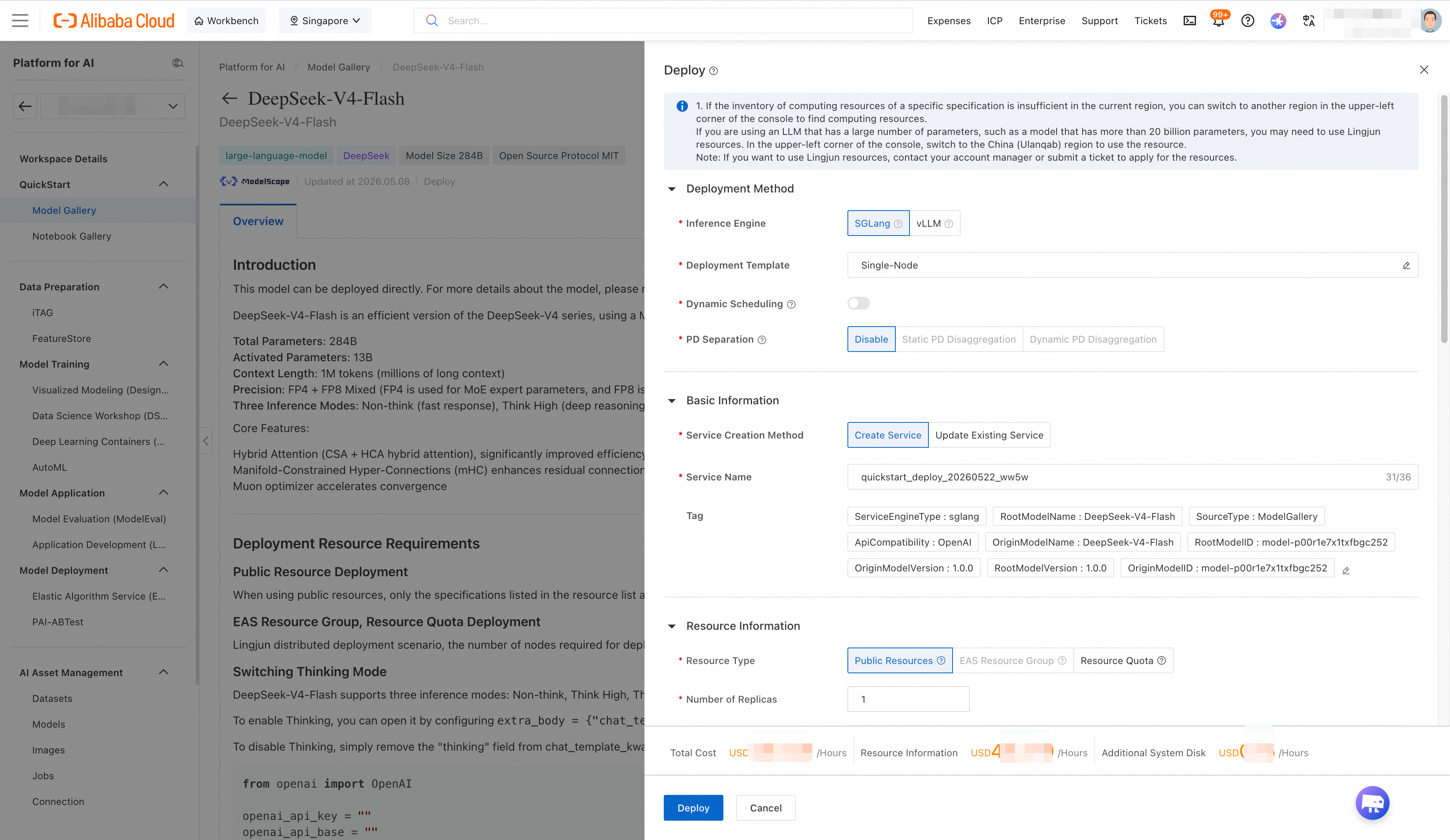
Service Name: deepseek-v4-flash-prod
Model Source: Select "Custom Model" and specify the DeepSeek V4-Flash model artifact. If the model is available in the Alibaba Cloud model registry, you can select it directly. Otherwise, provide the OSS path to your model weights.
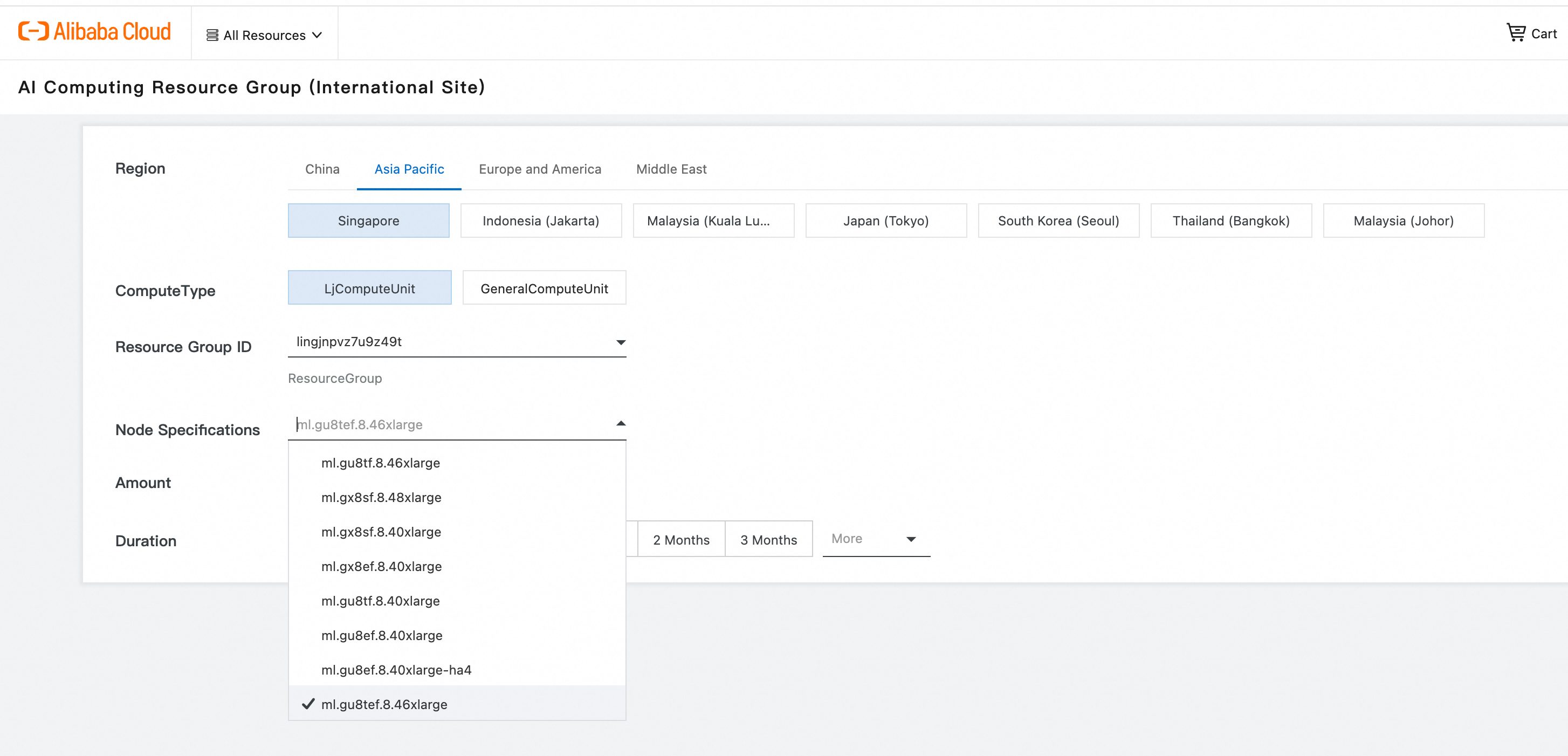
Resource Configuration:
Framework Configuration:
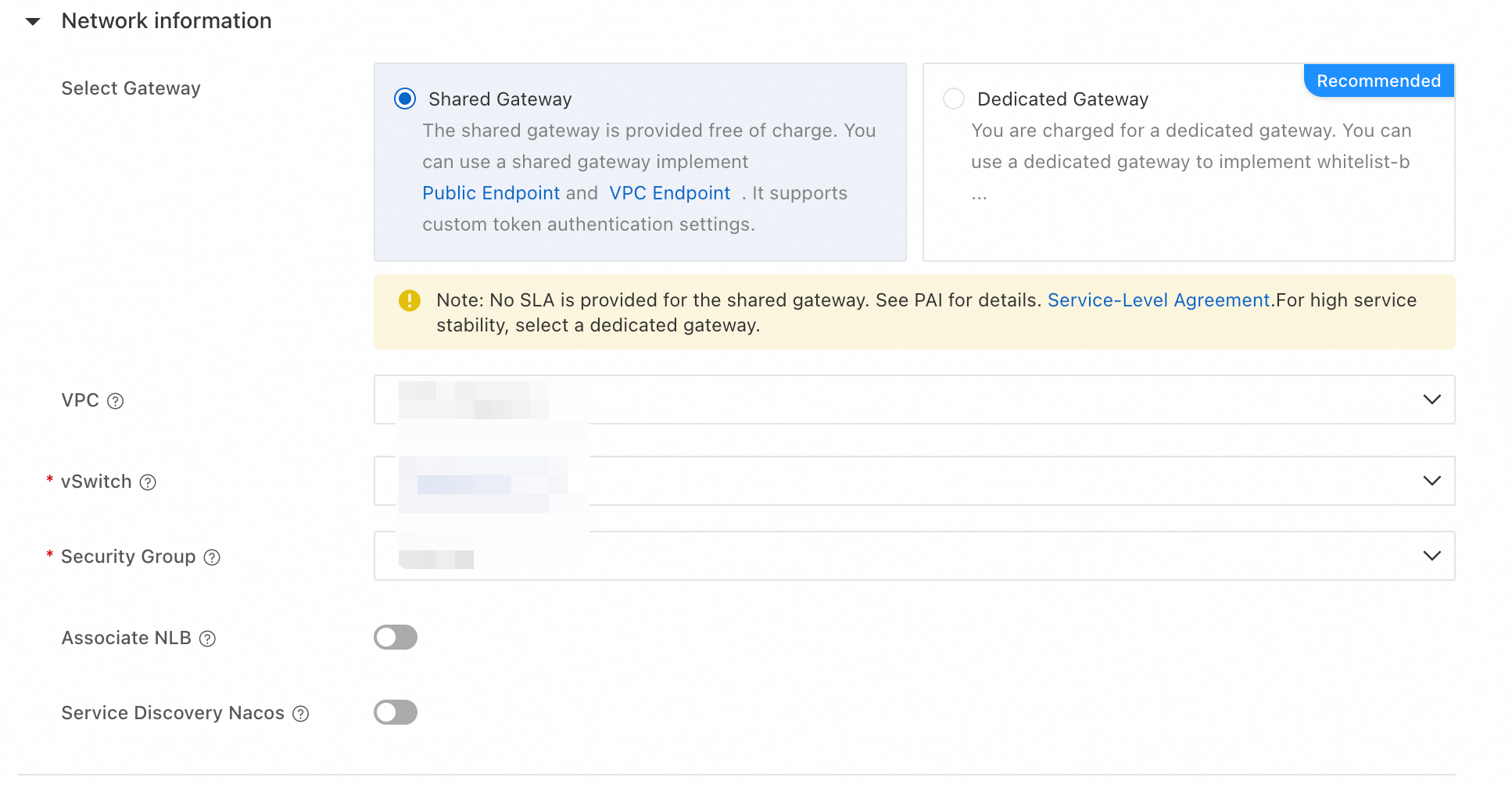
Set your VPC and vSwitch. For internet-facing APIs, enable the public endpoint. For internal services, use the private endpoint within your VPC.
Enable API key authentication. Generate a service-specific API key.
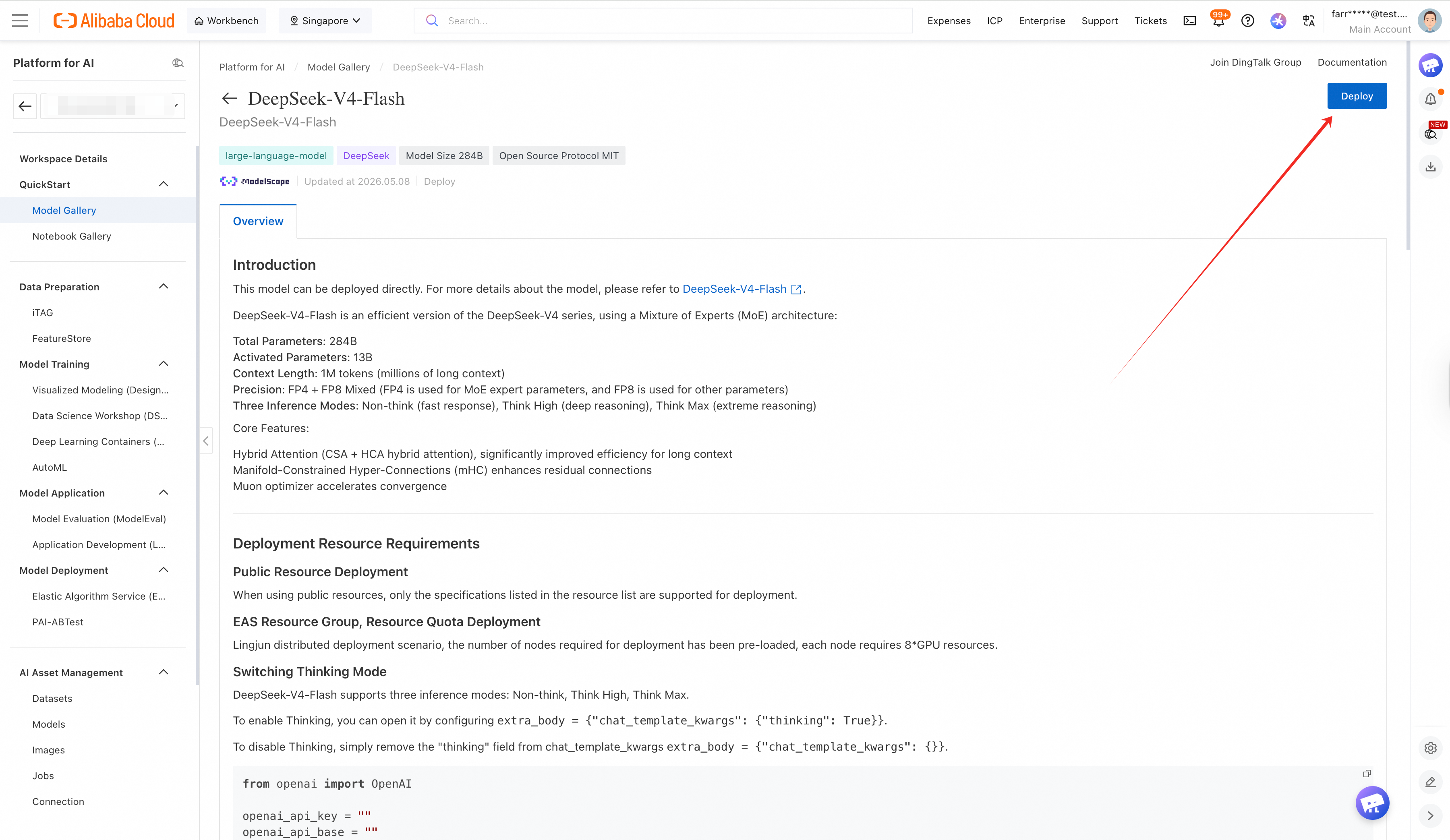
Click Deploy. The provisioning process takes 5-10 minutes as PAI-EAS allocates your dedicated GPU resources and loads the model weights into memory.
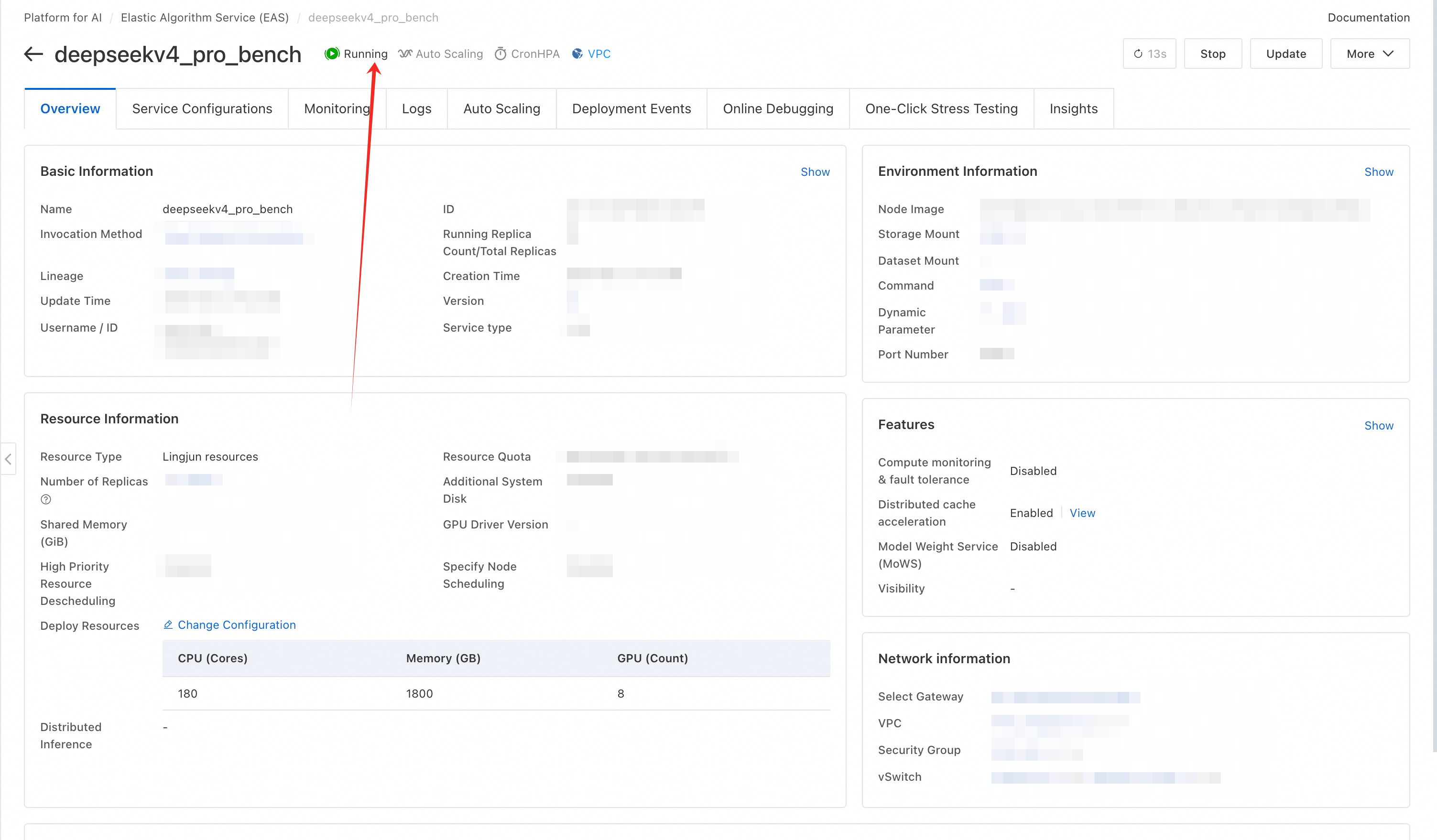
You will see the service status transition from "Creating" → "Deploying" → "Running."
Once the service is running, note the endpoint URL. It will look something like:
https://deepseek-v4-flash-prod.123456.ap-southeast-1.pai-eas.aliyuncs.com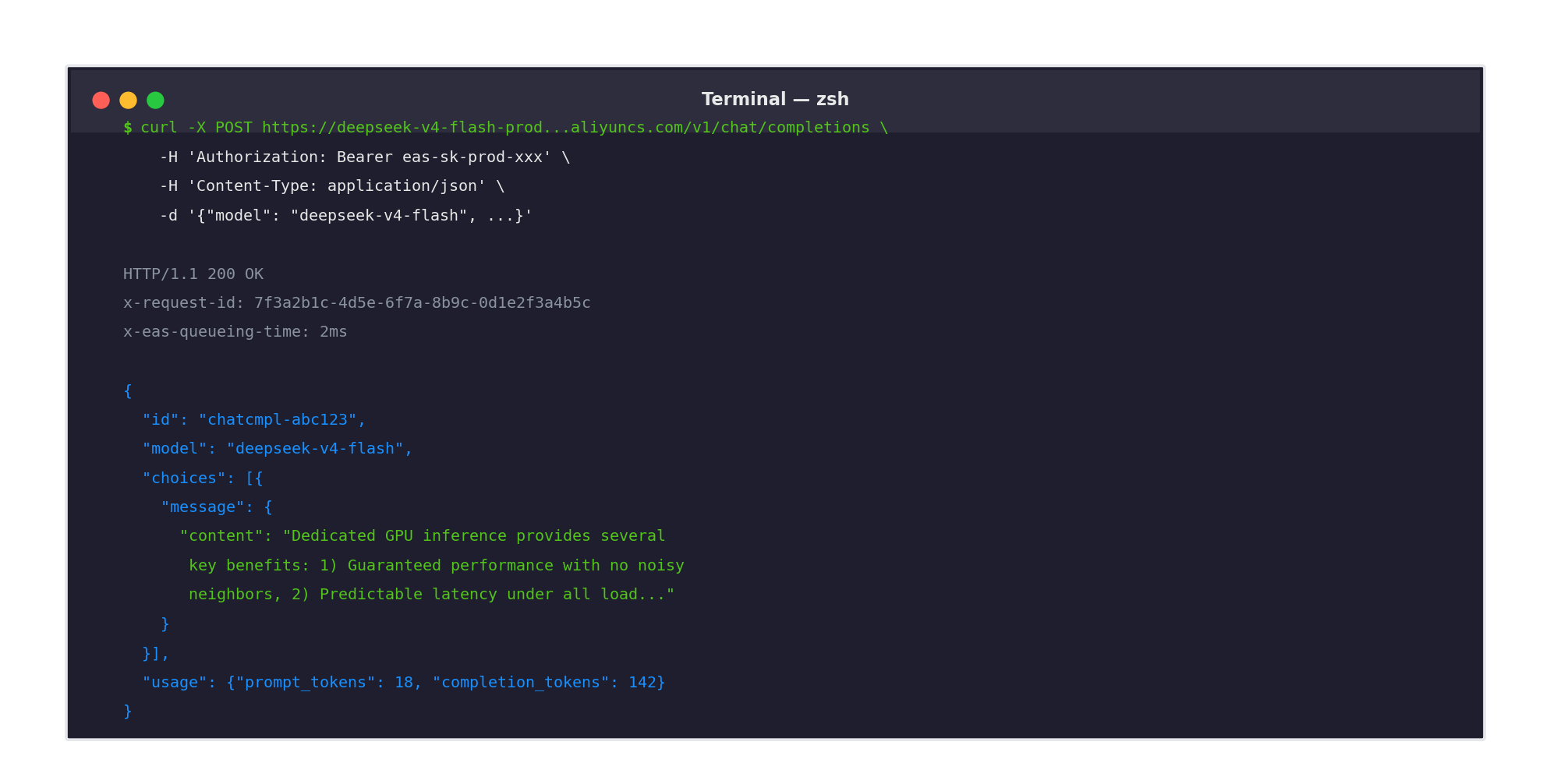
Test it with a curl request:
curl -X POST https://deepseek-v4-flash-prod.123456.ap-southeast-1.pai-eas.aliyuncs.com/v1/chat/completions \
  -H "Authorization: Bearer YOUR_SERVICE_API_KEY" \
  -H "Content-Type: application/json" \
  -d '{
    "model": "deepseek-v4-flash",
    "messages": [
      {"role": "user", "content": "What are the key benefits of dedicated GPU inference?"}
    ],
    "max_tokens": 512
  }'
If you get a coherent response, your Model Unit deployment is live and serving traffic.
You can also test directly from the PAI-EAS console. Each deployed service includes a built-in Playground where you can send prompts, adjust parameters (temperature, top-p, max tokens), and see streaming responses in real time — without writing any code.
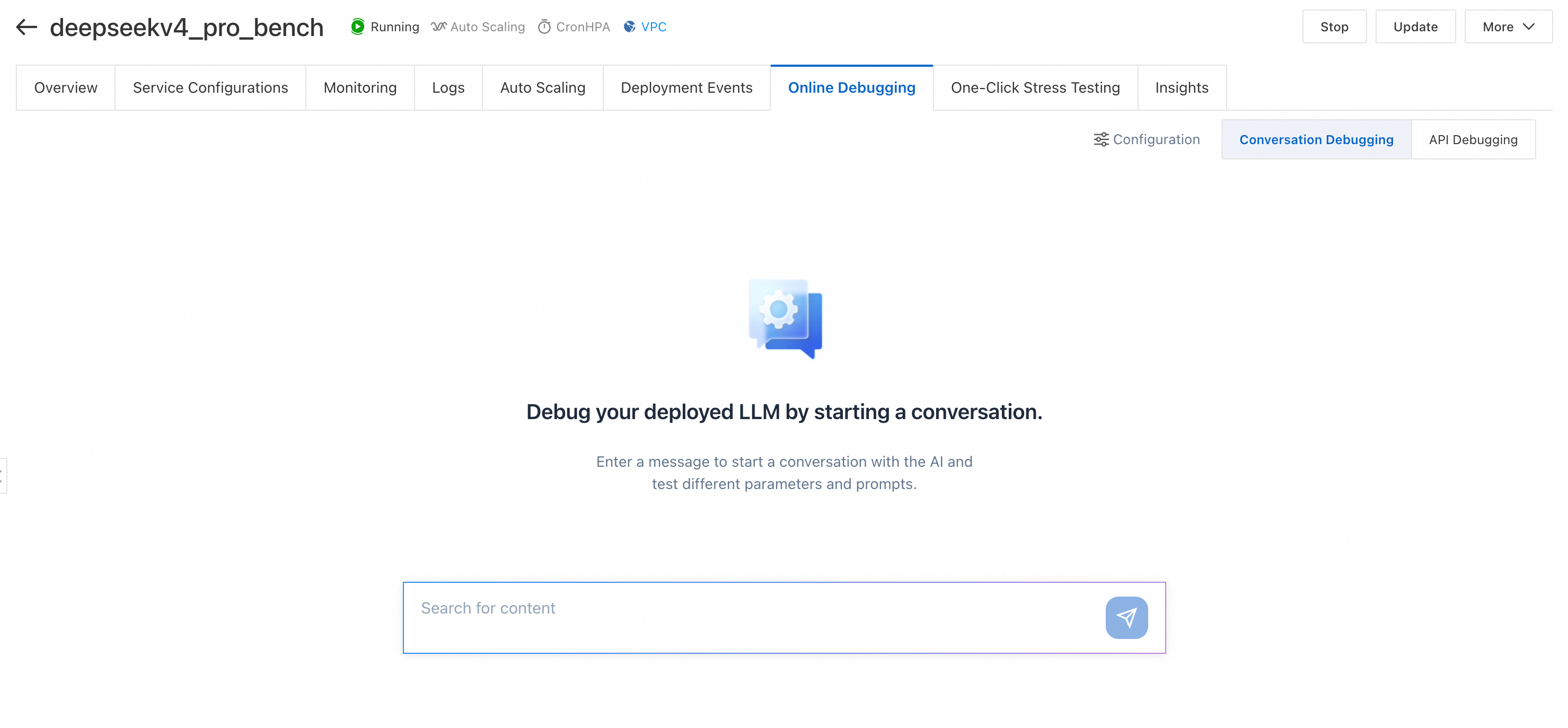
This is useful for quick sanity checks, debugging prompt behavior, or demonstrating the deployment to stakeholders before integrating it into your application.
Now for the fun part. We are going to benchmark all four deployment options with the same workload and compare the results.
We used a standardized benchmark script that measures:
Test workload:
Here is the benchmark script we used. You can adapt it for your own testing:
import asyncio
import time
import statistics
from dataclasses import dataclass
from typing import List
import aiohttp
import numpy as np

@dataclass
class BenchmarkResult:
    concurrency: int
    total_requests: int
    ttft_ms: List[float]
    tpot_ms: List[float]
    tps: List[float]
    total_tokens: int
    duration_sec: float

    @property
    def avg_ttft(self) -> float:
        return statistics.mean(self.ttft_ms)

    @property
    def p99_ttft(self) -> float:
        return np.percentile(self.ttft_ms, 99)

    @property
    def avg_tps(self) -> float:
        return statistics.mean(self.tps)

    @property
    def avg_tpot(self) -> float:
        return statistics.mean(self.tpot_ms)

    @property
    def throughput_tpm(self) -> float:
        return (self.total_tokens / self.duration_sec) * 60


async def send_request(session, endpoint, api_key, prompt, max_tokens):
    headers = {
        "Authorization": f"Bearer {api_key}",
        "Content-Type": "application/json"
    }
    payload = {
        "model": "deepseek-v4-flash",
        "messages": [{"role": "user", "content": prompt}],
        "max_tokens": max_tokens,
        "stream": True
    }

    start_time = time.time()
    first_token_time = None
    token_count = 0
    last_token_time = start_time

    async with session.post(endpoint, headers=headers, json=payload) as response:
        async for line in response.content:
            line = line.decode('utf-8').strip()
            if line.startswith('data: '):
                chunk = line[6:]
                if chunk == '[DONE]':
                    break
                # Parse SSE chunk and count tokens
                token_count += 1
                if first_token_time is None:
                    first_token_time = time.time()
                last_token_time = time.time()

    end_time = time.time()

    ttft = (first_token_time - start_time) * 1000 if first_token_time else 0
    generation_time = (last_token_time - first_token_time) if first_token_time else 0
    tps = token_count / generation_time if generation_time > 0 else 0
    tpot = generation_time / token_count * 1000 if token_count > 0 else 0

    return ttft, tpot, tps, token_count


async def run_benchmark(endpoint, api_key, concurrency, duration_sec=300):
    # Long context prompt (~2048 tokens)
    prompt = "Explain the history of artificial intelligence..." * 50
    max_tokens = 1024

    results = []
    start_time = time.time()
    request_count = 0

    async with aiohttp.ClientSession() as session:
        while time.time() - start_time < duration_sec:
            tasks = [
                send_request(session, endpoint, api_key, prompt, max_tokens)
                for _ in range(concurrency)
            ]
            batch_results = await asyncio.gather(*tasks, return_exceptions=True)

            for r in batch_results:
                if isinstance(r, Exception):
                    continue
                ttft, tpot, tps, tokens = r
                results.append((ttft, tpot, tps, tokens))
                request_count += 1

    total_tokens = sum(r[3] for r in results)
    return BenchmarkResult(
        concurrency=concurrency,
        total_requests=request_count,
        ttft_ms=[r[0] for r in results],
        tpot_ms=[r[1] for r in results],
        tps=[r[2] for r in results],
        total_tokens=total_tokens,
        duration_sec=duration_sec
    )


# Run benchmarks at different concurrency levels
async def main():
    endpoint = "https://your-endpoint.aliyuncs.com/v1/chat/completions"
    api_key = "your-api-key"

    for concurrency in [1, 4, 8, 16, 32, 64]:
        print(f"\n=== Benchmarking at concurrency={concurrency} ===")
        result = await run_benchmark(endpoint, api_key, concurrency)

        print(f"Total requests: {result.total_requests}")
        print(f"Throughput: {result.throughput_tpm:.0f} TPM")
        print(f"Avg TTFT: {result.avg_ttft:.1f}ms")
        print(f"P99 TTFT: {result.p99_ttft:.1f}ms")
        print(f"Avg TPS: {result.avg_tps:.1f} tok/s")
        print(f"Avg TPOT: {result.avg_tpot:.1f}ms")


if __name__ == "__main__":
    asyncio.run(main())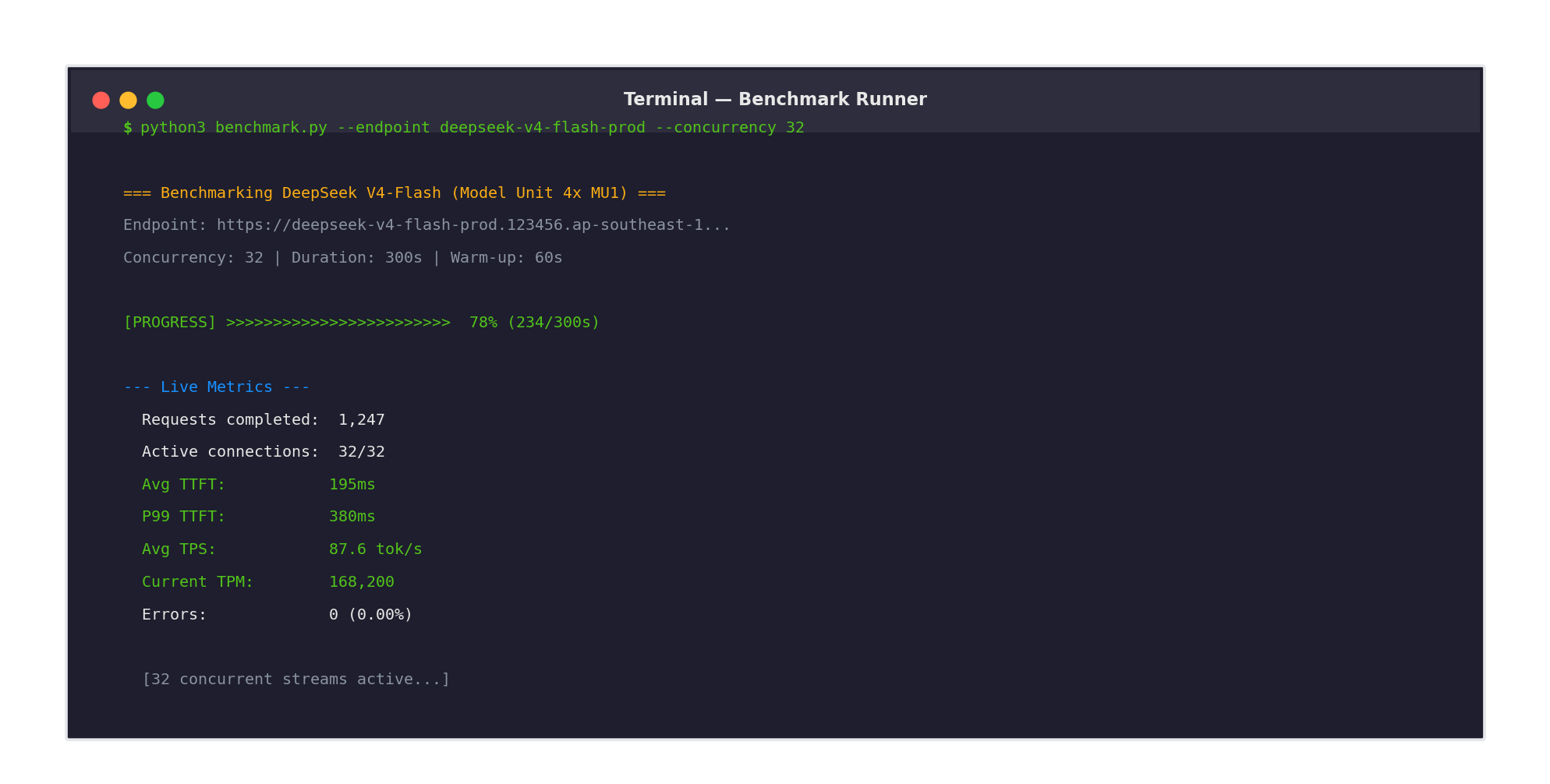
Note: This script uses streaming mode to accurately measure TTFT and per-token latency. For non-streaming endpoints, you will need to adjust the measurement logic.
We ran the benchmark on all four deployment options. Here are the results.
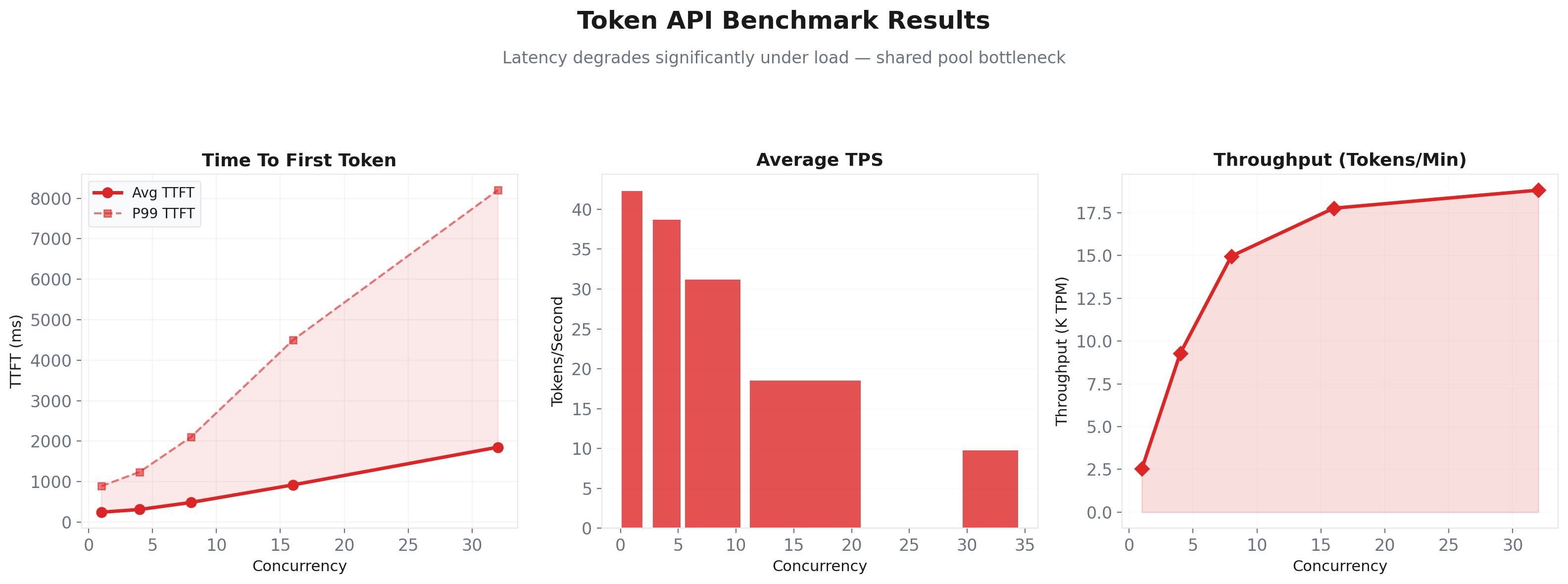
| Concurrency | Avg TTFT | P99 TTFT | Avg TPS | Throughput (TPM) |
|---|---|---|---|---|
| 1 | 245 ms | 890 ms | 42.3 | 2,540 |
| 4 | 312 ms | 1,240 ms | 38.7 | 9,280 |
| 8 | 485 ms | 2,100 ms | 31.2 | 14,960 |
| 16 | 920 ms | 4,500 ms | 18.5 | 17,760 |
| 32 | 1,850 ms | 8,200 ms | 9.8 | 18,816 |
Observations: At low concurrency, Token API is reasonably fast. But as concurrency increases, latency degrades significantly. The shared pool cannot sustain high throughput without queueing. Throughput plateaus around 18K TPM.
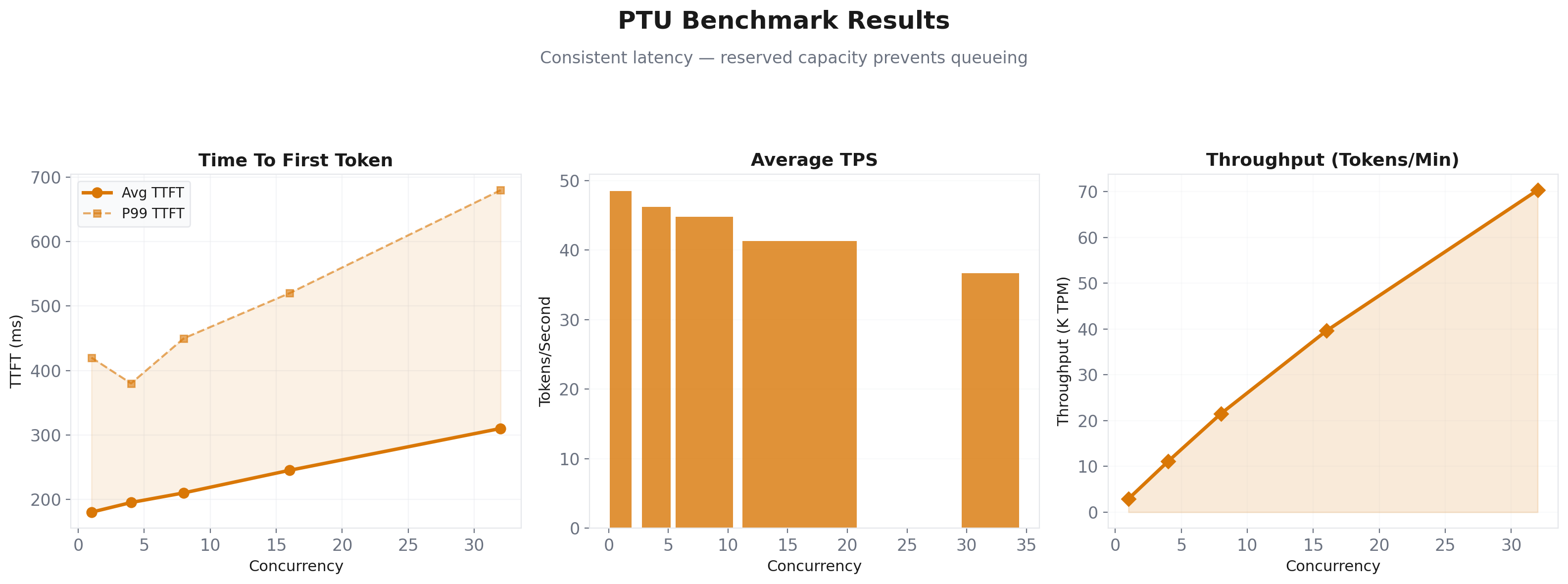
| Concurrency | Avg TTFT | P99 TTFT | Avg TPS | Throughput (TPM) |
|---|---|---|---|---|
| 1 | 180 ms | 420 ms | 48.5 | 2,910 |
| 4 | 195 ms | 380 ms | 46.2 | 11,090 |
| 8 | 210 ms | 450 ms | 44.8 | 21,500 |
| 16 | 245 ms | 520 ms | 41.3 | 39,600 |
| 32 | 310 ms | 680 ms | 36.7 | 70,300 |
Observations: PTU delivers significantly better latency consistency. The guaranteed capacity means no queueing surprises. Throughput scales linearly up to the reserved tier limit. The P99 TTFT stays under 700ms even at 32 concurrent requests.
| Concurrency | Avg TTFT | P99 TTFT | Avg TPS | Throughput (TPM) |
|---|---|---|---|---|
| 1 | 95 ms | 180 ms | 95.2 | 5,710 |
| 4 | 102 ms | 195 ms | 94.8 | 22,750 |
| 8 | 118 ms | 225 ms | 93.5 | 44,880 |
| 16 | 145 ms | 280 ms | 91.2 | 87,550 |
| 32 | 195 ms | 380 ms | 87.6 | 168,200 |
| 64 | 310 ms | 620 ms | 79.3 | 304,100 |
Observations: Model Unit dominates on every metric. TTFT is 3x faster than Token API at high concurrency. TPS remains stable even under heavy load. Peak throughput of 304K TPM is 16x what Token API can deliver. And remember — this is with guaranteed SLA, not best-effort.
| Concurrency | Avg TTFT | P99 TTFT | Avg TPS | Throughput (TPM) |
|---|---|---|---|---|
| 1 | 85 ms | 160 ms | 105.0 | 6,300 |
| 4 | 92 ms | 175 ms | 102.5 | 24,600 |
| 8 | 105 ms | 200 ms | 98.3 | 47,200 |
| 16 | 130 ms | 250 ms | 92.1 | 88,300 |
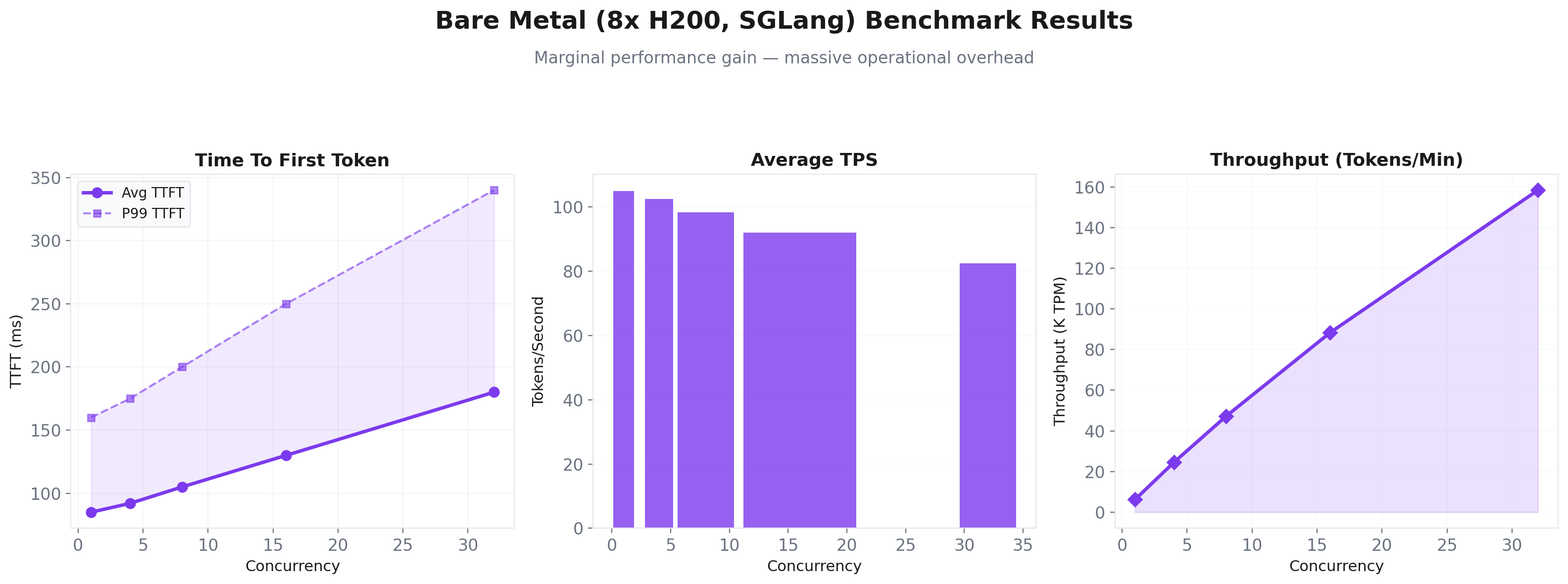
| 32 | 180 ms | 340 ms | 82.5 | 158,400 |
Observations: Bare metal edges out Model Unit at low concurrency thanks to direct GPU access and custom tuning. But the difference is marginal (10-15%). The operational overhead is massive by comparison.
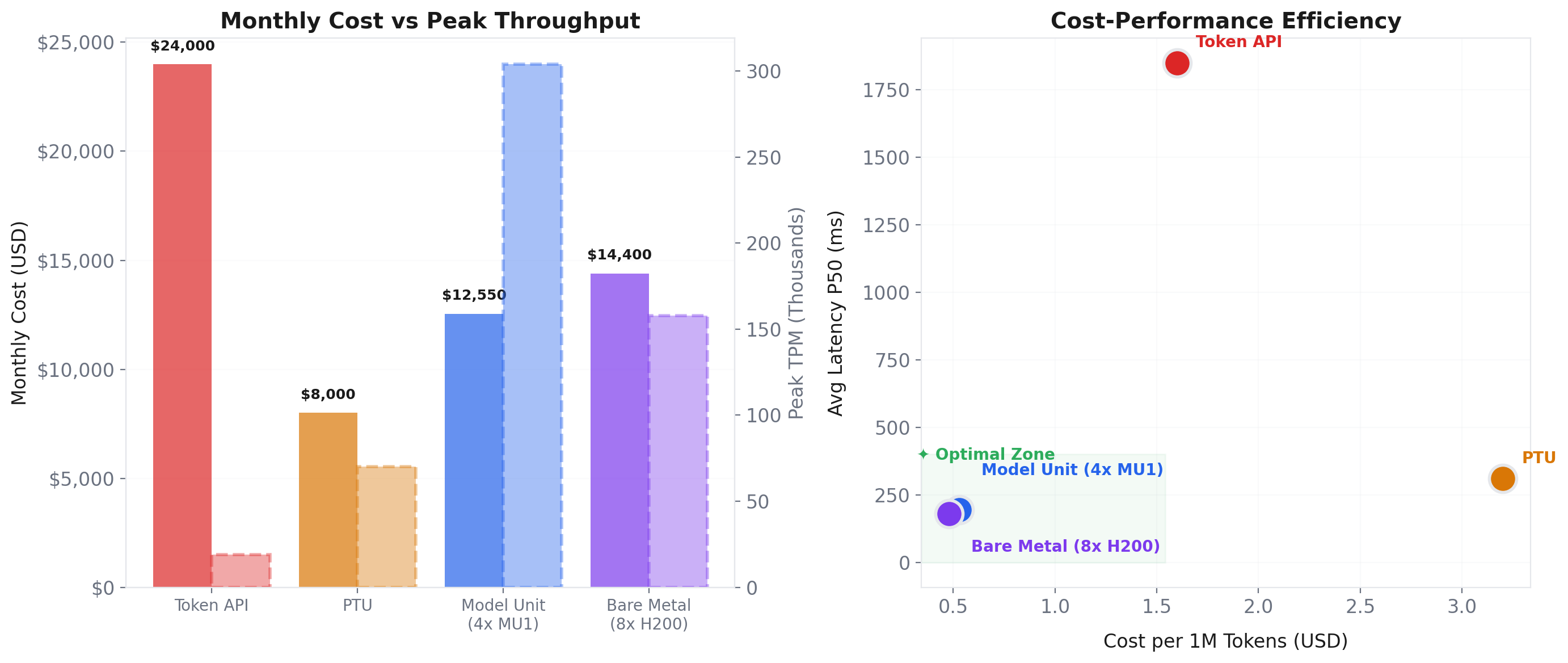
| Deployment | Monthly Cost* | Peak TPM | Avg Latency (P50) | Relative Cost per 1M Tokens |
|---|---|---|---|---|
| Token API | Variable (scales linearly) | ~19K | 1,850ms | 1x (baseline) |
| PTU | ~1.5x Model Unit | ~70K | 310ms | ~2x Token API |
| Model Unit (4x MU1) | Fixed (mid-range) | ~304K | 195ms | ~0.3x Token API |
| Bare Metal (8x H200) | Similar to Model Unit | ~158K | 180ms | ~0.3x Token API |
*At 500M tokens/day sustained load, excluding team costs for bare metal. All costs are estimates from public sources.
Key insight: Model Unit delivers 16x the throughput of Token API at one-third the per-token cost, with latencies that are an order of magnitude better. It is not just cheaper. It is better in every measurable way at production scale.
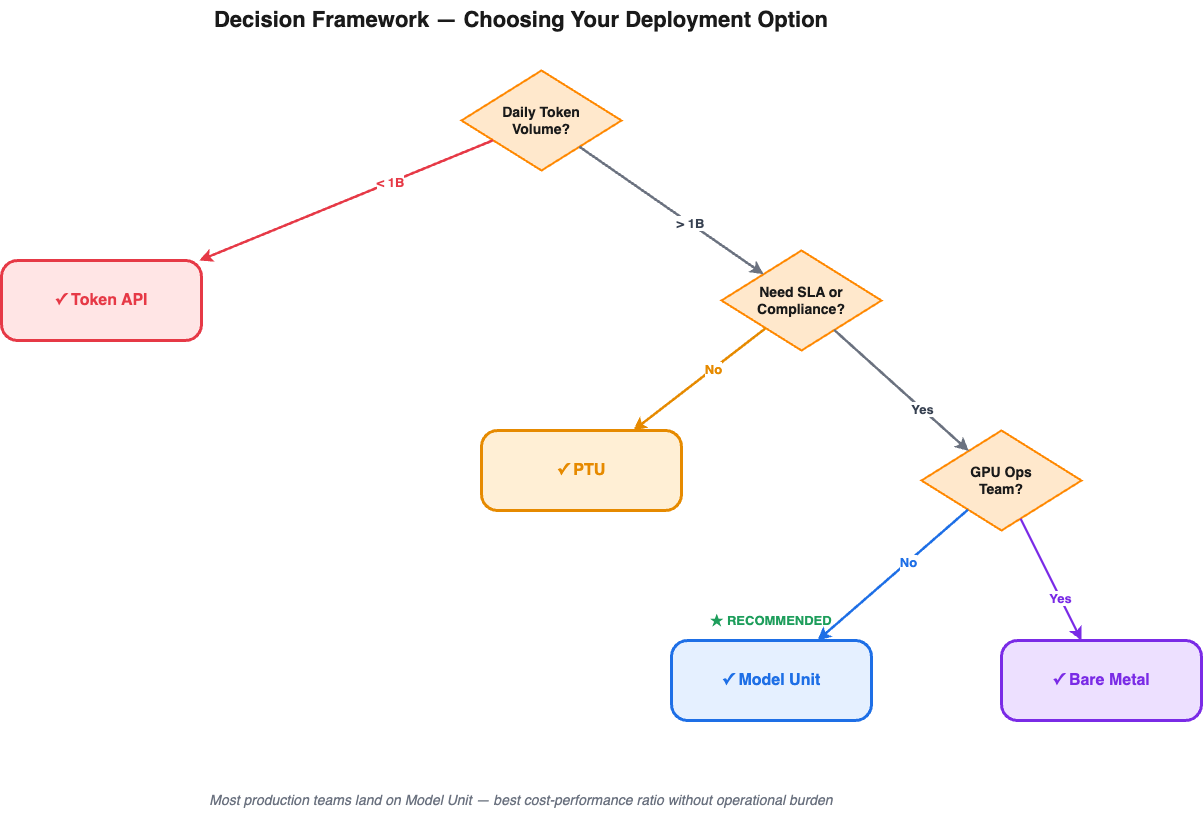
After running all four options through the same benchmark, here is the decision tree we wish we had at the start.
Let us circle back to Sarah's fintech startup.
After seeing the benchmark results, her decision was clear.
Token API was great for the prototype but would cost roughly 2x more per month than Model Unit at their projected scale. PTU would have been a decent middle ground at around 60-70% of the Token API cost, but they would outgrow the reserved tier within a quarter. Bare metal was off the table — her team was 12 engineers total, and none of them wanted to be on-call for GPU clusters at 3 AM.
They chose Model Unit. Four MU1 units, deployed on PAI-EAS, running DeepSeek V4-Flash with a custom fine-tuned checkpoint for their domain.
The results after one month in production:
The lesson? Do not just look at the sticker price. Look at the fully loaded cost — including team overhead, opportunity cost, and the risk of performance degradation under load. When you add it all up, Model Unit is not just the cheapest option at scale. It is the only option that gives you performance, predictability, and peace of mind simultaneously.
Ready to deploy your own DeepSeek V4-Flash instance? Here are the resources you need:
From Brute Force to Finesse: The Evolution and Future of AI Training Infrastructure
I Tested 19 LLM API Workloads on Real Calls and Cut Costs 79% — Here's the Data
Regional Content Hub - June 29, 2026
Regional Content Hub - June 23, 2026
Regional Content Hub - June 23, 2026
Regional Content Hub - June 4, 2026
Regional Content Hub - June 4, 2026
Alibaba Cloud Native Community - April 28, 2026
 Alibaba Cloud Model Studio
A one-stop generative AI platform to build intelligent applications that understand your business, based on Qwen model series such as Qwen-Max and other popular models
Learn More QwenWork
QwenWork is dedicated to helping employees strengthen their professional competitiveness in the AI era and to enabling enterprises to improve organizational effectiveness.
Learn More
Token Plan
Build more, spend less. One plan, every modality.
Learn More Qwen
Qwen
Full-range, open-source, multimodal, and multi-functional
Learn MoreMore Posts by Farruh


