A dataset bridges data sources and visualizations by creating a data model for visual analysis. IT personnel, data engineers, and data analysts typically use datasets for data processing. In Quick BI, datasets are the foundation of visual analysis. You can create a dataset from data tables by using visual configuration or custom SQL.
After you create datasets from data source tables or custom SQL, you can associate, process, edit, and rename them.
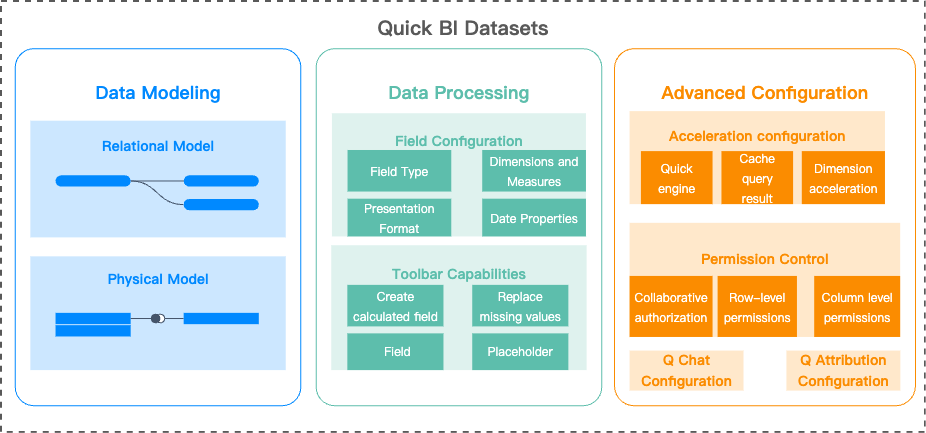
Dataset features overview
References
To complete data modeling, follow these steps: Create a dataset > Build a model > Process data > Advanced configuration > Manage datasets.
|
Step |
Documentation |
Description |
|
1. Create a dataset |
Explains how to create a dataset. |
|
|
2. Build a model |
Explains how to use the relational model for data modeling, including its workflow, benefits, and best practices. |
|
|
Explains how to use single- and multi-table models, join or merge tables, and write custom SQL to retrieve and manipulate data. |
||
|
Covers use cases for placeholders and explains how to optimize query performance with HINT statements. |
||
|
3. Data processing |
Explains how to create calculated fields, group dimensions, and more. |
|
|
Explains how to configure fields, configure fields in batches, create new folders, and more. |
||
|
Explains how to process data using built-in system functions. |
||
|
4. Advanced configuration |
Explains basic properties, Quick Engine, permission control, and Intelligent Query configuration. |
|
|
Introduces Quick Engine and explains how to configure it. |
||
|
5. Dataset management |
Explains toolbar features and how to switch data sources and restore historical versions. |
|
|
Explains how to replicate a dataset across workspaces. |
||
|
Explains how to preview a dataset. |
||
|
Explains how to query datasets, grant user permissions, delete, rename, transfer ownership, and request permissions. |
||
|
Explains how to manage dataset folders. |
||
|
6. Dataset combination |
Explains how to create dataset combinations. |
|
|
7. Dataset FAQ |
Covers common issues with dataset errors, field processing, and performance. |