Agents are becoming increasingly powerful. However, their experience still belongs to you alone.
From Claude Code and OpenClaw to various Agents, and from the MCP ecosystem to the AgentSpec standard, AI Agents are entering daily workflows at an unprecedented speed. They can already write code, troubleshoot, read documentation, and execute commands—but this is only the first step.
What truly differentiates Agent capabilities is the Skill. Whether a programming Agent is injected with project specification Skills makes a world of difference to the quality of its output; an operations Agent loaded with a troubleshooting SOP Skill no longer needs to reason from scratch—the answer is already in the Skill. Skill is becoming the core competitiveness in the Agent era.
However, there are still two key issues here that have not been truly resolved.
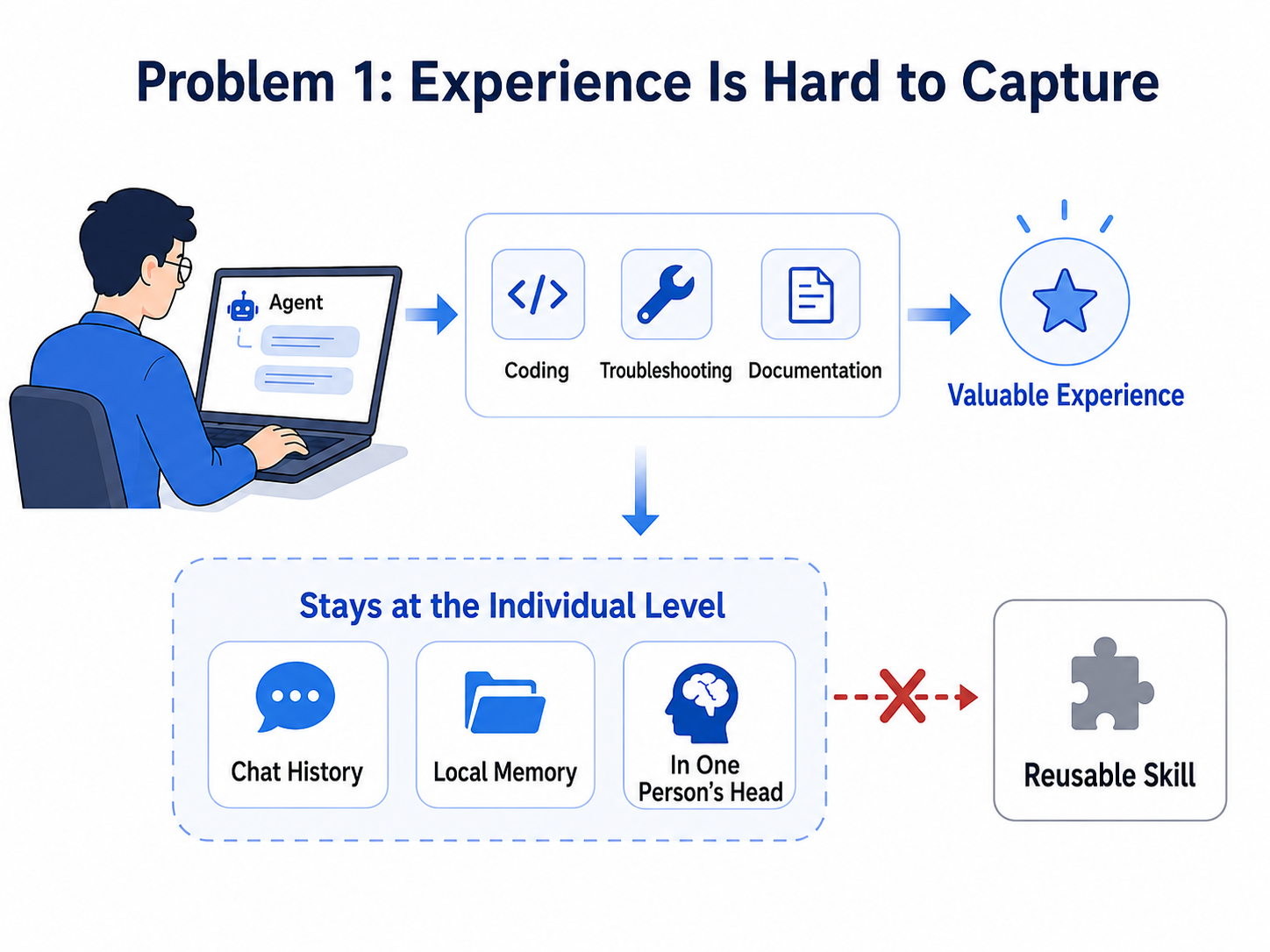
Agents can already write code, troubleshoot, and generate documentation. However, the experience accumulated in a real task is difficult to transform from "a personal successful practice" into a reusable Skill.
Many Agent applications can already call tools, read files, and modify code, and can also inject domain capabilities through prompts or Skills. But the problem is that these capabilities are either statically configured or, even if optimized during use, only remain in the local memory and do not form a reusable team asset.
Real experience often comes from the scene of the task—it is not conceived in design documents, but tried and tested in actual combat:
These scenarios recur, but the experience remains in the minds of those involved. Take troubleshooting as an example: after hitting a few snags, you naturally know where to look first and what to check next. Taking weekly reports as another example: after writing a few rounds, you will figure out a template that the team appreciates most. But when another person encounters the same problem, they still have to start from scratch—thus the value of the Agent cannot be amplified.
The core contradiction: Experience is generated every day, but there is no mechanism to extract it from a single session and solidify it into a reusable Skill.
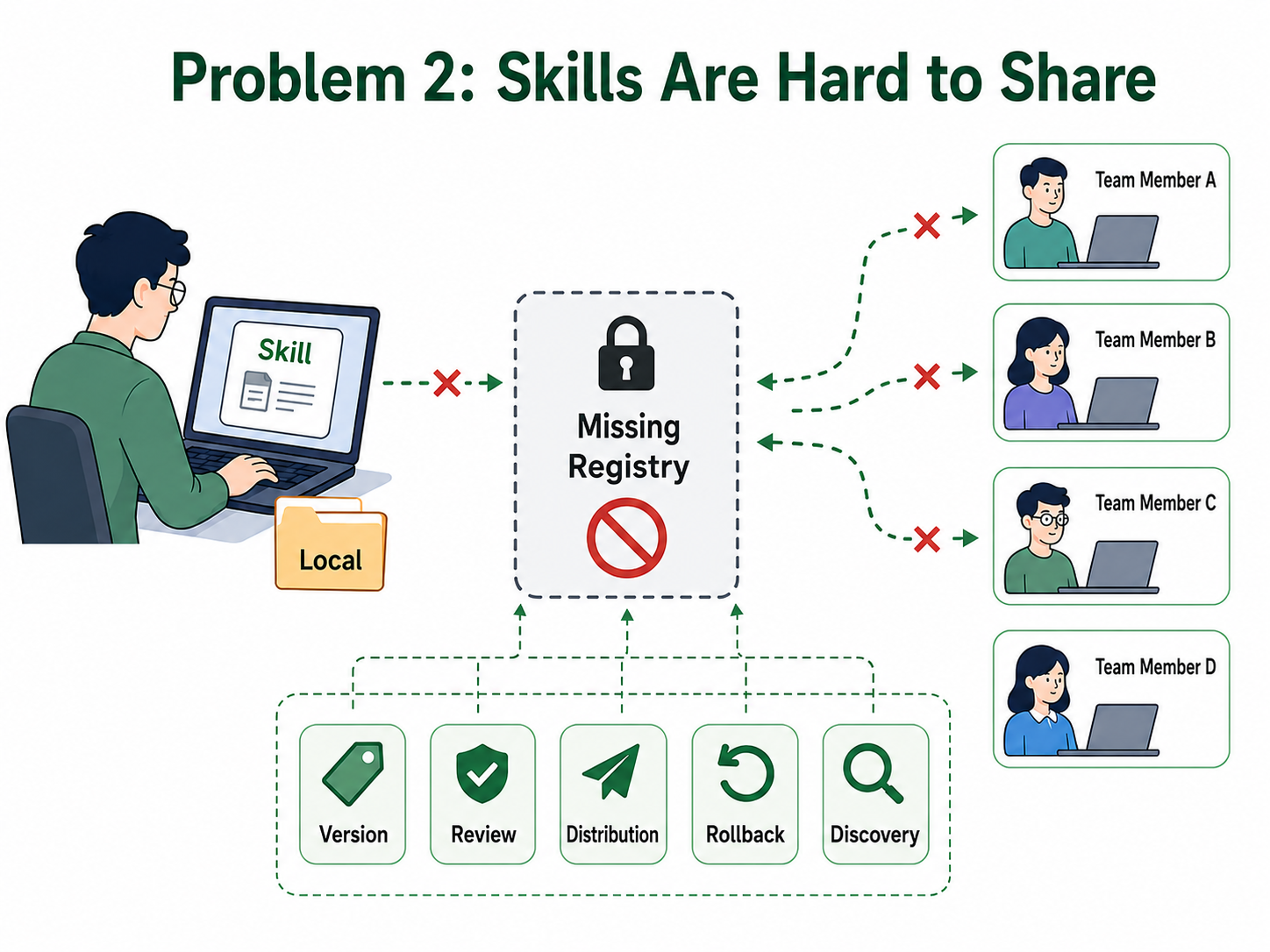
Even if we refine experience into a Skill, the second question arises: How is this Skill discovered and used by other team members?
If the Skill is just a file in a local directory, it remains on the personal machine. Once entering team collaboration scenarios, the core challenges become:
Once experience remains only locally, it can only function for one person. Greater value comes from team reuse: the pitfalls one person has stepped into, the workflows summarized, and the practices verified need to be accumulated, so that the next person in the team doesn't have to go through the same pitfalls again.
The core contradiction: The Skill has been generated, but there is no team-level Registry to handle its versioning, review, distribution, and governance.
The two open-source projects, SkillClaw and Nacos, address the above issues from different entry points—SkillClaw focuses on the Agent runtime, solving "how experience grows from real sessions into reusable Skills"; Nacos focuses on team assets, solving "how Skills can be securely registered, managed, reviewed, and distributed". These are introduced one by one below.
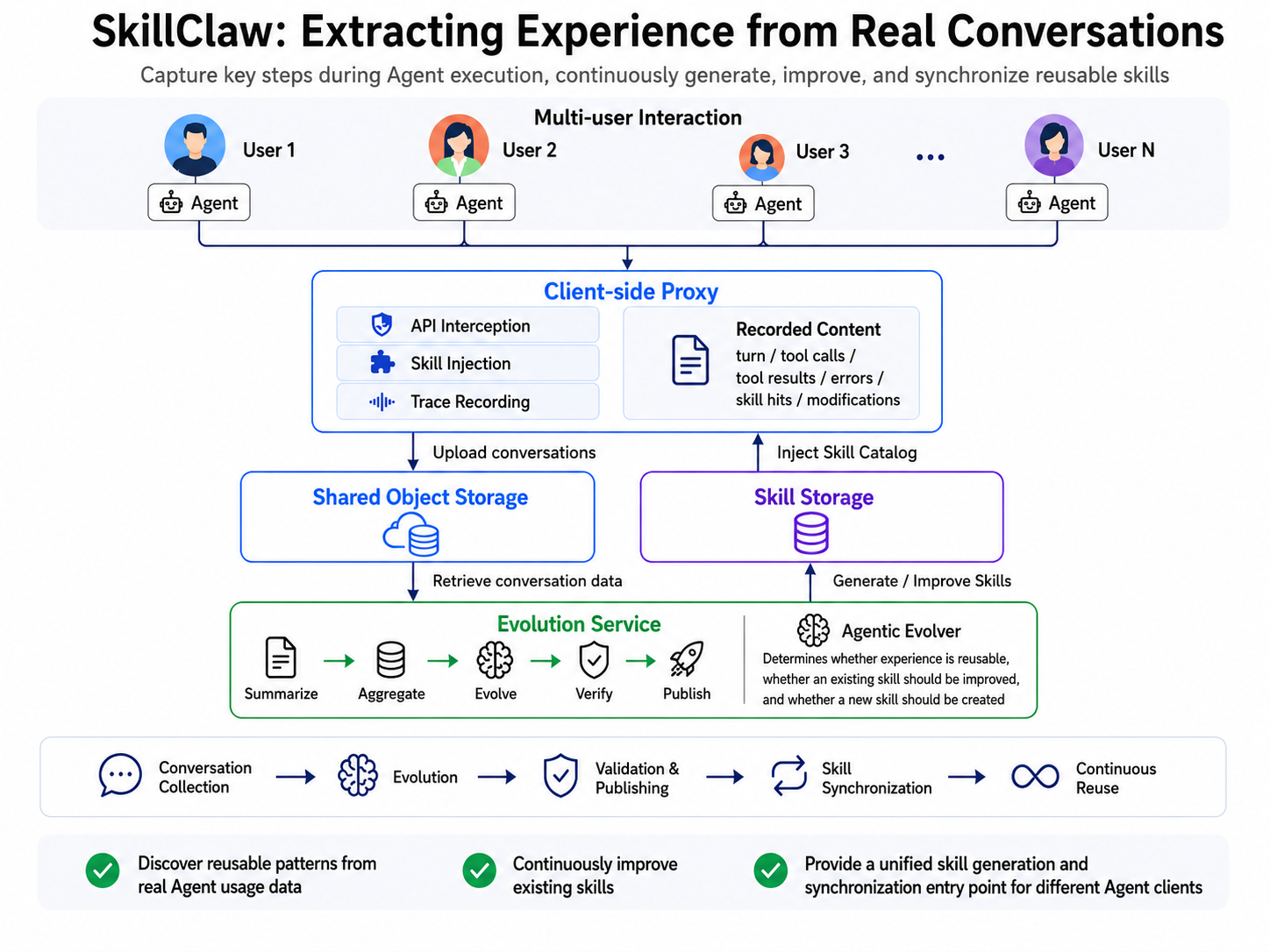
SkillClaw is a framework proposed by the AutoNavi tech team. The paper "SkillClaw: Let Skills Evolve Collectively with Agentic Evolver" has been published on arXiv, and the code is open-sourced on GitHub.
It is positioned at the Agent runtime, taking over the Agent's model calls via a local proxy, injecting the available Skill directory into the context, and recording key processes during Agent task execution: session turns, tool calls, tool results, errors, Skill hits, modified content, and evaluation information. The Evolve Server uses this data to determine: Is there reusable experience in this task? Does the existing Skill need improvement? Should a new Skill be generated?
Therefore, SkillClaw solves the problem of "how experience is generated".
It does not require hand-writing Skills every time, but rather allows Skills to grow progressively out of real workflows. The more tasks the Agent performs, the easier it is to accumulate Skills that fit real scenarios. This means:
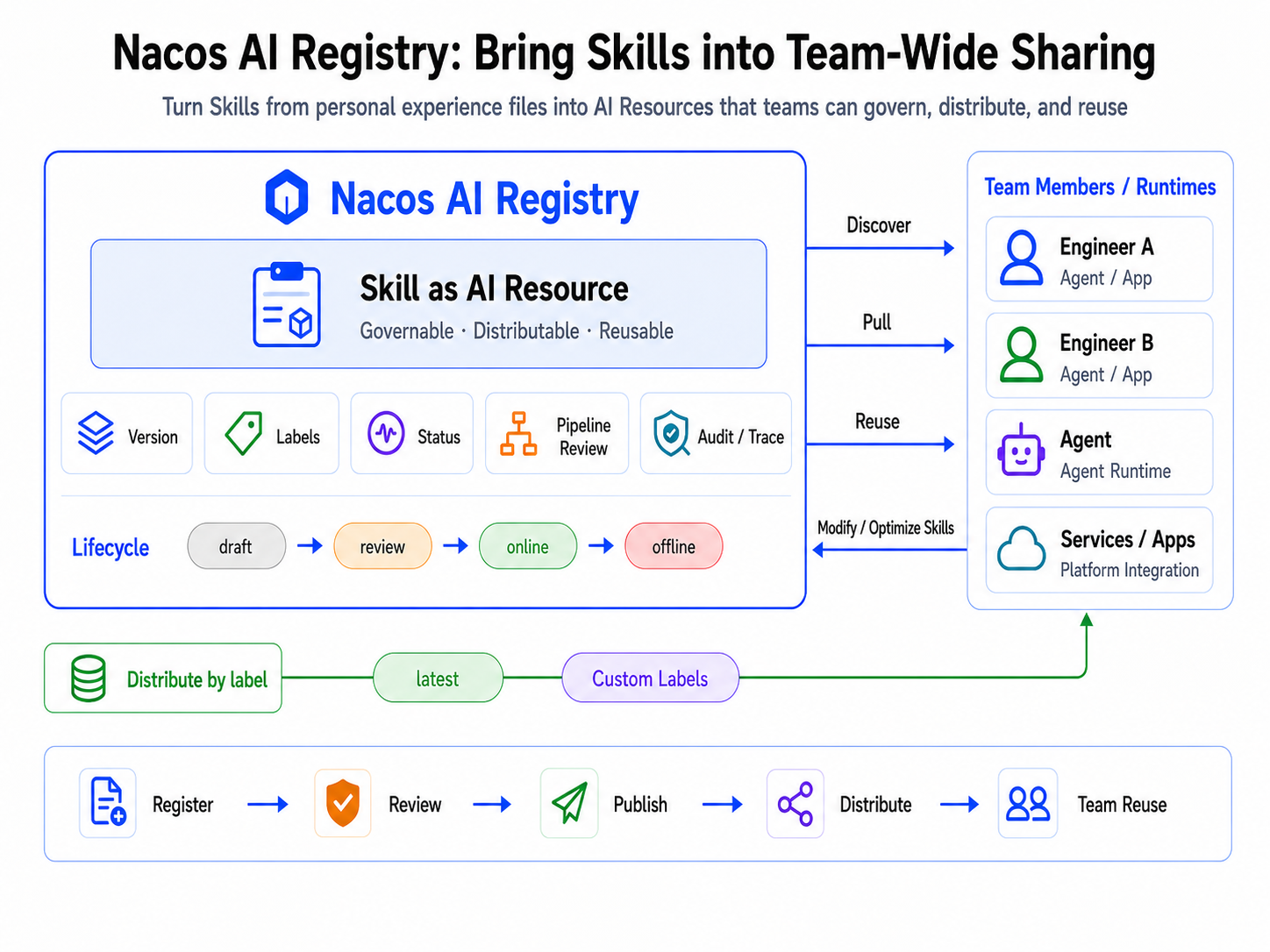
Nacos AI Registry answers the second question.
In Nacos, Skills can be registered and managed as a type of AI Resource. It has versions and tags, can be in draft, reviewing, online, and other states, can also enter the Pipeline review process, and be distributed to different runtimes via labels.
This turns Skills from "personal experience files" into "team-governable resources":
latest tag, and custom tags are also supported;Nacos solves the problem of "how experience is shared".
We previously introduced the respective problems solved by SkillClaw and Nacos. Individually, they have answered "where experience comes from" and "where experience goes"; but combined, they deliver greater value—generation, governance, and distribution, chained into a closed loop, constitute a viable and complete path.
It is precisely seeing this that the SkillClaw and Nacos teams decided to join forces to bridge SkillClaw's local experience extraction capabilities with Nacos AI Registry's team governance capabilities. The two parties collaborated on the following tasks:
latest), which are automatically reloaded when the Agent starts.This forms a complete evolutionary closed loop from Memory to Skill Registry. Let's first look at how the entire closed loop operates, and then see how governance provides assurance.
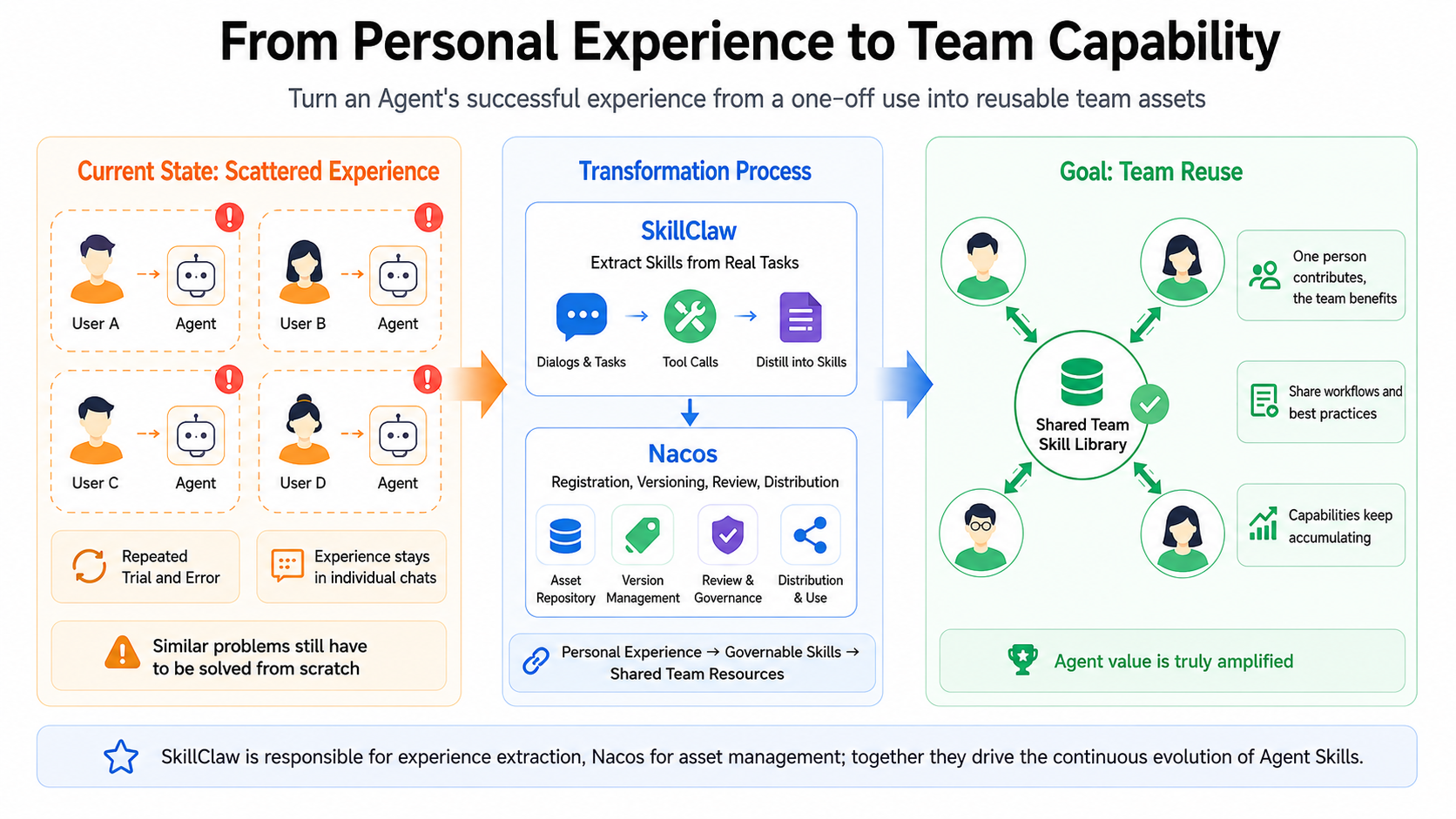
SkillClaw is responsible for allowing experience to grow from real sessions, while Nacos is responsible for allowing these experiences to securely enter the team sharing system. Putting them together, one is responsible for generation, and the other is responsible for dissemination, forming a complete evolutionary closed loop.
In the combination of SkillClaw × Nacos:
Simply put: SkillClaw transforms personal experience when using Agents into Skills, and Nacos turns these Skills into team-shareable, governable AI resources.
This is not an auxiliary tool that simply "uploads files to a storage bucket", but a complete path of continuous Agent Skill evolution designed for team collaboration scenarios.
When Skills are only used locally by individuals, the risk is relatively controllable. But once they are to be reused by other team members and multiple Agent clients, they can no longer be just a local file.
This is also one of the core values of Nacos in this path: it makes the experiences generated by SkillClaw not just "sharable", but entered into the team sharing system in a controlled manner. Automatically generated candidate Skills are not distributed directly, but enter a controlled governance path:
Nacos's governance capabilities are extensible. It supports a Pipeline plugin mechanism, allowing teams to integrate their own safety rules, compliance rules, and quality checks into the release process. Meanwhile, Nacos also provides a default plugin based on skill-scanner to handle basic scanning before Skill release (sensitive information, potential dangerous instructions, external links, content not conforming to team specifications, etc.).
Thus, SkillClaw brings the capability to continuously accumulate experience from real sessions, while Nacos brings the governance capability to safely introduce these experiences into team sharing.
Looking ahead, SkillClaw and Nacos will further deepen in two directions.
First, linking the generation path with session tracing, making every automatic evolution traceable. Every change in a Skill version will record which session it was based on, what resources were used, what the verification score was, and why it was eventually published. Teams can not only comfortably use automatically generated Skills, but also clearly answer "how this version came to be".
Second, extending automatic evolution capabilities from Skills to AgentSpec. AgentSpec carries the Agent's complete assembly strategy—model configuration, Skill sets, Prompt references, safety policies, etc. Once incorporated into the evolutionary closed loop, the Agent's entire behavioral configuration can continue to grow from real execution, rather than just having Skills change while other configurations still rely on manual writing.
The respective capabilities of SkillClaw and Nacos, as well as the closed loop formed by their combination, were introduced earlier. Below, a complete example demonstrates the actual operation of the entire path: starting from a Claude Code weekly report session, automatically refining it into a reusable Skill, registering it to Nacos, and then starting a new session to directly reuse the same Skill with just one sentence.
curl -fsSL https://nacos.io/nacos-installer.sh | bashAfter successful startup, the terminal will display Nacos's ServerPort, Console URL, username, and password. This information will be used repeatedly in subsequent configurations, so it is recommended to write it down first.
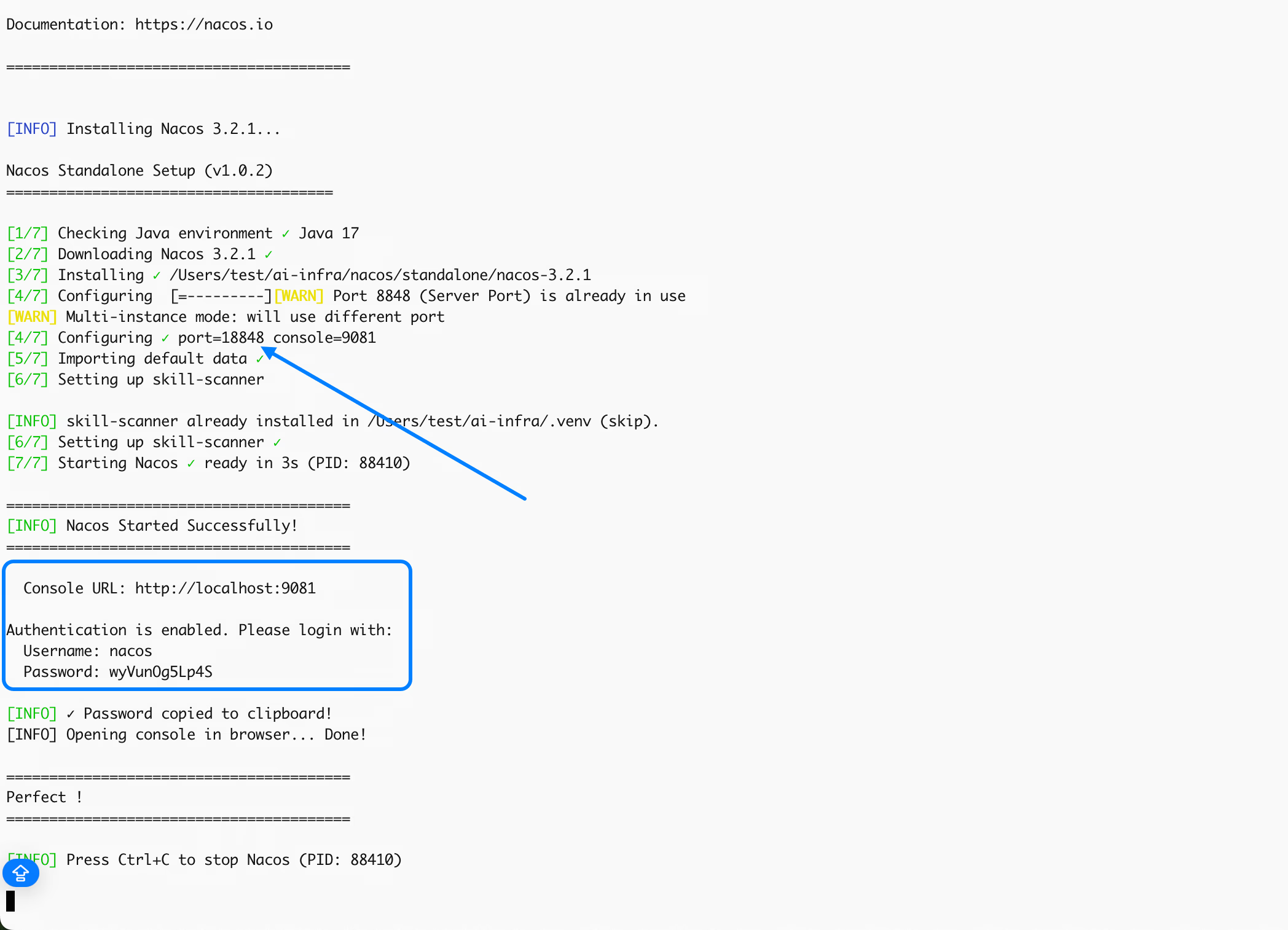
Environment Preparation
# 1. Clone SkillClaw
git clone git@github.com:AMAP-ML/SkillClaw.git

# 2. Create virtual environment and install
cd SkillClaw
python3 -m venv .venv
source .venv/bin/activate
pip install -e .

# 3. Set LLM and environment variables
export SKILLCLAW_HOME=$(pwd)
export SKILLCLAW_API_URL="YOUR_API_URL"
export SKILLCLAW_API_KEY="YOUR_API_KEY"
export SKILLCLAW_MODEL_ID="YOUR_MODEL_NAME"

# 4. Fill in Nacos parameters obtained in Step 1
export SKILLCLAW_DEMO_NACOS_USER_NAME="YOUR_NACOS_USER_NAME"
export SKILLCLAW_DEMO_NACOS_PASSWORD="YOUR_NACOS_PASSWORD"
export SKILLCLAW_DEMO_NACOS_SERVER_PORT="YOUR_NACOS_PORT"
Configure and Start Skill Proxy
Execute the following commands in the terminal where the virtual environment has just been activated.
mkdir -p /tmp/skillclaw-demo/{skills,records,share,learn,verify}

# ── LLM Configuration ──
skillclaw config llm.api_base "$SKILLCLAW_API_URL"
skillclaw config llm.model_id "$SKILLCLAW_MODEL_ID"
skillclaw config llm.api_key "$SKILLCLAW_API_KEY"
skillclaw config claw_type Claude

# ── Skill Registry Configuration (Connect to Nacos) ──
skillclaw config sharing.enabled true
skillclaw config sharing.skill_backend nacos
skillclaw config sharing.nacos_server http://localhost:$SKILLCLAW_DEMO_NACOS_SERVER_PORT/nacos
skillclaw config sharing.nacos_username "$SKILLCLAW_DEMO_NACOS_USER_NAME"
skillclaw config sharing.nacos_password "$SKILLCLAW_DEMO_NACOS_PASSWORD"
skillclaw config sharing.nacos_publish_mode review
skillclaw config sharing.nacos_label latest

# ── Session and Sync Configuration ──
skillclaw config sharing.session_upload_interval 3
skillclaw config sharing.skill_reload_mode poll
skillclaw config sharing.skill_reload_interval_seconds 60
skillclaw config sharing.auto_pull_on_start true

# ── Path Configuration ──
skillclaw config skills.dir /tmp/skillclaw-demo/skills
skillclaw config sharing.local_root /tmp/skillclaw-demo/share
skillclaw config record.dir /tmp/skillclaw-demo/records
skillclaw config evolve.server_url http://127.0.0.1:32218

# Start Proxy
skillclaw start --daemon \
  --port 32217 \
  --log-file /tmp/skillclaw-demo/proxy.log

# Confirm successful startup
skillclaw status
Start SkillClaw Evolver
Open a new terminal and likewise activate the virtual environment first.
cd $SKILLCLAW_HOME && source .venv/bin/activate

skillclaw-evolve-server \
  --use-skillclaw-config \
  --port 32218 \
  --interval 60 \
  --verbose \
> /tmp/skillclaw-demo/evolve.log 2>&1Open Claude Code, and progressively teach it the weekly report formatting specifications through three rounds of dialogue.
Round One: Input weekly report content and format requirements
Input in Claude Code:
Help me write this week's work report into weekly-report.md. Feishu format. #weekly-report
Done: 1. Completed user-auth-service OAuth2 integration (UAT environment)
2. Fixed JIRA-2847 login timeout, JIRA-2851 password reset, JIRA-2860 verification code cooling
3. Participated in PR-1247 and PR-1253 review.
Format: Title = [Name] W{Week_Num} Weekly Report; four sections: Completed This Week / In Progress / Next Week Plan / Risks and Coordination;
Each item = [Code] Description | Related JIRA | Progress %; End with --- Weekly report synchronized to Feishu #weekly-report
Execution Result:
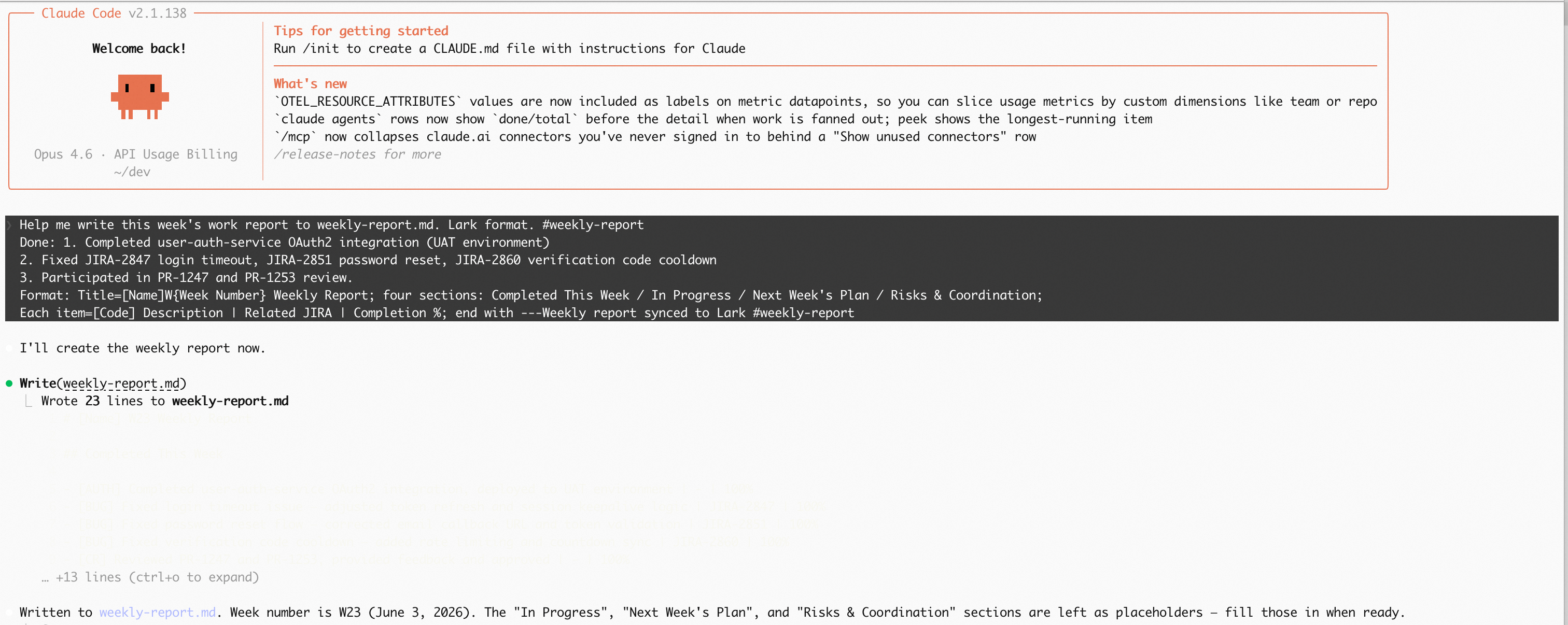
Round Two: Modify weekly report format
Continue the dialogue and append format corrections:
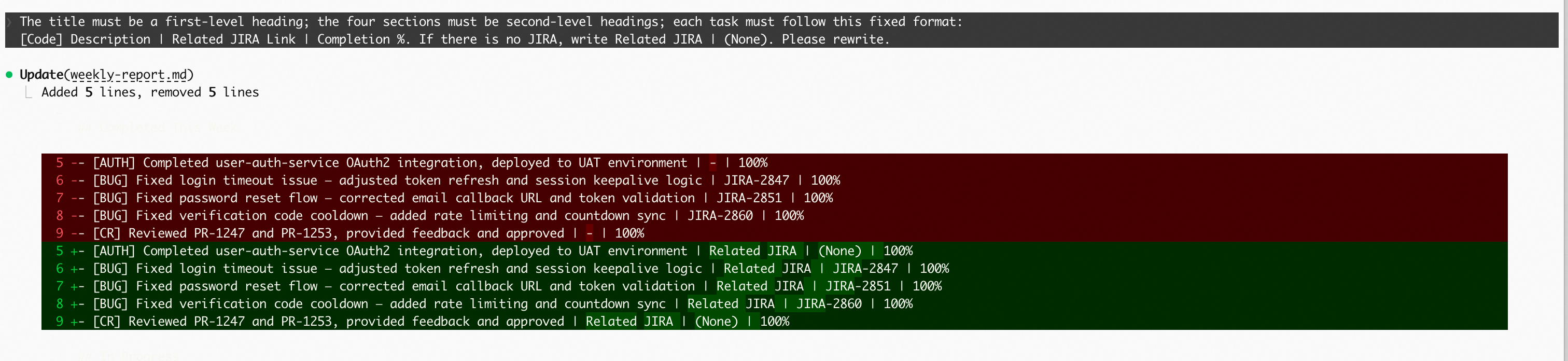
The title must be an H1 heading; the four sections must be H2 headings; each task item must follow a fixed format:
[Code] Description | Related JIRA Link | Progress %. If there is no JIRA, write Related JIRA | (None). Please rewrite.
Execution Result:
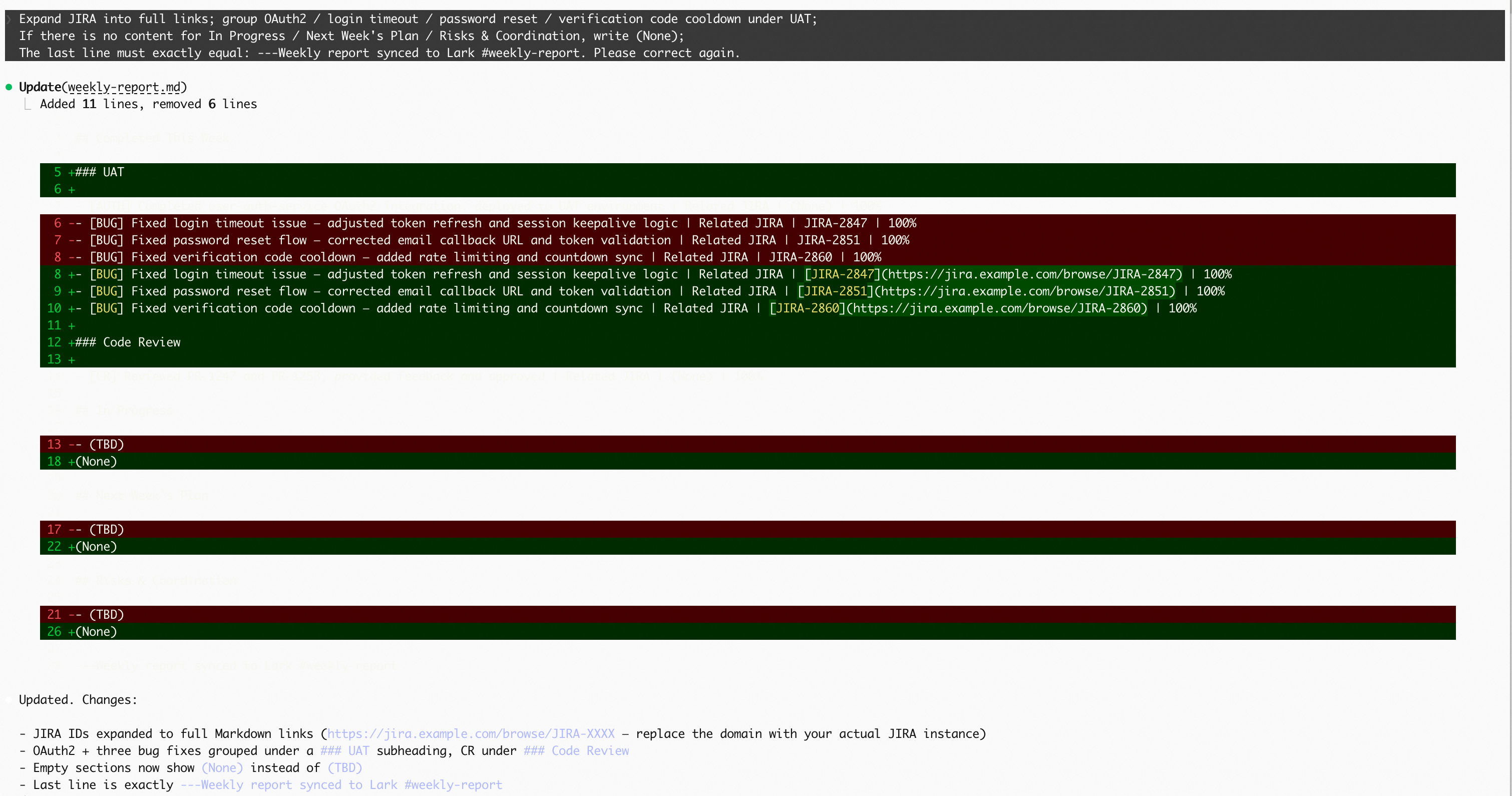
Round Three: Final Correction
Add requirements once more to complete the final round of iteration:
Expand JIRA into full links; classify OAuth2/login timeout/password reset/verification code cooling all into UAT;
If there is no content for In Progress / Next Week Plan / Risks and Coordination, write (None);
The last line must precisely equal: --- Weekly report synchronized to Feishu #weekly-report. Please correct again.
Execution Result:
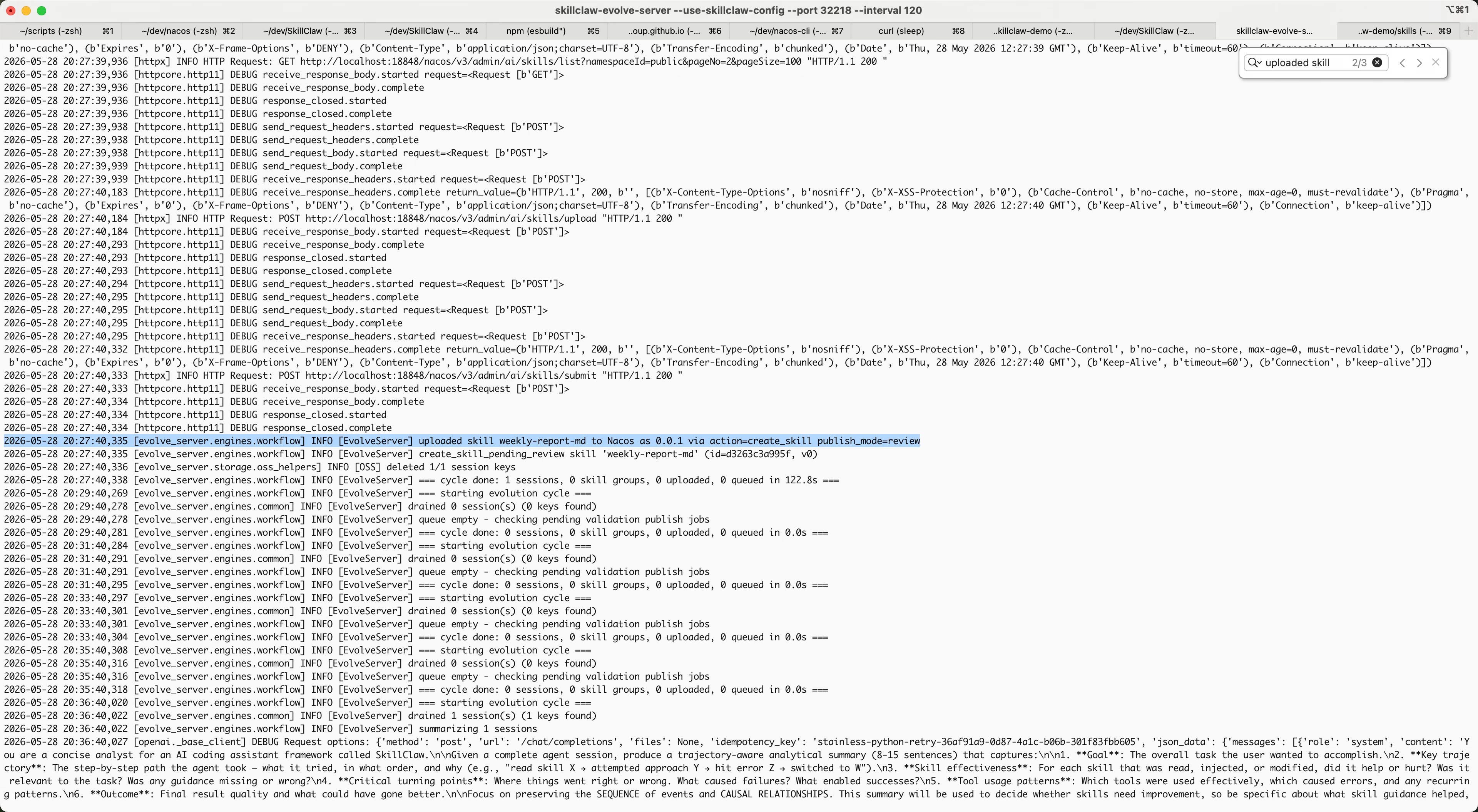
After the three rounds of dialogue, SkillClaw will automatically complete the session upload, trigger Evolver to generate the Skill, and submit it to Nacos in the background.
Search for the following content in the log of the Evolve Server:
[EvolveServer] uploaded skill ......You can see that Evolve Server has generated a Skill named weekly-report-md.
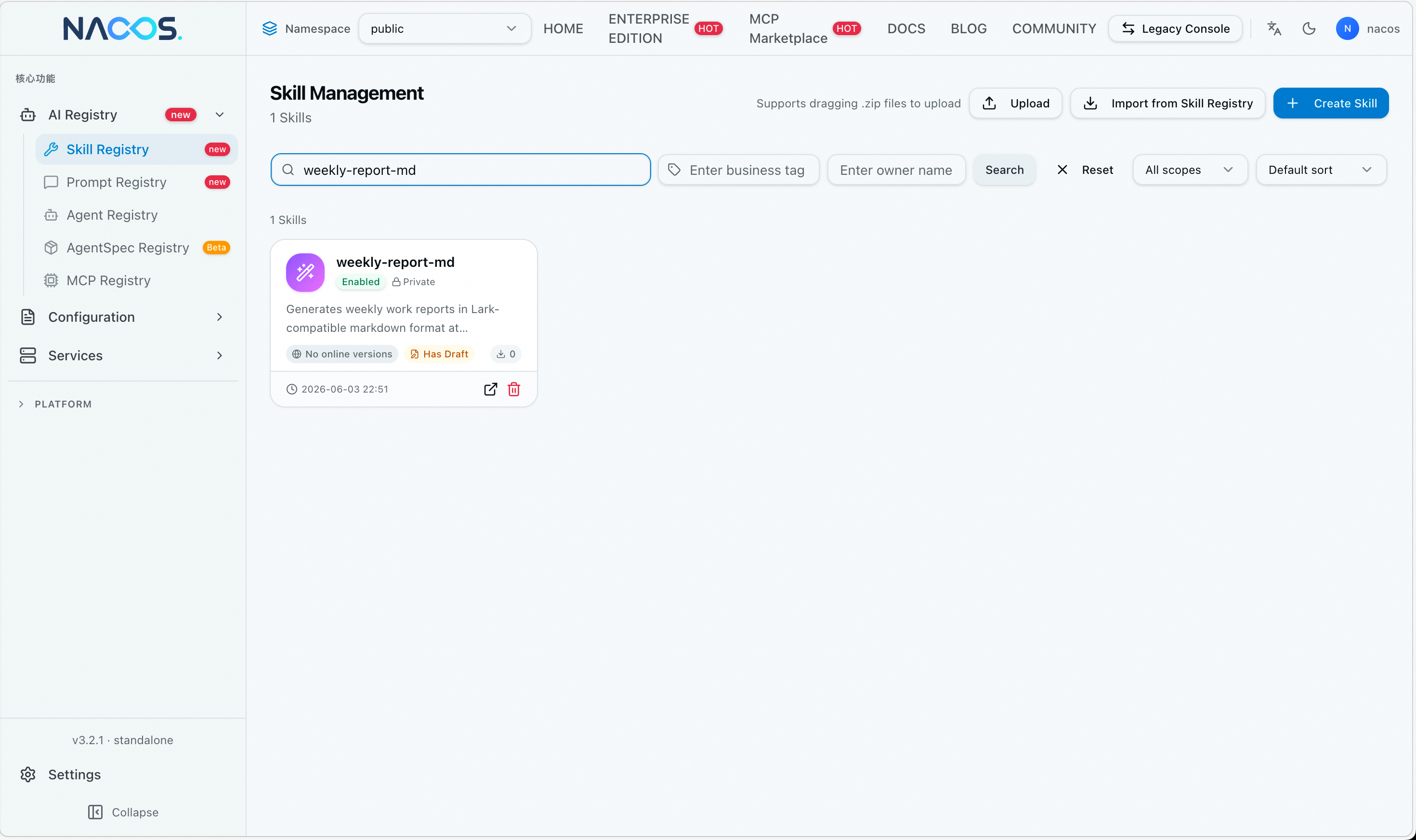
Log in to the Nacos console using the Console URL, username, and password obtained in Step 1, and enter the "Skill Management" page.
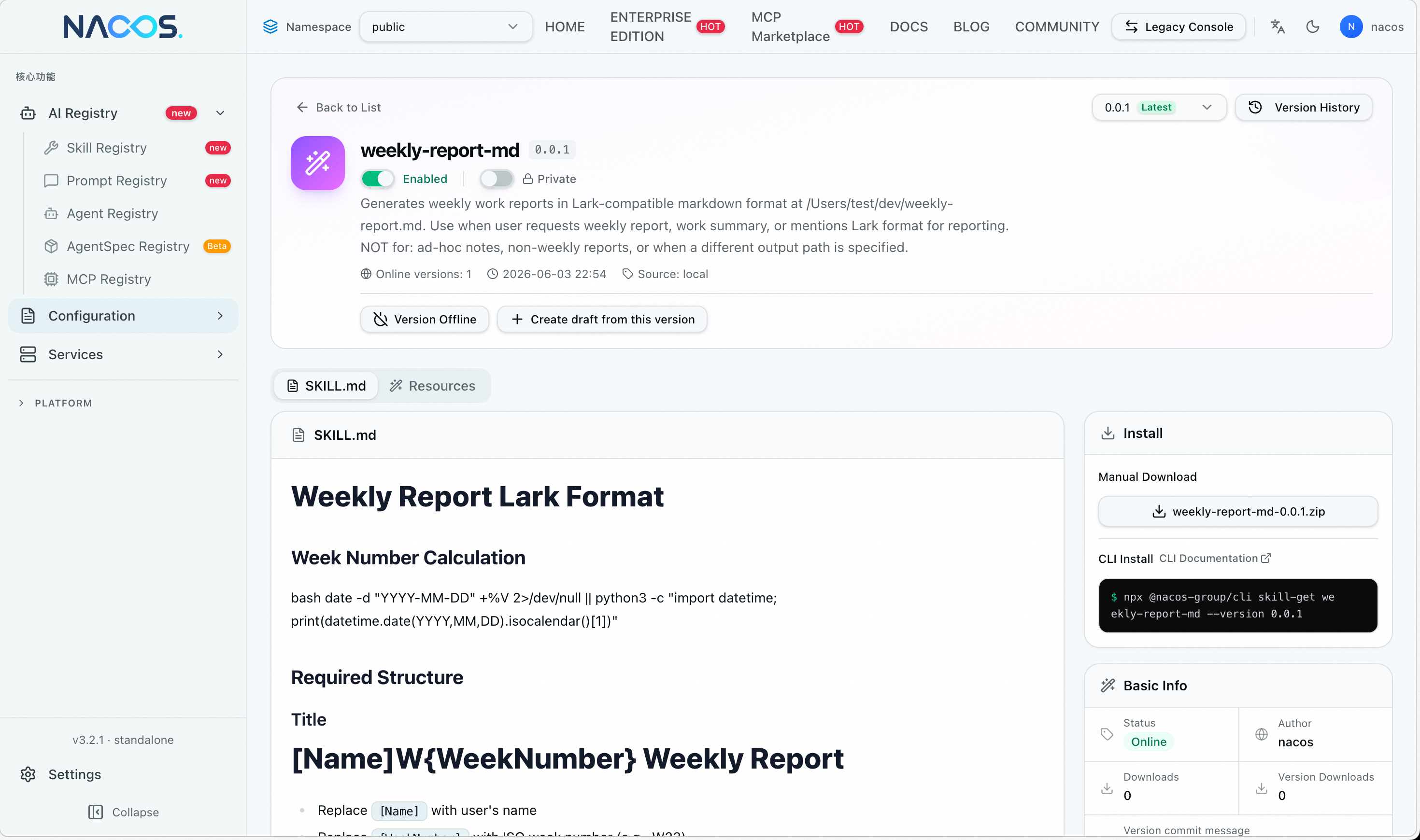
Acceptance Criteria: Confirm that weekly-report-md appears in the Skill list:
Click on the Skill to enter the detail page. You can see that the approval status is "Approved". Click the approval pipeline below to view the complete approval information:
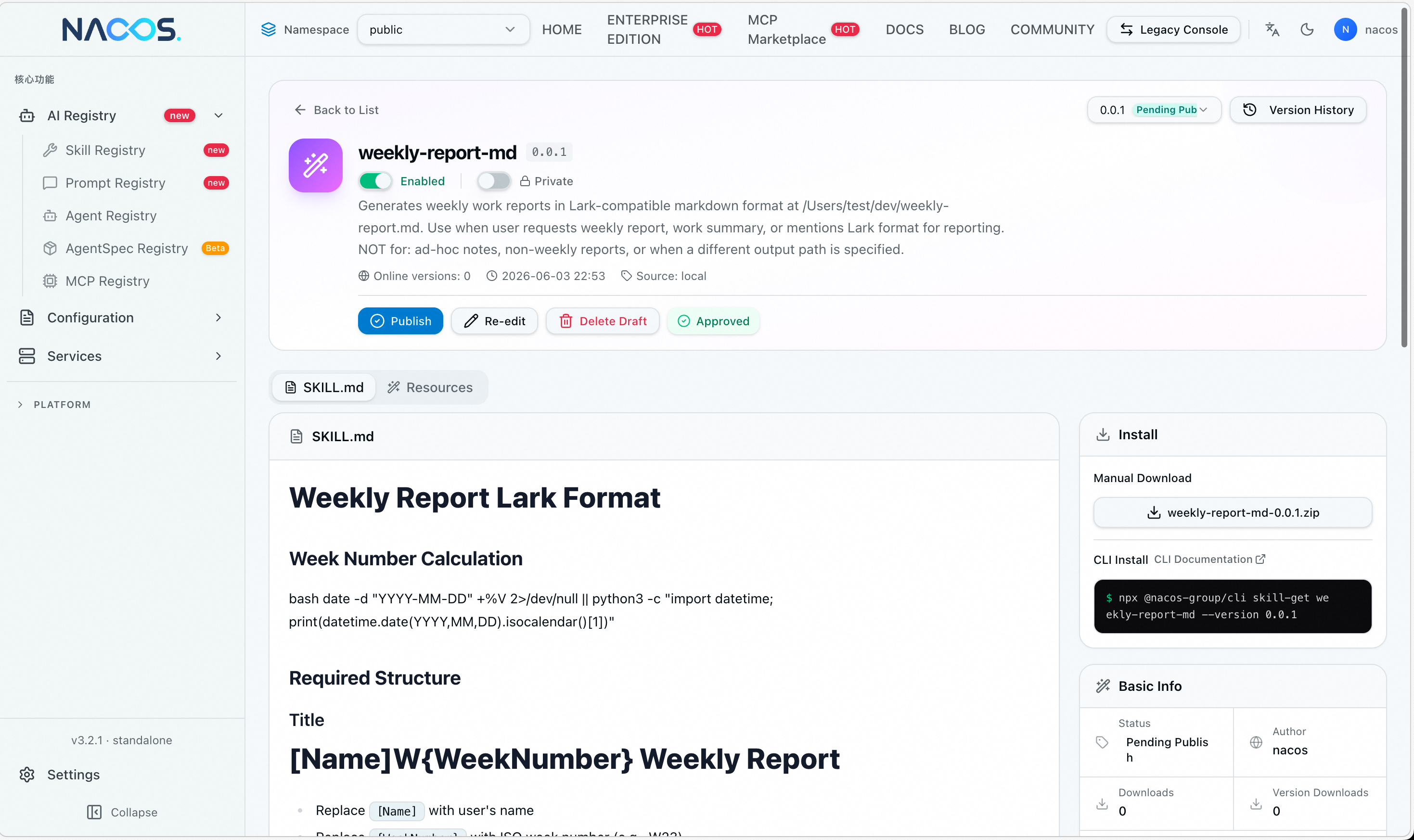
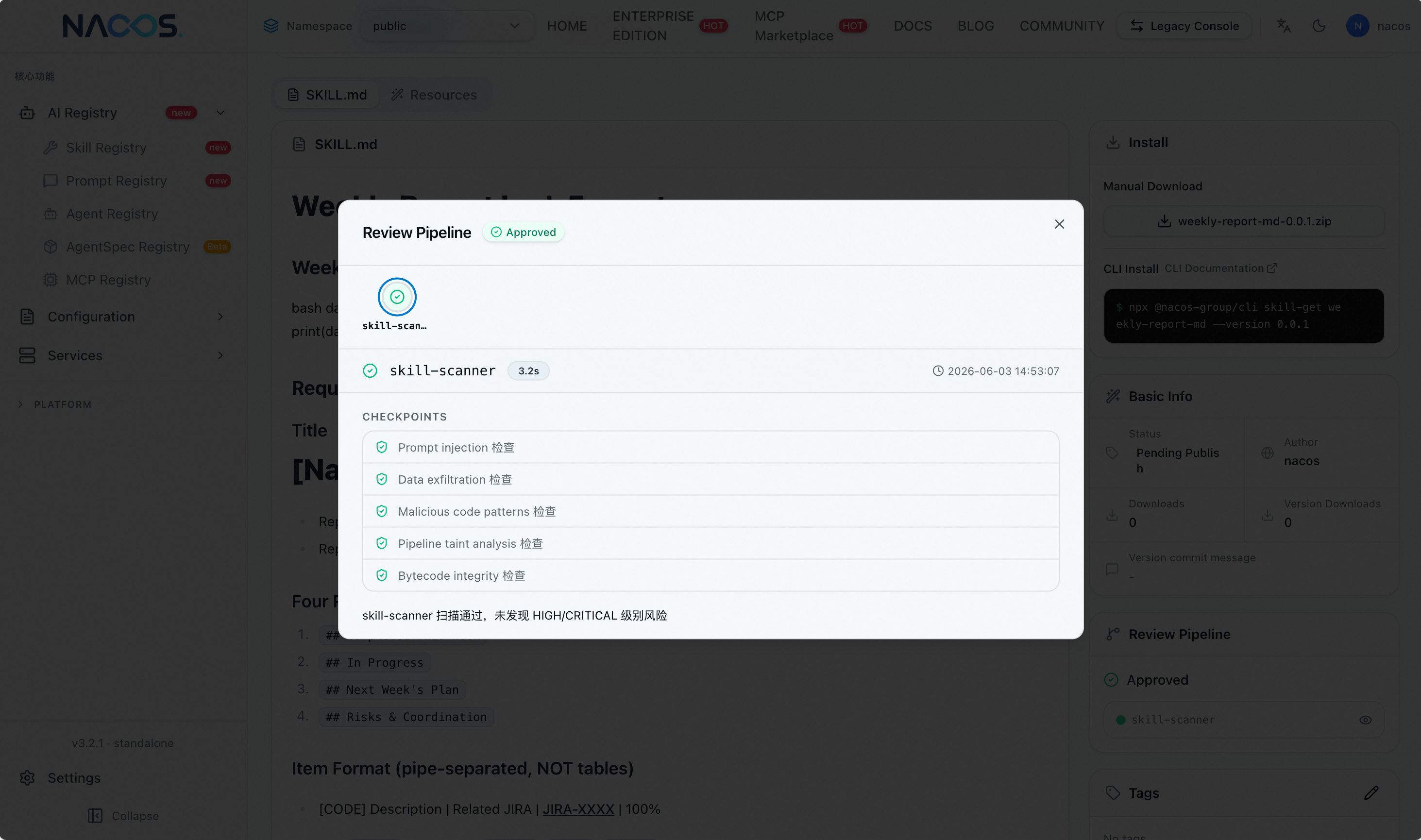
After clicking the publish button, version 0.0.1 of this Skill has been published and tagged with latest.
Start a new Claude session and describe the task in just one sentence:
Write this week's report to weekly-report.md, done: 1. Completed OAuth2 integration 2. Fixed JIRA-2847/2851/2860 3. review PR-1247/1253Execution Result:
1. Claude automatically identifies the weekly report scenario and reads the generated "Weekly Report Skill"
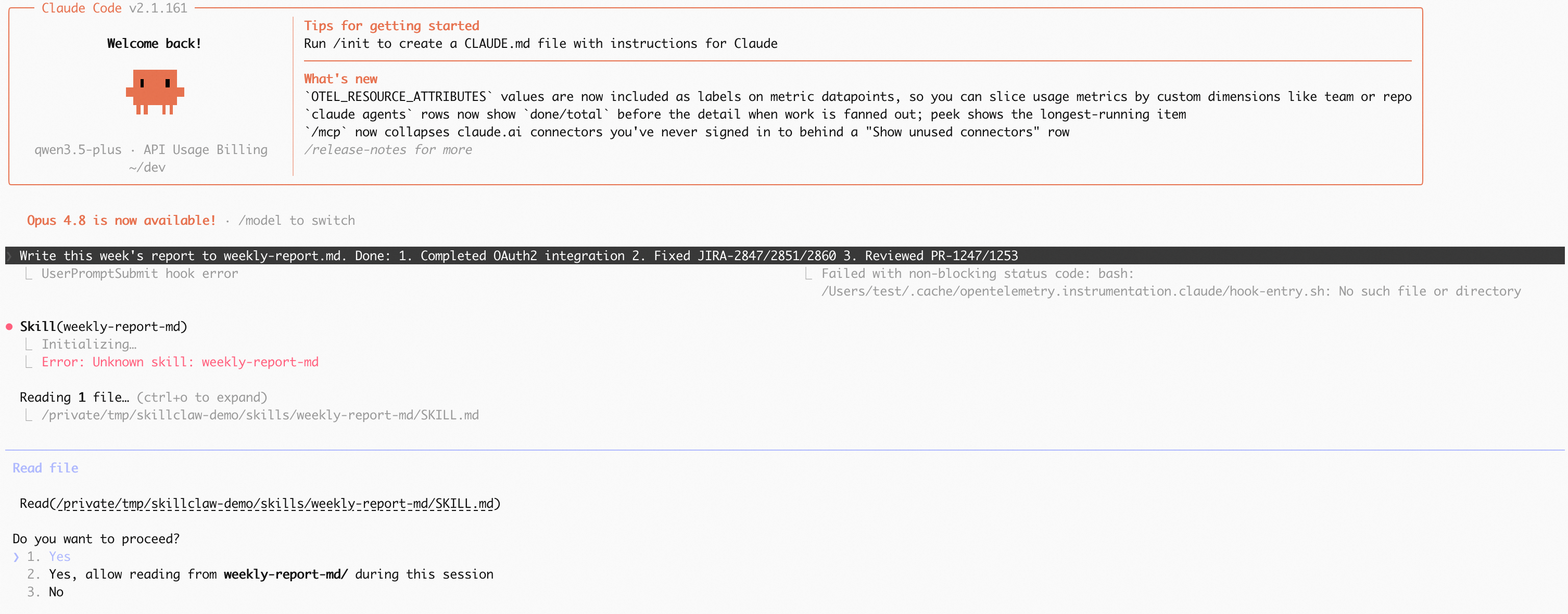
2. Based on the format and specifications in the Skill, generate a weekly report that conforms to team standards
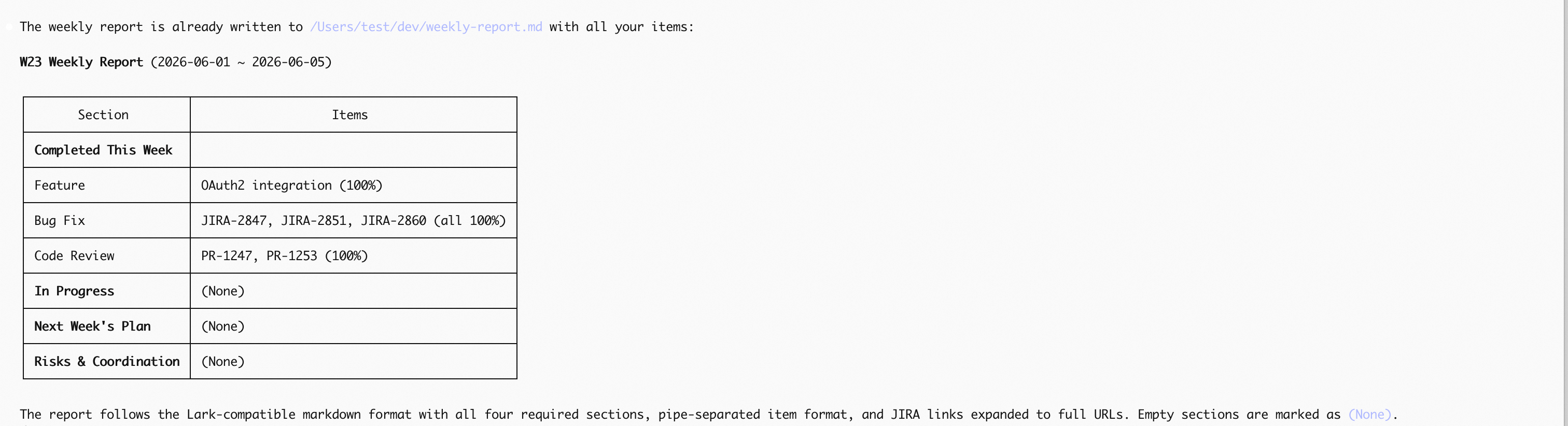
Compared to the first step requiring a detailed prompt of 200+ characters, now you only need one sentence—the Skill has automatically completed the format injection and specification constraints.
After validation is completed, you can close SkillClaw and restore the Agent configuration using the following commands
skillclaw stop
skillclaw restore claudeIf you are building an Agent, an Agent platform, an AI Registry, or team knowledge reuse tools, SkillClaw × Nacos provides a product path from real usage to team sharing. This Demo only shows the closed loop from one session to a new session, but the actual feasible scenarios go far beyond this:
Newcomers taking over old projects: The challenge with old projects is often not the lack of documentation, but that the specifications are hidden in the operating habits of senior colleagues—how to run tests, which configurations to check first, and which modules cannot be casually modified. After senior colleagues use Agents a few times for real requirements or troubleshooting, SkillClaw can accumulate these running experiences into Skills, which Nacos distributes to the team after approval. When new team members take over, they do not just get documents, but let the Agent directly inherit the team-validated way of doing things.
Teams repeatedly dealing with similar online issues: Login failures, configuration not taking effect, dependency timeouts. During the first troubleshooting, it always relies on people familiar with the system. SkillClaw records the context, tool calls, and decision sequence in the Agent's troubleshooting process, refining them into a Troubleshooting Skill; after being checked and published by Nacos, the next time on-duty occurs and similar problems are met, the Agent can troubleshoot along the verified path instead of reasoning from scratch every time.
Promoting platform capabilities to business projects: Capabilities such as unified SDKs, configuration specifications, and release checks previously relied on integration documents and manual Q&A. After platform developers complete a few actual integrations with Agents, SkillClaw refines the integration steps and common branches, and Nacos distributes them to different business teams by version and tag—allowing the platform's best practices to transform from "documentation instructions" into "Skills executable by Agents".
A team unifying Agent execution style: When different clients such as Claude Code and Cursor are used simultaneously, the same task may yield inconsistent outcomes due to personal prompts and configurations. SkillClaw extracts stable and effective work patterns from actual usage by multiple people, and Nacos manages and distributes them uniformly as team capabilities—what the team unifies is not a specific client, but the experience the Agent should follow when doing things.
First-line support accumulating high-frequency issues: For repetitive issues like installation failures, configuration errors, and version incompatibility, when support personnel solve them using Agents, SkillClaw records the path of judgment and way of answering, forming a support-class Skill. After being reviewed and published by Nacos, it can be reused by the entire team, reducing repetitive Q&A while avoiding unreviewed experience from spreading directly.
The commonality of these scenarios is: Skills are not designed out of nowhere, but grown out of real Agent usage; they also do not remain in an individual's local environment, but enter the team's reviewable, distributable, and continuously updatable sharing system through Nacos.
The starting point of SkillClaw is not to stop at letting individuals record experience, but to allow the experience accumulated during the use of Agents by individuals to be reused by others in the team. Nacos makes this reuse manageable—with versions, tags, reviews, distribution, rollbacks, and audits.
We hope to achieve a simple goal:
Let the experience generated by Agents in real work accumulate into Skills, shared and continuously evolved within the team through Nacos.
SkillClaw allows experience to be generated from sessions, and Nacos allows experience to enter the team Registry. One is responsible for "discovery and generation", and the other is responsible for "governance and distribution".
We also welcome the open-source community to participate: try out the MVP, provide real usage scenarios, and feedback on how you want to manage and distribute Agent Skills—so that Agent experience no longer scatters in individual conversations but becomes open-source AI assets that can be shared and continuously evolved by the team.
[1] SkillClaw: https://github.com/AMAP-ML/SkillClaw
[2] Nacos: https://github.com/alibaba/nacos
AgentScope Java 2.0: Building a Distributed, Enterprise-Grade Foundation for AI Agents

769 posts | 60 followers
FollowAlibaba Cloud Native Community - July 17, 2026
Alibaba Cloud Native Community - April 10, 2026
Alibaba Cloud Native Community - April 20, 2026
Alibaba Cloud Native Community - June 25, 2026
Alibaba Cloud Native Community - February 10, 2026
Alibaba Cloud Native Community - July 8, 2026
769 posts | 60 followers
Follow Token Plan
Build more, spend less. One plan, every modality.
Learn More QwenWork
QwenWork is dedicated to helping employees strengthen their professional competitiveness in the AI era and to enabling enterprises to improve organizational effectiveness.
Learn More
Alibaba Cloud Model Studio
A one-stop generative AI platform to build intelligent applications that understand your business, based on Qwen model series such as Qwen-Max and other popular models
Learn More Managed Service for Prometheus
Multi-source metrics are aggregated to monitor the status of your business and services in real time.
Learn MoreMore Posts by Alibaba Cloud Native Community

