By Yan Hua
In today's data-driven business landscape, traditional self-managed MySQL databases face growing challenges: ensuring high availability is increasingly difficult, performance bottlenecks become more pronounced, and the costs and efforts of scaling and maintenance rise sharply. As business expands, many organizations are turning to database solutions that offer greater efficiency, reliability, and scalability. PolarDB-X Standard Edition is designed to meet those needs. Compared with a self-managed MySQL database, PolarDB-X Standard Edition addresses several critical pain points:
• Powered by the self-developed XPaxos algorithm, PolarDB-X provides financial-grade high availability, delivering strong consistency with a recovery point objective (RPO) of 0 and removing the need to build complex primary/secondary replication and failover mechanisms.
• The self-developed Lizard transaction system enhances InnoDB's transaction processing, improving read/write performance while providing a solid foundation for integrated centralized and distributed architectures.
• PolarDB-X is 100% compatible with MySQL, making migration from a self-managed MySQL database smooth and straightforward without requiring changes to existing application logic.
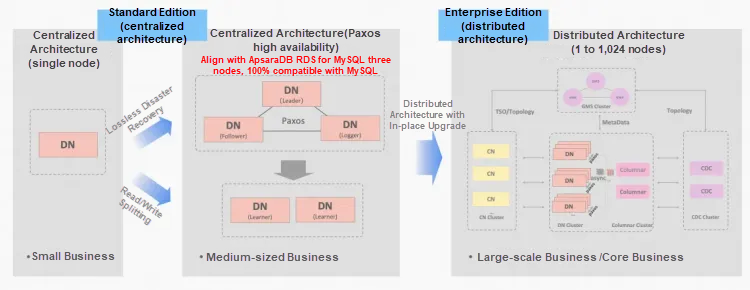
When users plan to migrate a self-managed MySQL database to PolarDB-X Standard Edition, they may ask why an in-place physical upgrade is not advisable. PolarDB-X Standard Edition is built on MySQL Community Edition, whereas self-managed MySQL environments commonly run either MySQL 5.7 or 8.0.
• MySQL 5.7 to PolarDB-X Standard Edition
• MySQL 8.0 to PolarDB-X Standard Edition
Logical migration avoids all of the preceding pitfalls and also standardizes the upgrade process. Therefore, in-place physical upgrades are not supported. Logical migration is the recommended method for migrating a self-managed MySQL database to PolarDB-X Standard Edition.
Although you can perform data migration with basic methods such as dump-and-load or primary/secondary replication, we strongly recommend that you use professional migration tools for these reasons:
• Significantly reduced migration duration: Professional tools use parallel/concurrent transfer to greatly increase synchronization throughput and shorten total migration duration.
• Minimized downtime: They automate critical steps such as suspending writes, validating data, and performing the traffic cutover, which drastically reduces cutover windows and eliminates human operational risks.
• Robust monitoring: Built-in monitoring gives real-time visibility into progress and risks, so you can track the migration process end-to-end.
• Strong data consistency: Features such as resumable transfer, real-time validation, and reverse (backward) synchronization help ensure that data remains consistent across all migration steps.
For various reasons, some users may still need to perform a manual migration. If you understand the risks and limits of manual logical migration, the following simplified procedure can be used as a reference for migrating a self-managed MySQL database to PolarDB-X Standard Edition.
• Physical backups are performed. Data is your company's most valuable asset. A failed migration can have catastrophic consequences. No matter how well the process is designed, migrating without reliable backups is highly risky. Keep at least one full physical backup on independent storage and verify its restorability. Perform backups at multiple critical points where feasible, and make sure that they include at minimum: the source database backed up during the cutover downtime (while writes are suspended), and the destination database backed up during the cutover downtime (while writes are suspended).
• Binary logging is enabled for the source database. Manual logical migration depends on MySQL binary logs, so the source database must have binary logging enabled and use the ROW binary log format (binlog_format = ROW).
• Global transaction identifier (GTID) is enabled for the source database. Although MySQL replication can use file/position-based offsets, that approach does not reliably support resumable transfer or robust data validation. Enabling GTID is strongly recommended and required for reliable logical migration.
• Different server_id values are used. Make sure that the source and destination databases have different server_id values, so the logical migration will not fail due to duplicate server identifiers.
The overall migration process consists of the following steps: full migration → incremental synchronization → downtime backup and validation → reverse synchronization → traffic cutover → post-cutover wrap-up.
• Full migration refers to exporting all data from the source database into SQL files and then importing those files into the destination database.
@@SESSION.SQL_LOG_BIN is enabled during the import process.• Incremental synchronization uses a MySQL replication link, where the self-managed MySQL database acts as the primary (source database) and PolarDB-X Standard Edition acts as the secondary (destination database). The destination database continuously synchronizes real-time writes from the source database.
• For downtime backup and validation, application writes are suspended before traffic cutover. Physical backups are performed on both the source and destination databases, and data consistency between them is verified. Traffic cutover can proceed only after validation succeeds.
• Reverse synchronization sets up a reverse MySQL replication link, in which the source database becomes the secondary and the destination database becomes the primary. The source database then continuously synchronizes real-time writes from the destination database. The purpose of this step is to ensure that the cutover operation is reversible.
• Traffic cutover refers to gradually redirecting both read and write traffic from the source database to the destination database, thereby accomplishing the final objective of the migration.
• After the destination database works in production for a period following cutover and meets expectations, the reverse replication link can be shut down and the source database can be decommissioned. This marks the completion of the manual logical migration from a self-managed MySQL database to PolarDB-X Standard Edition.
Because MySQL system tables are not always compatible across different MySQL versions, full data migration requires handling non-system tables and account (user/permission) tables separately.
1. Connect to the source MySQL database and use mysqldump to dump data. Sample code:
nohup /u01/xcluster80/bin/mysqldump -h127.0.0.1 -uadmin -p123456 -P3101 \
--set-gtid-purged=ON --databases d2 d1 > dbs.sql &
Note:
• Because incremental synchronization will follow, it is essential to use the --set-gtid-purged=ON option when you run mysqldump. This ensures that GTIDs are recorded in the dump file.
2. Modify the dump file.
After the dump file is generated, make modifications to enable binary logging. Sample code:
# Comment out statements that disable binary logging.
sed -i '/SET @@SESSION\.SQL_LOG_BIN/ s/^/-- /' dbs.sql
Note:
• Commenting out SQL_LOG_BIN ensures that the imported full data generates binary logs on PolarDB-X DNs, allowing synchronization to follower nodes. Without this step, the imported data exists only on the leader node, and follower nodes cannot receive it.
• Migration from MySQL 5.7 to 8.0 requires specifying default_collation_for_utf8mb4:
-- Set the default collation for utf8mb4.
sed -i '/SET @@SESSION.SQL_LOG_BIN.*/a\set @@session.default_collation_for_utf8mb4=utf8mb4_general_ci;'  dbs.sql
3. Import full data.
/u01/xcluster80/bin/mysql -h 127.0.0.1 -uadmin -p123456 -P3201 < dbs.sqlNote:
• After data is imported, on the PolarDB-X leader node, run this command: select * from information_schema.ALISQL_CLUSTER_HEALTH. This ensures no replication delay and no interruption to applications.
You can use the following script to export all user creation statements and permission grants in one step, and then execute them on the destination database.
hostname='127.0.0.1'
port=3306
username='root'
password='your_password'
mysql_exe=/usr/bin/mysql  # Adjust based on the actual installation path.

echo "SELECT CONCAT('SHOW CREATE USER ''',user,'''@''',host, ''';','SHOW GRANTS FOR ''',user,'''@''',host, ''';') FROM mysql.user WHERE user NOT IN ('mysql.sys', 'root', 'mysql.information_schema', 'mysql.session' )" | \
${mysql_exe} --host=$hostname --user=$username --password=$password --port=$port -N | \
${mysql_exe} --host=$hostname --user=$username --password=$password --port=$port -N | \
sed "s/$/;/" > ./create-users.sql
/u01/xcluster80/bin/mysql -h 127.0.0.1 -uadmin -p123456 -P3201 < create-users.sqlIncremental synchronization is performed by using standard MySQL replication, with the self-managed MySQL database as the primary and the PolarDB-X leader node as the secondary.
#1. Create a replication user on the primary.
create user rep identified with mysql_native_password by '123456';
grant replication slave on *.* to rep;

#2. Display a list of replica servers registered with the source server.
mysql> show slave hosts;
Empty set, 1 warning (0.00 sec)
#3. Stop the previously created aaa replication link on the secondary.
stop slave for channel 'aaa';
reset slave all for channel 'aaa';

#4. Configure the aaa replication link. Set master_host and master_port to the host and port of the primary.
# Set master_user to the replication user created in Step 1.
change master to master_host = '127.0.0.1', master_port = 13050, \
master_user = 'rep', master_password = '123456', \
master_auto_position=1 \
for channel 'aaa';

#5. Check the channel status. Initially, both Slave_IO_Running and Slave_SQL_Running are No.
show slave status for channel 'aaa'\G

#6. Exclude system databases and tables from replication, such as heartbeat tables.
#  Add the following parameters to the CNF file of the secondary and restart the instance for them to take effect:
replicate_ignore_db=aaa:mysql
replicate_ignore_db=aaa:sys
replicate_ignore_db=aaa:__recycle_bin__
replicate_ignore_db=aaa:information_schema
replicate_ignore_db=aaa:performance_schema

#7. Start the aaa replication link on the leader node of the secondary.
start slave for channel 'aaa';

#8. Check the channel status. Both Slave_IO_Running and Slave_SQL_Running become Yes.
show slave status for channel 'aaa'\G
#9. Confirm the replication server on the primary.
mysql>  show slave hosts;
+-----------+------+-------+-----------+--------------------------------------+
| Server_id | Host | Port  | Master_id | Slave_UUID                           |
+-----------+------+-------+-----------+--------------------------------------+
|        10 |      | 13060 |         2 | 26663b57-91e6-11f0-8700-b8599f3009a8 |
+-----------+------+-------+-----------+--------------------------------------+
1 row in set (0.00 sec)
Note:
• During incremental synchronization, the PolarDB-X DN cluster cannot switch the leader node. If a leader switch occurs, the replication link must be reconfigured on the new leader node.
• During incremental synchronization, you can monitor replication in real time on the destination database by running the show slave status for channel 'aaa' command to check for delay or interruption, ensuring no impact on applications.
If the business prioritizes data consistency and requires that no data be lost during migration, application writes must be suspended to obtain a validation window. If minimizing downtime is more important and online cutover without write suspension is required, the downtime backup and validation step can be skipped.
• Confirm that the incremental replication latency is less than 60 seconds and applications are not interrupted.
• Ensure that the destination PolarDB-X cluster itself has a synchronization latency less than 60 seconds and no interruptions.
• Suspend application writes.
• Set the source MySQL database to the read-only mode.
• Wait for the application latency in the destination database to reach zero.
• Perform a physical backup of the source MySQL database.
• Use the XtraBackup tool provided by PolarDB-X to perform a physical backup of the destination database.
• The backup process does not block subsequent data validation and can be run asynchronously in the background.
• Verify data consistency between the source and destination databases.
• Validate the actual data.
Method 1: Use CHECKSUM TABLE
CHECKSUM TABLE d1.t1;.• Remove the replication link from the destination database.
Database O&M actions must follow three guiding principles: observability, canary release, and rollback capability. Manual migration cannot fully ensure comprehensive observability or a true phased release, but it can preserve rollback capability as much as possible. To enable rollback, use MySQL replication to establish a reverse synchronization link, in which PolarDB-X Standard Edition serves as the primary and the self-managed MySQL database acts as the secondary. After cutover, application write traffic goes to PolarDB-X, while the writes are simultaneously replicated back to the legacy self-managed MySQL database. The following code provides an example:
#1. Check the latest binary logs.
mysql> show consensus logs;
+---------------+-----------+-----------------+
| Log_name      | File_size | Start_log_index |
+---------------+-----------+-----------------+
| binlog.000001 |     15777 |               1 |
| binlog.000002 |      7611 |              44 |
+---------------+-----------+-----------------+
2 rows in set (0.00 sec)

#2. Check the End_log_pos of the last entry in the latest binary logs.
mysql> show binlog events in 'binlog.000002';
+---------------+------+--------------------------+-----------+-------------+--------------------------------------------------------------+
| Log_name      | Pos  | Event_type               | Server_id | End_log_pos | Info                                                         |
+---------------+------+--------------------------+-----------+-------------+--------------------------------------------------------------+
| binlog.000002 |    4 | Format_desc              |        10 |         190 | Server ver: 8.0.32-X-Cluster-8.4.20-20241014, Binlog ver: 4  |
| binlog.000002 |  190 | Previous_consensus_index |        10 |         221 | ##PREV_CONSENSUS_INDEX: 44'                                  |
| binlog.000002 |  221 | Previous_gtids           |        10 |         332 | 37a1bb4b-91f9-11f0-b12d-b8599f3009a8:1-30,
902b4fe0-92a4-11f0-92ea-b8599f3009a8:1-11                                                                                                  |

.......

| binlog.000002 | 7580 | Xid                      |         3 |        7611 | COMMIT /* xid=237 */                                         |
+---------------+------+--------------------------+-----------+-------------+--------------------------------------------------------------+
78 rows in set (0.00 sec)
#3. Stop the previously created bbb replication link on the secondary.
stop slave for channel 'bbb';
reset slave all for channel 'bbb';

#4. Configure the bbb replication link. Set master_host and master_port to the host and port of the primary.
# The values of master_log_file and master_log_pos are obtained from the primary in the previous steps.
change master to master_host = '127.0.0.1', master_port = 13050, \
master_user = 'rep', master_password = '123456', \
master_log_file='binlog.000002' \
master_log_pos=7611 \
for channel 'bbb';

#5. Check the channel status. Initially, both Slave_IO_Running and Slave_SQL_Running are No.
show slave status for channel 'bbb'\G

#6. Exclude system databases and tables from replication, such as heartbeat tables.
#  Add the following parameters to the CNF file of the secondary and restart the instance for them to take effect:
#  MySQL 5.7 does not support channel-specific filters. Global filters are used.
replicate_ignore_db=mysql
replicate_ignore_db=sys
replicate_ignore_db=__recycle_bin__
replicate_ignore_db=information_schema
replicate_ignore_db=performance_schema

#7. Start the bbb replication link on the leader node of the secondary.
start slave for channel 'bbb';

#8. Check the channel status. Both Slave_IO_Running and Slave_SQL_Running become Yes.
show slave status for channel 'bbb'\G
#9. Confirm the replication server on the primary.
mysql>  show slave hosts;
+-----------+------+-------+-----------+--------------------------------------+
| Server_id | Host | Port  | Master_id | Slave_UUID                           |
+-----------+------+-------+-----------+--------------------------------------+
|        1  |      | 13010 |         2 | 902b4fe0-92a4-11f0-92ea-b8599f3009a8 |
+-----------+------+-------+-----------+--------------------------------------+
1 row in set (0.00 sec)
Note: The reverse synchronization procedure is largely the same as the incremental synchronization procedure, but with the following key differences and considerations:
• For reverse synchronization, do not specify master_auto_position in the CHANGE MASTER statement. Instead, explicitly specify master_log_file and master_log_pos.
• System databases still need to be excluded from replication. However, MySQL 5.7 does not support channel-specific replication filters, so global filters are used.
• During reverse synchronization to a MySQL 5.7 replica, the PolarDB-X primary cannot use MySQL 8.0 features, such as the utf8mb4_0900_ai_ci collation. Otherwise, replication will fail when those changes are applied to the MySQL 5.7 replica.
After the preceding steps are complete, proceed with application traffic cutover:
• Update the applications' database connections to use the PolarDB-X Java Database Connectivity (JDBC) driver and point to the PolarDB-X DN cluster.
• Bring the applications back online and run smoke tests followed by comprehensive functional tests.
• Monitor PolarDB-X DN metrics and the applications closely.
• Wait for the source and destination physical backups to finish. Retain these backups securely as rollback points.
• If PolarDB-X operates normally for a sustained observation period and meets expectations, consider the cutover successful.
• Decommission the self-managed MySQL database.
If an issue occurs during or after the cutover, you can roll back as needed:
• If an issue occurs before final wrap-up (for example, data validation fails or the destination database is unavailable):
• If an issue occurs after wrap-up (for example, the destination database becomes frequently unstable or unavailable):
• If you need to roll the applications back to a point in time around the cutover:
When you migrate workloads from a legacy self-managed MySQL database to a PolarDB-X DN, the parameter template must be derived from the original MySQL configurations, with DN-specific parameters applied on top of it. This approach ensures behavioral consistency before and after migration and avoids correctness or performance issues caused by parameters such as sql_mode and buffer_size. Custom parameter configurations used in the self-managed MySQL database cannot be removed. PolarDB-X DNs have strong dependencies on the following parameters:
• cluster_id: the unique cluster ID. Each DN cluster must use a different value.
• cluster_info: the topology of the cluster. The format is: ip1:port1;ip2:port2;ip3:port3@idx.
• server_id: the unique node ID within the cluster. The value must be different for each DN.
• port: Each DN must listen on a different port, and network access to the port must be ensured.
• sync_binlog=1: Together with innodb_flush_log_at_trx_commit=1, this setting ensures an RPO of 0 for a single DN. Default value: 1.
• innodb_flush_log_at_trx_commit=1: Together with sync_binlog=1, this setting ensures an RPO of 0 for a single DN. Default value: 1.
• log_bin: XPaxos-based log replication has a hard dependency on enabled binary logging. High-availability clusters also rely on this setting. Default value: ON.
• gtid_mode: DN relies on GTID to ensure an RPO of 0 during log application and crash recovery. Default value: ON.
• enforce_gtid_consistency: DN relies on GTID to ensure an RPO of 0 during log application and crash recovery. Default value: ON.
• implicit_primary_key: automatically adds an implicit primary key to tables that do not define one, preventing overall performance degradation on destination tables. Default value: OFF.
• sql_require_primary_key: forces explicit primary key definitions during table creation. Although an implicit primary key is added when implicit_primary_key is set to ON, it is still inferior to a primary key designed based on business logic. Recommended configurations:
In MySQL 5.7, when a table is created with the utf8mb4 character set but without an explicit collation, the default collation is utf8mb4_general_ci. The exported table schema includes only the character set, without an explicit collation. In MySQL 8.0, however, when a table is created with utf8mb4 and no collation is specified, the default collation becomes utf8mb4_0900_ai_ci.
Consequently, if a table schema exported from MySQL 5.7 is run on MySQL 8.0, the resulting table will use utf8mb4_0900_ai_ci. This can cause query results to differ from those on MySQL 5.7, leading to inconsistencies in application behavior.
| Scenario | utf8mb4_0900_ai_ci | utf8mb4_general_ci |
|---|---|---|
| Performance | Performance difference negligible on modern hardware and optimized algorithm | Simple algorithm, which may be slightly faster in extreme scenarios |
| Compatibility | Default recommendation for MySQL 8.0 and later | Default option for earlier MySQL versions |
| Language support | More languages and special characters | Mainly for English and basic Latin characters |
| Unicode standard | Based on Unicode 9.0 | Based on older simplified rules |
| Special Chinese characters | More comprehensive support | May not support or handle accurately |
| Mixed emojis | Correct ordering | Ordering may be inaccurate |
To avoid the community pitfall regarding default_collation_for_utf8mb4, PolarDB-X recommends the following approach:
1. During full migration, specify the following parameter in the full SQL dump file:
set @@session.default_collation_for_utf8mb4=utf8mb4_general_ci;2. During incremental migration, the system can automatically handle the changes in default_collation_for_utf8mb4 between MySQL 5.7 and PolarDB-X DN 8.0 to ensure compatibility.
3. After migration, to prevent the accidental misuse of default_collation_for_utf8mb4, specify the following parameters on PolarDB-X DNs:
# Disable reliance on the default collation for utf8mb4, that is, disallow specifying utf8mb4 without an explicit collation.
disable_default_collation_for_utf8mb4=ON

# Force the SHOW CREATE TABLE output to include an implicit collation for utf8mb4.
force_print_utf8mb4_implicit_collation=ONMigrating a self-managed MySQL 5.7 database to PolarDB-X Standard Edition is a complex technical task that requires a thorough understanding of the differences between the two database systems and the key points in the migration process. Although this article provides a detailed guide for manual migration, we still strongly recommend that you use professional migration tools such as Data Transmission Service (DTS) to reduce risks and improve migration efficiency.
During migration, the process must follow the "three guiding principles" (observability, canary release, and rollback capability) to ensure a secure and controllable process. After migration, comprehensive business verification is essential to confirm that all features operate correctly on the new database platform. Ensuring this is the ultimate goal of migration efforts.
Is Your AI Agent Getting Dumber? Alibaba Cloud AnalyticDB Unveils AI Context Engineering
Disaster Recovery for Databases: High-availability Architecture of PolarDB-X
ApsaraDB - January 17, 2025
ApsaraDB - January 29, 2026
ApsaraDB - January 3, 2024
PM - C2C_Yuan - May 6, 2026
ApsaraDB - June 19, 2024
ApsaraDB - January 16, 2026
 Oracle Database Migration Solution
Migrate your legacy Oracle databases to Alibaba Cloud to save on long-term costs and take advantage of improved scalability, reliability, robust security, high performance, and cloud-native features.
Learn More Database Migration Solution
Migrating to fully managed cloud databases brings a host of benefits including scalability, reliability, and cost efficiency.
Learn More Cloud Migration Solution
Secure and easy solutions for moving you workloads to the cloud
Learn More ADAM(Advanced Database & Application Migration)
An easy transformation for heterogeneous database.
Learn MoreMore Posts by ApsaraDB


