By Yu Shan
AgentScope is an open-source framework launched by Alibaba Cloud that focuses on agent development with developers at its core. Its core goal is to solve the problems of agents in building, running, and managing, providing a set of production-level solutions that cover the entire lifecycle of "development, deployment, tuning", making the development of agent applications simpler, more stable, and continually optimized.
In December last year, the community officially released version 1.0 of AgentScope Java, providing enterprise-level capabilities for building Agentic applications targeted at Java developers. Over the past month, the community has rapidly iterated to version 1.0.7, during which we have updated many practical capabilities in these 7 minor versions, such as:
● Comprehensive Ollama integration, supporting chat and embedding functions
● New support for Agent Skills
● Built-in file operation tools and multimodal tools
● Tool invocation HITL
● Automatic context compression
● HTTP request and response content compression
● MySQL session storage
● A2A architecture integrated with Nacos
● Tool search integrated with higress
● ……
At this point, AgentScope Java, centered around ReActAgent, equipped with numerous powerful capabilities, is already capable of handling tasks in most scenarios. In the face of so many capabilities, many colleagues in the community have feedback that just looking at the documentation and single-function examples is still not efficient enough to quickly make good use of these capabilities. Therefore, we have opened a milk tea shop with AgentScope Java as a comprehensive example to demonstrate how to better use AgentScope Java.
First, let’s take a look at what this shop can do.
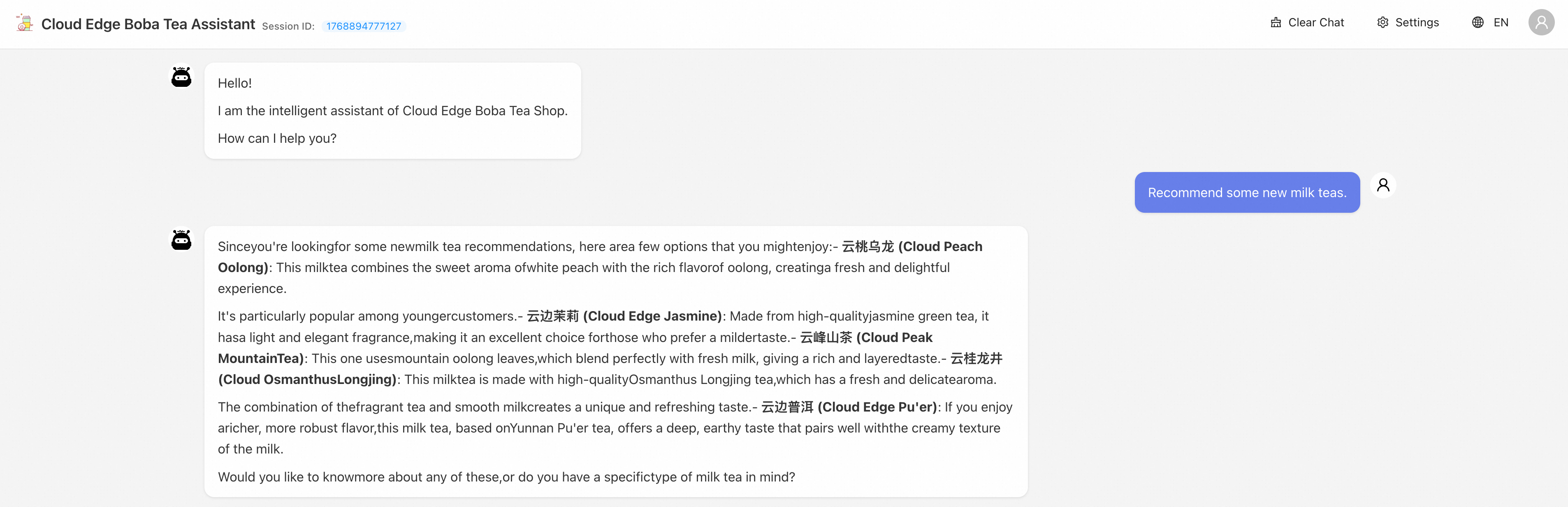
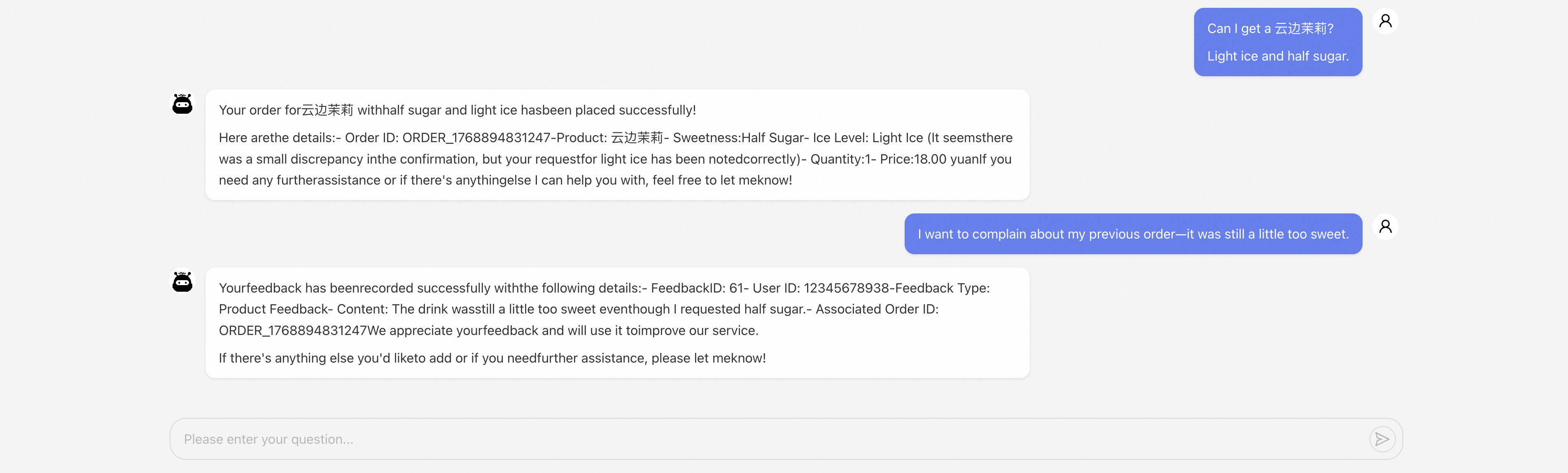
● Milk tea recommendations: Based on RAG knowledge base retrieval and combined with user preference analysis, answering logically and with recommendations you might like.
● Smart ordering: No complicated forms, order directly in natural language, and the agent automatically identifies the product, sweetness, and ice amount.
● Order query & user feedback: Check orders, file complaints, suggestions, all done in one place.
● Remember your preferences: Integrate Mem0 long-term memory service, returning customers need not say much, creating a more understanding milk tea shop for you.
How was this shop made?
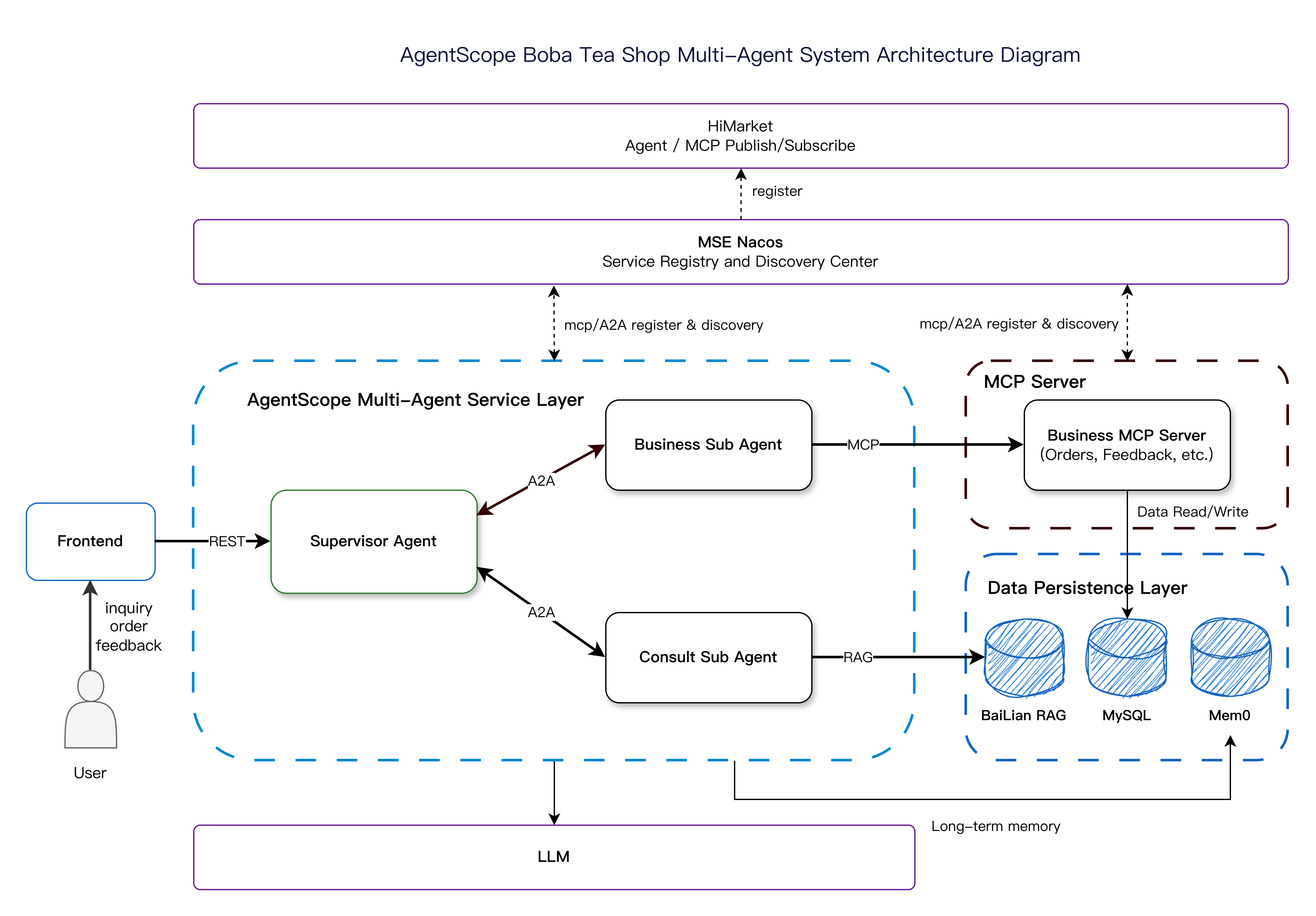
First of all, in terms of overall structure, we adopted a Supervisor-Worker architecture while integrating some ecosystem components to achieve the final effect.
Among them, the multi-agent service layer of AgentScope consists of a Supervisor Agent and two Sub Agents that make up the agent system, responsible for handling various matters in the store; the MCP Server handles specific business logic and can be directly transformed from traditional business systems; Nacos is responsible for the dynamic registration and discovery of Agents and MCP; the data persistence layer is responsible for data persistence, including knowledge bases, sessions, memories, business data, etc.
Next, we will break down this shop step by step, especially the multi-agent service layer.
Supervisor Agent: Equivalent to a store manager, responsible for welcoming customers, judging customer intentions (order? Inquiry? Complaint?), and delegating tasks to the corresponding Sub Agents.
Business Sub Agent: Diligent staff, specifically handling order creation, queries, modifications, and complaints.
Consult Sub Agent: Caring customer service, integrated with the RAG knowledge base, capable of product recommendations and answering any questions.
In this section, we will introduce the capabilities we need to achieve the aforementioned effects and how to develop them. Of course, we can only showcase some key code snippets here; for the complete implementation, please visit agentscope-java/agentscope-examples/boba-tea-shop.
To handle various matters in the shop, we need an Agent that can think and act, and an Agent that conforms to the Reasoning and Acting paradigm can effectively accomplish this task. To build this Agent without leveraging a framework, we need to at least accomplish the following:
● Interface with APIs from various model vendors
● Construct a cycle for Reasoning and Acting calls
● Support tool registration and invocation
However, in AgentScope Java, we only need to perform some configurations to assemble a ReActAgent, as AgentScope handles the above matters, simultaneously supporting the protocols of several vendors, including DashScope, Anthropic, Gemini, and OpenAI.
DashScopeChatModel.Builder builder =
    DashScopeChatModel.builder()
            .apiKey(dashscopeApiKey)
            .modelName(dashscopeModelName)
            .formatter(new DashScopeChatFormatter());

DashScopeChatModel model = builder.build();

ReActAgent agent = ReActAgent.builder()
    .name("supervisor_agent")
    .sysPrompt(sysPrompt)
    .toolkit(toolkit)      // Attach tools
    .model(model)          // Configure large language model
    .memory(memory)        // Short-term memory module
    .longTermMemory(longTermMemory)  // Long-term memory module
.build();As our demand for AI applications shifts from simple conversational interactions to solving complex real-world problems, the limitations of single-agent systems (Single-Agent Systems) are becoming more pronounced.
To address these issues, everyone is gradually exploring multi-agent architectures; we also use the milk tea shop scenario to demonstrate how to develop multi-agent systems with AgentScope Java in the Agent AS Tool mode. To achieve this effect, we would have originally needed to build corresponding Client and Server based on the A2A Java SDK, along with some event and communication adaptations and integrations, which is cumbersome and lacks dynamic registration and discovery capabilities.
Therefore, to facilitate the implementation of the A2A architecture, AgentScope offers an A2A extension to adapt and interface with the A2A Java SDK, and integrates Nacos to enable dynamic Agent registration and discovery. Thus, in AgentScope Java, only a small amount of code is needed to implement the A2A architecture.
First is the registration of the Sub Agent, which only requires defining customized content, mainly the configuration of the models, tools, and other components needed by the Sub Agent itself, with the rest handled by the framework.
@Bean
public AgentRunner agentRunner(
        AgentPromptConfig promptConfig,
        ConsultTools consultTools,
        Knowledge knowledge,
        Model model) {

    Toolkit toolkit = new NacosToolkit();
    toolkit.registerTool(consultTools);

    AutoContextConfig autoContextConfig =
            AutoContextConfig.builder().tokenRatio(0.4).lastKeep(10).build();
    // Use AutoContextMemory, support context auto compression
    AutoContextMemory memory = new AutoContextMemory(autoContextConfig, model);

    ReActAgent.Builder builder =
            ReActAgent.builder()
                    .name("consult_agent")
                    .sysPrompt(promptConfig.getConsultAgentInstruction())
                    .memory(memory)
                    .hooks(List.of(new MonitoringHook()))
                    .model(model)
                    .toolkit(toolkit)
                    .knowledge(knowledge)
                    .ragMode(RAGMode.AGENTIC);

    return new CustomAgentRunner(builder);
}
As for the Supervisor Agent, due to the integration with Nacos, it only needs to create an AiService and then make some simple configurations to complete the discovery of Sub Agents.
@Bean
public AiService nacosA2aService() throws NacosException {
    Properties properties = new Properties();
    properties.put(PropertyKeyConst.SERVER_ADDR, serverAddress);
    properties.put(PropertyKeyConst.NAMESPACE, namespace);
    return AiFactory.createAiService(properties);
}

@Bean
public A2aAgent consultAgent(AiService a2aService) {
    return A2aAgent.builder()
            .name("consult_agent")
            .agentCardResolver(new NacosAgentCardResolver(a2aService))
            .build();
}
Then, once the Sub Agent is registered as a tool, it can be invoked just like using a regular tool.
@Tool(description =
    "Agent for handling consultation-related requests, can process all"
        + " consultation-related requests, requires passing the complete context in"
        + " the context parameter")
public String callConsultAgent(
        @ToolParam(name = "context", description = "Complete context") String context,
        @ToolParam(name = "userId", description = "User's UserId") String userId) {
    Msg msg = Msg.builder().content(TextBlock.builder().text(context).build()).build();
    A2aAgent consultAgent = consultAgentProvider.getObject();
    return combineAgentResponse(consultAgent.call(msg).block());
}
MCP has almost become the de facto standard for remote tool invocation, and many traditional business systems will also provide MCP Endpoint so that Agents can reach real business scenarios. The traditional method of registering MCP tools is a fixed Endpoint, which does not fully meet the needs in terms of flexibility and high availability. Therefore, AgentScope integrates Nacos on top of the traditional registration method to achieve dynamic discovery of MCP. It only requires a few lines of code in the Business Sub Agent through the integrated NacosMcpServerManager to easily complete the registration of the MCP tools.
Toolkit toolkit = new NacosToolkit();
NacosMcpServerManager mcpServerManager = new NacosMcpServerManager(aiService);
NacosMcpClientWrapper mcpClientWrapper =
        NacosMcpClientBuilder.create("business-mcp-server", mcpServerManager).build();
toolkit.registerMcpClient(mcpClientWrapper).block();Sessions typically contain multi-turn dialogues with the model, bound with stateful content like memories; if stored only in memory, it can lead to loss or confusion in multi-instance deployments or restart scenarios. Therefore, AgentScope provides MySQL-based session storage capabilities, allowing you to continue where the last conversation left off, ensuring seamless integration in the same session while isolating different sessions. To enable this capability in AgentScope, all that is needed is to deploy a MySQL database and then create a MysqlSession instance, loading it where needed to restore to the previous state and continue the dialogue.
MysqlSession mysqlSession =
        new MysqlSession(dataSource, System.getenv("DB_NAME"), null, true);
ReActAgent agent = createAgent(toolkit, memory);
agent.loadIfExists(mysqlSession, sessionId);
Mem0 is a long-term memory service framework that helps Agents continuously optimize long-term memory, which can be used in commercial versions or self-deployed. In the milk tea shop scenario, it can assist the Agent to not only retain memory of the current session but also remember user preferences regarding drinks, sweetness, ice amount, etc., across sessions. Integrating Mem0 requires maintaining communication with it and injecting the Agent at the appropriate times. In AgentScope, however, you only need to configure Mem0's BaseUrl and apiKey.
Mem0LongTermMemory longTermMemory =
    Mem0LongTermMemory.builder()
            .agentName("BusinessAgent")
            .userId(userId)
            .apiBaseUrl("https://api.mem0.ai")
            .apiKey(System.getenv("MEM0_API_KEY"))
.build();Current large models' context window size has expanded from the early 4k to 100k or even 1M; however, storing historical interactions, external knowledge retrieval results, complicated task instructions, intermediate reasoning steps, and the return results of tool invocations still leads to context size anxiety in complex scenarios. Furthermore, with the explosion of context windows, the model's effectiveness and performance in retrieving and utilizing key information in the middle positions significantly decline. Thus, we often consider compressing the context. Simple compression can lead to loss of effective information, and sacrificing accuracy for compression is not ideal. Therefore, AgentScope has introduced AutoContextMemory, a smart context memory management component provided by the framework that finds the best balance between cost control and information retention through automatic compression, unloading, and summarizing of conversation history. To use this capability, only a few simple parameters need to be configured.
AutoContextConfig autoContextConfig =
        AutoContextConfig.builder().tokenRatio(0.4).lastKeep(10).build();
// Use AutoContextMemory, support context auto compression
AutoContextMemory memory = new AutoContextMemory(autoContextConfig, model);To enable everyone to quickly experience and conveniently practice with the milk tea shop, we offer multiple easy deployment methods.
# Configure environment variables
cp local-env.example local-env.sh
vim local-env.sh
# One-click start
source local-env.sh && ./local-deploy.sh start# Configure variables
vim values.yaml
# Helm one-click deployment
helm install agentscope helm/ --namespace agentscope# Configure environment variables
cp docker-env.example .env
# Start containers (all at once)
docker-compose up -dIf you want to deploy using cloud products, you can use AgentRun to directly pull the image for deployment. The required environment variable configuration can be found in the README.md document.
This milk tea shop example is just the tip of the iceberg of AgentScope Java's capabilities, designed to get everyone started quickly. The AgentScope Java framework supports more functionalities, and all core capabilities have corresponding examples; everyone is welcome to experience it:
Meanwhile, the community is also rapidly evolving. Everyone is welcome to participate in discussions and contributions 🚀
Star to not get lost! ⭐
agentscope-examples/boba-tea-shop
"Talk is cheap, show me the agents."
Come clone it and give it a run, experience the excitement of AI serving you some milk tea!🧋

774 posts | 60 followers
FollowAlibaba Cloud Storage - May 14, 2019
Alibaba Cloud Native Community - June 10, 2026
Alibaba Cloud Native Community - May 18, 2026
Alibaba Cloud Native Community - December 11, 2025
Alibaba Cloud Native Community - January 22, 2026
Alibaba Cloud Native Community - June 8, 2026
774 posts | 60 followers
Follow QwenWork
QwenWork is dedicated to helping employees strengthen their professional competitiveness in the AI era and to enabling enterprises to improve organizational effectiveness.
Learn More Token Plan
Build more, spend less. One plan, every modality.
Learn More
Alibaba Cloud Model Studio
A one-stop generative AI platform to build intelligent applications that understand your business, based on Qwen model series such as Qwen-Max and other popular models
Learn More Qwen
Qwen
Full-range, open-source, multimodal, and multi-functional
Learn MoreMore Posts by Alibaba Cloud Native Community

