By Yuan Yun
With the rapid development of LLM applications, more and more Agent applications are starting to come closer to everyone. Currently, there are three mainstream technical routes surrounding the core of Agent applications: no-code, low-code, and high-code. AgentScope, as a widely used high-code framework in the Python community, has an increasing demand in the Java ecosystem. We are pleased to announce that the AgentScope Java v0.2 version has officially been released, equipped with all core capabilities of the ReActAgent.
The primary design goal of AgentScope is to be transparent to developers.
Currently, many Agent frameworks deeply encapsulate the underlying scheduling, which simplifies some concepts for users but also increases complexity when troubleshooting issues. AgentScope is different:
● Prompt Engineering: Users can modify all prompt-related content themselves
● API Call: Each API call can be pinpointed
● Agent Build: All configurations of Agents come from user-determined settings
● Decision Process: The reasoning and execution processes of the Agent can be exposed through Hooks
Here is a simple example of an Agent:
<dependency>
    <groupId>io.agentscope</groupId>
    <artifactId>agentscope-core</artifactId>
    <version>0.2.1</version>
</dependency>public class HelloAgentScope {
public static void main(String[] args) {
// Create a ReActAgent
ReActAgent agent = ReActAgent.builder()
.name("Assistant")
.model(DashScopeChatModel.builder()
.apiKey(System.getenv("DASHSCOPE_API_KEY"))
.modelName("qwen3-max")
.build())
.build();
// Invoke the agent
Msg response = agent.call(
Msg.builder()
.role(MsgRole.USER)
.content(TextBlock.builder()
.text("Hello, please introduce yourself.")
.build())
.build()
).block();
System.out.println(response.getTextContent());
}
}Thus, an Agent is built. In this example, ReActAgent is the core of AgentScope, and almost all of our subsequent features are based on it.
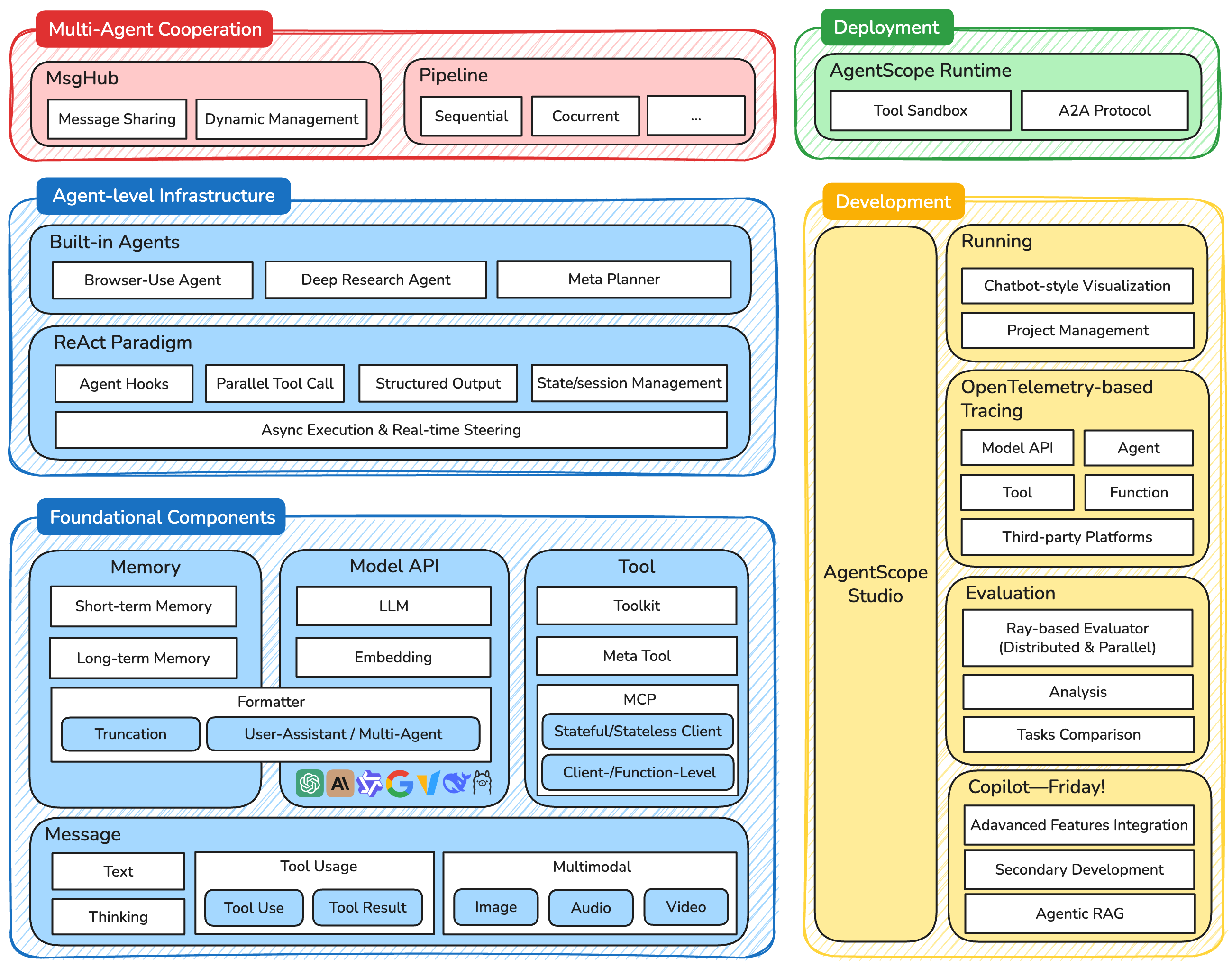
Similar to the Python version, AgentScope Java adopts a layered architecture:
Message: A unified message abstraction object that supports text, images, audio, and video through a set of data structures.
Model API: Supports mainstream model providers like DashScope and OpenAI. The Formatter mechanism shields the format differences between different model providers.
Tool: Allows users to define tools for LLM use, supporting synchronous/asynchronous, streaming/non-streaming API styles.
ReAct Paradigm: The core Agentic implementation, through iterative cycles of reasoning (Reasoning) and acting (Acting).
Agent Hooks: Run within the ReActAgent, allowing users to monitor and modify the Agent's execution process.
State Management: Session persistence component that supports saving and restoring user dialog states.
MsgHub: Facilitates message sharing between multiple Agents, serving as a tool for multi-Agent communication and cooperation
Pipeline: A tool for executing multiple Agents according to specific (sequential, parallel, etc.) strategies
AgentScope Runtime: An enterprise-level runtime infrastructure for solving distributed deployment and security isolation issues, providing capabilities such as tool running sandbox, A2A protocols, and remote deployment
AgentScope Studio: Provides visual debugging and observation capabilities from the development phase to the running phase, speeding up the development process for developers from 0 to 1.
ReAct (Reasoning and Acting) is the core implementation paradigm of AgentScope. Its design thinking is simple: separate thinking and execution to solve problems through iterative loops.
Reasoning Phase: The Agent analyzes based on the current context and decides on the next action:
● Understand user intent
● Evaluate available information (context)
● Determine the tools and parameters needed to call
Acting Phase: Execute the data acquisition actions required for the Reasoning phase
● Execute tool calls in parallel
● Collect execution results
● Incorporate results into memory
Iterative Control: The ReActAgent continuously executes iterations of Reasoning and Acting; if the model completes the iteration within the maximum iteration rounds, it will end normally; if not, it will trigger the ability to summarize the session.
To enable ReActAgent to truly perform Acting, corresponding tools must be added to ReActAgent.
Here’s an example with a Weather Assistant:
// Define a tool class
public class WeatherTools {
    @Tool(description = "Get the weather information of a specified city")
    public String getWeather(
        @ToolParam(name = "city", description = "City name") String city) {
        // In a real application, call a weather API here
        return String.format("%s: Sunny, temperature 25 ℃", city);
    }
}

// Register the tool
Toolkit toolkit = new Toolkit();
toolkit.registerTool(new WeatherTools());

// Build a ReActAgent with tools
ReActAgent agent = ReActAgent.builder()
    .name("WeatherAssistant")
    .sysPrompt("You are a weather assistant who can query weather information for cities.")
    .model(DashScopeChatModel.builder()
        .apiKey(System.getenv("DASHSCOPE_API_KEY"))
        .modelName("qwen3-max")
        .build())
    .toolkit(toolkit)
    .build();

// Invoke the agent
Msg response = agent.call(
    Msg.builder()
        .role(MsgRole.USER)
        .content(TextBlock.builder()
                .text("What's the weather like in Beijing today?")
                .build())
        .build()
).block();
Execution flow:
User question: What’s the weather like in Beijing today?
↓
[Reasoning] Need to check the weather, decide to call getWeather("Beijing")
↓
[Action] Execute tool → "Beijing: Sunny, temperature 25℃"
↓
[Reasoning] Information obtained, generating the response
↓
Answer: According to the query results, Beijing is sunny today with a temperature of 25℃In addition to the basic Reasoning and Acting capabilities, ReActAgent of AgentScope also possesses multiple features.
ReActAgent can handle multi-modal inputs, not limited to plain text:
// Create a vision-capable ReActAgent (using a vision model)
ReActAgent visionAgent = ReActAgent.builder()
    .name("VisionAssistant")
    .model(DashScopeChatModel.builder()
        .apiKey(System.getenv("DASHSCOPE_API_KEY"))
        .modelName("qwen3-vl-plus")  // Vision model
        .build())
    .build();

// Send a message that contains an image
Msg response = visionAgent.call(
    Msg.builder()
        .role(MsgRole.USER)
        .content(List.of(
            TextBlock.builder().text("Please analyze the content of this image.").build(),
            ImageBlock.builder()
                .source(URLSource.builder()
                    .url("https://example.com/image.jpg")
                    .build())
                .build()
        ))
        .build()
).block();
Supported multi-modal content types: TextBlock, ImageBlock, AudioBlock, VideoBlock.
Add hooks to ReActAgent to monitor and extend its behavior. Here we use the WeatherAssistant as an example to add hooks, allowing us to see the Agent's thought and execution processes in real-time:
// Define a debugging hook to display the full ReAct execution process
Hook debugHook = new Hook() {
    @Override
    public <T extends HookEvent> Mono<T> onEvent(T event) {
        try {
            switch (event) {
                case PreReasoningEvent e -> {
                    System.out.println("\n[Reasoning] The agent starts thinking...");
                }
                case PostReasoningEvent e -> {
                    System.out.println("[Reasoning] Reasoning result: " +
                        new ObjectMapper().writeValueAsString(e.getReasoningMessage()));
                }
                case PostActingEvent e -> {
                    System.out.println("[Action] Executing tool → " +
                        new ObjectMapper().writeValueAsString(e.getToolResult()));
                }
                case PostCallEvent e -> {
                    System.out.println("[Reasoning] Information obtained, generating final answer");
                    System.out.println("Answer: " + e.getFinalMessage().getTextContent());
                }
                default -> {}
            };
        } catch (JsonProcessingException e) {
            ...
        }
        return Mono.just(event);
    }
};

// Add the hook to WeatherAssistant
ReActAgent weatherAgent = ReActAgent.builder()
    .name("WeatherAssistant")
    .sysPrompt("You are a weather assistant who can query weather information for cities.")
    .model(DashScopeChatModel.builder()
           .apiKey(System.getenv("DASHSCOPE_API_KEY"))
           .modelName("qwen3-max")
           .build())
    .toolkit(toolkit) // Toolkit defined earlier
    .hook(debugHook)  // Add the debugging hook
    .build();

// Query the weather
Msg response = weatherAgent.call(
    Msg.builder()
    .role(MsgRole.USER)
    .content(TextBlock.builder()
             .text("What’s the weather like in Beijing today?")
             .build())
    .build()
).block();

// Example output:
// [Reasoning] The agent starts thinking...
// [Reasoning] Reasoning result: {"id":"xxx","name":"WeatherAssistant","role":"ASSISTANT","content":[{"type":"tool_use","id":"call_xxx","name":"getWeather","input":{"city":"Beijing"},"content":null}],"metadata":null,"timestamp":"xxx"}
// [Action] Executing tool → {"type":"tool_result","id":"call_xxx","name":"getWeather","output":[{"type":"text","text":"\"Beijing: Sunny, temperature 25 ℃\""}],"metadata":{}}
// [Reasoning] The agent starts thinking...
// [Reasoning] Reasoning result: {"id":"xxx","name":"WeatherAssistant","role":"ASSISTANT","content":[{"type":"text","text":"Today's weather in Beijing is sunny with a temperature of 25℃. Consider wearing sun protection. Have a wonderful day!"}],"metadata":null,"timestamp":"xxx"}
// [Reasoning] Information obtained, generating final answer
// Answer: Today's weather in Beijing is sunny with a temperature of 25℃. Consider wearing sun protection. Have a wonderful day!Save and restore the state of ReActAgent:
// Create a ReActAgent
ReActAgent agent = ReActAgent.builder()
    .name("PersistentAgent")
    .model(DashScopeChatModel.builder()
        .apiKey(System.getenv("DASHSCOPE_API_KEY"))
        .modelName("qwen3-max")
        .build())
    .memory(new InMemoryMemory())
    .build();

// Save the session
SessionManager.forSessionId("session-001")
    .withJsonSession(Path.of("./sessions"))
    .addComponent(agent)
    .saveSession();

// Restore on next startup
SessionManager.forSessionId("session-001")
    .withJsonSession(Path.of("./sessions"))
    .addComponent(agent)
    .loadIfExists();

// The agent is now restored to its previous state and can continue the conversationReturn type-safe structured data from ReActAgent:
// Define the output structure
public class WeatherReport {
    public String city;
    public int temperature;
    public String condition;
    public List<String> suggestions;
}

// Specify the output type when calling ReActAgent
Msg response = agent.call(
    Msg.builder()
        .role(MsgRole.USER)
        .content(TextBlock.builder()
                .text("Analyze the weather in Beijing and give some suggestions.")
                .build())
        .build(),
    WeatherReport.class  // Specify structured output type
).block();

// Extract structured data
WeatherReport report = response.getStructuredData(WeatherReport.class);

System.out.println("City: " + report.city);
System.out.println("Temperature: " + report.temperature);
Avoids the uncertainty of text parsing, catching type errors at compile time.
Multiple ReActAgents can cooperate through Pipelines:
// Create model configuration
DashScopeChatModel model = DashScopeChatModel.builder()
    .apiKey(System.getenv("DASHSCOPE_API_KEY"))
    .modelName("qwen3-max")
    .build();

// Create multiple ReActAgents
ReActAgent dataCollector = ReActAgent.builder()
    .name("DataCollector")
    .model(model)
    .build();

ReActAgent dataAnalyzer = ReActAgent.builder()
    .name("DataAnalyzer")
    .model(model)
    .build();

ReActAgent reportGenerator = ReActAgent.builder()
    .name("ReportGenerator")
    .model(model)
    .build();

// Sequential execution: agents process the task one after another
Msg result = Pipelines.sequential(
    List.of(dataCollector, dataAnalyzer, reportGenerator),
    inputMsg
).block();

// Parallel execution: multiple agents process the task simultaneously
List<Msg> results = Pipelines.fanout(
    List.of(dataCollector, dataAnalyzer, reportGenerator),
    inputMsg
).block();Since AgentScope Java open-sourced in September 2025, the current v0.2 version has core capabilities of ReActAgent.
We plan to release v1.0 at the end of November, which will include new functionalities such as RAG, Plan, Tracing, Evaluation, and Studio. This marks the framework as officially production-ready; Runtime v1.0 will also launch simultaneously, providing enterprise-grade landing solutions, including secure sandboxing and A2A Agent. Subsequently in December, we will further introduce context management based on ReMe and reinforcement learning best practices based on Trinity-RFT.
In terms of technical evolution, we are continuously exploring more efficient and intelligent context engineering and multi-Agent collaboration paradigms, striving to support more powerful AI application development. Additionally, addressing the "80/20 rule" characteristic of Agent traffic (the top 20% of Agents carry 80% of the traffic), we are fully advancing serverless architecture, achieving millisecond-level cold starts and hybrid deployments, which help developers significantly reduce deployment costs while improving efficiency when facing high concurrency.
This article is the first in the AgentScope Java series of posts, and due to space limitations, can only provide a glimpse. More valuable insights will follow:
1. AgentScope Runtime: Helping developers realize Agent applications from 1 to 100, providing powerful capabilities such as tool running sandbox, A2A protocols, and remote deployment
2. Discussion on Agent Development Paradigms: Workflow or Agentic? Sharing Agent practices based on the Werewolf game by AgentScope
3. Meta Tool: Facing the increasingly expanding Tool Definition, AgentScope's solution
4. Plan: Enabling Agents to autonomously decompose complex tasks and execute them systematically
We welcome everyone to give the AgentScope Java project a star ~ https://github.com/agentscope-ai/agentscope-java
SLS Copilot in Practice: Building a Flexible Data Infrastructure for LLM Applications with SLS

780 posts | 60 followers
FollowAlibaba Cloud Native Community - June 23, 2026
Alibaba Cloud Native Community - March 13, 2026
Alibaba Cloud Native Community - January 22, 2026
Alibaba Cloud Native Community - December 11, 2025
Alibaba Cloud Native Community - January 21, 2026
Alibaba Cloud Native Community - June 8, 2026
780 posts | 60 followers
Follow QwenWork
QwenWork is dedicated to helping employees strengthen their professional competitiveness in the AI era and to enabling enterprises to improve organizational effectiveness.
Learn More Token Plan
Build more, spend less. One plan, every modality.
Learn More
Alibaba Cloud Model Studio
A one-stop generative AI platform to build intelligent applications that understand your business, based on Qwen model series such as Qwen-Max and other popular models
Learn More Qwen
Qwen
Full-range, open-source, multimodal, and multi-functional
Learn MoreMore Posts by Alibaba Cloud Native Community

