By Kong Ke Qing (Qing Tang)
As the capabilities of large models mature, agents are rapidly moving from experimental prototypes to production-level applications. In scenarios such as customer service automation, operational diagnostics, data queries, and business process orchestration, agents demonstrate significant productivity value by invoking tools, planning tasks, and engaging in multiple rounds of interaction with users. To accommodate specific business needs, developers generally optimize agents using open-source large language models (LLM) through methods such as supervised fine-tuning (SFT) and reinforcement fine-tuning (RFT), seeking the best balance between inference costs, response latency, and task success rates.
However, once the model is deployed, its capabilities become static. If the agent cannot continuously learn from real user interactions, it struggles to adapt to business changes, tool evolution, or user behavior drift, leading to a gradual decline in long-term effectiveness.
Currently, agent optimization faces two key bottlenecks:
1. Separation of Training and Deployment Environments
Traditional fine-tuning processes heavily rely on offline datasets: developers must first accumulate a large volume of historical interaction logs, then manually clean and annotate them, and build a static training set. At the same time, to train in an isolated environment, additional simulation toolchains (such as Mock APIs or virtual databases) need to be developed to replicate online behaviors. This process is not only time-consuming, but also has delayed feedback; more critically, simulated environments often struggle to accurately reproduce the true tool responses, state transitions, and boundary conditions in production systems—such as the latency characteristics of internal APIs, concurrent behaviors of databases, or context dependencies of business systems. This environmental mismatch between "training" and "deployment" can lead to good performance in offline evaluations but produce behavioral deviations or even failures in real scenarios.
2. Lack of Java Ecosystem Support
The existing RFT frameworks (such as Trinity-RFT) primarily focus on the Python ecosystem. For enterprise teams that use Java to build agents, two high-cost options typically arise if they wish to optimize agent capabilities through model training:
● Rewrite existing Java agent logic in Python;
● Or develop an intermediary layer by themselves to implement components such as log collection, data format conversion, and training interface adaptation.
Regardless of the method, it forces Java developers to bear the added complexity of understanding algorithms and distributed training engineering, increasing development burdens and reducing iteration efficiency, hindering the implementation and promotion of training capabilities in the Java ecosystem.
To achieve the self-evolving goal of "the more the Agent is used, the smarter it becomes," a complete data closed loop must be established from the production environment to the training system. The ideal solution should possess the following features:
● Utilize real online interaction data: Agent developers can directly train based on the actual request calls and tool states of agents in the production environment.
● Low intrusion: No disturbance to existing agent business logic, low integration cost;
● Language stack friendly: Natively supports Java developers without the need for cross-language restructuring.
Based on this, we propose an end-to-end online training solution for Java agents, centered around AgentScope Java + Trinity-RFT, to build an efficient, safe, and practical path for continuous optimization.
Online Training is a training paradigm that continuously optimizes agent behavior using real user interaction data in a real-time system within a production environment. Unlike traditional offline training—where historical logs are collected first, static datasets are built, and model fine-tuning is performed in isolated environments—online training emphasizes deep coupling with real toolchains (such as APIs, databases, and business systems) and user behaviors, achieving a closed loop of "running, learning, and optimizing."
The core process is as follows: the system automatically filters high-quality samples from real online requests, and the agent processes these requests using the model to be trained, directly invoking real tools in the production environment to complete the tasks; the entire interaction process is fully recorded, and corresponding reward signals are generated based on preset rules or user feedback; when a sufficient number of reward-bearing trajectories are accumulated, the system automatically triggers training, using this real, high-fidelity data for incremental model optimization, thereby truly realizing the self-evolving capability of "learn as you use, become smarter as you use."
This solution natively integrates online training capabilities into AgentScope Java, providing Java agent developers with the following key values:
● No need to simulate production environment toolchains
Online training directly reuses real tools (such as internal APIs, databases, business systems) already deployed online, avoiding the need to build mocking tools separately for training. This not only significantly reduces integration costs but also effectively mitigates the risk of behavioral deviations caused by inconsistencies between mocked tools and actual online behavior, ensuring the authenticity of training data and model generalization capabilities.
● Continuous optimization driven by real data
Agents automatically collect interaction trajectories containing complete tool call sequences, system states, and contextual feedback while processing real user requests, which are used for incremental training. Quick cold start and continuous iteration can be achieved without waiting for historical log accumulation.
● Extremely simple integration, ready to use
Developers only need to provide training configurations and a custom reward function to begin training; processes such as data collection, trajectory storage, and training scheduling are automatically handled by the framework, greatly reducing engineering complexity.
● Unified training interface, covering mainstream optimization paradigms
Deeply integrates Trinity-RFT (v0.4+), natively supports supervised fine-tuning (SFT), knowledge distillation, and reinforcement learning algorithms such as PPO, with plans to expand to advanced methods like GRPO in the future. Developers do not need to switch training frameworks or delve into distributed training details, allowing them to use cutting-edge optimization techniques with ease.
This solution employs a decoupled architecture that divides the online training process into three independent components, supporting flexible deployment and elastic scaling:

● Agent Runner (User Side)
A Java agent application deployed and managed by developers, responsible for handling real user requests. It communicates with Explorer through standard RESTful APIs, does not require GPU resources, and is not constrained by the training framework.
● Explorer (Inference Service)
As an online inference gateway, it receives requests from the Agent Runner, performs LLM inference and tool calls, and records complete interaction trajectories (including inputs, outputs, tool call sequences, state changes, etc.). It also offers an OpenAI-compatible interface and supports hot loading of the latest model checkpoints.
● Trainer (Training Service)
Reads newly collected trajectory data from shared storage (such as SQLite or SQL databases), executes SFT or RFT training, and writes updated model checkpoints to shared file systems for Explorer's real-time loading.
The three components work together via a lightweight protocol:
● Agent Runner communicates with Explorer via HTTP;
● Explorer and Trainer share a file system (for model synchronization) and a database (for trajectory storage);
Agent Runner, Explorer, and Trainer can be deployed on different servers. The Agent Runner is managed by the users and only needs to ensure network connectivity with Explorer without requiring GPU resources. Explorer and Trainer need to be deployed on GPU servers via Trinity-RFT, and they must ensure access to the same shared file system so Trainer's saved model checkpoints can be read by Explorer.
To ensure the stability of the production environment, online training currently defaults to only support read-only tool calls. If write operations (such as creating orders or sending messages) are involved, developers must ensure replay safety through idempotent design, sandbox mechanisms, or manual review.
In addition, the current training paradigm natively supports single-turn user-agent interactions. For multi-turn dialogues or complex task flows, developers need to explicitly model state transitions or sampling strategies.
<dependency>
    <groupId>io.agentscope</groupId>
    <artifactId>agentscope-extensions-training</artifactId>
    <version>${agentscope.version}</version>
</dependency>The request filtering logic is used to filter out requests that need to be used for training.
SamplingRateStrategy - Random sampling. All online requests are filtered based on percentage.
TrainingSelectionStrategy strategy = SamplingRateStrategy.of(0.1); // 10%ExplicitMarkingStrategy - Users explicitly mark important requests.
TrainingSelectionStrategy strategy = ExplicitMarkingStrategy.create();

// Explicitly mark requests in your application code for training
TrainingContext.mark("high-quality", "user-feedback");
agent.call(msg).block(); // This request will be used for trainingYou can refer to SamplingRateStrategy (random selection based on fixed sampling rate) or ExplicitMarkingStrategy (active selection based on explicit marking) implementations to independently implement the TrainingSelectionStrategy interface, and embed request filtering logic that fits your business context within the shouldSelect method. This method is called before the agent processes each user request, allowing you to dynamically decide whether to include this interaction in the training dataset based on the following dimensions:
● Business value: For example, evaluate the value of user requests based on your agent's application scenario;
● Interaction quality: Filter out requests that are too short, vague, or clearly invalid;
● Compliance and security policies: Exclude dialogues containing sensitive information or not meeting data governance requirements.
By customizing filtering strategies, you can significantly enhance the relevance and training efficiency of samples while controlling the scale of training data, preventing the introduction of a large amount of low-value or noisy data into the training process. Especially in scenarios with limited online training resources or emphasizing data privacy, a refined filtering mechanism is a key aspect in ensuring training effectiveness and system stability.
You can implement the RewardCalculator interface and customize your reward calculation logic in the calculate method based on your business needs. The method's parameter is the agent, from which you can obtain all relevant information about the agent, such as Memory, Context, etc. By utilizing information from user input, agent responses, tool call sequences, and tool return results, you can dynamically assess the quality of agent behavior based on actual business indicators (such as task completion rates, response accuracy, etc.).
Generally, the reward value is normalized to a floating-point number between 0 and 1:
● Close to 1 indicates that agent behavior highly meets expectations (for example, correctly calling tools, returning accurate answers, achieving user goals);
● Close to 0 indicates deviations or failures in behavior (for instance, tool call errors, information omissions, or logical confusion);
● Intermediate values can express partial success or scenarios that need trade-offs (for example, trade-offs between response speed and accuracy).
Typical implementation methods include:
● Rule-based scoring (such as keyword matching, JSON Schema validation, business status validation);
● Calling external feedback systems (such as explicit user ratings, A/B testing metrics, operational alerts);
● Combining model scoring (such as using LLM models to judge response relevance).
Before installing, please ensure your system meets the following requirements; source installation is recommended:
● Python: Version 3.10 to 3.12 (inclusive)
● CUDA: Version >= 12.8
● GPU: At least 2 GPUs (depending on your model's size requirements)
git clone https://github.com/agentscope-ai/Trinity-RFT
cd Trinity-RFT
pip install -e ".[dev]"
pip install flash-attn==2.8.1mode: serve # set to 'serve' for online inference service
project: test # set your project name
name: test # set your experiment name
checkpoint_root_dir: CHECKPOINT_ROOT_DIR # set the root directory for checkpoints, must be an absolute path, and should be on a shared filesystem
model:
model_path: /path/to/your/model # set the path to your base model
max_model_len: 8192
max_response_tokens: 2048
temperature: 0.7
algorithm:
algorithm_type: "ppo" # current version only supports ppo for online training (group is not supported yet)
cluster:
node_num: 1
gpu_per_node: 4 # suppose you have 4 GPUs on the node
explorer:
rollout_model:
engine_num: 2
tensor_parallel_size: 2 # make sure tensor_parallel_size * engine_num <= node_num * gpu_per_node
enable_openai_api: true
enable_history: true
enable_auto_tool_choice: true
tool_call_parser: hermes
# reasoning_parser: deepseek_r1 # if using Qwen3 series models, uncomment this line
dtype: bfloat16
seed: 42
service_status_check_interval: 10 # check new checkpoints and update data every 10 seconds
proxy_port: 8010 # set the port for Explorer service
# trainer:
# save_interval: 1 # save checkpoint every step
# ulysses_sequence_parallel_size: 2 # set according to your model and hardware
buffer:
train_batch_size: 16
trainer_input:
experience_buffer:
name: exp_buffer # table name in the database
storage_type: sql
# path: your_db_url # if not provided, use a sqlite database in checkpoint_root_dir/project/name/buffer
synchronizer:
sync_method: checkpoint
sync_interval: 1
monitor:
monitor_type: tensorboardmode: train # set to 'train' for training service
project: test # set your project name, must be the same as in Explorer
name: test # set your experiment name, must be the same as in Explorer
checkpoint_root_dir: CHECKPOINT_ROOT_DIR # set the root directory for checkpoints, must be the same as in Explorer
model:
model_path: /path/to/your/model # set the path to your base model, must be the same as in Explorer
max_model_len: 8192 # must be the same as in Explorer
max_response_tokens: 2048 # must be the same as in Explorer
temperature: 0.7 # must be the same as in Explorer
algorithm:
algorithm_type: "ppo" # current version only supports ppo for online training (group is not supported yet)
cluster:
node_num: 1
gpu_per_node: 4 # suppose you have 4 GPUs on the node
buffer:
train_batch_size: 32 # trainer consumes samples per step
trainer_input:
experience_buffer:
name: exp_buffer # table name in the database, must be the same as in Explorer
storage_type: sql
# path: your_db_url # if not provided, use a sqlite database in checkpoint_root_dir/project/name/buffer
trainer:
save_interval: 16 # save checkpoint every step
ulysses_sequence_parallel_size: 1 # set according to your model and hardware
save_hf_checkpoint: always
max_checkpoints_to_keep: 5
trainer_config:
trainer:
balance_batch: false
max_actor_ckpt_to_keep: 5
max_critic_ckpt_to_keep: 5
synchronizer:
sync_method: checkpoint
sync_interval: 1
monitor:
monitor_type: tensorboardStart the Explorer and Trainer services after starting the ray cluster.
ray start --headStart the Explorer and Trainer services respectively.
trinity run --config explorer.yaml
trinity run --config trainer.yaml
After starting the Explorer service, the service address will be printed in the logs, usually on port 8010.
TrainingRunner trainingRunner = TrainingRunner.builder()
        .trinityEndpoint(TRINITY_ENDPOINT) // Trinity Explorer service endpoint
        .modelName(TRAINING_MODEL_NAME) // corresponds to model_path in the Trinity config
        .selectionStrategy(new CustomStrategy())
        .rewardCalculator(new CustomReward())
        .commitIntervalSeconds(60 * 5) // interval for committing training data
        .repeatTime(1) // number of times each training request is used for training
        .build();

trainingRunner.start();import io.agentscope.core.training.runner.TrainingRunner;
import io.agentscope.core.training.strategy.SamplingRateStrategy;
// 1. Start the training runner (no Task ID/Run ID required!)
TrainingRunner runner = TrainingRunner.builder()
.trinityEndpoint("http://trinity-backend:8010")
.modelName("/path/to/model")
.selectionStrategy(SamplingRateStrategy.of(0.1)) // 10% sampling
.rewardCalculator(new CustomReward()) // custom reward calculation logic
.commitIntervalSeconds(300) // commit once every 5 minutes
.build();
runner.start();
// 2. Use your Agent as usual — training is completely transparent!
ReActAgent agent =
ReActAgent.builder()
.name("Assistant")
.sysPrompt("You are a helpful AI assistant. Be friendly and concise.")
.model(
DashScopeChatModel.builder()
.apiKey(apiKey)
.modelName("qwen-plus")
.stream(true)
.formatter(new DashScopeChatFormatter())
.build())
.memory(new InMemoryMemory())
.toolkit(new Toolkit())
.build();
// Handle user requests normally (using GPT-4); automatically sample 10% of requests for training
Msg response = agent.call(Msg.userMsg("Search for Python tutorials")).block();
// 3. Stop after training is complete
runner.stop();In the following demo, the SQL agent is optimized using the PPO reinforcement learning algorithm through online training.
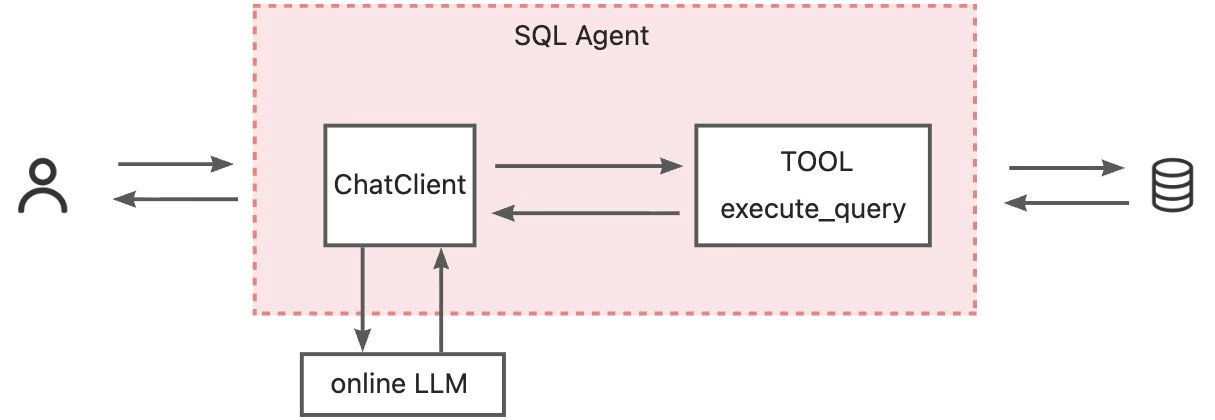
Users send requests to the SQL agent, for example:
DB: department_management
Question: List the creation year, name, and budget of each department.
The agent generates a SELECT statement based on the natural language question and the target database schema, and executes it via the execute_query tool in the real database to verify its executability and correctness of results.
If the SQL execution is successful and the results meet the semantic expectations, it returns directly; otherwise, the agent will combine execution error messages with the database schema for iterative corrections.
The entire process can retry for a maximum of N rounds (such as 3 rounds); when the SQL validation passes or the maximum retry count is reached, the agent stops the loop and returns the current optimal SQL.
To ensure security, the execute_query tool strictly limits execution to SELECT statements, prohibiting any data modification operations, thus effectively preventing accidental damage to the database.
In this scenario, the goal is to improve the SQL generation accuracy of Qwen2.5-Coder-1.5B-Instruct.
The reward function focuses on two aspects:
1) Whether the SQL statement generated by the SQL agent is syntactically correct and can be successfully executed?
By executing the code, the SQL statement is actually executed.
2) Can the SQL statement generated by the SQL agent meet user needs?
LLM Evaluation: The user's question, the database table definitions, the generated SQL statement, and the SQL execution result are assembled into a SyStemPrompt and passed to LLM (qwen-max), which determines whether the SQL statement meets user intent.
| Reward Value | Meaning | Condition | Description |
|---|---|---|---|
| 0.0 | Failure | SQL cannot be executed | Query has syntax errors or other execution errors |
| 0.5 | Partially Correct | SQL is executable but does not meet the requirements | Query runs but does not correctly answer the user's question |
| 1.0 | Perfect | SQL is executable and meets the requirements | Query perfectly answers the user's question |
trainingRunner = TrainingRunner.builder()
                .trinityEndpoint(TRINITY_ENDPOINT)
                .modelName(TRAINING_MODEL_NAME)
                .selectionStrategy(SamplingRateStrategy.of(1.0))
                .rewardCalculator( new SqlAgentReward())
                .commitIntervalSeconds(60*5) # commit once every five minutes
                .build();
As the dataset can be seen as a filtered high-quality dataset, since the sampling frequency when selecting requests is 1.0, all requests will be used for training.
Task Difficulty
SQL difficulty is determined based on scores across three dimensions:
● Component1 (Basic Components) - Count 7 basic structures: WHERE, GROUP BY, ORDER BY, LIMIT, JOIN (number of tables - 1), OR, LIKE (number of LIKEs)
● Component2 (Nested Queries) - Count nested and set operations: subqueries (nested SQL in WHERE/FROM/HAVING), UNION, INTERSECT, EXCEPT
● Others (Other Complexities) - Count additional complex factors: multiple aggregation functions (>1), multiple columns SELECT, multiple WHERE conditions, multiple GROUP BY columns
SQL Statement Accuracy
Since SQL statements have various equivalent forms, correctness is determined based on whether the actual execution results in the database match.
Binary determination accuracy: Whether the generated SQL's execution results match the Ground Truth SQL in the target database.
This demo evaluates using a subset of the test set from the Spider dataset. The test set contains a total of 1000 samples, and the evaluation script sends test requests in parallel to obtain the actual returns from the SQL agent.
Pre-training Agent Performance
The Qwen/Qwen2.5-Coder-1.5B-Instruct model is deployed on FC; the agent uses this model to provide services, and the evaluation metrics for the 1000 test data are as follows:
## Summary

- **Total Samples:** 1000
- **Execution Accuracy:** 47.60%

## Scores by Difficulty

| Difficulty | Count | Exec Accuracy | Percentage |
|------------|-------|---------------|------------|
| easy | 327 | 0.612 | 61.16% |
| medium | 445 | 0.449 | 44.94% |
| hard | 140 | 0.357 | 35.71% |
| extra | 88 | 0.295 | 29.55% |
| all | 1000 | 0.476 | 47.60% |

---
Post-training Agent Performance
After deploying the trained model to FC via NAS, the agent uses the trained model to provide services, and the evaluation metrics for the 1000 test data are as follows:
## Summary

- **Total Samples:** 1000
- **Success Count:** 1000
- **Error Count:** 0
- **Success Rate:** 100.00%
- **Execution Accuracy:** 65.70% (based on 1000 successful evaluations)

## Scores by Difficulty

| Difficulty | Count | Exec Accuracy | Percentage |
|------------|-------|---------------|------------|
| easy | 327 | 0.844 | 84.40% |
| medium | 445 | 0.616 | 61.57% |
| hard | 140 | 0.529 | 52.86% |
| extra | 88 | 0.375 | 37.50% |
| all | 1000 | 0.657 | 65.70% |

---
After training, the SQL agent's accuracy improved across all four difficulty levels of SQL statements, with a 23.24% increase in easy difficulty, a 16.63% increase in medium difficulty, a 17.15% increase in hard difficulty, and a 7.95% increase in extra difficulty, leading to an overall execution accuracy improvement of 18.1%.
Star us to stay updated! ⭐
Project Address: AgentScope Java
The AgentScope Java framework supports more functionalities, with corresponding Examples for all core capabilities, and we invite everyone to experience:
● Real-time human intervention
● PlanNotebook, plan before execution
● Structured output
● AI Werewolf
● ……
The community is also rapidly evolving, and you can provide feedback by submitting Issues or directly contribute code through Pull Requests. Let's work together to make this project better! Welcome to join the AgentScope DingTalk group, group number: 146730017349. 🚀
Migrated 60+ Ingress Resources in 30 Minutes Using AI - My Ingress Nginx to Higress Journey

780 posts | 60 followers
FollowAlibaba Cloud Native Community - December 11, 2025
Alibaba Cloud Native Community - March 13, 2026
Alibaba Cloud Community - December 17, 2025
Alibaba Cloud Native Community - May 18, 2026
Alibaba Cloud Native Community - February 3, 2026
Alibaba Cloud Native Community - January 22, 2026
780 posts | 60 followers
Follow QwenWork
QwenWork is dedicated to helping employees strengthen their professional competitiveness in the AI era and to enabling enterprises to improve organizational effectiveness.
Learn More Token Plan
Build more, spend less. One plan, every modality.
Learn More
Alibaba Cloud Model Studio
A one-stop generative AI platform to build intelligent applications that understand your business, based on Qwen model series such as Qwen-Max and other popular models
Learn More Qwen
Qwen
Full-range, open-source, multimodal, and multi-functional
Learn MoreMore Posts by Alibaba Cloud Native Community

