OpenClaw is a pretty neat open-source personal AI assistant. You can chat with it through all kinds of messaging apps, and it plays nice with Alibaba Cloud's Qwen models.
Then there's Mem0 — think of it as a memory layer for AI. It handles the heavy lifting: pulling out important stuff from conversations, turning it into vectors, storing it, and bringing it back when you need it. It's what gives your LLM that "I remember you" capability across different sessions.
Now, Hologres enters the picture. It's Alibaba Cloud's real-time data warehouse that's got some serious vector search chops. The cool part? They've open-sourced a Hologres and Mem0 integration. When you put Hologres behind Mem0, your OpenClaw instance gets cloud-based memory that syncs across devices and won't disappear if your laptop crashes.
Good reads if you want to dig deeper:
Here's the flow — pretty straightforward once you break it down:
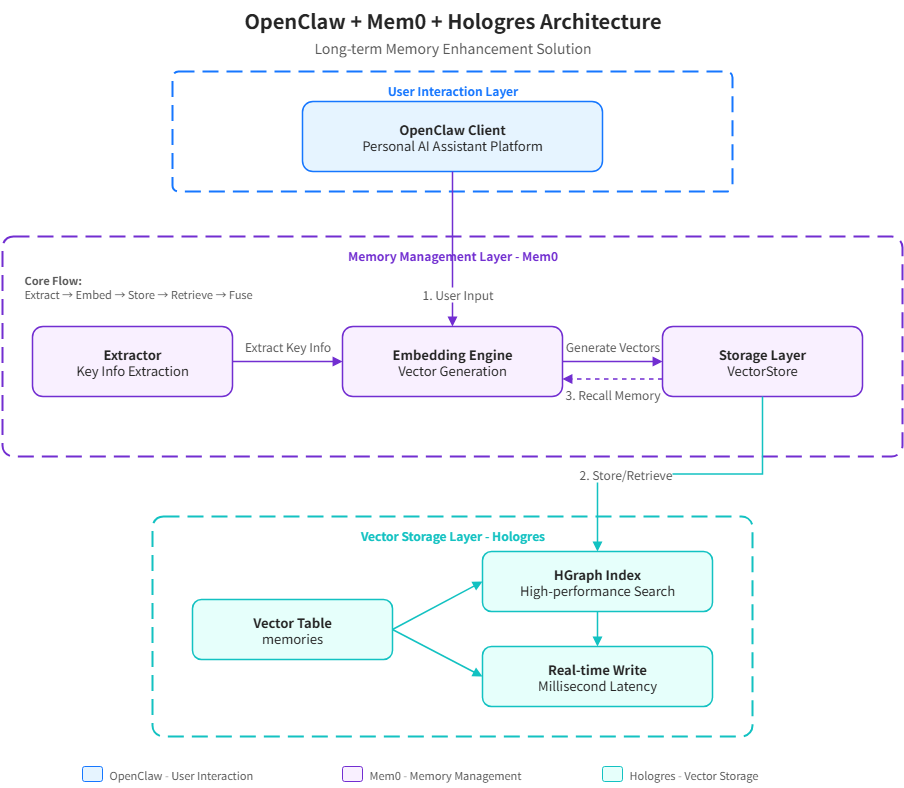
1. Extract — Mem0 scans what you type and figures out what's worth remembering. Not everything needs to go into long-term storage.
2. Embed — Takes those important bits and runs them through an embedding model (text-embedding-v4 works great). Now you've got vectors.
3. Store — Hologres gets the vectors, the original text, and some metadata. Everything's written in real-time, so nothing gets lost.
4. Retrieve — When you ask something new, it gets turned into a vector too. Then Hologres runs a vector similaritysearch using its HGraph index to find relevant memories.
5. Fuse — Those memories get woven into the context so your AI assistant actually knows what you're talking about.
If you're using OpenClaw, this setup gives you:
| What Matters | OpenClaw Default | With Hologres + Mem0 |
|---|---|---|
| Where data lives | Local SQLite/LanceDB | Hologres (cloud data warehouse) |
| Persistence | Hope your hard drive doesn't fail | Proper cloud storage with redundancy |
| Sync across devices | Nope | Yep |
| Vector search | It works | HGraph index — fast even at scale |
| How much data | Whatever fits locally | Petabytes, seriously |
| Write speed | Local writes | Milliseconds to cloud |
| SQL support | Basic | Full PostgreSQL |
| Full-text search | Bare bones | Tantivy — actually fast |
Pro tip: You can actually use OpenClaw itself to walk through these steps.
Create an instance, jump into your Hologres instance and create a database:
CREATE DATABASE openclaw_mem0;In your OpenClaw environment:
openclaw plugins install @hologres/openclaw-mem0Pop open ~/.openclaw/openclaw.json and add your Hologres details:
{
  "openclaw-mem0": {
    "enabled": true,
    "config": {
      "mode": "open-source",
      "userId": "<YOUR_NAME>",
      "oss": {
        "llm": {
          "provider": "openai",
          "config": {
            "baseURL": "https://dashscope.aliyuncs.com/compatible-mode/v1",
            "apiKey": "<YOUR_DASHSCOPE_API_KEY>",
            "model": "qwen-plus"
          }
        },
        "embedder": {
          "provider": "openai",
          "config": {
            "baseURL": "https://dashscope.aliyuncs.com/compatible-mode/v1",
            "apiKey": "<YOUR_DASHSCOPE_API_KEY>",
            "model": "text-embedding-v4",
            "embeddingDims": 1024
          }
        },
        "vectorStore": {
          "provider": "hologres",
          "config": {
            "host": "<hologres-url>",
            "port": 80,
            "dbname": "openclaw_mem0",#please create this db first
            "user": "<user>",
            "password": "<password>",
            "embeddingModelDims": 1024
          }
        }
      }
    }
  }
}
What goes where:
| Placeholder | What to put |
|---|---|
<YOUR_NAME> |
Your user ID — keeps your memories separate from others |
<YOUR_DASHSCOPE_API_KEY> |
Your Model Studio key for the LLM and embeddings.Check instruction here. |
<YOUR_HOLOGRES_HOST> |
Your Hologres instance endpoint |
<YOUR_HOLOGRES_USER> |
Database username |
<YOUR_HOLOGRES_PASSWORD> |
Database password |
openclaw gateway restartWant to see what's stored? Query Hologres directly:
SELECT id, vector, payload
FROM memories
LIMIT 10;
Q: What is Mem0? Mem0 is an open-source memory layer for AI that handles extracting, vectorizing, storing, and retrieving conversational memories.
Q: How does Hologres help with AI memory? Hologres provides cloud-based vector storage with HGraph indexing for fast similarity search across millions of memories.
Q: Can I sync OpenClaw across devices? Yes! With Hologres as the backend, your conversational AI remembers you across devices automatically.
Q: Is there a cost? Pricing varies based on usage. Check Alibaba Cloud for currentHologres pricingdetails.
Here's the thing: OpenClaw with local storage is fine for tinkering. But when you add Hologres as the memory backend, you get something you can actually rely on. Your conversational AI remembers you across devices, the data sticks around, and you get enterprise-grade reliability. If you're serious about your AI assistant setup, this is the way to go.
Want to see how Hologres lets you call LLMs directly using standard SQL? 👉 Try Hologres on Alibaba Cloud or talk to our solution architect to explore how you can seamlessly integrate AI capabilities into your real-time data workflows.
Build a RAG Platform with Hologres and n8n: A Step-by-Step Guide

27 posts | 0 followers
FollowData Geek - September 4, 2026
Alibaba Cloud Big Data and AI - April 13, 2026
Justin See - March 20, 2026
ApsaraDB - June 26, 2026
Alibaba Cloud Native Community - May 25, 2026
Justin See - March 26, 2026
27 posts | 0 followers
Follow Big Data Consulting for Data Technology Solution
Alibaba Cloud provides big data consulting services to help enterprises leverage advanced data technology.
Learn More Big Data Consulting Services for Retail Solution
Alibaba Cloud experts provide retailers with a lightweight and customized big data consulting service to help you assess your big data maturity and plan your big data journey.
Learn More Quick BI
A new generation of business Intelligence services on the cloud
Learn More Hologres
A real-time data warehouse for serving and analytics which is compatible with PostgreSQL.
Learn MoreMore Posts by Alibaba Cloud Big Data and AI

