OpenClaw's ClawHub market already has over 10,000 Skills, growing rapidly every day—it sounds great until a lot of malicious Skills are exposed. There was a "mail cleaning" Skill that, upon first run, packaged and sent your .env and SSH keys. ClawHub downloads a raw zip file, with no signatures, no verification, and no sandbox. Once loaded, the Skill inherits all the Agent's permissions—it can read your files, can use rm -rf, and can do whatever it wants. This is akin to hiring an intern without a background check and giving them root access on the first day.
Thus, the saying "half of ClawHub is poison" arose. Enterprises wanting to use OpenClaw or other Agents must prioritize security; the safety of Skills is a core issue for the implementation of OpenClaw in enterprises. The purpose of a private Skills Registry is to add a security checkpoint between the Agent and the Skill—scanning before release, signature verification, sandbox isolation, and minimizing privileges, changing each Skill from "I trust you" to "I have verified you."
The Nacos 3.2 version released the Skills Registry, born to solve this problem;
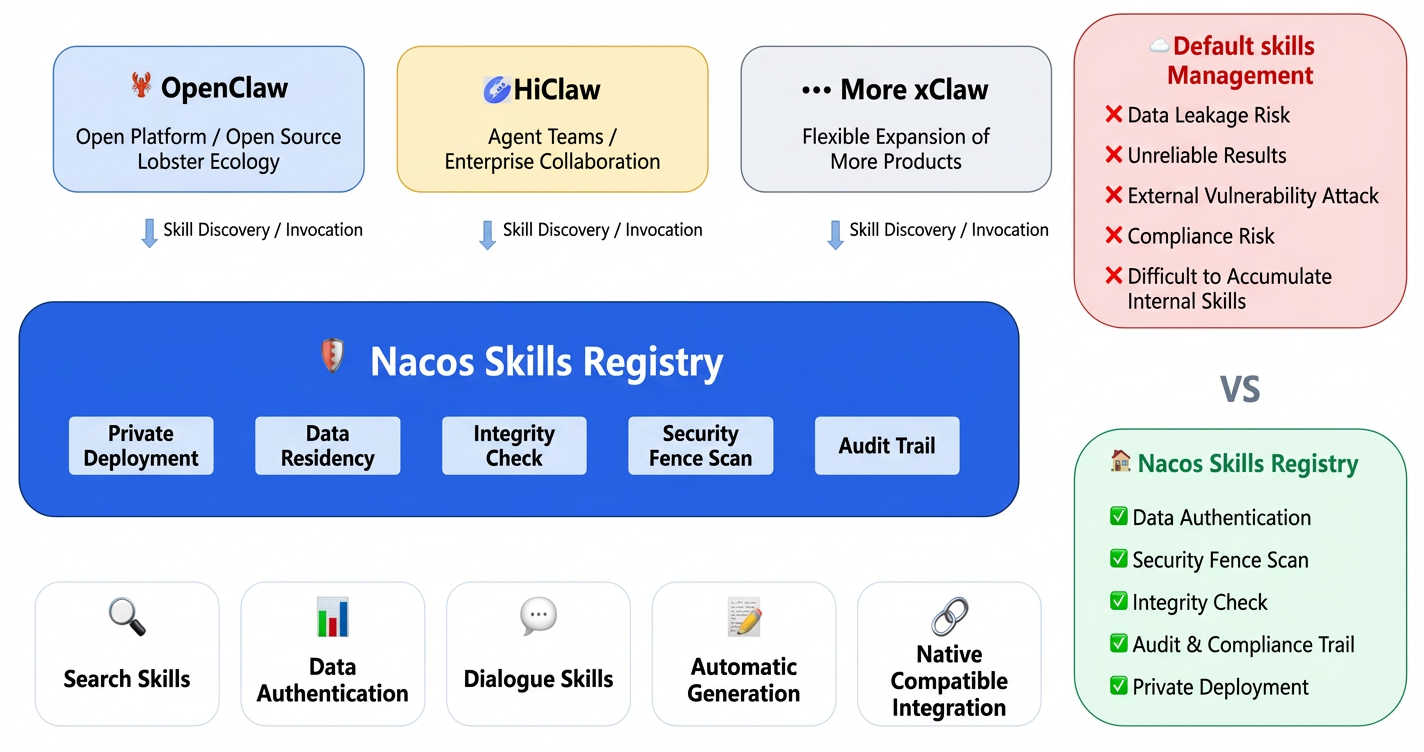
At the beginning of 2025, Nacos confirmed its commitment to embracing AI, continuing to invest in this direction. Last year, it launched MCP Registry and Agent Registry, taking the first step towards registering and governing AI resources.
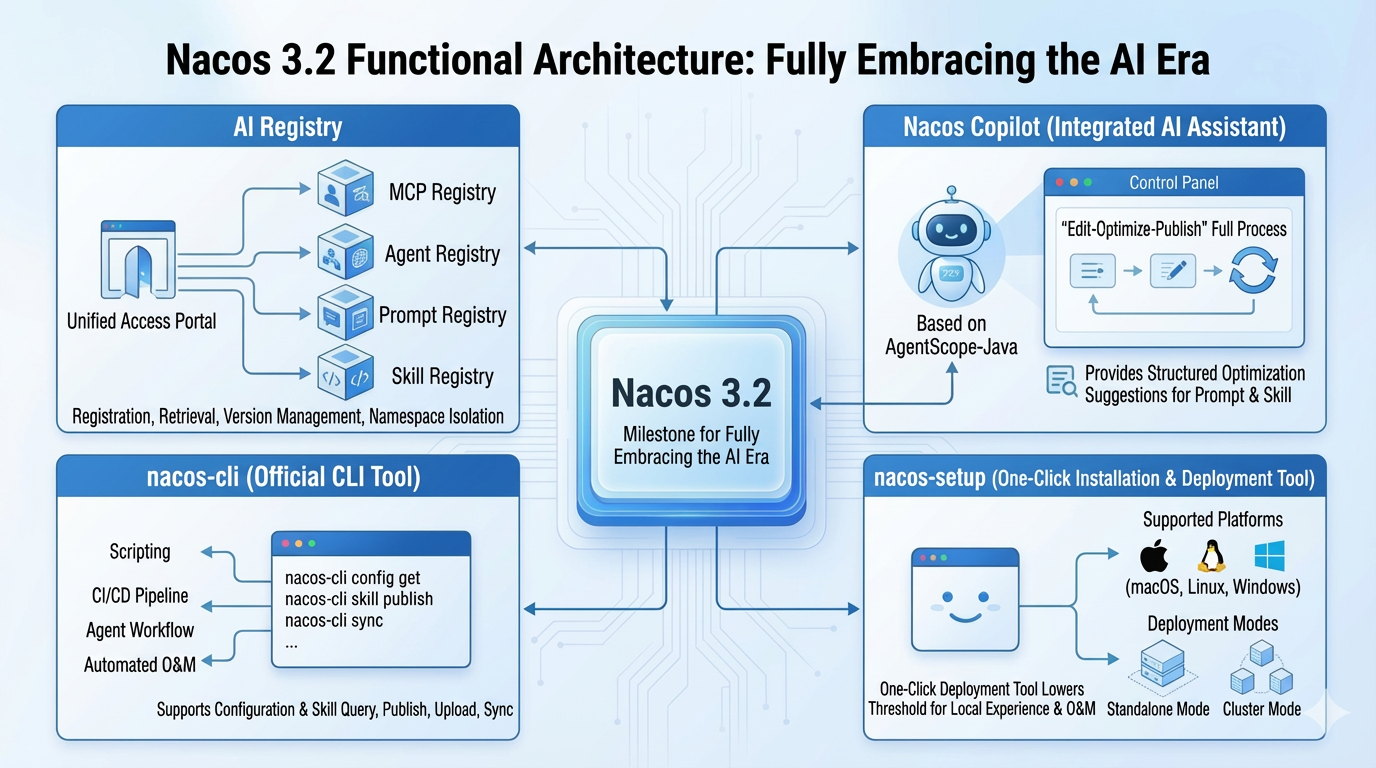
Nacos 3.2 is a milestone version for Nacos as it enters the AI era (currently in the Beta version). The key updates in this version include:
Skills are essentially capability packages callable by Agents (searching, calling APIs, executing scripts, etc.). Platforms like GitHub support open sharing of Skills, while enterprises often require a private and manageable Skill registration center. Skill Registry focuses on the registration and governance of private Skills: providing enterprise-level capabilities such as namespace and data isolation, permission management, and data security on the basis of team sharing and distribution of Skills, allowing full lifecycle management in the console just like configurations and services.
In the Skill page of AI Registry, the following can be accomplished:
Skills, like configurations and services, possess governance capabilities that are traceable, auditable, and collaborative.
OpenClaw, as the new generation of open-source personal AI assistant, has recently gained attention for evolving AI from a "conversationalist" to an "executor". It can run on users' local devices, focusing on privacy and long-term memory, capable of directly operating the computer, managing schedules, and automating complex tasks. Its core attraction lies in its modular Skills architecture, allowing developers to infinitely expand its capabilities by easily connecting various applications and services through custom Skills.
To enable OpenClaw to search, install, and publish Skills from Nacos, and facilitate internal sharing of custom Skills within teams, we have developed the nacos-skill-registry Skill.
Prerequisite: OpenClaw has been deployed according to https://openclaw.ai/
Here are the usage instructions:
Linux / macOS:
curl -fsSL https://nacos.io/nacos-installer.sh | sudo bashWindows (PowerShell):
iwr -UseBasicParsing https://nacos.io/nacos-installer.ps1 | iexRun sudo nacos-setup -v 3.2.0-BETA to start version 3.2.0-BETA locally.
Run the following command to download the plugin script to OpenClaw's Skill directory. After installing this Skill, OpenClaw will know how to manage Skills in Nacos:
curl -s https://download.nacos.io/SKILL.md -o ~/.openclaw/skills/nacos-skill-registry/SKILL.md --create-dirsAfter installation, OpenClaw will load the Skill automatically. During the first use, it will guide you to install nacos-cli and configure the Nacos connection information. Combine it with the one-click installation command from Chapter 6 to quickly deploy Nacos locally for unified management of Skills in OpenClaw.
You can use natural language directly in OpenClaw, for example:
data-analysis Skill; I need it to analyze reports soon."AI resources within enterprises have expanded from a single model and interface to multiple types of assets: MCP (Model Context Protocol) provides standardized context and tool access, Agent carries tasks and workflows, Prompt defines instructions and behavioral boundaries, and Skill encapsulates reusable capabilities. When there are many resources, they tend to be scattered across different systems and teams, making it challenging to maintain ownership, retrieval paths, and version information consistently; collaboration and governance costs consequently rise.
Since 2025, Nacos has incorporated the registration and governance of AI resources into its product direction, successively launching MCP Registry and Agent Registry. This version complements Prompt Registry and Skill Registry based on that foundation, centralizing management under AI Registry in the console: registration, retrieval, version management, as well as permissions and namespaces are consistent with existing Nacos capabilities, allowing cross-team reuse and isolation in multiple environments.
Prompts are the core inputs driving Agent behavior and output; their quality and consistency directly affect the stability and maintenability of the Agent. If only relying on fragments scattered in documents or code, it’s difficult to achieve team sharing, consistency across environments, and traceability of changes. Prompt Registry incorporates Prompts into platform-wide management: creating templates by Key, supporting variable placeholders, versioning, and historical queries, in line with Nacos' configuration management approach—but with the managed objects extending from configuration items to Prompts.
In this version, Prompt Registry provides complete lifecycle management:
{{variable}} variable placeholders.AI capabilities are evolving from independent tool forms to built-in product capabilities. In version 3.2, Nacos integrates large models into the console, launching Nacos Copilot: integrating large model capabilities into the console based on agentscope-java, allowing optimization of Prompts and Skills within the console, eliminating the need to switch back and forth between external tools and platforms.
The entire process of “editing—optimizing—publishing” can be completed within Nacos, without exiting the console.
Later, this will extend to configuration management, service management, and other scenarios, shifting AI capabilities from scattered usage to systematic application.
When trying out Nacos or setting up an environment locally, one often faces choices around installation packages, configuration modifications, port conflicts, and Java versions, among other factors.
nacos-setup is the official one-click installation and deployment tool, executing a single command to complete downloading, installation, and startup, supporting macOS, Linux, and Windows, suitable for both standalone and cluster setups. It aims to lower the barriers for local experience and operational maintenance: within a few minutes, Nacos can be installed and started locally, allowing access to capabilities such as AI Registry, configuration center, and service discovery.
How to use: First, install nacos-setup via the official installation script
curl -fsSL https://nacos.io/nacos-installer.sh | sudo bashExecute using PowerShell
iwr -UseBasicParsing https://nacos.io/nacos-installer.ps1 | iexStandalone mode and cluster mode:
nacos-setup -v 3.2.0-beta installs and starts version 3.2; the port can be specified with -p, and the installation directory can be designated with -d, using --detach for background running.-c, and the number of nodes can be defined with -n. For example, nacos-setup -c prod -n 3 -v 3.2.0-beta can create a 3-node cluster; it supports --join to join an existing cluster, --leave to remove a node, and --clean to rebuild after cleaning. Using --join, --leave combined with different -v version numbers allows switching nodes' versions in the cluster for simulating rolling upgrades and restarts to quickly validate compatibility issues during version upgrades. More parameters can be found in the nacos-setup usage instructions.Agents and automated pipelines rely more on an interaction method of "executing commands and parsing outputs," rather than processing each item in the console. nacos-cli exposes configuration, Skill, Prompt, and other capabilities in the command line format: supporting operations such as configuration queries, Skill uploads, and Prompt fetching through a single command, facilitating reuse in scripts and CI/CD. Agents can also interact with Nacos by executing commands without depending on the console or a specific language SDK, maintaining a unified integration approach for automation.
How to use: nacos-cli can be integrated in two ways:
1. Install nacos-cli separately using the official installation script, and after installation, configure the Nacos address in the terminal for use.
Linux / macOS:
curl -fsSL https://nacos.io/nacos-installer.sh | sudo bash -s -- --cliWindows (PowerShell):
iwr -UseBasicParsing https://nacos.io/nacos-installer.ps1 -OutFile $env:TEMP\nacos-installer.ps1; & $env:TEMP\nacos-installer.ps1 -cli; Remove-Item $env:TEMP\nacos-installer.ps12. If you have a Node.js environment, you can also use npm:
npm install -g @nacos-group/cli
nacos-cli --helpnpx @nacos-group/cli --helpExamples of Skill uploads, downloads, and synchronization operations can be seen in the section below "Quick Start." More usage can be found in the nacos-cli documentation.
Current Capabilities:
config-list), querying (config-get), and publishing (config-set).skill-list, skill-get, skill-upload, skill-sync), supporting both configuration file and interactive modes, facilitating script and pipeline integration.The following provides a minimal demonstration through "Local One-Click Installation → Console Management Prompt/Skill, Activate Copilot → nacos-cli Operate Skill" for a quick experience of the AI Registry capabilities in version 3.2.
Install Nacos using the official one-click installation script, supporting both standalone and cluster modes.
Linux / macOS:
curl -fsSL https://nacos.io/nacos-installer.sh | sudo bashWindows (PowerShell):
iwr -UseBasicParsing https://nacos.io/nacos-installer.ps1 | iexExecute sudo nacos-setup -v 3.2-BETA to install and start the beta version of Nacos 3.2.
Once started successfully, your browser will open the login page, with the default username as nacos and the password automatically generated and copied to the clipboard. After entering the username nacos and pasting the password, you will see the entry for AI Registry in the console.
Nacos Copilot leverages large model capabilities to provide optimization suggestions for Prompt and Skill, so it is necessary to configure access credentials for the large model (e.g., API Key).
You can choose any one of the following configuration methods:
COPILOT_API_KEY in the environment where Nacos is located, then restart Nacos to make the configuration take effect.Note: The current Beta version only integrates with Alibaba’s Qianwen model series, and more large model vendors will be supported in the future.
After logging into the console, navigate to the AI Registry in the left menu to experience both Prompt Registry and Skill Registry:
{{variable}} variable placeholders), edit content, publish new versions and fill in version descriptions, support searching by Key, pagination viewing and namespace isolation; you can view iteration records and rollbacks in the history version.If you have enabled Nacos Copilot (see "Enable Nacos Copilot" above), you can also experience Prompt Optimization and Skill Optimization features on the editing pages of Prompts and Skills: after initiating an optimization for the current content, structured improvement suggestions will be provided by the large model, supporting streaming output, facilitating the complete process of "editing—optimizing—publishing" in the console.
The Nacos started with nacos-setup has authentication enabled, and connecting with nacos-cli requires specifying a password. You can connect by specifying the password in the command with -p, for example: nacos-cli -p <password>, the password can be obtained in the terminal from Step One.
Once successfully connected, you can perform basic management of Skills with the following commands:
Queries, publishing, etc., can be accomplished via commands like config-list, config-get, config-set. For more commands and parameters, see the nacos-cli user documentation.
Note: In addition to specifying a password with -p, you can also specify the service address with -h, the port with --port, and the configuration file path with --conf, etc. The configuration file may include service address, port, username, password, namespace, etc., suitable for scenarios where fixed connection information is required.
Current mainstream AI coding CLI (Qoder, Cursor, Claude Code, Gemini CLI, etc.) all support the Skill mechanism, which allows extending the capabilities of AI through installing Skills.
nacos-skill-registry enables your AI coding CLI to search, install, and publish Skills from Nacos, making it easy for teams to share Skills.
Installation
After installation, the AI coding CLI will automatically load; during the first use, it will guide you to install nacos-cli and configure Nacos connection information.
Usage
You can use natural language directly in the AI coding CLI, for example:
After installing and configuring nacos-cli in the environment where Cursor is located, the terminal can directly call Nacos to complete the reading and writing of configurations and Skills; the built-in nacos-skill can be synchronized from the console or via skill-sync to Cursor's local Skill directory, which can be loaded after Cursor, allowing for the use of Nacos' configurations and Skills through natural language or tool calls within the editor. The terminal side utilizes nacos-cli, while conversations and workflow sides use nacos-skill; together they enable configuration management and Skill management within Cursor.
Steps for Integration with Cursor (all to be completed in the environment where Cursor is located):
Complete the installation as outlined in the earlier "nacos-cli" section, configure the Nacos service address and namespace in the terminal (e.g., through environment variables or nacos-cli's config command), so that the terminal in Cursor can access Nacos.
Log in to the Nacos console, navigate to AI Registry → Skill, find the built-in nacos-skill, and use the "Download to Local" feature provided by the console to download nacos-skill to the local Skill directory used by Cursor (i.e., Cursor's skill root directory, specific path as per Cursor documentation). You can also use the skill-sync command of nacos-cli in the terminal to synchronize nacos-skill from Nacos to that directory.
After loading the synchronized nacos-skill in Cursor, you can query, publish, modify Nacos configurations, and manage Skills (listing, pulling, uploading, etc.) through natural language or tools exposed by Skills in the editor; at the same time, you can directly execute nacos-cli commands in the Cursor terminal for scripted operations on configurations and Skills. Thus, both configuration management and Skill management can be completed within Cursor.
More nacos-cli commands and parameters can be found in the nacos-cli user documentation.
skills.sh is an open Agent Skills ecosystem that acts as a "global app store" for AI assistants like Cursor and Claude Code. It aggregates a vast number of high-quality workflows and prompts contributed by the community through standardized protocols; users only need to visit its official website to browse resources, and with the npx skills add command, they can seamlessly integrate professional skills from GitHub (such as code review, architecture design, etc.) into their local environment with minimal cost, rapidly reusing the wisdom of developers worldwide, and significantly enhancing the AI Agent's professional performance in specific areas.
By using nacos-cli and Nacos Server, Nacos can be built as a team-level AI Skill registration center, seamlessly integrated with the npx skills ecosystem.
Completed: Upload Skill to Nacos via nacos-cli
Supports the uploading of Skills that have been downloaded locally via npx skills to Nacos, achieving centralized management and distribution of Skills within the team.
Usage Example:
# 1. Download a Skill via npx skills
npx skills add my-sill

# 2. Upload to Nacos
nacos-cli skill-upload ~/.skills/my-skill --config ~/.nacos-cli.conf

# 3. Bulk upload an entire directory
nacos-cli skill-upload --all ~/.skills --config ~/.nacos-cli.conf

# 4. Teammates pull it
nacos-cli skill-get my-skill --config ~/.nacos-cli.conf
Planned: Nacos Server as the backend Registry for npx skills
Support modification of the registry URL for npx skills via Nacos Server, allowing npx skills commands to directly connect with Nacos without the need for nacos-cli forwarding.
>npx skills find [query]          # Search results include Skills in Nacos
>npx skills add skill-name # Pull the Skill directly from Nacosnpx skills add can directly recognize and pull Skills from Nacosnpx skills, providing an experience consistent with the public skills.shnacos-cli skill-upload (as npx skills itself does not have publishing capabilities)The upcoming new version of Agentscope Java will support full integration of Prompt and Skill capabilities from the Nacos AI Registry. If you want to directly use Prompts and Skills managed on Nacos in the Java side Agent, you can complete the integration with Agentscope Java and Nacos, pulling or subscribing as needed during Agent runtime, and supporting real-time awareness of configuration changes.
It is recommended to use the following versions (compatible with Nacos 3.2):
1.0.10, used for integrating Prompt and Skill capabilities in the Agent.Maven dependency example:
<dependency>
    <groupId>com.alibaba.nacos</groupId>
    <artifactId>nacos-client</artifactId>
    <version>3.2.0-BETA</version>
</dependency>

<dependency>
    <groupId>io.agentscope</groupId>
    <artifactId>agentscope-core</artifactId>
    <version>1.0.10</version>
</dependency>
<dependency>
    <groupId>io.agentscope</groupId>
    <artifactId>agentscope-extensions-nacos-prompt</artifactId>
    <version>1.0.10</version>
</dependency>
<dependency>
    <groupId>io.agentscope</groupId>
    <artifactId>agentscope-extensions-nacos-skill</artifactId>
    <version>1.0.10</version>
</dependency>Using AiFactory provided by Nacos, passing in the Properties required to connect to Nacos (which must contain serverAddr, optional namespace, etc.), you can create an AiService instance for pulling and subscribing to Prompts and Skills. Example:
import com.alibaba.nacos.api.ai.AiFactory;
import com.alibaba.nacos.api.ai.AiService;
import com.alibaba.nacos.api.PropertyKeyConst;

Properties properties = new Properties();
properties.put(PropertyKeyConst.SERVER_ADDR, "127.0.0.1:8848");  // Nacos address
properties.put(PropertyKeyConst.NAMESPACE, "public");            // Optional: namespace

AiService aiService = AiFactory.createAiService(properties);
// Use aiService later to fetch / subscribe to Prompts and SkillsTo integrate Nacos's Prompt in agentscope-java: through interfaces like AiService, pull or subscribe to the Prompt templates configured in the console (containing variable placeholders) by Prompt Key, filling in the variables in the Agent logic for use. Supports on-demand acquisition and listening for changes, facilitating iterative updates of Prompt on the Nacos side without needing to restart the Java side.
import com.alibaba.nacos.api.PropertyKeyConst;
import com.alibaba.nacos.api.config.ConfigFactory;
import com.alibaba.nacos.api.config.ConfigService;
import io.agentscope.core.nacos.prompt.NacosPromptListener;

import java.util.HashMap;
import java.util.Map;
import java.util.Properties;

public class Main {
    public static void main(String[] args) throws Exception {

        // 1. Create a NacosPromptListener
        NacosPromptListener promptListener = new NacosPromptListener(configService);

        // 2. Prepare template variables
        Map<String, String> variables = new HashMap<>();
        variables.put("role", "Technical consultant");
        variables.put("domain", "Java development");
        variables.put("style", "Concise and professional");

        // 3. Get the rendered Prompt (supports fallback to defaults)
        String defaultPrompt = "You are an AI assistant. Please answer the user's questions.";
        String sysPrompt = promptListener.getPrompt("my-agent", variables, defaultPrompt);

        // 4. Build an Agent with the Prompt
        ReActAgent agent = ReActAgent.builder()
                .name("MyAgent")
                .sysPrompt(sysPrompt)
                .model(DashScopeChatModel.builder()
                        .apiKey(System.getenv("DASHSCOPE_API_KEY"))
                        .modelName("qwen-plus")
                        .build())
                .memory(new InMemoryMemory())
                .build();

        // 6. Call the Agent
        Msg response = agent.call(Msg.builder()
                .name("user")
                .role(MsgRole.USER)
                .content(TextBlock.builder().text("Hello").build())
                .build()).block();

        System.out.println(response.getFirstContentBlock());
    }
}There are two common ways to integrate Nacos's Skill in agentscope-java:
Use the skill-sync command of nacos-cli to synchronize the specified Skills from Nacos to the local directory, and configure FileSystemSkillRepository in agentscope-java to point to this directory, with the Agent loading Skills from the local file system, suitable for "synchronize first, then load locally" offline or scripted workflows.
// 1. Sync the specified Skill to local

// 2. Configure FileSystemSkillRepository using the Skill path
FileSystemSkillRepository repository = new FileSystemSkillRepository(skillsBaseDir, false);
if (!repository.skillExists(SKILL_NAME)) {
    // ...
    return;
}
AgentSkill skill = repository.getSkill(SKILL_NAME);

// 3. Load and use the Skill
Toolkit toolkit = new Toolkit();
SkillBox skillBox = new SkillBox(toolkit);
skillBox.registration().skill(skill).apply();

ReActAgent agent = ReActAgent.builder()
                    // ...
                    .toolkit(toolkit)
                    .skillBox(skillBox)
                    // ...
.build();Directly use NacosSkillRepository in agentscope-java, pulling or subscribing Skills from Nacos through the built AiService (or Nacos connection configuration), with the Agent fetching in real-time from Nacos, supporting change subscription and automatic awareness, suitable for online scenarios requiring synchronization with Nacos.
// 1. Get a specific Skill
NacosSkillRepository repo = new NacosSkillRepository(aiService, "public")
if (repo.skillExists(SKILL_NAME)) {
    AgentSkill skill = repo.getSkill(SKILL_NAME);
    System.out.println("Skill: " + skill.getName() + " - " + skill.getDescription());
} else {
    System.out.println("Skill not found: " + SKILL_NAME);
}
Specific integration methods and examples can refer to the official documentation and example projects of Nacos and agentscope-java.
Nacos 3.2 is an important step for Nacos towards the AI era: while continuing to serve as a configuration center and service discovery, it integrates AI Registry, Nacos Copilot, nacos-cli, and nacos-setup into a complete chain from "registration and governance" to "optimization, consumption, and implementation", helping developers manage AI resources like Prompt, Skill, MCP, and Agent more smoothly in local and production environments.
The Skills Registry is an important module under the Nacos 3.x architecture. In the area of Agent security governance, Nacos will deepen security features such as security fence review, fine-grained data authorization, Skills resource approval, and Skills signing in the next version. We will also optimize the experience for creating and verifying Skills. We welcome everyone to feedback needs and issues in the community, and we will follow up promptly. You can join our DingTalk community group: 115205016856 to discuss;
In the past few years, Nacos has accompanied many developers in the cloud-native era, becoming one of the infrastructures in the field of microservices configuration and discovery. In the AI era, Nacos will continue to serve a large number of developers and teams and assist in building a stable and maintainable AI infrastructure. Future plans will focus on the following directions:

774 posts | 60 followers
FollowAlibaba Cloud Native Community - April 10, 2026
Alibaba Cloud Native Community - May 7, 2026
Alibaba Cloud Native Community - June 5, 2026
Alibaba Cloud Native Community - July 17, 2026
Alibaba Cloud Native Community - April 20, 2026
CloudSecurity - March 27, 2026
774 posts | 60 followers
Follow QwenWork
QwenWork is dedicated to helping employees strengthen their professional competitiveness in the AI era and to enabling enterprises to improve organizational effectiveness.
Learn More Token Plan
Build more, spend less. One plan, every modality.
Learn More
Alibaba Cloud Model Studio
A one-stop generative AI platform to build intelligent applications that understand your business, based on Qwen model series such as Qwen-Max and other popular models
Learn More DevOps Solution
Accelerate software development and delivery by integrating DevOps with the cloud
Learn MoreMore Posts by Alibaba Cloud Native Community

