Hologres AI Plugins Definition:A specialized open-source toolkit designed to empower AI Agents with secure, structured, and autonomous access to Alibaba Cloud Hologres. It features a JSON-first CLI for machine-readable outputs and integrated Agent Skills that provide domain-specific knowledge for real-time data warehouse management.
In the past, we manually queried databases, tuned performance, and troubleshot issues using SQL. DBAs were the "translators" of data warehouses.
But in the AI Agent era, the paradigm has shifted:
hg_query_log when troubleshooting slow queries.Agents won't manually open DBeaver or dig through operations manuals. What they need is:
| What Agents Need | Traditional Way | Agent-Ready Way |
|---|---|---|
| Check table schema | Log in to console, find database | hologres schema describe orders |
| Execute SQL | Open SQL editor | hologres sql run "SELECT ..." |
| Analyze execution plan | Manual EXPLAIN | hologres sql explain "SELECT ..." |
| Adjust parameters | Hand-write ALTER DATABASE | hologres guc set param value |
| Create dynamic tables | Stitch DDL together | hologres dt create -t my_dt --freshness "10 min" -q "..." |
Agents need a CLI with "structured input, structured output, and safety guardrails," not a GUI designed for humans.
This is exactly what Hologres AI Plugins solves.
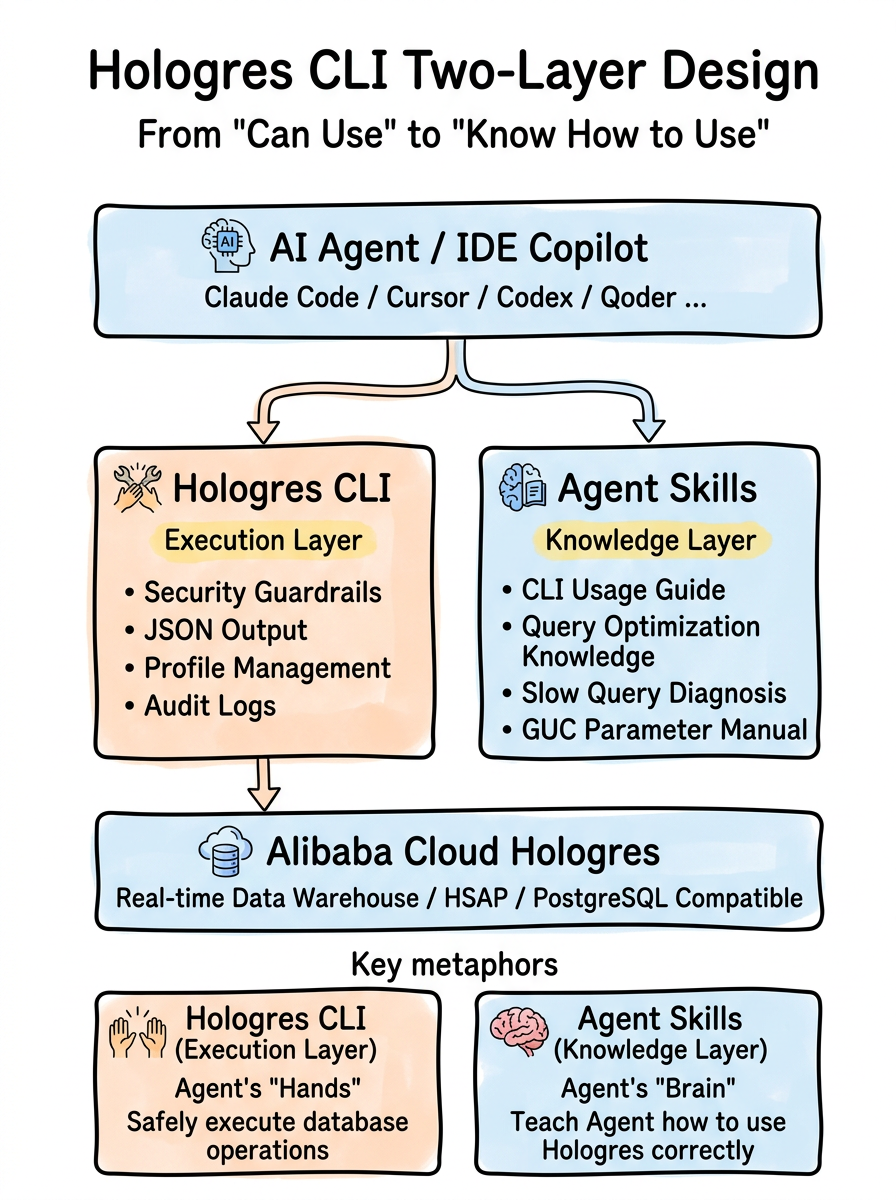
┌─────────────────────────────────────────────────────────┐
│                   AI Agent / IDE Copilot                │
│         (Claude Code / Cursor / Codex / Qoder ...)      │
└─────────────────────┬───────────────────────────────────┘
                      │
        ┌─────────────┴─────────────┐
        │                           │
        ▼                           ▼
┌───────────────┐         ┌──────────────────┐
│  Hologres CLI │         │  Agent Skills    │
│ (Execution)   │         │ (Knowledge)      │
│               │         │                  │
│ • Safety      │         │ • CLI Guide      │
│ • JSON Output │         │ • Query Opt.     │
│ • Profiles    │         │ • Slow Query Diag│
│ • Audit Logs  │         │ • GUC Handbook   │
└───────┬───────┘         └──────────────────┘
        │
        ▼
┌───────────────────────────────────────────┐
│         Alibaba Cloud Hologres            │
│    (Real-time DW / HSAP / PG-Compatible)  │
└───────────────────────────────────────────┘All commands return structured JSON by default:
$ hologres status
{
  "ok": true,
  "data": {
    "connected": true,
    "version": "Hologres 4.1.0",
    "database": "production_db"
  }
}
When an AI Agent sees "ok": true, it knows the operation succeeded; if it sees "ok": false, it can pinpoint the issue based on error.code. No regex parsing or guessing output formats is needed.
It also supports 4 output formats—JSON / Table / CSV / JSONL—to meet different scenario needs:
hologres -f json  schema tables    # For Agent consumption
hologres -f table schema tables    # For human reading
hologres -f csv   schema tables    # For data export
hologres -f jsonl schema tables # For stream processingWhen AI Agents autonomously operate databases, safety is the top priority. Hologres CLIfeatures six progressive security mechanisms, with the first three forming a three-layer defense-in-depth system for write operations:
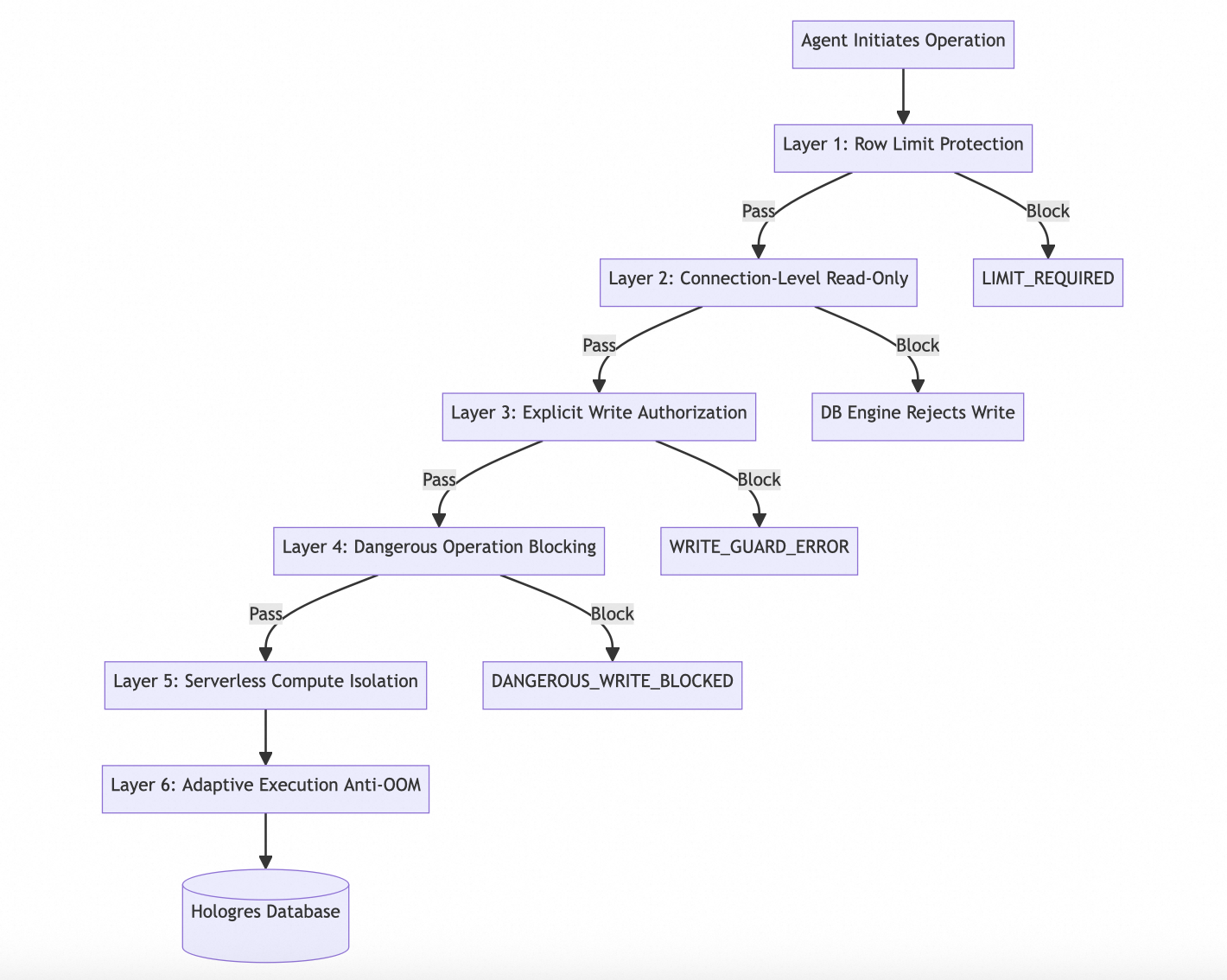
Layer 1: Row Limit Protection
# Agent writes a SELECT without LIMIT? Automatically blocked!
$ hologres sql run "SELECT * FROM orders"
{"ok": false, "error": {"code": "LIMIT_REQUIRED", "message": "Query returns >100 rows, add LIMIT clause"}}
The Agent sees LIMIT_REQUIRED and automatically retries with LIMIT 100. Zero human intervention.
Layer 2: Connection-Level Read-Only Protection — Database Engine Fallback
All connections created by Hologres CLI are read-only by default, executing immediately upon creation:
SET default_transaction_read_only = ON;This means that even if an Agent bypasses all CLI-level checks, the database engine will reject any write operations. The CLI only creates a writable connection (read_only=False) when a command explicitly requires writing.
# Default read-only connection — DB engine directly rejects writes
$ hologres sql run "INSERT INTO logs VALUES (1, 'test')"
{"ok": false, "error": {"code": "WRITE_GUARD_ERROR"}}

# Even if SQL is sent directly, the connection layer blocks it
# Because the connection itself is read_only
Write Intent Confirmation Table — Only the following methods create writable connections:
| Write Intent Confirmation Method | Command | Connection Mode |
|---|---|---|
--write flag |
sql run --write "INSERT ..." |
read_only=False |
--confirm confirmation |
dt drop --confirm, table drop --confirm, table truncate --confirm, |
read_only=False |
Non --dry-run execution |
dt create, dt alter
|
read_only=False |
| Command inherently implies writing |
guc set / reset,extension create
|
read_only=False |
| No Write Intent (Default) | All queries, list/show/describe operations | read_only=True |
Three-layer write protection defense-in-depth:

  ┌─────────────────────────────────────────────┐
  │  Layer 1: Connection Level (DB Engine)      │
  │  SET default_transaction_read_only = ON     │
  │  → Even if all CLI checks are bypassed, DB  │
  │    still rejects writes                     │
  ├─────────────────────────────────────────────┤
  │  Layer 2: CLI Level (--write flag)          │
  │  → sql run must explicitly use --write      │
  ├─────────────────────────────────────────────┤
  │  Layer 3: Security Level (Dangerous SQL)    │
  │  → DELETE/UPDATE without WHERE is blocked   │
  └─────────────────────────────────────────────┘
Layer 3: Explicit Write Authorization
# All SQL write operations must explicitly add the --write flag
$ hologres sql run "INSERT INTO logs VALUES (1, 'test')"
{"ok": false, "error": {"code": "WRITE_GUARD_ERROR"}}

# Allowed only after explicit intent
$ hologres sql run --write "INSERT INTO logs VALUES (1, 'test')"
{"ok": true}
Layer 4: Dangerous Operation Blocking
# DELETE without WHERE? Directly blocked, no negotiation
$ hologres sql run --write "DELETE FROM users"
{"ok": false, "error": {"code": "DANGEROUS_WRITE_BLOCKED"}}
Layer 5: Serverless Compute Isolation — Agent Queries Don't Impact Production
One of the biggest risks with AI Agents: a single unoptimized complex SQL query can instantly max out instance resources, causing failover for online services.
Hologres CLI defaults to routing all Agent-initiated SQL to the Serverless Computing resource group:
# Every SQL executed by the Agent automatically uses Serverless resources
$ hologres sql run "SELECT region, SUM(amount) FROM orders GROUP BY region LIMIT 100"
# Internally executes: SET hg_computing_resource = 'serverless'; SELECT ...
This means:
┌──────────────┐     ┌──────────────────────┐
│  AI Agent    │────▶│  Hologres CLI       │
│  (Query Req) │     │  routing=serverless  │
└──────────────┘     └──────────┬───────────┘
                               │
                    ┌──────────┴───────────┐
                    │                      │
              ┌─────▼──────┐     ┌────────▼─────────┐
              │ Serverless │     │  Local Instance  │
              │ Compute    │     │  (For Online Biz)│
              │ Agent SQL  │     │  Unaffected      │
              └────────────┘     └──────────────────┘
Layer 6: Adaptive Execution — Complex SQL Won't OOM
The complexity of SQL generated by Agents is unpredictable—it could be a simple SELECT * or a multi-table JOIN + subquery + window function. Using a fixed execution strategy could either waste resources or cause Out-Of-Memory (OOM) errors.
Hologres CLI enables Adaptive Execution Stage mode, intelligently selecting execution strategies based on SQL complexity:
# Internally sets adaptive execution automatically
# SET hg_experimental_enable_adaptive_execution = on;| SQL Complexity | Execution Strategy | Effect |
|---|---|---|
| Simple Query (Single Table Scan) | Single-stage direct execution | Low latency, fast return |
| Medium Query (JOIN + Aggregation) | Multi-stage pipeline | Balanced resources & performance |
| Complex Query (Multi-JOIN + Window) | Adaptive staging | Intermediate results to disk, avoiding OOM |
Core Principle: When the optimizer detects that an operator's intermediate result might exceed memory thresholds, it automatically splits the execution plan into multiple Stages. Intermediate results are exchanged via disk Shuffle, trading controllable performance costs for execution certainty.
Agent SQL ──▶ Optimizer Evaluates Complexity
                   │
          ┌────────┴────────┐
          │ Simple SQL      │ Complex SQL
          ▼                 ▼
     Single-stage      Multi-stage Adaptive
     (In-memory)       (Disk-based intermediates)
          │                 │
          └────────┬────────┘
                   ▼
              Safe Result Return
              (Never OOM)
The combination of Serverless + Adaptive Execution ensures every Agent SQL runs in a "safe sandbox"—neither impacting production instances nor crashing due to insufficient memory. This is an AI-Native safety capability not found in traditional CLI tools.
The core philosophy of the six-layer guardrail design is: Agents can explore freely but won't accidentally destroy data or impact online stability. Connection-level read-only + CLI write guards + dangerous SQL blocking create a "watertight" three-layer defense for write protection.
When an Agent queries data containing sensitive fields, the CLI automatically identifies and masks them based on column name patterns:
| Field Pattern | Raw Data | Masked Data |
|---|---|---|
| phone / mobile | 13812345678 | 138****5678 |
| john@example.com | j***@example.com |
|
| password / token | mysecret123 | ******** |
| id_card / ssn | 110101199001011234 | 110***********1234 |
| bank_card | 6222021234567890 | ************7890 |
Agents can access data for analysis without leaking user privacy.
Switch between dev / staging / prod environments with a single command:
hologres config                      # Interactive configuration wizard
hologres --profile prod status       # Switch to production environment
hologres --profile dev schema tables # Check tables in dev environment
Agents can automatically select environments based on context, switching between multiple environments like an experienced DBA.
From daily queries to advanced management, covering all core Hologres scenarios:
Schema Mgmt    ─── schema tables / describe / dump / size
Table Mgmt     ─── table list / create / show / properties / drop / truncate
View Mgmt      ─── view list / show
SQL Execution  ─── sql run / explain
Data Import/Export ─── data export / import / count
Dynamic Tables ─── dt create / list / show / ddl / lineage / refresh / alter / drop
GUC Params     ─── guc show / set / reset / list
Extensions     ─── extension list / create
Instance Info ─── instance / warehouse / statusThe CLI solves the "can operate" problem, but Agents also need to know "how to operate"—when to use which command, how to optimize queries, and how to diagnose issues.
This is the value of Agent Skills.
The Agent Skills now cover 8 specialized skills across three categories:
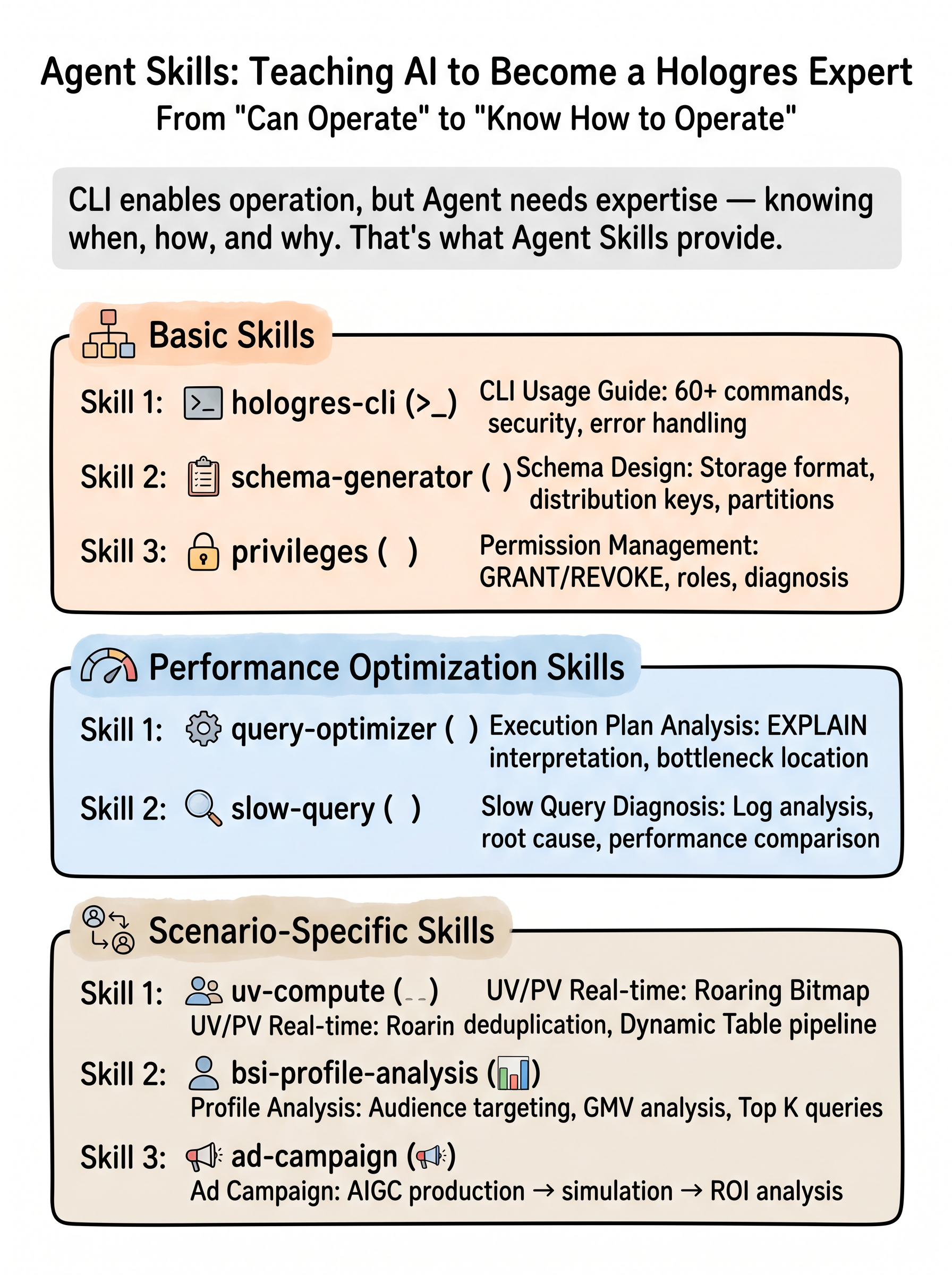
┌──────────────────────────────────────────────────────────────────────────────┐
│                          Agent Skills (Knowledge Layer)                       │
├──────────────────────┬──────────────────┬────────────────────────────────────┤
│ Basic Skills         │ Performance Opt. │ Scenario-Based Skills              │
│                      │                  │                                    │
│ hologres-cli         │ query-optimizer  │ hologres-uv-compute               │
│ (CLI Guide)          │ (Plan Analysis)  │ (UV/PV Real-Time Dedup)           │
│                      │                  │                                    │
│ schema-generator     │ slow-query       │ hologres-bsi-profile-analysis     │
│ (Schema Design)      │ (Slow Query Diag)│ (BSI Profile Analysis)            │
│                      │                  │                                    │
│ privileges           │                  │ hologres-ad-campaign              │
│ (Permission Mgmt)    │                  │ (AIGC Ad Campaign)                │
└──────────────────────┴──────────────────┴────────────────────────────────────┘| Skill | Role | What the Agent Gains |
|---|---|---|
| hologres-cli | CLI Usage Guide | Correctly use 60+ commands, understand safety mechanisms, handle error codes |
| query-optimizer | Query Optimization Expert | Interpret EXPLAIN output, identify bottleneck operators (Seq Scan / Redistribution / PQE), recommend optimization strategies |
| slow-query-analysis | Slow Query Diagnostician | Analyze hg_query_log, locate failure root causes, cross-period performance comparison |
| schema-generator | Schema Designer | Choose storage format (row/column/hybrid), configure distribution keys/indexes, design partition strategies |
| privileges | Permission Administrator | PostgreSQL standard GRANT/REVOKE, role system, permission diagnostics |
| uv-compute | UV/PV Expert | RoaringBitmap billion-level deduplication, Dynamic Table incremental refresh pipelines |
| bsi-profile-analysis | Profile Analyst | BSI audience targeting, GMV analysis, tag distribution stats, Top K queries |
| ad-campaign | Ad Campaign Expert | AIGC material production → virtual delivery simulation → real-time ROI analysis full pipeline |
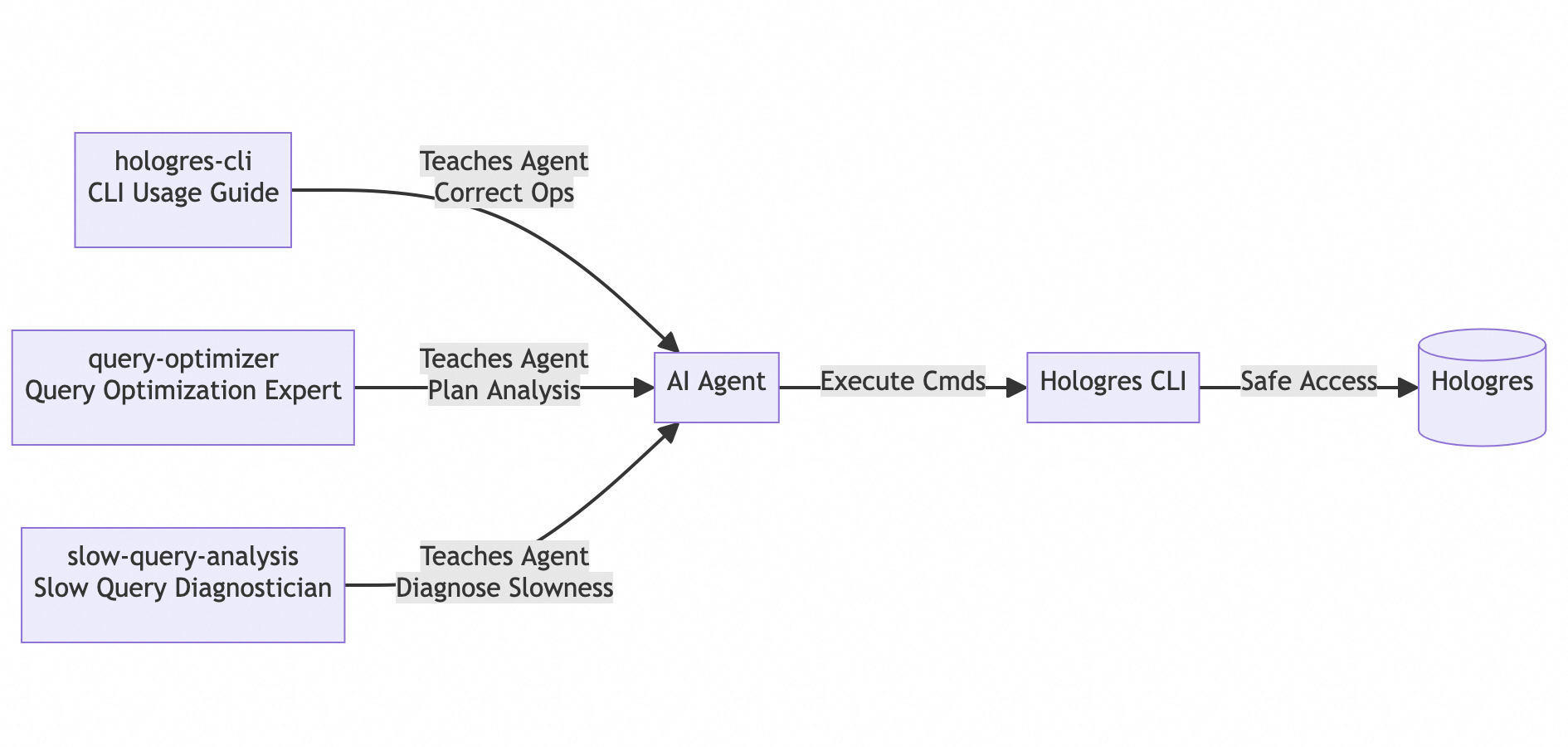
Skill 1: hologres-cli — CLI Usage Guide
Teaches Agents how to correctly use 60+ commands, understand safety mechanisms, and handle error codes. After reading this Skill, the Agent knows:
Skill 2: hologres-query-optimizer — Query Optimization Expert
Condenses Hologres execution plan interpretation experience into AI-consumable knowledge:
Agent Analysis Flow:
1. Execute EXPLAIN ANALYZE
2. Check ADVICE section for system suggestions
3. Identify bottleneck operators (Seq Scan? Redistribution?)
4. Apply remedies (Add index? Change distribution key? Tune GUC?)
The Agent knows that rows=1000 means missing statistics requiring ANALYZE; Redistribution means mismatched distribution keys requiring adjustment of distribution_key; and ExecuteExternalSQL means it went through PQE and needs SQL rewriting.
Skill 3: hologres-slow-query-analysis — Slow Query Diagnostician
A diagnostic workflow based on the hologres.hg_query_log system table:
# Install to your AI tool with one command
uvx hologres-agent-skills
The interactive installer supports 8 major AI development tools:
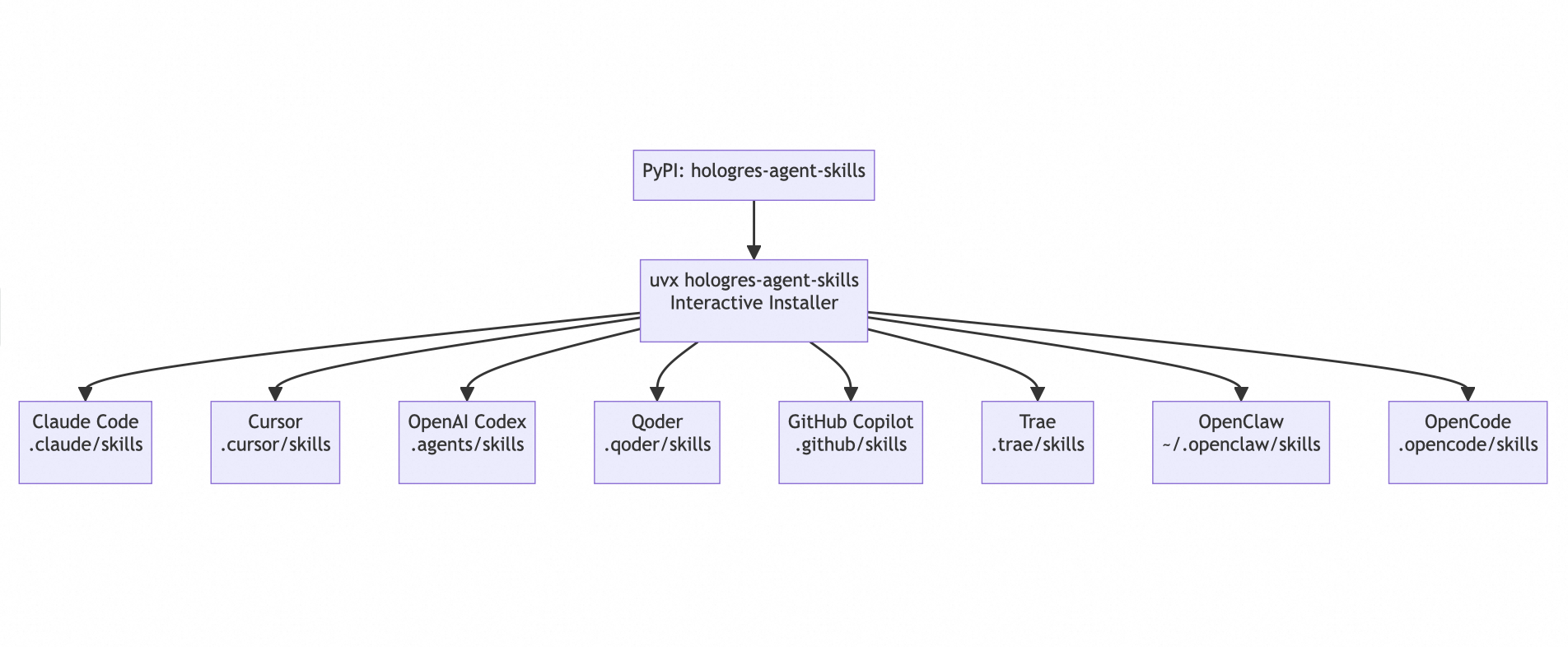
Select your tool, choose your skill package, and install with one click. Skill files are automatically copied to the corresponding tool's skills directory.
Hologres CLI introduces the data warehouse's native AI creation capability — use SQL to call large models for generating text, images, and videos, paired with Volume storage for full-pipeline asset management:
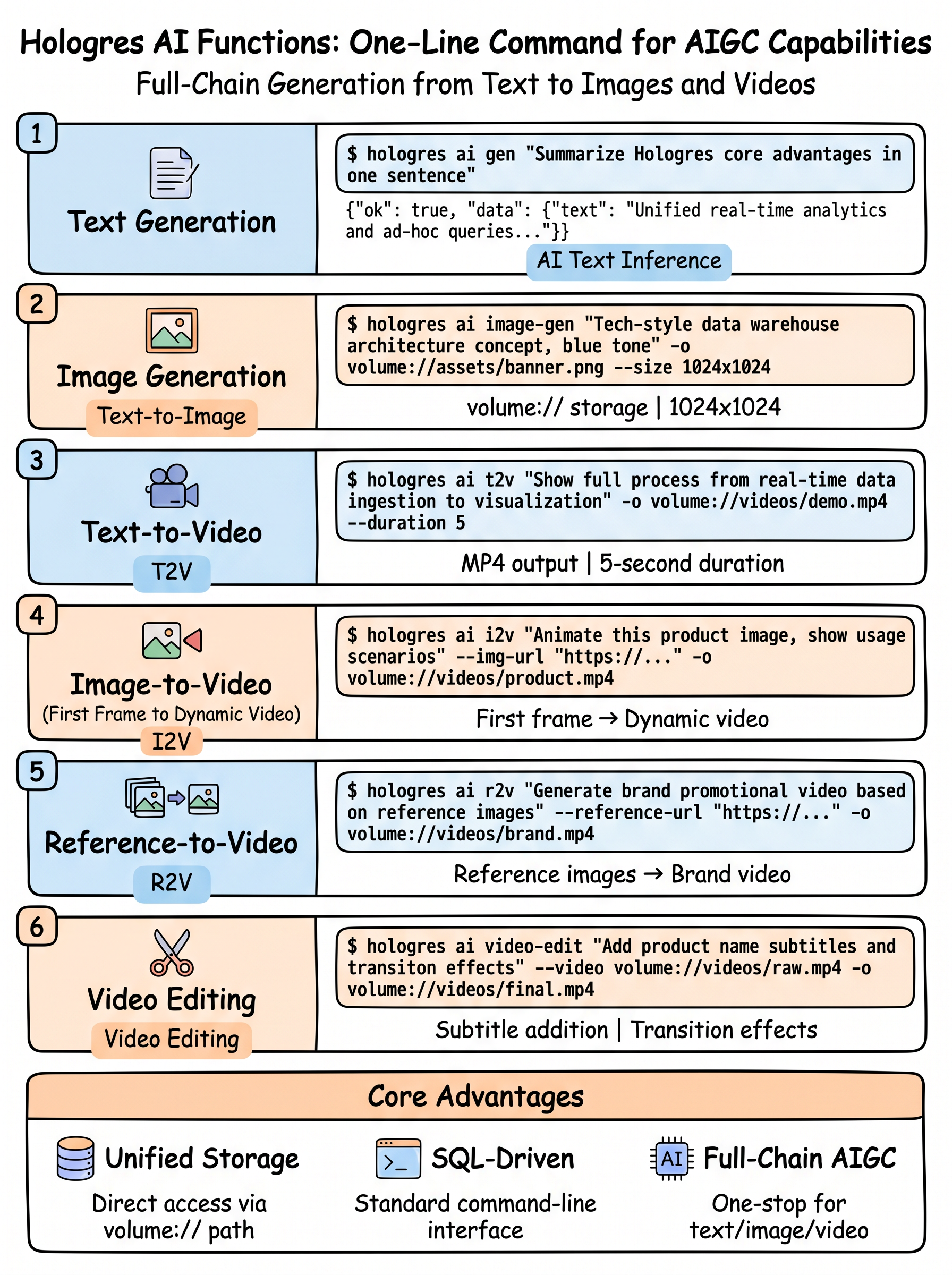
# Register models to Hologres
hologres model create --name qwen3 --type qwen3.6-plus --api-key <api_key>
hologres model create --name qwen-image2 --type qwen-image-2.0-pro --api-key <api_key>
hologres model create --name happyhorse-t2v --type happyhorse-1.0-t2v --api-key <api_key>
hologres model create --name happyhorse-i2v --type happyhorse-1.0-i2v --api-key <api_key>
hologres model create --name happyhorse-r2v --type happyhorse-1.0-r2v --api-key <api_key>
hologres model create --name happyhorse-video-edit --type happyhorse-1.0-video-edit --api-key <api_key>

# Text generation
$ hologres ai gen "Summarize Hologres' core advantage in one sentence" --model qwen3
{"ok": true, "data": {"text": "Real-time analytics and ad-hoc query unified, row/column hybrid storage..."}}

# Image generation to Volume storage
$ hologres ai image-gen "Tech-style data warehouse architecture concept, blue tones" \
    -o volume://assets/output/ --size 1024x1024 --model qwen-image2

# Text-to-video
$ hologres ai t2v "Show the full flow from real-time ingestion to visual query" \
    -o volume://videos/output/ --duration 5 --model happyhorse-t2v

# Image-to-video (animate a first-frame image)
$ hologres ai i2v "Make this product image move, showing usage scenarios" \
    --img-url volume://videos/firstframe.png \
    -o volume://videos/output/ --model happyhorse-i2v

# Reference-image video generation
$ hologres ai r2v "Generate a brand promo video based on these reference images" \
    --reference-url volume://videos/liubei.png \
    -o volume://videos/output/ --model happyhorse-r2v

# Video editing
$ hologres ai video-edit "Add product name subtitles and transition effects" \
    --video volume://videos/raw.mp4 -o volume://videos/output/ \
    --model happyhorse-video-edit
Volume Storage Management — the Agent's AIGC asset warehouse:
hologres volume create my-assets --endpoint oss-cn-hangzhou.aliyuncs.com ...
hologres volume upload-file --volume my-assets --local-file ./logo.png --target-file brand/logo.png
hologres volume list-files --volume my-assets --prefix brand/
hologres volume view volume://my-assets/brand/logo.png   # Download and preview
Model Management:
# List all supported models
hologres model catalog [--task T] [--search S]
# List models registered in Hologres
hologres model list [--task T] [--model-type T] [--search S]
# Register a supported model into Hologres
hologres model create --name qwen3 --type qwen3.6-plus --api-key <api_key>
# Delete a registered model from Hologres
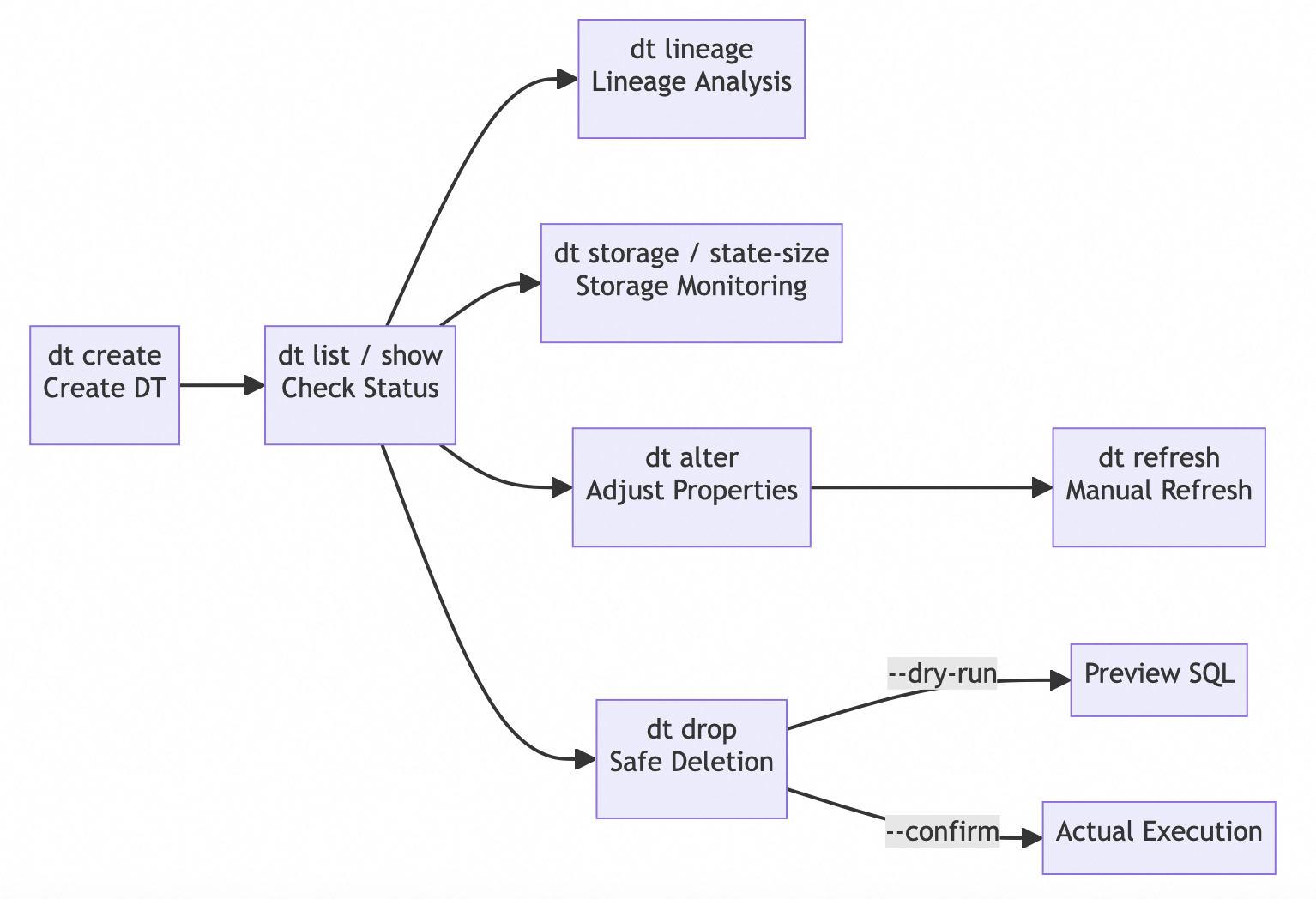
hologres model delete qwen3 --confirmHologres Dynamic Tables are the core capability of real-time data warehousing. In the AI Agent era, creating dynamic tables no longer requires hand-writing complex DDL—tell the Agent what you want in natural language, and it will generate and execute it automatically.
User: "Help me build a real-time regional sales dashboard based on the orders table, refreshing every 5 minutes"

Agent Chain of Thought:
  1. hologres schema describe orders → Understand source table structure
     (region VARCHAR, amount DECIMAL, ds DATE, ...)
  2. Based on user intent, automatically generate CLI command:
     hologres dt create -t region_sales_realtime
       --freshness "5 minutes"
       --refresh-mode incremental
       --computing-resource serverless
       -q "SELECT region, ds,
              SUM(amount) AS total_amount,
              COUNT(*) AS order_count,
              AVG(amount) AS avg_amount
           FROM orders GROUP BY region, ds"
       --dry-run
  3. Preview SQL with --dry-run first → Show to user for confirmation
  4. Remove --dry-run and execute formally after confirmation
  5. hologres dt show region_sales_realtime → Confirm successful creation
The user only spoke one sentence, and the Agent completed: understanding table structure → designing aggregation logic → selecting refresh strategy → safe preview → execution.
After creation, the Agent can also manage the entire lifecycle via natural language:
# "Check the data sources for this dynamic table" → Agent executes:
hologres dt lineage region_sales_realtime

# "Change refresh frequency to 1 minute" → Agent executes:
hologres dt alter region_sales_realtime --freshness "1 minute"

# "This table is no longer needed" → Agent executes (default dry-run, safety first):
hologres dt drop region_sales_realtime           # Preview SQL only
hologres dt drop region_sales_realtime --confirm # Actually execute after user confirmation
Agents can autonomously create, adjust, and monitor real-time data pipelines based on business needs—while users only need to describe requirements in natural language.
27 common Hologres parameters, categorized for management, with --help for instant lookup:
$ hologres guc --help

Known Hologres GUC Parameters:

  [Auto Analyze]
    hg_enable_start_auto_analyze_worker
        default=on  Enable Auto Analyze (V1.1+)

  [Query Optimization]
    optimizer_join_order
        default=exhaustive  Join order strategy (exhaustive/query/greedy)

  [Timeout & Connection]
    statement_timeout
        default=8h  Active Query timeout

  ...
# View current value
hologres guc show statement_timeout

# Persistent database-level setting
hologres guc set statement_timeout '5min'

# Reset to default
hologres guc reset statement_timeout

# View current values of all parameters
hologres guc list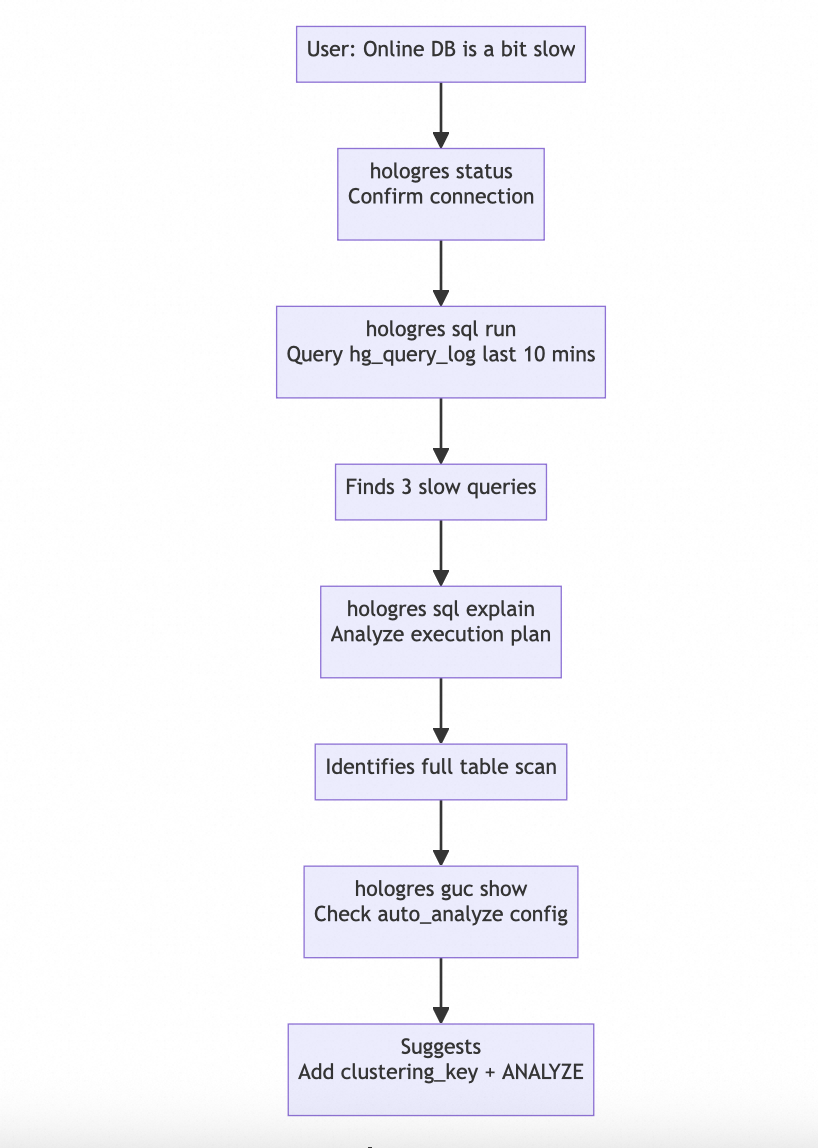
User: "The online database is a bit slow, help me check what's going on"

Agent Thought Chain:
  1. hologres status → Confirm connection is normal
  2. hologres sql run "SELECT status, duration, query::char(60)
     FROM hologres.hg_query_log
     WHERE query_start >= now() - interval '10 min'
     ORDER BY duration DESC LIMIT 20"
     → Finds 3 slow queries
  3. hologres sql explain "SELECT ..." → Identifies full table scan
  4. hologres guc show hg_enable_start_auto_analyze_worker → Confirms auto analyze is on
5. Provides suggestion: Add clustering_key + run ANALYZEUser: "Help me create Instagram ad materials for our new product"
Agent Execution Chain (guided by ad-campaign Skill):
1. hologres ai image-gen "Instragram style, fresh and natural, product showcase" -o volume://creative/xhs1.png
2. hologres ai t2v "15-second recommendation short video, showing product usage scenarios" -o volume://creative/video1.mp4
3. hologres sql run --write "INSERT INTO ad_materials ..." # Register materials
4. hologres dt create -t campaign_roi_realtime \
--freshness "1 minute" -q "SELECT channel, SUM(cost), SUM(conversion) ..."
→ Create real-time ROI monitoring dashboard
5. Provide budget allocation recommendations based on ROI dataUser: "We have 500M users, need real-time daily UV stats per channel"
Agent Execution Chain (guided by uv-compute Skill):
1. Based on Skill knowledge, chooses RoaringBitmap + Dynamic Table approach
2. hologres table create --name uid_mapping ... --dry-run # UID dictionary encoding table
3. hologres table create --name channel_bitmap ... --dry-run # Bitmap base table
4. hologres dt create -t channel_uv_realtime \
--freshness "1 minute" --refresh-mode incremental \
-q "SELECT channel, ds, RB_BUILD_AGG(uid_int) AS uv_bitmap FROM ..."
5. Verify query: hologres sql run "SELECT channel, RB_CARDINALITY(uv_bitmap) FROM ..."
→ Sub-second return for billion-level UVUser: "Help me design an orders table, 100M rows/day, mainly queried by time range"
Agent Execution Chain (guided by schema-generator Skill):
1. Analyze query patterns → time range queries → column storage + daily partitioning
2. hologres table create \
--name orders \
--columns "order_id BIGINT, user_id BIGINT, amount DECIMAL, region TEXT, order_time TIMESTAMPTZ" \
--distribution-key order_id \
--clustering-key order_time \
--orientation column \
--partition-by "LIST(ds)" \
--time-column order_time \
--dry-run
3. Preview DDL → Explain design decisions:
- Column storage: suitable for analytical queries
- clustering_key=order_time: time range query acceleration
- distribution_key=order_id: even distribution
- Daily partitioning: lifecycle management + query pruning
4. Create after user confirmationUser: "Help me build a real-time regional sales dashboard, refreshing every 5 minutes"
Agent Thought Chain:
1. hologres schema describe orders → Confirm source table structure
2. hologres dt create -t region_sales_rt
--freshness "5 minutes"
--refresh-mode incremental
--computing-resource serverless
-q "SELECT region, ds, SUM(amount) AS total, COUNT(*) AS cnt
FROM orders GROUP BY region, ds"
--dry-run → Preview SQL
3. Executes without --dry-run after confirmation
4. hologres dt show region_sales_rt → Confirms successful creationUser: "This SQL took 30 seconds, help me optimize it"
Agent Thought Chain:
1. hologres sql explain "..." → Reads execution plan
2. Identifies Redistribution operator → Distribution key mismatch
3. hologres table properties orders → Checks current distribution_key
4. Suggests changing distribution key or adjusting GUC
5. hologres guc set optimizer_force_multistage_agg on --scope session
6. Re-runs explain to verify effect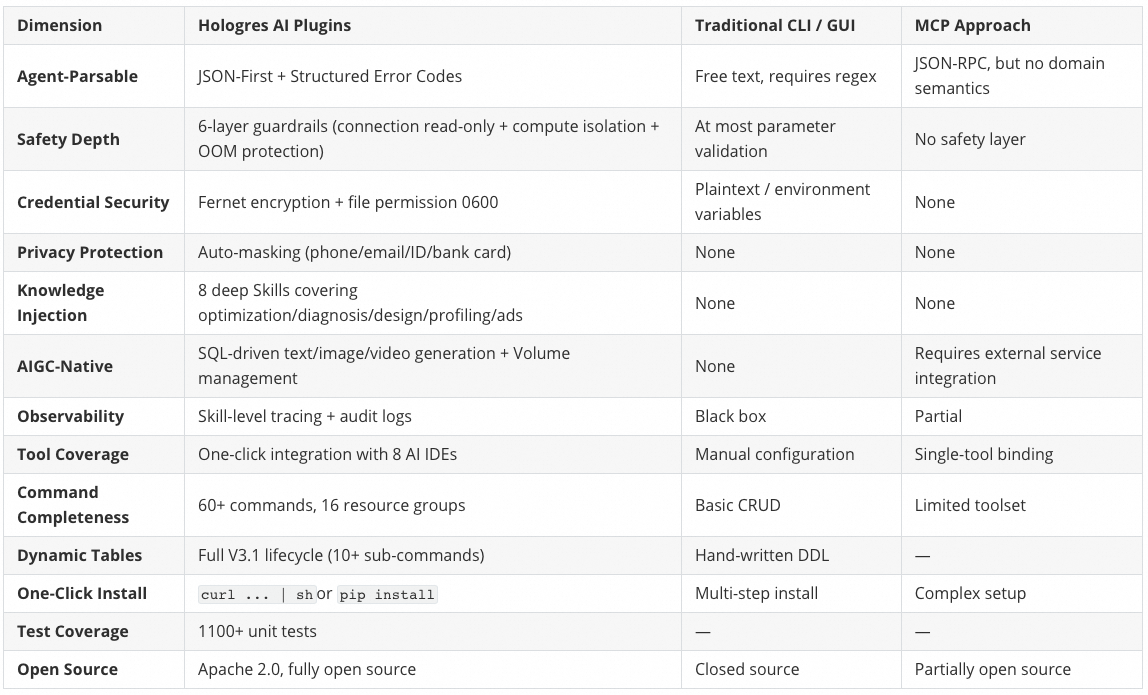
| Capability | Hologres AI Plugins | Traditional CLI / GUI |
|---|---|---|
| AI-Parsable | JSON-First, Structured Error Codes | Free text, requires regex parsing |
| Safety Mechanisms | Six-layer guardrails + Auto-masking | Relies on human judgment |
| Compute Isolation | Default Serverless, no production impact | Shared instance resources, risky |
| Memory Safety | Adaptive Execution, no OOM for complex SQL | Fixed strategy, large queries may crash |
| Knowledge Injection | Agent Skills auto-loaded | Manual documentation search |
| Toolchain | One-click integration with 8 AI tools | Manual configuration |
| Dynamic Tables | Full V3.1 lifecycle | Hand-written DDL |
| Parameter Tuning | 27 parameters categorized | Memory + Documentation |
| Audit Trails | Full operation logging | None |
Automatically detects environment, installs uv, configures PATH, installs CLI:
curl -sSf https://raw.githubusercontent.com/aliyun/hologres-ai-plugins/master/hologres-cli/install.sh | shReload shell after installation:
source ~/.bashrc   # bash users
source ~/.zshrc # zsh userspip install hologres-cliuv tool install hologres-cligit clone https://github.com/aliyun/hologres-ai-plugins.git
cd hologres-ai-plugins/hologres-cli
pip install -e ".[dev]"hologres --versionOption 1: Install via uvx (Recommended)
# No pre-installation needed, run directly
uvx hologres-agent-skills
Option 2: Install via pip
pip install hologres-agent-skills
hologres-agent-skills
Option 3: Install from Source
cd hologres-ai-plugins/agent-skills
uv sync
uv run hologres-agent-skills
The installer guides you through the following steps:
In the AI Agent era, the value of a data warehouse doesn't lie in how much data it stores, but in how quickly, safely, and intelligently AI can use that data.
What Hologres AI Plugins does is simple:
Make Hologres the most handy data warehouse for AI Agents.
When your Agent needs to query data — it has a secure CLI; When your Agent needs to understand the database — it has professional Skills; When your Agent needs to tune performance — it has a complete diagnostic chain.
From pip install to autonomous Agent troubleshooting, there's only a hologres config distance in between.
This is Agent-Ready.
The project is fully open-source. Feel free to Star and contribute:
Announcing DataWorks Data Agent: Meet Your AI Agent for Data

27 posts | 0 followers
FollowAlibaba Cloud Big Data and AI - June 3, 2026
Alibaba Cloud Big Data and AI - July 9, 2026
Alibaba Cloud Big Data and AI - August 21, 2026
Alibaba Cloud New Products - January 19, 2021
Hologres - June 30, 2021
Alibaba Cloud Big Data and AI - January 21, 2026
27 posts | 0 followers
Follow Big Data Consulting for Data Technology Solution
Alibaba Cloud provides big data consulting services to help enterprises leverage advanced data technology.
Learn More Big Data Consulting Services for Retail Solution
Alibaba Cloud experts provide retailers with a lightweight and customized big data consulting service to help you assess your big data maturity and plan your big data journey.
Learn More Hologres
A real-time data warehouse for serving and analytics which is compatible with PostgreSQL.
Learn More Data Security Center (Original SDDP)
An all-in-one data security solution that provides various features, such as sensitive data detection, classification, grading, and de-identification, to help you meet compliance requirements specified in General Data Protection Regulation (GDPR) and personal information protection
Learn MoreMore Posts by Alibaba Cloud Big Data and AI

