We recently launched Computer Use: a capability that lets AI operate real desktop interfaces. The final product matters, but the more interesting story is how we built it.
Computer Use lets AI see the screen, click buttons, type, drag, and keep working in the background without interrupting the user. The hard part is not merely sending an action. The action has to actually take effect, the post-action state has to be readable, and the tool must not steal the foreground.
In practice, this project came with three very concrete challenges:
That created one hard constraint: I could not judge quality by reading the code. I had to judge it by observing behavior. I did not know whether the code was right, but I could tell whether the tool correctly operated the computer. The strategy became clear: focus on defining what a correct result looks like, and make the AI prove that it achieved it.
The first workflow was very traditional: I wrote the requirement, the Agent wrote code, I manually ran tests, inspected the result, and then gave feedback.
If you have used AI coding assistants, this probably feels familiar. Every conversation starts from zero. You have to restate the context, explain how to test, and remind the Agent which directions have already failed. The Agent may be capable, but without persistent memory, each round feels like working with a new person.
The bottleneck is the human. Human attention is limited and discontinuous. When the human stops, the system stops. To keep iterating, the system has to be able to run on its own.
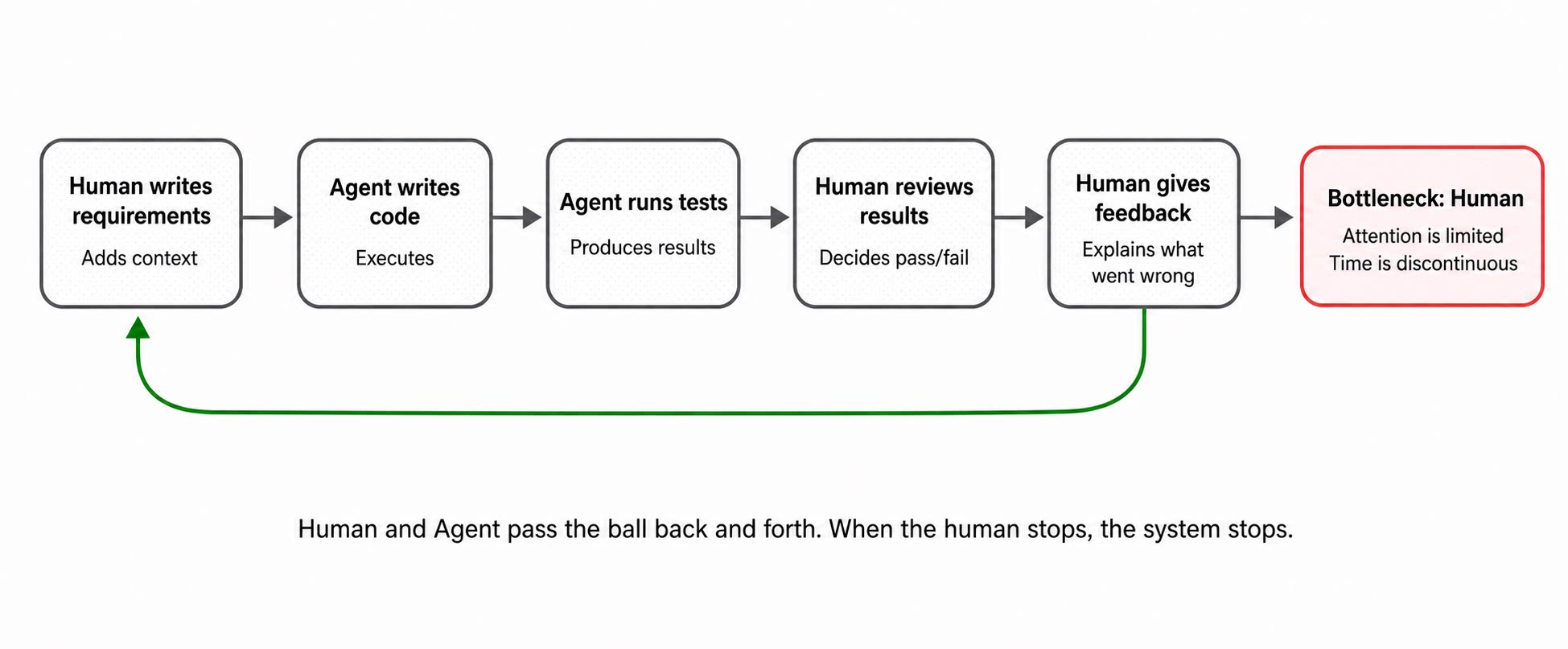
To make the Agent iterate autonomously, the first step was to build a pipeline it could complete by itself.
ComputerUse depends on system permissions. Every build has to be signed with the same certificate; otherwise macOS treats it as a new application and invalidates the previously granted Screen Recording and Accessibility permissions. We wrapped the entire path from source build, to stable signing, to launch, to tests. The Agent can run the full path with one command. It does not need to understand signing details; it only needs a reliable route to a behaviorally valid package.
Being able to run once is not enough. A normal Agent conversation is request-and-response: once the task is done, it stops. But building a tool often requires many turns before it converges. Compilation fails, tests fail, behavior is wrong in one app, or a fix causes a regression elsewhere. If a human has to restart every round, the efficiency collapses.
We used Qoder Goal Mode. You give the Agent a goal, such as "implement the click tool and pass the end-to-end test." It keeps working toward that goal: implement, test, fix failures, and try again until it either succeeds or clearly needs a human decision. It no longer "runs once and stops"; it loops until the target converges.
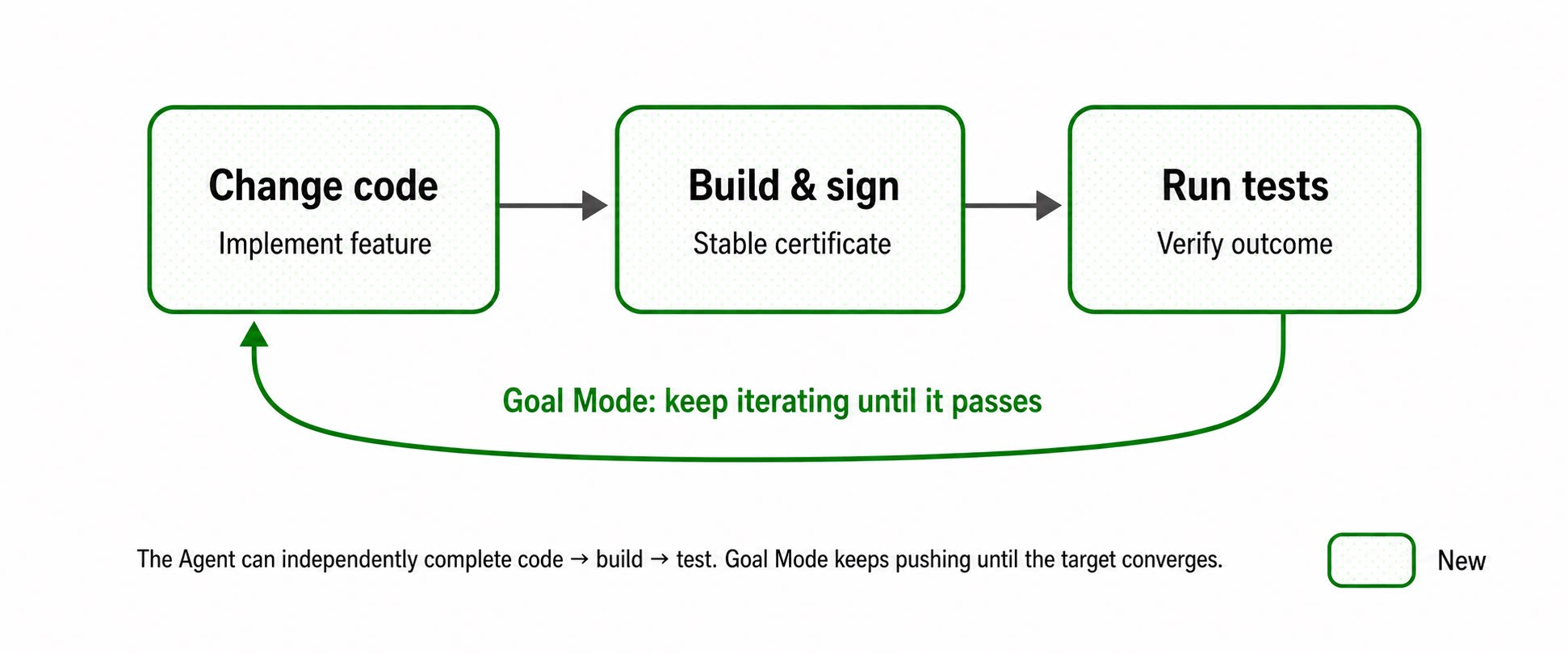
Once the Agent could run by itself, a new problem appeared quickly.
For example, we asked the Agent to implement the click tool. It ran the test and reported success. But when we checked manually, the button had not actually been clicked. The test only checked that the call did not throw; it did not check that the button state changed. The test was green, but the real behavior was wrong.
The issue was not that tests were missing. The issue was that the tests were too weak. If a test only covers the happiest path, the Agent can write an implementation that does nothing and still "pass." We changed the rule: no change is complete unless it passes real and sufficient verification.
That verification has three layers:
The key is that the Agent generates its own tests. If it implements the click tool, it has to create an app that can actually be clicked and prove that the visible state changes. The example below is one such Agent-generated test app. It covers text fields, buttons, sliders, scrolling, nested views, lists, and other UI elements. There are many such apps, each built for different scenarios.
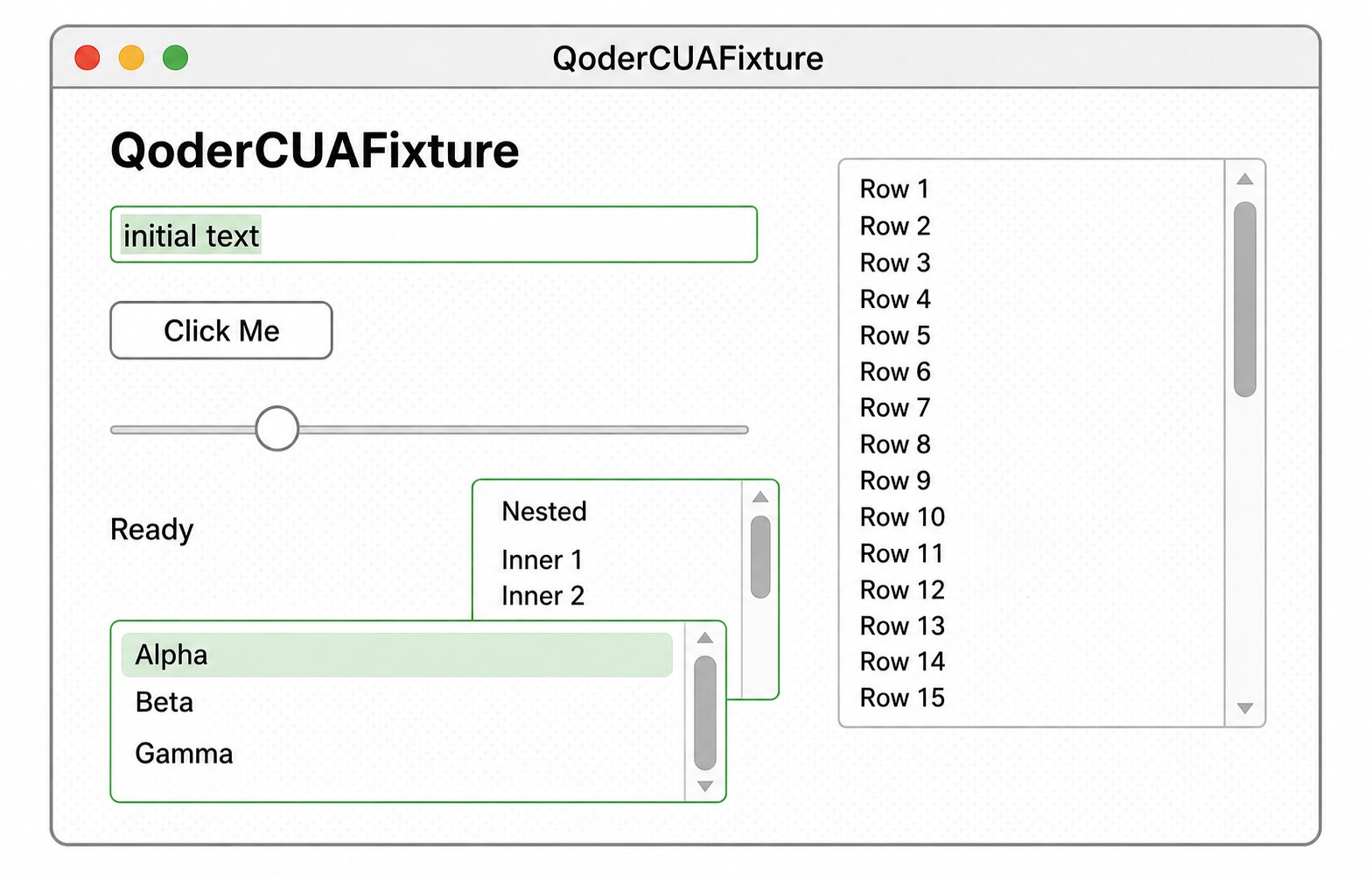
From single-function tests to full workflow acceptance, the point is not that a tool call returns success. The point is that the final effect is verified from multiple angles.
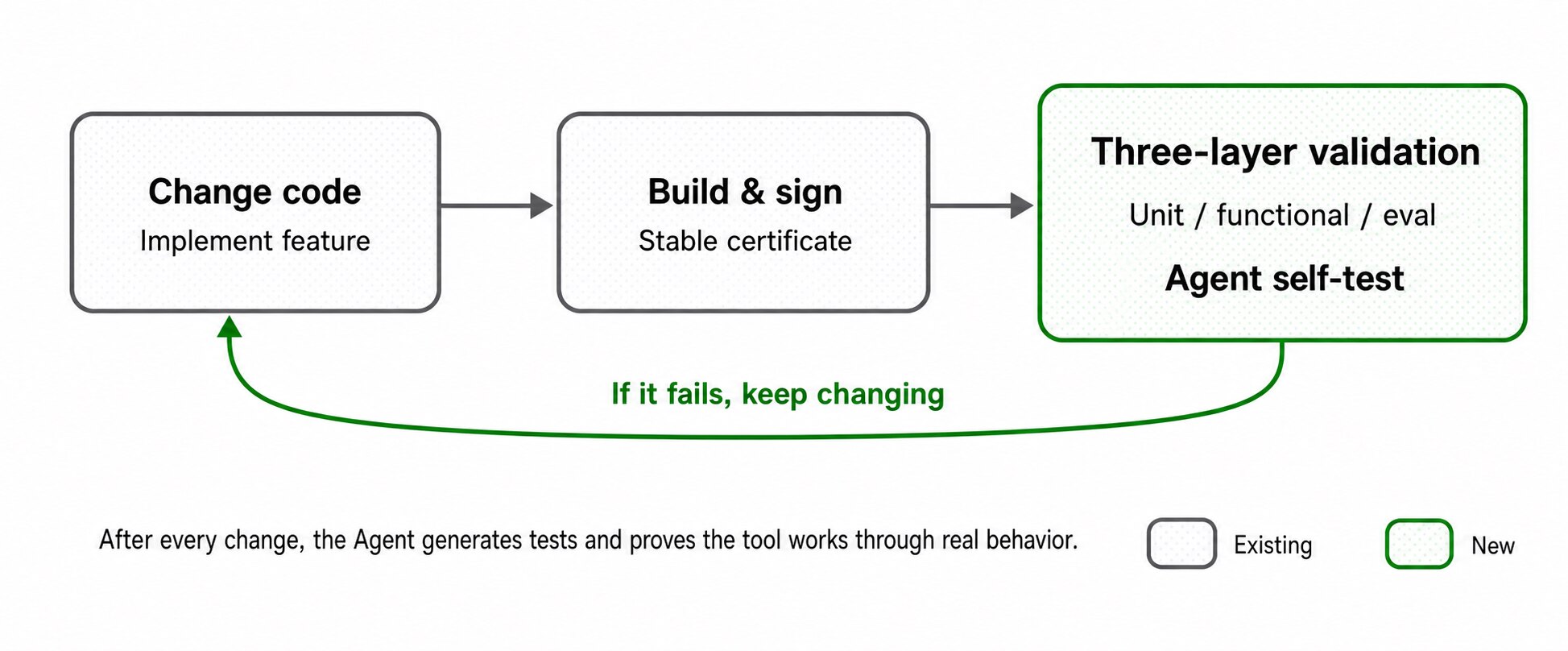
Verification lets the Agent prove that the current change works. But it does not automatically protect against another class of failure.
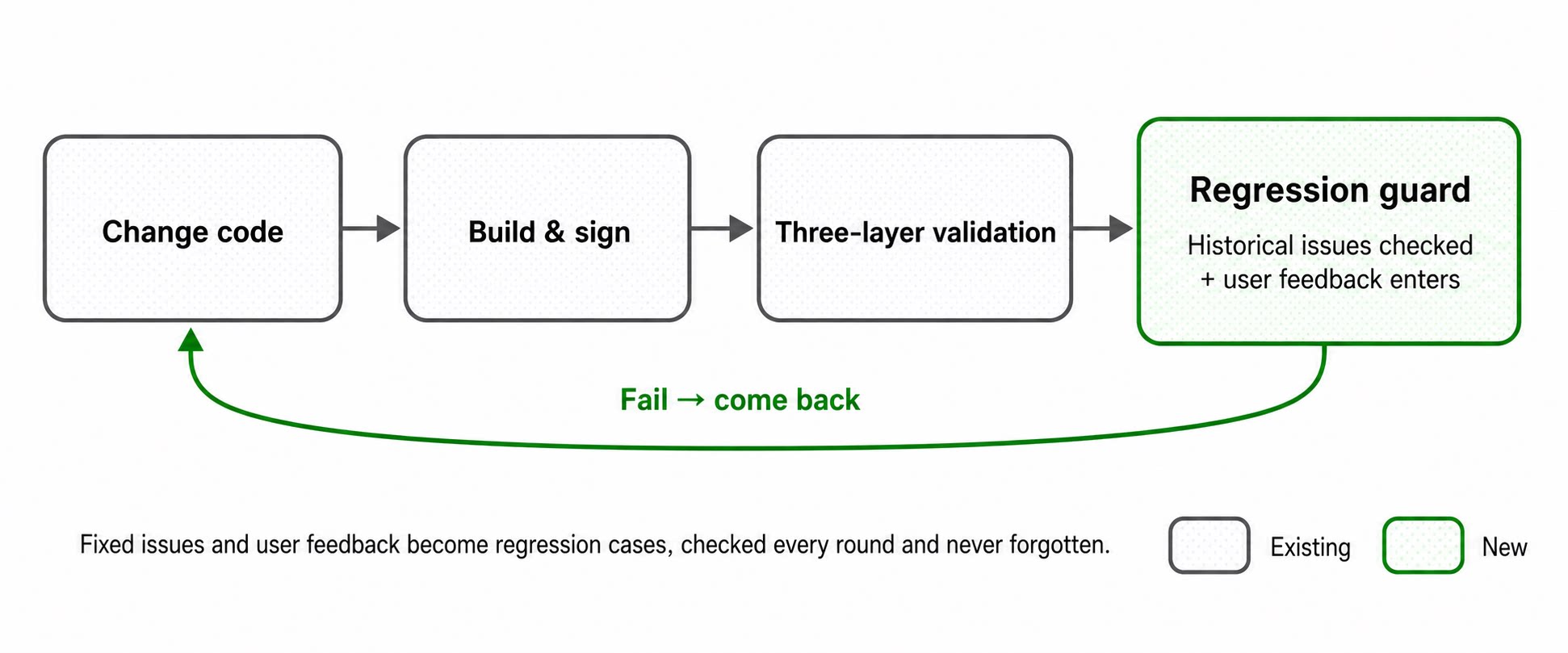
Suppose we fix an issue on Monday: clicking a button sometimes steals foreground focus. On Wednesday, the Agent optimizes another feature and accidentally changes related logic. The old issue comes back, but no one notices because it is outside the current task's test scope.
The answer is straightforward: every fixed issue becomes a persistent test case and gets checked automatically in future rounds. We went one step further. Bugs discovered during development enter the regression suite, and so does real user feedback. A report like "clicking did not work in this app" becomes a repeatable scenario and permanently joins the regression set.
Problems that have already happened should not live only in human memory. They should become automatic checks.
Here are two real examples:
Both failures had the same root cause: the Agent had no memory across rounds.
Putting all knowledge into the prompt does not work either. The context window is not large enough, and manual explanation will always miss something. Our approach was to put memory in the file system, split into two layers: project memory for stable knowledge such as architecture, constraints, and research conclusions, and retrospective notes for dynamic knowledge from each round, such as what changed, what remains, and where the next round should begin.
docs/
├── specs/              requirements and acceptance criteria
├── architecture/       architecture and core constraints
├── implementation/     notes on key implementation modules
├── research/           technical research and decision rationale
├── plans/              next-stage iteration plans
├── retrospectives/     per-round reviews, open issues, and risks
├── evidence/           test results and behavior validation records
└── test-cases/         source, coverage, and history of test scenarios
At the start of each round, the Agent reads project memory and the previous retrospective. At the end, it writes back.
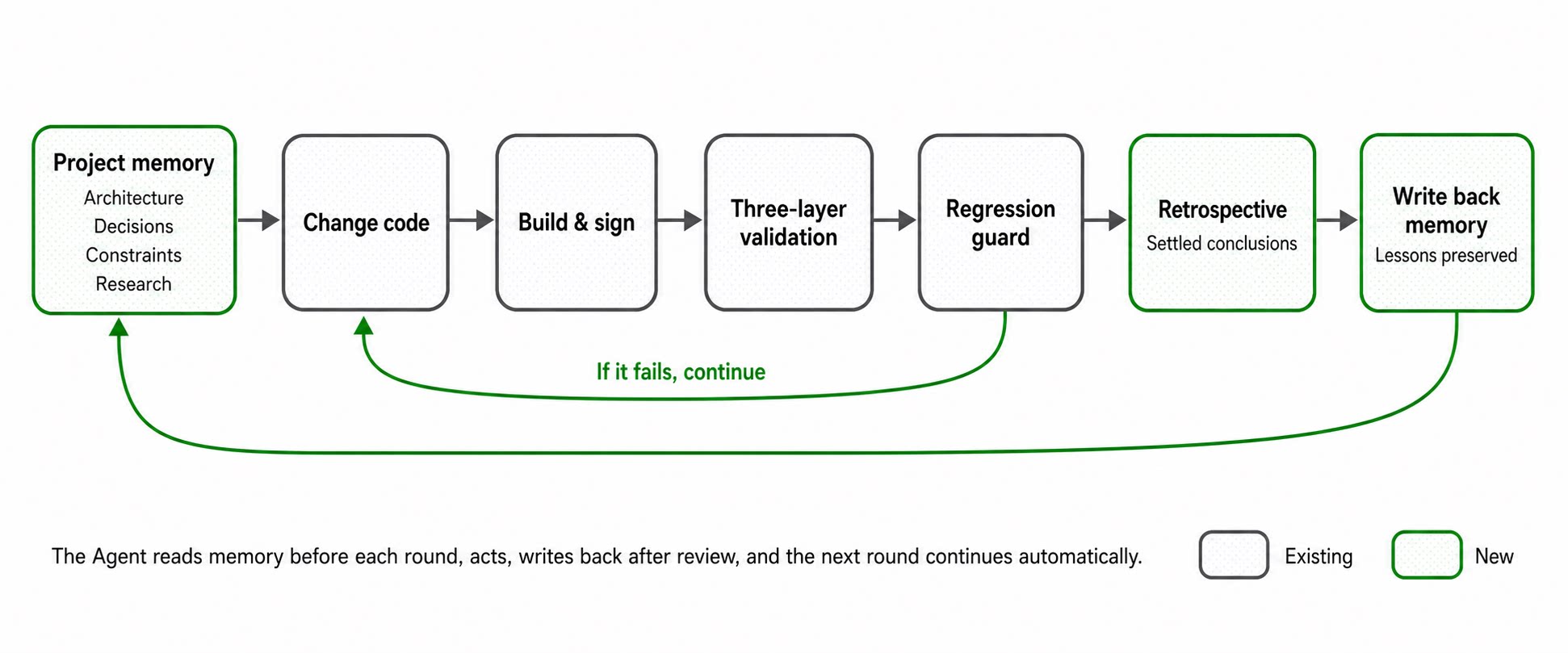
Put together, the system forms a complete loop:
Goal → Implementation → Verification → Retrospective → Next goal
Each round no longer starts from zero. It starts from everything the previous round has already learned.
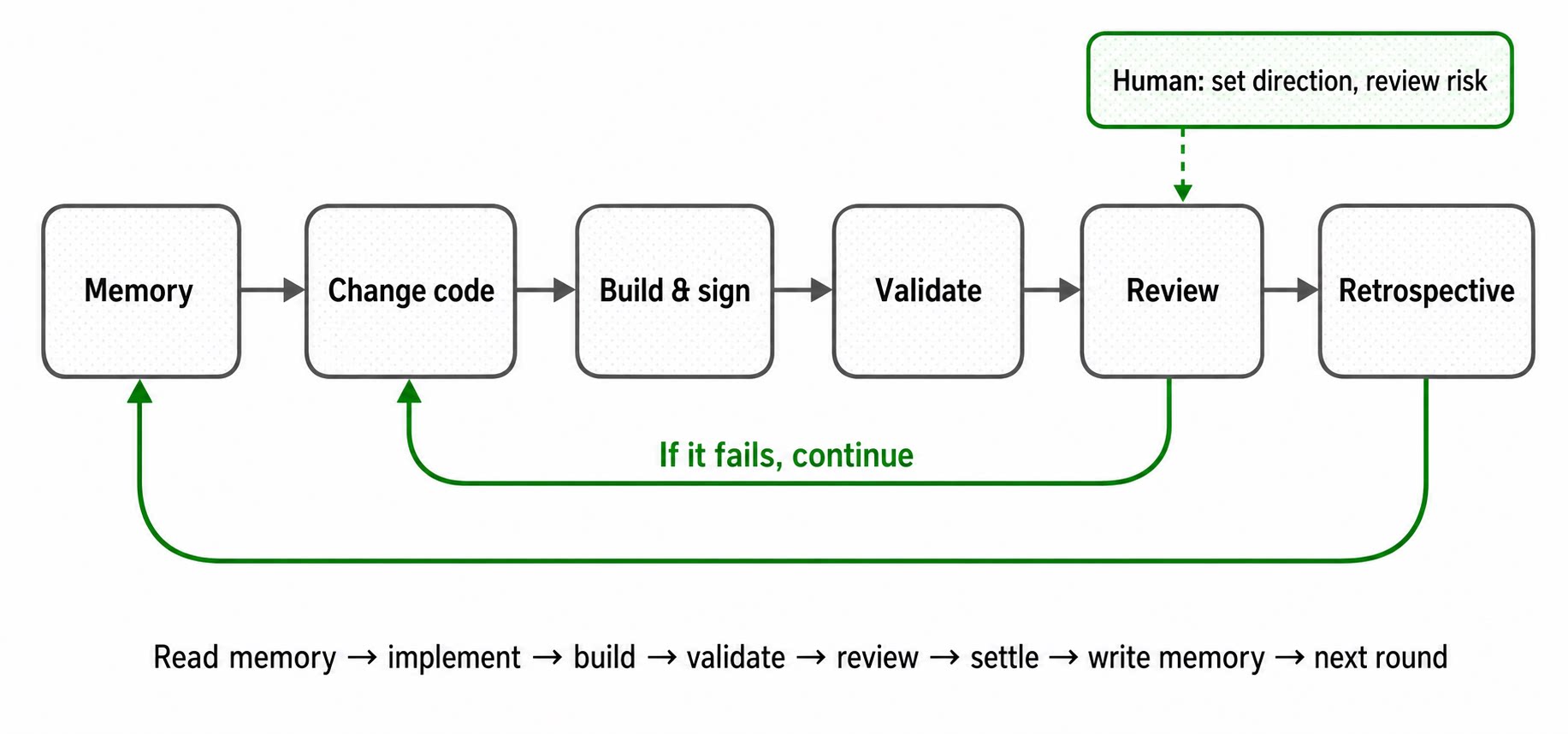
Once the loop is in place, it no longer requires a human to watch it in real time:
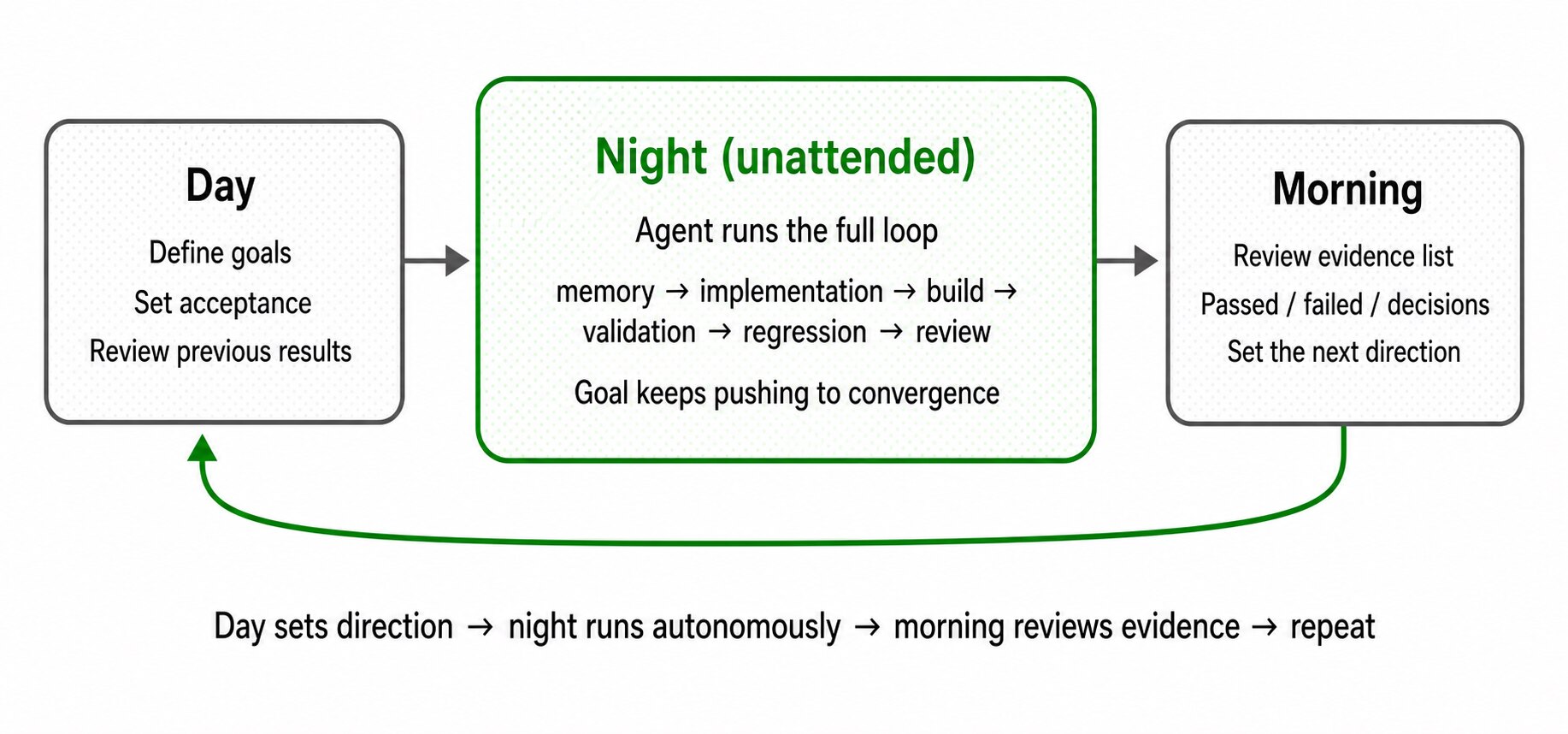
This system has run for hundreds of hours of continuous iteration, including a large amount of unattended overnight work. The two charts below show real evaluation data.
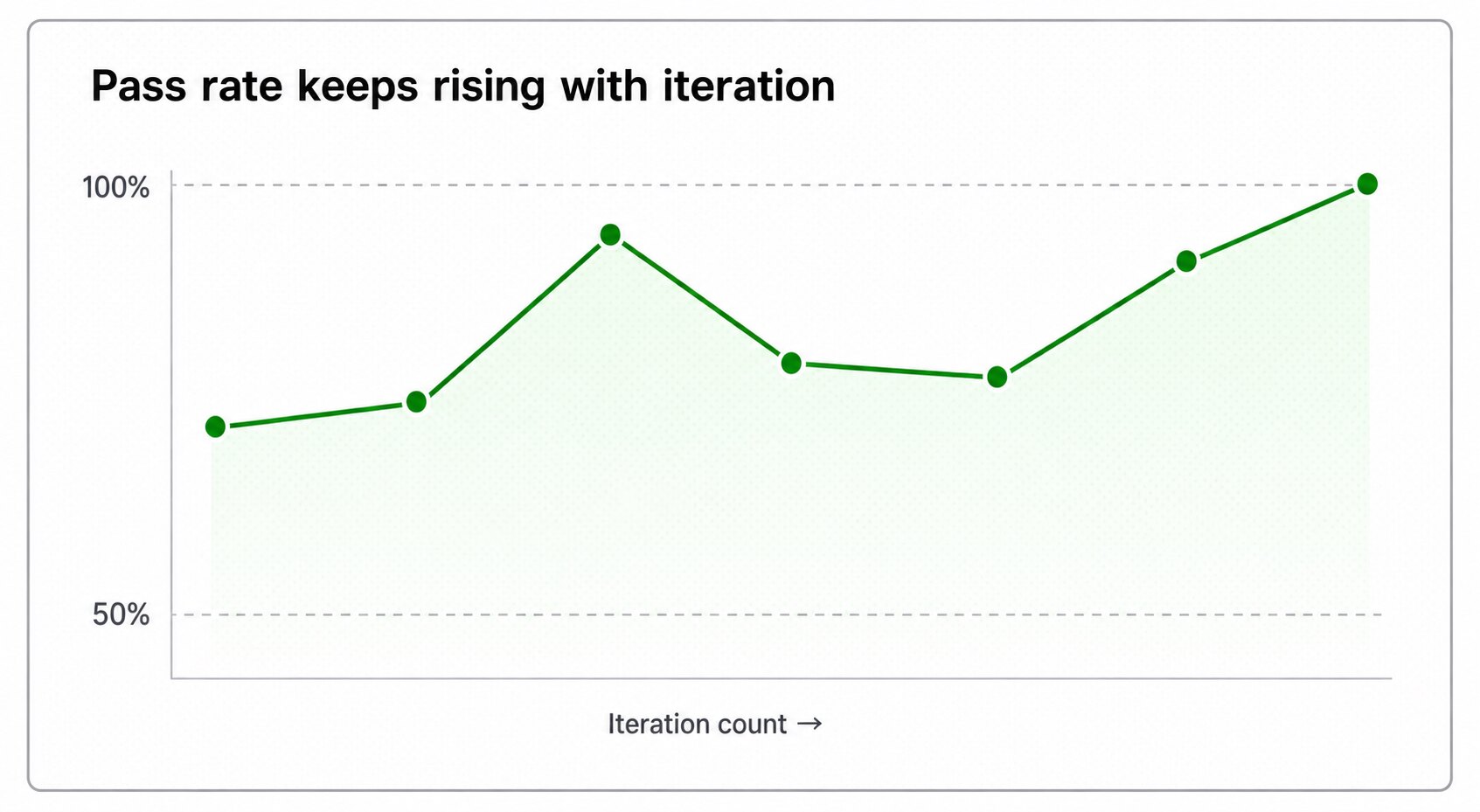
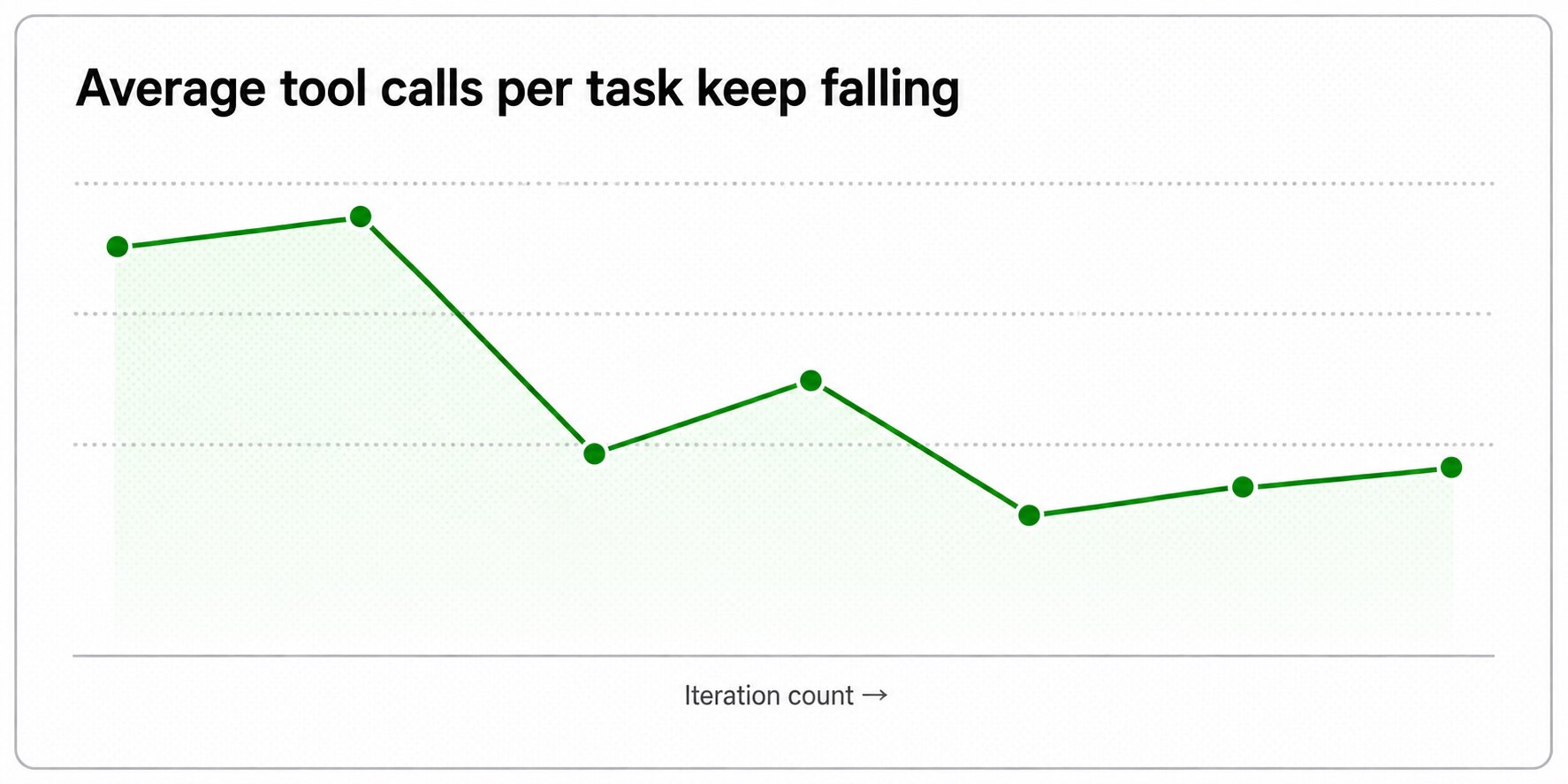
Back to the original problem: one person who did not know Swift had to deliver production-grade native macOS software. In the end, it worked. The reason was not simply that AI was powerful. It worked because we built a system around acceptance, testing, memory, and regression. Inside that system, AI could run, verify, and accumulate knowledge by itself.
The human role shifted from "write code and watch execution" to "define standards, design verification, and choose direction." Recently, the term "Loop Engineering" has become popular. When we saw it, we realized that this is exactly the practice we had already been using inside Qoder.
Once this loop works, an engineer no longer has to be an expert in a specific technology stack to deliver production-grade software. The technology stack is no longer the main barrier. The real leverage is the ability to define the target and verify the result.
Qoder Desktop already includes Goal Mode and Spec capabilities, and the latest release upgrades UltraPlan and UltraReview. Together with general-purpose validation tools such as Computer Use and Browser Use, they can help you build your own autonomous iteration system much faster.

1,596 posts | 525 followers
FollowAlibaba Cloud Community - August 31, 2026
Alibaba Cloud Community - November 2, 2026
Alibaba Cloud Community - October 13, 2026
Alibaba Cloud Community - July 23, 2026
Alibaba Cloud Community - June 16, 2026
Alibaba Cloud Community - October 19, 2026
1,596 posts | 525 followers
Follow QwenWork
QwenWork is dedicated to helping employees strengthen their professional competitiveness in the AI era and to enabling enterprises to improve organizational effectiveness.
Learn More Token Plan
Build more, spend less. One plan, every modality.
Learn More
Alibaba Cloud Model Studio
A one-stop generative AI platform to build intelligent applications that understand your business, based on Qwen model series such as Qwen-Max and other popular models
Learn More DeepSeek
DeepSeek-V4.1-Flash is the lightweight flagship of DeepSeek's new architecture family, packing 552B total MoE parameters to deliver flagship-surpassing intelligence across key benchmarks.
Learn MoreMore Posts by Alibaba Cloud Community

