Reading files, modifying code, running commands—these are how a Coding Agent gets work done. The more capable the agent becomes, the less developers want to be interrupted by every single command, and the more they need assurance that the agent won't overstep, won't touch files or data it shouldn't.
We didn't build this capability in a vacuum. Since the sandbox went live, it processes nearly one million terminal commands per day, flags over ten thousand as worth a second look, and catches close to a hundred that directly touch something they shouldn't—enough to wipe out a developer's entire week of work.
These commands aren't necessarily malicious. Model hallucinations can mistake a project directory for a temp folder and delete it. Environment variable mismatches can redirect a cleanup command at a system directory.
This is why Qoder built a native terminal sandbox: when an agent can execute commands on your behalf, a simple "allow?" prompt isn't enough. The better approach is to draw boundaries first, then let the agent operate within them.
Two real cases—one from model hallucination, one from environment mismatch.
In the screenshot, the agent is executing a Windows command:
cmd /c "rmdir /s /q \"C:\Users\...\SuperMarioGame\src\""The intent was file cleanup. The model treated the project source directory as disposable.
rmdir /s /q recursively deletes the target path without confirmation.
What makes this dangerous: the command looks like a normal development operation. There's no obvious malicious payload, yet the result may be unrecoverable.
A developer asked the agent to run a build-cleanup script containing:
rm -rf "$OUTPUT/root"In the local environment, $OUTPUT pointed to /home/user/project/build—build artifacts. But when the agent executed it, the variable wasn't loaded correctly. $OUTPUT expanded to empty, and the command became rm -rf "/root", targeting the system root directory.
No attacker required—pure environment mismatch. The sandbox restricts write access to the workspace; /root is not on the allowlist, so the deletion was denied outright.
Model hallucinations and environment mismatches have different origins but the same outcome: the command's actual behavior diverges from what the developer expected. Any link in the execution chain that goes wrong can land on the user's machine.
The industry's common terminal defenses fall into two categories: blocklists and confirmation dialogs.
Blocklist interception maintains a list of dangerous commands—rm -rf, sudo, format—and blocks on match. The problem is that string-level matching is trivially bypassed. cmd /c "rmdir /s /q" does the same thing as rm -rf but looks completely different. Backtick nesting, pipe chaining, and variable expansion all make rules brittle. A more covert approach: wrap the dangerous command in a .sh script—the command name never appears in the invocation arguments.
User confirmation dialogs seem safer. Every command pops a dialog, letting the user decide. But in a real development session with hundreds of commands and fragmented context, most people end up clicking "Allow" reflexively. The dialog persists; the security burden shifts to the user.
The deeper issue: once a command is approved, it runs with the same privileges as if you typed it yourself—full access to files, network, environment variables, and system resources.
Terminal security needs one more layer: process isolation. Risky commands can run, but they can't freely read and write your machine.
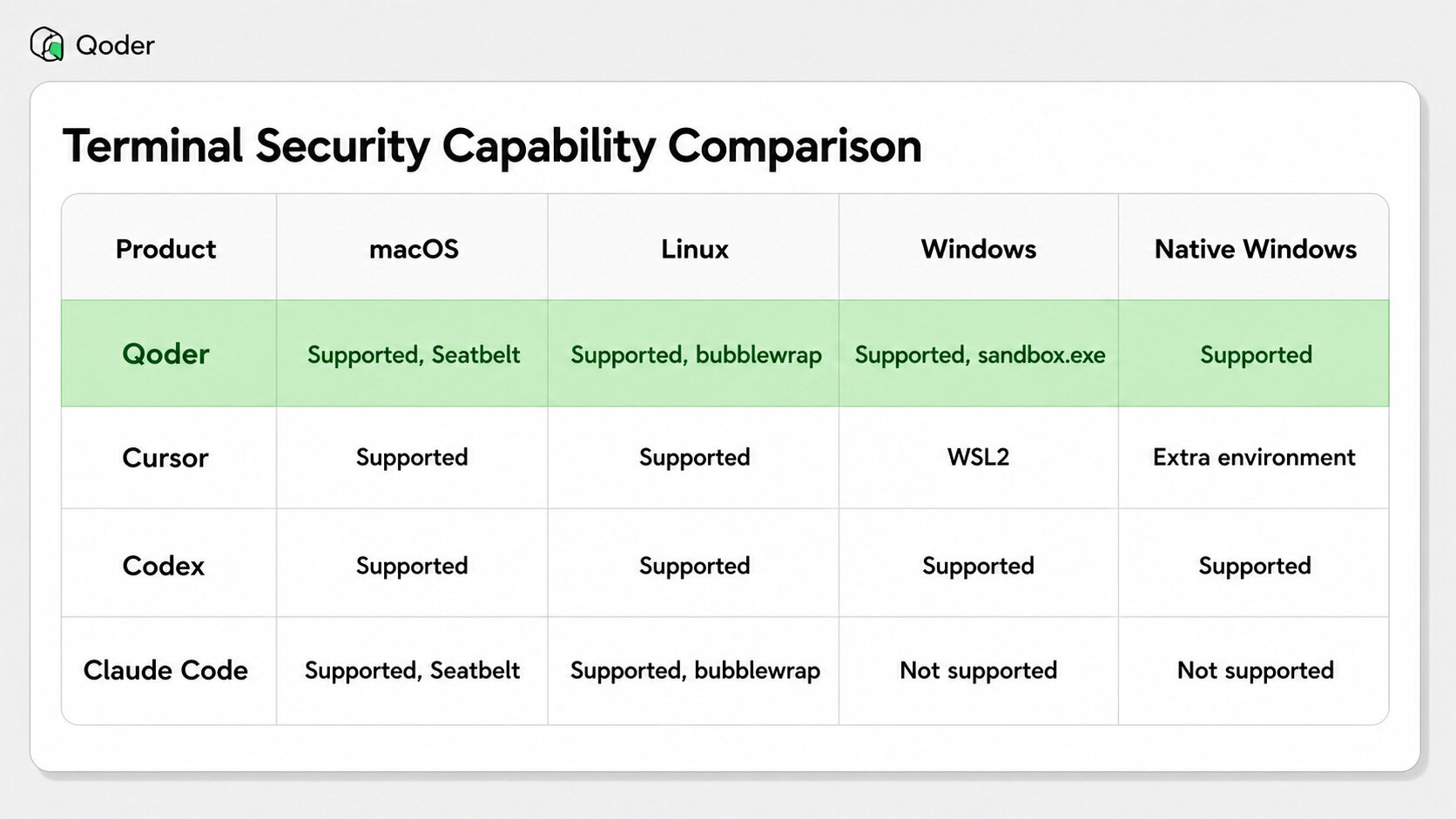
We surveyed the terminal security models of major AI coding tools. Terminal execution is table stakes; sandboxing is catching up fast. But many solutions still require users to understand platform differences, network policies, writable paths, and fallback flows when sandboxing fails.
Cursor's agent runs shell commands directly in the terminal and supports sandboxed execution. It configures network, filesystem paths, and allowlists via sandbox.json. macOS and Linux have native sandbox support; Windows relies on WSL2 for isolation. Developers already using WSL have a viable path; those who want to work in the native Windows terminal face an extra environment switch.
Codex leans toward CLI-first execution policies. Public documentation shows Codex CLI / IDE Extension enforcing sandbox policies via OS-level mechanisms—restricting file write scope, network access, and approval strategies for model-generated commands. The policy surface is exposed in full, suited for power users and automation scenarios.
Claude Code uses sandboxing to reduce permission prompts, letting Bash commands execute more autonomously within filesystem and network boundaries. Public documentation cites Seatbelt on macOS and bubblewrap on Linux. The emphasis is on balancing "fewer interruptions" with "bounded execution," suited for long tasks and automated workflows.
The pattern across the industry: permission dialogs alone aren't enough. Agents need explicit local execution boundaries. What matters most to developer experience is whether the user's current platform is covered, whether they need to switch to WSL or a container, and whether the fallback from sandbox failure to user confirmation is smooth.
Qoder integrates the most appropriate OS-level mechanism on each of macOS, Linux, and Windows. When the agent executes autonomously in the real development environment, both filesystem and network have boundaries. Users open the IDE and get sandbox protection without needing to understand the platform-specific implementation underneath.
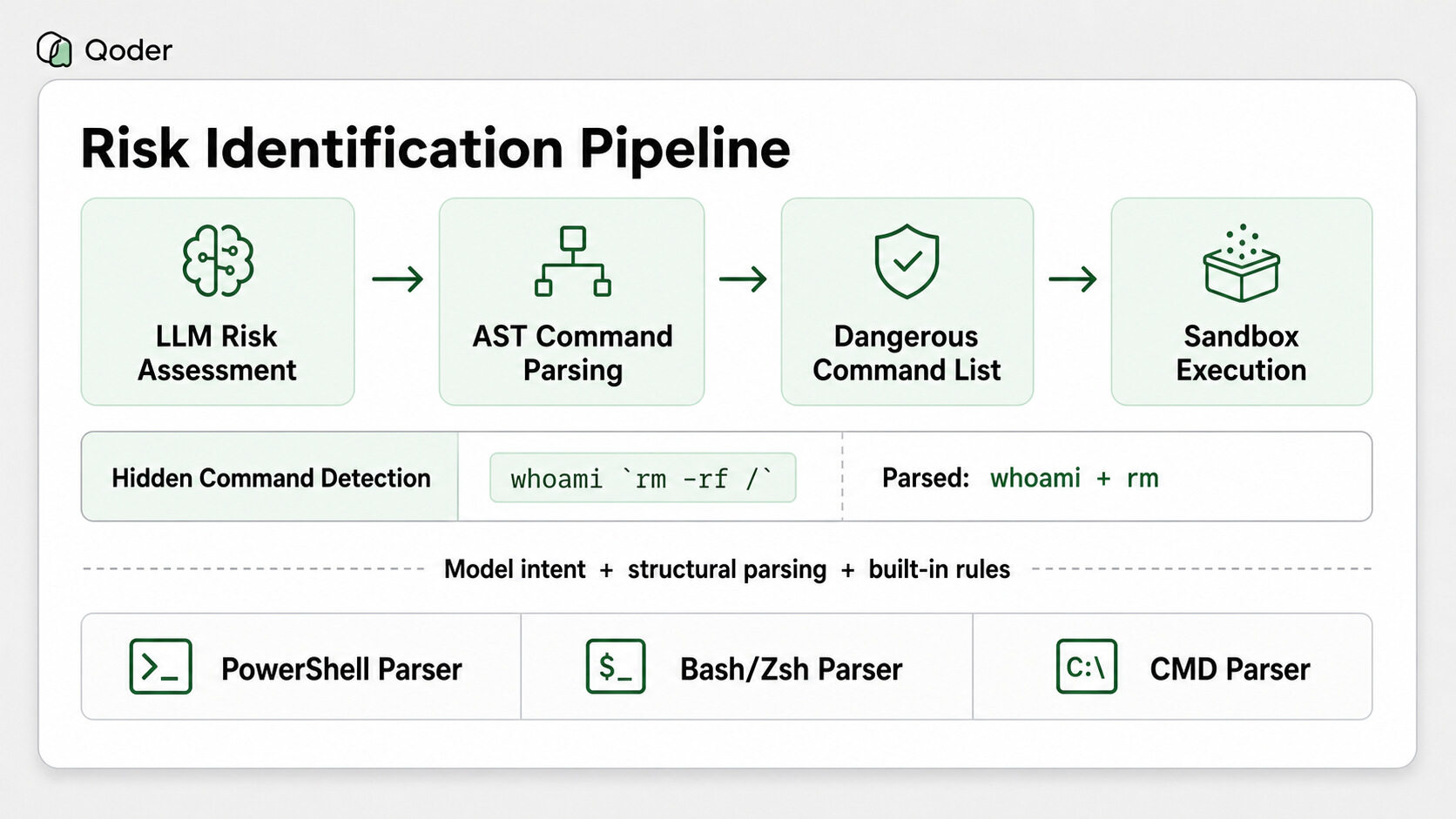
Every command passes through a pipeline before execution: risk identification, command parsing, sandbox wrapping, and platform isolation.
Layer 1: LLM risk assessment. The model evaluates risk at generation time. This layer examines intent—"this command deletes a system path," "the variable value is uncertain, execution outcome is unpredictable."
Layer 2: Multi-platform command parsers. Three AST parsers handle PowerShell, Bash/Zsh, and CMD syntax respectively, decomposing raw commands into structured command names and argument lists.
Example: a prompt injection causes the model to generate:
whoami `rm -rf /`To the eye, it's a whoami. The parser decomposes it to { cmd: "whoami", args: ["rm -rf /"] }, extracting two command names: whoami and rm. The rm -rf / hidden inside backticks is identified.
This differs fundamentally from string-level blocklists: AST-level parsing first, then list comparison. Obfuscation and nesting can't bypass it.
Layer 3: Built-in dangerous command list. Parsed command names are checked one by one against the built-in list—rm, format, del, rmdir, etc. get flagged. If the LLM flags the command as risky, or the parser's structural analysis reveals hidden dangerous commands, the command goes directly to sandbox execution. If the only trigger is a name match against the built-in list (e.g., the command contains rm), the system shows a confirmation dialog and lets the user decide.
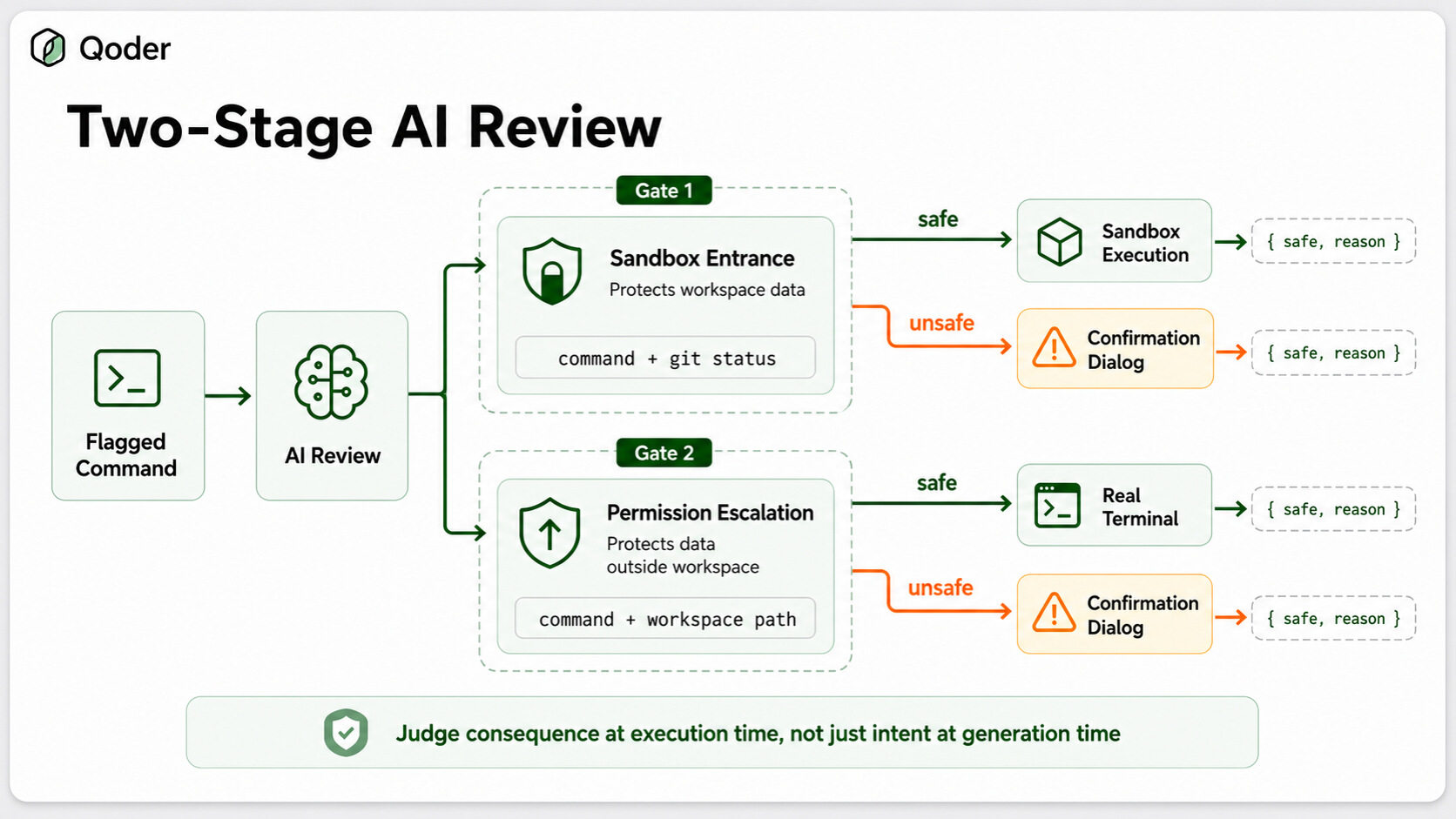
The pipeline above answers one question—"is this command dangerous?"—but not the one that actually matters for developer experience: "what should we do about it?" A flagged command isn't necessarily destructive. Deleting a file that's tracked by git and already committed is fully recoverable; deleting a path built from an unresolved variable is not. Treating both the same way means either too many confirmation dialogs or too much silent risk. The name match alone can't tell them apart.
So we recently shipped an AI Review layer: a second, lightweight model invocation that runs synchronously at decision time, after a command has been flagged. It's distinct from the Layer 1 risk flag, which judges intent at generation time—this one judges consequence at the moment of execution, and it does so at two different points, each protecting a different boundary.
The first review sits at the sandbox entrance. When a flagged command is about to run for the first time, the review decides whether it would delete or overwrite files inside the workspace on a large scale. To reason about recoverability rather than just intent, it's handed the repository's git status as natural-language context—whether the directory is under version control, how many uncommitted files exist. If the verdict is safe, the command runs in the sandbox; if not, it falls back to a confirmation dialog. This review protects the data inside your current project directory.
The second review sits at the permission-escalation gate. When sandbox execution fails and the model asks to re-run the command with full permissions in the real terminal, the command is about to leave the boundary entirely—so this review is deliberately more conservative. It looks only at the command and the workspace path, judging whether the command would damage system files outside the workspace. Safe means the escalation is allowed; otherwise it drops back to a confirmation dialog. This review protects the data outside your current project directory.
Mechanically both reviews use the same lightweight model at low temperature for stable output, and return structured JSON carrying a safe verdict and a human-readable reason. Each call times out at 10 seconds with up to three retries. The fallback is asymmetric on purpose: when the experiment switch is off, the sandbox entrance defaults to allowing (preserving prior behavior) while escalation defaults to blocking; when the model is unreachable entirely, everything blocks. An extra dialog is cheap—a missed destructive command isn't.
Once sandbox execution is determined, Qoder uses command wrapping to take over: the original command is wrapped by the platform's sandbox tool before entering the terminal. The user sees an isolated process in the terminal—the wrapping layer is invisible.
Agent → SandboxWrapper.wrapCommand(cmd, policy) → Terminal executionThe code uses a unified interface ISandboxWrapper as an abstraction, dispatching to three platform-specific implementations:
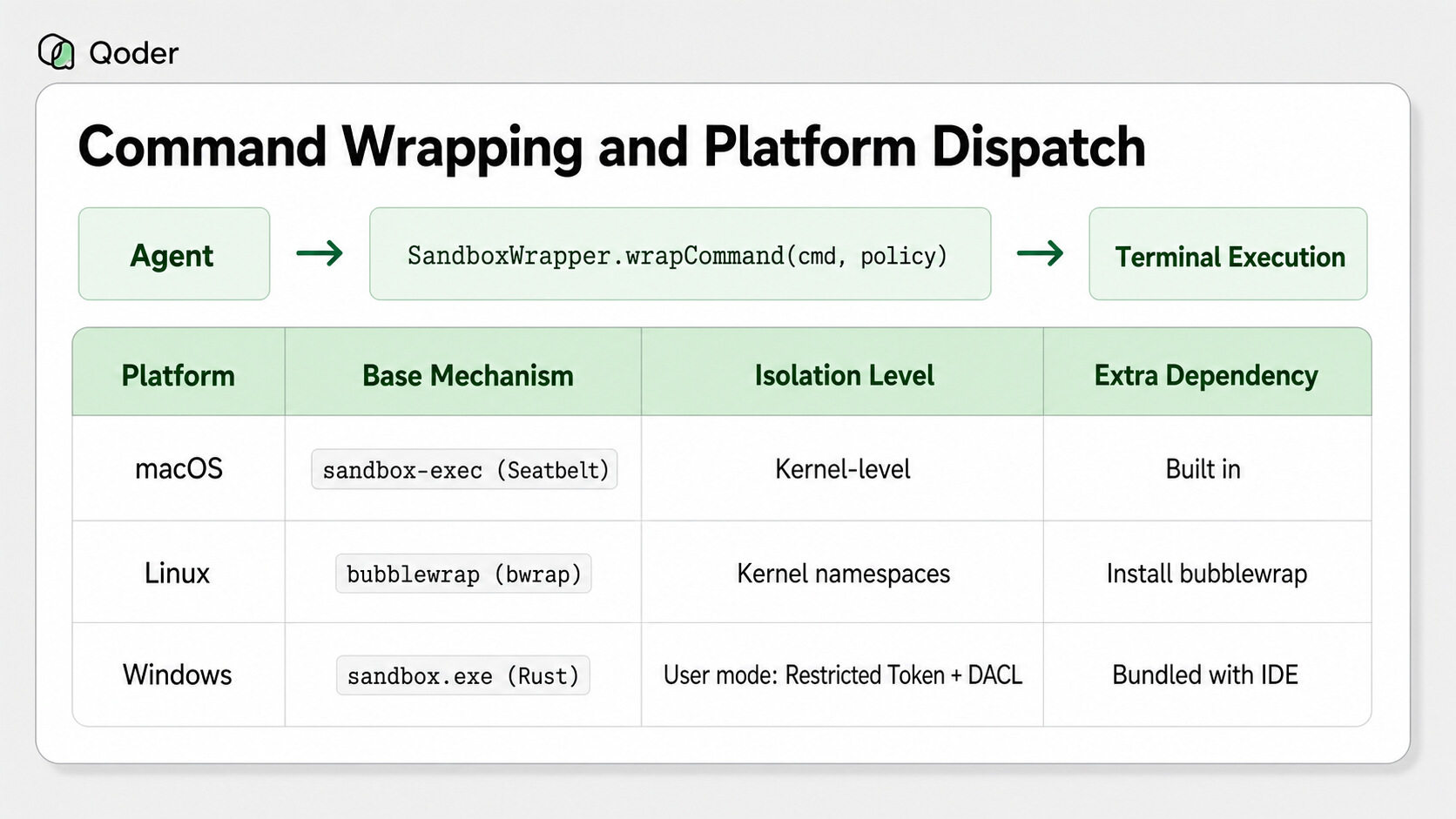
All three platforms share the same policy semantics. On the filesystem side, the workspace directory is writable, everything else is read-only, and sensitive paths like ~/.ssh are invisible to the process. On the network side, the default allows all traffic, with the option to tighten to full blockage per policy.
macOS has the smoothest path: sandbox-exec is Apple's own tool for sandboxing system services—kernel-level isolation, performance-tuned, and ships with the OS, introducing zero third-party dependencies (also the friendliest for enterprise compliance audits). We reuse it directly, dynamically generating Seatbelt policy files at runtime. Policies start from (deny default)—deny everything—then whitelist system libraries, IPC, and other essential calls. File read/write permissions are translated to corresponding allow/deny rules; network is controlled with a coarse-grained switch.
During implementation we hit several edge cases. Git operations require write access to temp directories (/tmp, /private/tmp) and read/write access to device files (/dev/null, /dev/urandom)—without these, even git status won't run. We also set .git directories to read-only: git log and git diff work normally, but git commit and git push are blocked, requiring the user to explicitly escalate permissions.
Linux uses bubblewrap, building lightweight isolation via the kernel's user namespaces. The entire root filesystem is mounted read-only with --ro-bind; paths that need write access are overlaid with --bind; sensitive paths are covered with --tmpfs (empty directories). Network isolation is a single --unshare-net flag.
On first use, the system checks whether bwrap is installed. If missing, a dialog guides one-click installation (auto-detecting apt / dnf / yum / pacman / zypper). If the user declines, execution degrades to non-sandboxed with a warning.
Windows has nothing comparable to sandbox-exec or bwrap out of the box. This was the hardest part of the entire project.
We evaluated 15 isolation technologies—from Hyper-V VMs, Windows Sandbox, and WSL2, to AppContainer, Sandboxie, Job Objects, Restricted Tokens, and Mandatory Integrity Control, through AppLocker, WDAC, Windows Defender Application Guard, WASM runtimes, Docker Desktop, firewall rules, and Process Mitigation Policies. The full spectrum from VMs and containers to user-mode isolation. Each has its niche, but inside an IDE—high invocation frequency, startup-latency sensitive, backward-compatible to older Windows versions—very few satisfy all constraints simultaneously.
We ended up assembling our own solution from Windows' built-in security primitives: implemented in Rust, distributed with the IDE, works on every Windows version since Windows 7, with millisecond-level startup. It relies on three mechanisms:
CreateRestrictedToken creates a weak-privilege token; child processes can only write to explicitly authorized paths.Why not AppContainer? Its isolation is stronger (deny-all default, registry redirection, child processes inherit sandbox), but dynamic authorization through its Capability system is difficult, and it only supports Windows 8 and above. The restricted token approach has better compatibility, faster startup, and more flexible resource access granularity.
Windows shell diversity is another challenge. CMD, PowerShell, and Git Bash have completely different quoting conventions. For PowerShell, we use -EncodedCommand (UTF-16LE + Base64) to avoid inner-quote conflicts.
The sandbox has a practical problem: it can block legitimate operations.
When sandbox execution fails, the system feeds the failure reason back to the model, which decides whether to escalate permissions and re-execute in the real terminal. Only after user confirmation does the command run in the unsandboxed terminal.
In Experts mode, potentially dangerous commands automatically execute in the sandbox without requiring per-command user confirmation.
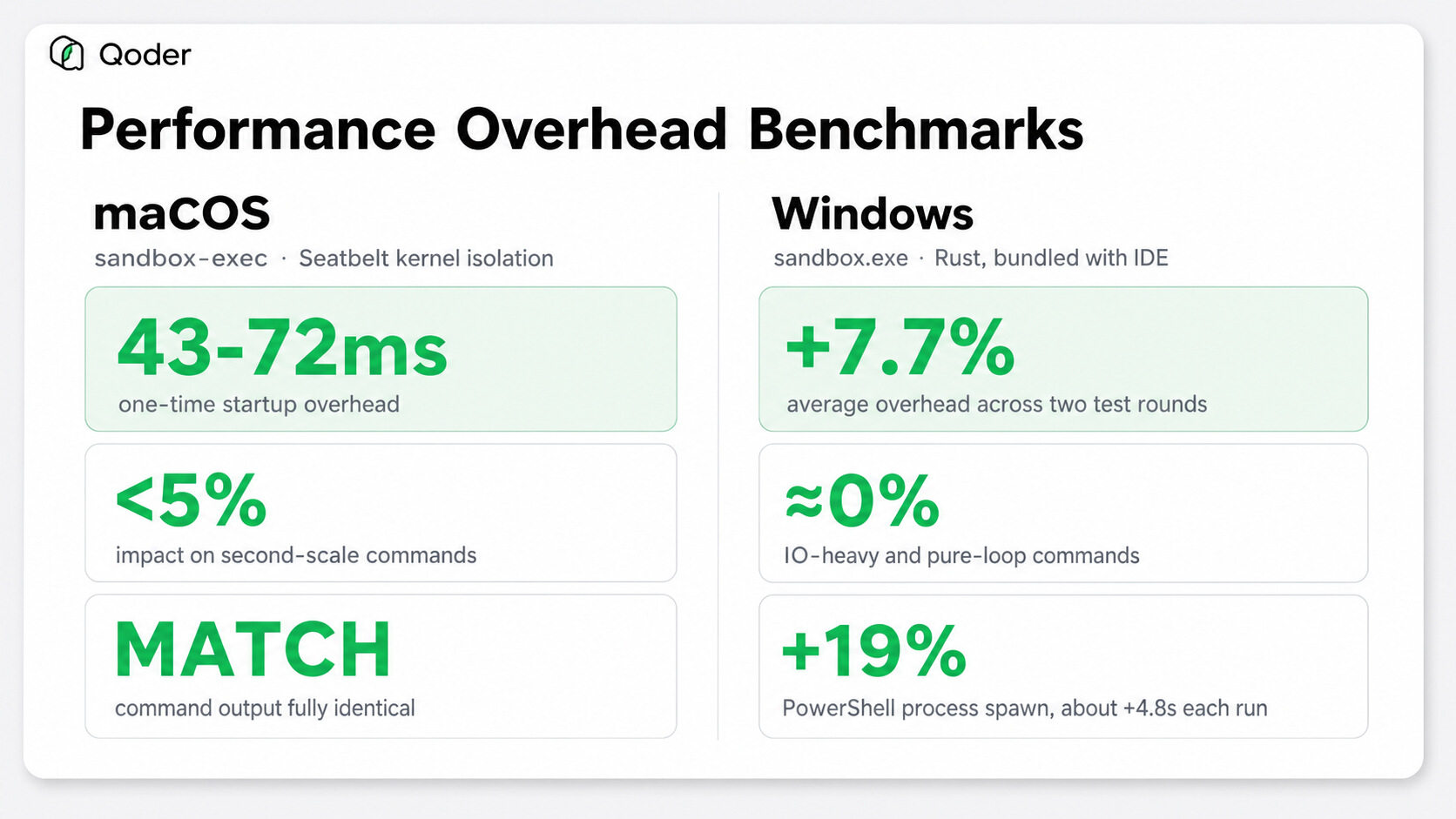
Execution speed can't suffer either. On macOS, sandbox-exec adds a one-time startup overhead of 43–72 milliseconds—less than 5% impact on second-scale commands. Command output is identical to non-sandboxed execution.
Under real workloads, longer commands approach zero overhead: tar compression +3%, seq sorting +0.3%, find full-disk +2%, shell loops +1%. Overhead concentrates on millisecond-scale commands: echo shows +270%, which sounds alarming, but the absolute value is +54ms—imperceptible in actual development flow.
On Windows, two rounds of comprehensive testing averaged +7.7% overhead. Pure loop and IO-intensive commands show virtually no extra cost; impact concentrates on process startup—e.g., PowerShell spawn ~+19%, roughly 4.8 seconds additional per invocation.
Back to the numbers from the introduction. In a single day:
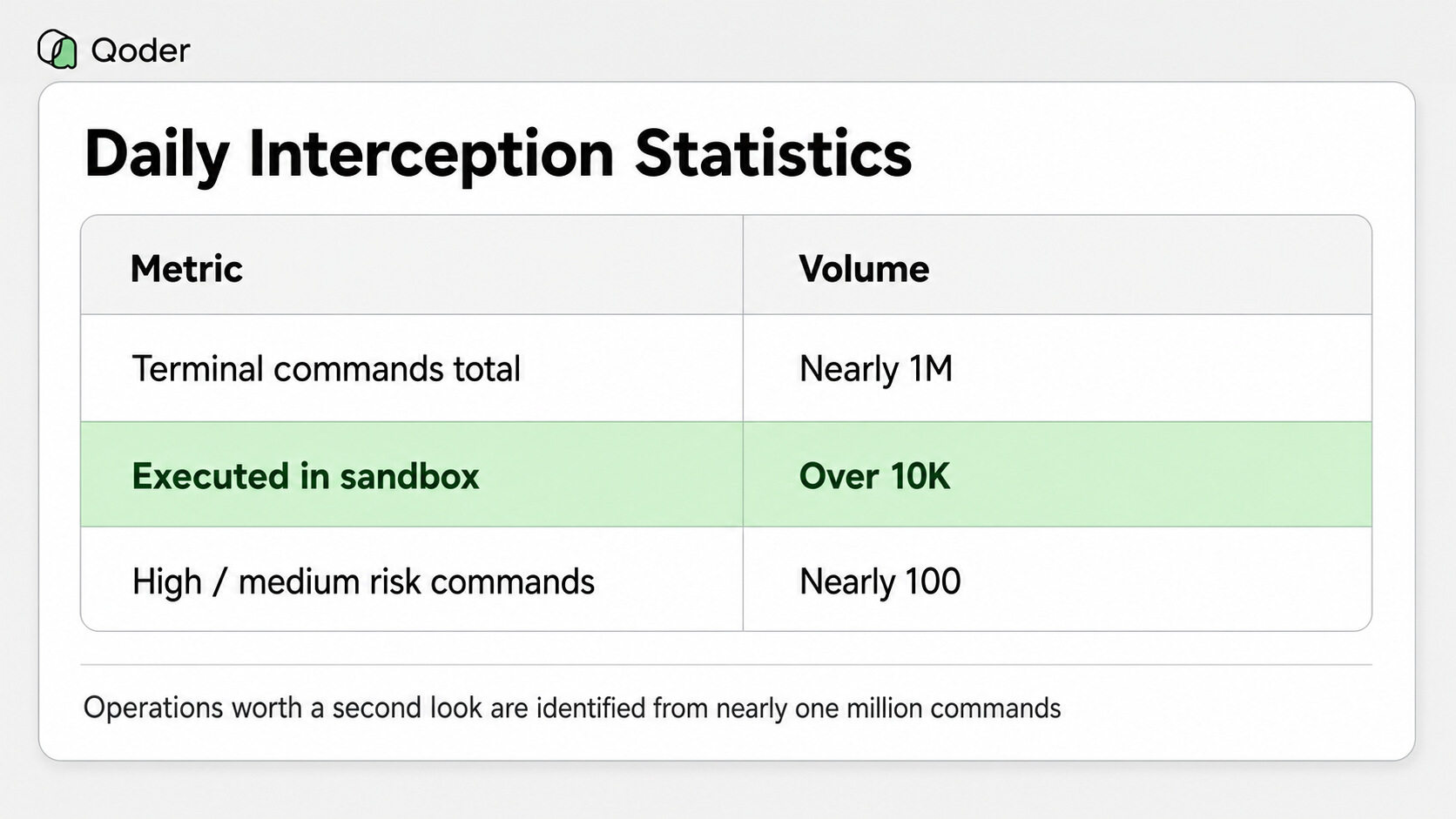
High-risk indicators: deletion targets pointing at system paths, user home directories, unresolved variables, or wildcards. Often accompanied by sudo or remote execution. Unrecoverable.
Medium-risk indicators: deletion targets are relative paths or project directories, but missing a preceding cd. If the working directory is wrong, unintended files get deleted. Example: rm -rf comic-site without verifying the current directory.
Nearly 100 potentially destructive commands caught silently by the sandbox every day.
Numbers are cold. Here's a real developer report that we keep pinned to our wall.
A developer asked AI to clean up temp files in the project root. The project happened to contain a subdirectory named $HOME. The model generated:
rm -rf "$HOME"To the eye, it's a project-internal deletion. But the moment the command enters the shell, $HOME expands to the user's actual home directory. Recursive deletion happens against the home directory. The confirmation dialog did appear; the developer did click confirm—in their mind, they were approving deletion of the $HOME folder inside the project. The semantic mismatch between human intent and shell interpretation is unbridgeable by a confirmation button. The disk was nearly wiped clean; the OS wouldn't boot.
With sandbox execution, the outcome is entirely different: the workspace directory is writable, everything else is read-only. $HOME expands to a path outside the workspace; the deletion is denied. The developer sees a message—"sandbox blocked deletion outside project"—and can decide whether to retry in the native terminal. No waiting until OS reinstall time to realize what went wrong.
Confirmation dialogs protect the user's judgment. The sandbox protects the moment that judgment fails—so a wrong click doesn't cost an entire disk.
Known limitations:
On the roadmap: user-defined policy overrides, enterprise policy distribution, per-command dynamic policies, and audit log reporting.
Developers adopt AI coding tools to focus their energy on evaluating approaches, reviewing results, and driving projects forward. Repetitive execution, risk identification, and permission boundaries should be handled by the agent platform as much as possible.
Previously, agents mostly generated code—risk largely stayed in the code review phase. Now agents run commands, modify files, invoke Skills, and access the network. The IDE must take on more responsibility for local execution security.
The terminal sandbox is becoming infrastructure for the Agent Harness. Its value lies in confining risk to ever-smaller boundaries. For individual developers, that's one fewer chance of accidentally deleting an entire project. For teams and enterprises, it's the starting point for permission governance, audit, and compliance.
How We Used Qoder to Let an Agent Iterate on Itself: Computer Use as an Example
Introducing Qoder Code Security: Security From the First Line of Code

1,596 posts | 525 followers
FollowAlibaba Cloud Native Community - June 23, 2026
Alibaba Cloud Native Community - October 28, 2026
Alibaba Cloud Native Community - June 11, 2026
Alibaba Cloud Native Community - May 18, 2026
Alibaba Cloud Native Community - June 2, 2026
Alibaba Cloud Native Community - June 8, 2026
1,596 posts | 525 followers
Follow QwenWork
QwenWork is dedicated to helping employees strengthen their professional competitiveness in the AI era and to enabling enterprises to improve organizational effectiveness.
Learn More Token Plan
Build more, spend less. One plan, every modality.
Learn More
Alibaba Cloud Model Studio
A one-stop generative AI platform to build intelligent applications that understand your business, based on Qwen model series such as Qwen-Max and other popular models
Learn More DeepSeek
DeepSeek-V4.1-Flash is the lightweight flagship of DeepSeek's new architecture family, packing 552B total MoE parameters to deliver flagship-surpassing intelligence across key benchmarks.
Learn MoreMore Posts by Alibaba Cloud Community

