By Mocheng
"PolarDB-X Best Practice Series (10): Best Practices for Data and Traffic Skew Analysis (Part 1)" introduces how to analyze data skew. This article continues to introduce the analysis steps for traffic skew.
In the most ideal scenario, we hope that the SQL requests of a table are evenly distributed to all DNs. In this way, cost and access efficiency can be optimized. When the distribution of SQL requests on a table results in more requests on some DNs and fewer requests on other DNs, "traffic skew" occurs. The most obvious phenomenon of traffic skew is that CPU alerting occurs on some DNs first. The "DN perspective" section describes how to start from the alerting DN to find the table that causes the skew. Receiving an alert and post-processing belong to post-event analysis. The "Global perspective" section provides methods to discover traffic skew in advance. You can analyze traffic skew existing in the system as a whole to prevent system bottlenecks.
There are two common reasons that cause DN CPU alerting: "slow SQL" and "high traffic". The differences are:
• "Slow SQL": The SQL itself has room for optimization, such as missing indexes or selecting unexpected indexes that result in scanning a large amount of data. In this case, you must optimize the slow SQL first.
• "High traffic": The SQL itself has no issues. For example, the SQL is already a point query on an index, or the scan range does not exceed the actual requirements of the business. However, the QPS on the alerting DN is significantly higher than that on other DNs. In this case, you need to optimize traffic skew.
Therefore, after you receive an alert, you must first determine whether the alert is related to traffic skew. You can follow these steps for the determination process.
1. View the sum of read and write traffic ratios of a single table on a specific DN
SELECT single_table_read,
       single_table_write,
       total_read,
       total_write,
       single_table_read * 100 / total_read   AS single_table_read_pct,
       single_table_write * 100 / total_write AS single_table_write_pct
FROM (SELECT storage_inst_id,
      SUM(table_read)  AS single_table_read,
      SUM(table_write) AS single_table_write
      FROM (SELECT table_schema,
            table_name,
            storage_inst_id,
            COUNT(*) OVER ( PARTITION BY table_schema, table_name ) AS total_partitions,
            SUM(ROWS_READ)                                          AS table_read,
            SUM(ROWS_INSERTED + ROWS_UPDATED + ROWS_DELETED)        AS table_write
            FROM information_schema.table_detail
            GROUP BY table_schema, table_name, storage_inst_id) t_single_table
      WHERE total_partitions = 1
      AND storage_inst_id = 'pxc-xdb-s-xxxxxxxxx'
      GROUP BY storage_inst_id) AS t_sintle_table_total
         JOIN (SELECT storage_inst_id,
               SUM(ROWS_READ)                                   AS total_read,
               SUM(ROWS_INSERTED + ROWS_UPDATED + ROWS_DELETED) AS total_write
               FROM information_schema.table_detail
               WHERE storage_inst_id = 'pxc-xdb-s-xxxxxxxxx') AS t_all_table
              ON t_sintle_table_total.storage_inst_id = t_all_table.storage_inst_id;
Use an example to introduce the meaning of the return result. Modify the conditions on the two storage_inst_id fields in the SQL to 'pxc-xdb-s-xxxxxxxxx'. The following result is obtained after execution:
|
single_table_read |
single_table_write |
total_read |
total_write |
single_table_read_pct |
single_table_write_pct |
|
95599844145 |
1618782605 |
2161588848705 |
2314208175 |
4.4227 |
69.9497 |
The meaning of the result is as follows:
| Column name | Meaning | Sample interpretation |
|---|---|---|
| single_table_read | Total read rows of single tables | On the current DN, the total number of read rows of all single tables is 95599844145. |
| single_table_write | Total written rows of single tables | On the current DN, the total number of written rows of all single tables is 1618782605. |
| total_read | Total read rows | On the current DN, the total number of read rows of all tables is 2161588848705. |
| total_write | Total written rows | On the current DN, the total number of written rows of all tables is 2161588848705. |
| single_table_read_pct | Percentage of read rows of single tables | On the current DN, the number of rows read from the single table accounts for 4.4227% of the total number of rows read. |
| single_table_write_pct | Percentage of rows written to the single table | On the current DN, the number of rows written to the single table accounts for 69.9497% of the total number of rows written. |
You can see that on the DN instance pxc-xdb-s-xxxxxxxxx:
• The read traffic ratio of the single table is not high, but the write traffic accounts for 69.9497% of the entire DN. There is obvious write traffic skew, which needs to be optimized.
• Combined with the two metrics "InnoDB Read Volume" and "InnoDB Write Volume," if the read volume is also significantly higher than that of other DNs, you also need to consider read traffic skew caused by partitioned tables.
2. View single tables with high read and write traffic ratios on a specific DN
SELECT table_schema,
       table_name,
       single_table_read,
       single_table_write,
       total_read,
       total_write,
       table_read * 100 / total_read   AS single_table_read_pct,
       table_write * 100 / total_write AS singlt_table_write_pct
FROM (SELECT table_schema,
      table_name,
      storage_inst_id,
      COUNT(*) OVER ( PARTITION BY table_schema, table_name ) AS total_partitions,
      SUM(ROWS_READ)                                          AS table_read,
      SUM(ROWS_INSERTED + ROWS_UPDATED + ROWS_DELETED)        AS table_write
      FROM information_schema.table_detail
      GROUP BY table_schema, table_name, storage_inst_id) AS t_single_table
         JOIN (SELECT storage_inst_id,
               SUM(ROWS_READ)                                   AS total_read,
               SUM(ROWS_INSERTED + ROWS_UPDATED + ROWS_DELETED) AS total_write
               FROM information_schema.table_detail
               WHERE storage_inst_id = 'pxc-xdb-s-xxxxxxxxx') AS t_all_table
              ON t_single_table.storage_inst_id = t_all_table.storage_inst_id
WHERE t_single_table.total_partitions = 1
ORDER BY table_read DESC, table_write DESC
LIMIT 10;
Continue to use the example to introduce the meaning of the return result. In the first step, we have already found that there is write traffic skew for single tables on pxc-xdb-s-xxxxxxxxx. We need to further analyze which single table causes the write traffic skew. Modify the condition on storage_inst_id in the SQL to 'pxc-xdb-s-xxxxxxxxx'. Adjust the sorting condition to "ORDER BY total_write DESC, total_read DESC" to search for single tables with high write traffic.
The following result is obtained after execution:
|
table_schema |
table_name |
single_table_read |
single_table_write |
total_read |
total_write |
single_table_read_pct |
singlt_table_write_pct |
|
db_1 |
tb_0 |
10944059216 |
774494628 |
2161588848705 |
2314208175 |
0.5063 |
33.4669 |
|
db_2 |
tb_1 |
556349680 |
167125408 |
2161588848705 |
2314208175 |
0.0257 |
7.2217 |
|
db_1 |
tb_2 |
266182404 |
135264119 |
2161588848705 |
2314208175 |
0.0123 |
5.8449 |
From the preceding result, we can see that: The write traffic of the table db_1.tb_0 accounts for 33.4669% of the entire DN. The skew is critical. We recommend that you optimize this table first.
If the read/write proportion of a single table on a specified DN is not high, you need to further view the partitioned tables with read/write traffic skew on the specified DN. Such partitioned tables are characterized by the number of read/write rows on the specified DN being higher than the average value.
Specifically, partitioned tables meeting the following conditions are considered to have read/write traffic skew:
SELECT t.table_schema,
       t.table_name,
       t.index_name,
       t.storage_inst_read * 100 / r.storage_inst_total_read                     AS storage_inst_read_pct,
       t.storage_inst_read * 100 / s.table_read                                  AS table_read_pct,
       s.table_read * (t.storage_inst_read / s.table_read - (1 / s.storages))    AS read_delta,
       t.storage_inst_write * 100 / r.storage_inst_total_write                   AS storage_inst_write_pct,
       t.storage_inst_write * 100 / s.table_write                                AS table_write_pct,
       s.table_write * (t.storage_inst_write / s.table_write - (1 / s.storages)) AS write_delta,
       t.storage_inst_partitions,
       t.storage_inst_partitions * 100 / s.table_partitions                      AS partitions_pct
FROM (SELECT table_schema,
             table_name,
             index_name,
             SUM(ROWS_READ)                                   AS storage_inst_read,
             SUM(ROWS_INSERTED + ROWS_UPDATED + ROWS_DELETED) AS storage_inst_write,
             COUNT(partition_name)                            AS storage_inst_partitions
      FROM information_schema.table_detail
      WHERE storage_inst_id = 'pxc-xdb-s-hzrubzcs1ulu8gfc70'
      GROUP BY table_schema, table_name, index_name) AS t
         JOIN (SELECT table_schema,
                      table_name,
                      index_name,
                      COUNT(distinct storage_inst_id)                  AS storages,
                      SUM(ROWS_READ)                                   AS table_read,
                      SUM(ROWS_INSERTED + ROWS_UPDATED + ROWS_DELETED) AS table_write,
                      COUNT(partition_name)                            AS table_partitions
               FROM information_schema.table_detail
               GROUP BY table_schema, table_name, index_name
               HAVING table_partitions > 1) AS s
              ON t.table_schema = s.table_schema AND t.table_name = s.table_name AND t.index_name = s.index_name
         JOIN (SELECT SUM(ROWS_READ)                                   AS storage_inst_total_read,
                      SUM(ROWS_INSERTED + ROWS_UPDATED + ROWS_DELETED) AS storage_inst_total_write
               FROM information_schema.table_detail
               WHERE storage_inst_id = 'pxc-xdb-s-hzrubzcs1ulu8gfc70') AS r
ORDER BY read_delta DESC, write_delta DESC
LIMIT 10;
To explain the meaning of the result with an example, you can modify the condition on storage_inst_id in the SQL to 'pxc-xdb-s-xxxxxxxx08'. The following result is obtained after execution:
|
table_schema |
table_name |
index_name |
storage_inst_read_pct |
table_read_pct |
read_delta |
storage_inst_write_pct |
table_write_pct |
write_delta |
storage_inst_partitions |
partitions_pct |
|
db_1 |
tb_1 |
|
0.4607 |
30.1656 |
6387822840.9479 |
20.2558 |
10.0970 |
1428484.8786 |
13 |
10.1563 |
|
db_0 |
tb_7 |
|
0.3692 |
12.4678 |
1515724225.3374 |
0.7602 |
12.5012 |
1116872.4949 |
4 |
12.5000 |
|
db_1 |
tb_6 |
|
0.1195 |
10.9542 |
215855124.5913 |
24.5334 |
11.7910 |
27363643.9626 |
7 |
10.9375 |
The meaning of the result is as follows:
| Column Name | Description | Sample Interpretation |
|---|---|---|
| table_schema | Database Name | The logical database where the single table resides. |
| table_name | Table Name | Name of the single table. |
| index_name | Index Name | Global index name. This column is an empty string for ordinary logical tables. |
| storage_inst_read_pct | Percentage of rows read on DN | The number of rows read from db_1.tb_1 on DN pxc-xdb-s-xxxxxxxx08 accounts for 0.4607% of the total number of rows read on the DN. |
| table_read_pct | Percentage of rows read from logical table | The number of rows read from db_1.tb_1 on DN pxc-xdb-s-xxxxxxxx08 accounts for 30.1656% of the total number of rows read from the entire logical table. |
| read_delta | Difference in read rows | The number of rows read from db_1.tb_1 on DN pxc-xdb-s-xxxxxxxx08 is 6387822840.9479 rows more than the average number of rows read on all DNs. |
| storage_inst_write_pct | Percentage of rows written on DN | The number of rows written to db_1.tb_1 on DN pxc-xdb-s-xxxxxxxx08 accounts for 20.2558% of the total number of rows written on the DN. |
| table_write_pct | Percentage of rows written to logical table | The number of rows written to db_1.tb_1 on DN pxc-xdb-s-xxxxxxxx08 accounts for 10.0970% of the total number of rows written to the entire logical table. |
| write_delta | Difference in written rows | The number of rows written to db_1.tb_1 on DN pxc-xdb-s-xxxxxxxx08 is 1428484.8786 rows more than the average number of rows written on all DNs. |
| storage_inst_partitions | Number of partitions on DN | db_1.tb_1 has 13 partitions on DN pxc-xdb-s-xxxxxxxx08. |
| partitions_pct | Percentage of partitions on DN | The number of partitions of db_1.tb_1 on DN pxc-xdb-s-xxxxxxxx08 accounts for 10.1563% of the total number of partitions of the entire logical table. |
From the above result, you can see that:
• The read traffic of db_1.tb_1 on pxc-xdb-s-xxxxxxxx08 accounts for 30.1656% of the entire logical table, which is much higher than the partition quantity proportion of 10.1563 on the DN. There is read traffic skew. (Note that although there is read traffic skew, the read traffic on this table accounts for only 0.4607% of the entire DN. This is not enough to trigger resource alerting such as CPU, so the processing Priority is not high.)
• The read/write traffic proportion of db_0.tb_7 on pxc-xdb-s-xxxxxxxx08 is consistent with the partition quantity proportion. There is no traffic skew.
Unlike the DN perspective, the focus of the global perspective is no longer on the impact of skew on DN monitoring metrics. Instead, it starts from the traffic distribution of each partition of the logical table to determine whether traffic skew exists in the table. Based on the statistics information in INFORMATION_SCHEMA.TABLE_DETAIL, you can find the most critical tables/databases with skew in the instance.
We consider a single table whose read/write traffic is higher than the average value of logical tables on the DN to be a "large single table". Specifically:
SELECT t.table_schema,
       t.table_name,
       t.table_total_read * 100 / t_all_table.total_read                 AS table_read_pct,
       t.table_total_write * 100 / t_all_table.total_write               AS table_write_pct,
       t.table_total_data_size_gb * 100 / t_all_table.total_data_size_gb AS table_total_data_size_pct,
       100 / t_all_table.total_logical_table_count                       AS logical_table_avg_pct,
       t.table_total_read,
       t.table_total_write,
       t.table_total_data_size_gb
FROM (SELECT table_schema,
             table_name,
             storage_inst_id,
             part_count,
             inst_table_total_read  AS table_total_read,
             inst_table_total_write AS table_total_write,
             data_size_gb           AS table_total_data_size_gb
      FROM (SELECT table_schema,
                   table_name,
                   FIRST_VALUE(storage_inst_id) OVER (PARTITION BY table_schema, table_name) AS storage_inst_id,
                   COUNT(1) OVER (PARTITION BY table_schema, table_name)                     AS part_count,
                   SUM(ROWS_READ)                                                            AS inst_table_total_read,
                   SUM(ROWS_INSERTED + ROWS_UPDATED + ROWS_DELETED)                          AS inst_table_total_write,
                   SUM(DATA_LENGTH + INDEX_LENGTH + DATA_FREE) / (1024 * 1024 * 1024)        AS data_size_gb
            FROM information_schema.table_detail
            GROUP BY table_schema, table_name, storage_inst_id) t_part_total
      WHERE part_count = 1) AS t
         JOIN (SELECT storage_inst_id,
                      COUNT(DISTINCT table_schema, table_name, index_name)               AS total_logical_table_count,
                      SUM(ROWS_READ)                                                     AS total_read,
                      SUM(ROWS_INSERTED + ROWS_UPDATED + ROWS_DELETED)                   AS total_write,
                      SUM(DATA_LENGTH + INDEX_LENGTH + DATA_FREE) / (1024 * 1024 * 1024) AS total_data_size_gb
               FROM information_schema.table_detail
               GROUP BY storage_inst_id) AS t_all_table
              ON t.storage_inst_id = t_all_table.storage_inst_id
WHERE (t.table_total_read * 100 / t_all_table.total_read) > (100 / t_all_table.total_logical_table_count)
   OR (t.table_total_write * 100 / t_all_table.total_write) > (100 / t_all_table.total_logical_table_count)
ORDER BY table_total_read DESC, table_total_write DESC
LIMIT 20;
To explain the meaning of the result with an example, you can directly execute the SQL to obtain the following result:
|
table_schema |
table_name |
storage_inst_id |
table_read_pct |
table_write_pct |
table_total_data_size_pct |
logical_table_avg_pct |
table_total_read |
table_total_write |
table_total_data_size_gb |
|
db_0 |
tb_10 |
pxc-xdb-s-xxxxxxxxx |
2.5517 |
0.0130 |
0.00147017 |
0.3311 |
55158278400 |
300333 |
0.0353 |
|
db_1 |
tb_0 |
pxc-xdb-s-xxxxxxxxx |
0.5063 |
33.4669 |
0.36080047 |
0.3311 |
10944059216 |
774494628 |
8.6631 |
|
db_2 |
tb_5 |
pxc-xdb-s-xxxxxxxxx |
0.1273 |
3.2226 |
0.98836448 |
0.3311 |
2751515975 |
74576631 |
23.7314 |
The meaning of the result is as follows:
| Column Name | Description | Sample Interpretation |
|---|---|---|
| table_schema | Database Name | The logical database where the single table resides. |
| table_name | Table Name | Name of the single table. |
| storage_inst_id | DN Instance ID | The instance ID of the DN where the single table resides. |
| table_read_pct | Percentage of table read rows | Since the table was created, on the current DN, the number of rows read from the single table tb_10 accounts for 2.5517% of the total number of rows read. |
| table_write_pct | Percentage of table written rows | Since the table was created, on the current DN, the number of rows written to the single table tb_0 accounts for 33.4669% of the total number of rows written. |
| table_total_data_size_pct | Percentage of table data volume | On the current DN, the data volume of the single table tb_5 accounts for 0.98836448% of the total data volume. |
| logical_table_avg_pct | Percentage of average read and written rows of logical table | On the current DN, the average number of read and written rows of the logical table accounts for 0.3311%. |
| table_total_read | Number of table read rows | Since the table was created, on the current DN, the number of rows read from the single table tb_10 is 55158278400. |
| table_total_write | Number of table written rows | After the table is created, the number of rows written to the single table tb_0 on the current DN is 774494628. |
| table_total_data_size_gb | Table data volume (in GB) | The data volume of the single table tb_5 on the current DN is 23.7314 GB. |
From the above result, you can see that on the DN instance pxc-xdb-s-xxxxxxxxx:
• The read traffic of the single table db_0.tb_10 is higher than the average value, but the degree of skew is not high.
• The write traffic of the single table db_1.tb_0 accounts for 33.4669% of the entire DN. There is obvious write traffic skew.
1. Top 20 partitioned tables sorted by the degree of skew in read-write row counts
Summarize the read/write traffic of each logical table on different DNs, sort by standard deviation, and list the coefficient of variation (standard deviation × 100/average value) to describe the intensity of fluctuation.
SELECT table_schema,
       table_name,
       index_name,
       SUM(table_read)                                  AS total_read,
       STDDEV_POP(table_read)                           AS read_stddev,
       STDDEV_POP(table_read) * 100 / AVG(table_read)   AS read_cv,
       SUM(table_write)                                 AS total_write,
       STDDEV_POP(table_write)                          AS write_stddev,
       STDDEV_POP(table_write) * 100 / AVG(table_write) AS write_cv,
       SUM(partitions)                                  AS partitions,
       STDDEV_POP(partitions) * 100 / AVG(partitions)   AS partitions_cv
FROM (SELECT table_schema,
             table_name,
             index_name,
             COUNT(partition_name)                            AS partitions,
             SUM(ROWS_READ)                                   AS table_read,
             SUM(ROWS_INSERTED + ROWS_UPDATED + ROWS_DELETED) AS table_write
      FROM information_schema.table_detail
      GROUP BY table_schema, table_name, index_name, storage_inst_id) AS t
GROUP BY table_schema, table_name, index_name
ORDER BY read_stddev DESC, write_stddev DESC
LIMIT 20;
To explain the meaning of the result with an example, you can directly execute the SQL to obtain the following result:
|
table_schema |
table_name |
index_name |
total_read |
read_stddev |
read_cv |
total_write |
write_stddev |
write_cv |
partitions |
partitions_cv |
|
db_0 |
tb_0 |
|
21339861579429 |
266670264877.90015 |
12.49 |
73798816 |
922388.635671017 |
12.49 |
32 |
12.5 |
|
db_1 |
tb_1 |
|
31676905138 |
2878444309.553111 |
90.86 |
1473055107 |
7606158.009817813 |
5.16 |
128 |
3.125 |
|
db_0 |
tb_2 |
|
87474821033 |
1245822059.8291767 |
14.24 |
108439839 |
1356277.2040424075 |
12.50 |
32 |
12.5 |
The meaning of the result is as follows:
| Column name | Description | Sample interpretation |
|---|---|---|
| table_schema | Database name | The logical database where the single table resides. |
| table_name | Table name | Single table name |
| index_name | Index name | Global index name. This column is an empty string for normal logical tables. |
| total_read | Total read rows | A total of 31676905138 rows were read from tb_0 across all DNs. |
| read_stddev | Standard deviation of read rows | The standard deviation of rows read from tb_0 on each DN is 2878444309.553111. |
| read_cv | Coefficient of variation of read rows | The coefficient of variation of rows read from tb_0 is 12.49, which means the standard deviation is 12.49% of the average value. |
| total_write | Total written rows | A total of 1473055107 rows were written to tb_0 across all DNs. |
| write_stddev | Standard deviation of written rows | The standard deviation of rows written to tb_0 on each DN is 7606158.009817813. |
| write_cv | Coefficient of variation of written rows | The coefficient of variation of rows read from tb_0 is 12.49, which means the standard deviation is 12.49% of the average value. |
| partitions | Total number of partitions | tb_0 has a total of 128 partitions across all DNs. |
| partitions_cv | Coefficient of variation of partition count | The coefficient of variation of rows read from tb_0 is 12.5, which means the standard deviation is 12.5% of the average value. |
From the above result, you can see that:
• The standard deviation of read row counts for db_0.tb_0 is the largest among all partitioned tables. However, the read/write coefficient of variation is close to the partition coefficient of variation. This indicates that read/write traffic might be evenly distributed across all partitions, but some DNs are assigned more partitions, resulting in traffic skew.
• The coefficient of variation of read traffic for db_1.tb_1 is significantly higher than the coefficient of variation of the partition count. This indicates that there is skew in read traffic across different partitions.
2. For partitioned tables with obvious traffic skew, you can use the following SQL to further analyze the traffic distribution on each DN.
SELECT t.storage_inst_id,
       t.storage_inst_read,
       t.storage_inst_read * 100 / r.storage_inst_total_read   AS storage_inst_read_pct,
       t.storage_inst_read * 100 / s.table_read                AS table_read_pct,
       t.storage_inst_write,
       t.storage_inst_write * 100 / r.storage_inst_total_write AS storage_inst_write_pct,
       t.storage_inst_write * 100 / s.table_write              AS table_write_pct,
       t.storage_inst_partitions,
       t.storage_inst_partitions * 100 / s.table_partitions    AS partitions_pct
FROM (SELECT storage_inst_id,
             SUM(ROWS_READ)                                   AS storage_inst_read,
             SUM(ROWS_INSERTED + ROWS_UPDATED + ROWS_DELETED) AS storage_inst_write,
             COUNT(partition_name)                            AS storage_inst_partitions
      FROM information_schema.table_detail
      WHERE table_schema = "db_xxx"
        AND table_name = "tb_xxx"
        AND index_name = "idx_xxx"
      GROUP BY storage_inst_id) AS t
         JOIN (SELECT SUM(ROWS_READ)                                   AS table_read,
                      SUM(ROWS_INSERTED + ROWS_UPDATED + ROWS_DELETED) AS table_write,
                      COUNT(partition_name)                            AS table_partitions
               FROM information_schema.table_detail
               WHERE table_schema = "db_xxx"
                 AND table_name = "tb_xxx"
                 AND index_name = "idx_xxx") AS s
         JOIN (SELECT storage_inst_id,
                      SUM(ROWS_READ)                                   AS storage_inst_total_read,
                      SUM(ROWS_INSERTED + ROWS_UPDATED + ROWS_DELETED) AS storage_inst_total_write
               FROM information_schema.table_detail
               GROUP BY storage_inst_id) AS r
              ON t.storage_inst_id = r.storage_inst_id
ORDER BY storage_inst_read DESC, storage_inst_write DESC;
To continue explaining the meaning of the query result with an example, the following result is returned after you enter db_0.tb_0 and db_1.tb_1:
|
storage_inst_id |
storage_inst_read |
storage_inst_read_pct |
table_read_pct |
storage_inst_write |
storage_inst_write_pct |
table_write_pct |
storage_inst_partitions |
partitions_pct |
|
pxc-xdb-s-xxxxxxxx01 |
2667331583964 |
97.5276 |
40.0122 |
9223167 |
1.2889 |
39.9805 |
4 |
40.0000 |
|
pxc-xdb-s-xxxxxxxx02 |
2667248104786 |
97.0708 |
40.0110 |
9226127 |
0.8322 |
39.9934 |
4 |
40.0000 |
|
pxc-xdb-s-xxxxxxxx03 |
2009494587775 |
96.7391 |
30.1441 |
6922087 |
0.9871 |
30.0058 |
3 |
30.0000 |
|
pxc-xdb-s-xxxxxxxx04 |
2001238590177 |
96.7606 |
30.0203 |
6922421 |
0.9703 |
30.0073 |
3 |
30.0000 |
|
pxc-xdb-s-xxxxxxxx05 |
2000255056683 |
96.7449 |
30.0055 |
6919067 |
0.9859 |
29.9927 |
3 |
30.0000 |
|
pxc-xdb-s-xxxxxxxx06 |
1999913632048 |
96.7484 |
30.0004 |
6922864 |
0.9859 |
30.0092 |
3 |
30.0000 |
|
pxc-xdb-s-xxxxxxxx07 |
1999744416391 |
96.7253 |
29.9979 |
6920133 |
0.9858 |
29.9973 |
3 |
30.0000 |
|
pxc-xdb-s-xxxxxxxx08 |
1998628892311 |
92.4611 |
29.9811 |
6915577 |
0.2988 |
29.9776 |
3 |
30.0000 |
|
pxc-xdb-s-xxxxxxxx09 |
1998174194493 |
96.7425 |
29.9743 |
6913332 |
0.9614 |
29.9679 |
3 |
30.0000 |
|
pxc-xdb-s-xxxxxxxx10 |
1997832520801 |
96.3319 |
29.9692 |
6914041 |
0.9416 |
29.9709 |
3 |
30.0000 |
|
storage_inst_id |
storage_inst_read |
storage_inst_read_pct |
table_read_pct |
storage_inst_write |
storage_inst_write_pct |
table_write_pct |
storage_inst_partitions |
partitions_pct |
|
pxc-xdb-s-xxxxxxxx08 |
9555513372 |
0.4607 |
30.1656 |
148733996 |
20.2558 |
10.0970 |
13 |
10.1563 |
|
pxc-xdb-s-xxxxxxxx01 |
8199165224 |
0.2984 |
25.8837 |
165109958 |
14.8934 |
11.2087 |
13 |
10.1563 |
|
pxc-xdb-s-xxxxxxxx04 |
2346704121 |
0.1135 |
7.4082 |
149923342 |
21.3575 |
10.1777 |
13 |
10.1563 |
|
pxc-xdb-s-xxxxxxxx02 |
1712295516 |
0.0626 |
5.4055 |
147406640 |
20.6001 |
10.0069 |
13 |
10.1563 |
|
pxc-xdb-s-xxxxxxxx10 |
1687034662 |
0.0780 |
5.3258 |
147514594 |
6.3743 |
10.0142 |
13 |
10.1563 |
|
pxc-xdb-s-xxxxxxxx09 |
1683287773 |
0.0815 |
5.3139 |
147361706 |
20.4919 |
10.0038 |
13 |
10.1563 |
|
pxc-xdb-s-xxxxxxxx03 |
1660566437 |
0.0799 |
5.2422 |
147394810 |
21.0194 |
10.0061 |
13 |
10.1563 |
|
pxc-xdb-s-xxxxxxxx07 |
1655472300 |
0.0801 |
5.2261 |
136103130 |
19.3926 |
9.2395 |
12 |
9.3750 |
|
pxc-xdb-s-xxxxxxxx05 |
1594554859 |
0.0771 |
5.0338 |
147473414 |
20.6702 |
10.0114 |
13 |
10.1563 |
|
pxc-xdb-s-xxxxxxxx06 |
1582310874 |
0.0765 |
4.9952 |
136033517 |
19.3737 |
9.2348 |
12 |
9.3750 |
The meanings of the results are as follows:
| Column name | Description | Sample interpretation |
|---|---|---|
| storage_inst_id | DN instance ID | Instance ID of the DN where the physical partition resides. |
| storage_inst_read | DN read rows | A total of 2667331583964 rows were read from db_0.tb_0 on DN pxc-xdb-s-xxxxxxxx01. |
| storage_inst_read_pct | Percentage of DN read rows | The number of rows read from db_0.tb_0 on DN pxc-xdb-s-xxxxxxxx01 accounts for 97.5276% of the total read rows on the DN. |
| table_read_pct | Percentage of logical table read rows | The number of rows read from db_0.tb_0 on DN pxc-xdb-s-xxxxxxxx01 accounts for 40.0122% of the total read rows of the entire logical table. |
| storage_inst_write | DN written rows | A total of 9223167 rows were written to db_0.tb_0 on DN pxc-xdb-s-xxxxxxxx01. |
| storage_inst_write_pct | Percentage of DN written rows | The number of rows written to db_0.tb_0 on DN pxc-xdb-s-xxxxxxxx01 accounts for 1.2889% of the total written rows on the DN. |
| table_write_pct | Percentage of logical table written rows | The number of rows written to db_0.tb_0 on DN pxc-xdb-s-xxxxxxxx01 accounts for 39.9805% of the total written rows of the entire logical table. |
| storage_inst_partitions | DN partition count | db_0.tb_0 has 4 partitions on DN pxc-xdb-s-xxxxxxxx01. |
| partitions_pct | Percentage of Data Node (DN) partitions | The number of partitions of db_0.tb_0 on DN pxc-xdb-s-xxxxxxxx01 accounts for 40% of the total number of partitions of the entire logical table. |
Consistent with the results observed in the overall analysis steps:
• For db_0.tb_0, the percentage of read and write traffic on each DN is consistent with the percentage of partitions. This indicates that read and write traffic is evenly distributed across all partitions. However, some DNs are assigned more partitions, which causes traffic skew.
• For db_1.tb_1, read traffic is mainly concentrated on pxc-xdb-s-xxxxxxxx08 and pxc-xdb-s-xxxxxxxx01. In addition, the read traffic percentage of 30.1656% is significantly higher than the partition count percentage of 10.1563%, indicating that read traffic skew exists.
The preceding two steps focused on traffic skew caused by some logical tables. Another situation is that the access volume of single tables is not large, but the single tables all land on one DN. In this case, you can determine the traffic skew caused by single tables by viewing the distribution of single table traffic on each DN.
SELECT t_all_table.storage_inst_id,
       single_table_cnt,
       single_table_read,
       single_table_write,
       total_read,
       total_write,
       single_table_read * 100 / total_read   AS single_table_read_pct,
       single_table_write * 100 / total_write AS single_table_write_pct
FROM (SELECT storage_inst_id,
             SUM(table_read)  AS single_table_read,
             SUM(table_write) AS single_table_write,
             COUNT(1) AS single_table_cnt
      FROM (SELECT table_schema,
                   table_name,
                   storage_inst_id,
                   COUNT(*) OVER ( PARTITION BY table_schema, table_name ) AS total_partitions,
                   SUM(ROWS_READ)                                          AS table_read,
                   SUM(ROWS_INSERTED + ROWS_UPDATED + ROWS_DELETED)        AS table_write
            FROM information_schema.table_detail
            GROUP BY table_schema, table_name, storage_inst_id) t_single_table
      WHERE total_partitions = 1
      GROUP BY storage_inst_id) AS t_sintle_table_total
         JOIN (SELECT storage_inst_id,
                      SUM(ROWS_READ)                                   AS total_read,
                      SUM(ROWS_INSERTED + ROWS_UPDATED + ROWS_DELETED) AS total_write
               FROM information_schema.table_detail
               GROUP BY storage_inst_id) AS t_all_table
              ON t_sintle_table_total.storage_inst_id = t_all_table.storage_inst_id
ORDER BY single_table_read DESC, single_table_write DESC;
To illustrate the meaning of the Return Result, you can execute the SQL statement directly to obtain the following results.
|
storage_inst_id |
single_table_cnt |
single_table_read |
single_table_write |
total_read |
total_write |
single_table_read_pct |
single_table_write_pct |
|
pxc-xdb-s-xxxxxxx01 |
222 |
95599844145 |
1618782605 |
2161588848705 |
2314208175 |
4.4227 |
69.9497 |
|
pxc-xdb-s-xxxxxxx02 |
59 |
43460344 |
4615470 |
2068237812192 |
713458523 |
0.0021 |
0.6469 |
The meanings of the columns are the same as those described in the "DN View" - "Single tables causing DN traffic skew" section. The additional storage_inst_id represents the DN instance ID, and single_table_cnt represents the quantity of single tables on the DN. You can see that single tables are mainly concentrated on pxc-xdb-s-xxxxxxx01 and cause write traffic skew.
This article focuses on how to start from DN CPU alerting to analyze the source of traffic skew that causes the alert. This topic also provides methods to detect traffic skew early from a global perspective. Traffic skew is not the only cause of DN CPU alerting. After you receive an alert, you must first determine whether the cause of the alert is related to traffic skew based on monitoring and SQL auditing to avoid misjudgment that affects the efficiency of alert handling. The following figure summarizes the flowchart for analyzing traffic skew:
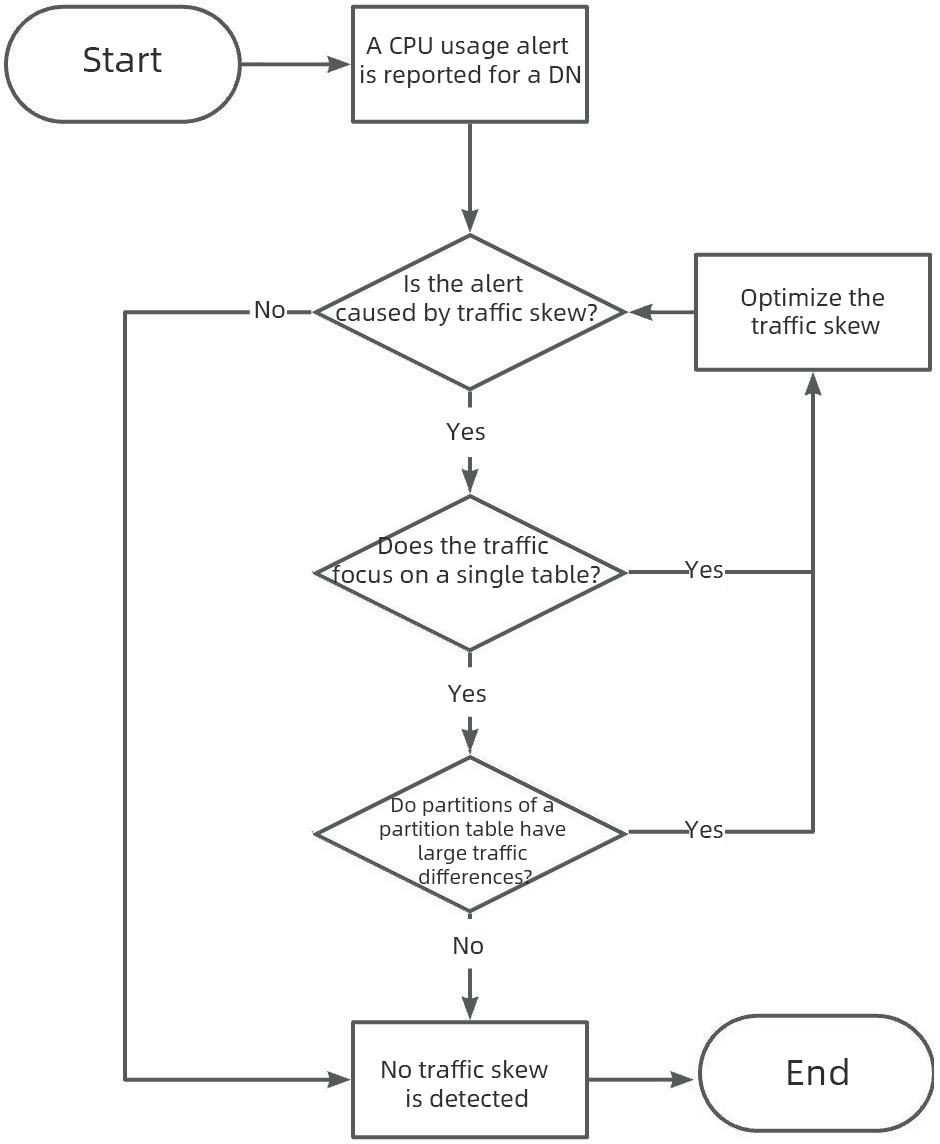
The analysis steps for traffic skew are mainly based on the INFORMATION_SCHEMA.TABLE_DETAIL system table. The provided SQL statements apply to most business scenarios. Usually, you only need to adjust the sorting conditions based on the severity of read and write skew in the metrics. For example, if monitoring shows that the innodb_read metric of the alerting DN is significantly higher than that of other DNs, keep the sorting conditions unchanged. If the innodb_write metric is significantly higher than that of other DNs, taking "View the read and write traffic percentage of single tables on a specific DN" as an example, adjust the sorting conditions to ORDER BY table_write DESC, table_read DESC. No other parts need to be adjusted.
Due to space limitations, how to optimize data and traffic skew will be discussed in subsequent articles. Stay tuned.
Q: Does the data in the TABLE_DETAIL view represent exact values?
A: Information such as the number of rows in this view is calculated based on statistics information, so the information does not represent exact values. In a few scenarios, missing data or large bias may occur, but the information is sufficient for reference.
Q: Is it safe and reliable to query the TABLE_DETAIL view?
A: When the total number of partitions in the system is large, querying this view takes a long time. Querying the view is safe, but do not query the view with high concurrency (such as performing a large number of queries on the view in a program).
Q: How do I avoid traffic skew in advance during the early business design process?
A: Refer to the previous article
Alibaba Cloud PolarDB PolarStore Receives Best Paper Award Nomination at Top Conference FAST'26
Alibaba Cloud ApsaraDB Data Agent Achieves Dual Breakthroughs in Performance and Experience
ApsaraDB - June 18, 2026
ApsaraDB - April 30, 2026
ApsaraDB - December 12, 2025
ApsaraDB - December 22, 2025
ApsaraDB - June 4, 2024
ApsaraDB - April 20, 2023
 Best Practices
Follow our step-by-step best practices guides to build your own business case.
Learn More PolarDB for PostgreSQL
Alibaba Cloud PolarDB for PostgreSQL is an in-house relational database service 100% compatible with PostgreSQL and highly compatible with the Oracle syntax.
Learn More
PolarDB for Xscale
Alibaba Cloud PolarDB for Xscale (PolarDB-X) is a cloud-native high-performance distributed database service independently developed by Alibaba Cloud.
Learn More
PolarDB for MySQL
Alibaba Cloud PolarDB for MySQL is a cloud-native relational database service 100% compatible with MySQL.
Learn MoreMore Posts by ApsaraDB


