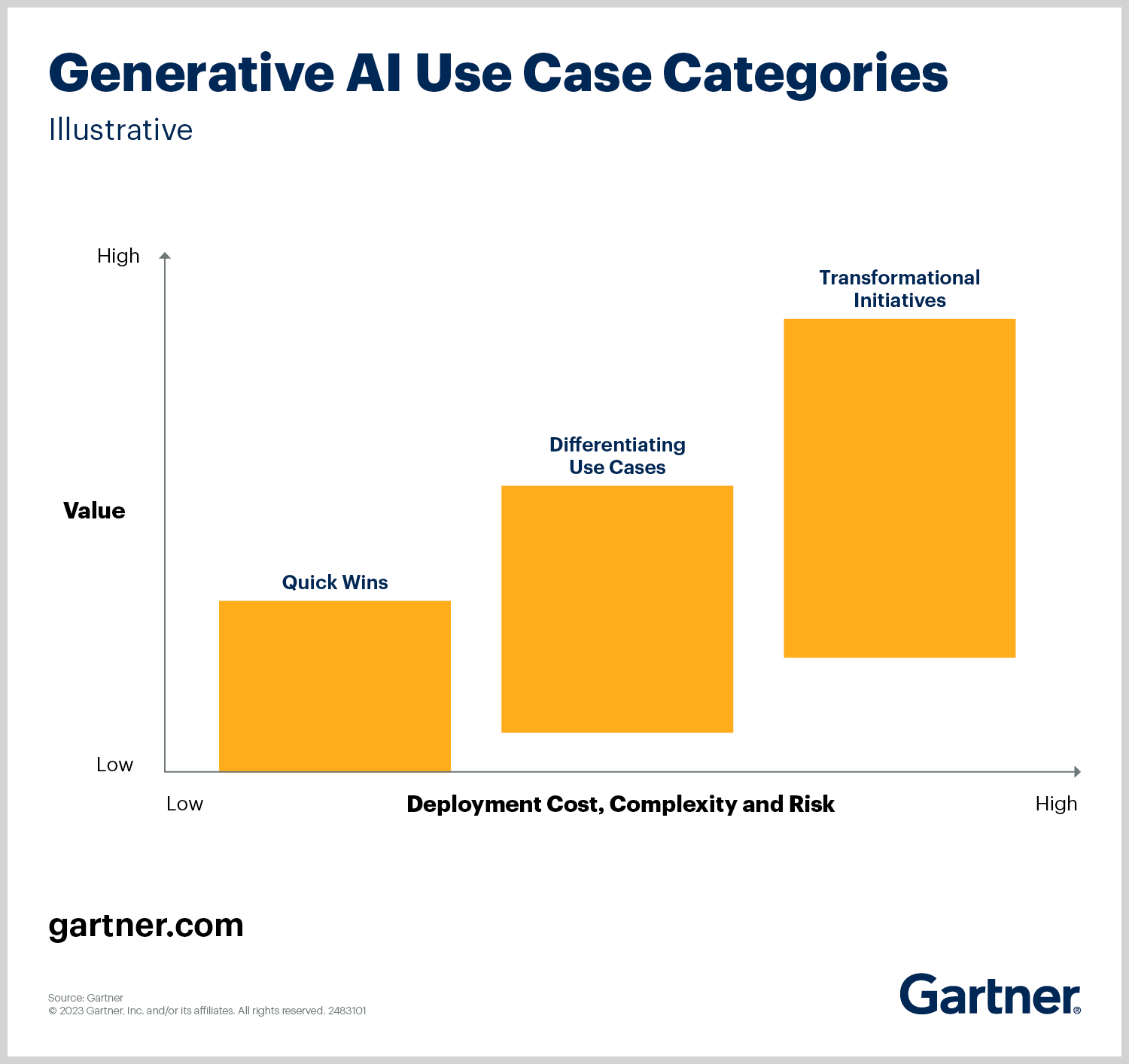
_Source: Gartner (2023)_
Gartner에 따르면"빠른 성과"는 다음 사용 사례를 말합니다.
이러한 프로젝트는 대규모 인프라 점검 없이 생성형 AI를 통해초기 ROI(투자 수익)를 얻고자 하는 조직에 이상적입니다.
저희 솔루션이 빠른 성과의 예가 되는 이유는 다음과 같습니다.
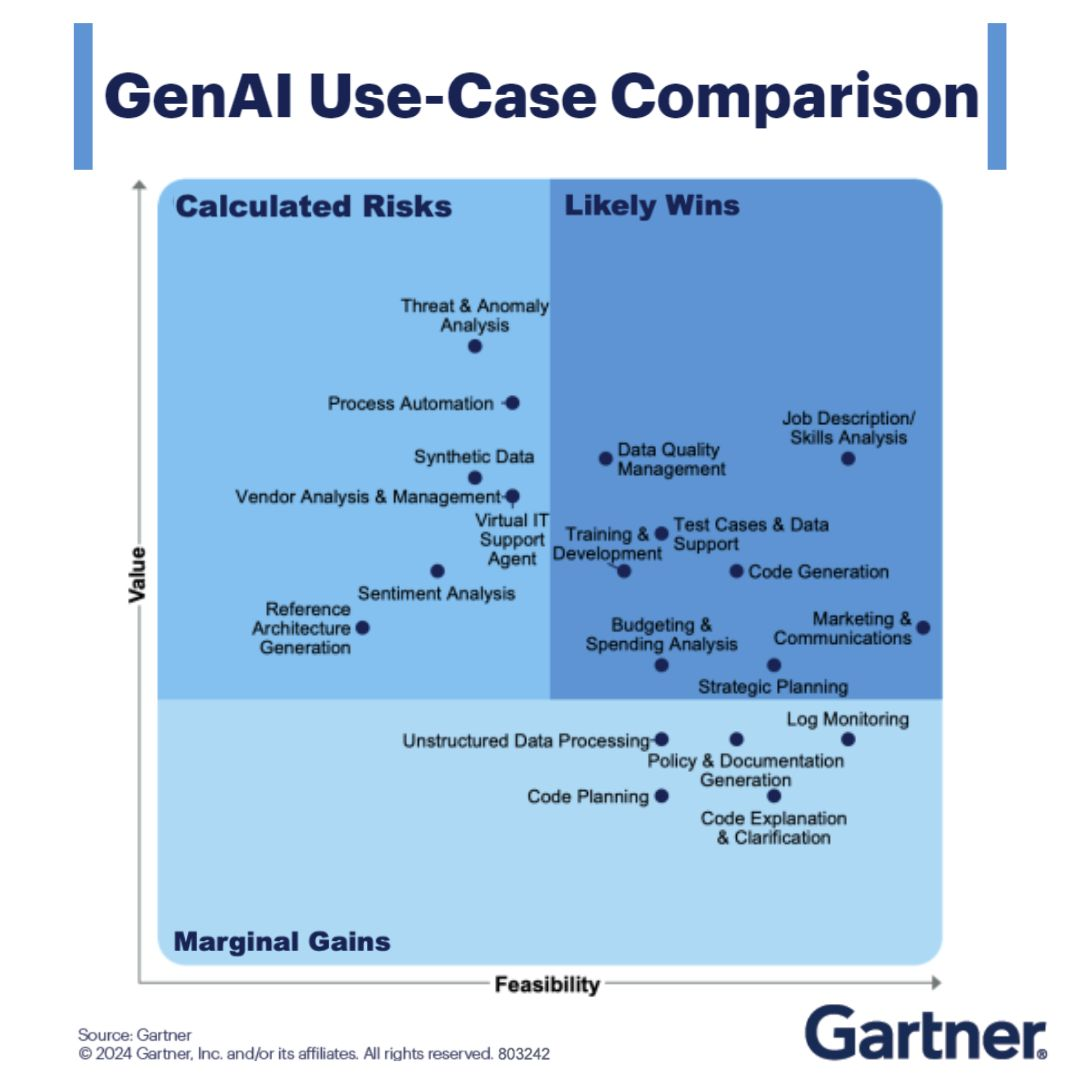
_Source: Gartner, Inc. (2024)_
Gartner의 분석에 따르면 코드 생성(Text-to-SQL 포함)은 높은 실현 가능성, 높은 가치, 낮은 위험이라는 "가능성 높은 성과" 4분면에 속합니다. 주요 시사점:
1. 비용 효율:
2. 확장성:
3. 빠른 가치 실현 시간:
Text-to-SQL 솔루션을 채택함으로써 조직은 위험도가 낮고 영향력이 큰AI 이니셔티브에 우선순위를 두라는 Gartner의 권고에 부합할 수 있습니다. 이는 단순한 자동화가 아니라 최소한의 초기 투자로 생산성을 높이고 데이터 기반 의사 결정을 가속화하는 것입니다.
더 깊은 통찰력을 얻으려면 Gartner의 보고서를 살펴보십시오.
이 구조는 비즈니스 조정, 위험 완화, 실용적인 ROI를 강조하므로 경영진과 의사 결정권자에게 적합합니다.
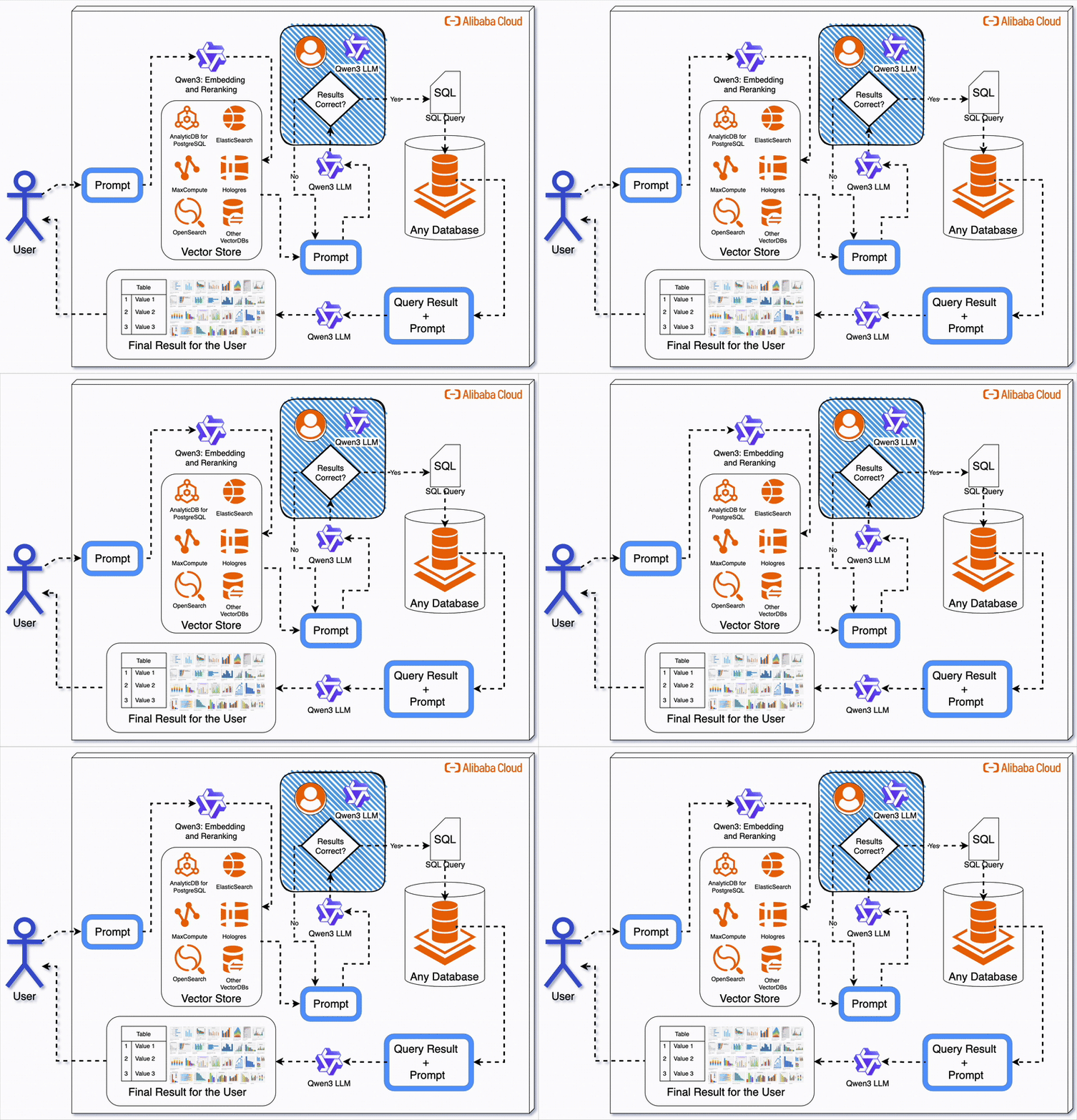
SQL 쿼리를 작성하는 것은 시간이 많이 걸리고 오류가 발생하기 쉬우며 비용이 많이 듭니다. 고객 데이터를 분석하든 보고서를 생성하든 자연어 질문을 SQL로 번역하려면 데이터베이스에 대한 깊은 이해가 필요합니다. AI를 사용하여 이 프로세스를 자동화하고 비용을 절감할 수 있다면 어떨까요?
이 문서에서는 최첨단 대규모 언어 모델(LLM)인 Alibaba Cloud의 Qwen3 (이 예에서는 Qwen-Max를 사용함)로 구동되는 Text-to-SQL 챗봇을 구축하겠습니다. 이 챗봇은 PostgreSQL 데이터베이스에 연결되어, 사용자의 질문을 SQL로 변환하고 결과를 반환합니다. 단 한 줄의 SQL도 직접 작성할 필요가 없습니다.
Alibaba Cloud의 비용 효율적인 API 요금 및 Qwen-Max의 높은 정확도를 통해 개발 시간_ 및_ 클라우드 비용을 모두 절감할 수 있습니다.
Alibaba Cloud 방문 후 가입합니다. 로그인한 후 모델 스튜디오 콘솔(링크)로 이동합니다.
API 키 관리 페이지(링크)로 이동하여 새 API 키를 만듭니다. Qwen-Max에 대한 액세스 토큰이므로 안전하게 보관합니다.
다음과 같이 가상 환경을 만들고 종속 요소를 설치합니다.
# Create virtual environment
python3 -m venv venv
source venv/bin/activate

# Install required packages
pip install openai python-dotenv psycopg2-binary tabulaterequirements.txt에 다음을 저장합니다
openai
python-dotenv
psycopg2-binary
tabulate제공된 예제 코드를 통해 빠른 테스트를 실행하여 API 키가 작동하는지 확인합니다.
import os
from openai import OpenAI

try:
    client = OpenAI(
        # If the environment variable is not configured, replace the following line with your API key: api_key="sk-xxx",
        api_key=os.getenv("DASHSCOPE_API_KEY"),
        base_url="https://dashscope-intl.aliyuncs.com/compatible-mode/v1",
    )

    completion = client.chat.completions.create(
        model="qwen-plus",  # Model list: https://www.alibabacloud.com/help/en/model-studio/getting-started/models
        messages=[
            {'role': 'system', 'content': 'You are a helpful assistant.'},
            {'role': 'user', 'content': 'Who are you?'}
            ]
    )
    print(completion.choices[0].message.content)
except Exception as e:
    print(f"Error message: {e}")
print("For more information, see: https://www.alibabacloud.com/help/en/model-studio/developer-reference/error-code")관리형 PostgreSQL 인스턴스를 설정하려면 PostgreSQL 용 ApsaraDB를 사용합니다. 자세한 내용은 이 문서를 참조합니다.
또 다른 옵션은 단계별 가이드에 따라 Alibaba Cloud에서 PostgreSQL 17 데이터베이스를 프로비저닝하고 psql을 사용하여 로컬 머신에 연결하는 것입니다.
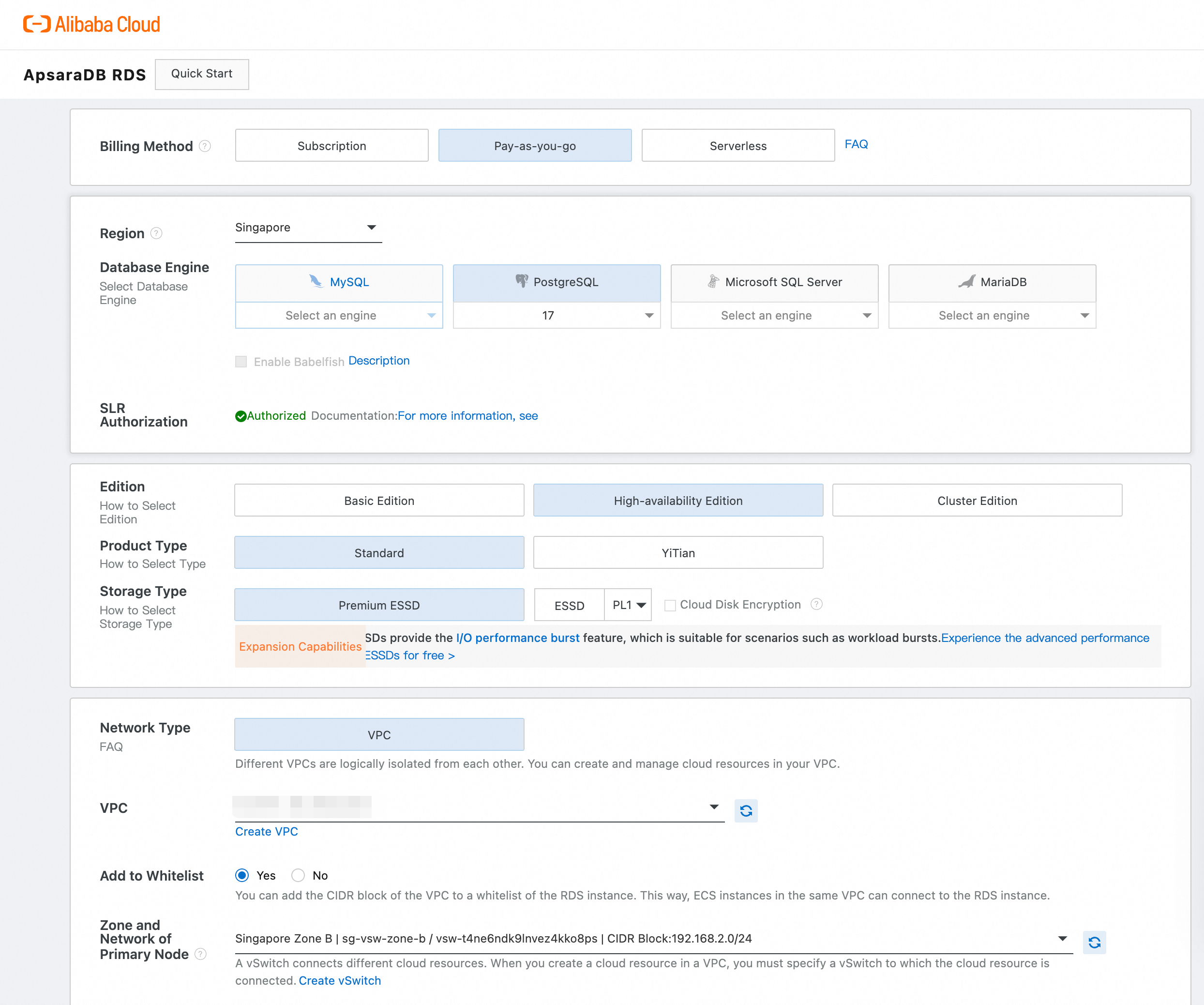
위 이미지에 표시된 인터페이스를 사용하여 PostgreSQL 17 인스턴스를 설정합니다.
| 설정 | 작업 |
|---|---|
| 리전 | 리전(예: 싱가포르)을 선택합니다. |
| 데이터베이스 엔진 | PostgreSQL 선택 후 드롭다운에서 버전 17을 선택합니다. |
| SLR 인증 | 보안 강화를 위해 '인증됨'이 선택되어 있는지 확인합니다. |
| 에디션 | 이중화를 위해 고가용성 에디션을 선택합니다. |
| 제품 유형 | 대부분의 사용 사례는 표준을 선택합니다. |
| 저장 유형 | 고성능 I/O를 위해 프리미엄 ESSD를 선택합니다. |
| 네트워크 유형 | 안전한 격리를 위해 VPC를 선택합니다. |
| 화이트리스트에 추가 | 예를 활성화하여 로컬 IP 또는 VPC에서 연결을 허용합니다. |
인스턴스가 활성화되면 다음을 수행합니다.
psql로 로컬로 연결로컬 컴퓨터에 psql을 설치한 다음(아직 설치하지 않은 경우) 다음을 사용하여 연결합니다.
psql -h <ENDPOINT> -U <USERNAME> -d <DATABASE_NAME> -p <PORT>자리 표시자를 값으로 바꿉니다(예: 기본 데이터베이스의 경우 -d postgres).
자세한 구성에 대해서는 Alibaba Cloud의 공식 문서를 참조하십시오.
macOS/Linux에서 다음을 실행하십시오.
brew install postgresql  # macOS
sudo apt install postgresql-client # Ubuntu다음과 같이 DVD 대여 샘플 데이터베이스를 다운로드하여 복원합니다.
# Restore the database
pg_restore -U your_user -h your_host -p your_port -d dvdrental dump_file.tarpsql또는 pgAdmin으로 테스트샘플 쿼리를 실행하여 모든 것이 작동하는지 확인합니다.
SELECT * FROM film LIMIT 5;다음 스크립트는 Qwen-Max를 사용하여 자연어 쿼리를 SQL로 변환하고 PostgreSQL에서 실행합니다.
import os
import psycopg2
from openai import OpenAI
from dotenv import load_dotenv
from tabulate import tabulate

load_dotenv()

client = OpenAI(
    api_key=os.getenv("DASHSCOPE_API_KEY"),
    base_url="https://dashscope-intl.aliyuncs.com/compatible-mode/v1"
)

def generate_sql_query(natural_language_query):
    system_prompt = """
You are a helpful assistant trained to convert natural language queries into SQL statements.
The database schema includes the following tables:
- film_category (category_id, name)
- film (film_id, title, category_id)
- inventory (inventory_id, film_id, store_id)
- rental (rental_id, inventory_id, customer_id, return_date, rental_date)
- payment (payment_id, customer_id, staff_id, rental_id, amount, payment_date)

Generate a valid SQL query that answers the user's question.
"""

    response = client.chat.completions.create(
        model="qwen-max",
        messages=[
            {"role": "system", "content": system_prompt},
            {"role": "user", "content": natural_language_query}
        ],
        temperature=0.2
    )

    sql_query = response.choices[0].message.content.strip()

    # Extract SQL between "```sql" and "```"
    start_marker = "```sql"
    end_marker = "```"
    start_idx = sql_query.find(start_marker)
    end_idx = sql_query.find(end_marker, start_idx + len(start_marker))

    if start_idx != -1 and end_idx != -1:
        sql_query = sql_query[start_idx + len(start_marker):end_idx]
    elif start_idx != -1:
        sql_query = sql_query[start_idx + len(start_marker):]
    elif end_idx != -1:
        sql_query = sql_query[:end_idx]

    sql_query = sql_query.strip()

    # Fallback to 'select' keyword
    if not sql_query.lower().startswith("select"):
        select_index = sql_query.lower().find("select")
        if select_index != -1:
            sql_query = sql_query[select_index:]

    return sql_query.strip()

def execute_sql_query(sql_query):
    conn = psycopg2.connect(
        dbname=os.getenv("DB_NAME"),
        user=os.getenv("DB_USER"),
        password=os.getenv("DB_PASSWORD"),
        host=os.getenv("DB_HOST"),
        port=os.getenv("DB_PORT")
    )
    cursor = conn.cursor()
    try:
        cursor.execute(sql_query)
        columns = [desc[0] for desc in cursor.description]
        rows = cursor.fetchall()
        return columns, rows
    except Exception as e:
        print(f"Error executing SQL: {e}")
        return [], []
    finally:
        cursor.close()
        conn.close()

def main():
    user_query = "show the sum of amount by each payment id that is greater then 10"
    print("Generating SQL query...")
    sql_query = generate_sql_query(user_query)
    print("Generated SQL:")
    print(sql_query)

    print("\nExecuting SQL query...")
    columns, rows = execute_sql_query(sql_query)

    if columns and rows:
        print("\nQuery Result:")
        print(tabulate(rows, headers=columns, tablefmt="psql"))
    else:
        print("No results returned.")

if __name__ == "__main__":
main()generate_sql_query(): Qwen-Max를 사용하여 자연어를 SQL로 변환합니다.execute_sql_query(): PostgreSQL에 연결하고 생성된 SQL을 실행합니다.main(): 흐름을 조율합니다.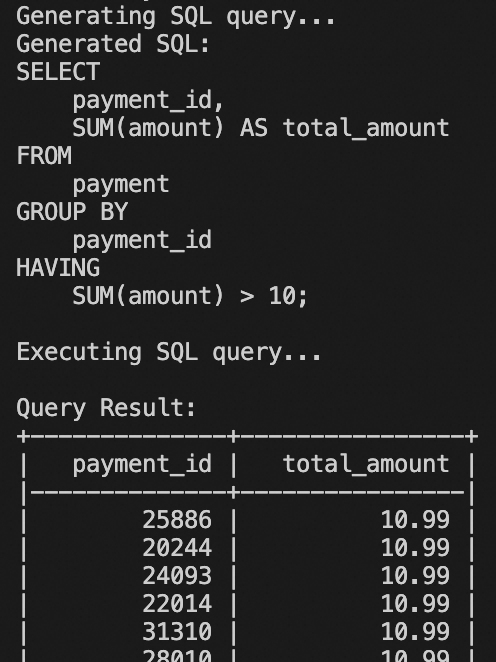
결과는 위의 그림과 유사해야 합니다. 또한 이 코드를 추가로 개발 및 수정하여 대시보드를 만들 수 있으며, ChatBI와 통합될 예정입니다. 하지만 QuickBI의 ChatBI만큼 발전된 기능은 아니지만 좋은 시작입니다.
psql 또는 pgAdmin에서 직접 SQL 출력을 테스트합니다.print(repr(sql_query))를 사용합니다.이 챗봇은 시작에 불과합니다. Alibaba Cloud의 Qwen 시리즈를 사용하면 다음과 같이 확장할 수 있습니다.
비용을 절감하고 생산성을 높일 준비가 되셨습니까? 이 Text-to-SQL 챗봇으로 시작하여 AI 기반 자동화의 잠재력을 최대한 발휘하십시오.
이 문서는 영어에서 번역되었습니다. 원본 문서는 여기를 참조하십시오.

144 posts | 4 followers
FollowRegional Content Hub - August 12, 2024
Regional Content Hub - July 23, 2025
Regional Content Hub - April 15, 2024
Hosung Kim - July 20, 2026
JJ Lim - January 23, 2025
Regional Content Hub - May 20, 2024
144 posts | 4 followers
Follow Qwen
Qwen
Full-range, open-source, multimodal, and multi-functional
Learn More Alibaba Cloud Model Studio
A one-stop generative AI platform to build intelligent applications that understand your business, based on Qwen model series such as Qwen-Max and other popular models
Learn More
Token Plan
Build more, spend less. One plan, every modality.
Learn More QwenWork
QwenWork is dedicated to helping employees strengthen their professional competitiveness in the AI era and to enabling enterprises to improve organizational effectiveness.
Learn MoreMore Posts by Regional Content Hub

