This topic summarizes frequently asked questions (FAQs) about VPN Gateway.
Quick links
Product inquiries
Can VPCs in different regions communicate through a VPN Gateway?
Can a VPN Gateway encrypt traffic between a VPC and a public IP address?
How do I perform access control on the public IP of the VPN gateway?
Does VPN Gateway support cross-account migration or changing the VPC?
Does it support using the WireGuard protocol to access an on-premises database from the cloud?
What is the configuration process for enabling IPsec-VPN / SSL-VPN?
How do I check the bandwidth/traffic monitoring of a VPN gateway?
IPsec-VPN features
How many IPsec-VPN connections can I create for each VPN Gateway?
Can I configure multiple remote networks in one IPsec-VPN connection?
What is the difference between single-tunnel mode and dual-tunnel mode?
SSL-VPN features
What are non-cross-border and cross-border connections?
Alibaba Cloud VPN Gateway provides services in compliance with the relevant policies and regulations in China. It supports only non-cross-border connections and does not support cross-border connections. If you need to access cross-border resources through a VPN connection, see How do I access cross-border resources over a VPN connection?.
Non-cross-border connections
An IPsec-VPN connection is considered non-cross-border if the regions of the on-premises data center and the peer resources meet one of the following conditions:
The on-premises data center is located in the Chinese mainland region, and the peer resources are in an Alibaba Cloud region in the Chinese mainland.
The on-premises data center is located outside the Chinese mainland, and the peer resources are in an Alibaba Cloud region outside the Chinese mainland.
An SSL-VPN connection is considered non-cross-border if the regions of the client and the peer resources meet one of the following conditions:
The client is located in the Chinese mainland, and the peer resources are in an Alibaba Cloud region in the Chinese mainland.
The client is located outside the Chinese mainland, and the peer resources are in an Alibaba Cloud region outside the Chinese mainland.
Example 1 | Example 2 |
 |  |
Cross-border connections
An IPsec-VPN connection is considered cross-border if the regions of the on-premises data center and the peer resources meet one of the following conditions:
The on-premises data center is located in the Chinese mainland, and the peer resources are in an Alibaba Cloud region outside the Chinese mainland.
The on-premises data center is located outside the Chinese mainland, and the peer resources are in an Alibaba Cloud region in the Chinese mainland.
An SSL-VPN connection is considered cross-border if the regions of the client and the peer resources meet one of the following conditions:
The client is located in the Chinese mainland, and the peer resources are in an Alibaba Cloud region outside the Chinese mainland.
The client is located outside the Chinese mainland, and the peer resources are in an Alibaba Cloud region in the Chinese mainland.
Example 1 | Example 2 |
 |  |
Region classification
Region classification | Included regions |
The Chinese mainland | China (Qingdao), China (Beijing), China (Zhangjiakou), China (Hohhot), China (Ulanqab), China (Shenzhen), China (Heyuan), China (Guangzhou), China (Hangzhou), China (Shanghai), China (Nanjing - Local Region), China (Chengdu) |
Outside the Chinese mainland | China (Hong Kong), Singapore, Malaysia (Kuala Lumpur), Japan (Tokyo), Indonesia (Jakarta), Philippines (Manila), South Korea (Seoul), Thailand (Bangkok), Germany (Frankfurt), UK (London), UAE (Dubai), US (Silicon Valley), US (Virginia), SAU (Riyadh - Partner Region)), Mexico |
How do I access cross-border resources over a VPN connection?
To access cross-border resources over a VPN connection, use a Transit Router. A TR enables flexible, private network communication between resources across regions, including cross-border ones.
Sample network topologies:
IPsec-VPN | SSL-VPN |
 |  |
Can I use a VPN Gateway to access the internet?
No.
A VPN Gateway provides private network access to a VPC. It does not provide internet access.
IPsec-VPN connection prerequisites
The gateway device in the data center must support the IKEv1 and IKEv2 protocols.
IPsec-VPN supports the IKEv1 and IKEv2 protocols. Any device that supports either protocol can connect to an Alibaba Cloud VPN Gateway. For more information about how to select an IKE version, see Selecting an IKE version.
The gateway device in the data center must be assigned a static public IP address (a fixed public IP address).
IPsec-VPN does not support establishing connections using dynamic public IP addresses. In scenarios where the public IP address is dynamically assigned by carriers, such as office networks or home broadband, the public IP address changes, making it impossible to stably establish an IPsec-VPN tunnel with the Alibaba Cloud VPN gateway. The peer (on-premises gateway device) must have a static public IP address to ensure a stable tunnel.
The CIDR blocks of the data center and the VPC must not overlap.
For information about how a data center can connect to a VPC by using an IPsec-VPN connection, see Standard VPN Gateway quick start.
Compatible on-premises gateways
An Alibaba Cloud VPN Gateway supports the standard IKEv1 and IKEv2 protocols. Therefore, any device that supports these protocols can connect to an Alibaba Cloud VPN Gateway. Examples include devices from H3C, Hillstone, Sangfor, Cisco ASA, Juniper, SonicWall, Nokia, IBM, and Ixia. For more information, see Configure on-premises devices.
Can VPCs in different regions communicate through a VPN Gateway?
Yes.
For more information, see Connect two VPCs in dual tunnel mode.
If you establish an IPsec-VPN connection between VPCs in different regions, the connection quality depends on public network conditions. We recommend that you use Cloud Enterprise Network (CEN) to establish connections between VPCs in different regions. For more information, see Connect VPCs across accounts.
Does traffic between VPCs travel over the internet?
When you use a VPN Gateway to enable communication between VPCs:
If the two VPCs are in the same region, traffic is transmitted over the Alibaba Cloud network, not the internet.
If the two VPCs are in different regions, traffic is transmitted over the internet.
If I have already purchased a VPN Gateway, do I still need to purchase elastic public bandwidth?
No. IPsec-VPN establishes an encrypted tunnel over the private network, and traffic is transmitted over the private network. Therefore, ECS instances in a VPC can communicate with a data center over the VPN without purchasing an elastic IP address (EIP) or public bandwidth.
Can I change the VPC of a VPN gateway after it is created?
No. After a VPN gateway is created, you cannot change its VPC. To associate the VPN gateway with another VPC, you must create a new VPN gateway and select the target VPC.
If the VPN gateway and the ECS instance are not in the same VPC and you do not want to recreate the VPN gateway, you can use VPC Peering Connection to connect the private networks of the two VPCs, enabling cross-VPC resource communication.
Does VPN Gateway support cross-account migration or changing the VPC?
No. After a VPN Gateway is created, it does not support cross-account migration or changing the associated VPC. The limits and handling methods for each scenario are as follows:
Cross-account migration: VPN Gateway does not support direct migration to another account (including same-region cross-account scenarios). To use a VPN Gateway under another account, you need to create a new VPN Gateway instance under the target account.
Change VPC: A created VPN Gateway does not support changing the associated VPC. To associate the VPN Gateway with another VPC, you need to delete the existing VPN configuration, unsubscribe from the instance, and then purchase a new VPN Gateway.
When deleting the elastic network interface, the message "managed by dependent cloud services, created by VPN" is displayed: The elastic network interface bound to a VPN Gateway cannot be deleted directly. You must first release the VPN Gateway instance, and the bound elastic network interface will be released automatically. The release methods are as follows:
Traditional VPN Gateway: If the instance has not expired, find the target VPN Gateway in the console and select Action in the Apply for Refund column; if the instance has expired, the system will release it automatically.
Enhanced VPN Gateway: In the Action column of the target VPN Gateway, click Delete.
Can I use a VPN Gateway to connect two VPCs that belong to different Alibaba Cloud accounts?
Yes. You can connect two VPCs that belong to different Alibaba Cloud accounts in either of the following ways:
Using a VPN Gateway: Create a VPN Gateway instance under each account, and configure an IPsec-VPN connection, a customer gateway, and routes under each account to enable connectivity between the two VPCs.
Without a VPN Gateway: Use a VPC Peering Connection or Cloud Enterprise Network (CEN) instead.
How do I choose the VPC to associate with a VPN Gateway?
After a VPN Gateway is created, you cannot change the associated VPC. Make your selection before creation based on the deployment of your resources in the cloud:
No resources are deployed in the cloud yet: Create a VPC first, and then associate the VPC when you create the VPN Gateway.
Cloud resources (such as ECS and RDS) are located in a single VPC: Associate the VPN Gateway with the VPC in which the resources reside.
Cloud resources are distributed across multiple VPCs: We recommend that you use a VPN Gateway associated with a Transit Router to communicate with multiple VPCs through IPsec-VPN connections. For more information, see Bind to a transit router.
Does creating a VPN Gateway change the public IP addresses of existing ECS instances?
No. Creating a VPN Gateway does not affect the public IP addresses of existing ECS instances in the VPC. The public IP addresses of the ECS instances remain unchanged.
Does it support using the WireGuard protocol to access an on-premises database from the cloud?
Currently, Alibaba Cloud IPsec-VPN connections only support the standard IPsec protocol (including the IKEv1 and IKEv2 versions), and the WireGuard protocol is not supported.
To enable cloud backend applications to access an on-premises database, we recommend using IPsec-VPN to establish an encrypted tunnel and form a virtual LAN between the on-premises server and the cloud VPC to enable secure mutual access:
Create a VPN Gateway in the Alibaba Cloud console and configure an IPsec connection, specifying the local CIDR block (the CIDR block where the VPC resides) and the remote CIDR block (the CIDR block where the on-premises database server resides).
Complete the corresponding IPsec-VPN configuration on the on-premises gateway device, ensuring that the IKE/IPsec parameters on both sides are consistent.
Configure correct routing rules to ensure that traffic between the cloud VPC CIDR block and the on-premises server CIDR block is forwarded correctly.
After completing the above configuration and confirming that the IPsec connection status is "Phase 2 negotiation succeeded", you can achieve secure mutual access between cloud services and the on-premises database.
IPsec server vs. SSL server
|
Item |
IPsec server |
SSL server |
|
Use scenario |
Provides end-to-site connections. |
Provides end-to-site connections. |
|
Client mode |
iOS mobile clients connect via IPsec-VPN. |
Android mobile clients and computers connect via SSL-VPN. |
|
Connection mode |
Uses the built-in iOS VPN feature. |
Uses OpenVPN. |
|
Encryption methods |
IPsec |
SSL certificates |
Can I configure multiple remote networks in one IPsec-VPN connection?
Yes.
Before you configure multiple remote networks for an IPsec-VPN connection, review the configuration suggestions for multiple CIDR blocks. For more information, see Configuration suggestions for multi-CIDR block scenarios.
How many IPsec-VPN connections can I create for each VPN Gateway?
By default, you can create up to 10 IPsec-VPN connections for each VPN Gateway. You can adjust the quota on the Alibaba Cloud console. For more information, see Manage quotas.
How do I configure the on-premises side when multiple IPsec-VPN connections use the same VPN Gateway and customer gateway?
Alibaba Cloud side: When multiple IPsec-VPN connections are associated with the same VPN Gateway and customer gateway, the IPsec negotiation parameters of each connection (such as the encryption algorithm, authentication algorithm, DH group, and pre-shared key) must be consistent.
On-premises side: You do not need to set up a separate physical connection or an additional interface for each IPsec-VPN connection. You only need to ensure that the IPsec configuration on your on-premises gateway device matches the negotiation parameters of the corresponding connection on the Alibaba Cloud side.
Device capability check: Verify whether your on-premises gateway device supports one-to-many IPsec connection mode. If it does not, you need to adjust your network architecture or replace your on-premises gateway device.
How to configure network ACLs
VPN Gateway type | Required rules |
IPsec-VPN | In the network ACL, configure outbound and inbound rules to allow traffic from the following CIDR blocks and IP addresses. This ensures that the VPN Gateway can establish IPsec-VPN connections.
|
SSL-VPN | In the network ACL, configure outbound and inbound rules to allow traffic from the following CIDR blocks and IP addresses, and open the SSL-VPN port. This ensures that the VPN Gateway can establish SSL-VPN connections.
|
Can I upgrade or downgrade a VPN Gateway?
Yes.
To upgrade or downgrade the bandwidth of your VPN Gateway, see Upgrade.
To upgrade or downgrade the maximum number of concurrent SSL connections for your VPN Gateway, see Modify SSL concurrent connections.
To enable the IPsec-VPN or SSL-VPN feature for your VPN Gateway, see Enable IPsec-VPN and Enable the SSL-VPN feature.
Viewing SSL client connection information
Yes.
For more information, see View SSL client connections.
VPN Gateway instances created after December 10, 2022 support this feature by default.
By default, VPN Gateway instances created before December 10, 2022 do not support viewing SSL client connection information. To enable this, upgrade the VPN Gateway instance.
SSL-VPN on legacy instances
No.
To use the SSL-VPN feature, you must upgrade the VPN Gateway to the latest version. For more information, see Upgrade a VPN gateway.
Selecting an IKE version
When you configure an IPsec-VPN connection, select an IKE version based on the IKE version the peer gateway device supports and whether you need to communicate across multiple CIDR blocks.
Multi-CIDR-block communication means that you have configured multiple Local Network or Remote Network when configuring the IPsec connection.
Peer device IKE support | Multi-CIDR communication | Configuration |
Only IKEv1 | Yes |
|
No | Use IKEv1 for both the IPsec-VPN connection and the peer gateway device. | |
Only IKEv2 | Yes |
|
No | Use IKEv2 for both the IPsec-VPN connection and the peer gateway device. | |
Both IKEv1 and IKEv2 | Yes |
|
No | Use IKEv2 for both the IPsec-VPN connection and the peer gateway device. Compared with IKEv1, IKEv2 simplifies the Security Association (SA) negotiation process and provides better support for scenarios with multiple CIDR blocks. Use IKEv2. |
Why is IPsec-VPN negotiation slow to take effect, and how long does it normally take?
Normal effective time: If the configurations on both ends of the IPsec-VPN connection (the Alibaba Cloud side and the on-premises gateway device side) are correct and match each other, IPsec-VPN negotiation basically takes effect within seconds.
Troubleshooting slow effectiveness: If negotiation is slow to take effect, verify whether the configurations on both ends were adjusted during this period, such as modifying IKE/IPsec negotiation parameters, route configurations, or security group rules. Configuration changes trigger renegotiation, which may increase the negotiation time.
How do I trigger renegotiation of an IPsec-VPN connection?
IPsec-VPN connections do not support a direct restart operation.
If you need to forcibly trigger tunnel renegotiation (for example, when a configuration change does not take effect automatically), you can modify any configuration item (such as Pre-shared key or SA lifetime) and save it. After the configuration takes effect, change the configuration item back to its original value and save it again to trigger the system to re-initiate IKE/IPsec negotiation.
IPsec-VPN connections with NAT
For example, a data center plans to use the IP address 42.XX.XX.1 to establish an IPsec-VPN connection with an Alibaba Cloud VPN Gateway. However, the data center uses SNAT, which translates the source IP address from 42.XX.XX.1 to 47.XX.XX.21. In this case, when you create a customer gateway on the VPN Gateway console, you must set the IP address of the customer gateway to 47.XX.XX.21. This allows the Alibaba Cloud VPN Gateway to establish an IPsec-VPN connection with the data center.
Use the default IPsec ports (UDP 500 and 4500) to establish the IPsec-VPN connection between your data center and the VPN Gateway. Do not translate the port numbers.
On the Alibaba Cloud side, if the VPC to which a public-facing VPN Gateway is associated also has a NAT Gateway configured, the NAT Gateway does not translate the IP address of the public-facing VPN Gateway instance.
Increasing IPsec-VPN bandwidth
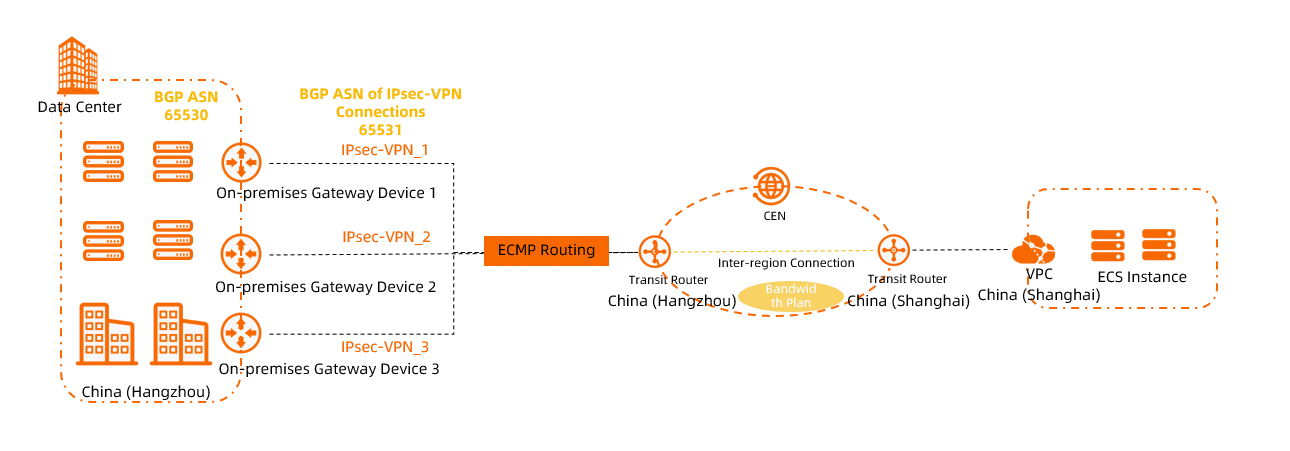
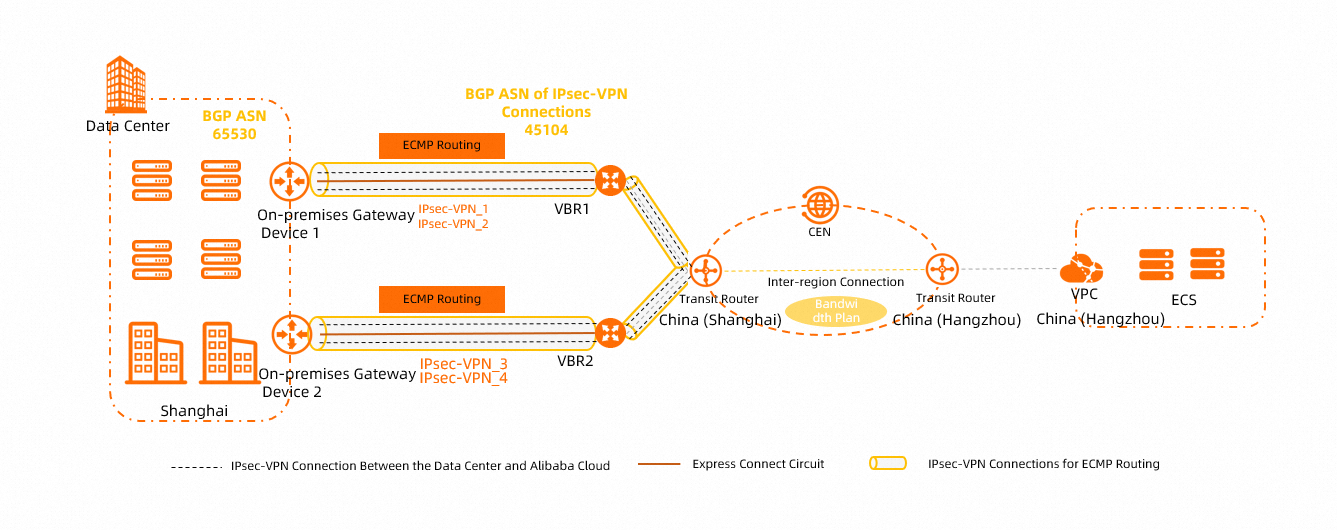
When an IPsec-VPN connection is associated with a VPN Gateway instance, the maximum bandwidth of the instance is 1,000 Mbit/s (500 Mbit/s in some regions). To increase the bandwidth of the IPsec-VPN connection, associate the IPsec-VPN connection with a Transit Router (TR) instance to connect your data center to Alibaba Cloud. You can then use the TR to enable network communication between your data center and VPCs.
When an IPsec-VPN connection is associated with a TR instance, the maximum bandwidth of a single IPsec-VPN connection is 1,000 Mbit/s. To increase the total bandwidth, you can establish multiple IPsec-VPN connections between the TR and the data center. This allows traffic between the data center and Alibaba Cloud to be transmitted over multiple IPsec-VPN connections simultaneously, as shown in the following figures. For more information, see Load balancing with multiple public IPsec-VPN connections and Create multiple private IPsec-VPN connections to implement load balancing.
Public IPsec-VPN connection scenario:
Private IPsec-VPN connection scenario:
Forwarding traffic across zones?
Yes.
When you create a VPN Gateway instance, you must specify a vSwitch. The system deploys the VPN Gateway in the zone where the specified vSwitch resides. After the VPN Gateway instance is created, it can forward traffic for ECS instances in all zones of the VPC.
Depending on your setup, you may need to add routes to enable the VPN Gateway instance to forward traffic from ECS instances. For example, if the vSwitches in some zones are associated with a custom route table of the VPC, you must add a custom route that points to the VPN Gateway instance to that custom route table.
Resolving route conflicts
If an error is reported when you add a route to a VPN Gateway instance, this error usually occurs for one of the following reasons:
The destination CIDR block of the route you want to add is the same as the destination CIDR block of an existing route in the VPC. Check the routes in the route table of the VPC to resolve the route conflict.
The route you want to add conflicts with an existing route of the VPN Gateway instance. Check the policy-based routes and destination-based routes of the VPN Gateway instance to resolve the route conflict.
If you add a destination-based route whose destination CIDR block and next hop are the same as those of an existing destination-based route of the VPN Gateway instance, a route conflict occurs.
If you add a policy-based route whose source CIDR block, destination CIDR block, and next hop are the same as those of an existing policy-based route of the VPN Gateway instance, a route conflict occurs.
Why doesn't a VPN connection reach its purchased bandwidth?
While a VPN Gateway provides your purchased bandwidth, the following factors affect actual throughput:
The features, connection capacity, average packet size, and protocols (TCP and UDP) of the device that is associated with the customer gateway.
The network latency between the device that is associated with the customer gateway and the VPN Gateway.
NoteIf you purchase a public-facing VPN Gateway instance or use a public-facing IPsec-VPN connection, public bandwidth capacity and internet latency may affect your throughput.
If you need to test the bandwidth of the VPN Gateway, use the iPerf3 tool. The transfer rates of commands such as FTP, SCP, and CP do not reflect actual network throughput because they are limited by disk I/O speed. For more information about how to use the iPerf3 tool, see Use iPerf3 to test the bandwidth of the Express Connect circuit.
If you have high requirements for transmission quality, use Cloud Enterprise Network (CEN).
Why is the transmission speed of IPsec-VPN slower than the Internet, or its latency higher than that of a leased line?
Source of performance overhead: On top of the original data packets, IPsec-VPN adds encryption and decryption processing overhead, header encapsulation, and security mechanisms, which increase RTT latency and result in lower throughput than pure Internet access or a physical leased line.
Comparison with leased lines: A physical leased line does not pass through the carrier backbone network of the Internet and has no encryption overhead, so it can optimize RTT and reduce latency.
Can a VPN Gateway encrypt traffic between a VPC and a public IP address?
Yes.
To use a VPN Gateway to encrypt traffic from resources in a VPC to a public IP address, the following conditions must be met:
Add the CIDR block to which the public IP address belongs to the VPN Gateway:
If you use IPsec-VPN, you need to add the public CIDR block to the Remote Network of the IPsec connection.
If you use SSL-VPN, you need to add the public CIDR block to the Client CIDR Block of the SSL server.
Set the public CIDR block as a user-defined CIDR block for the VPC to ensure that the VPC can access the public CIDR block. For more information about user-defined CIDR blocks, see VPC FAQ and VPC FAQ.
Route entry quota exceeded
If you cannot add a new route entry or an IPsec-VPN connection cannot learn BGP routes because the route entry quota is.
Increase the route entry quota.
You can increase the quota for policy-based route entries, destination-based route entries, or BGP route entries. For more information, see IPsec-VPN quotas.
Configure aggregate routes.
Without affecting your business, aggregate multiple configured route entries into a single route entry.
For example, if you have configured three destination-based routes with destination CIDR blocks 10.10.1.0/24, 10.10.2.0/24, and 10.10.3.0/24, whose next hops all point to the same IPsec connection (for example, IPsec connection 1), you can add a destination-based route with the destination CIDR block 10.10.0.0/22 and its next hop pointing to IPsec connection 1, and then delete the three destination-based routes above to save the destination-based route entry quota.
When the VPN bandwidth is saturated or the bandwidth usage is high, how do I find the top source IPs and destination IPs?
You can enable VPC flow logs to collect and analyze the traffic of the VPN elastic network interface. For more information, seeQuery VPN Gateway traffic using ENI flow logs.
When uploading large files, why does the speed gradually slow down to 0?
Impact of bandwidth saturation: When the bandwidth of the VPN gateway is saturated, other IPsec connections or SSL connections under the VPN gateway may experience slowdowns and packet loss. You can view the bandwidth usage through Monitor a VPN Gateway instance to check whether the bandwidth is saturated.
Verification suggestion: We recommend that you retest the upload and download speeds during a period without heavy traffic to confirm the actual bandwidth capability of the VPN gateway.
What type is the public IP address of the VPN gateway?
The public IP address type of the VPN gateway is multi-line BGP. This type provides users with a fast and stable access experience by connecting to multiple carrier lines and automatically selecting the optimal path.
What is the difference between single-tunnel mode and dual-tunnel mode?
IPsec connections of newly purchased VPN gateway instances are in dual-tunnel mode by default. Existing VPN gateway instances support creating only single-tunnel mode IPsec-VPN connections by default. We recommend that you Upgrade VPN Gateway to dual-tunnel mode as soon as possible to obtain higher connection availability. Upgrading to dual-tunnel mode does not change the billing method and incurs no additional fees.
Differences | Single-tunnel mode | Dual-tunnel mode |
Number of tunnels under a single IPsec-VPN connection | One | Two |
Number of associated vSwitches | You only need to specify one vSwitch when creating a VPN gateway instance. | When creating a VPN gateway instance, you need to specify two vSwitches distributed in different zones. |
High availability | You need to achieve high availability by creating multiple IPsec-VPN connections under a VPN gateway instance or by creating multiple VPN gateway instances. | High availability can be achieved through the two tunnels under a single IPsec-VPN connection. |
Configure route weights | Supported | Not supported |
Health check feature | Supported | Not supported |
IP address of the VPN gateway | After a VPN gateway instance is created, the system assigns only one IP address to the VPN gateway instance. The VPN gateway uses this IP address to establish an IPsec-VPN connection or SSL-VPN connection with the peer. | After a VPN gateway instance is created, the system assigns up to three IP addresses to the VPN gateway instance (in scenarios where the VPN gateway instance has both IPsec-VPN and SSL-VPN features enabled). Among them, the IPsec-VPN connection uses two IP addresses to establish two encrypted tunnels, and the SSL-VPN connection uses one IP address to establish a connection with the client. The three IP addresses are different from each other. |
How do I delete the secondary tunnel of an IPsec-VPN?
The secondary tunnel cannot be deleted. Alibaba Cloud IPsec-VPN uses the dual-tunnel high availability architecture by default. The two tunnels together ensure link redundancy and zone-disaster recovery, so the system does not allow you to delete the secondary tunnel.
Make sure that both tunnels are configured and in the available state. If you configure or use only one of the tunnels:
You cannot obtain link redundancy, and a failure of a single tunnel will directly cause business interruption.
You cannot obtain zone-disaster recovery.
In this scenario, the VPN gateway does not provide an SLA commitment.
We recommend that you refer to the configuration documentation of the on-premises gateway device vendor and complete the configuration of both tunnels simultaneously to ensure the high availability of the VPN connection.
I purchased a dual-tunnel VPN gateway but only want to use a single tunnel. How do I configure it?
This method loses link redundancy and zone-disaster recovery, and is only recommended for special testing or transitional scenarios.
When creating an IPsec connection, ensure that the parameters of the first tunnel are configured correctly. The customer gateway and other parameters of the second tunnel can be specified arbitrarily.
On the on-premises IDC side, configure only the IPsec connection corresponding to tunnel 1, and do not configure the negotiation parameters of tunnel 2.
How do I perform access control on the public IP of the VPN gateway?
The VPN gateway itself does not support directly configuring a public source IP whitelist at the product level. For the two scenarios of IPsec-VPN and SSL-VPN, the access control mechanisms are as follows:
IPsec-VPN: When creating an IPsec-VPN connection, you must configure the public IP address of the customer gateway on the Alibaba Cloud side. The VPN gateway only accepts IKE/IPsec negotiation requests from this customer gateway IP address. IP addresses from other sources cannot establish an IPsec tunnel with the VPN gateway, so no additional source IP access control is required.
SSL-VPN: The SSL-VPN connection does not restrict the source IP address of the client, and access control relies on client certificate verification. If you need to strengthen access control, you can use IDaaS to implement two-factor authentication.
If you need to filter the network traffic of the subnet where the VPN gateway resides by source IP, you can use the VPC network ACL feature. Create a network ACL in the VPC console, set inbound rules to restrict source IPs, and then associate the network ACL with the vSwitch where the VPN gateway resides. For more information, see How to configure network ACLs.
Security group ICMP rule conflict with the same priority causes VPN failure
Symptom: Unable to ping resources in the VPC after the SSL-VPN connection is established.
Cause: There are two inbound ICMP rules with priority 1 in the security group:
Deny all sources (0.0.0.0/0)
Allow the VPN client CIDR block (10.200.200.0/24)
When two rules have the same priority, the deny rule takes precedence, causing ICMP traffic to be blocked.
Solution: Increase the priority value of the deny rule (for example, from 1 to 2) so that the allow rule (priority 1) is matched first and takes effect.
The smaller the priority value of a security group rule, the higher the priority. After you increase the priority value of the deny rule, the allow rule is matched first.
How do I purchase/bill a VPN gateway?
You need to confirm the type of VPN gateway you want to purchase:
IPsec-VPN gateway (connecting IDC to VPC):
Enhanced IPsec-VPN Gateway: pay-as-you-go. Currently, only the Internet traffic fee is charged (billed by CDT), and the IPsec connection fee is not charged for now.
Standard IPsec-VPN Gateway: billed by bandwidth specification (starting from 5 Mbps, supporting 5/10/20/50/100/200/500/1000 Mbps), prepaid monthly/yearly.
Purchase method: Create an IPsec-VPN gateway.
SSL-VPN gateway (connecting clients to VPC): billed by maximum number of concurrent connections (for example, 20/50/100/500/1000-user packages), independent of the number of certificates—the number of packages = the maximum concurrency, not the number of certificates to create. Purchase method: Create an SSL-VPN gateway
Will an IPsec-VPN bound to a transit router (TR) continue to be billed after it is disconnected? How do I stop the billing?
Even if the IPsec-VPN connection has been disconnected or no data is being transmitted:
As long as IPsec connection exists, IPsec connection instance fees continue to be incurred.
As long as VPN connection (the network instance connection on the TR) exists, TR connection fees continue to be incurred.
For specific billing rules, see Billing.
How to stop billing: To stop billing, first delete the VPN connection on the corresponding transit router in the Cloud Enterprise Network console, and then delete the corresponding IPsec connection in the IPsec-VPN console.
Does the VPN gateway support Savings Plans or resource plan deductions?
No. VPN Gateway currently does not support cost-deduction offerings such as Savings Plans or resource plans. All fees are settled independently based on the actual billing items (the subscription or pay-as-you-go billing method).
Among them, the Enhanced IPsec-VPN Gateway currently does not charge the IPsec connection fee.
What is the configuration process for enabling IPsec-VPN / SSL-VPN?
The processes for the two types are different:
IPsec-VPN (site-to-site): ① Create a VPN gateway → ② Create a customer gateway (enter the peer public IP) → ③ Create an IPsec connection (configure the pre-shared key, local/peer CIDR blocks, IKE version, and algorithms) → ④ Configure routing (add a route pointing to the VPN gateway in the VPC route table) → ⑤ Configure the corresponding parameters on the on-premises device. Reference: Enhanced VPN gateway quick start.
SSL-VPN (client access): ① Create a VPN gateway (SSL type) → ② Create an SSL server (configure the local CIDR block and client CIDR block) → ③ Create a client certificate → ④ Download the client configuration and client software → ⑤ Connect. Reference: Connect to a VPC from a PC/Android device over SSL-VPN.
How do I check the bandwidth/traffic monitoring of a VPN gateway?
Two entry points:
VPN gateway console → Select an instance → View monitoring charts (including tunnel traffic, inbound and outbound bandwidth).
CloudMonitor console → Search for "VPN gateway" → Select the region and instance. Reference: Monitor a VPN Gateway instance.