This topic describes the configuration recommendations for implementing multi-CIDR block communication by using an IPsec-VPN connection, and summarizes the FAQ about multi-CIDR block communication.
Configuration recommendations for multiple CIDR blocks
We recommend that you use IKEv2 for the IPsec-VPN connection and its peer gateway device.
NoteIf the peer gateway device does not support IKEv2, the IPsec-VPN connection and its peer gateway device can use IKEv1. In scenarios where the IPsec-VPN connection uses IKEv1, each IPsec-VPN connection supports only one local CIDR block and one peer CIDR block. You can refer to Recommended configuration solutions for multiple CIDR blocks for the configuration to implement multi-CIDR block communication.
If the peer of the IPsec-VPN connection uses a device from a traditional vendor such as Cisco, H3C , the configuration recommendations are as follows:
On the Alibaba Cloud side of the IPsec-VPN connection, Encryption Algorithm, Authentication Algorithm, and DH Group (Perfect Forward Secrecy) in IKE Configurations and IPsec Configurations each support only a single value. Therefore, when you add VPN configurations on the peer gateway device, Encryption Algorithm, Authentication Algorithm, and DH Group (Perfect Forward Secrecy) (PFS) in IKE Configurations and IPsec Configurations can also be set to only a single value, which must be the same as the value on the IPsec-VPN connection side.
If dead peer detection (DPD) is enabled for the IPsec-VPN connection, the peer gateway device must use the standard DPD feature.
The SA (Security Association) lifetime configured for the IPsec-VPN connection and the peer gateway device must be the same.
If the peer gateway device supports specifying a traffic-based SA lifetime, you must set the traffic-based SA lifetime of the peer gateway device to the maximum value. Some vendors allow you to set 0 bytes as the maximum value.
Recommended configuration solutions for multiple CIDR blocks
When an on-premises data center and a VPC (Virtual Private Cloud) use an IPsec-VPN connection to enable multi-CIDR block communication, we recommend that you use the following configuration solution.
Solution | Applicable IKE version | Solution description | Solution benefits or limits | Configuration example |
Solution 1 (recommended) |
| We recommend that you use one IPsec-VPN connection to connect the on-premises data center and the VPC. The IPsec-VPN connection uses the Destination routing routing mode, and the gateway device on the peer of the IPsec-VPN connection is configured with a protected data flow whose source CIDR block is | Solution benefits:
| |
Solution 2 (second choice) |
| We recommend that you use one IPsec-VPN connection to connect the on-premises data center and the VPC. Aggregate the CIDR blocks that need to communicate on the on-premises data center side and the VPC side into one CIDR block each, and then configure the aggregated CIDR blocks for the IPsec-VPN connection and the peer gateway device. | Solution limits: If CIDR blocks are added or deleted later, you may need to specify the aggregated CIDR block again and reconfigure the IPsec-VPN connection and its peer gateway device. This operation causes the IPsec-VPN connection to renegotiate, resulting in a brief traffic interruption. | |
Solution 3 |
| Create multiple IPsec-VPN connections between the on-premises data center and the VPC, and use one IPsec-VPN connection for each CIDR block to communicate. The multiple IPsec-VPN connections must meet the following conditions:
Note If multiple IPsec-VPN connections exist under a VPN gateway instance, the IPsec-VPN connections are associated with the same customer gateway, and the IKE versions of the IPsec-VPN connections are the same, the IPsec-VPN connections share Phase 1. In the share Phase 1 scenario, the Pre-Shared Key and all parameter configurations of the IKE Configurations phase (including Version, Negotiation Mode, Encryption Algorithm, Authentication Algorithm, DH Group (Perfect Forward Secrecy), and SA Life Cycle (seconds)) of all IPsec-VPN connections must be the same. This ensures that the IKE Configurations phase configuration of any IPsec-VPN connection can be shared during IPsec protocol negotiation. | Solution limits: If you need to modify the CIDR blocks that need to communicate later, you must modify the configurations of the IPsec-VPN connection and the peer gateway device. This operation causes the IPsec-VPN connection to renegotiate and results in a brief traffic interruption. |
Configuration solution examples for multiple CIDR blocks
Configuration example for Solution 1
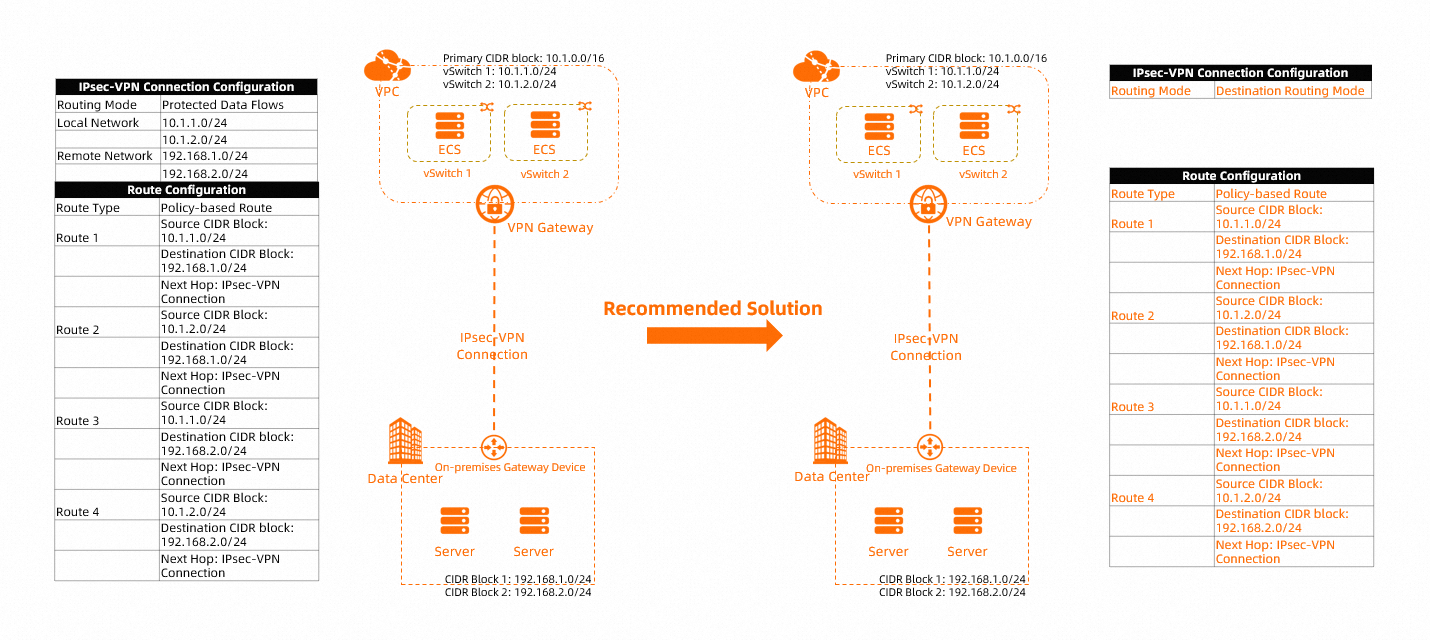
The following scenario is used as an example. Multiple CIDR blocks in the VPC (10.1.1.0/24 and 10.1.2.0/24) need to communicate with multiple CIDR blocks in the on-premises data center (192.168.1.0/24 and 192.168.2.0/24). The recommended configurations are as follows:
When you configure the IPsec-VPN connection on the Alibaba Cloud side, set the Routing Mode of the IPsec-VPN connection to Destination routing mode. For more information, see Create an IPsec-VPN connection.
When you add route configurations for the VPN gateway instance, we recommend that you use a policy-based route and add the related route configurations. For more information, see Configure policy-based routes.
Add a protected data flow whose source CIDR block is 0.0.0.0/0 and destination CIDR block is 0.0.0.0/0 on the on-premises gateway device. For the specific commands, consult the vendor of the on-premises gateway device.
Configuration example for Solution 2
Example 1
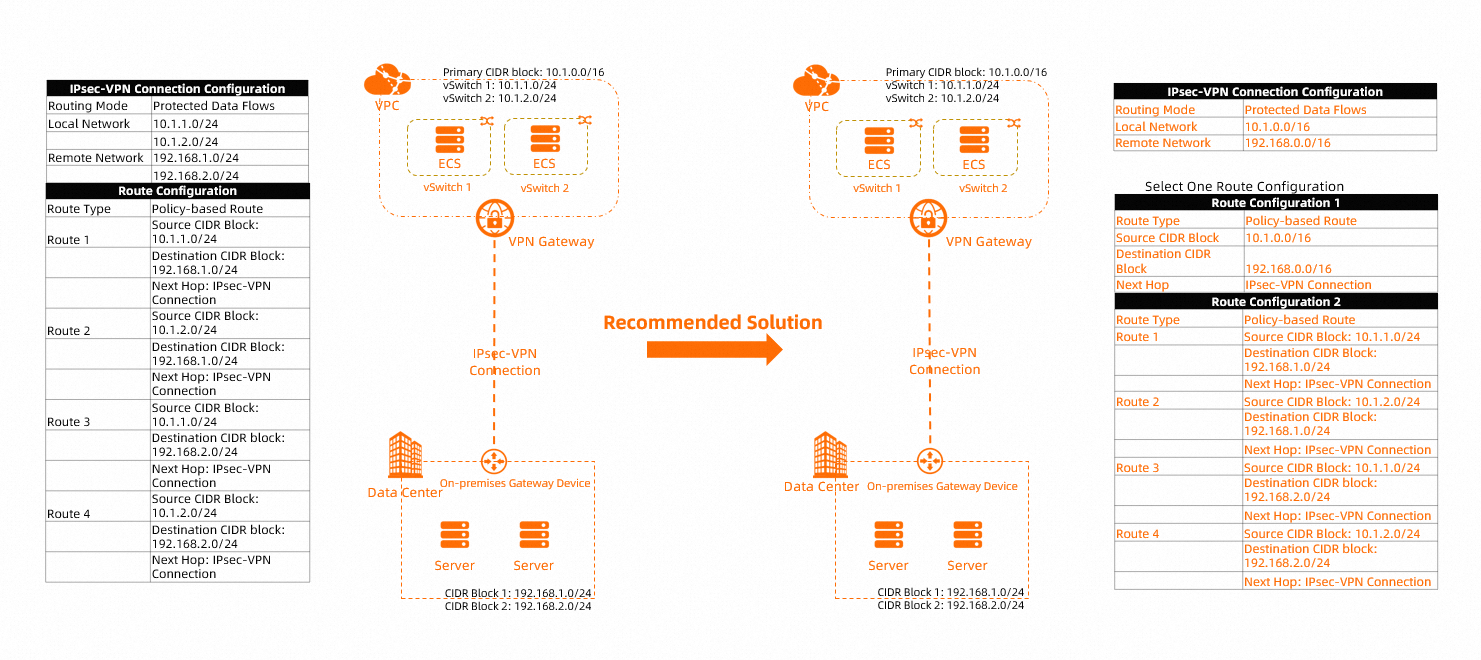
The following scenario is used as an example. Multiple CIDR blocks in the VPC (10.1.1.0/24 and 10.1.2.0/24) need to communicate with multiple CIDR blocks in the on-premises data center (192.168.1.0/24 and 192.168.2.0/24). The recommended configurations are as follows:
When you configure the IPsec-VPN connection on the Alibaba Cloud side, set the Routing Mode of the IPsec-VPN connection to Protected data flows mode, configure the Local Network of the IPsec-VPN connection as the aggregated CIDR block 10.1.0.0/16 of the VPC, and configure the Remote Network as the aggregated CIDR block 192.168.0.0/16 of the on-premises data center. For more information, see Create an IPsec-VPN connection.
When the Routing Mode of the IPsec-VPN connection is Protected data flows mode, the system automatically adds a policy-based route to the Policy-based Route Table of the VPN gateway instance. The Source CIDR Block of the policy-based route is the Local Network of the IPsec-VPN connection, the Destination CIDR Block of the policy-based route is the Remote Network of the IPsec-VPN connection, and the next hop points to the IPsec-VPN connection. By default, this policy-based route is not advertised to the VPC.
If you choose to use the default policy-based route, you must advertise the policy-based route to the VPC. If you want to use a custom policy-based route, delete the policy-based route that is automatically added by the system and reconfigure it as needed. For more information, see Configure policy-based routes.
Example 2
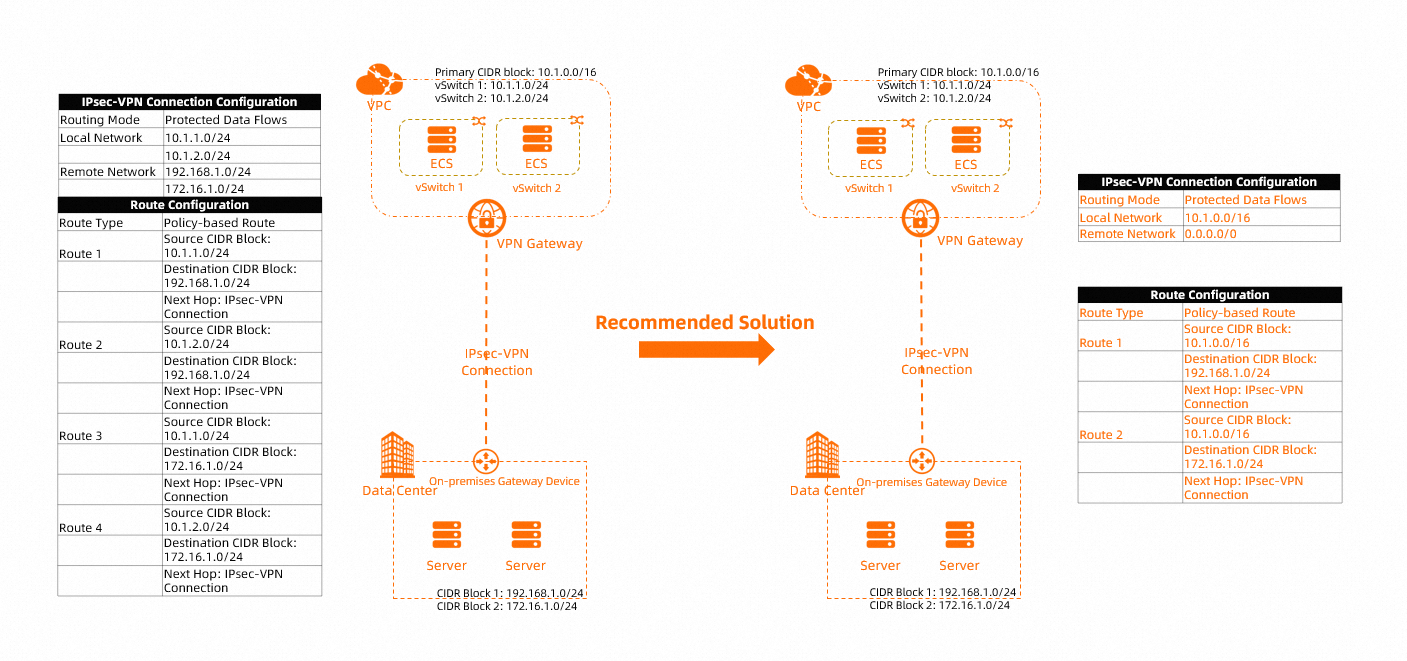
Take the scenario in the following figure as an example. Multiple CIDR blocks in the VPC (10.1.1.0/24 and 10.1.2.0/24) need to communicate with multiple CIDR blocks in the on-premises data center (192.168.1.0/24 and 172.16.1.0/24). The recommended configuration is as follows:
When you configure an IPsec-VPN connection on the Alibaba Cloud side, set the Routing Mode of the IPsec-VPN connection to Protected data flows mode, configure the Local Network of the IPsec-VPN connection as the aggregated CIDR block 10.1.0.0/16 of the VPC, and configure the Remote Network as 0.0.0.0/0. For more information, see Create an IPsec-VPN connection.
NoteThe two CIDR blocks of the on-premises data center are not adjacent to each other and cannot be effectively aggregated. In this scenario, we recommend that you set the Remote Network of the IPsec-VPN connection to 0.0.0.0/0.
When the Routing Mode of the IPsec-VPN connection is Protected data flows mode, the system automatically adds a policy-based route to the Policy-based Route Table of the VPN gateway instance. The Source CIDR Block of the policy-based route is the Local Network of the IPsec-VPN connection, the Destination CIDR Block of the policy-based route is the Remote Network of the IPsec-VPN connection, and the next hop points to the IPsec-VPN connection. By default, this policy-based route is not advertised to the VPC.
We do not recommend that you configure a route to the 0.0.0.0/0 CIDR block in Policy-based Route Table. Therefore, we recommend that you delete the policy-based route automatically added by the system and then add a more specific policy-based route. For more information, see Configure policy-based routes.
Solution 3 configuration example
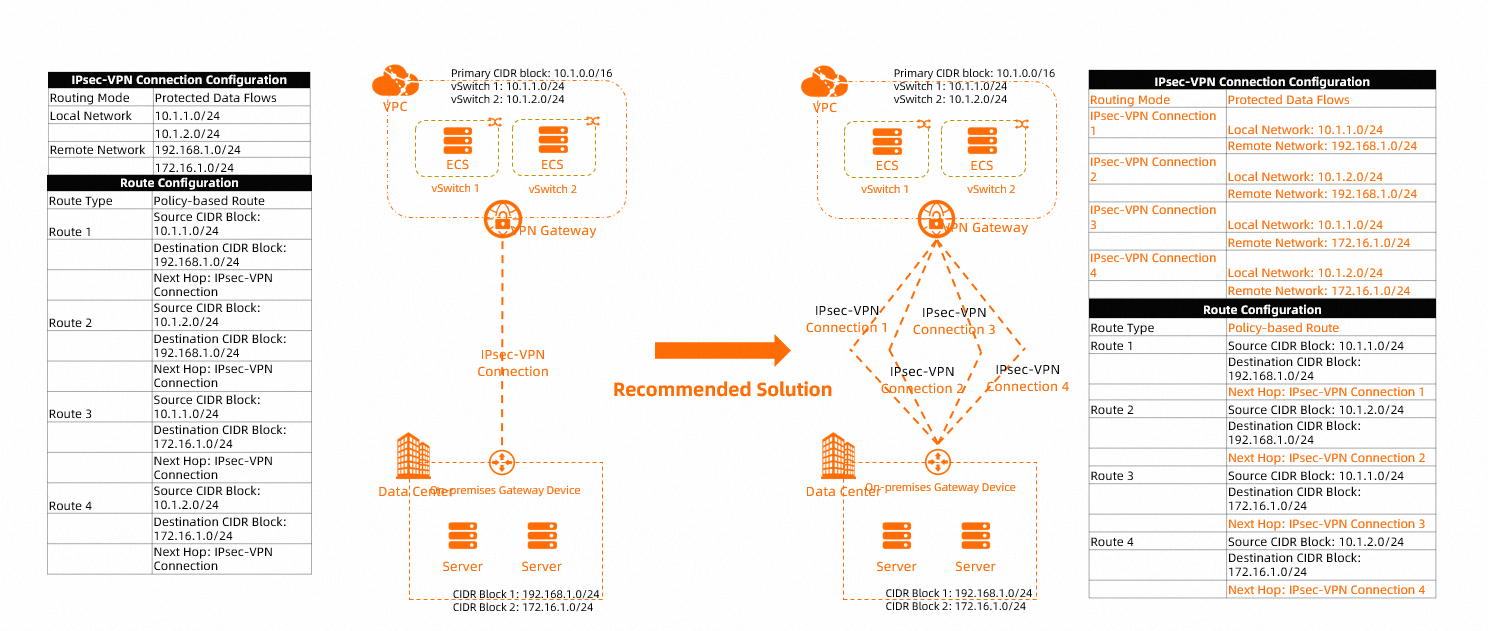
The following figure shows an example scenario. Multiple CIDR blocks (10.1.1.0/24 and 10.1.2.0/24) in a VPC need to communicate with multiple CIDR blocks (192.168.1.0/24 and 172.16.1.0/24) in an on-premises data center. The recommended configuration is as follows:
Create multiple IPsec-VPN connections on the Alibaba Cloud side. Set Routing Mode of the IPsec-VPN connections to Protected data flows mode, and configure one Local Network and one Remote Network for each IPsec-VPN connection. For more information, see Create an IPsec-VPN connection.
When the Routing Mode of an IPsec-VPN connection is Protected data flows mode, the system automatically adds a policy-based route to the Policy-based Route Table of the VPN gateway instance, in which the Source CIDR Block is Local Network of the IPsec-VPN connection and the Destination CIDR Block is Remote Network of the IPsec-VPN connection. The next hop points to the IPsec-VPN connection. By default, this policy-based route is not published to the VPC.
You must publish the four policy-based routes that are automatically added by the system to the VPC. For more information, see Configure policy-based routes.
FAQ
Why is the status of the IPsec-VPN connection "Phase 2 negotiation succeeded", but in scenarios with multiple CIDR blocks, some CIDR blocks can communicate normally while others cannot?
Cause
In scenarios where an IPsec-VPN connection is used to connect an on-premises data center to a VPC, if the VPN gateway is connected to devices from traditional vendors such as Cisco, H3C, and the IPsec-VPN connection uses the Protected data flow Routing Mode with multiple CIDR blocks configured, only one CIDR block can communicate and the remaining CIDR blocks cannot.
This phenomenon is caused by the incompatibility of the IPsec protocols on the two ends when an Alibaba Cloud VPN gateway is connected to devices from traditional vendors such as Cisco, H3C. When multiple CIDR blocks are configured for an IPsec-VPN connection, the Alibaba Cloud VPN gateway uses one SA to negotiate with the peer gateway device, whereas the peer gateway device uses multiple SAs to negotiate with the VPN gateway in scenarios with multiple CIDR blocks.
Solution
For more information, see Recommended configuration solutions for multiple CIDR blocks in this topic.
How do I implement multi-CIDR block communication if the on-premises gateway device does not support IKEv2?
Use IKEv1. For more information, see Recommended configuration solutions for multiple CIDR blocks in this topic.
Why does the IPsec-VPN connection log show "can't find sa for proto ESP", or why does the tunnel fail to be established after a DELETE message is received?
Cause
In scenarios that involve multiple CIDR blocks (that is, multiple protected data flows are configured for an IPsec-VPN connection), the two ends negotiate the protected data flows in an inconsistent manner, and cross-negotiation occurs between the protected data flows of different CIDR blocks. This causes the Phase 2 negotiation of the IPsec-VPN connection to time out. After the negotiation times out, the established SAs are deleted, or the VPN gateway on the Alibaba Cloud side sends a DELETE message to the peer. As a result, can't find sa for proto ESP appears in the logs of the peer, or the tunnel fails to be established.
Solution
For more information, see Recommended configuration solutions for multiple CIDR blocks in this topic.